28 posts tagged with "Approvals"

Description for the approvals tag.

View All Tags

Release notes edition 3.7.15

Release date: Wednesday 21 October 2026
Version: v3

Here's the latest summary of what's new and improved in Zudello, as well as what we resolved in the latest release.

In this release:​

  • Certifications: track your suppliers' insurances and certificates, with expiry dates extracted for you
  • Import card transactions from a statement file, straight from the Imports screen
  • See Zudello as your users see it: admins can start a session as a user in a sandbox team
  • Approvals that start from the purchase order raiser, due date checks that can block a document, and more

Looking for something? Browse by tag to find release notes on a specific feature.

New and improved​

Certifications​

Most teams ask their suppliers for a certificate of currency, a licence, or a professional indemnity certificate before they do business with them, and then keep those documents in a shared drive with a spreadsheet of expiry dates. Certifications brings them into Zudello. Each certificate is a record linked to the supplier or customer it belongs to, with its key details extracted from the document, so you can see at a glance who's covered and when that cover runs out.

Certificates come from customers as well as suppliers. A franchisor or landlord holds a certificate of currency for each franchisee or tenant they bill, and a contractor needs a customer's site accreditation or licence before they can supply them. Certifications handles both sides.

Capture a certificate

  • Upload a certificate under Certifications, or email it to a Zudello inbox the same way you'd send an invoice. Zudello reads the document and fills in the policy or certificate Code, the Effective, Issued, Expiry, and Renewal dates, and the Total value with its Currency.
  • Add the contact matching extension to the certification form, the same as on a contract, and Zudello matches the company on the certificate to your supplier or customer record. Where there's no match, or more than one candidate, you search for and pick the right one from the extension.
  • Set the Certification category, such as public liability or professional indemnity, from the categories you define, and group related certificates with a Certification group.
  • The record keeps the original document alongside the form, and has the same actions as any other document: copy a link, download, print, duplicate, download the audit log, and so on.
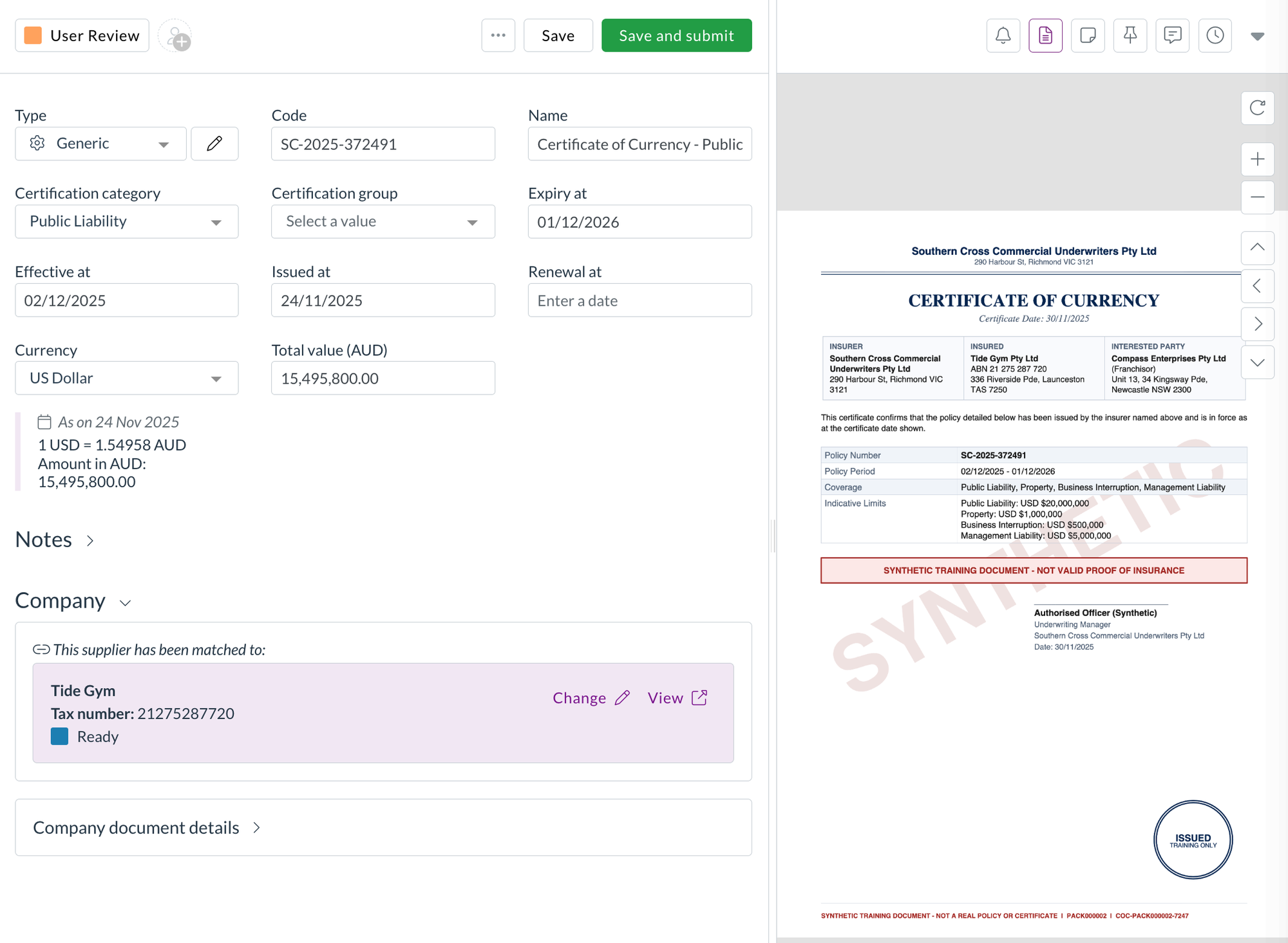
A certification record with the extracted details on the left and the certificate of currency on the right

Track and report on them

  • Certifications use document statuses, so you can move them through your own review flow and see which are current.
  • The list shows the total value in the certificate's own currency and converted to your team's currency, and you can export it like any other list.
  • Certifications sit with your suppliers and customers under CRM, and have their own permissions in that group, so you can choose which user groups can view, create, and update them without touching their access to suppliers.

Reminders ahead of expiry are coming in a later release.

Corporate cards​

Corporate card transactions usually arrive in Zudello through a bank feed. Some banks don't offer one, and some teams would rather load a statement themselves. We've added a card statement import, so you can load a statement file from your bank without waiting on an integration.

Import a card statement

  • Go to Imports, select Corporate cards, then Debits and credits.
  • Choose the Statement format for your bank, and fill in any settings the format needs, such as the card account it belongs to. Once a format has been set up for your team, its settings are shown for reference.
  • Upload the statement file. Zudello runs the format over it and shows you the result, including how many transactions were created, or the reason the file was refused.
  • If the upload fails, start the import again with the file. There's no Try again, since the import can't run without it.
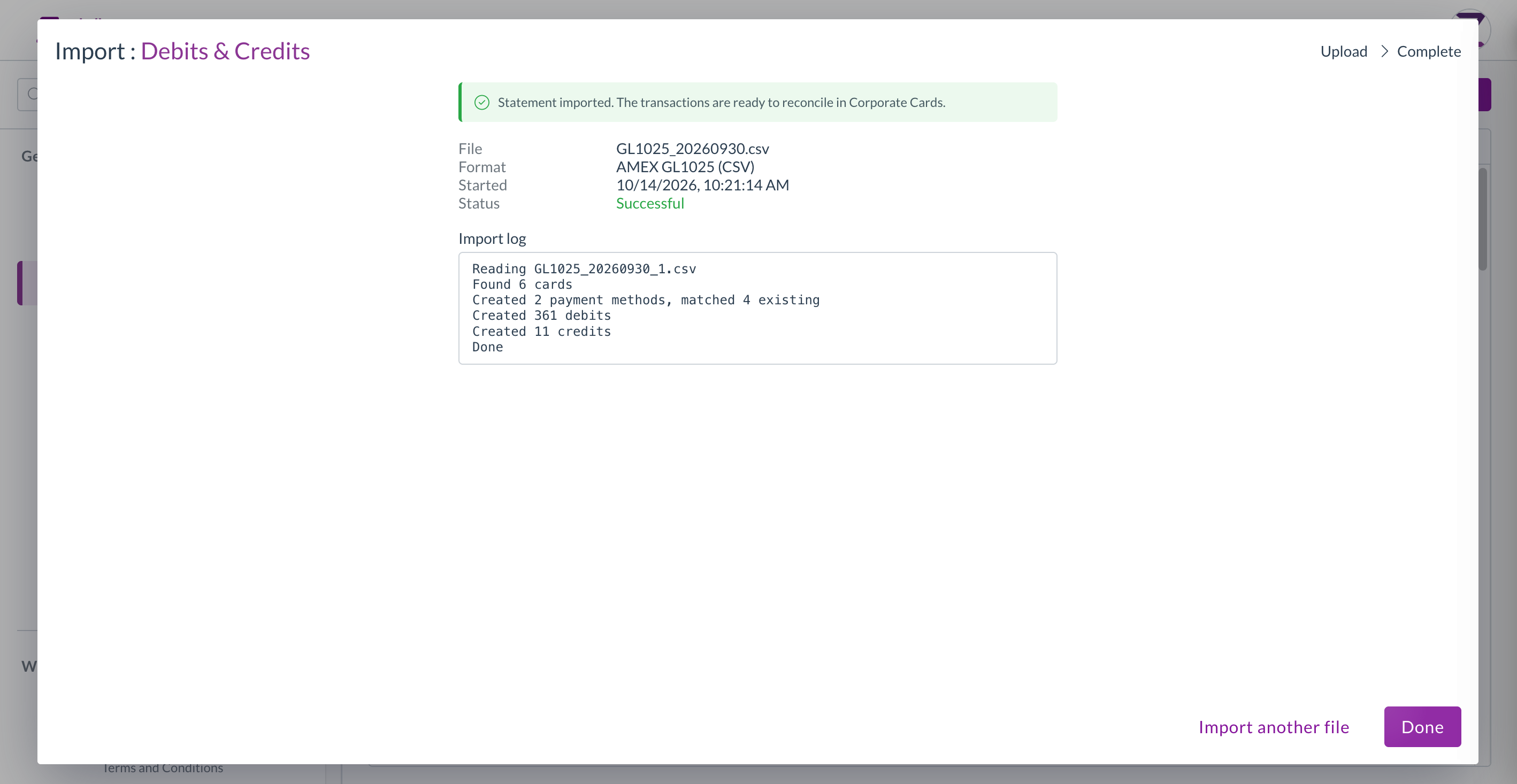
A completed card statement import showing the transactions created

User management​

See Zudello as one of your users sees it

When someone can't find a record or a menu item, the quickest answer is usually to look at Zudello through their eyes. Organisation admins can now do that in a sandbox team, without asking us.

Start a session as a user

  1. Open Setup, then Organisation, then Users.
  2. Find the user and select the Impersonate icon at the end of their row.
  3. Enter a reason for the session, then select Impersonate. The reason is recorded in the audit log.
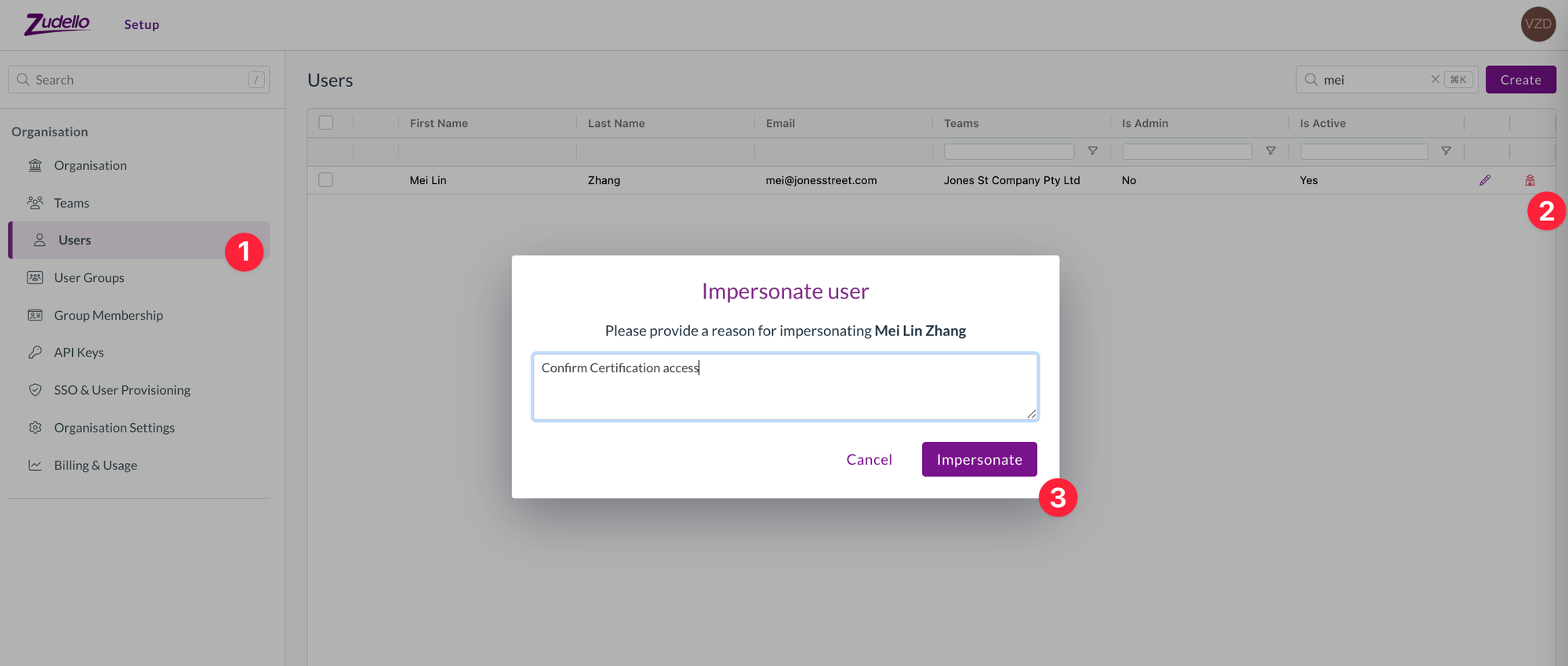
The Users list under Organisation, with the Impersonate icon on a user's row and the Impersonate user prompt asking for a reason

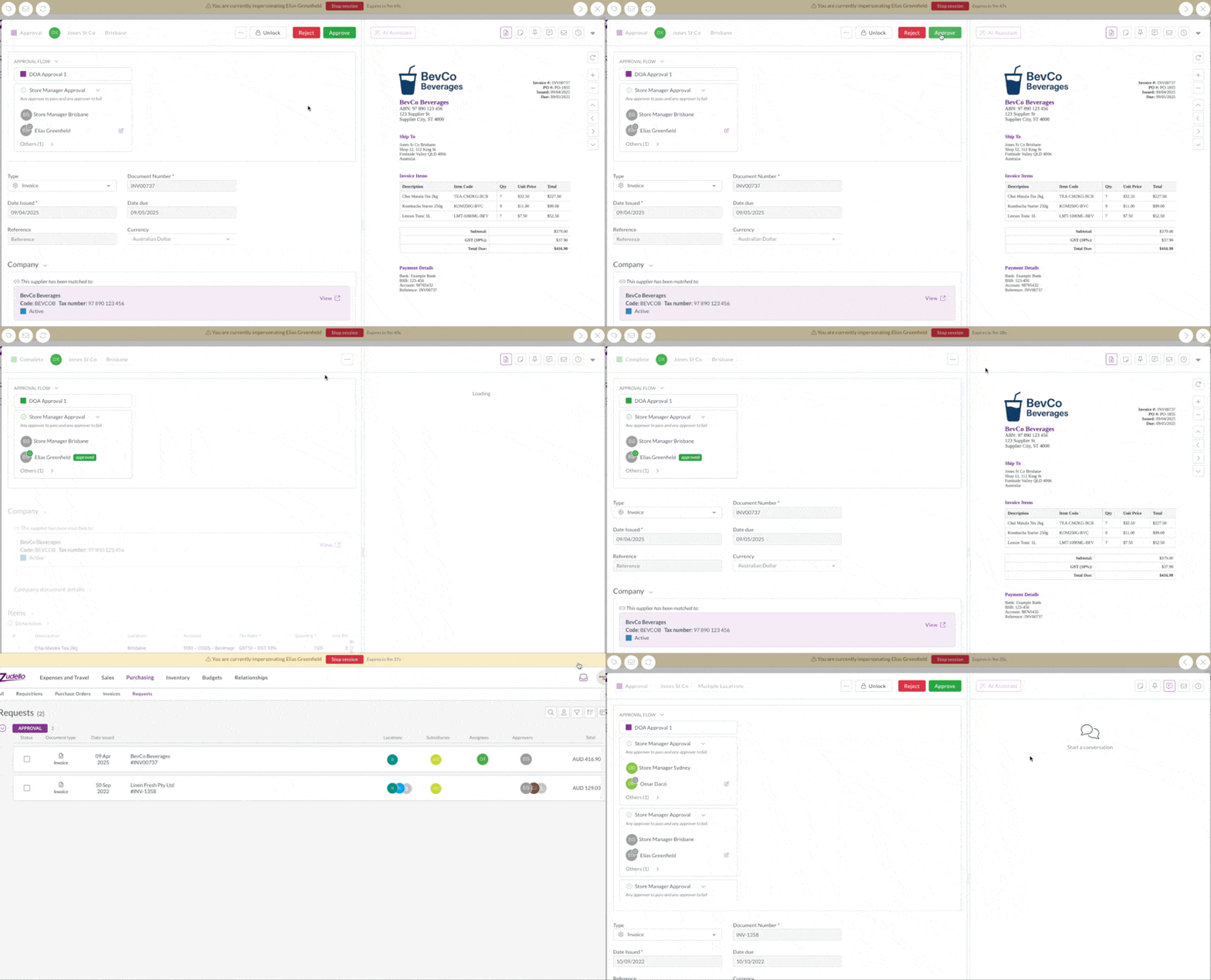
  • Zudello shows a banner for the whole session so you know whose view you're in and how long is left. Select Stop session on the banner to return to your own account.
  • The option is only offered in sandbox teams, and a session is limited to the user's sandbox teams. Production teams are never available this way, so your live data stays as it is.
  • You can only start a session as a user who isn't an organisation admin, so what you see is the experience of someone with ordinary access.
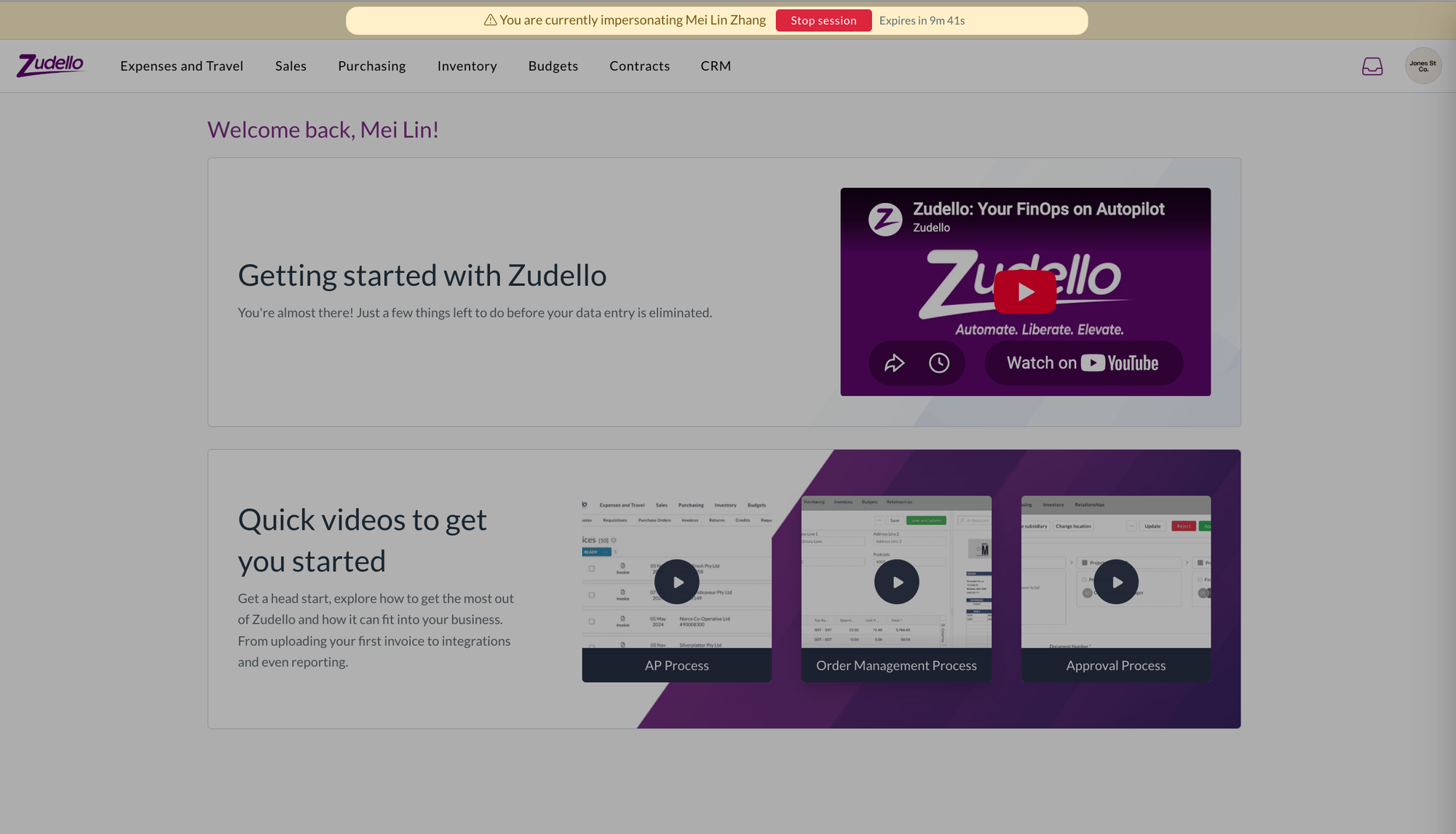
The home page during a session as another user, with the banner across the top naming them and showing the time left

Admin rights per organisation

  • If you belong to more than one organisation, you now see and open organisation settings only for the organisations where you're an admin. Your admin rights in one organisation no longer carry over to the others.

User group exports

  • The permissions export on a user group now has a Granted column with Yes or No against every permission, so you can see at a glance what the group allows.
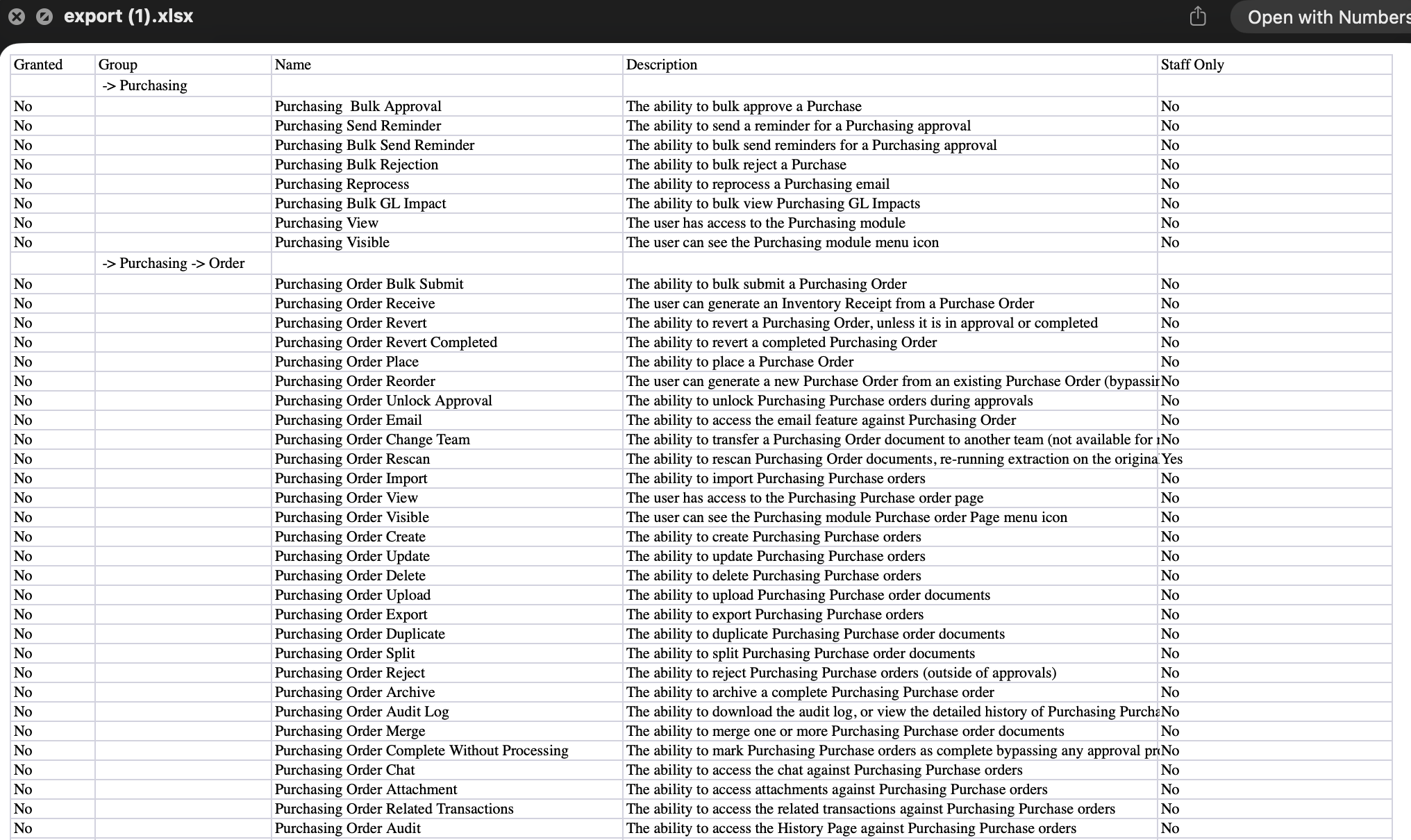
A user group permissions export opened in a spreadsheet, with the Granted column

Approvals​

Approval automations decide who needs to sign off a document and in what order. We've added a new place a management tree approval can start from, a way to keep moving through your approvals, and a couple of gaps filled in the requests lists.

Start from the purchase order raiser

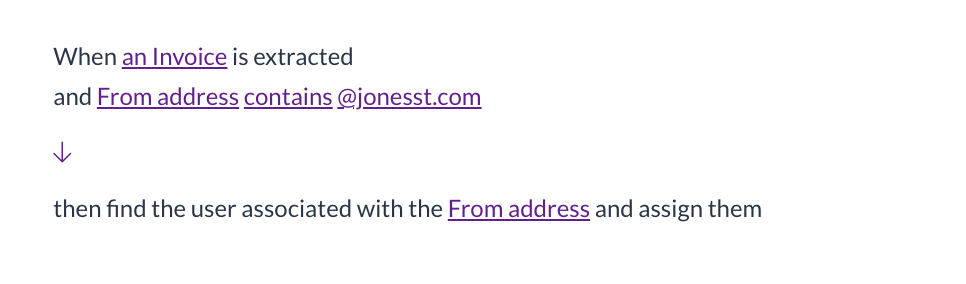
  • A management tree approval can now start from the person who raised the purchase order the invoice is matched to, rather than only from the submitter or the assignees.
  • Choose Purchase order raiser under Start from when you set up the automation. Where an invoice is matched to orders raised by different people, each person's tree is walked once.

Open the next document after you approve

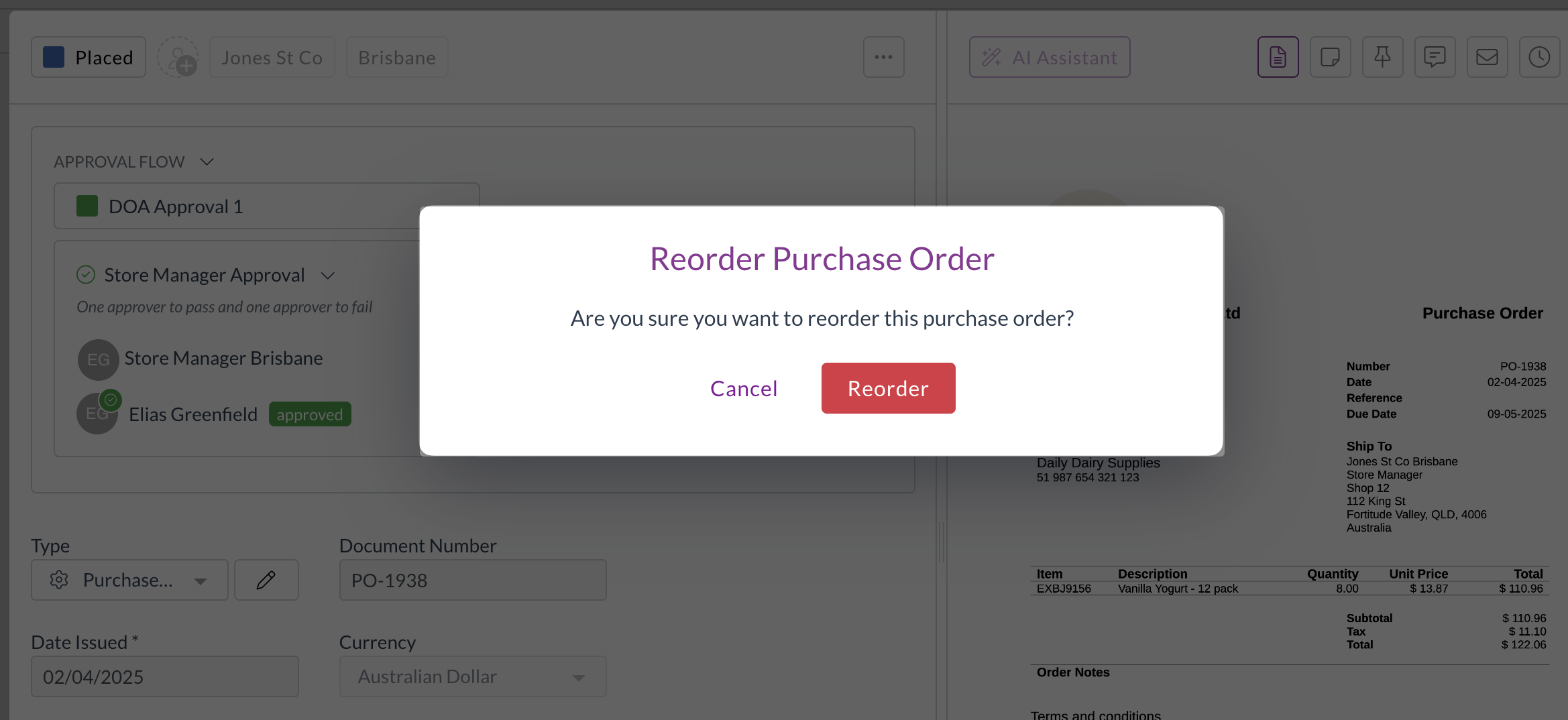
  • A new form extension, Open the next document, opens the next document in your list as soon as you select I approve or I reject, and closes the viewer when there are none left.
  • Add it under the form's utility extensions, next to Close the document viewer. It's off unless you add it, so nothing changes for teams that don't.
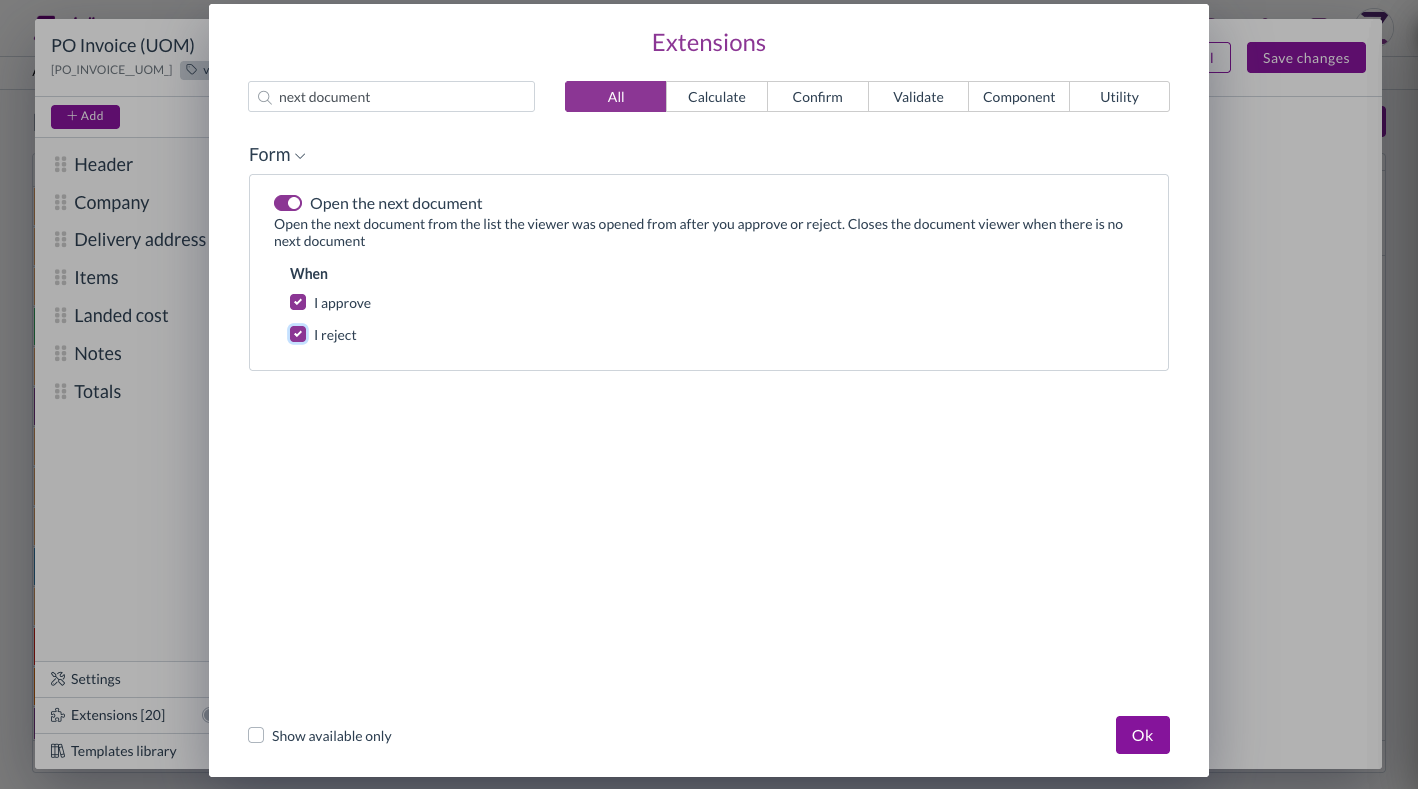
The Open the next document extension in the form extension editor

Requests lists

  • Mileage claims waiting on your approval now show under Expenses in your requests, alongside expense claims.
  • Requests under suppliers and customers now covers customers as well as suppliers. Switch between Suppliers and Customers in the toolbar, and approve or reject a contact straight from the list.

Validations​

Validations check a document for problems before it moves on. The Validate document due date check compares a document's due date with the payment terms on the supplier.

  • You can now choose the level of this check: Info, Warning, or Action required, the same as the delivery address checks.
  • At Action required, a due date that doesn't match the payment terms is listed with the document's other blocking errors, so the document can't be submitted until it's corrected.
  • Your existing configuration keeps its current level.
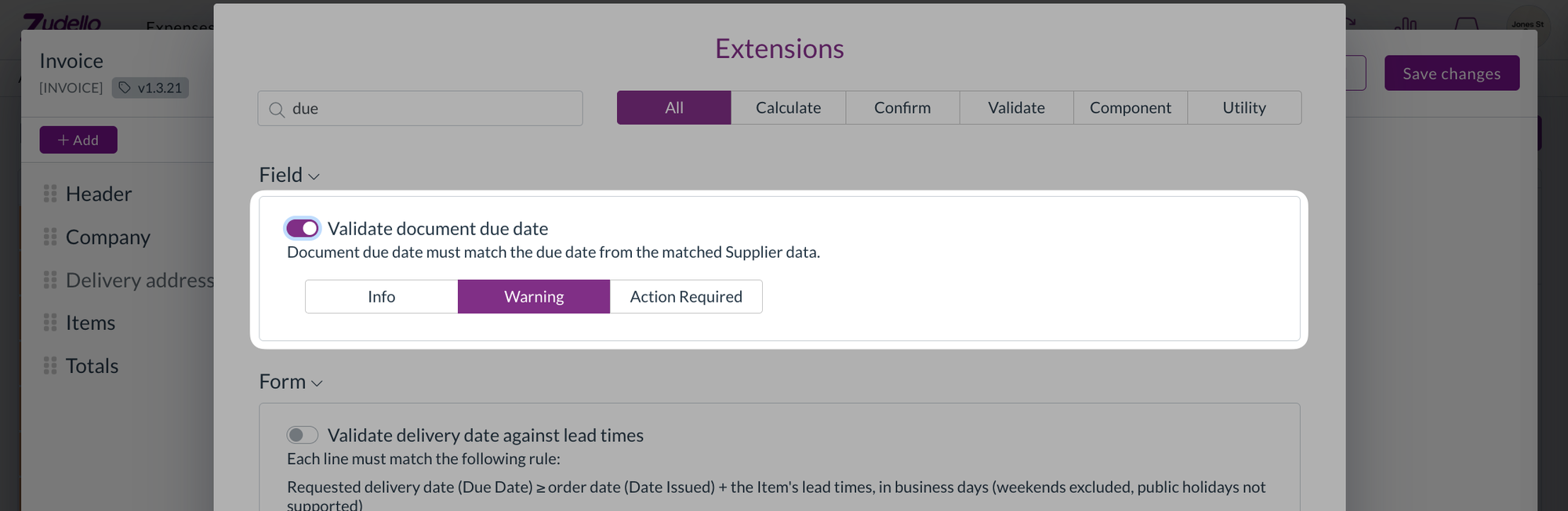
The Validate document due date extension with Info, Warning, and Action required levels, set to Warning

Dependencies​

Dependencies narrow a drop-down to the values that go with what's already on the document, such as the cost centres that belong to a location.

  • Mileage rate, expense category, payment method, and the other dimensions chosen by name now follow your dependencies in the same way as cost centre and location. Their drop-downs are filtered, a value that conflicts with the document is flagged, and inactive records are hidden.

Document viewer​

  • The Inbox tab now shows a blue dot when the document has inbox messages, the same as the related documents, attachments, and chat tabs. It updates after you email the document.
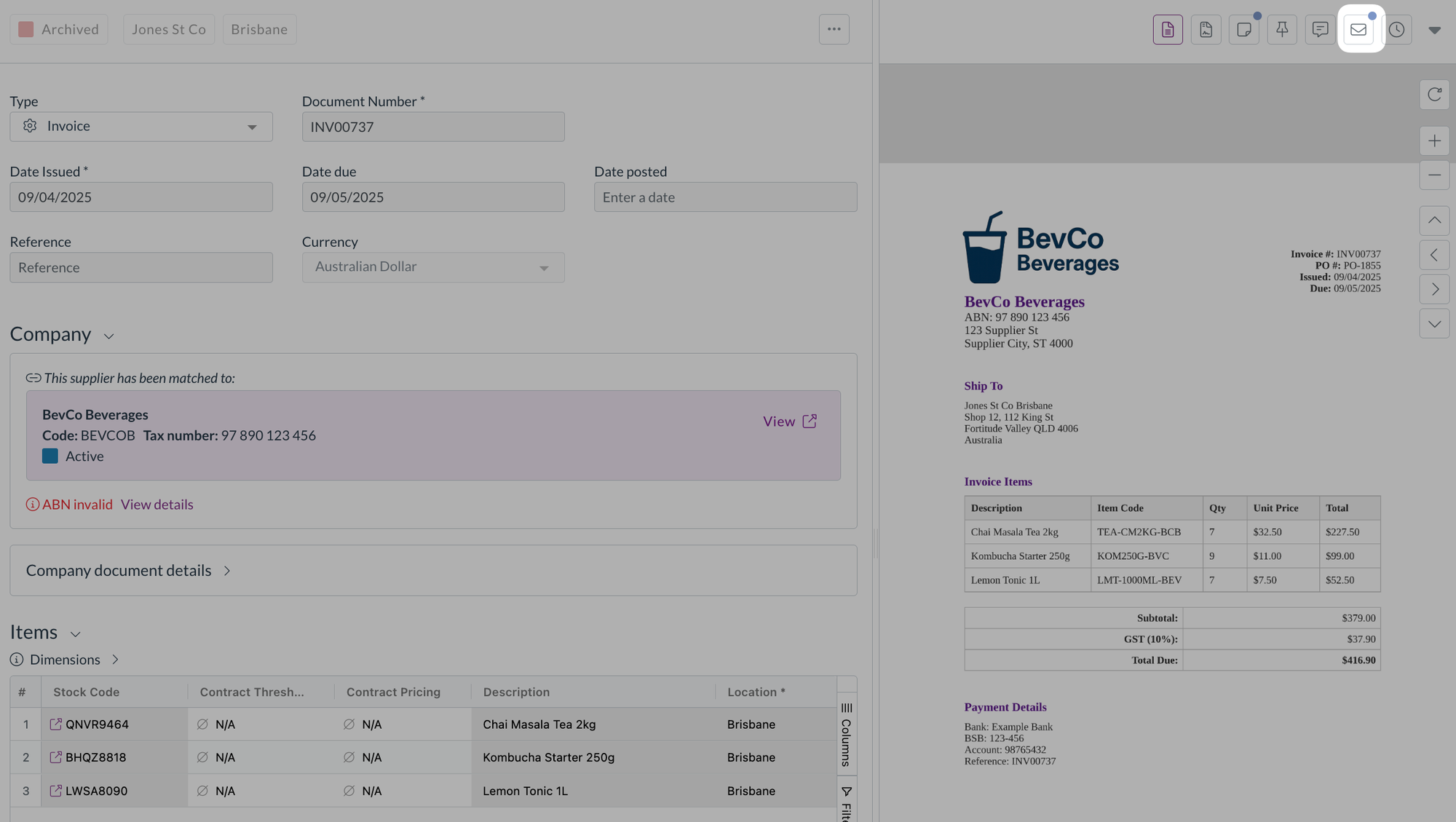
An invoice in the document viewer, with the Inbox tab highlighted and a blue dot showing it has new messages

  • The Inbox tab is now available on documents that are still scanning or unclassified, so you can open the email a stuck document came from.
  • Selecting documents in a list now stops at 100 everywhere. Select all and the header checkbox stop at 100 with the same message as shift-click, and Select all picks the first 100 regardless of how far you've scrolled.

Contracts​

  • Superseded documents under a contract's Related documents now show their version number, such as Version 2, with the newest first. Documents superseded before this release show a plain Version badge.

Budgets​

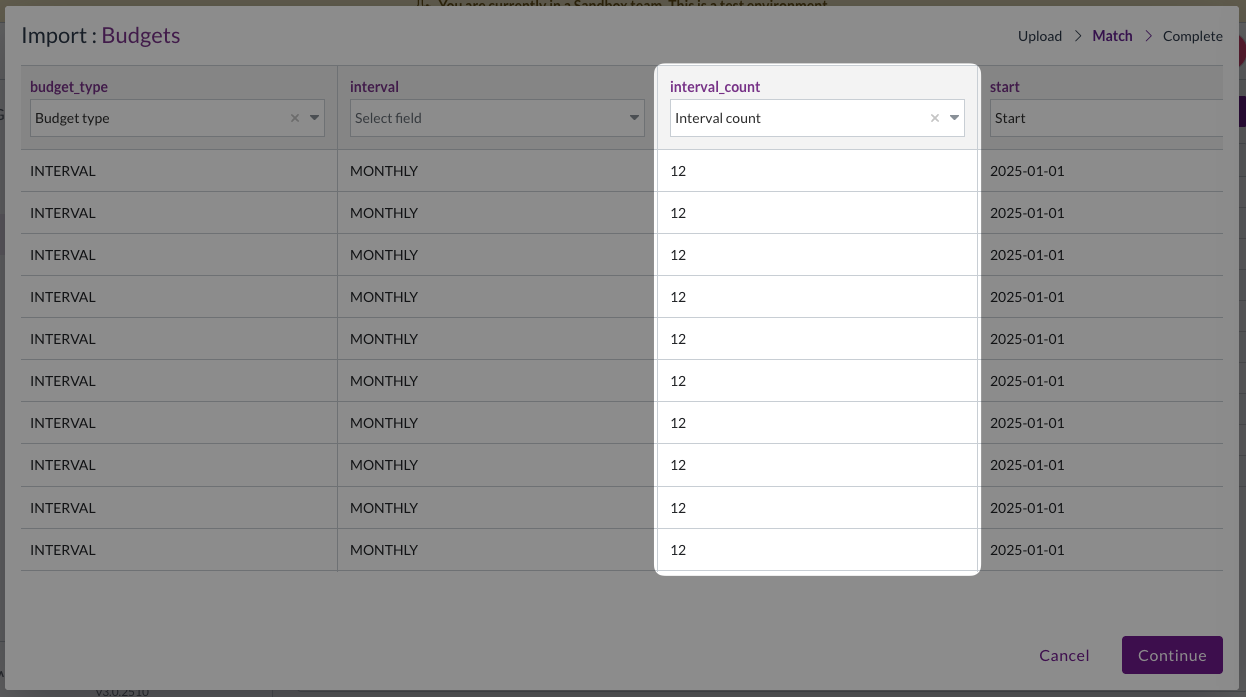
Budget imports match each row to a budget using a budget number or ID. If no column was mapped to either, every row failed with the same message after the import ran.

  • The Match step now keeps Continue unavailable until a column is mapped to Budget number or UUID, and tells you why.
  • A warning shows when no column is mapped to Budget config code. It doesn't stop the import.
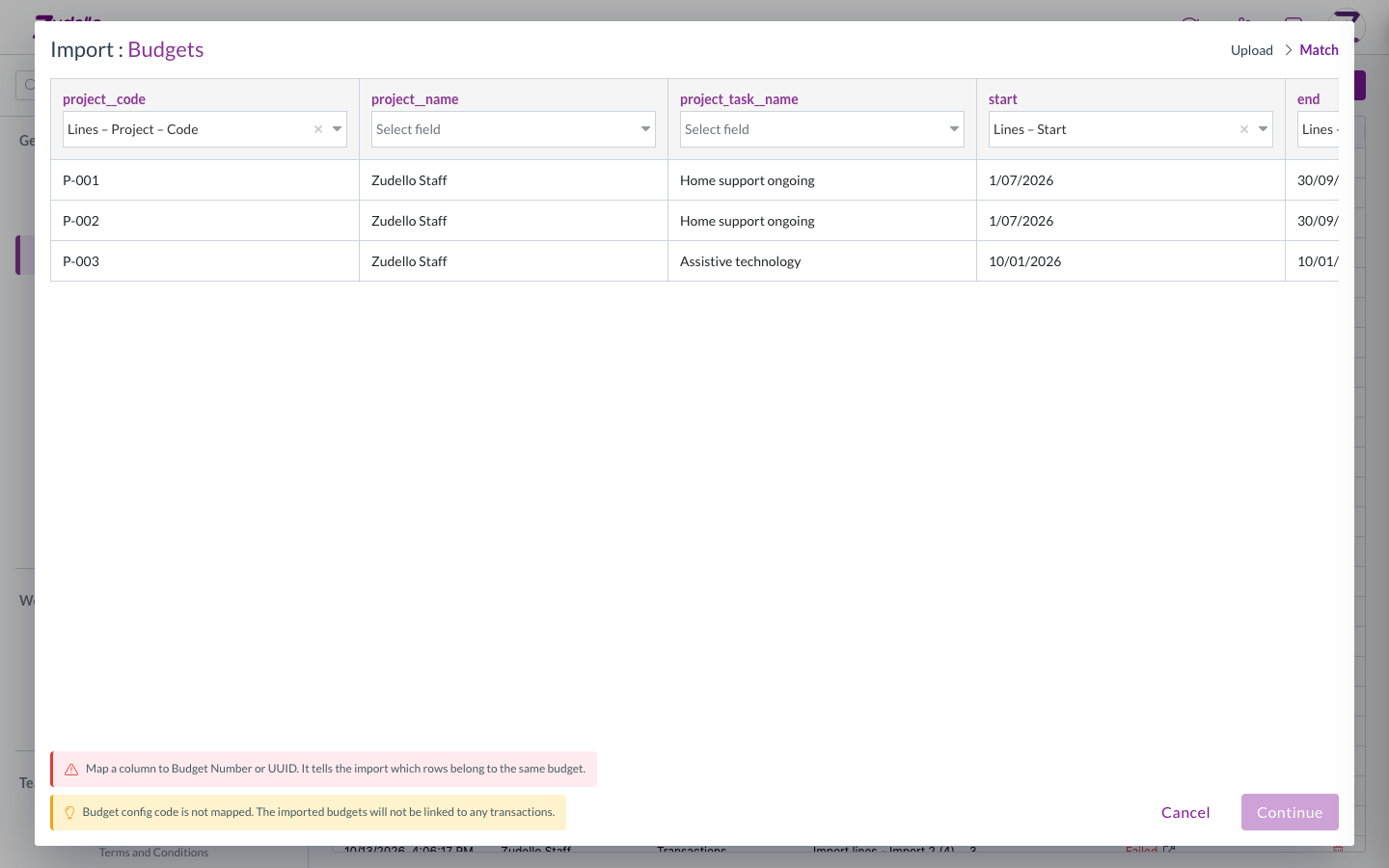
The budget import Match step, with Continue unavailable until a key column is mapped

Reporting​

  • GL impact now has a Document number column for transactions, which you can group by. Contracts don't have a document number, so they're unchanged.
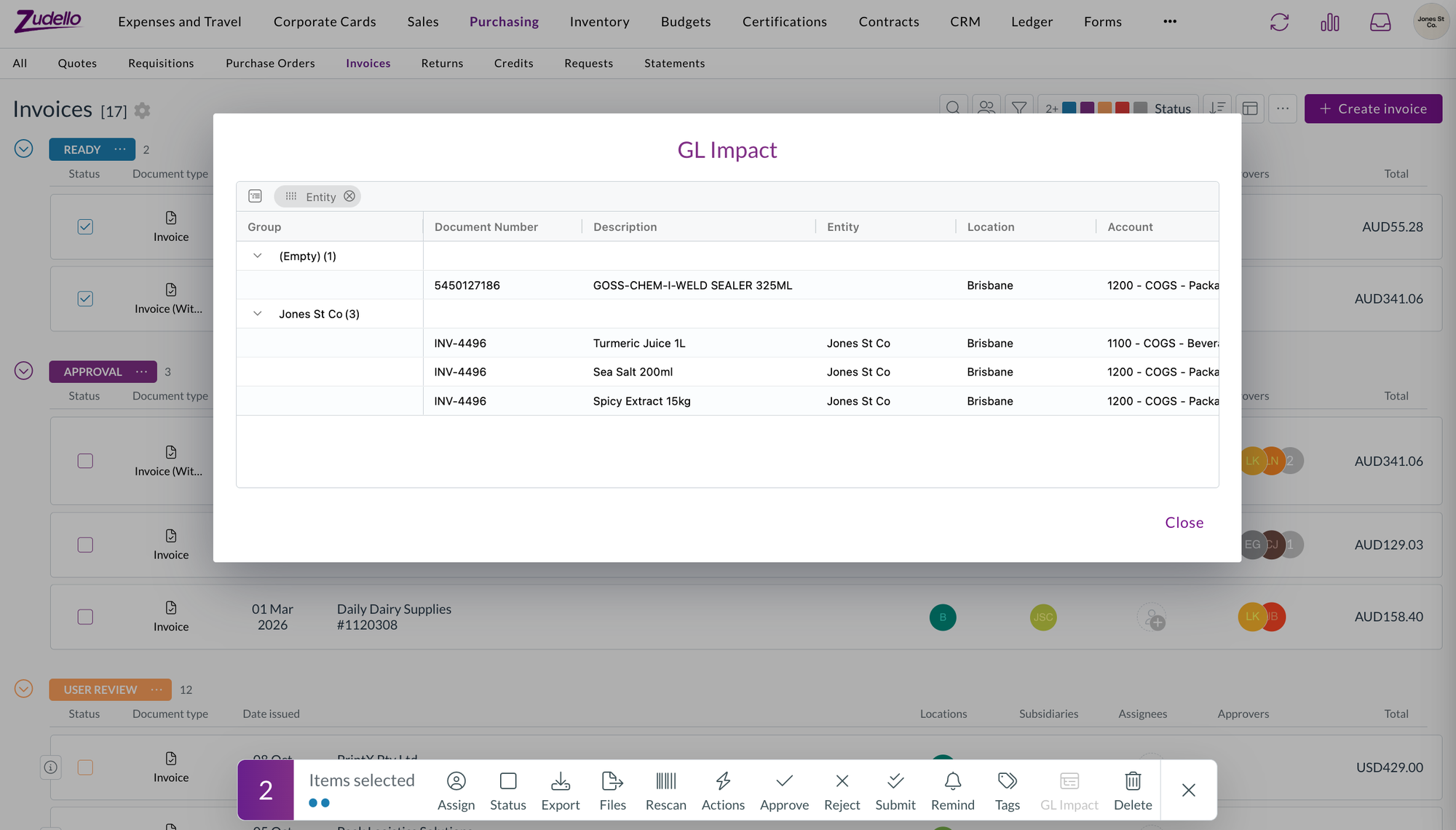
The GL impact report for two selected invoices, grouped by entity, with the Document number column

Suppliers and customers​

  • A supplier or customer you add from a document's contact field now takes the creation status you've set for that contact type, rather than being created as Active straight away. If your team creates contacts as Draft, they go through your usual review and approval first.

Performance​

  • Zudello's first load is about a third smaller. The form settings, email, and reconciliation windows are now loaded when you open them, and some shared code no longer pulls in large libraries up front.
  • If you have Zudello open while this release goes out, the first time you open one of those windows may show a loading error. Reload the page and it'll be fine from then on.

New UI​

We've kept building out the new interface at platform.zudello.io. Everything above is available there as well.

The changes in this section are available in the new UI only.

Group membership matrix

  • Group membership has a new Matrix view next to By group, with users as rows and groups as columns, grouped under Access, Approval, and Visibility. A dot marks each membership, and users in no groups get their own section.
  • Filter by team, search, reorder columns, and export the matrix to Excel. Hovering a cell highlights its row and column.
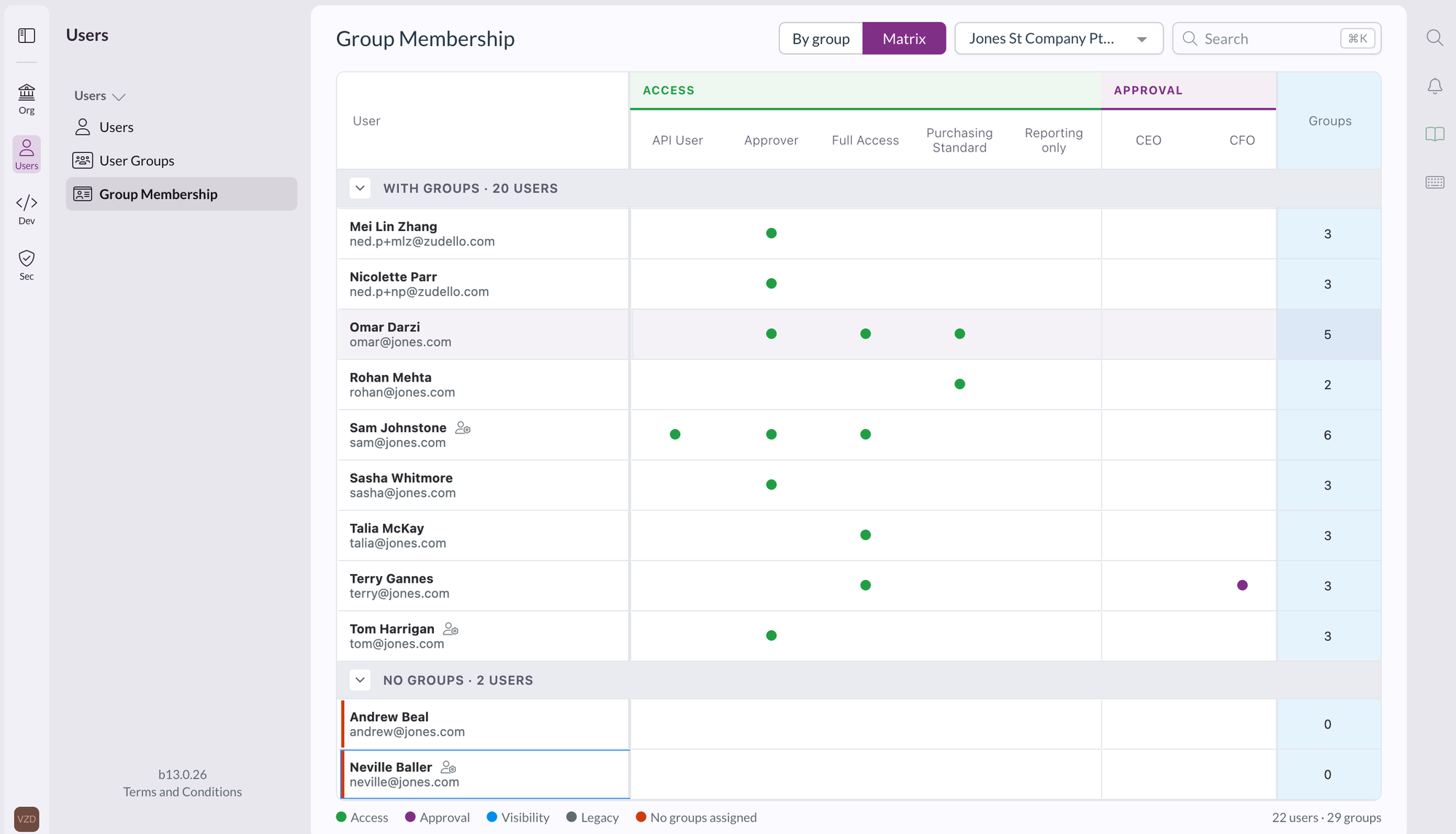
The group membership matrix view, with users as rows, groups as columns under Access and Approval, and a dot where a user belongs to a group

Prepayment schedules

  • Prepayment schedules are now a dimension in Settings, then Data, with their own statuses, document types, data permissions, and renaming in your team language. You can use them in form value lists, document coding rules, and the allocations extension, and lines pick up the prepayment schedule from the item, supplier or customer, and employee.

Grid filters

  • The grey filter boxes above a grid are now drop-downs you can select, and each filter list opens under its own column.
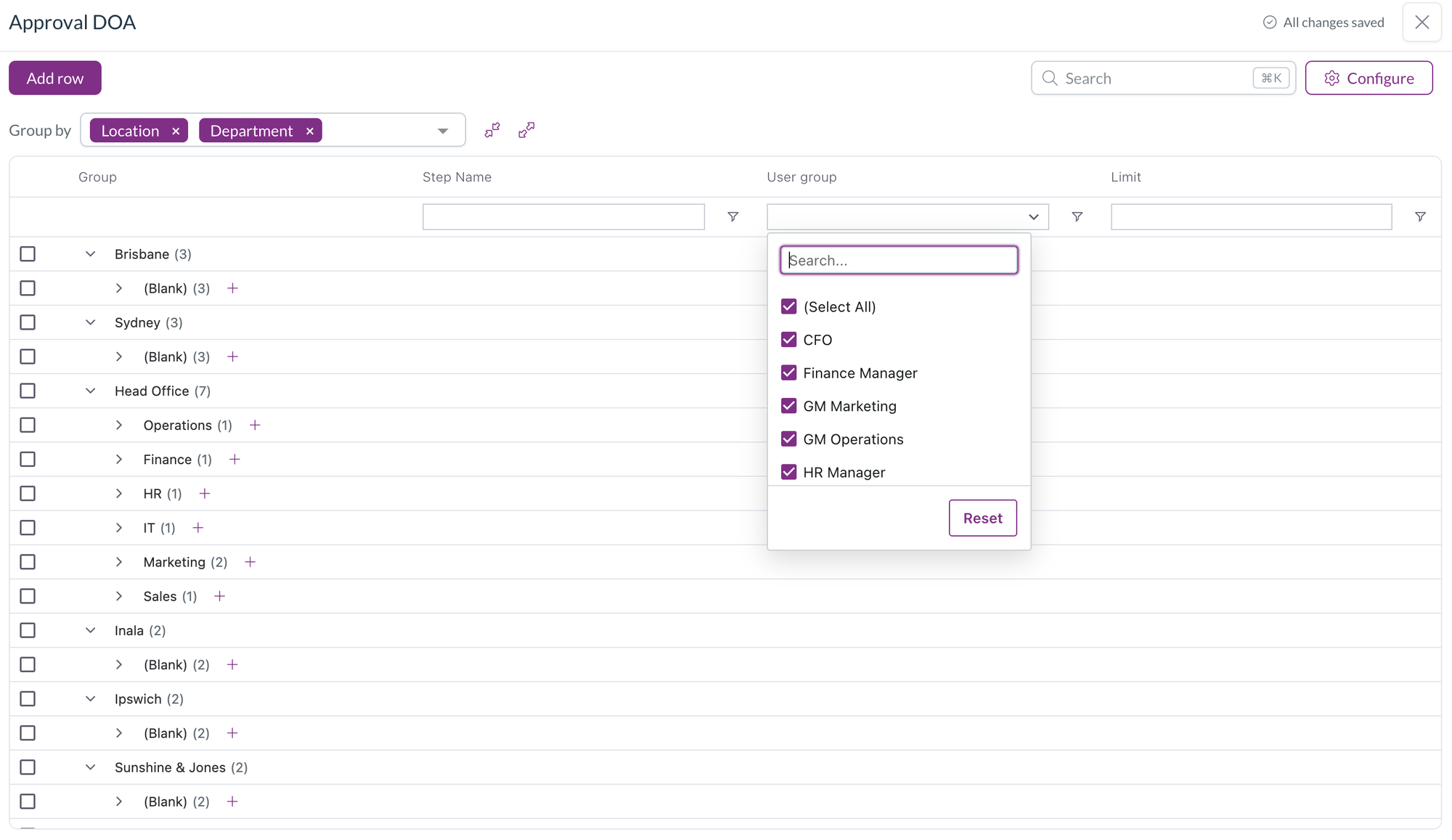
A column filter on a grouped grid, with a searchable list of user groups to tick or untick and a Reset button

Field manager

  • Option lists that Zudello defines, such as the statement line document type, are now read-only in the form editor and field manager, so they can be used as filters but not changed.
  • Your own option lists get a checkbox on each row. Remove selected removes the rows and saves the field, and the list grows with its rows, up to ten, before it scrolls.

Resolutions​

We're constantly working to refine Zudello's functionality and address any issues as soon as possible. As part of this release, we've made the following resolutions:

  • We've fixed Uploaded document in the document viewer downloading the file instead of showing it, so you can highlight and copy text from the original again.
  • Bank account validation no longer flags letters in a BSB. Suppliers who store a SWIFT code in the BSB field are no longer blocked at review.
  • We've fixed a contract's approval being reset when a new document version was promoted to its primary document.
  • We've fixed the card section of the approval digest listing transactions that were already reconciled. Its View all link now opens the list filtered to your unreconciled transactions.
  • We've fixed bulk updates through the API reporting a failure when the documents had validations on them.
  • We've fixed a file dropped onto a document list opening in a new browser tab instead of uploading when the list was refreshing, and the same problem in Chrome on a Mac.
  • We've fixed tax-inclusive scanned invoices being given the wrong tax-inclusive setting and subtotal, which put tax on top of the total.
  • We've fixed a line's tax amount being cleared when the line had a tax amount entered but no tax rate linked. The amount you entered is kept.
  • We've fixed automations set to run when a document is converted firing before all of the converted document's lines were written.
  • We've fixed automations with a reconciled trigger, on transactions or payment disputes, never running.
  • We've fixed a contract's value in your home currency not being recalculated when the contract was edited.
  • We've fixed line and document totals not updating after choosing a unit of measure or editing a converted quantity or price, and a converted quantity edit setting the unit price to zero.
  • We've fixed landed cost lines being counted when working out a document's dimensions, which showed Multiple on items dimensions and header badges. Setting a dimension on a section's lines now updates only that section.
  • We've fixed corporate card expenses being left out of the check that stops an unreconciled expense being submitted.
  • We've fixed card reconciliation crashing and leaving stray connection lines after a quick refresh.
  • We've fixed an error when a statement reconciliation was closed while it was still loading, and the "Error while fetching remote item statuses" message when another statement was opened at the same time.
  • We've fixed a chat message containing only a pasted screenshot showing "Please enter a message or attach a file" instead of being sent.
  • We've fixed indented lists and centred or right-aligned text losing their formatting in emails sent from Zudello, including rejections, place order emails, and inbox replies.
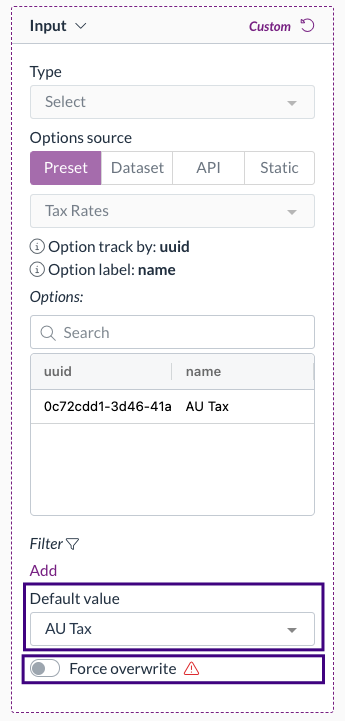
  • We've fixed date fields disappearing, with an error on the page, after a date field was redrawn, such as after switching Force overwrite on a default date in form settings.
  • We've fixed module-level permissions showing under an unnamed group in the user group permissions grid instead of under their module.
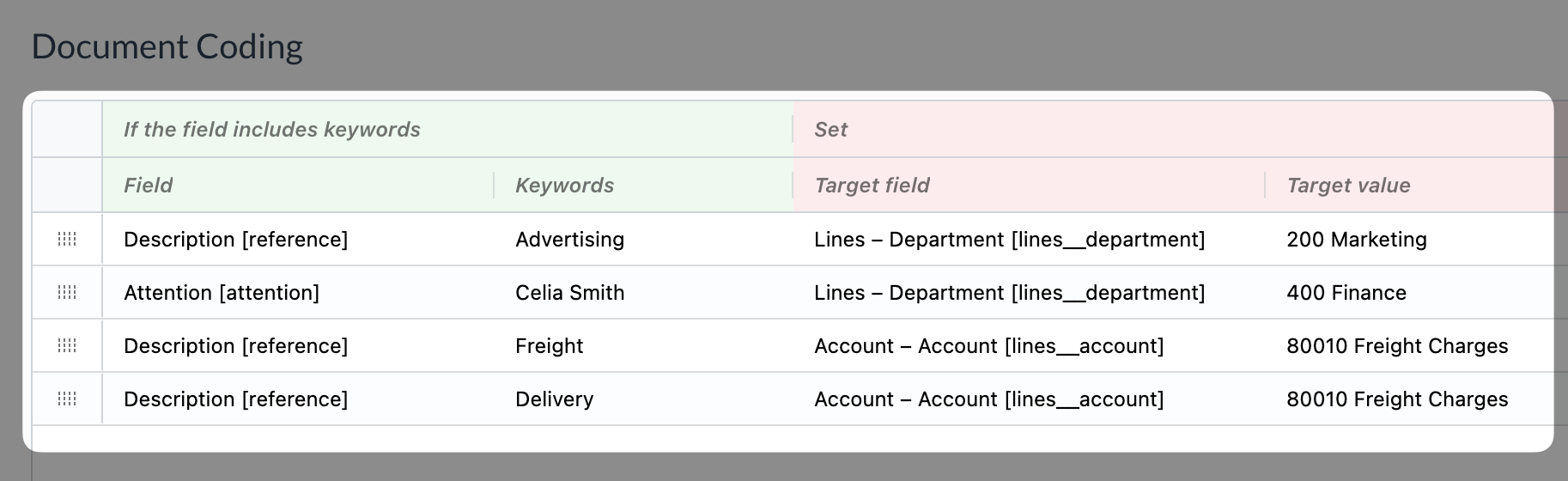
  • We've fixed the field to scan and the target field in a document coding rule not offering fields that only contracts have, and the target value showing an ID instead of the item SKU.
  • We've fixed the budgets information pop-over closing when you selected its icon and not opening again on hover.
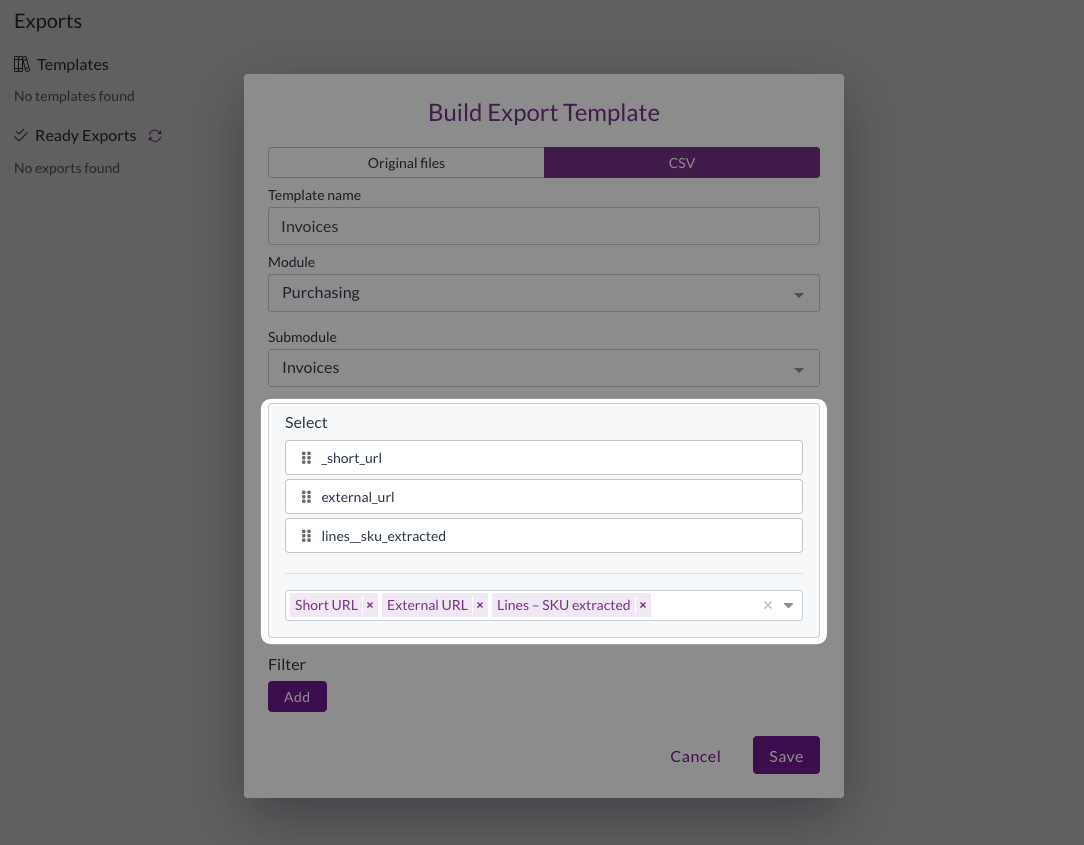
  • We've fixed long field labels overlapping the next row in export template field pickers.
  • We've fixed Document Studio showing "Failed to fetch team settings" for users who aren't admins.
  • We've fixed adding an existing user to another organisation failing.
  • We've fixed the "Could not find any first approver" message being recorded as an error when a delegation of authority rule was skipped on purpose.
  • We've fixed, in the new UI, windows opened from inside the document viewer, such as reject, resolve duplicates, and create dependency, opening behind the viewer on some screens.
  • We've fixed, in the new UI, the submodule search in Create status finding nothing.

Have an idea?​

Do you have an idea for a new feature or how we can improve our current features? Let us know at support@zudello.com.

Your ideas and feedback are an important part of our product planning process to make Zudello better for everyone.
Mobile app 1.3.2

Release date: Friday 9 October 2026
Version: Mobile app 1.3.2

Here's the latest summary of what's new and improved in the Zudello mobile app, as well as what we resolved in the latest release. Get it from the App Store or Google Play.

In this release:​

  • View more file types on your phone
  • Landed cost lines shown in their own section
  • Clearer full-screen documents, more reliable approvals and more

Looking for something? Browse by tag to find release notes on a specific feature.

New and improved​

Viewing documents​

When you open a document or attachment, the app shows it in a full-screen view. We've extended that view so the files you can upload to Zudello can also be read on your phone.

  • You can now open PDFs, images (JPEG, PNG, HEIC and HEIF), Word documents, Excel spreadsheets, CSV files and plain text files.
  • Spreadsheets and CSV files open as a table you can scroll. For large files the preview shows the first rows and tells you when there's more to see in the original file.
  • Documents now sit on a white page, as they do on the web.
  • If a file type can't be previewed, the app now tells you.

Landed cost lines​

Landed costs are the extra charges, such as freight and duties, recorded against a document alongside its item lines.

  • Documents with landed costs now show those lines in their own section, separate from the item lines, as they do on the web.
  • When you edit a document, you can add, change and remove landed cost lines, and they stay as landed costs when you save.

Resolutions​

We're constantly working to refine Zudello's functionality and address any issues as soon as possible. As part of this release, we've made the following resolutions:

  • We've fixed documents with landed cost lines, which could fail to open from Approvals with an "Invalid request" error, so they couldn't be viewed or approved.
  • We've fixed the full-screen document view, which could show a black page with missing text for PDFs that don't have a white page background.

Have an idea?​

Do you have an idea for a new feature or how we can improve our current features? Let us know at support@zudello.com.

Your ideas and feedback are an important part of our product planning process to make Zudello better for everyone.
Release notes edition 3.7.14

Release date: Wednesday 7 October 2026
Version: v3

Here's the latest summary of what's new and improved in Zudello, as well as what we resolved in the latest release.

In this release:​

  • Card payments that remember their supplier and show the documents they're reconciled against
  • Units of measure on sales documents, converted to the item's base unit
  • A sneak peek at our new UI
  • Price book prices that follow your cost centre, location, or subsidiary, and more

Looking for something? Browse by tag to find release notes on a specific feature.

New and improved​

Card reconciliation​

Card reconciliation matches your card payments to the invoices and expenses they paid for. Card statements often describe a payment with a merchant reference, such as "AMEX *NETFLIX.COM SYDNEY", rather than a supplier Zudello already knows. We've made those payments easier to match, and easier to follow once they're reconciled.

Remember a match for next time

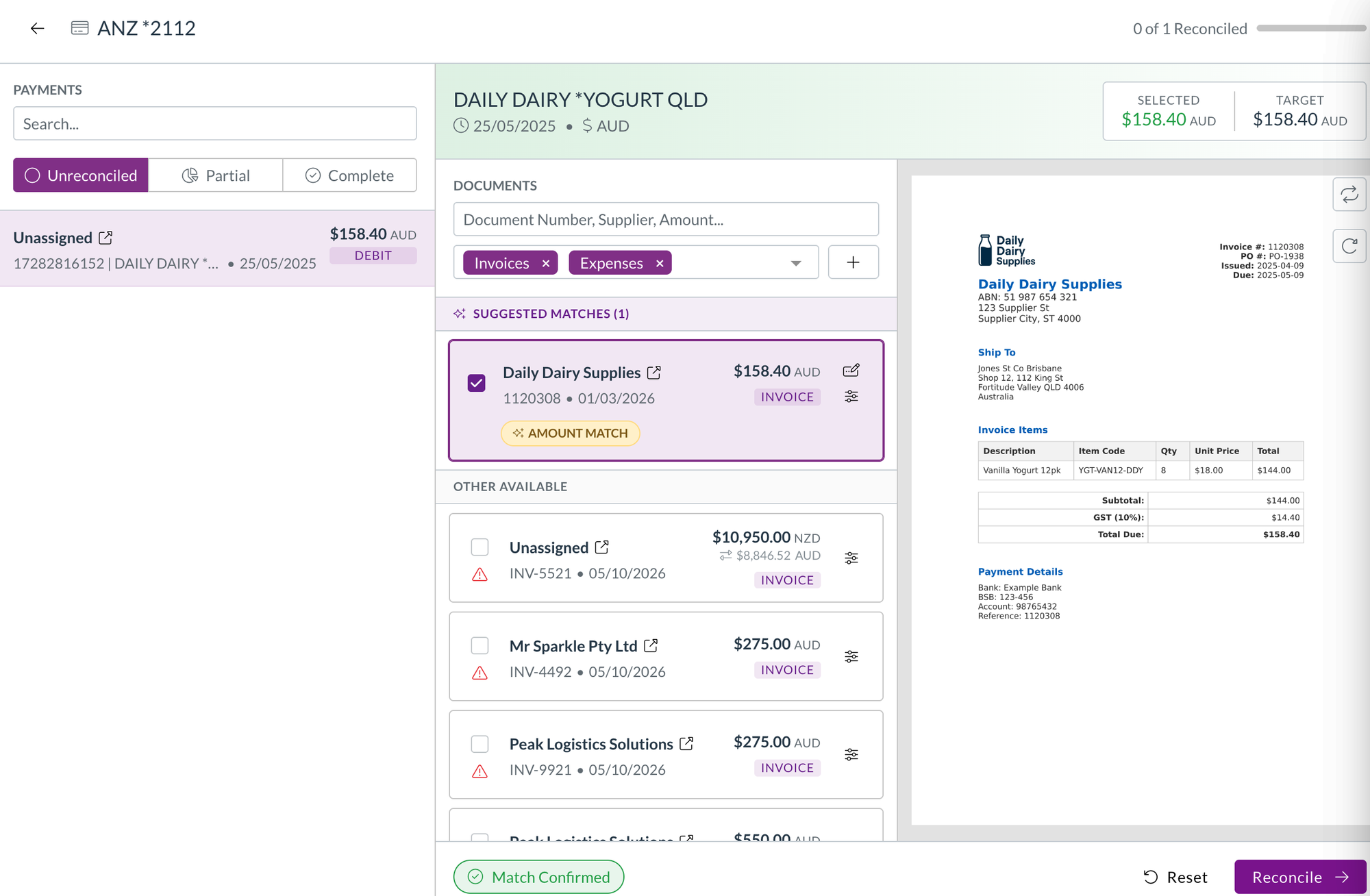
  • When a payment comes through without a supplier or customer matched to it, it shows as Unassigned. Find the document it paid for and reconcile it as usual.

An unassigned card payment with a suggested invoice ticked, ready to reconcile

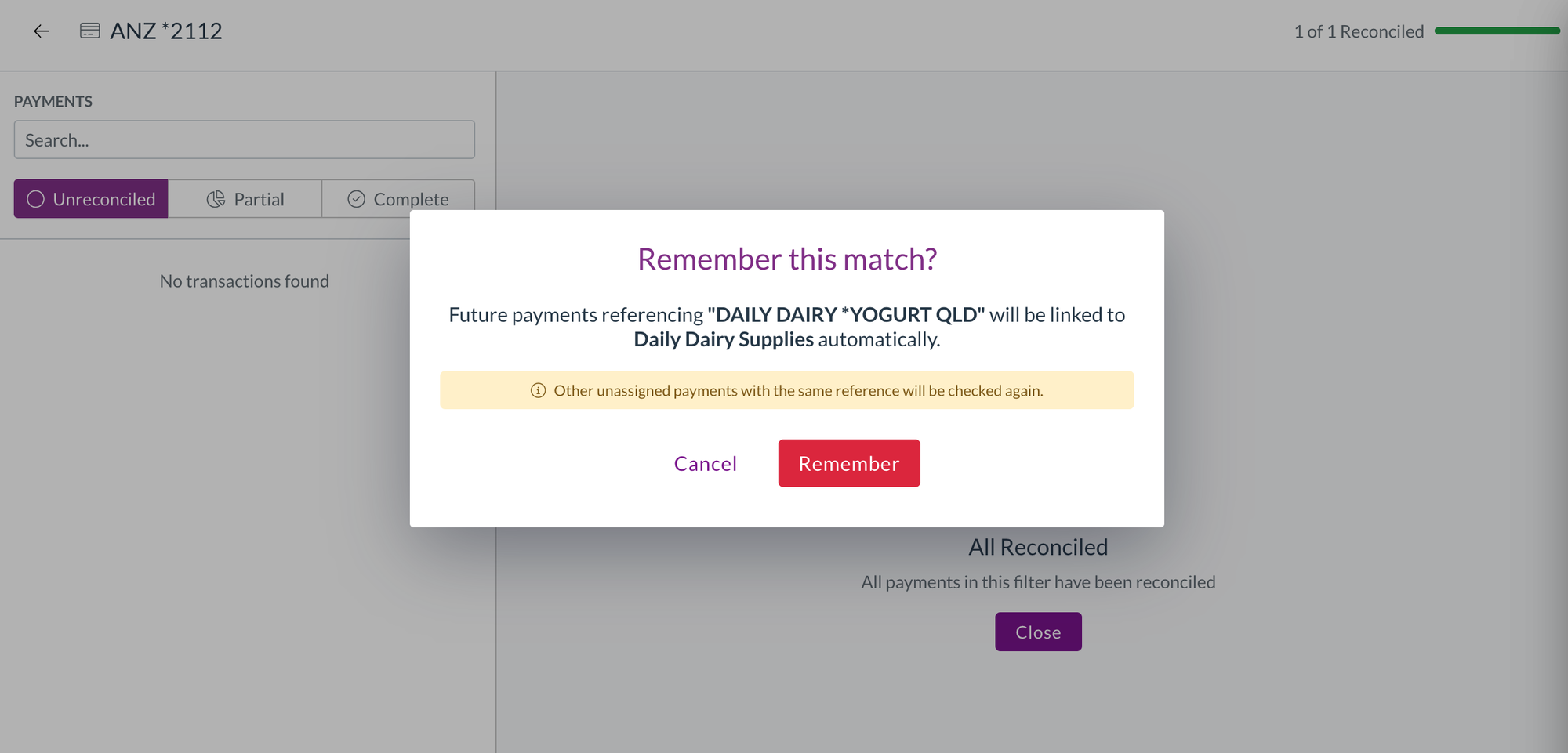
  • When the documents you've reconciled it against all belong to the same supplier or customer, Zudello asks whether to remember the match.
  • Select Remember, and future payments with the same reference are linked to that supplier or customer automatically. Other unassigned payments with the same reference are checked again straight away.
  • Zudello only asks when the match is clear, so you won't be prompted when a payment is reconciled against documents from different suppliers.

The Remember this match prompt, offering to link future payments with the same card reference to a supplier

Reconcile payments in another currency

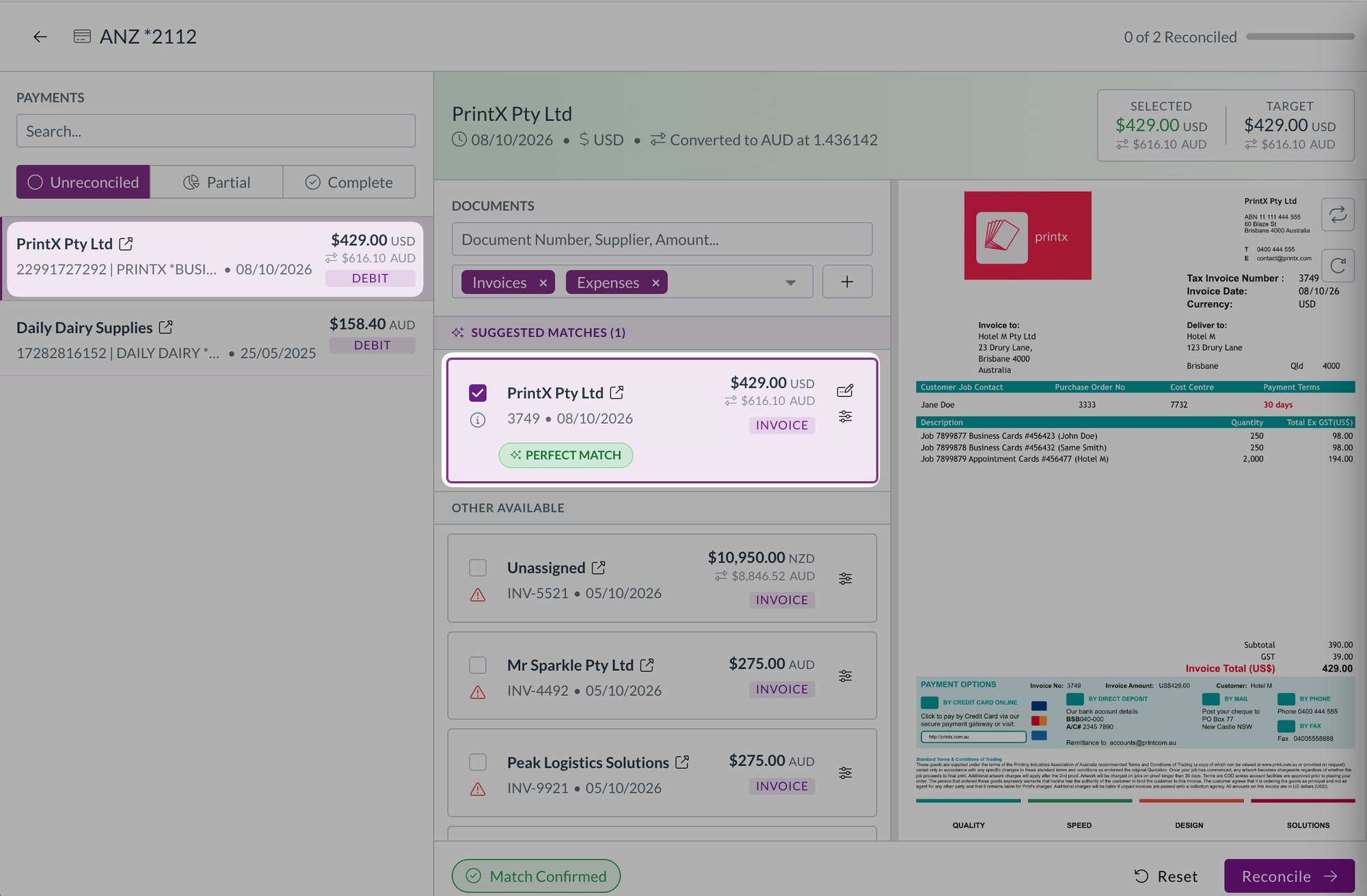
  • Payments and documents now show their own amount and currency first, with the amount in your home currency underneath.
  • The payment header shows the exchange rate used. Hover over a converted amount to see the original amount, the converted amount, the rate, and the rate date.
  • Selected and Target show in the shared currency when the payment and the documents you've ticked use the same one, and switch to your home currency, with a note, when they're mixed.
  • You can search for a payment or document by either amount, and search the matched documents by amount.
  • If your team works in a single currency, nothing changes.

A US dollar card payment and its matching invoice, each showing the converted Australian dollar amount, with the exchange rate in the payment header

See what a payment is reconciled against

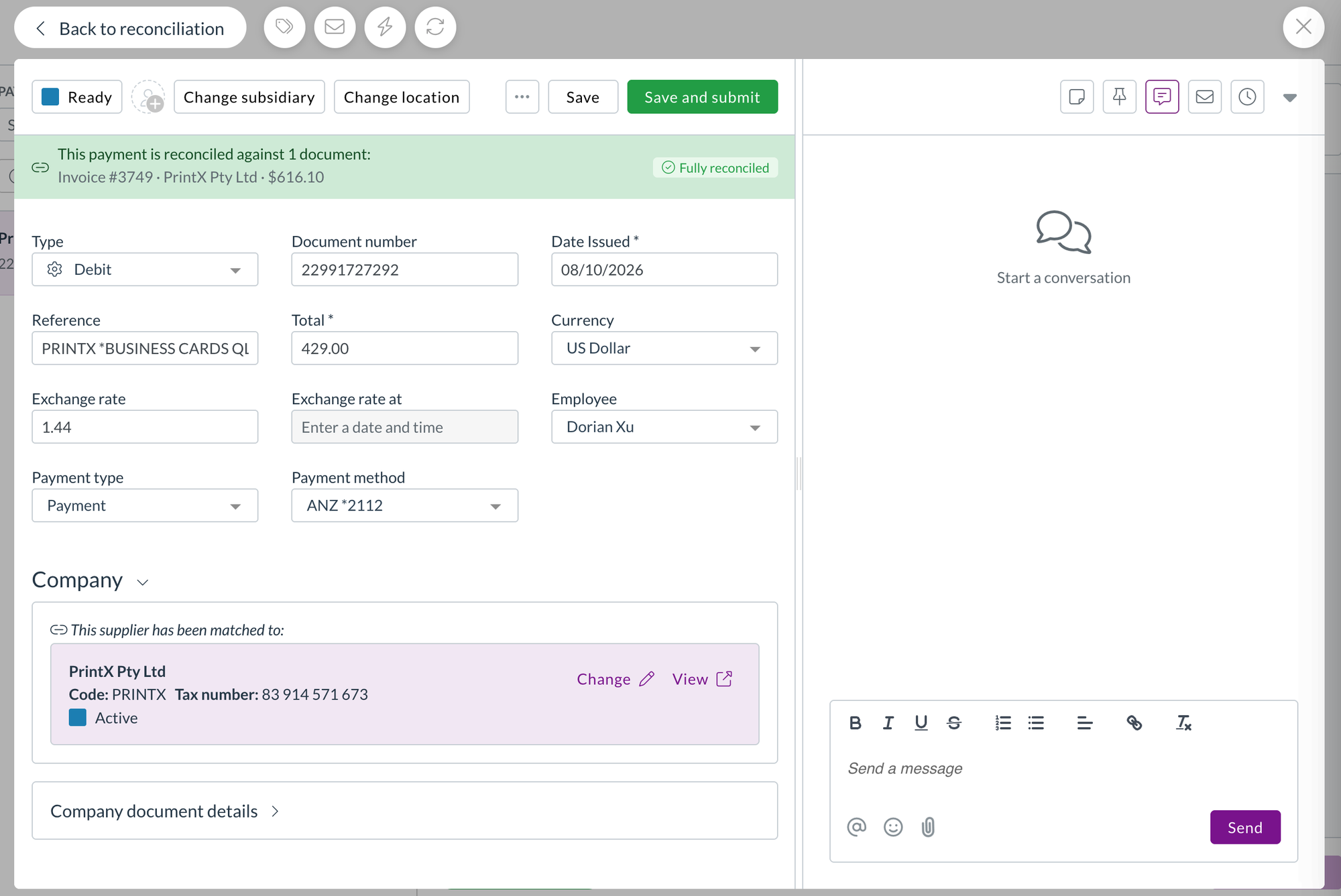
  • An open payment now lists the documents it's reconciled against, each with its number, supplier, and amount. Select one to open it.
  • The reconciliation banner on a payment, invoice, or expense now shows the status of the record you're looking at. A fully covered expense no longer shows as partially reconciled just because its payment is.
  • When you open a linked document, Back takes you to the payment or expense you came from, and back to the reconciliation screen if that's where you started.
  • Long payment references are shortened in the banner, with the full reference on hover.

A card payment showing the invoice it's reconciled against, marked Fully reconciled, with Back to reconciliation above it

Price books​

Price books hold the prices you've agreed for each item, so Zudello can fill in and check prices on your orders and invoices. A price book entry can be set for a dimension alone, such as a cost centre, location, or subsidiary, without a supplier or customer.

  • Changing a line's cost centre, location, or subsidiary now updates the line's price to the matching price book entry, rather than only showing whether the price matches.
  • Only the lines whose price book match has changed are updated, and opening a document never changes its prices.

Units of measure​

Units of measure let you buy and sell an item in a different unit from the one you stock it in, such as a carton of eight. Zudello already converted quantities and prices to the item's base unit on purchasing documents. We've brought the same conversion to sales.

  • Incoming sales documents now convert the quantity and price to the item's base unit. Two cartons at 250 each become 16 units at 31.25 each.
  • The units offered on a sales line are limited to the customer's own conversions and your general ones.
  • Choosing a unit keeps the line's quantity and price, and uses the price book entry for that unit and customer where there is one.
  • Price checks compare like with like, and fully matched lines in a different unit no longer show as over-allocated.

Bank account validation​

Bank account validation compares the bank details on an invoice with the details on your supplier record, to help catch payment fraud and keying errors.

  • A BSB that contains letters, such as a SWIFT code entered in the BSB field, is now flagged with BSB can't contain letters, since it can never match.
  • When the letters are on your supplier record, Zudello asks you to update the supplier record, so the fix is made where the problem is.

Downloads and exports​

  • Documents you download, and original files you export, are now named with the supplier or customer and the document number, such as "Acme Supplies - INV-1042.pdf", so you can tell them apart without opening each one.
  • Where a document has no contact or number, Zudello names the file with whichever of the two it has.
  • Purchase order export templates can now include the remaining amount on each line, so you can report on what's still to be received or invoiced.

Custom dimensions​

Custom dimensions let you code documents against categories your business uses that don't map to Zudello's standard dimensions.

  • Each custom dimension now has its own permissions, so you can choose which user groups can see, create, update, delete, export, and bulk submit its records.

Forms​

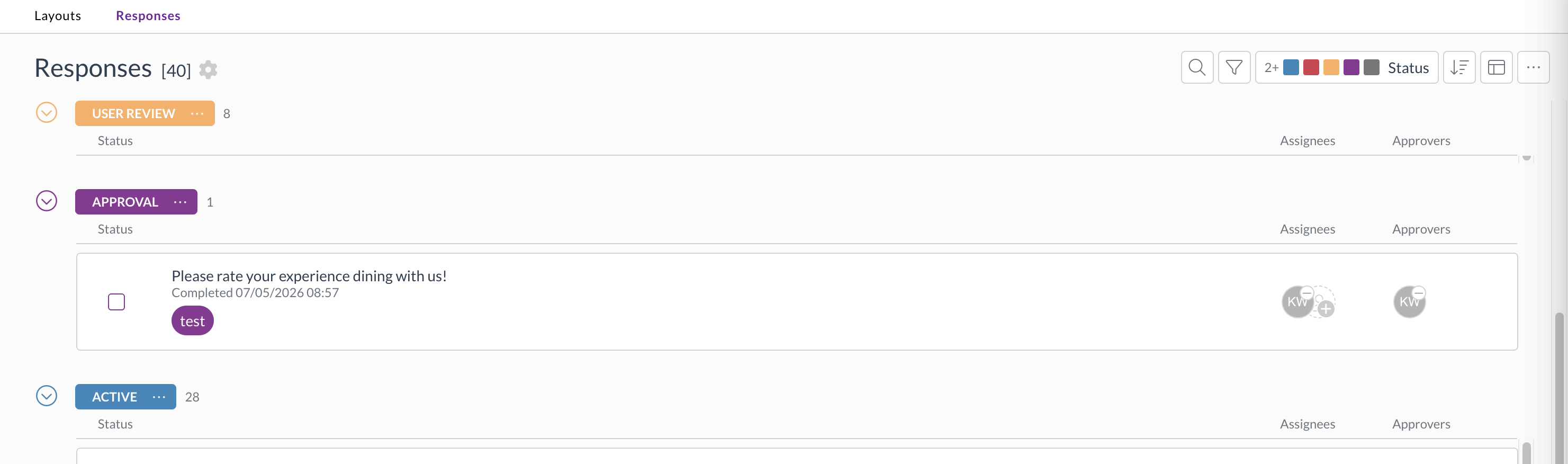
  • Form layouts and responses now have an Approvers column in the list and table layouts, so you can see which forms are waiting on you.
  • You can link a form response or a form layout as a related document. Select Add document under Related documents, then search by title, name, or code. The link is saved on both documents.

The form responses list with an Approvers column next to Assignees

Contracts​

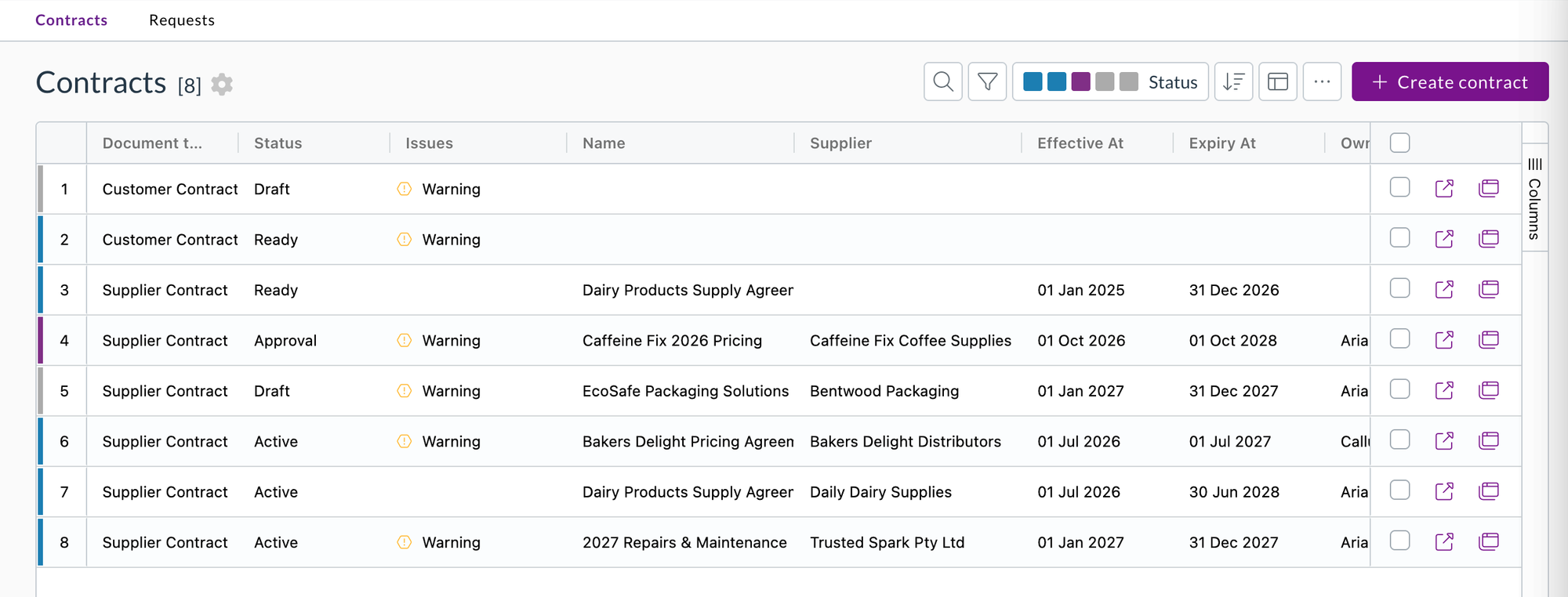
  • The contracts list now has a Supplier column that you can sort by, and searching the list matches supplier names.

The contracts list with the new Supplier column

Quick actions​

Quick actions are your own buttons for the steps your team repeats on a document.

  • A quick action can now be shown on documents in a complete status. Tick Show on complete statuses when you create or edit it. It's off by default, so your existing quick actions behave as before.
  • The Status field is now called Set status after action, and shows Don't change status when it's empty.

Sneak peek: the new UI​

We've been rebuilding the Zudello interface, and you can take an early look at platform.zudello.io. Sign in with your usual details. Your teams, documents, and settings are the same in both, so you can switch between them whenever you like.

The new UI rethinks how you move around Zudello. A side bar replaces the top menu and groups your modules by the work you do, such as expenses, purchasing, sales, and inventory. A home screen and a single approvals area bring together what's waiting on you across every module. Your inbox, notifications, search, help, and keyboard shortcuts sit in a panel on the right, so they're one click away without leaving the document you're working on. It also has a cleaner look throughout, with a choice of themes and accent colours.

Notifications​

Notifications tell you when something in Zudello needs your attention, such as a document assigned to you or waiting on your approval. We've added a notifications panel inside Zudello, alongside your notification emails, and a scheduled digest you can set up yourself.

Only available on platform.zudello.io.

In-app notifications

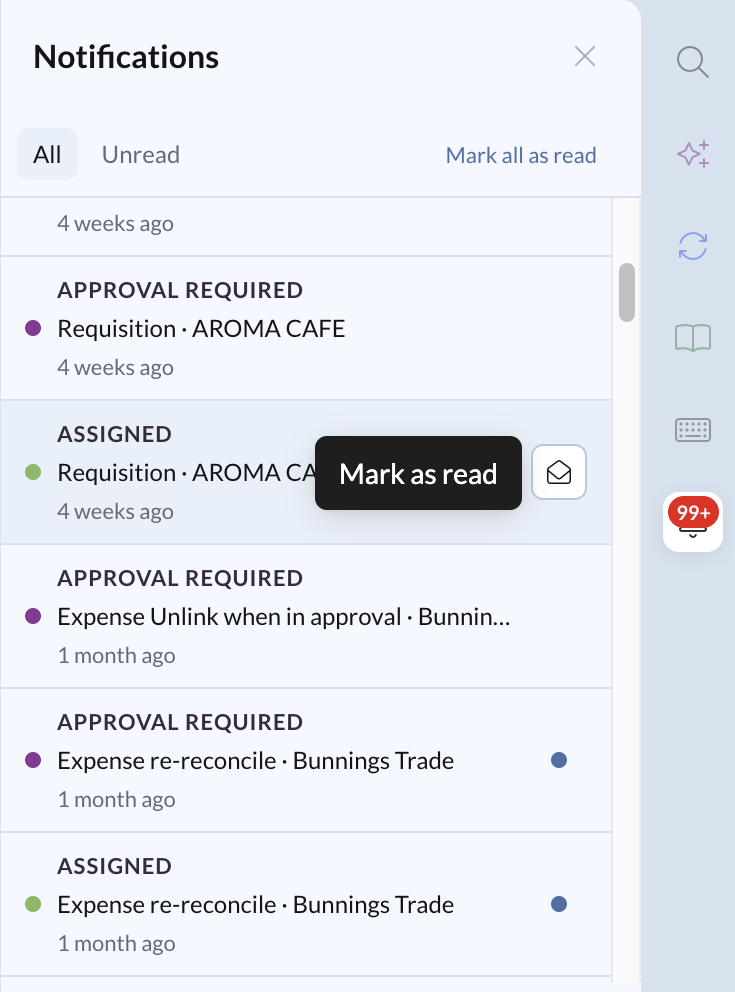
  • The notifications icon in the side bar shows how many unread notifications you have. Select it to open the panel.
  • You're notified when a document is assigned to you, when one needs your approval, and when a contract reminder is due. New notifications appear as they happen, without reloading the page.
  • Select a notification to open the document it's about. It's marked as read when you open it.
  • Switch between All and Unread, mark a single notification as read or unread, or select Mark all as read.
  • Notifications are kept for 30 days.
  • The panel is available to every user, with no permission needed on your user groups. You can still hide the panel or turn notifications off.

The notifications panel listing assigned and approval required notifications, with the All and Unread tabs and Mark all as read

Set up your own approval digests

Only available on platform.zudello.io.

  • An approval digest is one scheduled email with everything still waiting on you in a team: your outstanding approvals and your unreconciled card transactions.
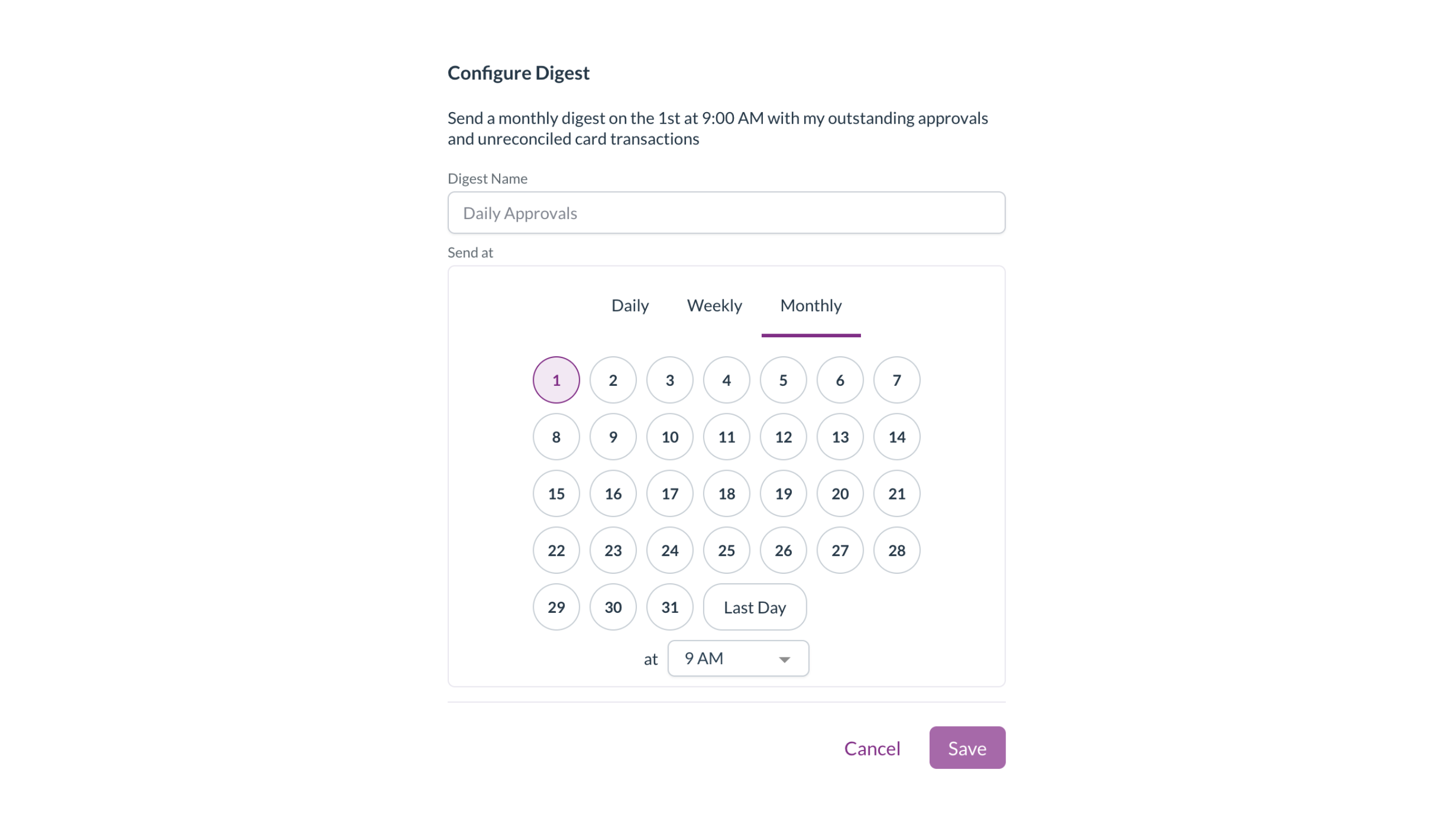
  • In your notification preferences, select Add digest, give it a name, and choose whether it's sent daily, weekly, or monthly, on which day, and at what time.
  • Each digest reads back the schedule it will send on, such as "Send a monthly digest on the 1st at 9:00 AM with my outstanding approvals and unreconciled card transactions".
  • A digest is built when it sends, so anything you've already actioned is left out, and nothing is sent when you have nothing outstanding. Your individual approval emails keep sending as well.
  • Selecting a digest notification opens your approvals.

The Configure Digest window, set to send a monthly digest on the 1st at 9 AM

Go straight to your unreconciled card transactions

  • The link in a digest opens your corporate card expenses, filtered to your own transactions that aren't fully reconciled yet.
  • A My unreconciled transactions badge next to the title shows the filter is on. Select the cross on the badge to show all transactions again.

The corporate card expenses list with the My unreconciled transactions badge next to the title

Countries​

  • Spain, Switzerland, Ukraine, the Netherlands, and six more countries have been added to Zudello's country list, along with the Swiss franc, so suppliers based in those countries sync from your ERP without errors.

Resolutions​

We're constantly working to refine Zudello's functionality and address any issues as soon as possible. As part of this release, we've made the following resolutions:

  • We've fixed converting a quote to a purchase order creating several purchase orders when Enter was held down on the confirmation. Only one is created now.
  • We've fixed purchase orders changing to Unable to process when many goods receipts were matched to the same order.
  • We've fixed duplicate matches being created between an invoice and a goods receipt or order when they were linked from the other side.
  • We've fixed coding lines not being saved on three-way matched invoices.
  • We've fixed statements coming through with no supplier and no lines when a payment on the statement was shown as a positive amount.
  • We've fixed dimension drop-downs showing blank options when the dimension's label was set up to include its external ID.
  • We've fixed budget line dimension drop-downs not applying your dimension dependencies, which offered values that shouldn't have been available.
  • We've fixed people who were removed from a chat message still being notified. Only the people mentioned when the message is sent are notified now.
  • We've fixed menu actions, including quick actions, doing nothing on iPhone and iPad.
  • We've fixed statuses from another section staying on screen when your statuses couldn't be loaded. Zudello now tells you they couldn't be loaded.
  • We've fixed changes you saved on a supplier or customer, such as a BSB, not showing on the document when you went back to it.
  • We've fixed the teams list showing IDs or "undefined" for country, time zone, and currency after you saved a team.
  • We've fixed an error when changing a document's type.
  • We've fixed searches containing special characters not returning the expected results.
  • We've fixed the documents list no longer updating live after your connection dropped and reconnected.
  • We've fixed an error when signing in after your session had expired.
  • We've fixed an error in the tag picker when a tag had no name.
  • We've fixed saving team settings sometimes failing with a "didn't find active resource" message.
  • We've fixed approval emails being delayed after an approval on a very large invoice.
  • We've fixed documents occasionally failing to process when several arrived at the same time.
  • We've fixed line tax not being recalculated when a line's tax rate was filled in from a matched purchase order, which could leave the tax off the invoice total.
  • We've fixed tax-inclusive invoices that include a credit being treated as tax exclusive, which added tax on top of the total.
  • We've fixed a second invoice being matched to a purchase order that only had a tiny rounding amount left on it.
  • We've fixed document coding rules that look at line item details not applying, and one faulty rule stopping the rest of your rules from running.
  • We've fixed custom field values filled in from a matched line not being saved.
  • We've fixed a faulty unit of measure conversion leaving the whole document without its number, dates, totals, and lines. The affected line is now flagged with a warning and the rest of the document is processed.
  • We've fixed approved documents occasionally staying in Approval.
  • We've fixed card payments reconciled to within a cent showing under Partial rather than Complete.
  • We've fixed errors when resizing your browser window after closing a reconciliation.
  • We've fixed Ctrl+Enter submitting a document when Save and submit was hidden or unavailable.
  • We've fixed document lists going back to sorting by Date issued each time the page was reloaded. Your last sort order is remembered again.
  • We've fixed inbox templates filling in the subject but leaving the message blank when sending an email or rejecting a document. The message now shows in the editor, with its formatting kept.
  • We've fixed an error when emailing a document if you didn't have access to inbox templates.
  • We've fixed chat messages with only an attachment not being posted, and files dropped onto the chat being uploaded as new documents.
  • We've fixed the document viewer using more memory with each PDF opened, which could crash the browser after a long run of documents.
  • We've fixed the header menu pushing your profile picture off screen after the window was resized. Modules that don't fit are collapsed under ... again.
  • We've fixed the list layout showing the wrong document type label and icon on some forms.
  • We've fixed an error in advanced filters when changing the field on a filter.
  • We've fixed saving forms, custom fields, and other settings taking up to 40 seconds to finish.
  • We've fixed the time zone on a scheduled automation being reset when you switched between Daily, Weekly, and Monthly, or reopened the schedule.
  • We've fixed the Last ordered and Next order dates on recurring order templates showing in your browser's time zone rather than your team's.

Have an idea?​

Do you have an idea for a new feature or how we can improve our current features? Let us know at support@zudello.com.

Your ideas and feedback are an important part of our product planning process to make Zudello better for everyone.
Mobile app 1.2.0

Release date: Thursday 27 August 2026
Version: Mobile app 1.2.0

Here's the latest summary of what's new and improved in the Zudello mobile app, as well as what we resolved in the latest release. Get it from the App Store or Google Play.

In this release:​

  • Approve invoices and purchase requisitions on the go, not just expenses
  • A new Activity timeline on every document
  • Clearer line item editing and faster item search
  • Camera, wording, and offline improvements and more

Looking for something? Browse by tag to find release notes on a specific feature.

New and improved​

Approvals​

The Zudello mobile app lets you clear your approvals from your phone, wherever you are. Until now that covered expenses and mileage claims only. We've extended it to the rest of the documents that wait on you.

Invoices and purchase requisitions

  • Invoices and purchase requisitions now appear in your approvals list alongside expenses and mileage, so everything waiting on you is in one place.
  • Open one and you get the full document, including the header details, every line, and the coding behind them.
  • Preview the source PDF from the document, so you can check the original before you decide.
  • Approve, reject, or flag from the document itself, following the same approval flow as the web app.

Wording that matches the document

  • The reject and flag actions now use wording specific to the document type you're looking at, rather than the same wording for everything, so it's clear what you're sending back.

Activity​

Every document now has an Activity timeline, so the conversation and the history travel with the document rather than sitting on a screen you can only reach from a desk.

  • Read the comments people have left on a document, in order, without leaving the app.
  • See the document's history, including status changes and who made them.
  • Add your own comment, so you can ask a question or explain a decision at the point you make it.

Line items​

We've made lines easier to read and edit on a small screen.

  • Dropdown and relation fields now show their label rather than the underlying data, so a line reads the way it does on the web.
  • Fields holding several values show them as a single joined list.
  • Item search now leaves out inactive items and ranks the closest matches first, so the item you want is at the top.
  • You can clear a value that was filled in for you, rather than being stuck with it.
  • A line's SKU now matches to the item record it belongs to and keeps that link, so the item's details carry through.

Capturing receipts​

  • If camera access is turned off, the app now takes you straight to your device settings to turn it back on, rather than leaving you to find it.

Working offline​

  • A dedicated screen now tells you when you have no connection, so it's clear the app is waiting rather than broken.
  • The app reconnects on its own once your connection returns, and picks up where it left off.

Resolutions​

We're constantly working to refine Zudello's functionality and address any issues as soon as possible. As part of this release, we've made the following resolutions:

  • We've fixed the on-screen keyboard on both iOS and Android, which could cover the field you were typing into.
  • We've fixed the approvals filter, which didn't always return the documents you'd filtered for.
  • We've fixed spacing at the bottom of pop-up panels, where actions could sit too close to the edge of the screen.
  • We've fixed the no-connection screen on Android, which didn't always appear when the connection dropped.
  • We've improved stability when the app loses and regains its connection, so it recovers rather than needing a restart.

Have an idea?​

Do you have an idea for a new feature or how we can improve our current features? Let us know at support@zudello.com.

Your ideas and feedback are an important part of our product planning process to make Zudello better for everyone.
Release notes edition 3.7.11

Release date: Wednesday 19 August 2026
Version: v3

Here's the latest summary of what's new and improved in Zudello, as well as what we resolved in the latest release.

In this release:​

  • Bank account verification on your suppliers
  • GL Impact on approvals and everywhere you can bulk select
  • Clearer warnings before deletes and uploads change your data
  • Extraction, budget, and automation improvements and more

Looking for something? Browse by tag to find release notes on a specific feature.

New and improved​

Supplier bank account verification​

Zudello checks supplier details on your documents so you can pay with confidence. If your team uses Eftsure, we now show the result of their bank account verification directly on the document.

See the verification result on the contact card

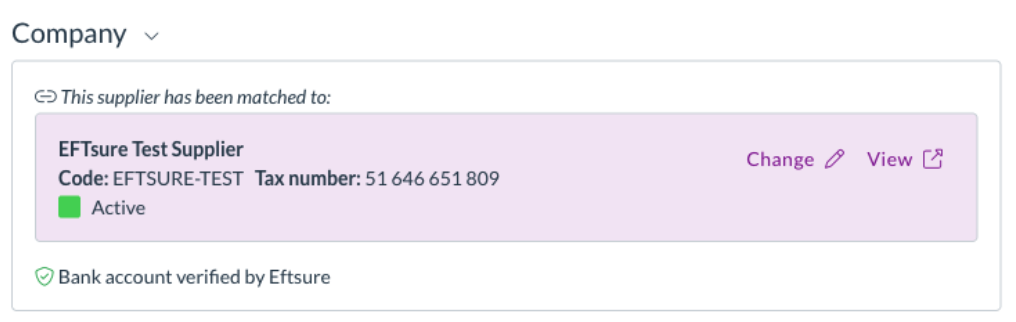
  • The contact match card now shows a bank account verification line alongside the existing ABN and bank details checks.
  • The line tells you the result in plain language, such as Bank account verified by Eftsure, rather than a status code.
  • Accounts verified under a different name, cross-matched but not independently verified, or not yet verified are raised as warnings so you can decide how to proceed.

The Eftsure bank account verification result shown on the contact match card

Blocking results stop a submit

  • An account reported as incorrect, or one Eftsure doesn't recognise at all, blocks submission and appears in the document's issues list.
  • If your team doesn't use Eftsure, nothing is shown at all. There's no placeholder and no change to how the card looks.

Approvals​

Zudello's delegation of authority routes documents to the right approvers based on rules you define. We've made it easier to spot approvers who can no longer act, and given approvers more to work with.

Inactive and removed users are flagged

  • Users who've been deactivated stayed in delegation of authority and management trees with nothing to show they were inactive, so approvals routed to them stalled with no explanation.
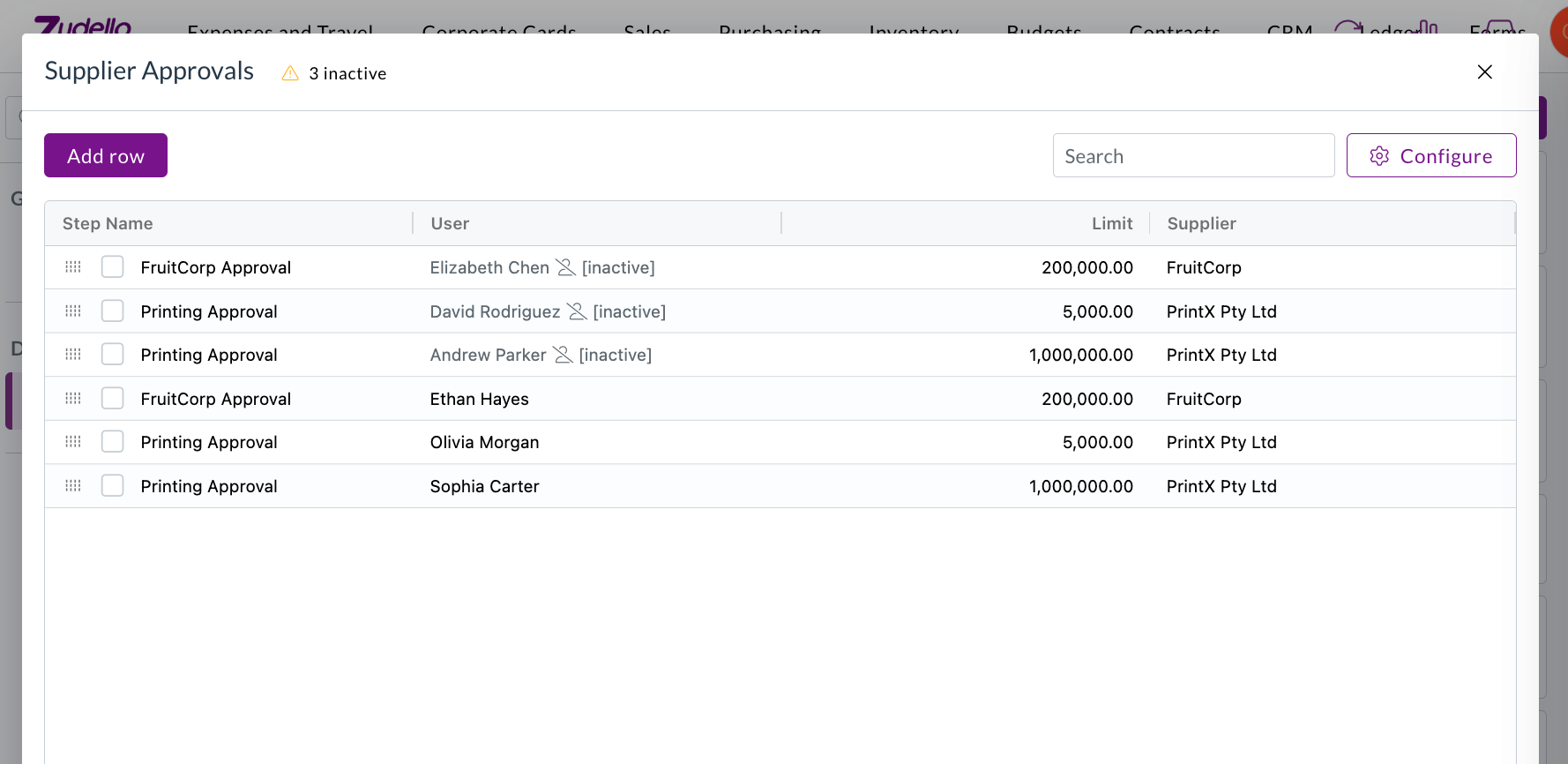
  • Inactive and removed users are now flagged wherever they appear, in delegation of authority trees, management trees, and dataset user columns, including on approvals already waiting on them.

A delegation of authority dataset flagging three inactive users, with an inactive count in the header

  • A warning above the dataset counts how many users are affected and opens a list grouped by user. Selecting a row takes you straight to it.

The inactive or removed users list, grouped by user, with a link through to each affected row

  • Where a row has several assignees, only the inactive ones are greyed out, rather than the whole cell.

GL Impact available wherever you can bulk select

  • GL Impact was previously only available on expenses. It's now available on every list where you can bulk select documents with lines, including the Approvals screen.
  • Approvers can now preview the accounting impact of what they're about to approve, and the same is true for supplier invoices, credit notes, and orders.

The GL Impact bulk action on a purchase order list with four documents selected

The GL Impact window showing the selected lines grouped by entity, with location, account, and department

Reverting and reassigning expense approvals

  • The permissions for reverting an expense during approval, and for changing the approver on an active step, can now be granted to your own user groups. Previously these actions couldn't be assigned.

Suppliers​

Choose the supplier your Zudello-only records export as

  • Suppliers marked as Zudello Only stay in Zudello and are never sent to your ERP. You can now choose the generic supplier they're exported against instead, from Generic Supplier in Team Settings.
  • Until one is configured, documents coded to a Zudello Only supplier fail validation on export. Only suppliers your ERP will accept are offered, and one that's later deactivated or deleted is flagged rather than quietly reading as unset.

The Generic Supplier setting in Team Settings, with no generic supplier configured yet

  • Setting or changing it asks you to confirm first. The dialog names the supplier your documents will sync to the ERP as, and makes clear the document itself keeps showing the supplier it matched. Only the ERP sync is substituted.

The Update Generic Supplier confirmation, naming the supplier documents will sync as

Expenses and claims​

Know what a claim deletion will do before you do it

  • Deleting a claim resets the expenses inside it back to their revert status, which meant expenses you'd deliberately closed reappeared in review with no explanation.
  • Deleting a claim now lists the expenses that will be affected and the status each one returns to, so there are no surprises. Cancel and nothing is changed.
  • This applies whether you delete a single claim or several at once.

The confirmation listing expenses affected by deleting a claim

Document viewer​

Confirm before an upload replaces what you've entered

  • Uploading a document to a record that already has data triggers a fresh extraction, which clears the header fields and replaces the lines. There was no warning, and no way back.
  • You'll now see a warning naming exactly what will be replaced, including the supplier, the fields you've filled in, and the number of lines. Cancel and both the record and its documents are left untouched.
  • Uploading to an empty record works exactly as it did before, with no extra step.

A warning naming the fields and lines an upload will replace

Automations​

Scheduled automations only offer actions that can run

  • An automation with a schedule trigger runs on its own, without a document to act on, so document-level actions either failed or quietly did nothing.
  • With a schedule trigger selected, the action list now only offers actions that work without a document, so you can't build an automation that can never succeed.

The action list limited to actions that run without a document

Document extraction​

We've made extraction more resilient, so fewer documents get stuck.

  • Some PDFs that couldn't be opened before are now repaired automatically. Zudello attempts a wider range of fixes before marking a document as unsupported.
  • A document that fails classification now keeps the extraction work already done, so it can be re-extracted instead of starting again.
  • Large spreadsheets are now read progressively, so a file with a very large empty range no longer causes extraction to fail.

Inboxes​

  • Your inbox's default entity and location are now applied to statement documents, the same way they already were for other document types.

Permissions​

  • A new Rescan permission controls who can re-run extraction on a document, and is enforced when the rescan is requested.
  • Rescans are now recorded against the person who triggered them, so you can see who re-ran extraction, when, and what it spent from your team's quota.

The rescan confirmation, warning that a rescan counts one document against the team's quota

  • New permissions have been added for contract configuration, reasons, and auto coding configuration.

Resolutions​

We're constantly working to refine Zudello's functionality and address any issues as soon as possible. As part of this release, we've made the following resolutions:

  • We've fixed the Procurement Bottlenecks dashboard, which took 30 to 40 seconds to load and returned intermittent errors.
  • We've fixed new passwords being accepted and then rejected as invalid. Passwords are now capped at 70 characters and must use standard characters, matching the limit applied when your account is created, with a clear message when one doesn't qualify.
  • We've fixed the budget and contract threshold panels on a document showing foreign-currency amounts unconverted, so a document could read as over budget when it was comfortably under. Stored budget figures were always correct, only the on-screen check was wrong.
  • We've fixed budgets continuing to show spend against the dimensions a budget line used before it was edited, which a manual resync didn't clear. Changing a budget configuration now relinks budgets across the whole team.
  • We've fixed documents with unresolved error-level validations being able to complete, so a card expense could reconcile to Complete while still carrying a blocking error. Errors now block completion the same way they block submission.
  • We've fixed archived, deleted, and rejected documents appearing in the list of documents available to reconcile against and in suggested matches, across invoices, expenses, and credit notes. A document archived while the reconciliation screen is open is now removed from the list rather than staying selectable.
  • We've fixed an issue where the supplier on an item's unit of measure conversion couldn't be updated.
  • We've fixed the reorder workflows screen in Document Studio, where Save Order could stay disabled even though the order needed saving.
  • We've fixed line numbers that weren't visible on forms with purchase order matching turned on.
  • We've fixed searchable dropdowns on long lists, which only ever searched the first 30 records, and which could show a blank value for a record outside the loaded page.
  • We've fixed an issue where the automation value editor could open off the edge of the screen, and where a long email body ran past the bottom of the window.
  • We've fixed an issue where an email arriving with several attachments could create a document with no link back to its email, leaving the inbox thread linked to a different, previously processed invoice instead of the correct one.
  • We've fixed an issue that prevented a file being uploaded into an existing contract from the document side panel.
  • We've fixed an issue where completed documents could be moved back to Unable To Process.
  • We've fixed paged searches that also requested a total count, which returned the first page repeatedly.
  • We've made the documents filter panel faster to open.
  • We've removed the beta label from the process email body option on inboxes.

Have an idea?​

Do you have an idea for a new feature or how we can improve our current features? Let us know at support@zudello.com.

Your ideas and feedback are an important part of our product planning process to make Zudello better for everyone.
Release notes edition 3.7.9

Release date: Monday 20 July 2026
Version: v3

Here's the latest summary of what's new and improved in Zudello, as well as what we resolved in the latest release.

In this release:​

  • More powerful contract management
  • Cleaner supplier matching and inbox controls
  • Images on suppliers, customers, and items
  • Approval, allocation, and filtering improvements and more

Looking for something? Browse by tag to find release notes on a specific feature.

New and improved​

Contracts​

Contracts let you store and manage your supplier and customer agreements in Zudello, with automatic extraction to pull key details straight from your documents. We've expanded what you can do with contracts, from reminders through to pricing.

Contract reminders

  • You can now set up reminders on a contract, so key dates like renewals and expiries are never missed.
  • Renewal and expiry reminder types automatically use the relevant contract date, while custom reminders let you choose the date yourself.
  • Set each reminder to trigger a chosen number of days, weeks, or months before or after the date, and assign it to specific users or to a person recorded on the contract.

Setting up reminders on a contract

Contract lines and contract value

  • Zudello now stores individual pricing lines on a contract and calculates a total contract value, converted to your local currency where needed.

Pricing without a catalogue match

  • Contract pricing rows now appear even when there's no matching catalogue item.
  • A single stock code column lets you pick an existing item, create a new catalogue item, or keep the value as free text, the same way you would on transaction lines.

Contract pricing with the stock code editor

Data permissions for contract records

  • Dimension-based data permissions now extend to contract pricing, thresholds, and lines, so you can control access to these records the same way you do elsewhere.

Approvals​

Zudello's delegation of authority routes documents through the right approvers based on rules you define. We've made two improvements to give you more control over how approval steps are built.

Keep duplicate approvers on a step

  • A new Remove duplicate approvers option (turned on by default) controls what happens when the same person is required more than once on a step.
  • Turn it off to keep the full required approver count, so a step is no longer dropped when the same approver appears more than once.

The Remove duplicate approvers option on an approval step

Blank dimensions match any value

  • A new setting lets a blank dimension cell in a delegation of authority dataset be treated as matching any value.
  • This means a single rule can cover every option for that dimension, rather than needing a separate row for each one. Blank cells show a muted "any" in the preview.

Blank dimensions treated as any value in a delegation of authority dataset

Supplier matching and inbox rules​

When documents arrive by email, Zudello matches them to the right supplier automatically. We've given you more control over how that matching works.

Ignore senders for supplier matching

  • A new Inbox Rules tab in Settings lets you maintain a list of email addresses and domains to exclude from supplier matching.
  • This stops shared or generic senders from being matched to the wrong supplier.

The Inbox Rules exclusion list in Settings

Screen unknown senders

  • You can now maintain an allowlist of trusted senders, and Zudello records how trusted an incoming document's sender is, so you can spot documents that arrived from an unrecognised sender.

Tell apart suppliers with the same name

  • The supplier match dropdown on a transaction now shows the supplier code in front of the name, so suppliers that share a name can be told apart at a glance.

Supplier code shown in the supplier match dropdown

Images on suppliers, customers, and items​

  • You can now add images to your supplier, customer, and item records.
  • Upload a single image or a gallery of several, drag to reorder them, and choose which one is the cover.
  • Images appear on list rows, in picker dropdowns, and in the document viewer, and open full screen when you click them.

A supplier image shown on the matched-supplier card in the document viewer

Allocations and matching​

Zudello matches related documents, such as an invoice to a purchase order, so you can track what's been received, billed, and paid. We've tightened up manual allocation.

One-to-one document allocation

  • A new setting restricts a document to a single allocation, guarding against a document being matched more than once.
  • When it's turned on, the match buttons are disabled for a document that's already allocated, with a tooltip naming the document it's matched to.

The one-to-one document allocation setting

Cleaner match list

  • Documents that are already fully allocated are now hidden from the Match with… list, so you only see documents that are still available to match.

Corporate cards​

The Corporate Cards module manages the full lifecycle of company card expenses, from capture through to reconciliation and payment. We've made reconciliation safer and more flexible.

  • Payment reconciliations can now be matched to employees.
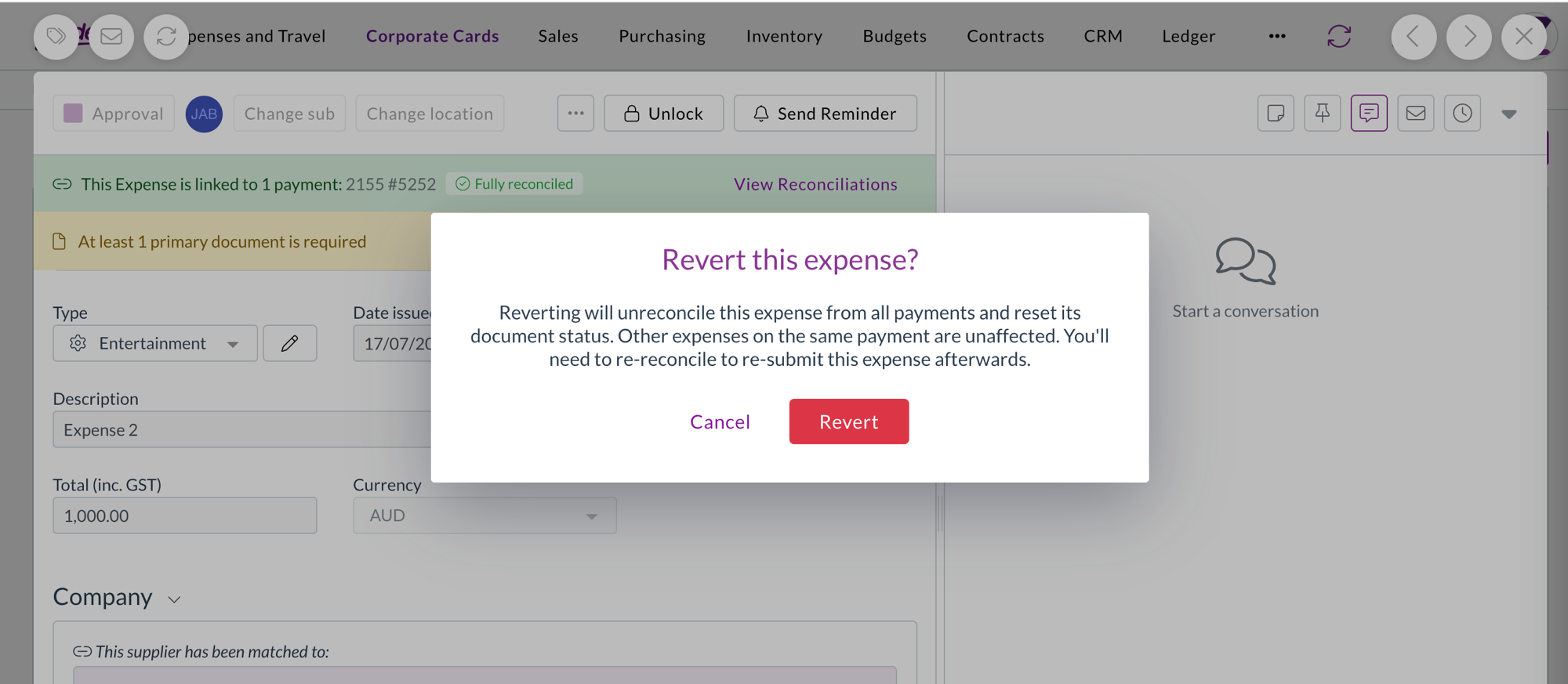
  • Reverting a reconciled expense now shows a confirmation warning first, because the revert removes the expense from all its payments and resets its status. The warning explains that other expenses on the same payment aren't affected.

Confirmation warning before reverting a reconciled expense

Filters​

We've made the filter dropdowns across the platform faster and easier to work with.

  • Filter dropdowns now load only the values actually in use for what you're looking at, and search the full set on the server as you type.
  • Inactive records are hidden by default behind a Hide inactive toggle.
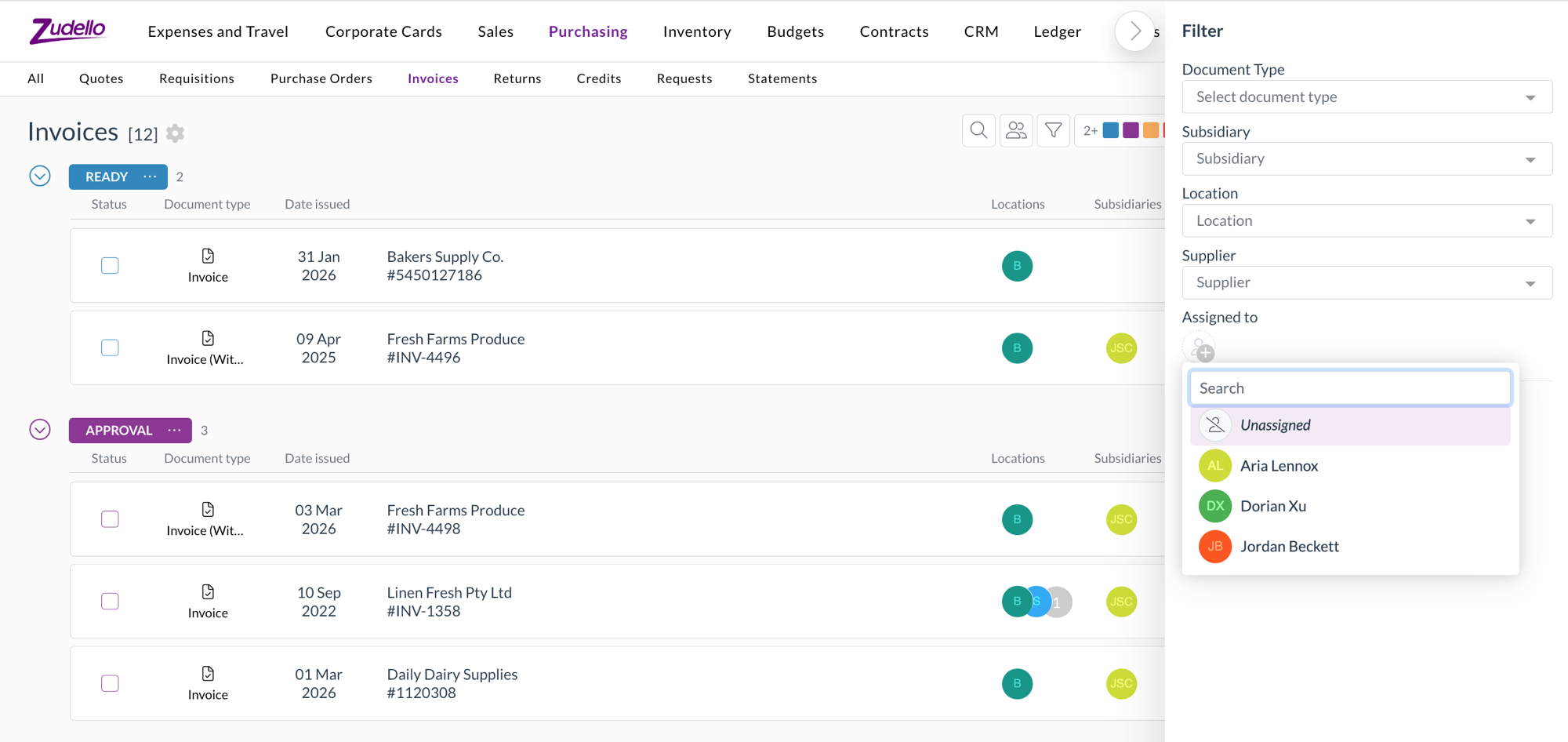
  • The assignee filter now has a pinned Unassigned option, so you can quickly find documents that haven't been assigned to anyone.

The pinned Unassigned option in the assignee filter

Currencies​

  • Singapore Dollar (SGD) and Hong Kong Dollar (HKD) are now fully selectable currencies.
  • Documents priced in SGD or HKD convert to your local currency across transactions, budgets, and approvals.

Document splitting​

Zudello can split a single file that contains several documents into separate records during extraction. We've improved how splitting works.

  • Splitting is now more accurate, so documents from the same supplier are separated correctly and unusual single documents are no longer split by mistake.
  • The original email is now linked to each split document, and Zudello enriches each one so it's ready to work with straight away.

Other improvements​

  • For the End of Month and End of Next Month payment terms, the unit field is now clearly marked as not applicable, so it's obvious the value isn't used in the calculation.

Resolutions​

We're constantly working to refine Zudello's functionality and address any issues as soon as possible. As part of this release, we've made the following resolutions:

  • We've fixed an issue where PDF text could be missing for some users on Windows using Chrome or Edge.
  • We've fixed an issue where downloaded Excel files were missing their file extension.
  • We've fixed date fields that displayed or accepted dates as yyyy-mm-dd instead of dd/mm/yyyy.
  • We've fixed an issue where a dataset section filter couldn't resolve the Customer column, even though it worked for Supplier.
  • We've fixed the Next and Previous buttons at the bottom of the form response viewer, which weren't navigating between responses.
  • We've fixed deep links into the inbox so they open the correct document.
  • We've fixed an issue where bulk admin actions failed for newly created users with an "organisation user not found" error.
  • We've fixed inline table editors so your changes are saved when you click away from the cell.
  • We've fixed the compact location and subsidiary selectors so they stay usable after the window is resized.
  • We've fixed an issue where opening a document directly by its link could fail to load its settings.
  • We've fixed an issue that prevented approved claims from being exported.
  • We've fixed dataset grid cells that could visually bleed into the next column.
  • We've fixed an issue where custom form fields with dataset options could be hidden by mistake.

Have an idea?​

Do you have an idea for a new feature or how we can improve our current features? Let us know at support@zudello.com.

Your ideas and feedback are an important part of our product planning process to make Zudello better for everyone.
Mobile app 1.1.1

Release date: Thursday 21 May 2026
Version: Mobile app 1.1.1

Here's the latest summary of what's new and improved in the Zudello mobile app, as well as what we resolved in the latest release. Get it from the App Store or Google Play.

In this release:​

  • A rebuilt approval flow screen
  • Document type filters on every list
  • Mileage claims that keep their own totals
  • A quicker create menu and more

Looking for something? Browse by tag to find release notes on a specific feature.

New and improved​

Approvals​

Mileage claims joined the approvals list in 1.1. This release tidies up what you see once you open one.

  • The approval flow screen has been rebuilt, so you can see where a document sits in its approval and who it is with without leaving the document.
  • Lists now filter on document type, so you can narrow a long list down to just the expenses or just the mileage claims.

Mileage​

  • A mileage claim now works out its own lines from the distance and the rate, so lines can no longer be added or removed by hand and the total always matches the trip.
  • Totals recalculate before the claim is saved, so what you submit matches what you saw on screen.

Elsewhere in the app​

  • The create menu has been reworked, so starting a new expense, mileage claim, or upload takes fewer taps.

Resolutions​

We're constantly working to refine Zudello's functionality and address any issues as soon as possible. As part of this release, we've made the following resolutions:

  • We've fixed mileage totals, which could be saved before the recalculation had finished.
  • We've made a batch of smaller fixes and interface improvements across the app.

Have an idea?​

Do you have an idea for a new feature or how we can improve our current features? Let us know at support@zudello.com.

Your ideas and feedback are an important part of our product planning process to make Zudello better for everyone.
Mobile app 1.1

Release date: Friday 8 May 2026
Version: Mobile app 1.1

Here's the latest summary of what's new and improved in the Zudello mobile app, as well as what we resolved in the latest release. Get it from the App Store or Google Play.

In this release:​

  • Mileage claims, from submitting to approving, in the app
  • Miles or kilometres, with automatic recalculation when you switch
  • Upload several documents at once
  • Custom fields, document types, reconciled documents, and more

Looking for something? Browse by tag to find release notes on a specific feature.

New and improved​

Mileage​

Mileage claims let you claim for the distance you've travelled rather than a receipt you've kept, at the rate your team has set. The mobile app is where most people make those claims, so this release brings mileage to the phone end to end.

Making a claim

  • Create and submit a mileage claim from the app, and Zudello works out the value from the distance and your team's rate.
  • Record the distance in miles or kilometres, whichever your team uses.
  • Switching between miles and kilometres recalculates the claim automatically, so you don't have to convert anything yourself.

Approving a claim

  • Mileage claims now appear in the approvals list and open with their full detail, so approvers can clear them from the phone alongside everything else.

Documents​

We've made the app work with more of what your documents actually hold, rather than a fixed set of fields.

  • Upload several documents in one go, rather than one at a time.
  • Open and edit a document that's fully or partially reconciled, instead of having to undo the reconciliation first.
  • Change a document's type after it's been created, so something captured as the wrong type can be put right in place.
  • Custom fields set up for your team now appear on documents in the app, on the header and on the lines.
  • Dimensions are filled in for you wherever Zudello can work them out, so there's less to enter by hand.

Resolutions​

We're constantly working to refine Zudello's functionality and address any issues as soon as possible. As part of this release, we've made the following resolutions:

  • We've fixed mileage totals, which didn't always refresh when you changed the distance on a claim.
  • We've fixed address lookup on mileage claims.
  • We've fixed an issue where deleting every line on a document could fail.
  • We've fixed sign out, which didn't always complete.
  • We've fixed the app's live connection, so a document's status updates as it changes rather than needing a refresh.
  • We've fixed text that was cut off inside document sections, which now shows in full.
  • We've removed the minus sign shown next to debit amounts, which read as though the value was negative.

Have an idea?​

Do you have an idea for a new feature or how we can improve our current features? Let us know at support@zudello.com.

Your ideas and feedback are an important part of our product planning process to make Zudello better for everyone.

Release notes edition 3.7.5

Release date: Thursday 23 April 2026
Version: v3

Here's the latest summary of what's new and improved in Zudello, as well as what we resolved in the latest release.

In this release:​

  • Task-level approvals
  • Support for additional mileage units
  • Three-way matching improvements and more

Looking for something? Browse by tag to find release notes on a specific feature.

New and improved​

Task-level approvals​

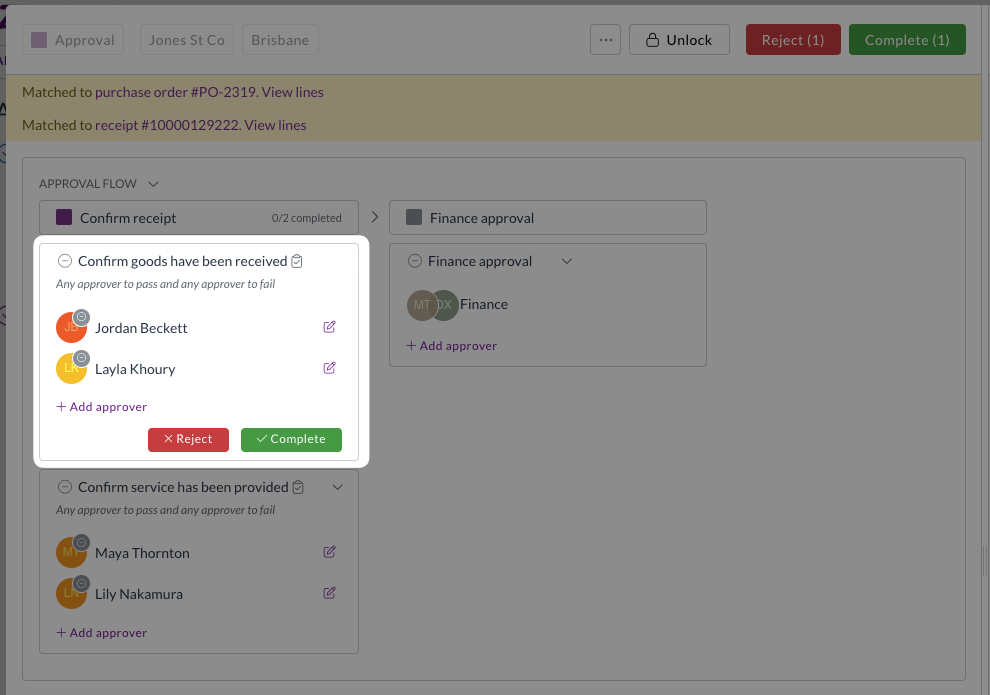
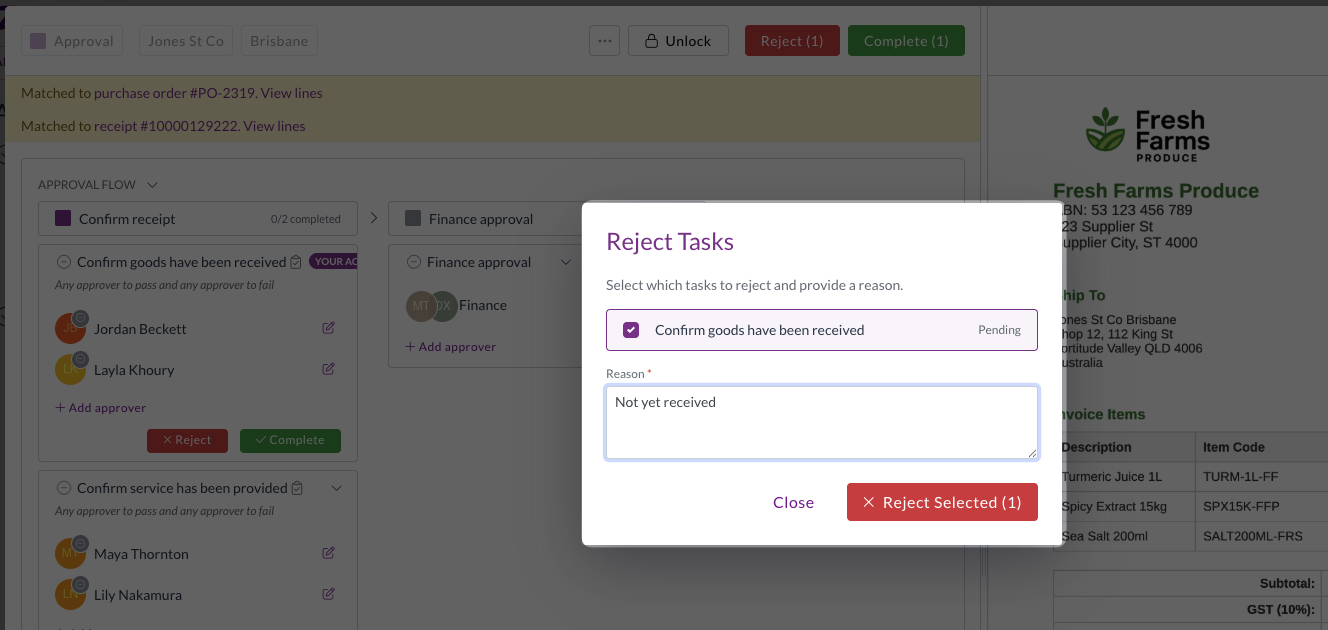
Zudello's approval workflows let you route documents through one or more milestones, each requiring sign-off before a document can progress. We've now introduced task approvals, a new type of approval milestone that give you more granular control over how documents are reviewed and confirmed.

Task approval milestones

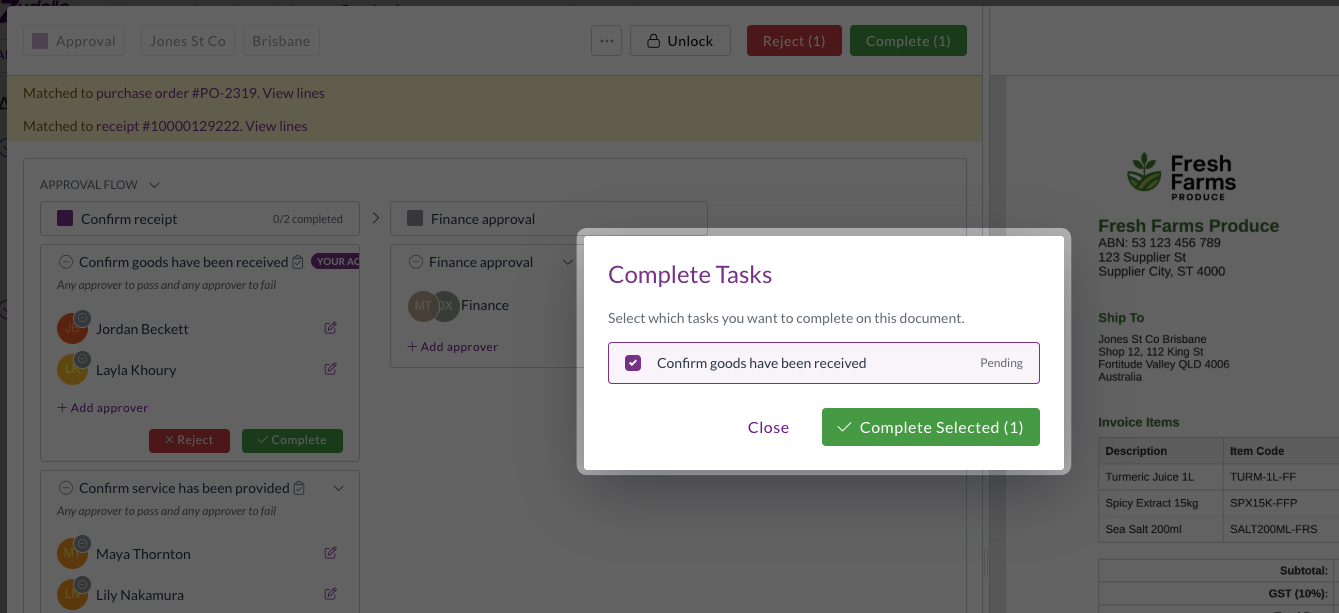
  • Standard approval milestones apply to the entire document, meaning an approver signs off on all line items at once. Task approvals work differently; each task within the milestone can be scoped to specific lines, so approvers can review and confirmonly the items for which they are responsible.

  • This is particularly useful when different people need to confirm different parts of a document, such as confirming that goods or services on specific lines have been received.
  • When completing or rejecting a task, approvers can select which tasks they are actioning, keeping the approval process clear and transparent.

  • If any task is rejected, the entire milestone fails. All tasks must be completed for the milestone to pass.
Note

Approval milestones can contain either tasks or steps, but not both.

Expenses and mileage improvements​

The expenses module helps you capture, submit, and approve employee expenses, including mileage claims. We've made several improvements to reduce manual effort and improve accuracy.

  • Mileage unit support
    • Mileage reimbursements can now be configured in either kilometres or miles.
    • The selected unit flows through to the Maps API calculation, unit conversion, and line totals, so reimbursement amounts are always accurate regardless of which unit your team uses.
    • The line quantity now matches the unit on the mileage rate, and the correct unit is applied even when rates change mid-draft or across multi-leg routes.
  • Employee field moved to transaction header
    • The employee field on expense transactions has moved from the expense line to the transaction header, alongside the assignee field.
    • This reduces repetitive data entry when submitting expenses with multiple lines.

  • Default split for expenses with no supplier splits
    • Expenses now receive a default 100% single-line split when no supplier splits are configured.
    • This means validation passes automatically without requiring manual intervention.

Three-way matching improvements​

Three-way matching in Zudello links your invoices, purchase orders, and goods receipts to ensure you only pay for what you ordered and received. We've made an improvement to how receipt allocations are handled to keep your matching accurate.

Receipt allocations constrained to matched purchase order lines

  • Invoice-receipt allocations are now always inferred through the matched purchase order, rather than being matched directly between invoices and goods receipts.
  • This eliminates cross-line splits that could cause matching issues, and keeps your three-way matching clean and consistent.
  • This change applies automatically for teams using three-way matching. Teams that don't use three-way matching are not affected.

Other improvements​

Framework upgrade

  • We've upgraded the underlying framework that powers the Zudello platform, improving overall stability, performance, and compatibility with modern browsers.

Interface improvements

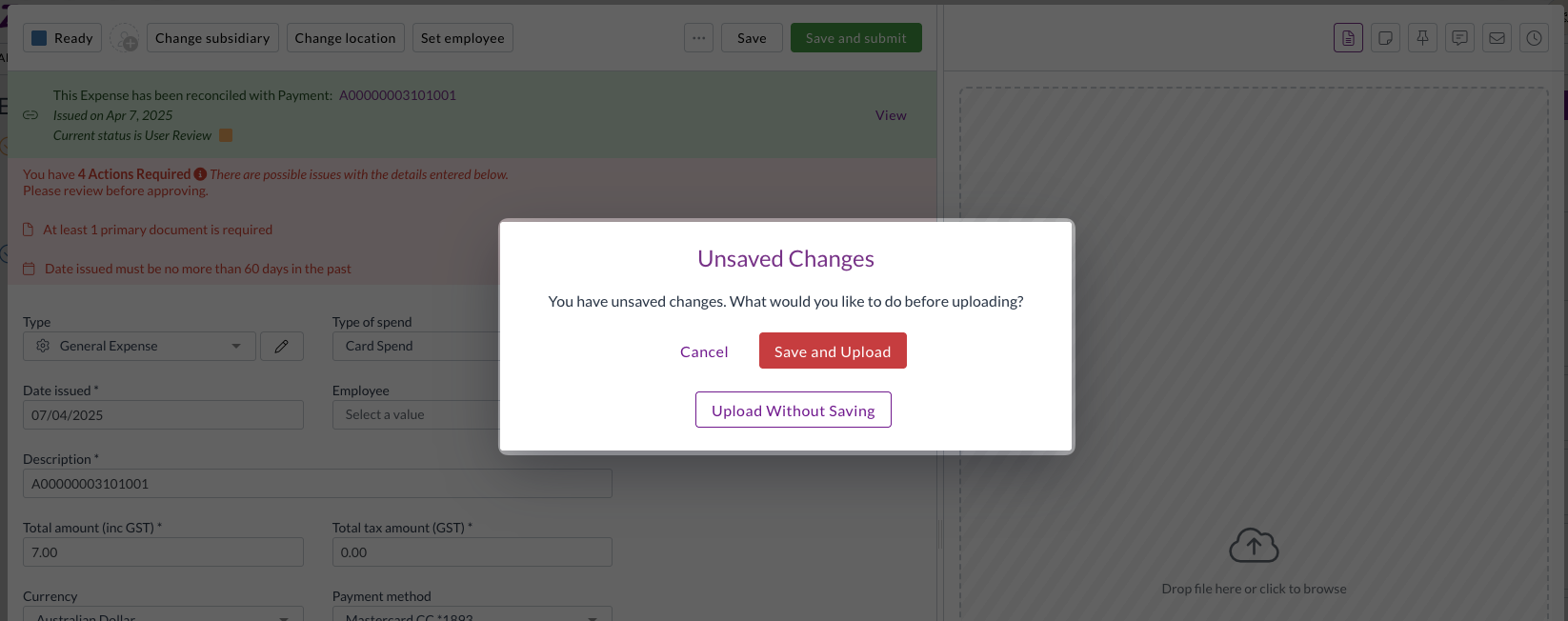
  • You are now warned if you attempt to upload a primary file while there are unsaved changes, preventing accidental data loss.

  • The Root field in the dataset approval field drop-down has been renamed to Header for clarity.

Security improvements

  • We've made a number of security improvements to the Zudello platform.

Resolutions​

We're constantly working to refine Zudello functionality and ensure that we address any issues as soon as possible. As part of this release, we've made the following resolutions and improvements:

  • We've fixed an issue where switching between teams could cause an unresponsive page.

Have an idea?​

Do you have an idea for a new feature or how we can improve our current features? Let us know at support@zudello.com.

Your ideas and feedback are an important part of our product planning process to make Zudello better for everyone.
Release notes edition 3.7.1

Release date: Thursday 26 February 2026
Version: v3

Here's the latest summary of what's new and improved in Zudello, as well as what we resolved in the latest release.

In this release:​

  • Redesigned expenses module for a faster, simpler claims experience
  • Bulk reject for approval workflows
  • New automation actions, interface improvements and more

Looking for something? Browse by tag to find release notes on a specific feature.

New and improved​

Redesigned expenses module​

The expenses module helps you capture, submit, and approve employee expenses. We took a closer look at how teams actually use the module, and identified a number of ways to simplify the process and save users time.

The result? A redesigned expenses module that gets out of your team's way.

  • Direct submission for expenses
    • For most teams, the majority of expenses are single-line submissions, but the old workflow required every expense to be added to a claim before it could be approved.
    • We've now removed this extra step. Expenses can now be submitted for approval directly, bypassing the claims step entirely for teams that don't need it.
    • The existing claims workflow remains fully supported for teams that do need to use it.

  • Improved GL splits
    • The way GL splits work on expense lines has been updated so that line items must equal the document total, giving you cleaner, more accurate cost allocations.
    • Split percentages are now visible directly on the expense.
  • Expense approval notifications
    • Users now receive email and in-app notifications for expense approval actions, including when an expense is approved, rejected, or flagged for review.
    • Your team stays informed at every step without needing to chase updates manually.

If you have any questions about the updated expenses module, or would like to discuss enabling direct submission for your team, contact support@zudello.com.

Bulk reject for approval workflows​

Approvers can now reject multiple documents in a single action, saving time when managing large volumes of documents awaiting approval.

The process for bulk

  • Select multiple documents from the document list and reject them in one action
  • Add a rejection reason that applies to all selected documents
  • Each rejected document triggers its own notification to the relevant user, including the rejection reason

For more information on bulk rejecting documents, see Bulk approving and rejecting.

New change team automation action​

We've added a new automation action to give you more options when automating your workflow.

You can now use a Change team action within sentence automations, to automatically move documents to the correct team when certain conditions are met. This is the same as the Change team action available manually on documents.

To discuss adding this automation to your team, please reach out to support@zudello.com.

Interface and performance improvements​

We've made several enhancements to improve usability and performance across the system:

  • Inbox field labels updated
    • Inbox fields are now more clearly labelled in export and import field selectors

  • Performance improvements
    • We've reduced unnecessary processing for users who belong to multiple groups with overlapping permissions, resulting in faster load times

Resolutions​

We're constantly working to refine Zudello functionality and ensure that we address any issues as soon as possible. As part of this release, we've made the following resolutions and improvements:

  • We've resolved an issue where inactive contracts were included in spend tracking and variance reporting. Inactive contracts are now correctly excluded, consistent with how inactive budgets are handled.
  • We've fixed an issue where repeatedly reordering documents could generate chains of false duplicate records.
  • We've resolved an issue where fields with forced default values could still be edited by users. These fields are now correctly displayed as read-only.
  • We've fixed a crash that could occur when converting a document type if no target document type was configured.
  • We've resolved an issue where photos taken on a phone camera in JPG format were not rendering correctly in the document preview panel.

Have an idea?​

Do you have an idea for a new feature or how we can improve our current features? Let us know at support@zudello.com.

Your ideas and feedback are an important part of our product planning process to make Zudello better for everyone.
Release notes edition 3.6.15

Release date: 27 January 2026
Version: v3

Here's the latest summary of what's new and improved in Zudello, as well as what we resolved in the latest release.

In this release:​

  • New Corporate Cards module for managing company card expenses
  • More flexibility for management tree approvals
  • Smart date posting for smooth ERP syncing and more

Looking for something? Browse by tag to find release notes on a specific feature.

New and improved​

Corporate Cards module​

Zudello helps you manage the full lifecycle of your business expenses, from capture through to approval and payment. We've now introduced a dedicated Corporate Cards module to give you clearer separation between company card spending and personal reimbursements.

Corporate card expenses are now distinct from standard expenses and travel, which remain the home for personal cards and out-of-pocket reimbursements. The dedicated corporate cards module supports:

  • Flexible document creation
    • Corporate card expenses can be created manually, uploaded for extraction, or received via the inbox
  • Enhanced reconciliation
    • Reconcile credit and debit transactions against an invoice, expense, or credit note
    • Zudello automatically suggests matches based on amount, date, and merchant or company name

  • Automated approvals
    • Once reconciled, expenses are automatically pushed through your approval workflows

For a full guide on setting up and using the corporate cards module, see Corporate cards.

Management tree approval improvements​

Management tree approvals allow you to move a document up your organisation structure, until someone with a sufficient limit approves it. We've added more flexibility to how management tree approvals are triggered.

Management tree approvals can now start from the user assigned to a document, rather than the user who submitted it. This gives teams more flexibility when documents are processed on behalf of others, or when documents are adjusted by a finance team and resubmitted.

Smart date posting for accounting periods​

Keeping your transactions aligned with open accounting periods is essential for accurate ERP syncing. Zudello can now automatically handle situations where an invoice date falls within a closed accounting period.

When this occurs, the system sets the date posted to the first day of the next open period, so the invoice can sync to your ERP without manual intervention.

For example:

  • Your previous accounting period closed on 3 February 2026
  • An invoice arrives after that date with an issue date of 31 January 2026
  • Zudello automatically sets the date posted to 1 February 2026 (the first day of the current period)
  • The invoice syncs to your ERP without any manual adjustment

We've also added a new form extension that can block document submissions if the date posted does not fall within an open accounting period. If there is no date posted set on the document, the extension looks at the date issued instead.

Interface improvements​

We've made several enhancements to improve usability and clarity across the system:

  • Export status indicators
    • When running data exports, a status indicator now appears against the transaction to show progress, such as Pending or Ready
  • Visual filter indicators
    • A purple dot now appears when a filter is active, making it easier to see at a glance when your view is filtered
  • Settings search
    • A new search bar has been added to the Settings area so you can find what you're looking for faster
  • Improved extension hints
    • Tooltip colours have been updated and tooltips now use scrollable popovers, resolving display issues where hints were cut off at the edge of the screen
  • Improved JSON viewer
    • The JSON viewer now includes buttons to search, collapse, and copy data, making it easier to navigate complex files
  • Default team selection
    • You can now set a default team in your personal settings, so you're taken straight to the right team when you log in

Resolutions​

We're constantly working to refine Zudello functionality and ensure that we address any issues as soon as possible. As part of this release, we've made the following resolutions and improvements:

  • We've resolved an issue where inactive budgets were included in impact calculations and validation checks. Inactive budgets are now correctly excluded, preventing false validation errors.
  • We've fixed an issue that prevented users from manually creating reconciliation expenses.
  • We've resolved an issue where the requests submodule was failing to load correctly.
  • We've improved how split percentages are handled. If a transaction line has a split percentage over 100%, the system now protects data integrity by not setting split percentages for any lines on that transaction.
  • We've improved the reliability of automation requests sent to the integration API through a new message queue, ensuring better handling of failures.
  • We've improved email address validation logic for more reliable processing.
  • We've fixed an issue where values after a comma were being stripped during data handling, and standardised internal variance calculations.

Have an idea?​

Do you have an idea for a new feature or how we can improve our current features? Let us know at support@zudello.com.

Your ideas and feedback are an important part of our product planning process to make Zudello better for everyone.
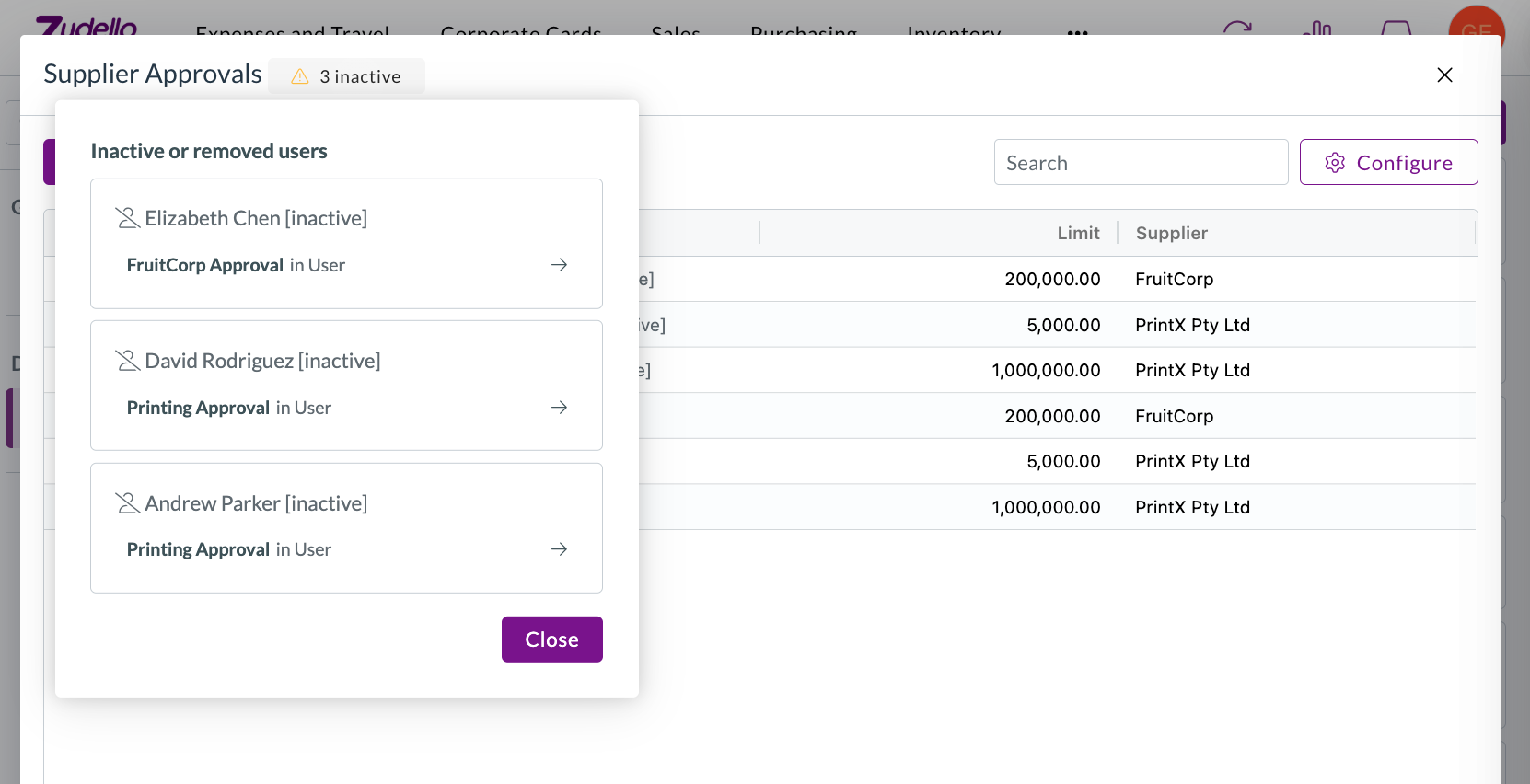
Release notes edition 3.6.7

Release date: 17 September 2025
Version: v3

Here's the latest summary of what's new and improved in Zudello, as well as what we resolved in the latest release.

In this release:​

  • New user actions for purchase orders and quotes
  • Enhanced approval workflow flexibility
  • Authentication improvements
  • Enhanced document validation capabilities and more

Looking for something? Browse by tag to find release notes on a specific feature.

New and improved​

New user actions​

User actions help streamline common workflows by providing quick access to frequently used functions. We've officially launched two powerful user actions that simplify standard requisition processes.

Reorder Purchase Order​

The reorder purchase order allows users to quickly create a copy of a previous order. This function is designed for teams that create Purchase Orders directly, rather than following the standard requisition to purchase order flow.

The Reorder function is now available for all teams:

  • Reorder function
    • Quickly create new purchase orders based on existing orders
    • Bypasses requisition workflows for faster processing
    • Any purchase order approval flows will apply to the newly created order

Organisation administrators can now enable this permission for users. For more information, see our guide on using the Reorder function.

Convert Quote to Purchase Order​

The convert quote to purchase order function is for teams that receive supplier quotes and want to streamline the transition from accepted quotes to purchase orders.

The Convert to PO function is now available for all teams using the quotes submodule:

  • Convert to PO function
    • Converts accepted quotes directly into purchase orders
    • Creates a new purchase order and copies over all information
    • Moves the original quote into Converted status
    • Bypasses requisition workflows for streamlined processing
    • Any purchase order approval flows will apply to the newly created order

Organisation administrators can now enable this permission for users. For more information, see Converting a quote to a purchase order.

New permissions​

Both functions include updated permission descriptions to clearly indicate they bypass requisitions, ensuring administrators understand the workflow implications when enabling these permissions.

Approval workflow enhancements​

Approval workflows ensure documents are reviewed and approved by the right people at the right time. We've introduced new flexibility for managing approvers during the approval process and refined escalation features to provide more reliable workflow progression.

Adding additional approvers​

Zudello's approval flows remove the need for manual approver assignment, but we understand that you may need flexibility from time to time. We've launched a new action that allows authorised users to add additional approvers to existing approval steps.

The new Add approver function provides:

  • Enhanced approval flexibility

    • Authorised users can select one or more users to add to any open approval step
    • Works for steps in the current active milestone as well as future milestones
    • Users can only be added to open approval steps
  • Smart restrictions

    • The system prevents adding users who are already assigned to the approval step
    • Submitters cannot be added if the approval step doesn't support self-approval
  • Audit trail maintenance

    • A reason is required when adding new approvers
    • User details and reasons are displayed in the approval interface and included in approval history
    • Added users receive standard approval notifications immediately

For more information on this feature, see Adding additional approvers.

Enhanced escalation improvements​

Approval escalation helps ensure documents continue processing when approvers are unavailable. We've refined the Next Milestone escalation feature to provide more reliable workflow progression.

We've improved how the system handles fallback steps and milestones in escalated approvals:

  • Streamlined escalation flow
    • Fallback milestones no longer escalate further using direct manager methods
    • Fallback milestones are now considered the final step in the approval flow
    • This prevents unexpected escalation behaviour and provides clearer workflow endpoints

The "Next Milestone" escalation feature is currently available for selected teams. To discuss enabling this feature for your team, reach out to support@zudello.com.

Authentication and user management improvements​

User authentication helps secure your Zudello account with multiple factors of verification. We've clarified the different types of two-factor authentication available and improved the user management interface.

Clearer two-factor authentication options​

We've updated the user management interface to better explain which types of two-factor authentication can be reset.

  • App-based OTP (One Time Password)

    • Can be reset using the Zudello user management interface
    • Works with authenticator apps like Windows Authenticator and Google Authenticator
    • Button renamed to Remove OTP (from Authenticator apps) for clarity
  • U2F (Universal 2nd Factor) and Passkeys

    • Cannot be reset through the Zudello interface
    • Includes Face ID, fingerprint, and Windows Hello authentication
    • Requires support assistance for reset

If you need help resetting two-factor authentication, please contact support.

Enhanced payment terms validation​

Payment terms help you manage cash flow by automatically applying due dates based on predetermined rules.

We've enhanced payment terms validation to work consistently across both the user interface and backend systems. This improvement provides warning-level validation messages to help you identify due date issues without needing to open each individual document.

For more information on using payment terms, see Supplier payment terms.

Enhanced document validation capabilities​

Document validation helps ensure information is accurate and complete before documents are processed. We've expanded validation support to include more document types and scenarios.

Landed cost validation support​

We've enhanced backend validation to handle landed cost tables for more comprehensive document checking:

  • Comprehensive validation coverage
    • Field validations now work with landed cost tables
    • Supports required field validation for landed cost entries
    • Works alongside existing item table validations

Validation rule flexibility​

The following validation extensions now include landed cost lines automatically:

  • Line total validation
  • Document total validation (subtotals, tax, totals)
  • Subsidiary and location requirements
  • Required line validations
  • Price validation for items

The following validation extensions exclude landed cost lines by default, but can be configured to include them:

  • New line item validation

These enhancements are currently available for selected customer only. If you'd like to explore document validations for your team, please contact support@zudello.com.

Resolutions​

We're constantly working to refine Zudello functionality and ensure that we address any issues as soon as possible. As part of this release, we've made the following resolutions and improvements:

  • We've expanded force approve functionality to automatically advance completed approvals, resolving an issue where approvals could become stuck with active milestones but no available actions.
  • We've added a new Employee code field to employee records to support employee ID tracking, available when importing or exporting employee records and when exporting expense claims.
  • We've fixed an issue that occurred email bodies contained unsupported data. We now sanitize email data before we store the email text.
  • We've resolved an issue that occurred when we receive documents with over 100 pages.

Have an idea?​

Do you have an idea for a new feature or how we can improve our current features? Let us know at support@zudello.com.

Your ideas and feedback are an important part of our product planning process to make Zudello better for everyone.
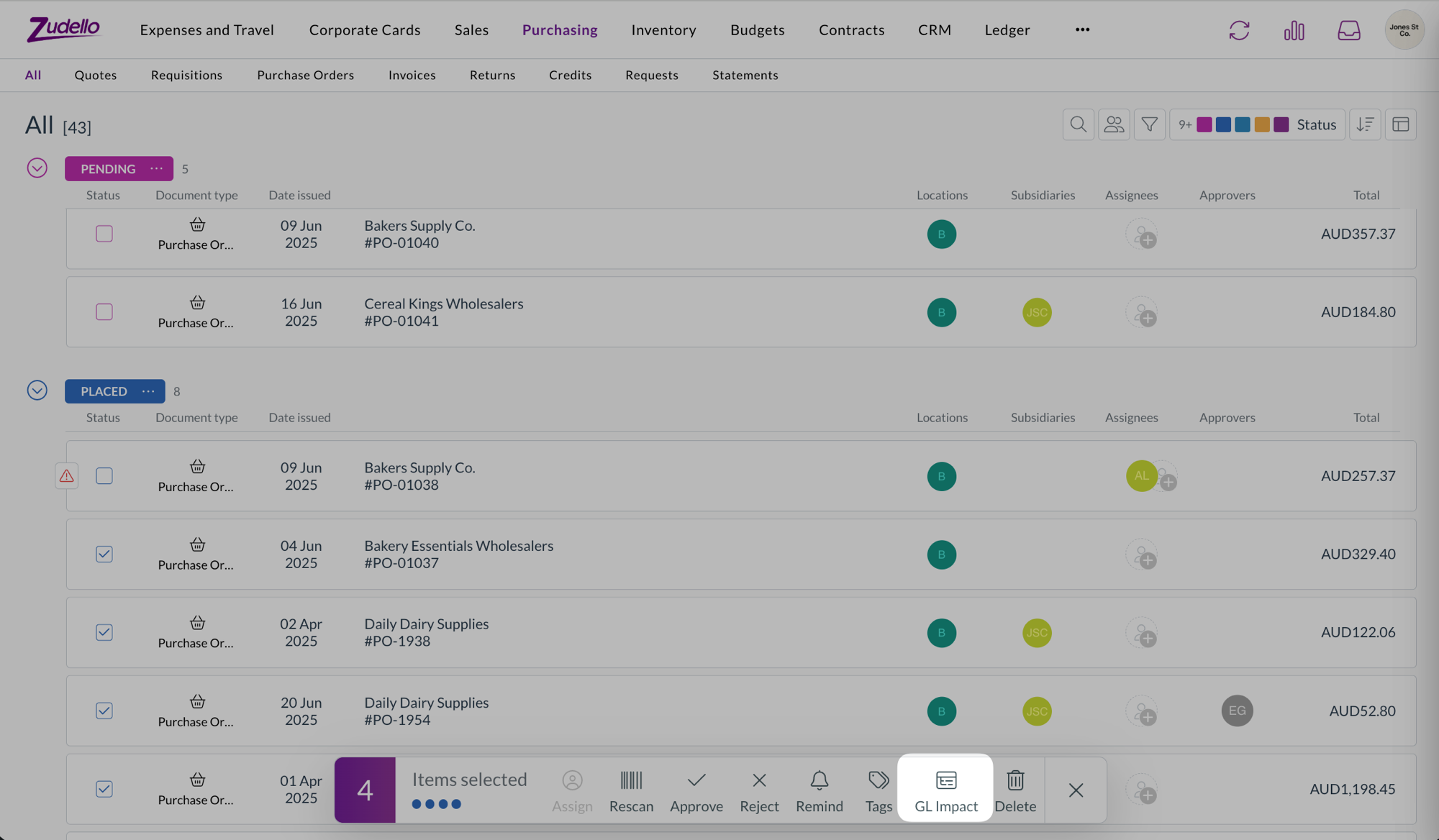
Release notes edition 3.6.6

Release date: 10 September 2025
Version: v3

Here's the latest summary of what's new and improved in Zudello, as well as what we resolved in the latest release.

In this release:​

  • Improved approval navigation and processing
  • Performance enhancements for document extraction
  • New escalation options for approval workflows
  • Document Studio improvements and more

Looking for something? Browse by tag to find release notes on a specific feature.

New and improved​

Requests submodule navigation​

The Requests submodule allows you to quickly view and action all of your outstanding approvals in one place. We've improved the navigation experience when moving between documents to help you process approvals more efficiently.

Previously when navigating through approval requests in the Requests submodule, the navigation buttons would disappear when documents were refreshed after approval, making it difficult to move to the next pending approval.

The system now maintains your position in the queue even after documents are approved and moved to the next processing stage. This allows you to seamlessly move from one approval to the next, without needing to click out of each document and into the next.

Approve GIF

Performance improvements​

We've made significant performance enhancements to improve processing speed and reliability of our document extraction, particularly during high-volume periods.

The system now uses smarter queue management to better handle large document uploads, and ensure fair processing for all teams. This means faster average document processing times and more consistent performance.

Enhanced tax number matching​

Supplier matching automatically links documents to the correct suppliers in your system, and is often driven by the extracted tax number on a document. We've improved how the system matches tax identification numbers such as ABNs to provide more accurate supplier recognition.

The system now correctly handles tax numbers that include dashes. This improvement ensures more reliable supplier matching, regardless of how the numbers are formatted on your documents.

New approval escalation options​

Approval workflows use automated escalations to ensure documents are processed within appropriate timeframes. We've introduced a new escalation method that provides more flexibility in who approvals are escalated to.

Next milestone escalation​

Instead of escalating only to direct managers, approvals can now be configured to escalate through your delegation of authority (DOA) structure.

  • Automatic progression
    • When an approval times out, it automatically moves to the next appropriate approval milestone based on your configured approval limits
  • Fallback protection
    • Configure fallback approvers to ensure approvals don't get stuck if they reach the end of the approval chain
  • Streamlined setup
    • Reduces the need to maintain direct manager relationships in user records if you are already maintaining an approval DOA

How it works​

When an approval exceeds its time limit, the system evaluates your delegation of authority rules and creates the next required approval milestone. The original approver's response is marked as escalated, and the next level approvers receive urgent approval notifications.

If approvals reach the end of the approval chain, they escalate to your configured fallback approvers, who can force approve to ensure processing continues.

This enhancement is particularly useful for organisations with complex approval hierarchies or those who prefer approvals to follow spending authority limits rather than management reporting lines.

Enabling next milestone escalation​

Next milestone escalation is currently only available for selected teams. To discuss enabling this feature for your team, reach out to support@zudello.com.

Document Studio improvements​

Document Studio empowers you to customise how Zudello extracts data from your documents, ensuring maximum accuracy for your specific document types and formats.

We've resolved issues with system prompt availability and improved custom prompt functionality, including better handling of tax extraction when no tax is found in documents.

Document Studio is currently only available for selected teams. To discuss enabling Document Studio for your team, reach out to support@zudello.com.

Resolutions​

We're constantly working to refine Zudello functionality and ensure that we address any issues as soon as possible. As part of this release, we've made the following resolutions and improvements:

  • We've resolved an approval issue where wildcard (empty) cells in delegation of authority (DOA) configurations weren't being applied correctly for header dimensions, such as suppliers.

Have an idea?​

Do you have an idea for a new feature or how we can improve our current features? Let us know at support@zudello.com.

Your ideas and feedback are an important part of our product planning process to make Zudello better for everyone.
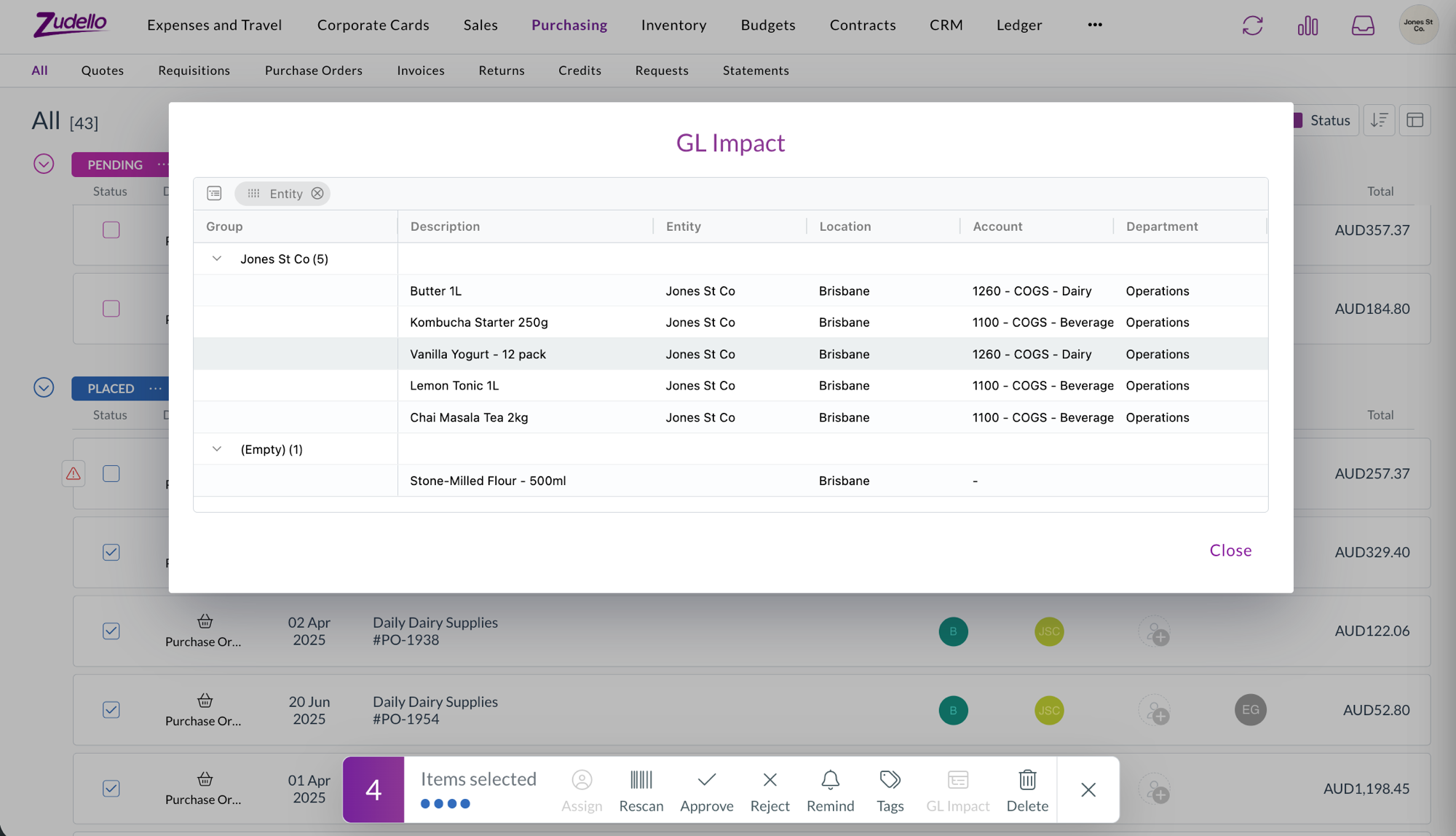
Release notes edition 3.6.4

Release date: 27 August 2025
Version: v3

Here's the latest summary of what's new and improved in Zudello, as well as what we resolved in the latest release.

In this release:​

  • Bulk tagging capabilities
  • Importing field enhancements
  • Search result improvements and more

Looking for something? Browse by tag to find release notes on a specific feature.

New and improved​

Enhanced bulk processing capabilities​

Bulk actions help you efficiently manage multiple documents or records at once, saving time when working with large volumes of data. We've expanded our bulk processing functionality to give you more flexibility in document management.

Bulk tagging for all records​

You can now add or remove tags from multiple records simultaneously using our new bulk tagging feature.

  • Universal availability: Works across all document types and statuses, making it simple to categorise transactions regardless of where they are in your workflow
  • No additional permissions required: If you can view the record, you can apply bulk tagging actions
  • Flexible tag management: Choose to either add specific tags to selected items or remove existing tags as needed

  • Status-independent operation: Unlike other bulk actions, tagging is available on records in read-only status types such as Completed

This enhancement is particularly useful for teams who need to categorise large volumes of transactions.

Importing improvements​

Document importing helps you efficiently upload large volumes of data into Zudello using CSV files and structured formats. We've continued enhancing our importing capabilities with additional field support and ongoing reliability improvements.

Expanded field support​

We've added support for the Interval count field when importing budgets, providing more comprehensive budget management capabilities when bulk importing data.

Ongoing system refinements​

We continue testing and refining the importing system to identify and resolve any remaining issues, ensuring reliable data uploads for all supported formats and field types.

Resolutions​

We're constantly working to refine Zudello functionality and ensure that we address any issues as soon as possible. As part of this release, we've made the following resolutions and improvements:

  • We've resolved an issue where item searches returned duplicate results when the same SKU appeared in both the primary and alternative SKU fields
  • We've fixed an issue where delegation of authority (DOA) approvals could get stuck in Unable to Process status due to allocation-related automation errors
  • We've improved how the system handles approval processes during temporary database connection issues, with additional stability improvements planned for future releases

Have an idea?​

Do you have an idea for a new feature or how we can improve our current features? Let us know at support@zudello.com.

Your ideas and feedback are an important part of our product planning process to make Zudello better for everyone.
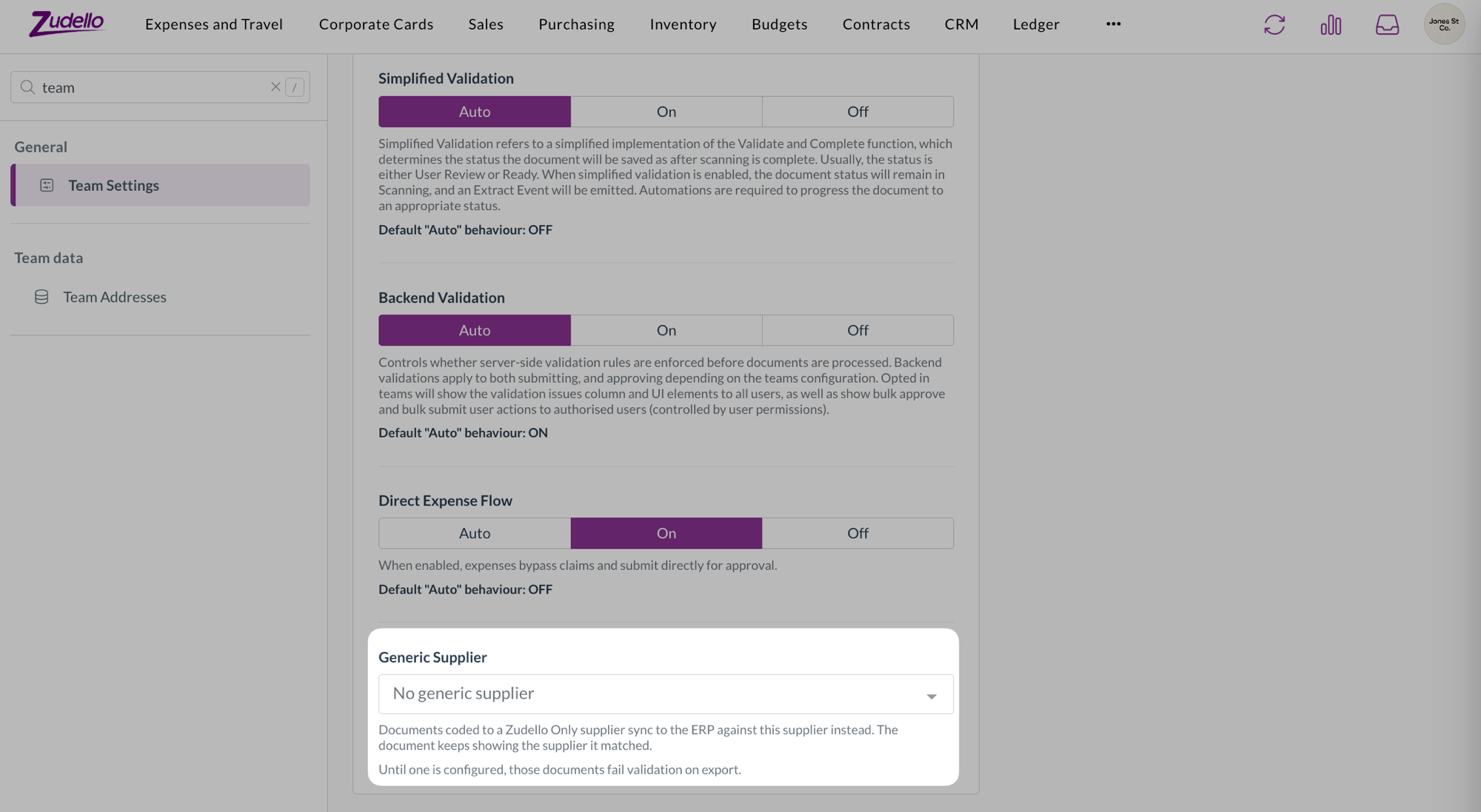
Release notes edition 3.6.3

Release date: 20 August 2025
Version: v3

Here's the latest summary of what's new and improved in Zudello, as well as what we resolved in the latest release.

In this release:​

  • Email matching for user assignment
  • Smarter document defaults
  • Next generation expenses
  • Bulk action refinements and more

Looking for something? Browse by tag to find release notes on a specific feature.

New and improved​

Enhanced automation capabilities​

Zudello's automations help streamline your document processing by automatically applying business rules and workflows. We've introduced powerful new automation features to reduce manual work and improve accuracy.

Find and assign users automatically​

We've launched a new automation action that automatically finds and assigns users based on email addresses in your documents:

  • Automatic user matching

    • The system can now find users by email address from fields like the sender (From email) field
    • Automatically adds matched users as assignees on documents
  • Smart error handling

    • The automation continues smoothly even if no email is present or no matching user is found, preventing unnecessary workflow disruptions

This enhancement is particularly useful for automatically routing documents to the right team members based on who sent them.

Enhanced approval workflows​

Zudello's approval system ensures documents are reviewed by the right people at the right time.

When a document is rejected, the rejection reason is now automatically posted to the document's chat.

This provides better visibility when approvals are restarted after resubmission, and ensures integrity and accuracy of approval audit trails.

Document type configuration enhancements​

Document types help you customise forms and workflows for different kinds of transactions. We've improved how the system handles default document type to reduce the need for manual adjustments.

Smarter default application during enrichment​

Document enrichment automatically applies coding rules and defaults to reduce manual data entry. We've enhanced when and how document type defaults are applied:

  • Automatic default application

    • Document type defaults are now applied during the enrichment process. This occurs in the background before you open a document.
    • This removes the case where validation errors appear in the submodule view, but disappear when you open the document.
  • Enrichment order of operations

    1. Keyword coding rules
    2. Supplier/customer/item matching
    3. Allocations auto-filling
    4. Apply coding defaults (employee, user, inbox, subsidiary, location, item, supplier/customer)
    5. Document type defaults
  • Smart field population

    • The enrichment process runs in the order above, but only fills empty fields (unless force overwrite is enabled).
    • This leaves any previously set values from other rules unchanged, ensuring general defaults like document defaults don't overwrite more specific defaults like item default coding.

For more information on automated coding rules, see Keyword coding rules, Supplier default coding, and Item default coding.

Improved document conversion handling​

Document conversion helps transform one document type into another, such as converting quotes to purchase orders. We've refined how the system handles automation events during conversion to prevent conflicts.

Streamlined event handling​

The system now raises appropriate events based on document origin:

  • System created documents

    • Only raises a Converted event when converted
  • Uploaded or emailed documents

    • Only raises an Extract event when converted

This prevents conflicting automations from trying to update the same record simultaneously, eliminating deadlock issues.

Export template enhancements​

Export templates help you extract data from Zudello for reporting, analysis, or integration with other systems. We've added new fields to provide better document tracking and reference capabilities.

URL fields​

You can now include Zudello document URLs in your exports:

  • Short URL: Direct link to the record within Zudello
  • External URL: Reference link to related records in your ERP (only when populated by integrations)

This makes it simple and easy to reference specific Zudello transactions from exported spreadsheets or reports.

Extracted SKU field​

We've added the extracted SKU field to transaction exports:

  • Available in purchasing, sales, and receipt exports
  • Shows the original SKU as extracted from documents

Note: This field is only populated for transactions processed after the date of this release.

Email processing improvements​

Email processing helps automatically capture and process documents sent to your Zudello inboxes. We've enhanced duplicate handling and added new reprocessing capabilities.

Enhanced duplicate detection​

The system now provides more transparency when emails are blocked due to duplicates:

  • Links to the existing document that triggered the duplicate check
  • Connects the email to the existing document for easy review

  • Adds quick filters and labels in the inbox for finding duplicates

Reprocess action​

You can now reprocess emails without requiring them to be resent:

  • Available when the original document has been deleted
  • Automatically creates new transactions and sends them for extraction
  • Eliminates the need to ask senders to resend documents

This is particularly useful when documents need to be processed by different team members or when the original sender isn't the authorised approver.

Required permissions​

To reprocess documents you need the following permissions:

  • Reprocess permission for the relevant module
  • E.g. Purchasing Reprocess

Expenses improvements​

We're making significant investments in improving the expense management experience:

Streamlined claim validation​

Claims now validate all linked expenses automatically when submitted:

  • View validation issues for all expenses directly from the claim
  • No need to open individual expenses to check for problems
  • Configurable validation rules including:
  • Matching employee records across claim and expenses
  • Consistent expense types (e.g. card spend vs personal spend)

Simplified expense editing​

We've removed unnecessary complexity from the expense editing process:

  • For claims in Approval status, the editability of all linked expenses is now derived from the claim milestone settings
  • This is combined with unlock permissions for better control
  • Eliminates the need to reopen both expenses and claims to make edits

Automatic status synchronisation​

Expense statuses now automatically update to match their linked claims:

  • Expenses follow claims through approval statuses
  • Automatic status updates for completed or rejected claims
  • Unlinking expenses from claims automatically reopens them for further editing

Improved user experience​

Several enhancements to reduce clicks and improve workflow:

  • Optional confirmation prompts for dimension summary updates
  • Simplified reject function without email requirements
  • Better handling of expenses without policy issues

These improvements are currently in alpha testing and are available only for selected teams. To discuss enabling these features for your team, reach out to support@zudello.com.

Bulk processing enhancements​

Bulk actions help you efficiently process multiple documents at once. We've improved the user experience for bulk approvals and submissions. Users can now easily deselect specific records after making their initial bulk selection, providing more precise control over which documents are processed.

This removes the need to exit the bulk submit or bulk approval modal and reselect the records for submission.

Resolutions​

We're constantly working to refine Zudello functionality and ensure that we address any issues as soon as possible. As part of this release, we've made the following resolutions and improvements:

  • Enhanced security by automatically rejecting emails with malicious file attachments and posting notifications to the email thread
  • Resolved an issue where supplier email validation was incorrectly blocking document submission even when email validation wasn't enabled
  • Fixed circular delegation loops that could cause authentication and team data errors
  • Improved persistence of default status settings for create and revert actions
  • Enhanced synchronisation between landed cost tables and item tables, preserving custom fields while updating matching fields
  • Various performance improvements to backend processing

Have an idea?​

Do you have an idea for a new feature or how we can improve our current features? Let us know at support@zudello.com.

Your ideas and feedback are an important part of our product planning process to make Zudello better for everyone.
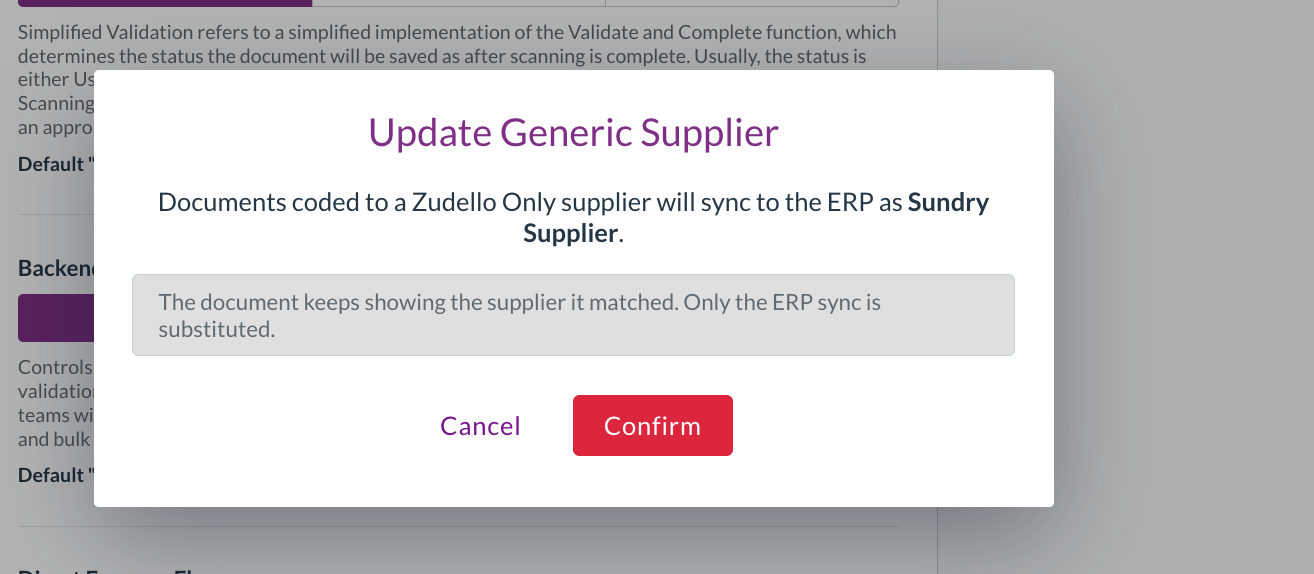
Release notes edition 3.6.2

Release date: 7 August 2025
Version: v3

Here's the latest summary of what's new and improved in Zudello, as well as what we resolved in the latest release.

Looking for something? Browse by tag to find release notes on a specific feature.

New and improved​

Enhanced delegation of authority (DOA) dataset handling​

Delegation of authority (DOA) datasets drive your approval workflows by determining who needs to approve transactions. We've improved how the system handles situations where approval automations don't find any matching dataset rows for a given transaction.

Skip line if no match handling​

We've adjusted the exception handling behaviour for DOAs set to Skip line if no match:

  • If the system can find a match for at least one row of the transaction, it's considered successful
  • If no applicable rows are found in the dataset, the document moves to Unable to Process status with an explanatory notice

Exception handling for DOAs set to Skip sentence if no match or Fail if no match remains unchanged.

Improved handling of misconfigured dataset rows​

We've also improved our handling of dataset rows with empty limit or user fields:

  • Empty dataset rows are automatically ignored instead of causing system errors
  • This prevents common configuration mistakes from disrupting your approval workflows

Enhanced document coding capabilities​

Document coding helps you automatically populate transaction fields based on extracted document information, reducing manual data entry and ensuring consistent coding. We've significantly expanded document coding capabilities to give you more automation options.

Document type automation based on keywords​

You can now automatically set document types (forms) based on keywords found in your documents:

  • Keyword-based document type assignment
    • Configure rules that automatically assign the correct document type when specific keywords are detected
    • Combine with module and submodule context for more precise automation
    • Opens up new customer-facing automation possibilities you can configure yourself

Custom field support​

Document coding now supports custom fields as both trigger and target fields:

  • Custom field triggers
    • Use custom fields as the source field to search for keywords
  • Custom field targets
    • Automatically populate custom fields based on detected keywords
  • Enhanced workflow integration
    • Works with Document Studio to create custom questions that can be used in coding rules
    • Enables more sophisticated document type assignment beyond a single default document type per supplier
    • Reduces manual data entry during document review
Important note

Select and multi-select custom fields are not currently supported for document coding rules.

Improved contact matching and enrichment​

Document enrichment helps ensure consistent supplier and customer information across your transactions. We've enhanced the contact matching process to provide more accurate and complete document information.

When the Force overwrite setting is enabled for supplier/customer information, the system now automatically updates document details to match the details on record for the linked supplier or customer:

  • Enhanced field overwriting

    • Company name, tax number, email, and phone details are automatically populated from supplier/customer records
    • This helps correct extraction inconsistencies such as slightly incorrect ABN numbers or company names affected by logo interference
    • Only overwrites when supplier/customer records contain information
  • Protected fields

    • Company reference and bank account details remain unchanged to preserve document-specific information
    • Ensures critical payment information isn't inadvertently modified

This enhancement ensures your transaction records maintain accurate supplier and customer information, without any additional manual review.

Importing improvements​

Document importing helps you efficiently upload large volumes of data into Zudello using CSV files and other structured formats. We've continued enhancing our importing capabilities with new features and better reliability.

Placed By user support​

You can now import and set the Placed By user field for transactions like purchase orders. This is particularly useful for migrating purchase orders, when you need to maintain accurate procurement owner records.

You can import the Placed by user by creating a column with their email addresses in your import file. During import, Zudello will search for a user with the same email address, and apply it.

Intelligent default application​

The system now automatically applies configured defaults when document types or statuses aren't provided. When you don't specify document types or statuses in your import files, and haven't made bulk selections or mapped these fields, Zudello will automatically apply your configured defaults. This smart handling only applies defaults to new transactions and won't overwrite existing values.

Streamlined bulk status updates​

For CSV-based workflows, we've introduced a quick process for bulk transaction status updates:

  1. Create export templates that include only transaction UUIDs
  2. After processing transactions in your external accounting system, export the UUID list
  3. Upload this file via the Imports tab in Zudello, and select your desired status
  4. Map the UUID column in your CSV to the UUID field in Zudello if it is not automatically recognised
  5. Zudello will bulk update all the transactions

For more help with importing, see our how-to guide on Importing

Enhanced bulk transaction imports​

We've improved bulk transaction imports with flexible column ordering. You can now mix transaction header and line columns in any order within your import files, rather than being required to group all header columns before line columns. This provides more flexibility in how you structure your import files.

Enhanced validation capabilities​

Data validation helps ensure information is accurate and complete before documents are processed. We've significantly expanded our validation system to provide better data quality controls across more scenarios.

Custom field validation support​

Validation now works with both custom header and custom line fields. You can apply validation rules to all custom field types including text, number, and select fields. These validations work across both document headers and transaction lines, ensuring data completeness for your specific business requirements.

Required if validation enhancements​

We've expanded conditional validation capabilities with Required if conditional logic. You can now mark fields as required only when specific conditions are met.

The system also considers Visible if rules and automatically suppresses required validations when fields aren't visible to users. This provides flexible validation that adapts to your document workflows.

Approval validation enforcement​

Validation errors are now fully enforced during approval processes. When validation errors exist, the system will:

  • Block both standard approve and force approve actions
  • Prevent approval actions from external sources such as email approval links
  • Stop automated approval actions like "Apply previous response" or "Auto approve submitter"

New expense-focused validations​

We've introduced specialised validation options for expense management. These ensure all expenses on a claim have passed their individual validations, verify that card spend expenses are properly reconciled to payments, and confirm all expenses on a claim have consistent employee and expense type information.

Enhanced email validation​

Email validation has been refined for better usability. The system now only validates fields that actually contain values, so empty email fields aren't flagged as invalid. You can combine email validation with "Required" validations if you need both valid and mandatory email addresses.

Email validation now also works on non-transaction resources such as supplier email fields.

For more information on using and understanding validations, see our guide on Document validations

Have an idea?​

Do you have an idea for a new feature or how we can improve our current features? Let us know at support@zudello.com.

Your ideas and feedback are an important part of our product planning process to make Zudello better for everyone.
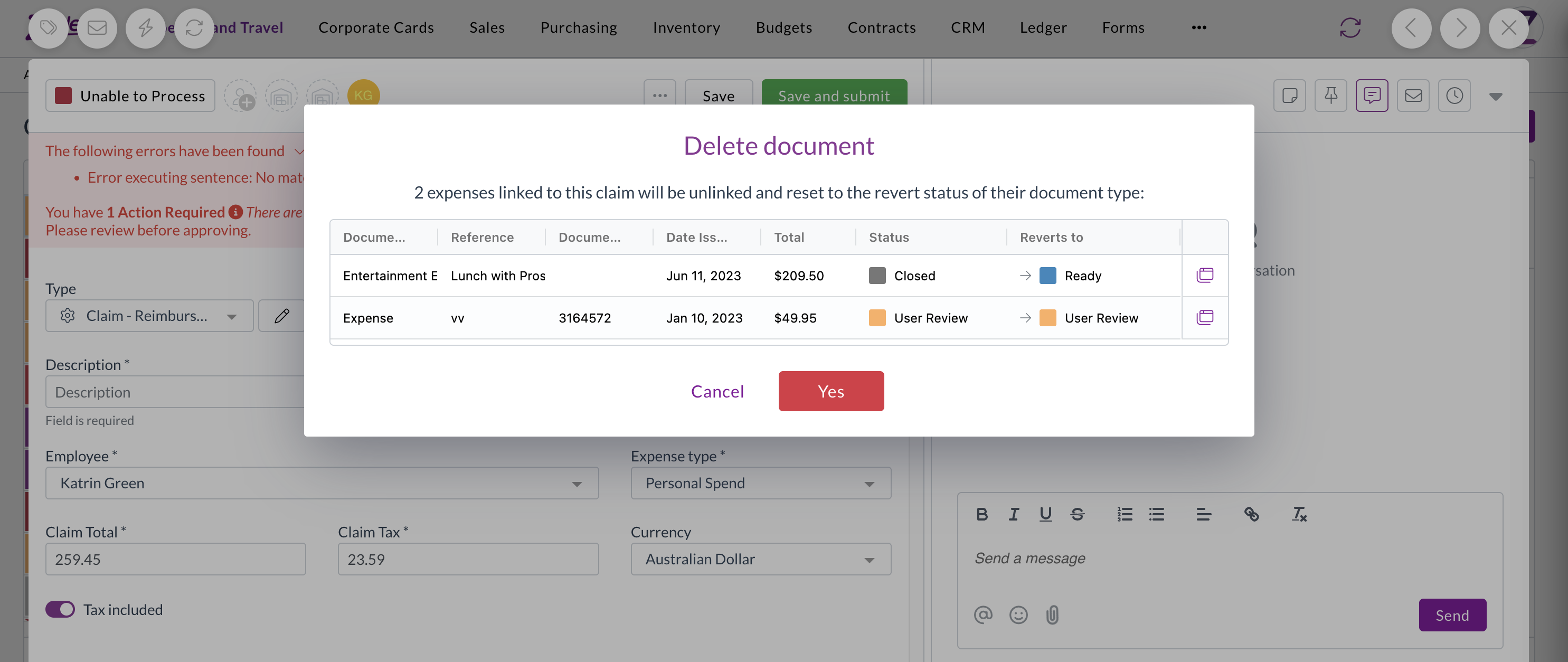
Release notes edition 3.6.1

Release date: 29 July 2025
Version: v3

Here's the latest summary of what's new and improved in Zudello, as well as what we resolved in the latest release.

Looking for something? Browse by tag to find release notes on a specific feature.

New and improved​

Enhanced automation capabilities​

Zudello's automations help you reduce manual data entry by automatically setting field values based on your business rules. We've expanded automation capabilities to support custom fields, giving you more flexibility in your document processing workflows.

Custom field automation support​

You can now create automation rules that set values for basic custom fields across both document headers and transaction lines. This includes the following field types:

  • Text fields
    • Automatically populate text-based custom fields
  • Number fields
    • Set numeric custom field values
  • Date fields
    • Apply date values to custom date fields
  • Checkbox fields
    • Control boolean custom field settings

Module-specific document coding​

Document coding helps automatically populate transaction fields based on extracted document information. We've enhanced document coding to support module-specific rules, allowing you to apply different coding logic across your various business processes.

You can now configure document coding rules to apply only to specific modules and submodules:

  • Context-specific rules
    • Set rules that only apply in specific areas like Expenses or Purchasing
  • Flexible configuration
    • Choose which modules and submodules each rule should affect

  • Backwards compatibility
    • Rules without module context will continue to apply across all modules as before

This enhancement allows you to create more precise coding rules that match your specific business workflows for different document types.

Enhanced document viewing options​

Document viewing helps you review and work with your uploaded documents efficiently. We've restored and improved document viewing options to give you better access to different document formats and information.

Expanded viewing capabilities​

All users now have access to multiple document viewing options through an enhanced viewing menu:

  • Original view
    • Shows documents converted to images for faster loading
  • OCR Text view
    • Displays the text that Zudello extracted from your document, helping you understand what information the AI processing identified
  • Uploaded Document view
    • Provides access to the original PDF format for easy text copying, annotation, rotation, downloading, and printing

Improved menu design​

With the addition of this new menu, the document viewer will now have two menus:

  • Three-dot menu (...)

    • Gives you access to various actions you can take on documents
  • Chevron menu (arrow down)

    • Gives you access to different ways of viewing the same document

Unlock permission for approvals​

Approval workflows ensure documents are reviewed and approved by the right people at the right time. We've introduced new permission controls to give you finer control over who can edit documents during the approval process.

We've added a new permission system that requires users to explicitly unlock documents before editing them during approvals:

  • Enhanced security
    • Prevents accidental edits by requiring an intentional unlock action
  • Granular control
    • Administrators can control which users have unlock permissions separate from general editing permissions
  • Performance improvement
    • Reduces system load by minimising unnecessary update calls during the approval process

Seamless transition​

To ensure continuity, we've automatically granted unlock permissions to all users who currently have update permissions. Administrators can adjust these permissions as needed for their specific workflow requirements.

Improved approval visibility​

We've enhanced how approval information is displayed to make it easier to track approval status without additional user interactions.

  • Always-visible responses
    • Approval responses are now permanently displayed on screen instead of requiring hover actions
  • Streamlined interface
    • The Others section remains collapsed by default for a cleaner view while keeping essential information visible

Enhanced rejection workflow​

Document rejection helps you return documents to suppliers or submitters when issues need to be resolved. We've improved the rejection feature to make the process more intuitive and automatic.

Intelligent email handling​

The system now automatically determines the appropriate recipient for rejection emails:

  • Primary contact
    • Uses supplier or customer email addresses from the document when available
  • Fallback lookup
    • Searches linked supplier or customer records for email addresses if document fields are empty
  • Module-aware display
    • Shows Supplier or Customer labels based on the module you're working in

Configuration improvements​

We've made several enhancements to system configuration options to improve usability and reduce setup complexity.

Enhanced default document types​

Setting up default document types against suppliers and customer is now more intuitive with dropdown menus for:

  • Module selection: Choose the appropriate module from a dropdown
  • Submodule selection: Select the relevant submodule
  • Document type selection: Pick the specific document type

Inbox management improvements​

For organisations with multiple inboxes, we've added features to help you find and manage inboxes more efficiently:

  • Search functionality: Quickly find specific inboxes by name
  • Alphabetical sorting: Inboxes are now sorted alphabetically for easier browsing
  • Quick access: The first five search results are pinned for convenient access

Better team management​

We've improved how the system handles default team settings to reduce confusion and prevent accidental changes:

  • Smart team loading
    • The system now prioritises your default team when displaying settings
  • Production team priority
    • If no default is set, production teams are shown before sandbox environments
  • Visual indicators
    • Team type icons help you identify when you're viewing sandbox team settings

Card reconciliation enhancements (limited customers only)​

Card reconciliation helps you match credit card transactions with expense records for accurate financial reporting and expense management. We've expanded the reference field display to make it easier to identify and match payments.

Card reconciliation is currently only available for a selected number of teams. Reach out to support@zudello.com to discuss enabling this feature for your team.

Document Studio improvements​

Document Studio empowers you to customise how Zudello extracts data from your documents, ensuring maximum accuracy for your specific document types and formats. We've enhanced extraction capabilities to capture more supplier and contact information.

Enhanced contact extraction​

We have made improvements to how Document Studio extracts and populates supplier, merchant, and contact name information, providing more complete data capture from your documents.

Document Studio is currently only available for a selected number of teams. Reach out to support@zudello.com to discuss enabling Document Studio for your team.

Resolutions​

We're constantly working to refine Zudello functionality and ensure that we address any issues as soon as possible. As part of this release, we've made the following resolutions and improvements:

  • We've resolved an issue where hover messages showed incorrect submodule information when opening transactions from related documents (for example, opening a receipt from a purchase order now correctly shows "receipt" in the hover message)
  • We've fixed an issue where expenses on claims were incorrectly numbered in some cases

Have an idea?​

Do you have an idea for a new feature or how we can improve our current features? Let us know at support@zudello.com.

Your ideas and feedback are an important part of our product planning process to make Zudello better for everyone.
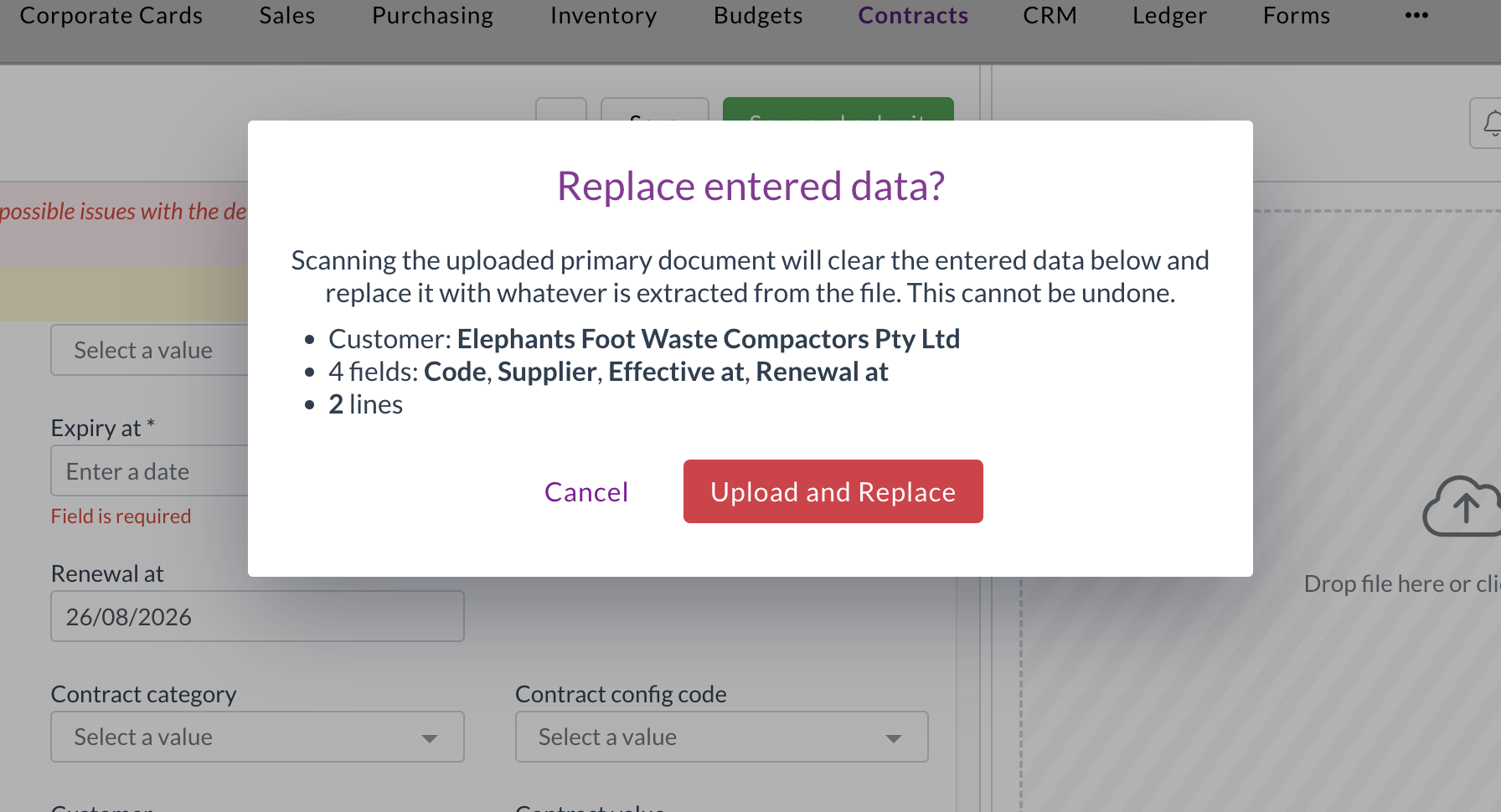
Release notes edition 3.6.0

Release date: 16 July 2025
Version: v3

Here's the latest summary of what's new and improved in Zudello, as well as what we resolved in the latest release.

Looking for something? Browse by tag to find release notes on a specific feature.

New and improved​

Enhanced document status controls​

Document status management helps control what actions are available based on where documents are in your workflow. We've improved status controls to prevent inappropriate actions on documents that have been completed or closed.

We've removed the following actions from documents in Rejected, Deleted, or Closed type statuses:

  • Create a goods receipt
  • Change team
  • Archive
  • Mark as complete without processing

These actions will no longer be available for the following statuses:

  • Rejected Type
    • Rejected
    • Duplicate
  • Deleted Type
    • Deleted
  • Closed Type
    • Closed
    • Archived

This enhancement ensures that completed or rejected documents maintain their final status and prevents accidental processing of documents that have already been finalised.

Importing improvements​

Document importing helps you efficiently upload large volumes of data into Zudello using CSV files and other structured formats. We've continued enhancing our importing capabilities to make the process more reliable and flexible.

SKU-based item updating​

You can now update item records using SKU as the primary identifier when importing. The importing tool will:

  • Update existing items when it finds a matching SKU
  • Create new items when no matching SKU is found
  • Fail the import if multiple items share the same SKU (to maintain data integrity)

If your team intentinally uses duplicate SKUs, you'll need to use the UUID or External ID field for updating records.

Intelligent field mapping​

We've added automatic field mapping suggestions based on your upload file column names:

  • Exact matches: "supplier_code" or "Supplier Code" maps to the supplier_code field
  • Close matches: "lines_sku" or "Lines Sku" maps to the lines_sku field
  • The system performs basic matching but won't make assumptions for partial matches

Other changes​

  • Import tracking: The system now displays which user created each import for better audit tracking
  • UTF-8 encoding: CSV files must be saved in UTF-8 format (Windows-1252 encoding is no longer supported)

Approval and notification improvements​

Approval workflows ensure documents are reviewed and approved by the right people at the right time. We've enhanced our approval system with new bulk reminder capabilities and improved notification content.

Bulk approval reminders​

Users with the appropriate permissions can now send reminder notifications to multiple approvers simultaneously:

Users can navigate to the relevant submodule and select the approvals they want to send reminders for. They can then click the Send Reminder button, and use the bulk actions modal to send reminders.

Reminders can run in the background, allowing users to close the bulk actions modal and continue with other tasks. For more information see Approval reminders.

Enhanced approval notifications​

We've improved the information displayed in approval notification emails:

The following dimension information is now included for relevant documents:

  • Project task
  • Unit of measure
  • Payment method
  • Mileage rate
  • Expense category
  • Currency

We have also made the following formatting improvements for better readbility:

  • Dimensions are sorted alphabetically
  • Large amounts now display with thousand separators

Enhanced email processing​

Email processing helps automatically capture and process documents sent to your Zudello inboxes. We've made it easier to identify email sources and destinations for automation and document coding purposes.

When documents are received via email, Zudello now automatically sets the following new fields on the transaction:

  • From address (Sender): The email address that sent the document
  • Original recipient (Inbox): The Zudello inbox email address that received the document

These new fields open up a number of automation possibilities, including:

  • Automatically coding documents to specific dimensions based on sender or inbox
  • Assigning documents to specific users based on which inbox received them
  • Setting up conditional workflows based on email source
Important note

Important note:** If users have auto-forwarding configured, the sender will show as the forwarding email address, not the original sender.

Quick Actions improvements​

Quick Actions help you perform common tasks efficiently across different areas of Zudello. We've added more control over where Quick Actions appear within your system.

You can now control which modules and submodules display specific Quick Actions by adding context settings (similar to automation actions or field manager settings):

  • No context: Quick Action appears everywhere (existing behaviour)
  • With context: Quick Action only appears in specified module/submodule combinations

This enhancement allows you to create more targeted Quick Actions that appear only where they're most relevant.

Automation improvements​

Automation helps streamline your document processing by automatically applying business rules and workflows. We've enhanced error handling to make issues more visible and easier to resolve.

Improved error processing​

When automations encounter errors, the system now provides better visibility and handling:

  • Enhanced error detection:

    • Errors that occur during database operations (not just action failures) now properly update document status
    • Documents with automation errors are moved to "Unable to Process" status
    • Error messages are displayed in the header banner for immediate visibility
  • Resolved error scenarios:

    • Fixed issues with consolidate actions when lines are linked to allocations and budgets
    • Resolved problems with incorrect payload construction
    • Improved handling when values like suppliers are unintentionally cleared
  • Better logging:

    • Expanded logging capabilities for easier troubleshooting and investigation
    • Improved traceability for automation-related issues

Enhanced duplicate document handling​

Duplicate document detection helps prevent processing the same document multiple times and avoids potential double payments. We've improved how the system handles duplicates to provide more flexibility in document management.

Smart duplicate checking​

The system uses SHA (Secure Hash Algorithm) codes to create unique fingerprints for each file. Previously, when a potential duplicate was detected, the system would block all duplicate uploads, requiring permanent deletion of the existing document.

The system now checks the duplicate transaction's status:

  • If the existing document status is Deleted, the new upload is accepted
  • This allows you to replace deleted documents while maintaining duplicate protection for active documents

For more information about managing duplicates, see our guide on Duplicate documents in Zudello.

Statement improvements​

During statement reconciliation, the auto-matching feature now ignores transactions in Deleted status, ensuring only active invoices and credit notes are considered for matching.

Resolutions​

We're constantly working to refine Zudello functionality and ensure that we address any issues as soon as possible. As part of this release, we've made the following resolutions and improvements:

  • Resolved an issue where staff user names weren't always properly anonymised in budget submissions and resource comments
  • Re-enabled the ability to use the @ symbol when adding users via the chat modal, with improved user selection using Enter or Tab keys
  • Fixed an issue where the Dimension Summary section remained editable on read-only approval documents
  • Resolved a permission error with the Place Order action when users lacked purchase order update permissions
  • Fixed an issue where Payment Method was incorrectly prefilled into transaction lines instead of headers when configured as a supplier default
  • Improved handling of Excel files that cannot be converted to PDF, preventing ingestion crashes
  • Enhanced error handling to properly mark unprocessable documents as UNSUPPORTED or prevent transaction creation for problematic email uploads

Have an idea?​

Do you have an idea for a new feature or how we can improve our current features? Let us know at support@zudello.com.

Your ideas and feedback are an important part of our product planning process to make Zudello better for everyone.
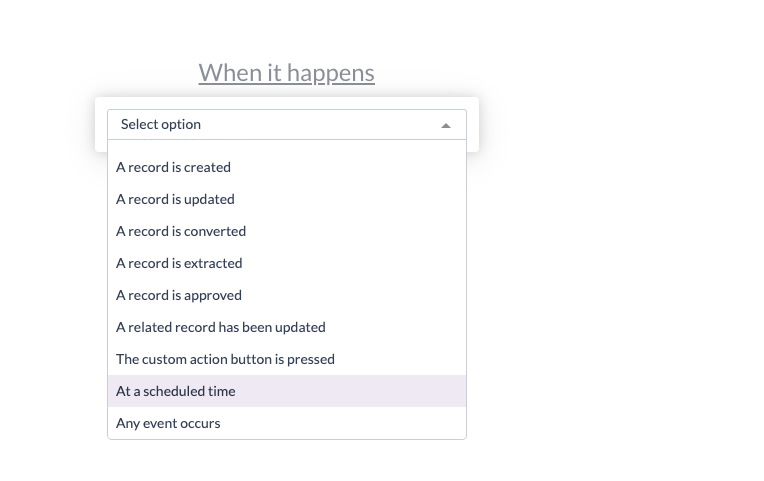
Release notes edition 3.5.8

Release date: 2 July 2025
Version: v3

Here's the latest summary of what's new and improved in Zudello, as well as what we resolved in the latest release.

Looking for something? Browse by tag to find release notes on a specific feature.

New and improved​

Enhanced item alternatives management​

Item alternatives let Zudello automatically recognise different codes that suppliers and customers use for the same products, reducing manual data entry and improving processing accuracy. We've made significant improvements to how the system searches for and manages existing item alternatives.

We've enhanced the search functionality when assessing potential new item alternatives, particularly when an item has existing alternatives linked to other suppliers or customers. This improvement ensures more accurate matching and reduces duplicate alternative creation, making your item management more efficient and reliable.

Importing improvements​

Document importing helps you efficiently upload large volumes of data into Zudello using CSV files and other formats. We've continued enhancing our importing capabilities with several key improvements to make the process more reliable and user-friendly.

Enhanced importing reliability​

We've upgraded our importing tool to use new backend technology, resolving several issues with the previous system:

  • Improved document type handling: The system now correctly sets document types during import, eliminating previous inconsistencies
  • Better error handling: Resolved issues where imports would stall without providing error messages to users
  • Enhanced UUID validation: Improved handling of invalid UUID entries during import

Code-based resource updates​

Previously, to update records you needed to provide the UUID or external ID of each record. We've now added the ability to import and update resources using the code field for matching, making it easier for end users to manage existing data via imports.

warning

Since codes aren't enforced as unique, imports will fail if multiple records share the same code. This helps maintain data integrity within your team.

Enhanced filtering capabilities​

Filtering helps you quickly locate specific transactions and documents within your system. We've expanded filtering options and improved the user experience for finding the information you need.

Improved quick filters and better display​

Quick filters are always visible when you open the filtering tab, and allow you to quickly drill down to the documents you need.

We've also improved the display of very long filter names, particularly for approval-related filters.

New allocation filters​

We've added allocation-related fields to the filtering options, making it easier to track transaction matching status:

  • Allocation statuses: Filter by current allocation status
  • Variance amounts and percentages: Find transactions with specific variance levels
  • Remaining amounts and percentages: Identify partially allocated transactions
  • Discrepancy amounts and percentages: Locate transactions with matching discrepancies

Enhanced approval filters​

We've expanded approval filtering capabilities to help you manage workflow status more effectively:

  • Filter by specific milestone names or statuses
  • Filter by step names or statuses
  • Filter by associated approvers
  • Filter by approval responses or reasons

Available approval statuses and responses:

  • PENDING (response and status)
  • ESCALATED (response and status)
  • DELEGATED (response only)
  • FORCED (response only)
  • CHANGED (response only)
  • APPROVED (response and status)
  • REJECTED (response and status)

Approval and notification improvements​

Approval workflows ensure documents are reviewed and approved by the right people at the right time. We've made several enhancements to improve the approval experience and ensure proper workflow management.

Automatic approval cleanup​

We've improved how the system handles archived or completed documents with open approvals:

  • Automatic clearing
    • When documents change from "Approve" status to any other status type (such as Archive or Mark as Completed), the system automatically clears any open approvals
  • Improved reporting accuracy
    • This ensures approval reporting correctly reflects actual outstanding approval actions
  • Reduced unnecessary notifications
    • Prevents escalation and reminder notifications for archived or completed documents

Open approvals are defined as active and future milestones, including all their steps and responses. Previously approved or rejected milestones are preserved for historical tracking.

Enhanced approval notifications​

We've improved the approval notification system:

  • New approver notifications
    • When you manually change an approver, the system automatically sends approval required notifications to the newly assigned approver
  • Expanded reminder options
    • Manual reminders are now available for escalated approval steps
  • Improved claim notifications
    • Enhanced handling of claim notifications to avoid showing "unavailable" or "unknown" placeholders when key information is missing

Document coding improvements​

Document coding helps you automatically populate transaction fields based on extracted document information, reducing manual data entry and ensuring consistent coding. We've enhanced the document coding configuration to prevent invalid setups and provide clearer error messaging.

Improved field selection​

We've refined which fields can be used in document coding rules:

  • Source fields
    • Limited to only text fields that can be populated by the extraction pipeline
  • Target fields
    • Filtered to show only writable fields, excluding system-controlled fields like:
      • User and system date fields (e.g. Created at, Created by)
      • System-controlled fields (e.g. Budget status, Allocation status)
      • Sub-resources that can't be directly updated

Enhanced error messaging​

We've reformatted error messages for invalid document coding rules to make them easier to read and understand, helping you resolve configuration issues more quickly.

Price Books improvements (limited customers only)​

Price management helps you maintain accurate pricing across different suppliers, customers, and business dimensions. We've continued enhancing our Price Books feature with new capabilities for managing complex pricing scenarios.

Dimension-specific pricing management​

Building on our basic implementation, we've added advanced pricing capabilities:

  • Accept pricing workflow
    • Ability to accept pricing when managing dimension-specific pricing (such as Subsidiary or Project pricing) without overwriting existing prices
  • Bulk import and export
    • Full support for importing and exporting item pricing records via the user interface

Price Books are currently only available for a selected number of teams and require additional implementation. Reach out to support@zudello.com to discuss enabling this feature for your team.

Reporting enhancements (limited customers only)​

Business intelligence and reporting help you gain insights into your document processing workflows and business performance. We've made improvements to enhance the reporting experience and provide better navigation capabilities.

Enhanced report exports​

We've improved how the system handles URLs and links when exporting reports:

  • Better CSV and Excel exports
    • Enhanced handling of document URLs and links in exported data
  • Approval dashboard improvements
    • Added document URLs and links to the approval dashboard, allowing users to easily navigate directly to transactions requiring attention (such as pending approvals)

Reporting is currently only available for selected teams. Reach out to support@zudello.com to discuss enabling this feature for your team.

Card Reconciliation improvements (limited customers only)​

Card reconciliation helps you match credit card transactions with expense records for accurate financial reporting and expense management. We have launched this new feature with selected customers and have made several enhancements based on initial feedback.

Enhanced expense management​

  • Payment method visibility
    • Added the Payment method field as a column to the payments submodule table view for better transaction tracking
  • Improved filtering
    • Added an additional filter to the card reconciliation screen specifically for Card Spend expenses

Smart default filters​

We've implemented intelligent default filters that users can modify as needed:

  • Payment method matching:

    • Filters expenses by the selected Payment Method for reconciliation
    • Includes expenses without a Payment Method set
    • Can be disabled to show expenses regardless of payment method
  • Card spend filtering:

    • Filters expenses by Expense Type = Card Spend
    • Can be disabled to show all expenses regardless of type
    • Both filters can be removed by clicking the 'x' if not needed

Card reconciliation is currently only available for a selected number of teams. Reach out to support@zudello.com to discuss enabling Document Studio for your team.

Document Studio improvements​

Document Studio empowers you to customise how Zudello extracts data from your documents, ensuring maximum accuracy for your specific document types and formats. We've added new extraction capabilities to capture more information from your documents.

Enhanced extraction capabilities​

We've expanded Document Studio's ability to extract information from transaction documents:

  • Transaction Line Notes support
    • Document Studio now supports extracting notes from individual transaction lines

Document Studio is currently only available for a selected number of teams. Reach out to support@zudello.com to discuss enabling Document Studio for your team.

Resolutions​

We're constantly working to refine Zudello functionality and ensure that we address any issues as soon as possible. As part of this release, we've made the following resolutions and improvements:

  • We resolved an issue where logos with identical names would overwrite each other across different teams, ensuring each team's branding remains distinct.

Have an idea?​

Do you have an idea for a new feature or how we can improve our current features? Let us know at support@zudello.com.

Your ideas and feedback are an important part of our product planning process to make Zudello better for everyone.
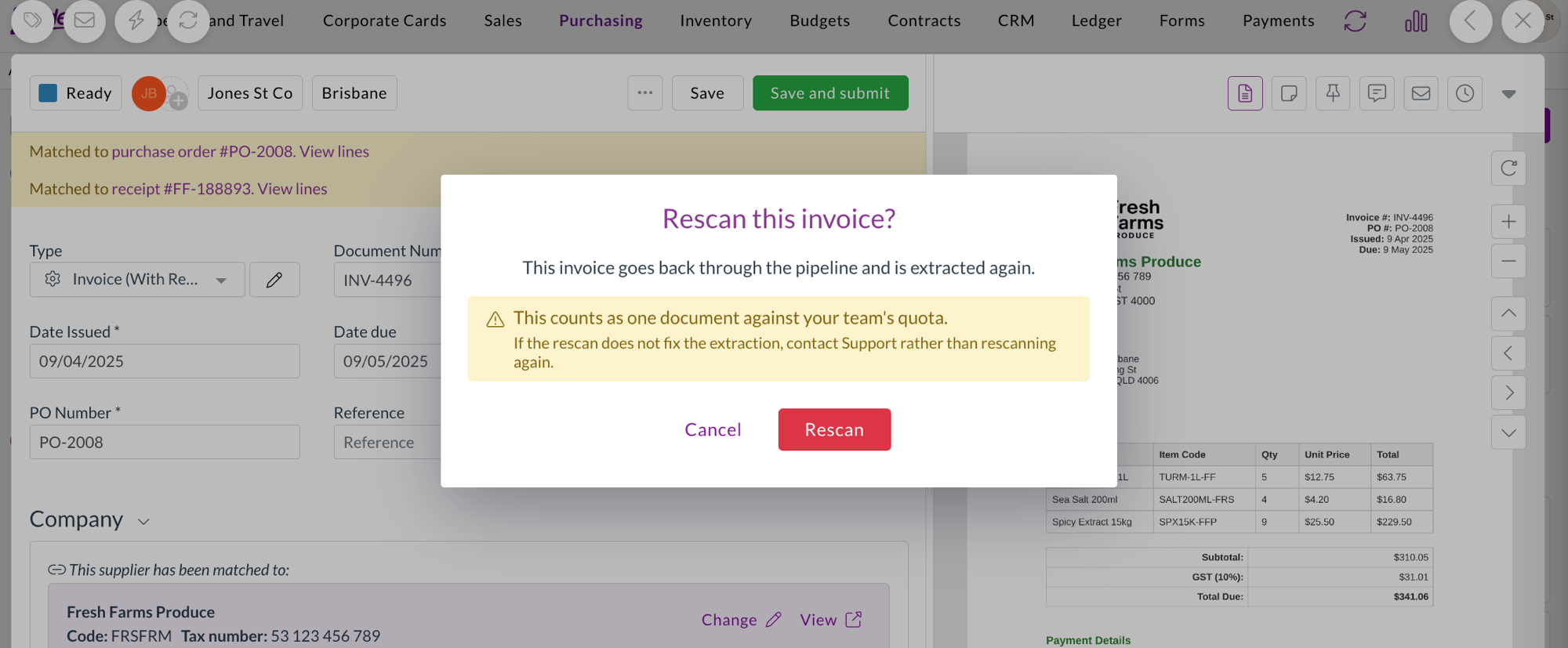
Release notes edition 3.5.6

Release date: 18 June 2025
Version: v3

Here's the latest summary of what's new and improved in Zudello, as well as what we resolved in the latest release.

Looking for something? Browse by tag to find release notes on a specific feature.

New and improved​

Manual approval reminders​

Zudello's approval workflows ensure documents are reviewed and approved by the right people, at the right time. We've now introduced the ability to send manual reminders for pending approvals directly through the Zudello interface.

This new feature allows users with the appropriate permissions to send approval reminder emails to approvers with pending approval steps against a document.

The system intelligently manages reminder notifications by:

  • Checking all approval steps within the current milestone
  • Sending reminders only to users with currently pending responses
  • Excluding users who have already approved, rejected, or had their responses processed through delegation or escalation
  • Including the name of the person who sent the reminder, and the time since the approval was first requested

info

Important note: Users with multiple pending responses on the same document may receive multiple reminder notifications.

For more information see Approval reminders.

Improved email approval experience​

For teams that require approvals to be completed within the Zudello platform, rather than via email, we've improved the messaging in approval emails. The updated emails make it clearer that users need to log into Zudello to complete their approval or rejection.

This improvement helps streamline the approval process and reduces confusion for users who might otherwise attempt to reply via email.

This change will automatically take affect for all applicable teams.

Purchase order reordering​

Purchase order management helps you track orders with suppliers from creation through to fulfilment. We've introduced a new Reorder function that allows you to quickly create new purchase orders based on existing ones.

The Reorder action is available in the ... menu at the top of the document viewer. The reorder function offers:

  • Quick duplication of existing purchase orders
  • Automatic status reset to the default creation status
  • Clearing of document-specific fields like document number, dates, and Placed by information
  • Preservation of supplier and line item details for easy reordering

This feature streamlines the process of placing repeat orders with suppliers, saving time and ensuring consistency.

The reorder function is currently only available for a selected number of teams. Reach out to support@zudello.com to discuss enabling this feature for your team.

Quote to purchase order conversion​

Quote management helps you track potential purchases from initial inquiry through to order placement. We've launched a new Convert to PO function that streamlines the process of converting approved quotes into purchase orders.

The Convert to PO action is available in the document viewer header and provides:

  • Seamless conversion from quote to purchase order format
  • Automatic status updates for both the original quote (set to Completed) and new purchase order (set to default creation status)
  • Proper document linking through related documents functionality
  • Preservation of all relevant quote details in the new purchase order

This enhancement eliminates manual re-entry of quote information and ensures accurate tracking of your procurement process from quote to order.

The convert to PO function is currently only available for a selected number of teams. Reach out to support@zudello.com to discuss enabling this feature for your team.

Enhanced data permissions for allocated documents​

Data permissions help control which users can access specific documents and information within your Zudello system. We've improved how data permissions work for documents linked through allocations (such as invoices matched to purchase orders and receipts).

Previously, users needed access to both documents in an allocation relationship to view either one. Now, if a user has access to one document (such as an invoice), they automatically gain access to any purchase orders or receipts allocated to that document.

This enhancement provides a more intuitive access experience while maintaining security controls, making it easier for users to work with related documents without requiring complex permission configurations.

Document Studio improvements​

Document Studio empowers you to customise how Zudello extracts data from your documents. We've resolved an issue where reference fields weren't being populated correctly during the extraction process, ensuring more accurate and complete data capture.

Document Studio is currently only available for a selected number of teams. Reach out to support@zudello.com to discuss enabling Document Studio for your team.

Expanded backend validation support​

Data validation helps ensure information is accurate and complete before documents are processed. We've expanded our backend validation capabilities to support:

  • Expense documents with basic validation requirements
  • Custom header fields for enhanced data quality control

These improvements provide more comprehensive validation coverage across different document types and field configurations.

Backend validation is currently only available for a selected number of teams. Reach out to support@zudello.com to discuss enabling this feature for your team.

Resolutions​

We're constantly working to refine Zudello functionality and ensure that we address any issues as soon as possible. As part of this release, we've made the following resolutions and improvements:

  • We've enhanced document extraction processes to no longer trigger unnecessary extraction events after converting system-created documents, while maintaining proper extraction for uploaded or emailed documents
  • We've improved error messaging when saving document coding rules to provide more context and clarity
  • We've introduced fallback handling for PDF processing to prevent system crashes when encountering unsupported file formats
  • We've resolved an issue with document conversion processes that could occasionally fail on the first attempt
  • We've fixed an issue where documents for certain suppliers would occasionally fail to save properly
  • We've addressed GST handling issues in claim generation processes

Have an idea?​

Do you have an idea for a new feature or how we can improve our current features? Let us know at support@zudello.com.

Your ideas and feedback are an important part of our product planning process to make Zudello better for everyone.
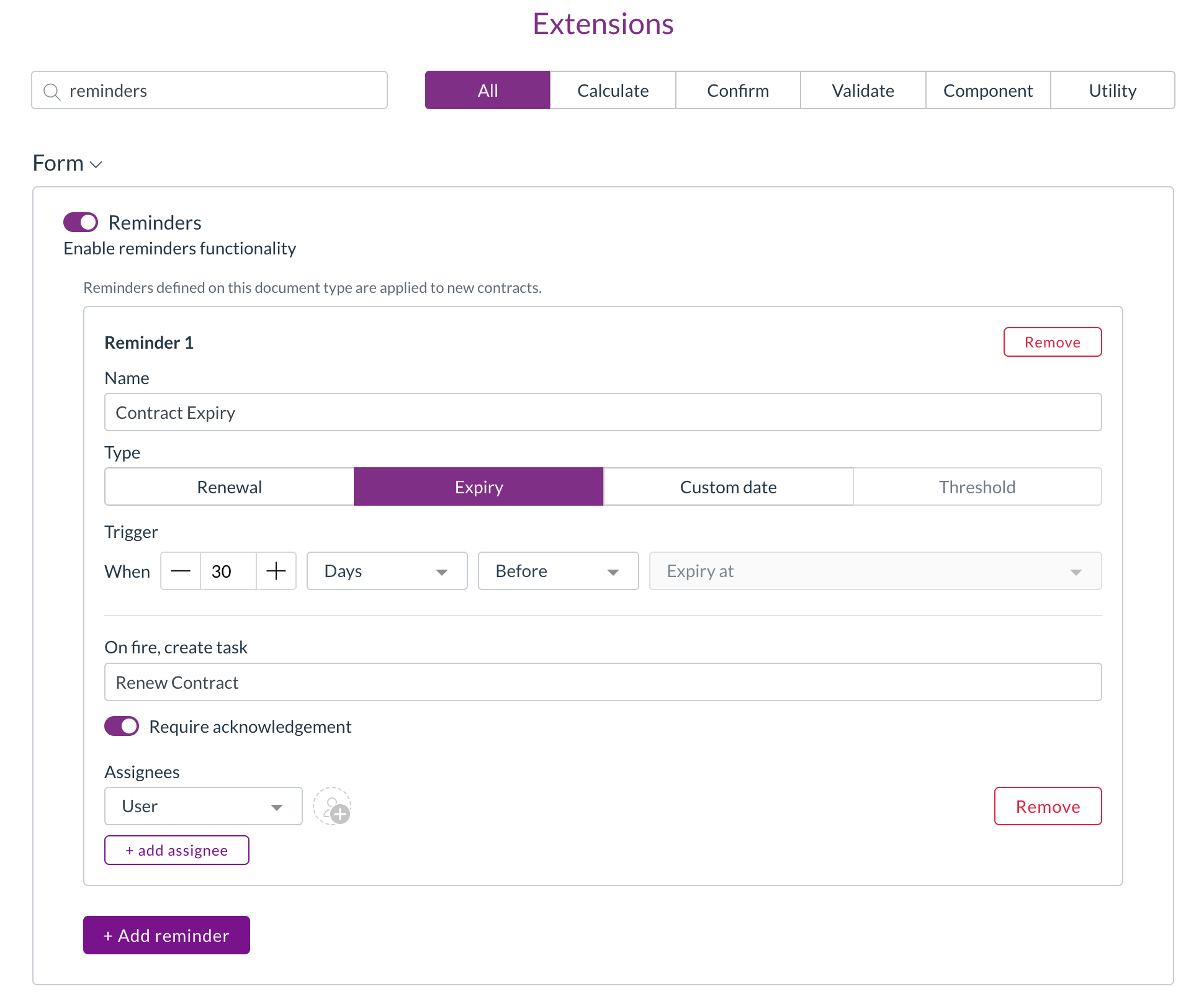
Release notes edition 3.5.5

Release date: 11 June 2025
Version: v3

Here's the latest summary of what's new and improved in Zudello, as well as what we resolved in the latest release.

Looking for something? Browse by tag to find release notes on a specific feature.

New and improved​

Enhanced supplier and customer matching​

Document extraction and supplier matching help automatically identify and link suppliers to invoices, reducing manual data entry and improving accuracy. We've significantly improved how Zudello matches suppliers and customers to documents through enhanced recognition capabilities.

Improved tax number matching​

We've enhanced our tax number (ABN) matching to handle common extraction issues:

  • Advanced handling of incorrectly extracted tax numbers, including situations where an extra digit is added during document scanning
  • Intelligent search algorithms that can still find the correct supplier even when tax numbers are extracted with minor errors
  • Improved accuracy for Australian ABN recognition and matching

Expanded matching criteria​

We've broadened the range of information used to match suppliers and customers:

  • Bank account number matching: Documents can now be matched using bank account details.
  • Company reference matching: Added support for account numbers and reference codes.
  • Enhanced email matching: Improved email-based supplier identification, including matching from sender email addresses.
  • Phone number matching: Documents can be matched using supplier phone numbers.
  • Alternative supplier information: Extended search to include supplier alternative records for more comprehensive matching.

The matching process now follows a logical hierarchy, starting with the most reliable identifiers (tax numbers) and progressively expanding to other criteria when needed. This ensures accurate supplier identification while reducing the need for manual intervention.

Field auto-filling enhancements​

Purchase order matching and auto-filling help reduce manual data entry by automatically copying information from linked documents like purchase orders to invoices. We've completely enhanced the auto-filling system to provide more comprehensive data transfer and better automation.

Expanded auto-fill capabilities​

Auto-filling now works across a much wider range of fields:

  • Header information:

    • Reference
    • PO number
    • Currency
  • Supplier details:

    • Supplier name, code, and tax information
    • Contact details including email and phone numbers
  • Delivery information:

    • Complete address details including attention, addressee, and full delivery address
  • Line-level details:

    • Stock codes and linked items
    • Dimensions such as account codes, cost centres, departments, locations, and subsidiaries
    • Project information
    • Tax rate codes
  • Custom fields:

    • Full support for all custom field types including text, numbers, dates, select fields, and boolean values

Enhanced auto-fill triggers​

Auto-filling now activates automatically in more situations:

  • When documents are uploaded, emailed, or rescanned and automatically matched
  • When you manually select purchase orders or purchase order lines to match
  • When you use the Apply trained rules function
  • Through API integration with enrichment enabled

After auto-filling completes, the system continues to apply other default values from your inbox settings, user preferences, and employee records for any remaining blank fields.

Expanded approval capabilities​

Approval workflows ensure that documents are reviewed and approved by the right people at the right time. We've enhanced our approval system to provide more flexibility and control over your approval processes.

Procurement owner approvals​

For organisations managing purchase orders through external systems, we've expanded procurement owner approvals to include approvals based on the Placed by field.

Invoice and receipt approval steps can now be assigned to the user who placed the original purchase order. This enhancement is particularly valuable for teams that create purchase orders in external systems but need approval workflows in Zudello.

Enhanced delegation of authority (DOA) options​

We've expanded DOA approval capabilities, and now support the Payment method fields as a DOA dimension.

This allows you to configure approval rules based on payment methods, giving you more control over transaction approval requirements.

Reach out to support@zudello.com to discuss adjusting your DOA settings.

Improved data permissions performance​

Data permissions help control which users can access specific documents and information within your system. We've implemented performance improvements to make data permission processing faster and more efficient, particularly for systems with complex permission structures.

Resolutions​

We're constantly working to refine Zudello functionality and ensure that we address any issues as soon as possible. As part of this release, we've made the following resolutions and improvements:

  • We've enhanced system stability by improving error handling for documents that cannot be processed, ensuring they're marked as unsupported rather than causing system issues
  • We've improved validation messaging for document coding rules to provide clearer feedback when configuration issues are detected
  • We've resolved configuration issues that could occasionally cause system errors in specific deployment scenarios
  • We've added enhanced field management capabilities with improved naming conventions for easier system administration
  • We've expanded the expenses module to include units of measure functionality for better expense tracking and reporting

Have an idea?​

Do you have an idea for a new feature or how we can improve our current features? Let us know at support@zudello.com.

Your ideas and feedback are an important part of our product planning process to make Zudello better for everyone.
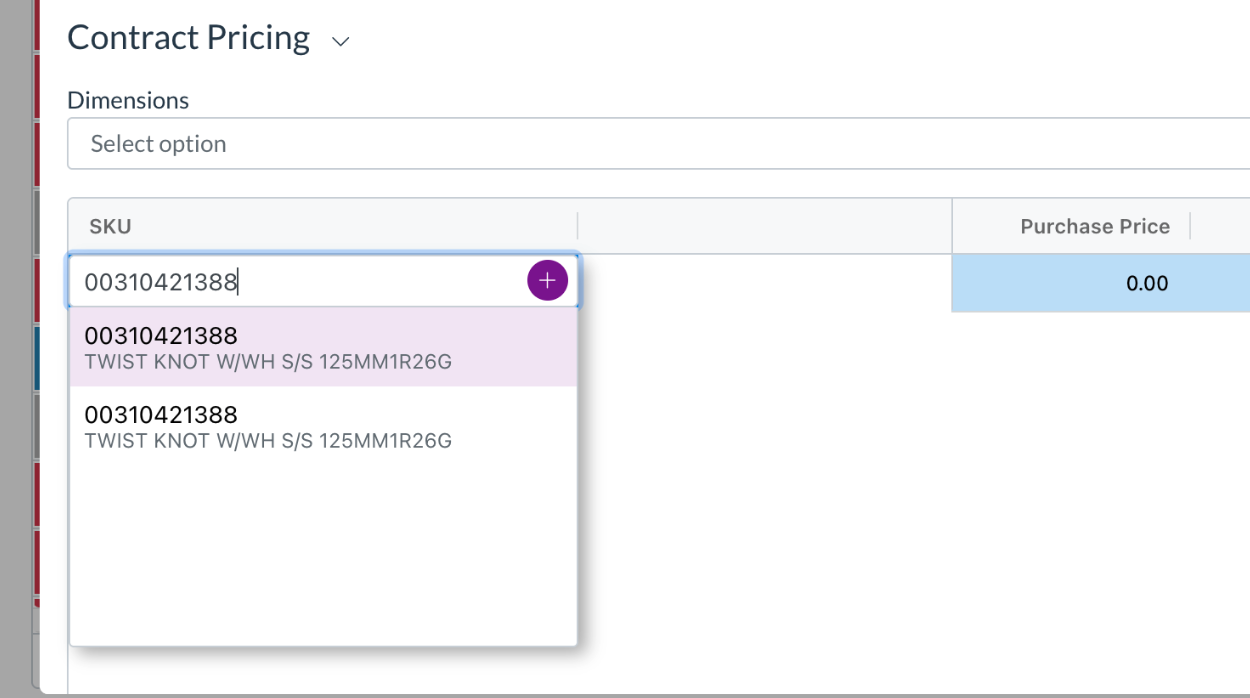
Release notes edition 3.5.4

Release date: 5 June 2025
Version: v3

Here's the latest summary of what's new and improved in Zudello, as well as what we resolved in the latest release.

Looking for something? Browse by tag to find release notes on a specific feature.

New and improved​

Enhanced approval validations​

Zudello's approval workflows help ensure documents are reviewed and approved by the right people at the right time. We've significantly enhanced our approval validation system to give you more control over what information is required before documents can be approved.

We've introduced new Required If validations that allow you to set fields as mandatory only when documents reach specific approval statuses. This flexible approach means users can still submit documents for review, but must complete all required information before the approval process can be finalised.

Key improvements include:

  • Flexible validation rules that activate only during approval processes
  • Smart blocking that prevents approval actions when required data is missing, while still allowing document rejection
  • Clear error messaging that shows users exactly what information needs to be completed

An important note is that this feature is not compatible with any of the following features:

  • Email-based approval buttons
  • Auto-approval processes, such as Apply previous response or Auto approve submitter
  • Backend validation processes
  • Bulk processing features, such as bulk submit, bulk approve, or low touch processing

Reach out to support@zudello.com to discuss enabling enhanced approval validations for your team.

Improved purchase order matching and auto-filling​

Zudello's automatic matching helps match invoices and receipts to their corresponding purchase orders, reducing manual data entry and ensuring accurate cost tracking. We've enhanced how auto-filling works to make the matching process even more efficient and reliable.

Auto-filling now automatically copies information from linked purchase orders to invoices at the following times:

  • When invoices are uploaded, emailed, or rescanned, and automatically matched to purchase orders
  • When you manually select a purchase order or purchase order line to match to an invoice
  • When you click Apply trained rules

We've significantly expanded the range of fields that can be auto-filled. The fields that can now be auto-filled are:

  • Header fields
    • Reference
    • PO Number
    • Currency
  • Supplier details
    • Supplier name
    • Supplier code
    • Tax number (ABN)
    • Email
    • Phone
  • Delivery address detais
    • Attention to
    • Addressee
    • All address fields
  • Line-level data
    • Stock codes
    • Account
    • Cost centres
    • Departments
    • Locations
    • Subsidiaries
    • Projects
    • Tax rate codes
  • Custom fields
    • Support for all custom field types including text, numbers, dates, selections, and boolean values

After auto-filling is complete, the system continues to apply other default values for any remaining blank fields, using defaults from your inbox settings, user preferences, or employee records.

Flexible allocation requirements​

Purchase order allocation ensures that invoice line items are properly matched to their corresponding purchase orders before processing. We've introduced more flexible options for managing allocation requirements, particularly for invoices that include freight charges or other costs not captured on the original purchase order.

You can now configure allocation requirements with these options:

  • All lines must match (disabled)
    • Transaction lines don't require allocations to proceed
  • All lines must match (enabled) with standard requirements
    • All transaction lines, regardless of type, must be allocated before submission
  • All lines must match (enabled) with flexible landed cost handling
    • Only standard item lines require allocation, while landed cost lines (such as freight or surcharges) can proceed without allocation

This enhancement provides the flexibility to handle real-world invoicing scenarios where suppliers include additional charges that weren't part of the original purchase order.

An important note is that any users with access to transactions can move standard lines to the landed cost section, potentially bypassing allocation requirements. Consider your security and permission requirements when deciding whether to implement this feature.

Document Studio enhancements​

Document Studio empowers you to customise how Zudello extracts data from your documents, ensuring maximum accuracy and efficiency in your document processing workflows.

We've made several improvements to enhance Document Studio's functionality:

  • Enhanced stability with various bug fixes and performance improvements
  • Better user experience through interface refinements and workflow optimisations

Document Studio is currently only available for a selected number of teams. Reach out to support@zudello.com to discuss enabling Document Studio for your team.

Expanded backend validation support​

Data validation helps ensure information is accurate and complete before documents are processed. We've expanded our backend validation capabilities to support more document types and field configurations.

Backend validation is now supported for:

  • Expense documents
    • Full backend validation support is available for expense processing workflows
  • Custom header fields
    • Validation rules can now be applied to custom fields configured at the document header level

These enhancements provide more comprehensive data quality controls across your entire document processing workflow.

Backend validation is currently only available for a selected number of teams. Reach out to support@zudello.com to discuss enabling this feature for your team.

Resolutions​

We're constantly working to refine Zudello functionality and ensure that we address any issues as soon as possible. As part of this release, we've made the following resolutions and improvements:

  • We've resolved an issue with item duplication that was identified during internal testing

Have an idea?​

Do you have an idea for a new feature or how we can improve our current features? Let us know at support@zudello.com.

Your ideas and feedback are an important part of our product planning process to make Zudello better for everyone.
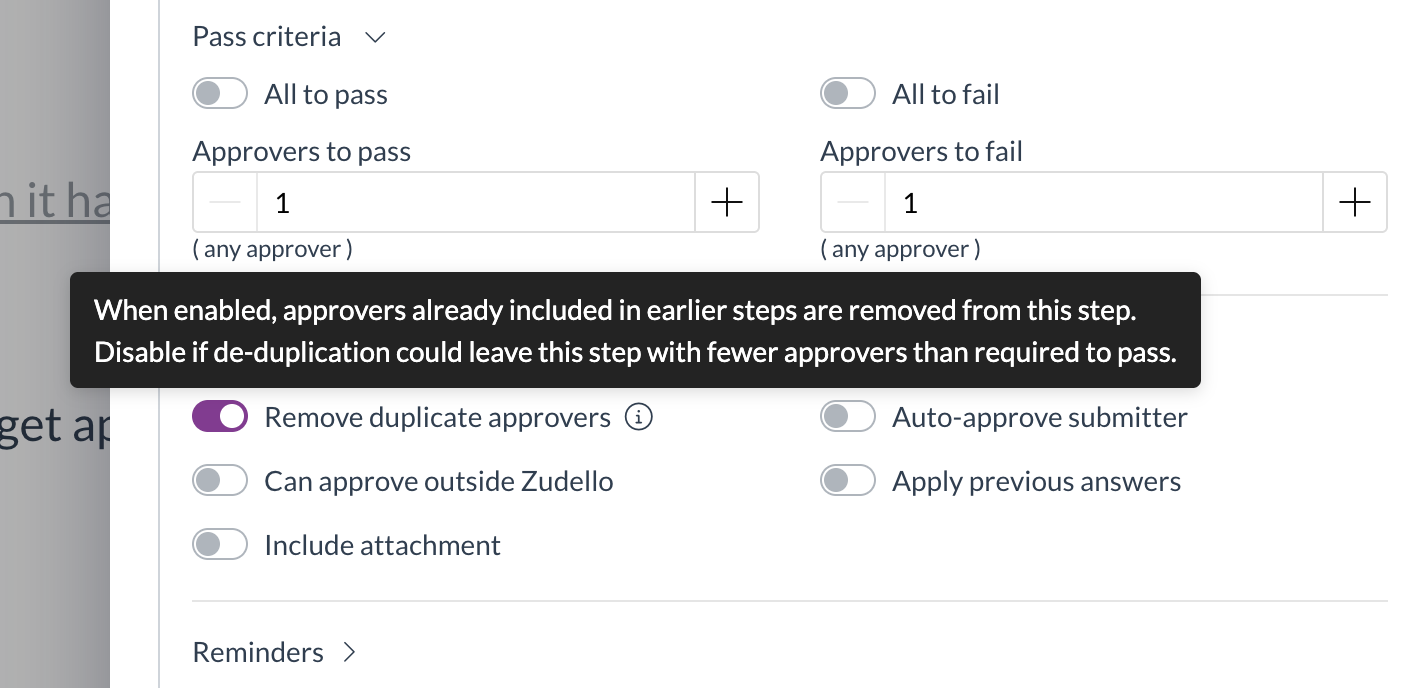
Release notes edition 3.4.8

Release date: 20 March 2025
Version: v3

Here's the latest summary of what's new and improved in Zudello, as well as what we resolved in the latest release.

Looking for something? Browse by tag to find release notes on a specific feature.

New and improved​

Finding the right items in your catalogue is essential for efficient document processing. We've made significant improvements to how searching works when looking for items by SKU or description.

Within the catalogue submodule​

We now use the following conditions for searches within the catalogue submodule:

  • For searches with hyphens (e.g. C-2500-NAVY-87R) we look for an exact string match
  • When you enter multiple keywords separated by spaces (e. g. Yakka Cargo), both keywords must be present in the results
  • Results that exactly match your search criteria now appear at the top of your results, with partial matches displayed further down the list
  • Sorting order is maintained based on the view you're using (date updated or date created)

In drop-down selectors​

  • Item selection drop-downs, such as on transactions and other forms, now show results ordered by relevance
  • The most relevant matches appear at the top of the list

These improvements make it much easier to find exactly what you're looking for, saving you time when creating and processing documents.

Keyword coding enhancements​

Keyword coding rules help automate the coding of dimensions and other information on your transactions. We've updated how these rules work to give you more control:

  • Rules now fully overwrite fields rather than only filling in blank values
  • All configured rules are now executed in the order they appear in the rules list
  • If multiple rules apply to the same field, the last rule executed will determine the final value

This change gives you more flexibility when setting up complex coding rules, as you can now create layered rules that run one after the other.

Expanded fields for delegation of authority (DOA) approvals​

Delegation of authority (DOA) rules ensure that transactions are approved by the right people, every time. We've expanded our DOA capabilities to include the following new dimensions:

  • Item groups
  • Item categories
  • Project types
  • Project groups

This expansion gives you more flexibility when configuring approval workflows, allowing you to match your ZUdello workflow exactly to your business needs.

Place order audit improvements​

Purchase order management helps you track orders with suppliers throughout the full procurement cycle. To maintain accurate audit trails, we've made the following improvement to system behaviour.

When duplicating a purchase order, the Placed by and Placed at fields are now automatically cleared. This ensures that your audit trails remain accurate and reliable, making it clear which orders have been placed, when they were placed, and by whom.

Resolutions​

We're constantly working to refine Zudello functionality and ensure that we address any issues as soon as possible. As part of this release, we've made the following resolutions and improvements:

  • We've optimised timezone settings for UK customers to improve performance
  • We've made improvements to the saving process for user groups with numerous permissions
  • We've resolved an issue where the Created by user field couldn't be added to forms, complementing the previously released ability to add Placed by and Submitted by fields

Have an idea?​

Do you have an idea for a new feature or how we can improve our current features? Let us know at support@zudello.com.

Your ideas and feedback are an important part of our product planning process to make Zudello better for everyone.
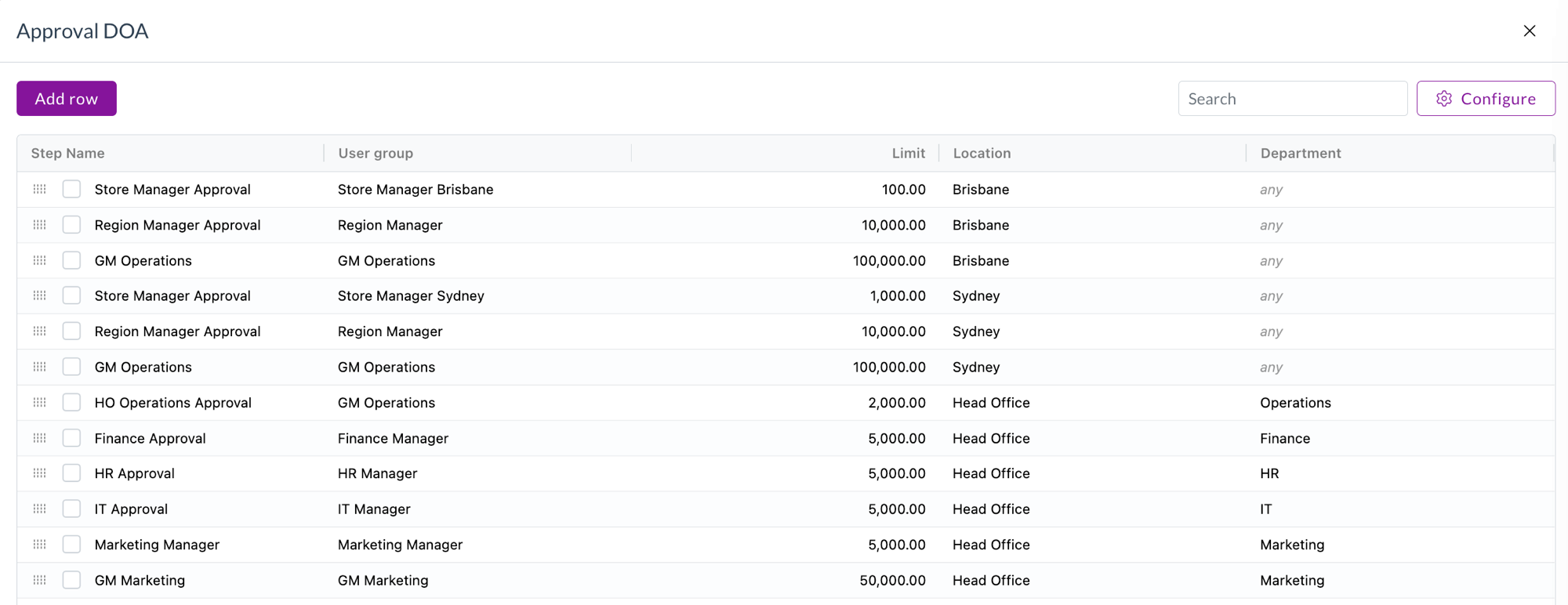
Release notes edition 3.4.2

Release date: 30 January 2025
Version: v3

Here's the latest summary of what's new and improved in Zudello, as well as what we resolved in the latest release.

Looking for something? Browse by tag to find release notes on a specific feature.

New and improved​

New feature: Keyword coding rules​

We have launched our new keyword coding rules feature, which automatically applies predefined coding when specific keywords are found on a document.

For more information on setting up and managing these rules, see Keyword Coding Rules guide.

New Create a goods receipt feature​

Goods receipts help you track when items have been received, ensuring accurate inventory management and supporting three-way matching for invoice processing.

Users now have the ability to create goods receipts directly from the related purchase order. The two documents will be automatically linked, and all header and line information can be automatically copied across.

For more information, see our guide on Creating Goods Receipts.

Editable approvals​

Approval workflows help ensure the right people review and approve documents before they're processed. We've improved how editable approval milestones work to enhance system performance.

  • We've implemented a new "Unlock" feature for editable milestones that makes approvals faster and more efficient
  • By default, editable milestones are now read-only during the approval process
  • When you need to make changes, simply click the Unlock button to edit the document
  • After editing, you can choose to:
    • Update to save your changes without approving
    • Approve or Reject to complete the approval process

Supplier and item onboarding​

Managing suppliers and items efficiently is crucial for procurement processes. We've added new capabilities to streamline this process.

  • You can now use computed field rules for automatically generating SKUs for items
  • Default dates can now be set to "today" to better support procurement processes
    • Available as a UI setting and as a sentence action

PDF templates​

PDF templates allow you to create professional, customized documents for your business communications.

  • PDF templates can now lookup additional information, including:
    • Subsidiary names
    • Document creator names
    • And more

Allocations​

Allocations help you match transaction lines to their corresponding documents, ensuring accurate records and preventing discrepancies.

  • We've continued our focus on improving allocations with several enhancements:
    • Allocations are now automatically cleared when users change a document's status to Deleted or Rejected
    • Resolved an issue where allocations were not automatically created after items were linked to transaction lines
    • Improved linking between items and transactions to ensure allocations are correctly created

Resolutions​

We're constantly working to refine Zudello functionality and ensure the best possible experience. As part of this release, we've made the following performance improvements and issue resolutions:

Performance enhancements​

  • Improved CPU threshold handling and scaling for better system responsiveness
  • Implemented connection pooling to optimize database performance
  • Enhanced our search API with dedicated resources and new options to improve search speed
  • Converted more processes from asynchronous to synchronous for faster response times
  • Improved auto-calculations when creating transactions, ensuring totals and tax calculate instantly when items are linked

Issue resolutions​

  • Fixed an issue where users were unable to access the Requests submodule within the CRM module
  • Resolved an issue that prevented users from selecting fields when building exports
  • Fixed display issues with logos
  • Improved row selection in transaction tables, allowing highlighting with mouse for bulk duplicate and bulk delete actions
  • Fixed an issue with supplier name search when configuring dependencies
  • Resolved integrity issues when using the convert with duplicate function in automations
  • Added a submodule filter to automations to make finding sentences for specific submodules easier
  • Fixed display issues with thousand separators in table views
  • Corrected the convert extension to properly reset document type selection when module or submodule changes
  • Reinstated the ability to view a statement while in reconcile mode

Have an idea?​

Do you have an idea for a new feature or how we can improve our current features? Let us know at support@zudello.com.

Your ideas and feedback are an important part of our product planning process to make Zudello better for everyone.
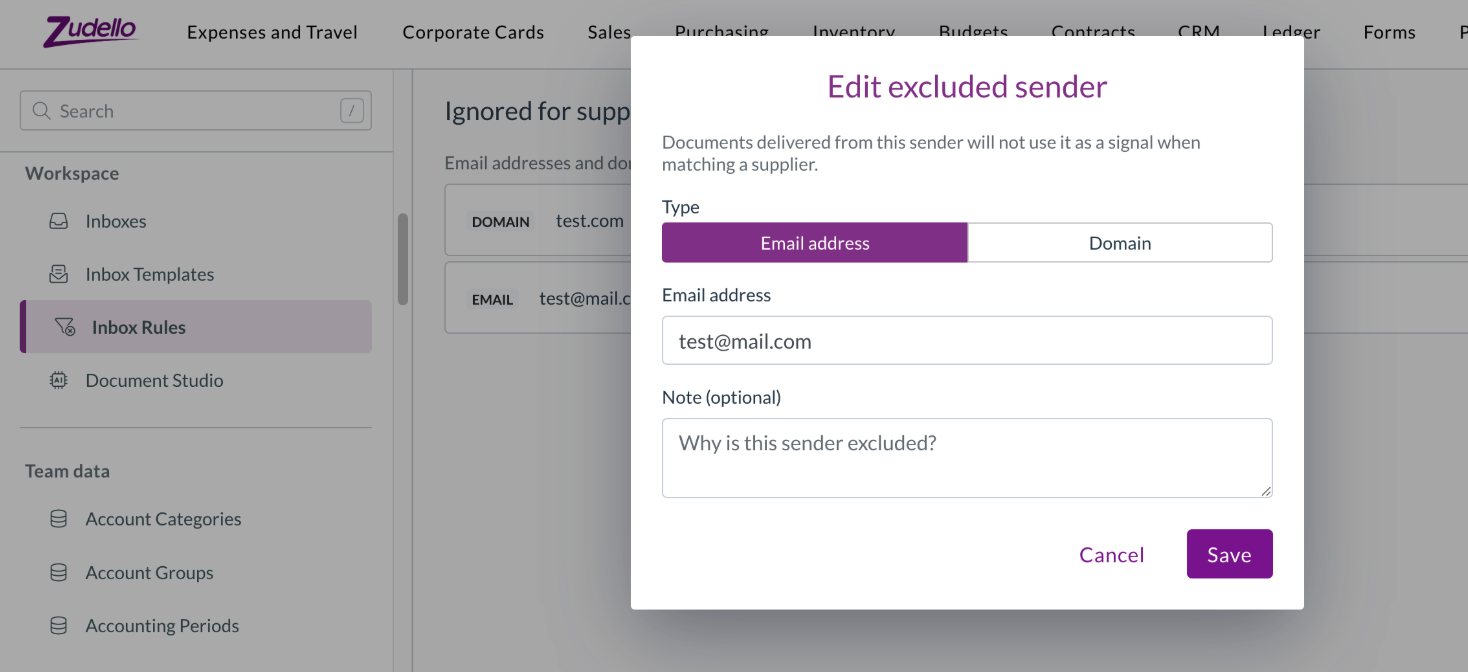
Release notes edition 3.4.0

Release date: 8 January 2025
Version: v3

Here's the latest summary of what's new and improved in Zudello, as well as what we resolved in the latest release.

Looking for something? Browse by tag to find release notes on a specific feature.

New and improved

Approvals​

Start from submitter for user group DOAs​

We’ve expanded the functionality for delegation of authority (DOA) approvals by introducing the ability to start approvals from the submitter. This gives you greater flexibility, allowing approvals to be triggered based on the user who submits the transaction.

Previously, only the Start from bottom option worked for user group DOAs. We now support the Start from submitter logic, which checks if the submitter is a member of any applicable groups in the DOA and begins the approval process from there. If the submitter is not part of any group, the system will revert to the Start from bottom behaviour to avoid errors.

This change ensures that the approval process is more dynamic, and avoids submitters having to reapprove documents that they submitted.

Exclude submitter logic for user group DOAs​

We’ve introduced improvements to prevent approvals from getting stuck when the submitter is not able to approve their own documents.

The system will now ensure that no approval steps are created where the only approver is the submitter. If the submitter is part of a group with only one member, the approval process will skip this milestone and move to the next applicable step.

Multi-select user groups for DOA approvals​

You can now select multiple user groups as the approvers for a single approval step, providing more flexibility in how the approval process is configured.

We’ve expanded DOA support to include transaction header and related dimensions, giving you more flexibility when setting up and managing approvals.

Previously, DOAs could only be configured with transaction line dimensions. Now, you can configure DOAs using header dimensions (such as supplier or customers) and related dimensions (such as account group).

This provides further flexibility in the approval process, to ensure your documents are approved by the right person every time.

Importing​

Zudello's importing feature let's you efficiently create new records or update existing ones in bulk, giving you more control over your team's data.

We have now added the ability to import inventory receipts, making it easier to process large volumes of inventory transactions.

We have removed the ability to import mileage expenses. Mileage expenses need to be entered via the expenses module, to ensure that all necessary information is captured.

Resolutions

  • We’ve resolved an issue where dependencies weren’t automatically deleted when related values were deleted. Now, deleting a record will properly remove any related dependency on other records.
  • An issue that prevented users from duplicating a Sales Order into a Purchase Order has been fixed.
  • We’ve fixed an error where some table views would fail to load, improving overall stability and performance.
  • An issue with audit logs displaying dimension UUIDs instead of names has been resolved, making logs easier to read.
  • We’ve continued our work on improving system performance, including converting more endpoints from asynchronous to synchronous processing.

Have some ideas?

Do you have an idea for a new feature or how we can improve our current features? Please let us know at support@zudello.com.

Your ideas and feedback are an important part of our product planning process to make Zudello better for everyone.
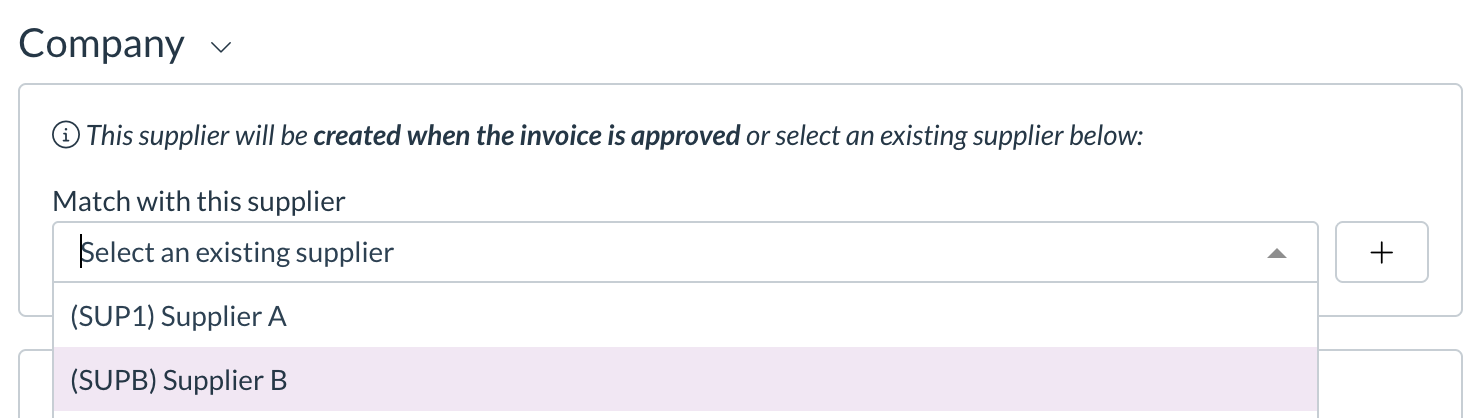
Release notes edition 3.3.8

Release date: 20 November 2024
Version: v3

Here's the latest summary of what's new and improved in Zudello, as well as what we resolved in the latest release.

Looking for something? Browse by tag to find release notes on a specific feature.

New and improved

Document type default statuses​

Document types now have configurable default statuses that are applied when documents are created or reopened:

  • Transactions (invoices, purchase orders, etc.) default to Review status when created and Ready status when reopened
  • Non-transactions (items, suppliers, customers, dimensions) default to Active status for both creation and reopening

You can customise these settings in the document type settings.

Auto-approve for submitters​

Previously, if document submitters were also valid approvers on a document, they would need to reopen and approve documents they had already submitted for approval.

You can now configure approval flows to automatically approve any steps for document submitters, streamlining the approval process and removing the need for double handling.

New LLM document extraction pipeline​

Zudello's document extraction system pulls key information from your documents and makes it available for processing.

All teams are now automatically opted into our LLM (Large Language Model) extraction pipeline, which provides faster and more accurate document extraction. This advanced technology significantly improves the quality and speed of information extracted from your documents.

Performance enhancements​

We've made several improvements to Zudello's performance, helping you work faster and more efficiently:

  • We've streamlined how documents are processed during enrichment, reducing the time it takes to extract and code your documents. We've also optimised how we calculate allocation variances, making the matching process faster.

  • Opening transactions with allocations is now faster, as we've reduced the amount of background information loaded when viewing these documents.

  • Processing claims with multiple linked expenses is now significantly faster. We've reduced processing time for claims with 20-30 linked expenses from nearly 2 minutes down to about 45 seconds.

We're committed to ongoing performance improvements and will continue to make Zudello faster with each release.

Resolutions

Bank account and ABN validations​

  • We've resolved an issue where bank account and ABN validations were sometimes appearing when they shouldn't. Validations now properly respect their document type extension settings.
  • We've corrected calculations for amount-based matching, ensuring that matching status and variance percentages are displayed accurately.
  • We've resolved an issue where users couldn't complete transactions with lengthy address information.
  • We've added search functionality to the Keyword Coding Rules page, making it easier to find and work with document coding settings.
  • We've upgraded several front-end components to ensure ongoing compliance with security standards.

Have some ideas?

Do you have an idea for a new feature or how we can improve our current features? Please let us know at support@zudello.com.

Your ideas and feedback are an important part of our product planning process to make Zudello better for everyone.
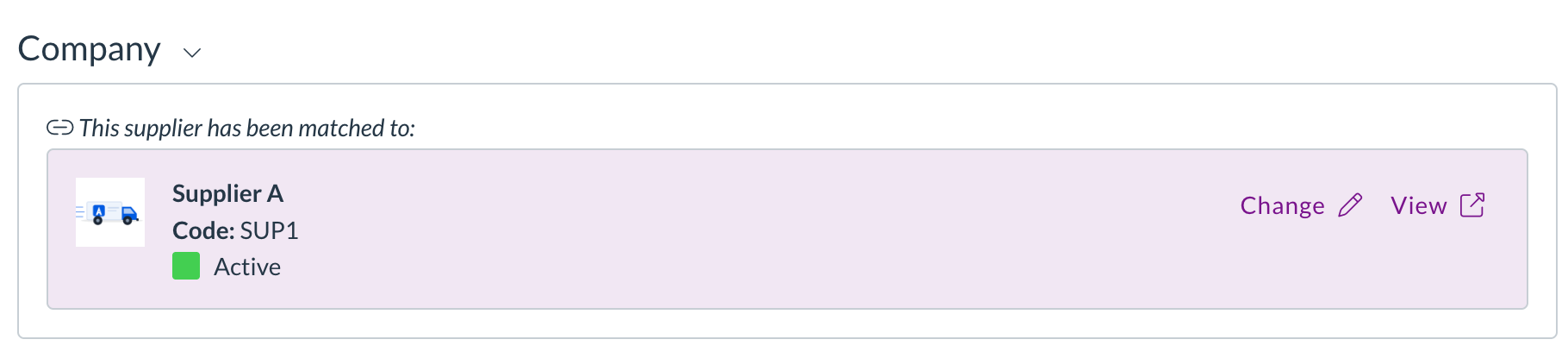
Release notes edition 3.3.7

Release date: 11 November 2024
Version: v3

Here's the latest summary of what's new and improved in Zudello, as well as what we resolved in the latest release.

Looking for something? Browse by tag to find release notes on a specific feature.

New and improved

Enhanced approval routing options​

Zudello's approval system routes documents to the right people at the right time, helping you maintain compliance and control over your business processes. Our delegation of authority (DOA) features ensure that approvals follow your company's governance requirements.

We've expanded our approval routing options to handle more complex approval scenarios. You can now configure approval flows to automatically exclude document submitters from the approval process. This improves separation of duties by ensuring that the person who submits a document can't also approve it, even if they would normally be part of the approval flow.

When Exclude submitter is turned on, documents will follow one of the following flows:

  • For approvals that start from the bottom of the tree
    • Approval follows your defined DOA from the lowest approval level upward
    • If the Submitter is responsible for any approval steps, the document will skip their step and move to the next approver in the DOA
  • For approvals that start from the submitter submitter
    • If the submitter is in the DOA, approvals will start from the next approver in the DOA
    • If the submitter is not defined in the DOA, approvals will start from the bottom of the tree as detailed above
  • For approvals that go directly to the user with a sufficient limit
    • Usually the approval will go directly to the approver with a sufficient approval limit
    • If the submitter is the first approver with a sufficient limit, the approval will go to the next approver in the DOA

These enhancements help you meet compliance requirements while maintaining efficiency and simplicity within your approval flow.

Resolutions

Approval sentence handling​

We've resolved an issue where error messages were sometimes displayed unnecessarily during the approval process. Previously, when certain approval conditions weren't met and the system was configured to skip that step, an error message would still appear in the system logs.

We've improved this process to display appropriate messages based on your exception handling configuration:

  • Fail if no match
    • If a required condition isn't met, the system will stop processing and display an error message
  • Skip sentence if no match
    • If a condition isn't met, the system will skip that automation and proceed to the next automation without unnecessary error messages
  • Skip line if no match
    • The system will only process document lines that meet the specified conditions

These improvements provide clearer information about approval routing decisions and reduce unnecessary error messages.

Have some ideas?

Do you have an idea for a new feature or how we can improve our current features? Please let us know at support@zudello.com.

Your ideas and feedback are an important part of our product planning process to make Zudello better for everyone.
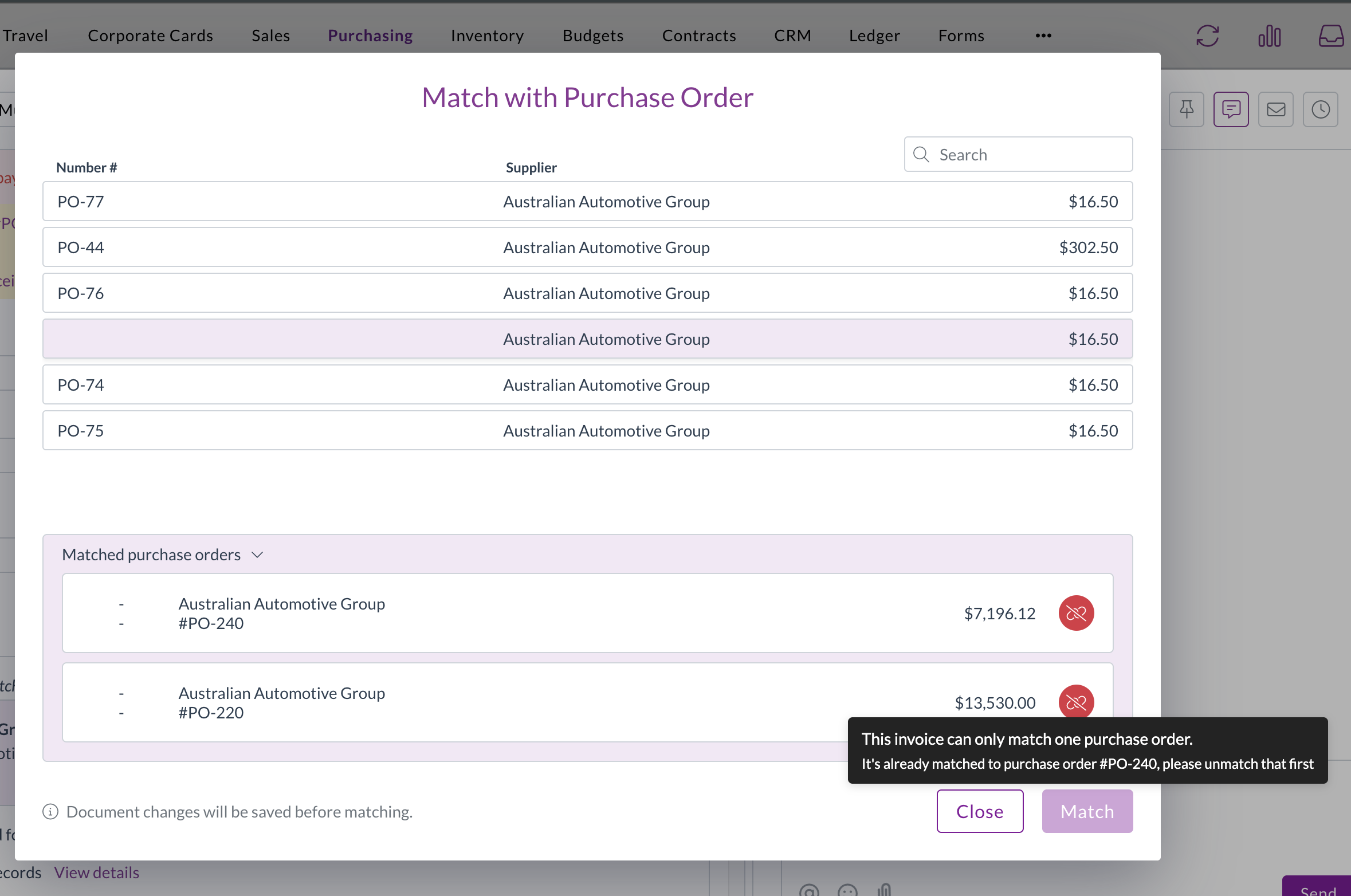
Release notes edition 3.3.3

Release date: 10 October 2024
Version: v3

Here's the latest summary of what’s new and improved in Zudello, as well as what was resolved in the latest release.

Looking for something? Browse by tag to find release notes on a specific feature.

New and improved

Supplier, customer and employee default document types​

Code documents faster than ever, by configuring the default document type that applies when you link specific suppliers, customers, or employees to a transaction.

You can configure default document types for different submodules. For example, you might receive inventory invoices from some suppliers and service invoices from others, but treat all suppliers' credit notes the same.

We extract default document types as part of the extraction process. Importantly, we won't apply default document types when you manually match suppliers, customers, or employees to a transaction, or when an automation sets them after the extraction process has already finished.

See Supplier Default Coding for more.

Allocations - any line to any line matching​

Zudello's two-way and three-way matching plays an integral role in ensuring compliance and accuracy across the procurement lifecycle. 

Previously, when allocating documents (e.g. matching an invoice to a purchase order), our intelligent engine would match the lines of each document based on either stock code or description. This works well for inventory and stock-based documents, but meant that service or non-stock documents had to be manually allocated line-by-line. 
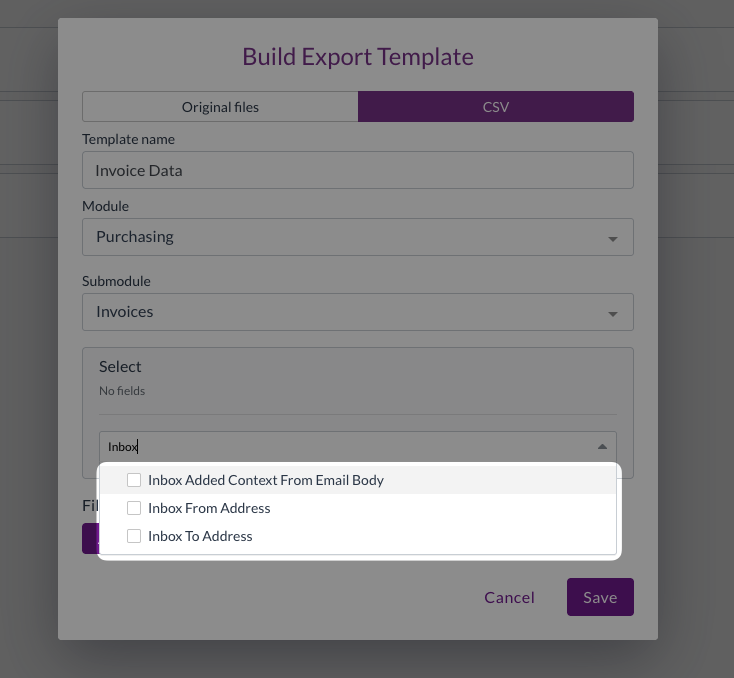
We have now expanded our engine to allow allocation on an any line to any line basis, allowing you to easily allocate any two transactions, even where the number of lines do not match.

When this option is enabled and a transaction is allocated (e.g. an invoice is allocated to a purchase order), lines will be allocated from top-to-bottom, until either all lines are matched or the matched transaction (in this case the purchase order) is fully consumed. 

Please contact Zudello Support to discuss enabling this feature for your team.

Approvals - DOA based on document total​

To increase the security and flexibility of approval flows, you now have the option to base each DOA approval decision on either of the following comparisons:

  • The sum of applicable transaction lines vs the user user group's limit
    OR
  • The document total vs the user user group's limit

Please contact Zudello Support to discuss enabling this feature for your team.

Importing - Item Alternatives​

Zudello's Item Alternatives feature removes the frustration of updating item codes, line-by-line, when your supplier uses different stock codes than you do. Instead of manually updating item codes, you can train Zudello to automatically swap out your suppliers stock codes for your corresponding item codes. 

Previously, Item Alternatives were updated one-by-one via the item card.

We have now enabled bulk importing of Item alternatives. When uploading item alternative imports users need to select:

  • Module: Inventory
  • Submodule: Catalogue
  • Item Alternative

The following fields are currently available when creating Item Alternatives (* denotes a mandatory field):

  • Item*

    • The Catalogue Item you want to lookup and link to the Transaction Line (i.e. your item code)

    • Can be imported using:

      • UUID
      • External ID
      • SKU

  • Supplier / Customer

    • The Supplier / Customer the Item Alternative relates to. This allows you to link the same Catalogue Item if Suppliers / Customer refer to them by different codes. Can be left blank if the rule is generic i.e. the SKU is 'FREIGHT'

    • Can be imported using:

      • UUID
      • External ID
      • Code

  • SKU*

    • The extracted code that you want to lookup and convert into the Linked Item (i.e. the supplier's/customer's item code)

Please reach out to your Organisation Administrator to discuss importing Item Alternatives for your team. 

Have some ideas?

Do you have an idea for a new feature or how we can improve our current features? Please let us know at support@zudello.com.

Your ideas and feedback are an important part of our product planning process to make Zudello better for everyone.