Release notes edition 3.7.10
Release date: Wednesday 5 August 2026
Version: v3
Here's the latest summary of what's new and improved in Zudello, as well as what we resolved in the latest release.
In this release:
- Clearer delivery address validation
- A run order you can actually read in Document Studio
- New weight and lead time checks on sales orders
- Filtering, expenses, and document viewer improvements and more
Looking for something? Browse by tag to find release notes on a specific feature.
New and improved
Delivery addresses
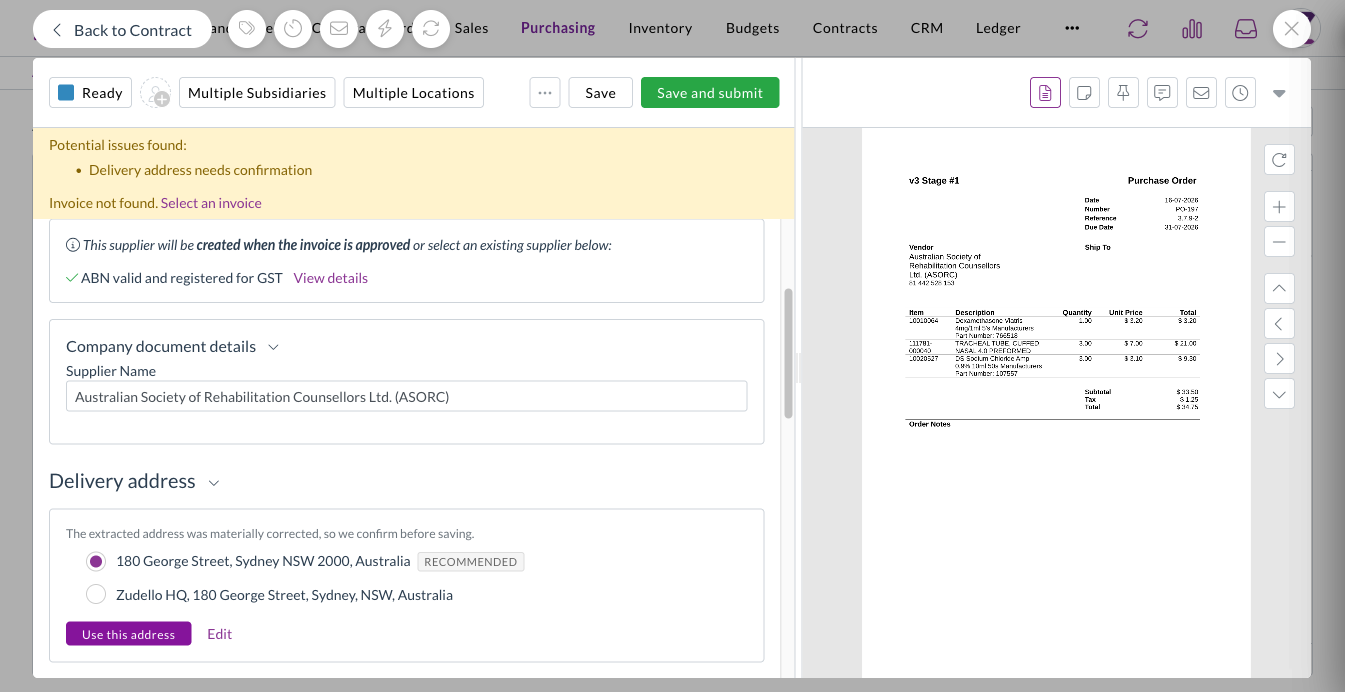
Zudello checks the delivery address on your documents against Google Address Validation, so orders go to an address that actually exists and can be delivered to. We've rebuilt the delivery address section to make it much clearer where an address stands and what to do about it.
One card, one answer
- The delivery address now shows its result in a single card, so you can see at a glance whether it's matched to an address on file, verified, corrected, or couldn't be verified.
- The outcome also appears in the Potential issues found bar, alongside everything else that needs your attention.

Suggested corrections
- When verification returns a meaningfully different address, Zudello shows you the suggestion so you can accept it or keep your own.
- Minor spelling corrections are applied without interrupting you, so you're only asked about changes that matter.
You decide what blocks a submit
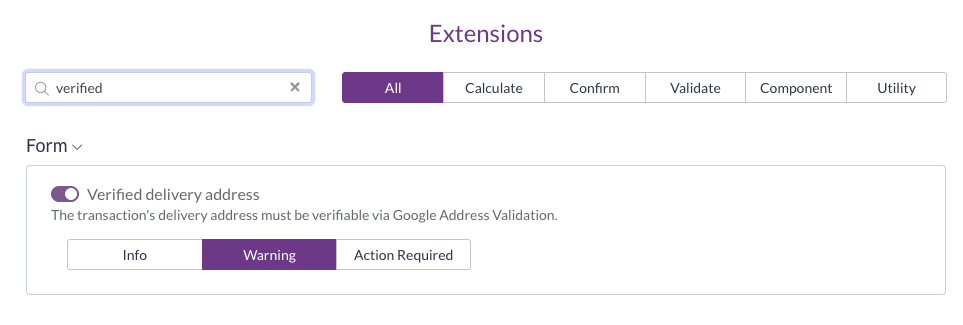
- An address that couldn't be verified now follows the extension level you've configured, rather than always blocking the document.
- Set it to Action required and it blocks the submit, set it to Warning and it appears as a warning, and set it to Info and it stays as a note on the section.
Saved addresses in one place
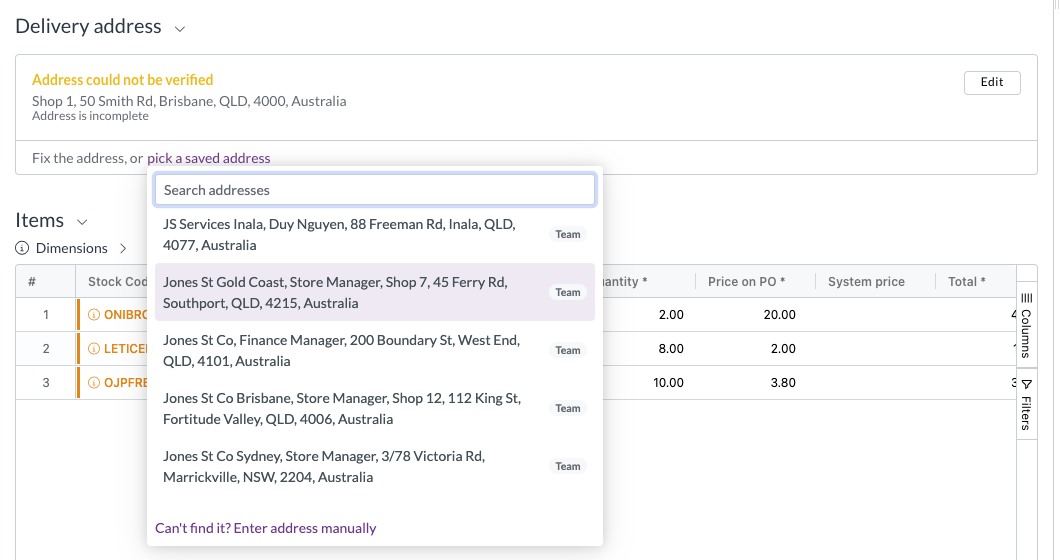
- The address search now offers the contact's saved addresses and your team's own addresses together in a single dropdown.
- Picking one of your team's addresses links the document to that address record, so details stored against it (a notification email address, for example) are available once the document is complete.
Document Studio
Document Studio lets you fine-tune how Zudello extracts information from your documents. Workflows run in order until one matches the document, but a workflow with no document selection question always matches, which means nothing after it ever runs. That was hard to see until now.
Creating a workflow
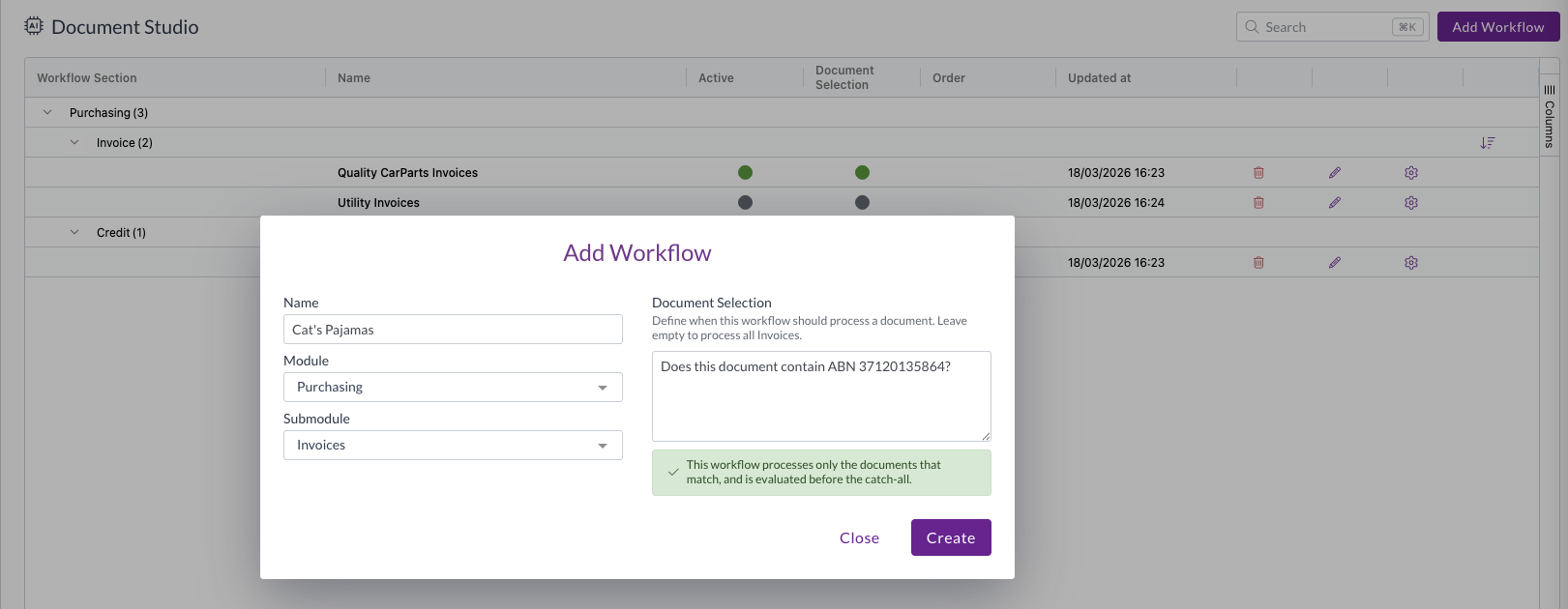
- We've made document selection more prominent when you create a workflow, so it's clear up front whether the workflow will run only on the documents that match, or become the catch-all for its section.
- Forking a workflow now warns you about unsaved document selection changes and offers to carry them into the fork, so you don't lose them.
Seeing and setting the run order
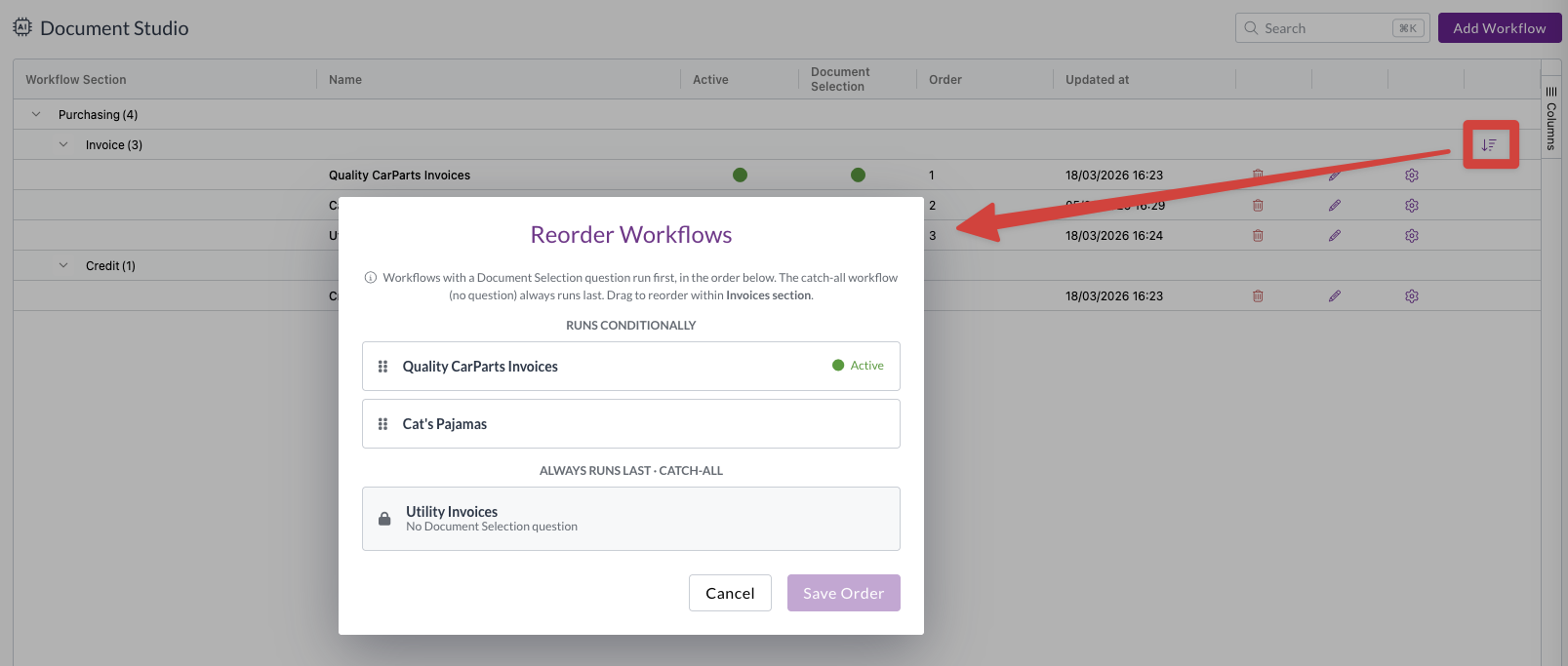
- A new Document Selection column shows at a glance which workflows have a document selection question and which don't.
- A workflow that can never run is flagged on the Order column with an icon, a highlighted row, and a tooltip explaining why.
- A columns sidebar has been added and the table now sizes to fit, so it no longer scrolls sideways.
- The reorder screen now separates the workflows that run conditionally from the ones that always run last, so you can drag the conditional workflows into order and see the catch-all group for what it is.
- You can order the catch-all group too, so the workflow that should win can be moved to the top. Every other workflow that always runs is flagged, and Zudello warns you when a section has more than one.
- Removing a workflow's document selection question now moves it to the bottom of its section automatically.
Filters
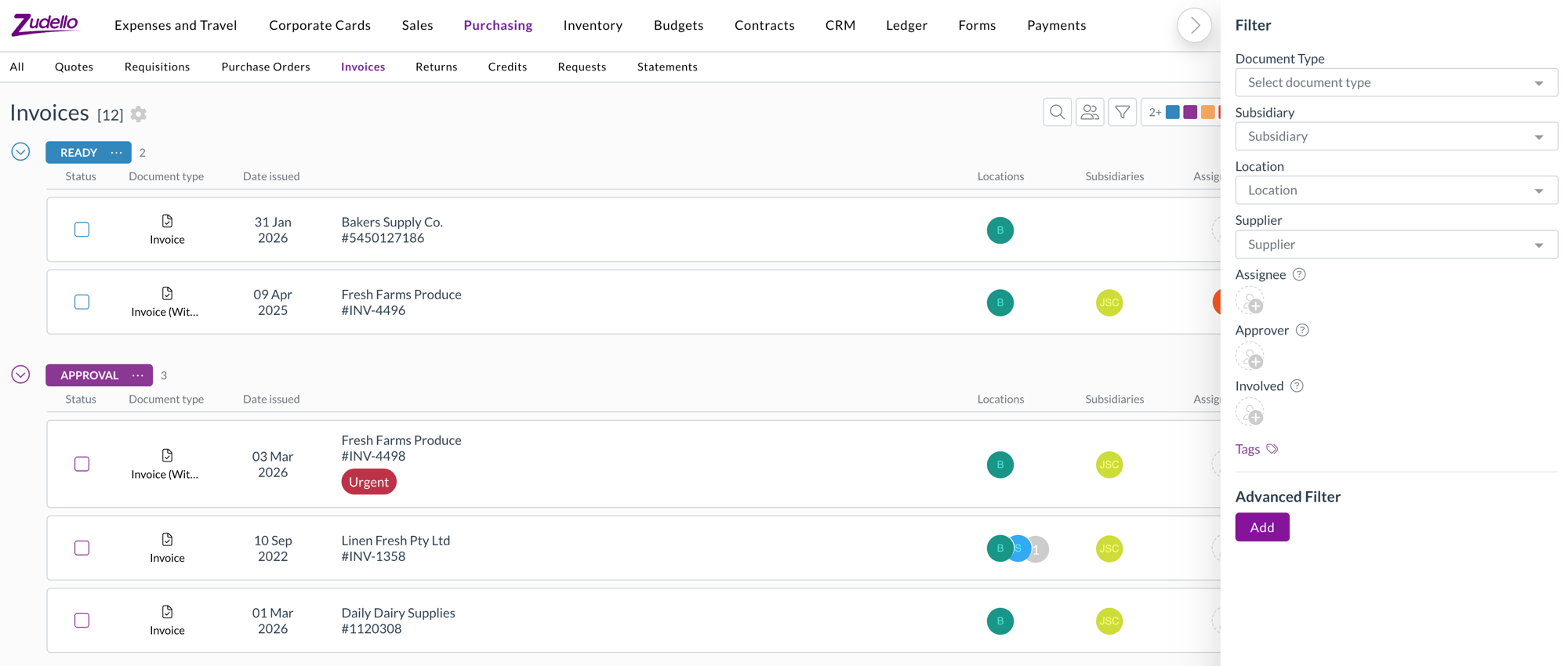
The Assigned to filter did several jobs at once. It's now split into three, so you can filter on exactly the relationship you mean.
- Assignee filters strictly on who the document is assigned to.
- Approver filters on who is approving it.
- Involved reproduces the previous Assigned to behaviour, covering the assignee, current and past approvers, and the employee.
- If you have saved views built on the old Assigned to filter, Involved is the equivalent.
- Filter values now load when you open the dropdown rather than up front, and a filter with no values to show is hidden entirely.
Expenses
- Employee is now available as a line-level dimension on expense forms, alongside location and subsidiary. Choose an employee in the header to apply it to every line, or set it line by line.
- Location on expense lines is now available in automations, filters, and exports.
Sales orders
Zudello can validate a sales order against your item details before it's placed. We've added two new checks.
Order weight
- Items can now carry a unit weight, and each line calculates its weight from that unit weight and the quantity, giving a total weight for the order.
- The order is validated against a configurable minimum and maximum pallet weight.
- An item with no unit weight is treated as zero and raises a flag naming the item, rather than passing silently.
Lead times
- Supplier, production, and seasonal lead times on an item now produce an earliest achievable date for each line, calculated in business days.
- The requested delivery date is validated against the latest achievable date across the order's lines.
Document viewer
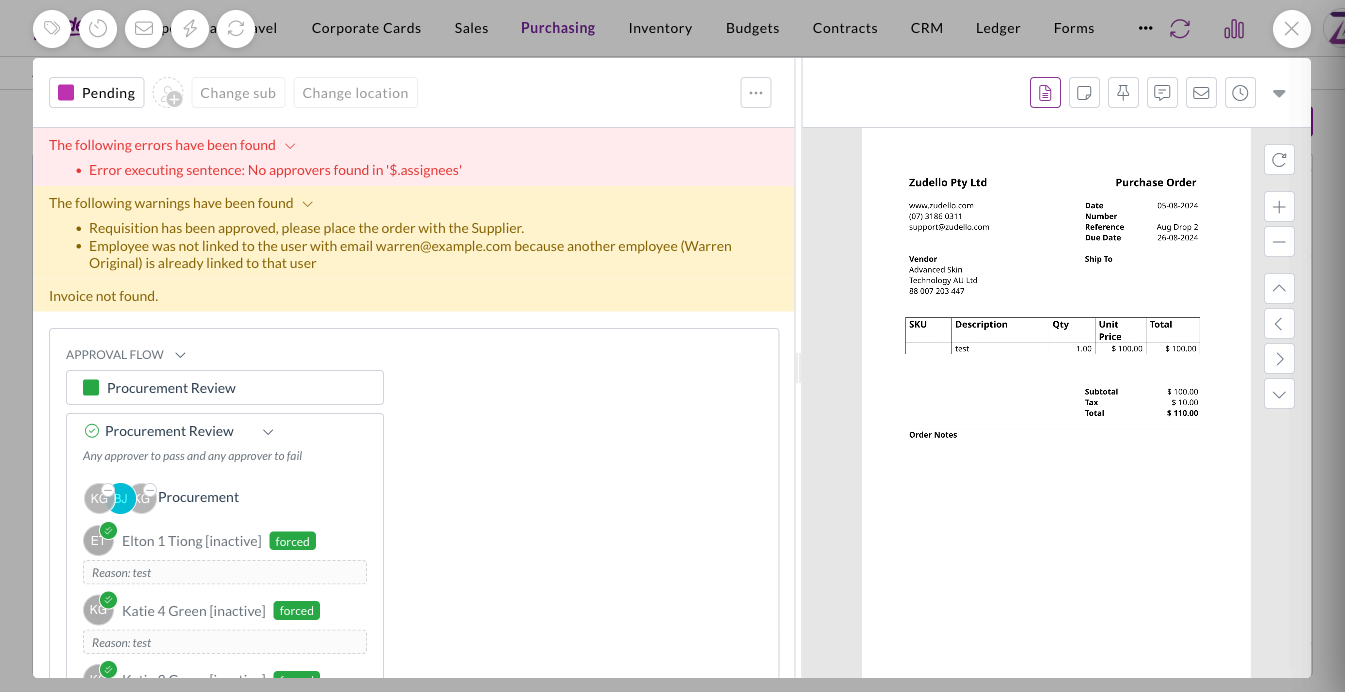
- Messages on a document are now split into red errors and amber warnings, so something that needs fixing is easy to tell apart from something you just need to know about.
Other improvements
- Whether a sales line item is in stock is now available in filters and exports.
Resolutions
We're constantly working to refine Zudello's functionality and address any issues as soon as possible. As part of this release, we've made the following resolutions:
- We've fixed an issue where expanding a lot of allocation details on one document could slow the page down or crash it. Editing line fields on documents with many allocations is also noticeably faster.
- We've fixed the pending transaction list for corporate cards, where a cardholder with a large number of transactions saw the same ones repeat while scrolling, with some transactions unreachable.
- We've fixed an issue where a reverted expense still showed as matched in payment searches.
- We've fixed the sentence value editor in automations, which closed before you'd finished when you picked a field from a dropdown.
- We've fixed auto-coding rules that failed when a document referenced both a supplier and a customer on the same line.
- We've fixed employee and supplier syncing so that a record arriving with an email address that's already in use raises a warning on the document instead of failing the whole batch.
- We've fixed an issue where a ZIP archive containing a very large number of documents could time out while being processed.
- We've fixed an issue where a document with outstanding validation errors could still be submitted through the API.
- We've fixed an issue where deleting a document that had allocations, or deleting a task, could fail.
- We've fixed cached supplier ABN details so they refresh rather than going stale.
- We've fixed an issue where some invoices were extracted as statements.
- We've fixed Document Studio so you can upload an existing document from another version or workflow.
- We've fixed an issue where auto-coding rules couldn't be chosen as a resource in visibility data permissions.
- We've fixed the JSON side panels, which didn't load on large documents.
- Contract lines can now carry custom fields, set up in Field Manager the same way as any other record.
Have an idea?
Do you have an idea for a new feature or how we can improve our current features? Let us know at support@zudello.com.
Your ideas and feedback are an important part of our product planning process to make Zudello better for everyone.