10 posts tagged with "Expenses"

Description for the expenses tag.

View All Tags

Release notes edition 3.7.10

Release date: Wednesday 5 August 2026
Version: v3

Here's the latest summary of what's new and improved in Zudello, as well as what we resolved in the latest release.

In this release:

  • Clearer delivery address validation
  • A run order you can actually read in Document Studio
  • New weight and lead time checks on sales orders
  • Filtering, expenses, and document viewer improvements and more

Looking for something? Browse by tag to find release notes on a specific feature.

New and improved

Delivery addresses

Zudello checks the delivery address on your documents against Google Address Validation, so orders go to an address that actually exists and can be delivered to. We've rebuilt the delivery address section to make it much clearer where an address stands and what to do about it.

One card, one answer

  • The delivery address now shows its result in a single card, so you can see at a glance whether it's matched to an address on file, verified, corrected, or couldn't be verified.
  • The outcome also appears in the Potential issues found bar, alongside everything else that needs your attention.

A delivery address card showing a Matched to supplier result

Suggested corrections

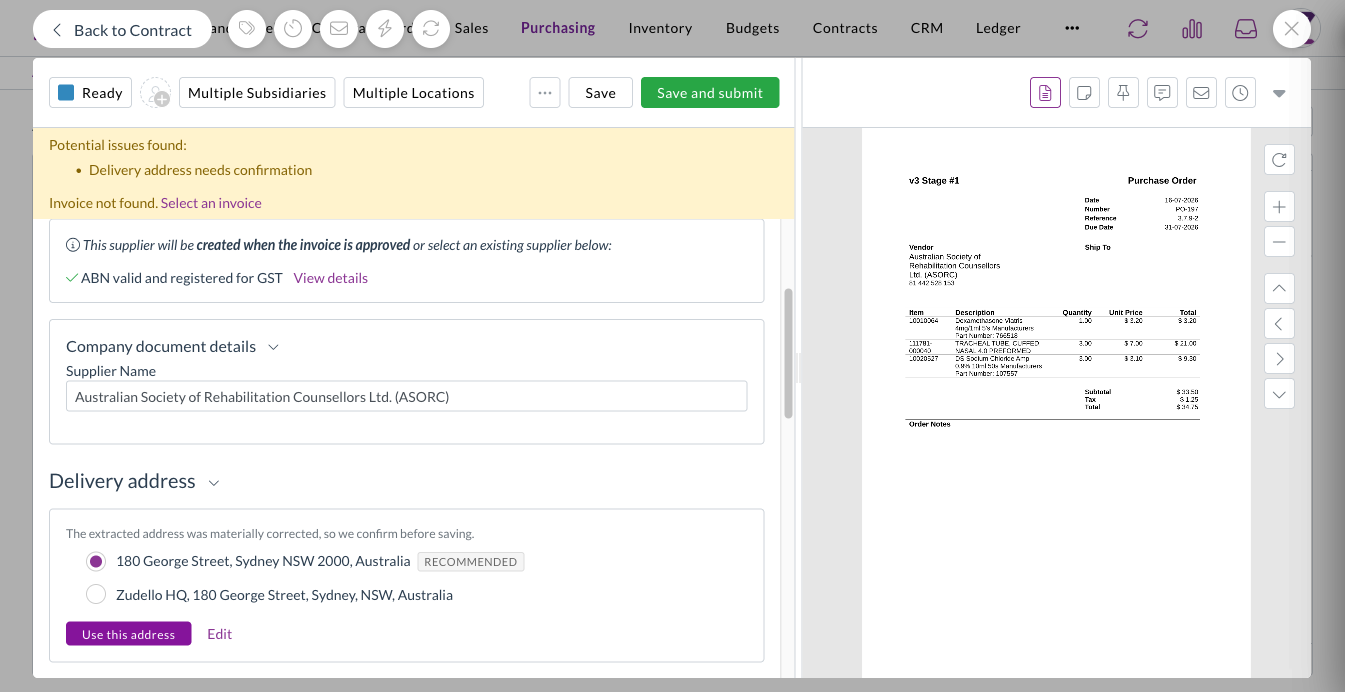
  • When verification returns a meaningfully different address, Zudello shows you the suggestion so you can accept it or keep your own.
  • Minor spelling corrections are applied without interrupting you, so you're only asked about changes that matter.

A suggested correction to a delivery address

You decide what blocks a submit

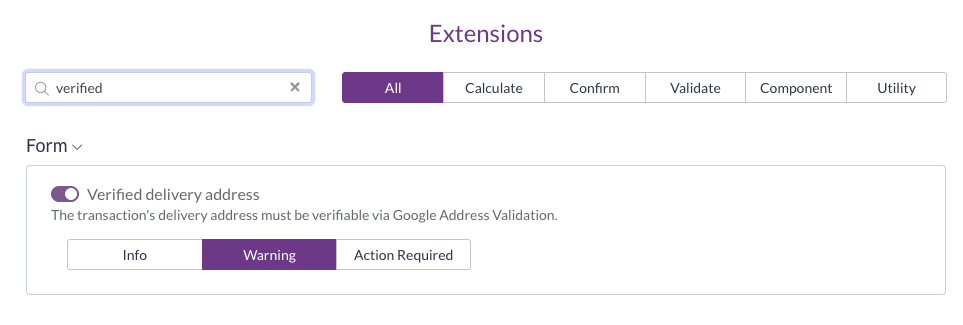
  • An address that couldn't be verified now follows the extension level you've configured, rather than always blocking the document.
  • Set it to Action required and it blocks the submit, set it to Warning and it appears as a warning, and set it to Info and it stays as a note on the section.

The Verified delivery address extension set to Info, Warning, or Action Required

Saved addresses in one place

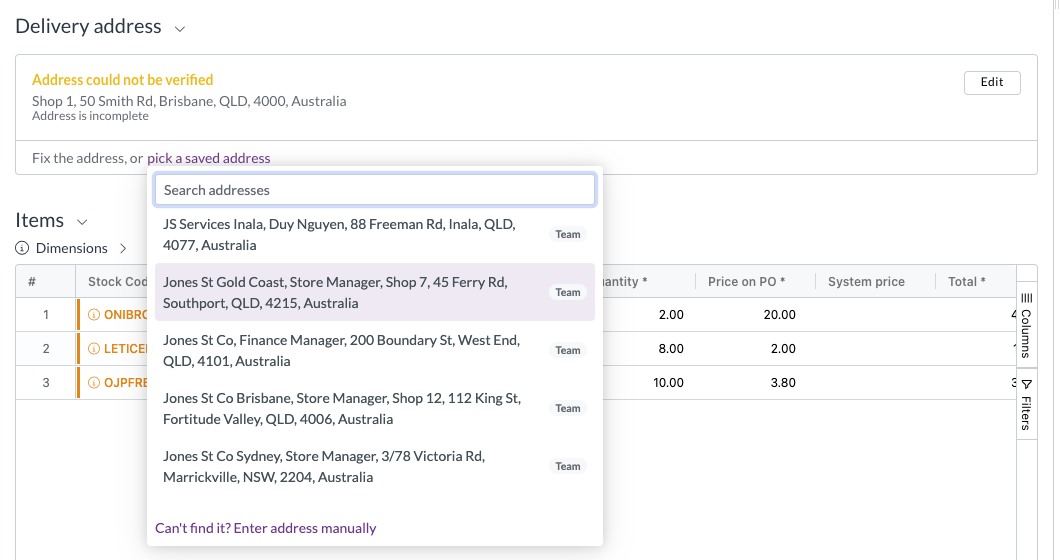
  • The address search now offers the contact's saved addresses and your team's own addresses together in a single dropdown.
  • Picking one of your team's addresses links the document to that address record, so details stored against it (a notification email address, for example) are available once the document is complete.

The saved address picker opened from a delivery address that could not be verified

Document Studio

Document Studio lets you fine-tune how Zudello extracts information from your documents. Workflows run in order until one matches the document, but a workflow with no document selection question always matches, which means nothing after it ever runs. That was hard to see until now.

Creating a workflow

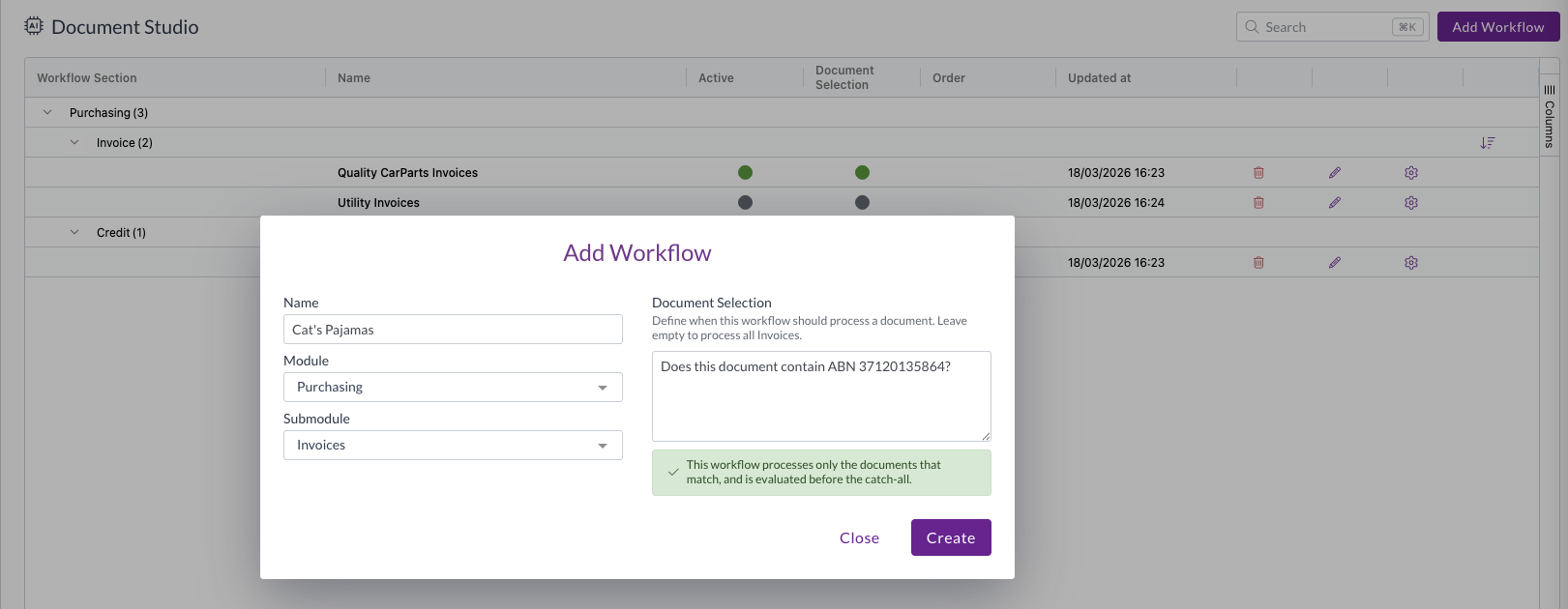
  • We've made document selection more prominent when you create a workflow, so it's clear up front whether the workflow will run only on the documents that match, or become the catch-all for its section.
  • Forking a workflow now warns you about unsaved document selection changes and offers to carry them into the fork, so you don't lose them.

The Add Workflow screen with the Document Selection question alongside the name, module, and submodule

Seeing and setting the run order

  • A new Document Selection column shows at a glance which workflows have a document selection question and which don't.
  • A workflow that can never run is flagged on the Order column with an icon, a highlighted row, and a tooltip explaining why.
  • A columns sidebar has been added and the table now sizes to fit, so it no longer scrolls sideways.
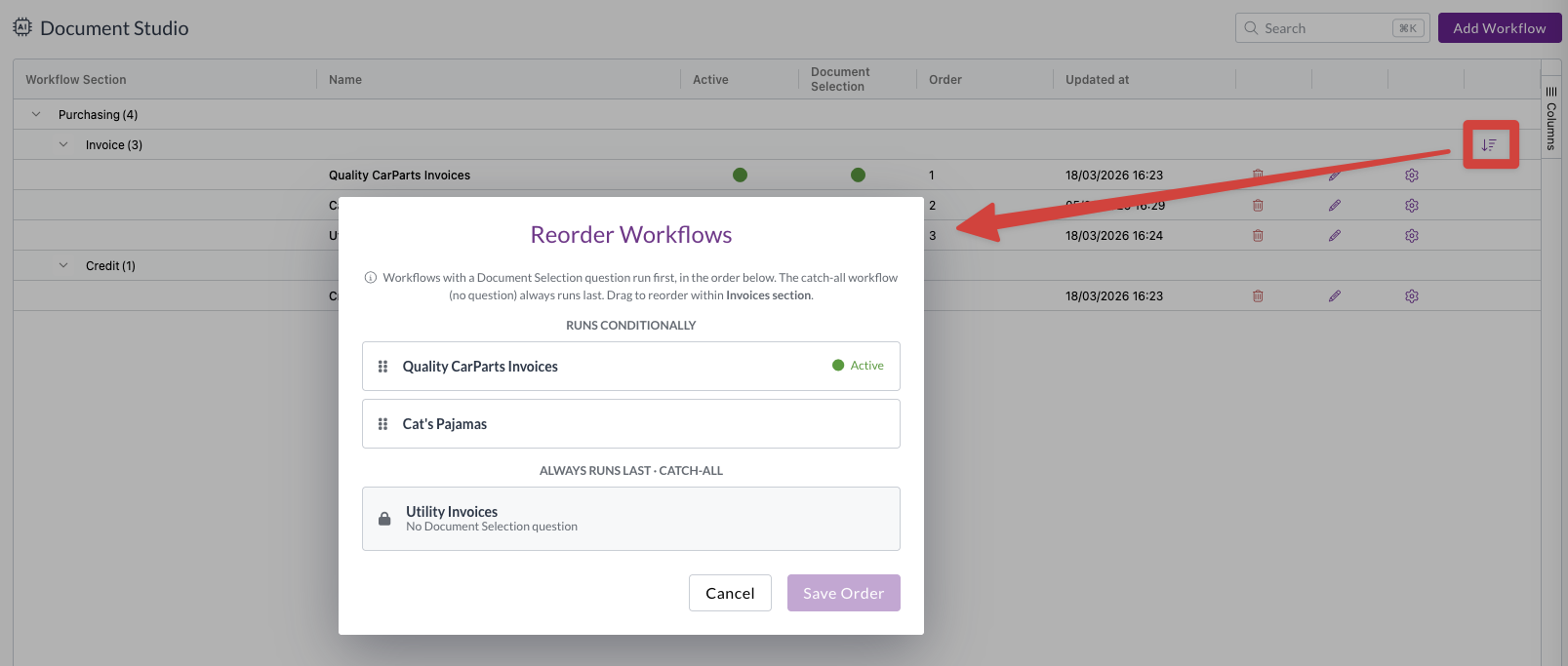
  • The reorder screen now separates the workflows that run conditionally from the ones that always run last, so you can drag the conditional workflows into order and see the catch-all group for what it is.
  • You can order the catch-all group too, so the workflow that should win can be moved to the top. Every other workflow that always runs is flagged, and Zudello warns you when a section has more than one.
  • Removing a workflow's document selection question now moves it to the bottom of its section automatically.

The reorder button on the workflow grid, opening the Reorder Workflows screen split into a runs conditionally group and an always runs last group

Filters

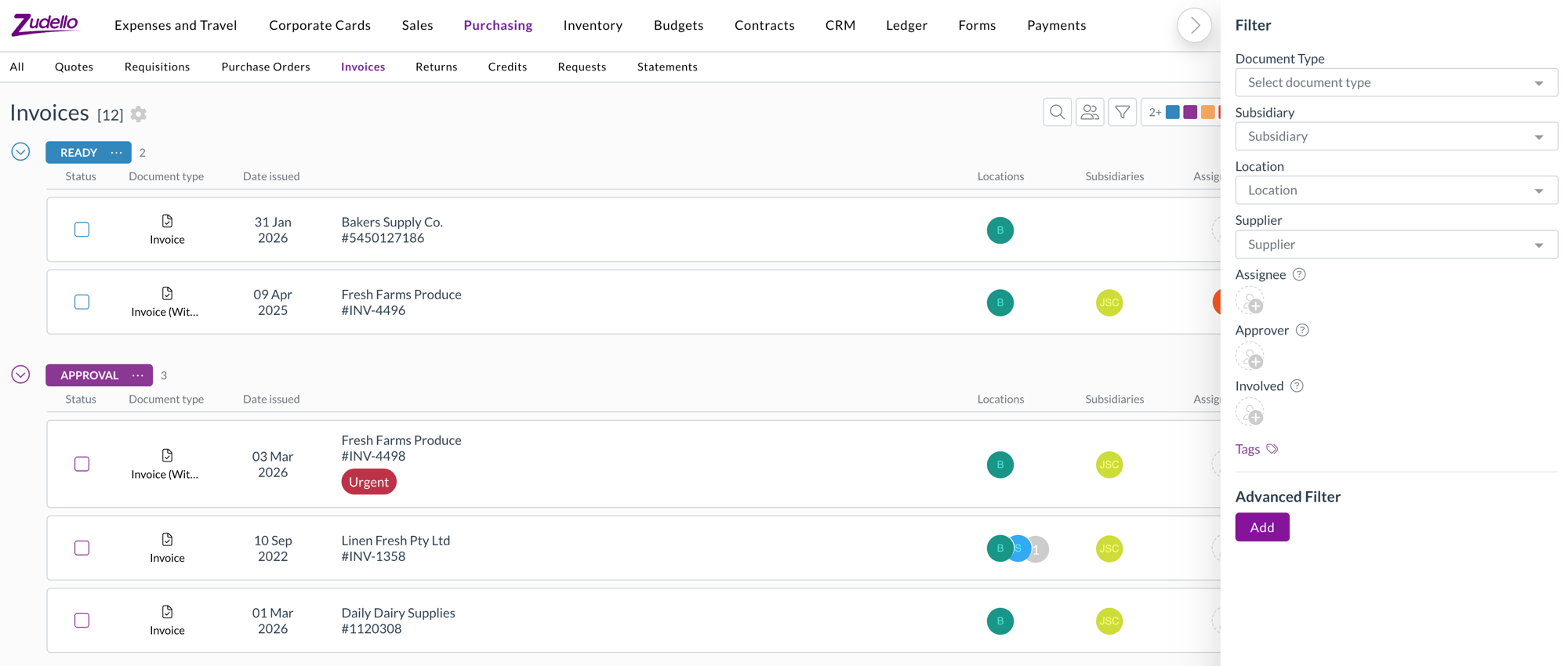
The Assigned to filter did several jobs at once. It's now split into three, so you can filter on exactly the relationship you mean.

  • Assignee filters strictly on who the document is assigned to.
  • Approver filters on who is approving it.
  • Involved reproduces the previous Assigned to behaviour, covering the assignee, current and past approvers, and the employee.
  • If you have saved views built on the old Assigned to filter, Involved is the equivalent.
  • Filter values now load when you open the dropdown rather than up front, and a filter with no values to show is hidden entirely.

The Assignee, Approver, and Involved filters in the filter panel

Expenses

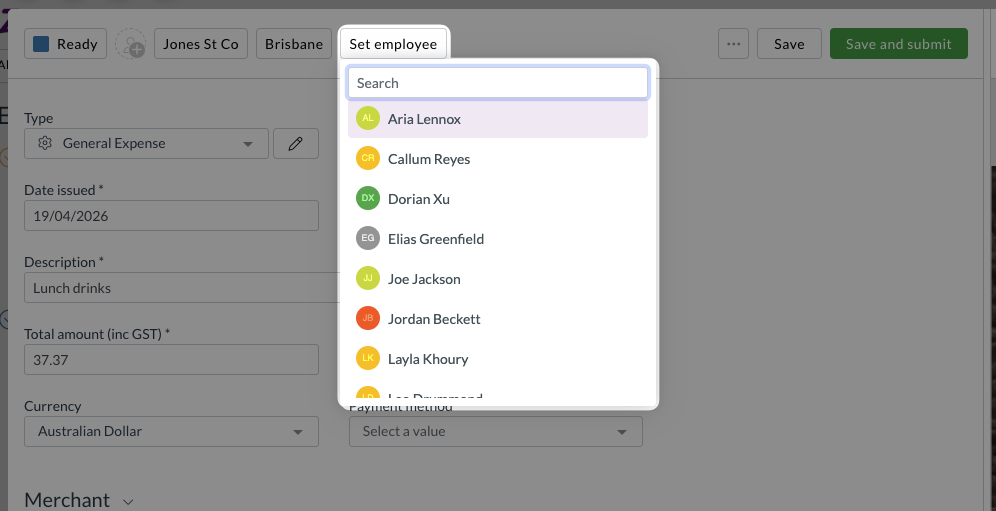
  • Employee is now available as a line-level dimension on expense forms, alongside location and subsidiary. Choose an employee in the header to apply it to every line, or set it line by line.
  • Location on expense lines is now available in automations, filters, and exports.

Sales orders

Zudello can validate a sales order against your item details before it's placed. We've added two new checks.

Order weight

  • Items can now carry a unit weight, and each line calculates its weight from that unit weight and the quantity, giving a total weight for the order.
  • The order is validated against a configurable minimum and maximum pallet weight.
  • An item with no unit weight is treated as zero and raises a flag naming the item, rather than passing silently.

Lead times

  • Supplier, production, and seasonal lead times on an item now produce an earliest achievable date for each line, calculated in business days.
  • The requested delivery date is validated against the latest achievable date across the order's lines.

Document viewer

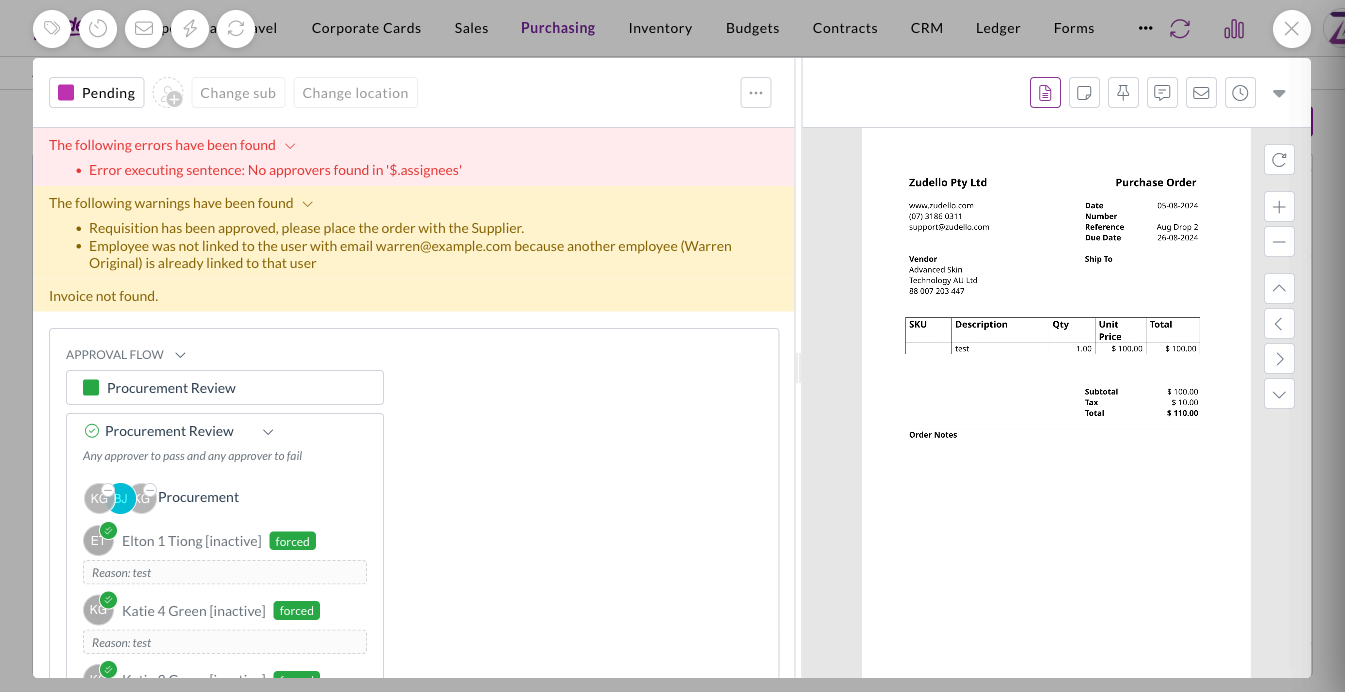
  • Messages on a document are now split into red errors and amber warnings, so something that needs fixing is easy to tell apart from something you just need to know about.

Errors and warnings shown separately on a document

Other improvements

  • Whether a sales line item is in stock is now available in filters and exports.

Resolutions

We're constantly working to refine Zudello's functionality and address any issues as soon as possible. As part of this release, we've made the following resolutions:

  • We've fixed an issue where expanding a lot of allocation details on one document could slow the page down or crash it. Editing line fields on documents with many allocations is also noticeably faster.
  • We've fixed the pending transaction list for corporate cards, where a cardholder with a large number of transactions saw the same ones repeat while scrolling, with some transactions unreachable.
  • We've fixed an issue where a reverted expense still showed as matched in payment searches.
  • We've fixed the sentence value editor in automations, which closed before you'd finished when you picked a field from a dropdown.
  • We've fixed auto-coding rules that failed when a document referenced both a supplier and a customer on the same line.
  • We've fixed employee and supplier syncing so that a record arriving with an email address that's already in use raises a warning on the document instead of failing the whole batch.
  • We've fixed an issue where a ZIP archive containing a very large number of documents could time out while being processed.
  • We've fixed an issue where a document with outstanding validation errors could still be submitted through the API.
  • We've fixed an issue where deleting a document that had allocations, or deleting a task, could fail.
  • We've fixed cached supplier ABN details so they refresh rather than going stale.
  • We've fixed an issue where some invoices were extracted as statements.
  • We've fixed Document Studio so you can upload an existing document from another version or workflow.
  • We've fixed an issue where auto-coding rules couldn't be chosen as a resource in visibility data permissions.
  • We've fixed the JSON side panels, which didn't load on large documents.
  • Contract lines can now carry custom fields, set up in Field Manager the same way as any other record.

Have an idea?

Do you have an idea for a new feature or how we can improve our current features? Let us know at support@zudello.com.

Your ideas and feedback are an important part of our product planning process to make Zudello better for everyone.

Release notes edition 3.7.8

Release date: Monday 8 June 2026
Version: v3

Here's the latest summary of what's new and improved in Zudello, as well as what we resolved in the latest release.

In this release:

  • Smarter approval routing for expenses
  • Improved address validation and matching
  • Smoother supplier and customer contact management
  • Flexible datasets and more

Looking for something? Browse by tag to find release notes on a specific feature.

New and improved

Approval routing for expenses

Zudello's approval workflows route expense claims and reimbursement requests through the right people before payment is made. We've improved how approvals are routed when expenses are raised on behalf of someone else.

Approvals now follow the employee, not the submitter

  • When an expense or claim is raised on behalf of another employee, the approval now routes through that employee's manager, not the submitter's.
  • This ensures approvals always reach the right people, regardless of who created the record.

Suppliers and customer contacts

Zudello's CRM module gives you a central place to manage your suppliers, customers, and the people associated with them. We've made it easier to navigate and manage the connections between companies and individual contacts.

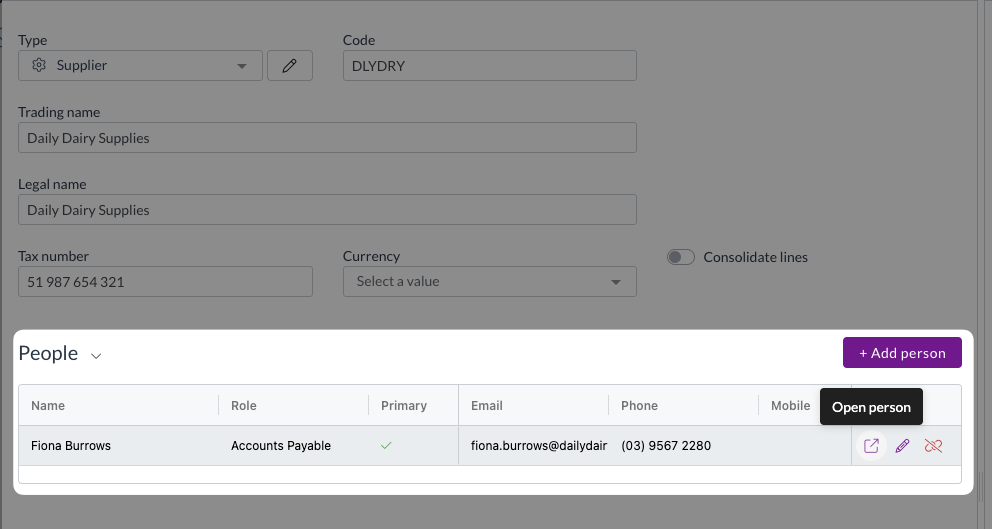
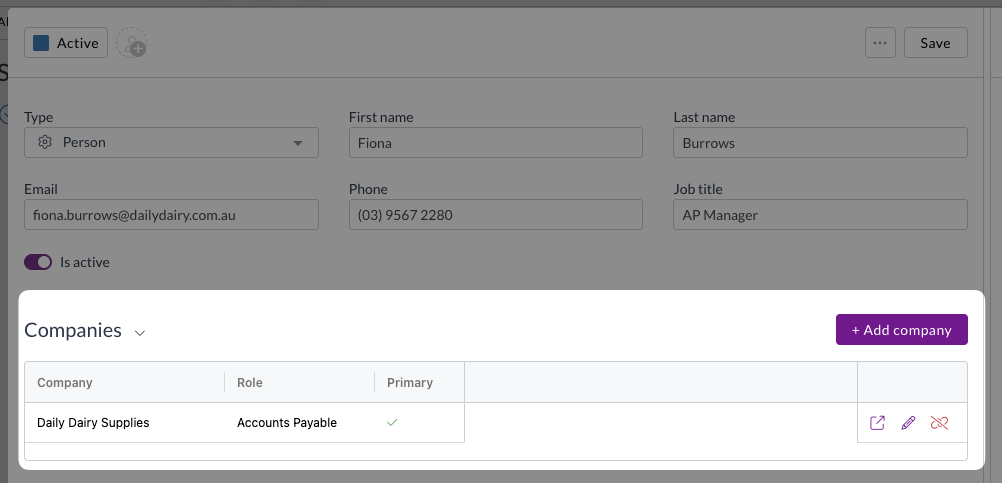
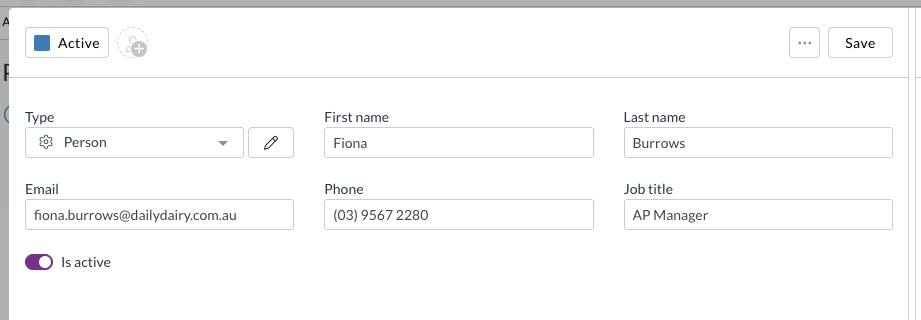
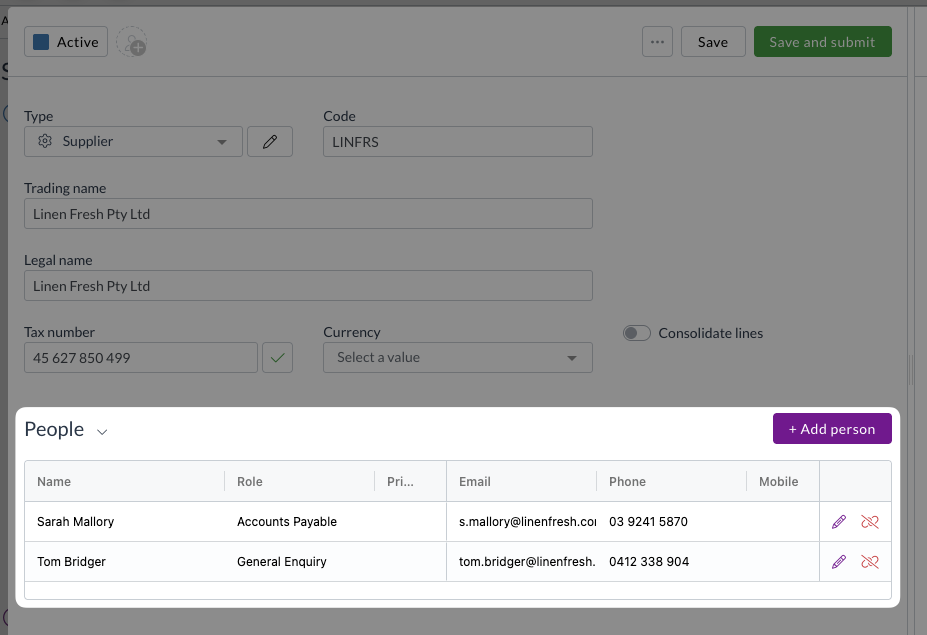
  • You can now open a linked person's record directly from a supplier or customer's people grid to view and edit their details without leaving the page.

  • A new reverse table on the person record shows all the suppliers and customers that person is linked to, with options to add, edit, unlink, or open each one.

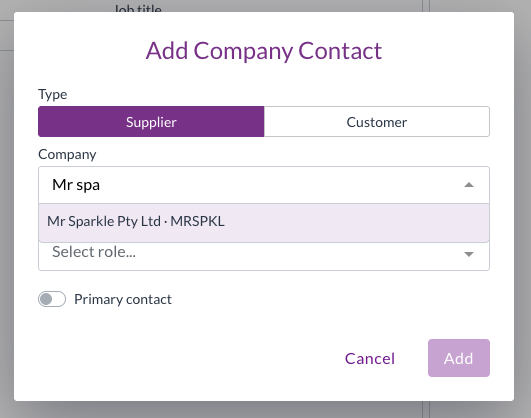
  • When adding a company to a People record, you can now explicitly select whether you're adding a supplier or a customer, so the search only returns the right type of record.

Contracts

Contracts let you store and manage your supplier and customer agreements in Zudello, with automatic extraction to pull key details directly from your documents. We've expanded what Zudello can do with contracts, making them easier to code, enrich, and control.

Document coding for contracts

  • You can now use document coding rules and the Apply trained rules action on contract documents, the same way you do for other document types.
  • Zudello automatically resolves the linked contact for contracts, checking for a set supplier or customer, and defaulting to the supplier if both are available.
  • Contract-writable fields are now available in the target field drop-down when configuring coding rules.

Data permissions for contracts

  • Contracts are now available in the data permissions picker, so you can control access to contract records using the same dimension-based permissions you use for other models.

Currencies and FX

Zudello converts foreign currency amounts into your base currency so that transactions, budgets, and approvals always reflect accurate local totals. We've expanded the range of currencies supported by our hourly exchange rate updates.

  • Singapore Dollar (SGD) and Hong Kong Dollar (HKD) are now included in Zudello's hourly exchange rate updates.
  • Documents priced in SGD or HKD will now convert to your local currency across transactions, budgets, and approvals.

Improved address validation and matching

Zudello validates and normalises addresses on your supplier, customer, and transaction records to keep your data clean and consistent. We've made significant improvements to how addresses are validated and matched across the platform.

  • Address validation now uses Google's Address Validation API, which provides more accurate normalisation and assigns a unique place ID to each address on save.

  • Delivery and billing addresses on transactions are now matched by place ID rather than by geographic distance, making matching faster and more reliable.
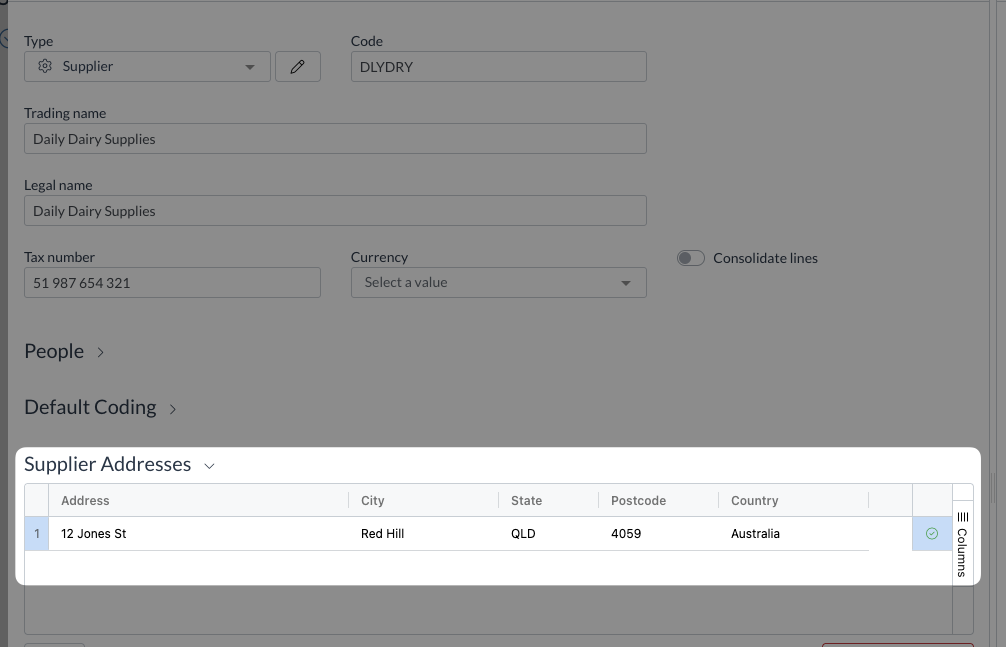
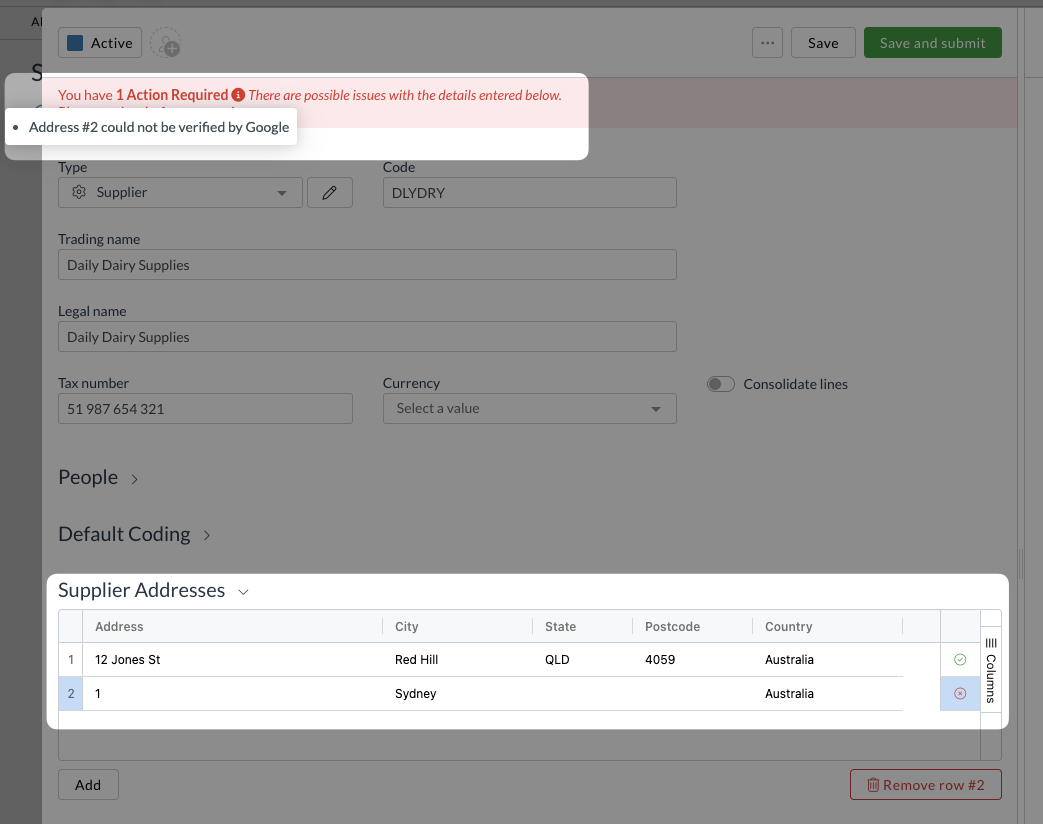
  • Validation errors are now shown per address, so you can see exactly which address needs attention.

  • Places Autocomplete can be turned on for contact address forms, making it faster to enter and validate addresses.

Datasets

Datasets let you store and manage structured data within Zudello, such as approval limits or custom dimensions used for coding documents. We've added two improvements to make datasets more powerful and easier to configure.

Embed datasets as editable tables in resource cards

  • You can now embed a filtered, editable dataset directly as a section inside a resource or transaction card.
  • The dataset acts as the source of truth for that data, avoiding the performance issues and stale data that can come from storing large amounts of information directly on a record.

Ignore dimension dependencies when configuring datasets

  • A new setting lets you ignore dimension dependency filters when configuring datasets and delegation of authority settings.
  • This prevents valid values from being incorrectly filtered out during configuration. For example, a location being hidden because of an unrelated supplier or currency filter.
  • Dependency filters continue to apply on form fields where they're genuinely needed.

Resolutions

We're constantly working to refine Zudello's functionality and address any issues as soon as possible. As part of this release, we've made the following resolutions:

  • We've fixed an issue where inactive inventory items could be added to transactions by typing a SKU directly, even though they were correctly excluded from the drop-down.
  • We've fixed an issue where a $0 tax value was being stored as blank rather than zero on some documents.
  • We've fixed an issue where contract documents were not populating field data correctly despite the values being present.
  • We've fixed an issue where selecting a default document type on a supplier record would appear to save but didn't.
  • We've fixed a Document Studio issue where newly created workflows were not added to the run order, causing unpredictable extraction behaviour.
  • We've fixed an issue where two near-simultaneous API calls for the same record could overwrite each other's data and return incorrect results.
  • We've fixed an issue where ABN lookup was reflecting ABN validity instead of GST registration status. The lookup now correctly shows GST registration status.
  • We've fixed an issue where the related expenses section on expense claims appeared blank when opened from a direct approval link.
  • We've fixed an error that occurred when sorting by the approver column in table view.

Have an idea?

Do you have an idea for a new feature or how we can improve our current features? Let us know at support@zudello.com.

Your ideas and feedback are an important part of our product planning process to make Zudello better for everyone.

Release notes edition 3.7.7

Release date: Thursday 21 May 2026
Version: v3

Here's the latest summary of what's new and improved in Zudello, as well as what we resolved in the latest release.

In this release:

  • Simpler corporate card reconciliation
  • Faster dataset range selection
  • Interface improvements and more

Looking for something? Browse by tag to find release notes on a specific feature.

New and improved

Corporate card reconciliation improvements

The Corporate Cards module helps you manage the full lifecycle of company card expenses, from capture through to reconciliation, approval, and payment. We've made several improvements to the reconciliation process.

More accurate partial reconciliation amounts

  • When reconciling a payment that covers only part of an expense, the reconciliation modal now defaults to the payment amount rather than the full expense total.
  • This prevents over-reconciliation when the selected payment is smaller than the matched expense.
  • When you enter a partial amount for reconciliation, the matched amount and status now reflect exactly what you've entered.
  • Adjustments, such as bank fees, are only applied automatically when you're fully matching one payment to one expense.

American Express card transaction references

  • Zudello now supports the card transaction reference format used by American Express, so your American Express transactions can be matched and reconciled correctly.

Dataset range selection

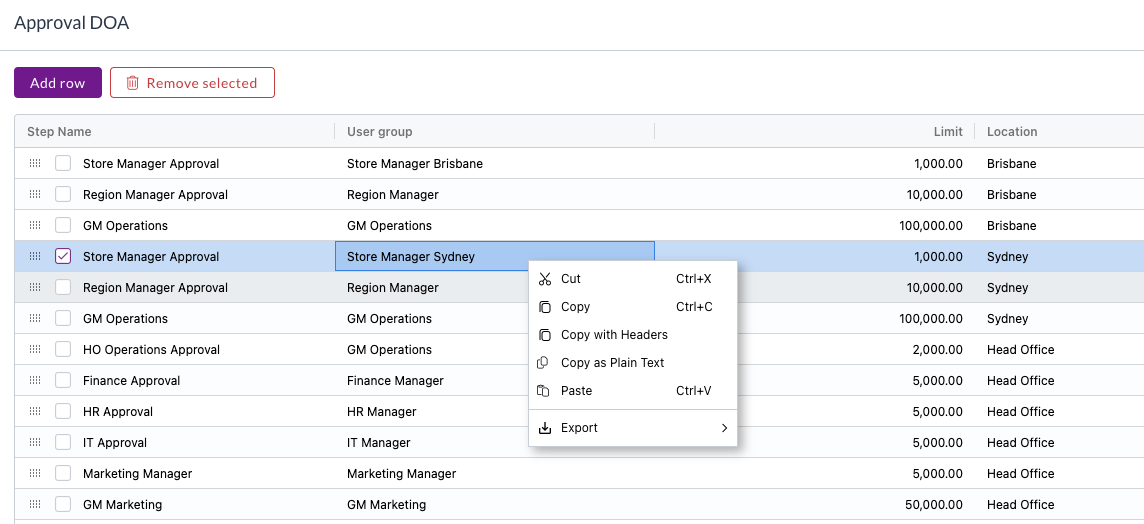
Datasets let you store and manage structured data within Zudello, like approval limits or custom dimensions used for coding documents. Previously, copying data out of a dataset would copy the entire row, making it time-consuming to manage rows in bulk.

We've added better range selection and clipboard support to dataset rows, making it faster and easier to manage your data:

  • Select a range of rows and copy, cut, or paste them using standard keyboard shortcuts.

  • Copy operates on the focused cell rather than the entire row, giving you more precise control over what you're copying.
  • You can also export selected rows directly from the dataset grid.
  • Paste is disabled when the dataset is not editable, preventing accidental changes.

Interface improvements

Dashboards

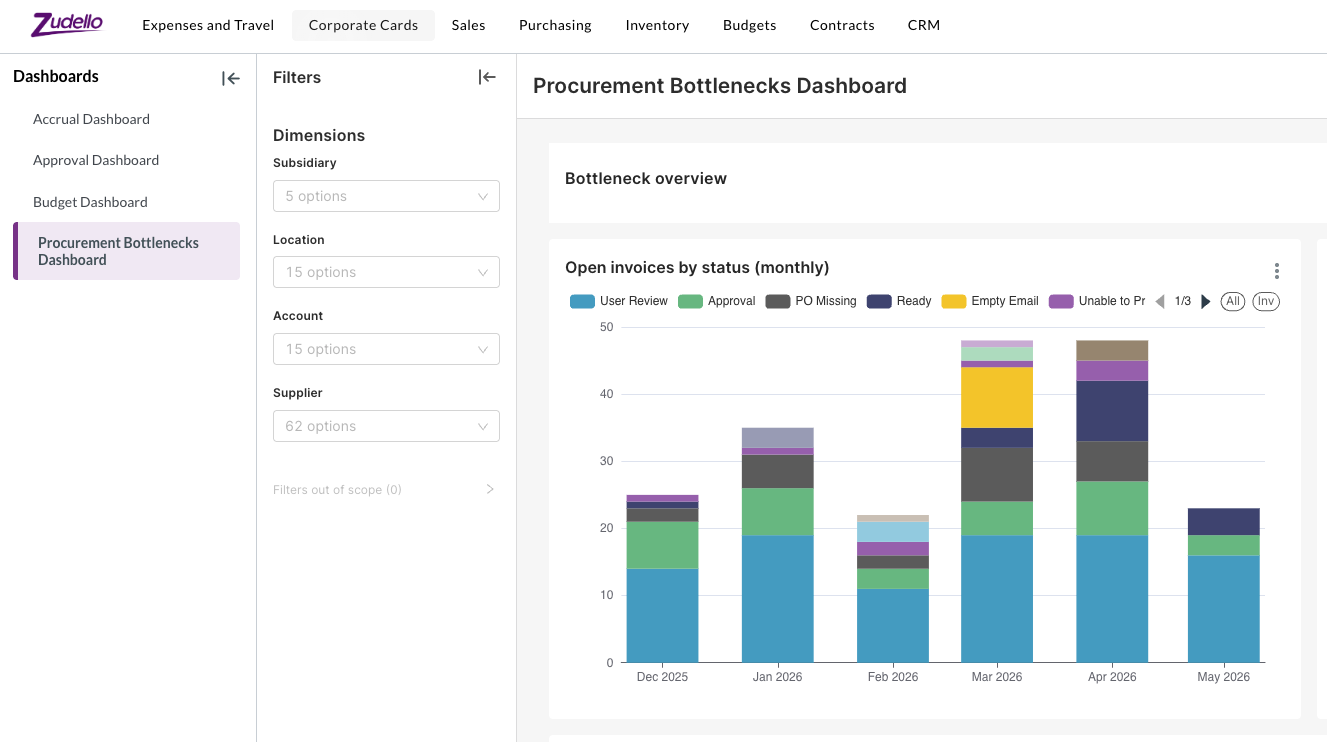
  • The procurement dashboard has been updated for easier review.
  • Dashboard report lists are now sorted alphabetically by default.

Document viewer improvements

  • Email body transactions now open in inbox view by default.
  • The map tab on mileage expenses is now hidden when the GeoMap section is not in use, keeping the interface clean for distance-only mileage forms.
  • Users can no longer select inactive items when entering SKUs on transaction lines. We now explicitly exclude any and all inactive, deleted, archived, or rejected items.

Resolutions

We're constantly working to refine Zudello functionality and ensure that we address any issues as soon as possible. As part of this release, we've made the following resolutions and improvements:

  • We've fixed an issue where some users were unable to add people to supplier records as contacts.
  • We've fixed an issue where some users were unable to manually upload sales orders.
  • We've fixed an issue where the document viewer on mobile could get stuck on a loading screen.
  • We've fixed an issue where write-backs to ledger and journal records could trigger re-extraction of the original document.
  • We've fixed an issue where the issue date extracted from a document could be set to a future date due to misread year context.

Have an idea?

Do you have an idea for a new feature or how we can improve our current features? Let us know at support@zudello.com.

Your ideas and feedback are an important part of our product planning process to make Zudello better for everyone.

Release notes edition 3.7.6

Release date: Monday 11 May 2026
Version: v3

Here's the latest summary of what's new and improved in Zudello, as well as what we resolved in the latest release.

In this release:

  • New People Submodule
  • Document Studio support for email body extraction testing
  • Three-way matching improvements and more

Looking for something? Browse by tag to find release notes on a specific feature.

New and improved

People submodule

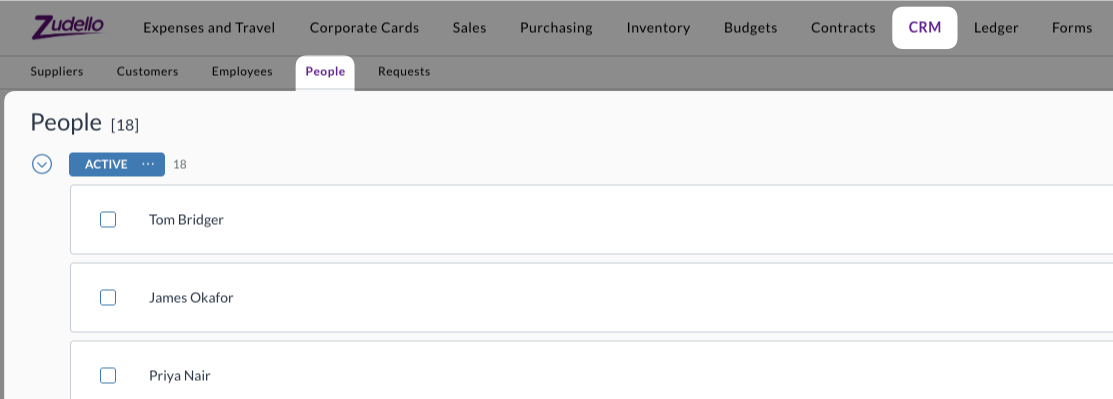
The new People submodule sits alongside Suppliers and Customers in the Relationships module, and provides a central place to record and manage contacts across your supplier and customer network. This means your team can record and access the contact information they need without needing to switch between systems.

  • A person represents a named individual associated with one or more suppliers or customers.

  • People are independent records that can be linked to multiple suppliers or customers, with a different contact role assigned at each.
    • For example, the same person can be recorded as the AP manager at one supplier and a general enquiry contact at another.
  • Contact roles are stored on the relationship between the person and the supplier or customer, so the person's record stays clean and reusable across your network.

Document Studio email body extraction testing

Document Studio lets you fine-tune how Zudello extracts information from your documents. You could already use Document Studio to adjust the extraction of email bodies, but there was no way to test your configuration before applying it.

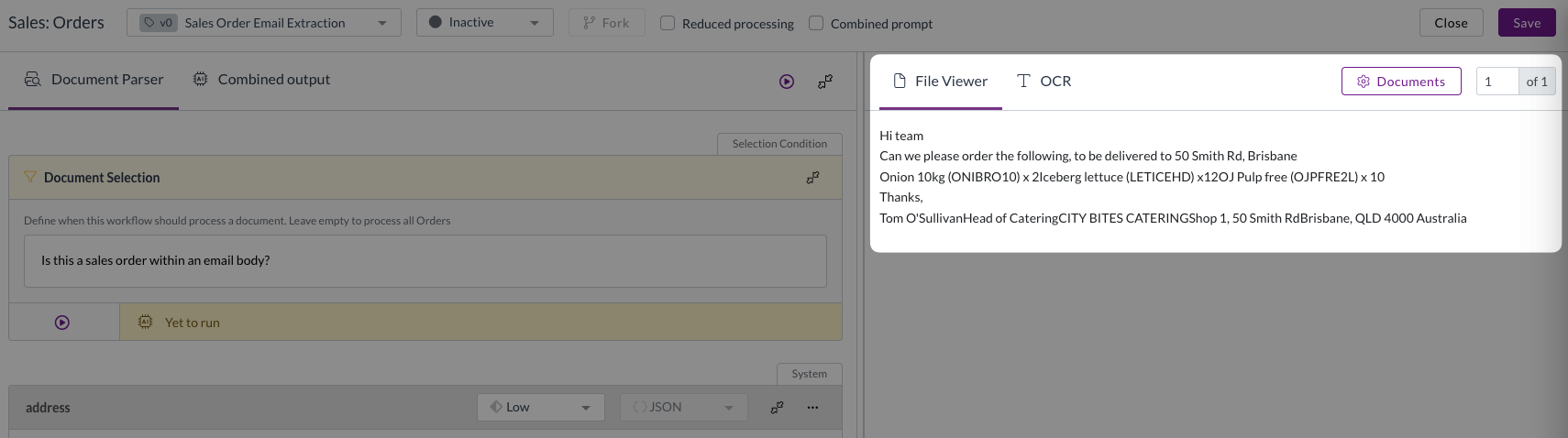
We have now added the ability to download an email body and test it within Document Studio.

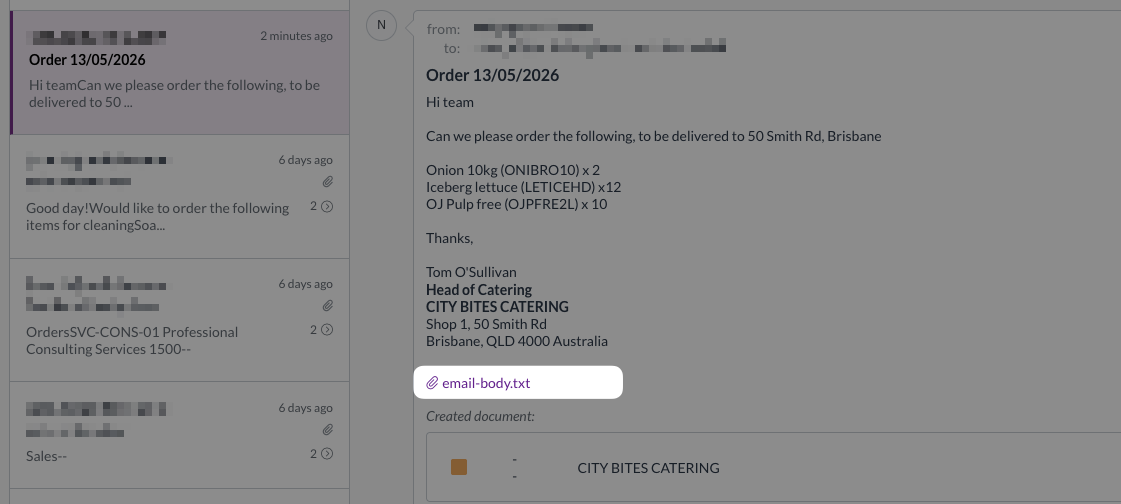
  • When an email is processed in Zudello, the raw email body is now saved as a text file and attached to the email in the inbox.

  • You can download this file directly from the inbox by clicking the email-body.txt attachment on the original email.
  • The downloaded file can then be uploaded into Document Studio to test and refine your extraction configuration before applying any changes.

This puts more power in your teams hands, ensuring you can customise the extraction of any documents you receive. For more information on using Document Studio, see our Document Studio guide.

Three-way matching improvements

Three-way matching in Zudello links your invoices, purchase orders, and goods receipts to ensure you only pay for what you ordered and received. We've made an improvement to how currency changes are handled during matching.

Accurate exchange rates when changing currency

  • Previously, changing the currency on a transaction could result in the original exchange rate being retained, causing incorrect local currency totals and throwing validation errors that blocked the document from progressing.
  • The exchange rate is now refreshed automatically whenever the currency on a transaction is changed, and allocation values are updated accordingly. This keeps variance calculations and purchase order allocation percentages accurate, and ensures you can continue processing the document without delay.

Other improvements

  • Additional support for related attachments
    • Related attachments now support drag-and-drop upload of .msg and .eml email files, ensuring you can upload a greater variety of supporting documentation.
  • Interface improvement for Task approvals
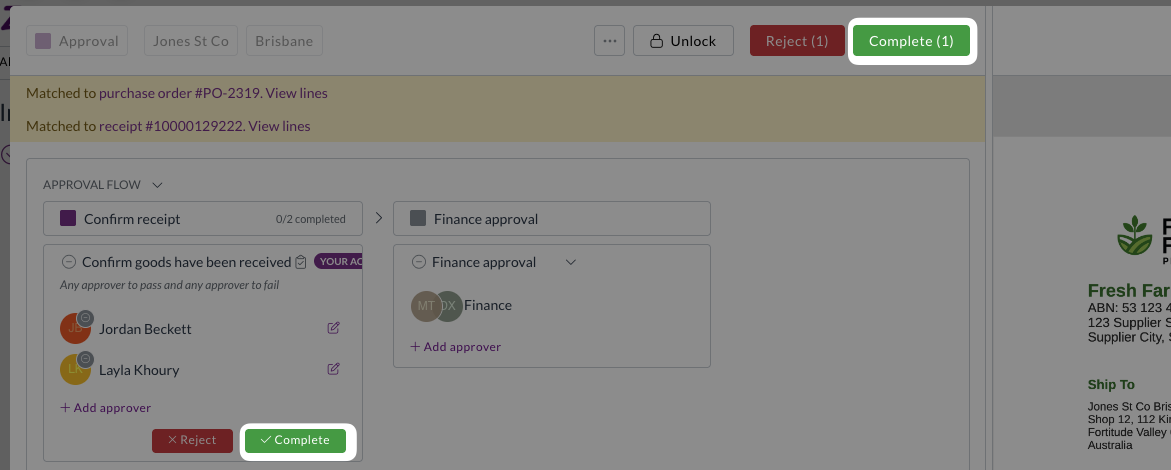
    • The task action button has been renamed from Approve to Complete for consistency with how tasks work.

  • Expenses performance improvement
    • We've improved how expenses are processed for teams that don't use expense consolidation.
    • Zudello now skips unnecessary steps during employee and expense lookups, resulting in faster processing for teams that don't require expense consolidation.
  • Reliability improvements
    • We've improved inbound email reliability, including better handling of email bounces or temporary outages.

Resolutions

We're constantly working to refine Zudello functionality and ensure that we address any issues as soon as possible. As part of this release, we've made the following resolutions and improvements:

  • We've fixed an issue where email images, logos, and signatures were not displaying correctly in inboxes.
  • We've fixed an issue where the exchange rate on expenses only refreshed after the first currency change. The rate now refreshes correctly on every currency change.

Have an idea?

Do you have an idea for a new feature or how we can improve our current features? Let us know at support@zudello.com.

Your ideas and feedback are an important part of our product planning process to make Zudello better for everyone.

Release notes edition 3.7.5

Release date: Thursday 23 April 2026
Version: v3

Here's the latest summary of what's new and improved in Zudello, as well as what we resolved in the latest release.

In this release:

  • Task-level approvals
  • Support for additional mileage units
  • Three-way matching improvements and more

Looking for something? Browse by tag to find release notes on a specific feature.

New and improved

Task-level approvals

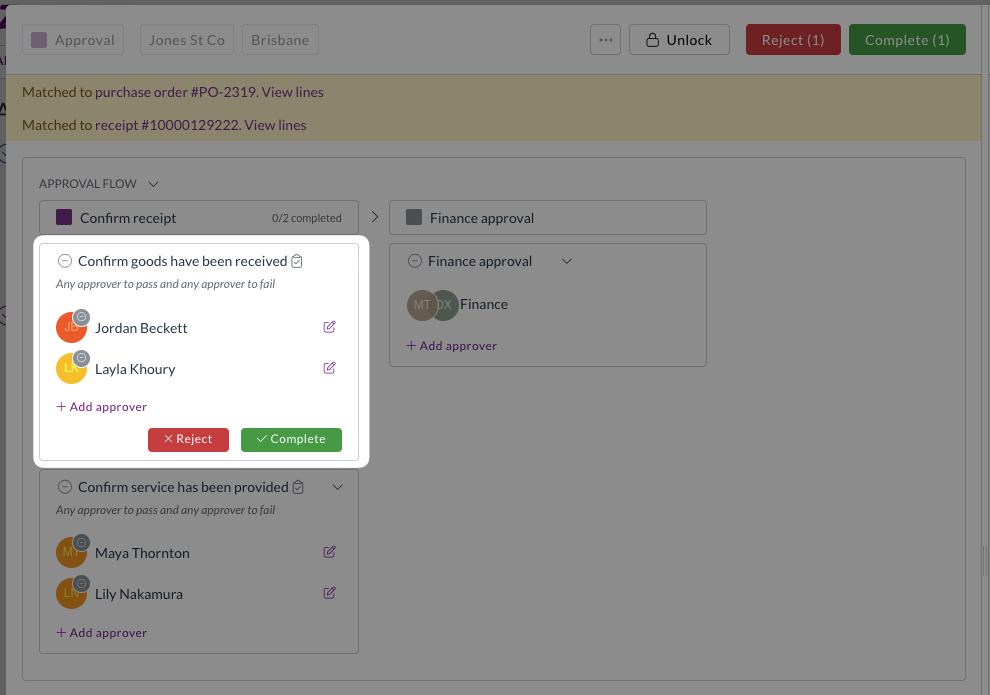
Zudello's approval workflows let you route documents through one or more milestones, each requiring sign-off before a document can progress. We've now introduced task approvals, a new type of approval milestone that give you more granular control over how documents are reviewed and confirmed.

Task approval milestones

  • Standard approval milestones apply to the entire document, meaning an approver signs off on all line items at once. Task approvals work differently; each task within the milestone can be scoped to specific lines, so approvers can review and confirmonly the items for which they are responsible.

  • This is particularly useful when different people need to confirm different parts of a document, such as confirming that goods or services on specific lines have been received.
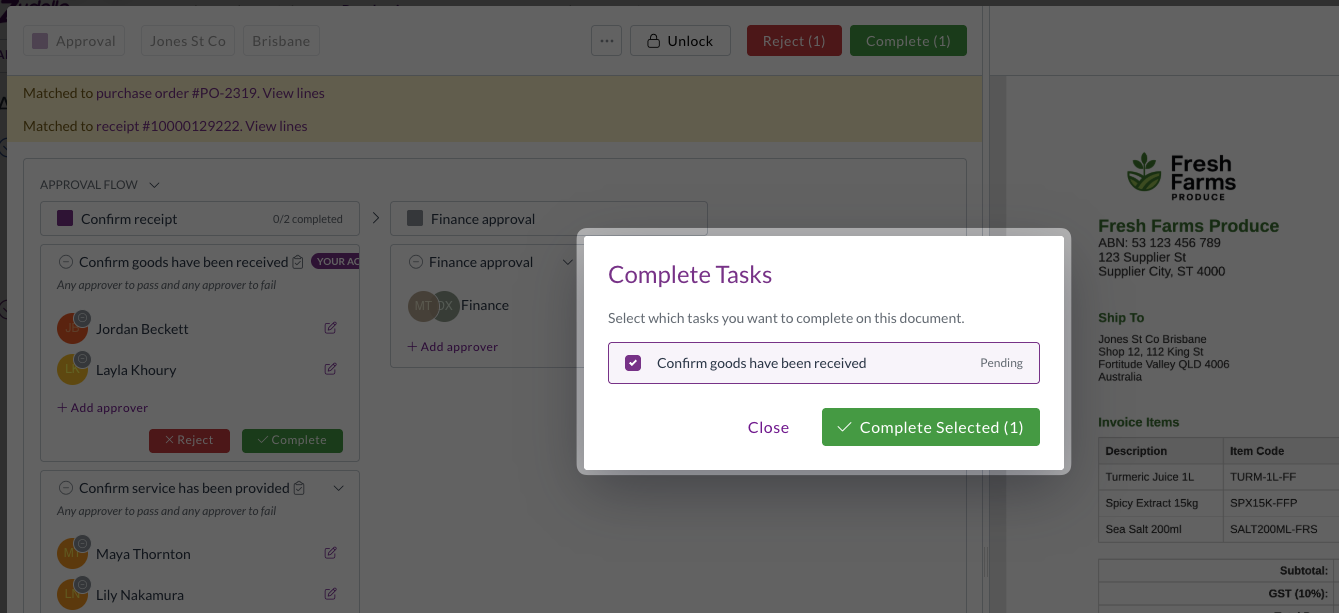
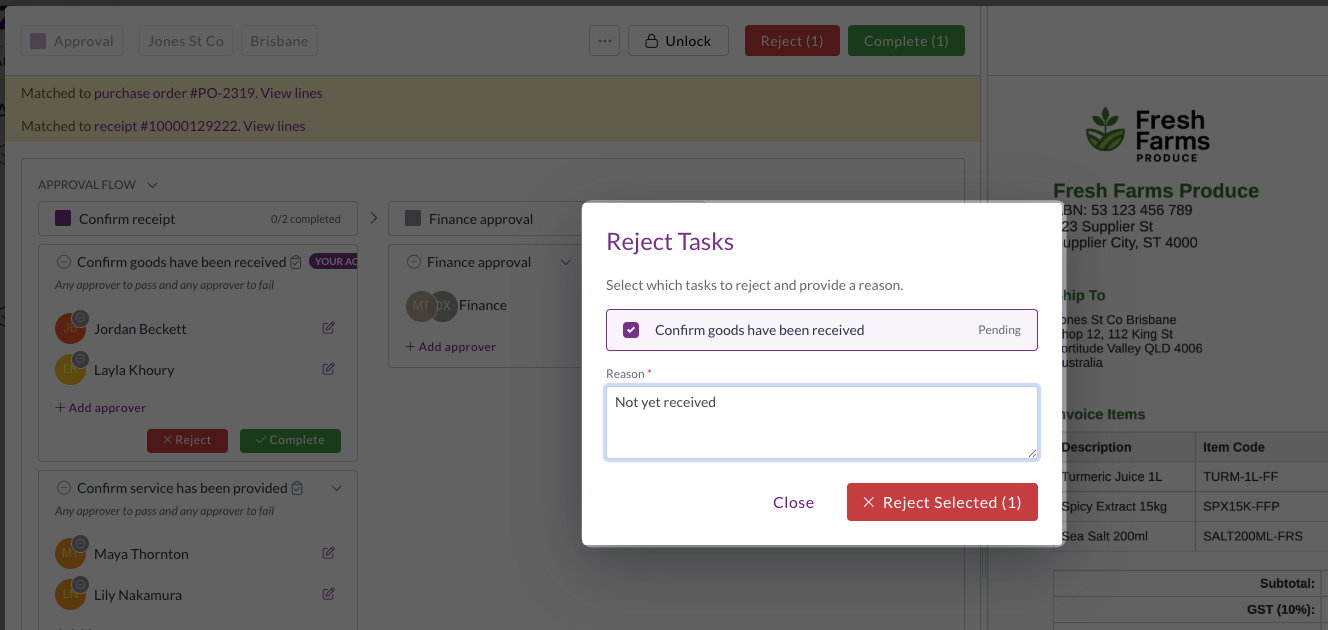
  • When completing or rejecting a task, approvers can select which tasks they are actioning, keeping the approval process clear and transparent.

  • If any task is rejected, the entire milestone fails. All tasks must be completed for the milestone to pass.
Note

Approval milestones can contain either tasks or steps, but not both.

Expenses and mileage improvements

The expenses module helps you capture, submit, and approve employee expenses, including mileage claims. We've made several improvements to reduce manual effort and improve accuracy.

  • Mileage unit support
    • Mileage reimbursements can now be configured in either kilometres or miles.
    • The selected unit flows through to the Maps API calculation, unit conversion, and line totals, so reimbursement amounts are always accurate regardless of which unit your team uses.
    • The line quantity now matches the unit on the mileage rate, and the correct unit is applied even when rates change mid-draft or across multi-leg routes.
  • Employee field moved to transaction header
    • The employee field on expense transactions has moved from the expense line to the transaction header, alongside the assignee field.
    • This reduces repetitive data entry when submitting expenses with multiple lines.

  • Default split for expenses with no supplier splits
    • Expenses now receive a default 100% single-line split when no supplier splits are configured.
    • This means validation passes automatically without requiring manual intervention.

Three-way matching improvements

Three-way matching in Zudello links your invoices, purchase orders, and goods receipts to ensure you only pay for what you ordered and received. We've made an improvement to how receipt allocations are handled to keep your matching accurate.

Receipt allocations constrained to matched purchase order lines

  • Invoice-receipt allocations are now always inferred through the matched purchase order, rather than being matched directly between invoices and goods receipts.
  • This eliminates cross-line splits that could cause matching issues, and keeps your three-way matching clean and consistent.
  • This change applies automatically for teams using three-way matching. Teams that don't use three-way matching are not affected.

Other improvements

Framework upgrade

  • We've upgraded the underlying framework that powers the Zudello platform, improving overall stability, performance, and compatibility with modern browsers.

Interface improvements

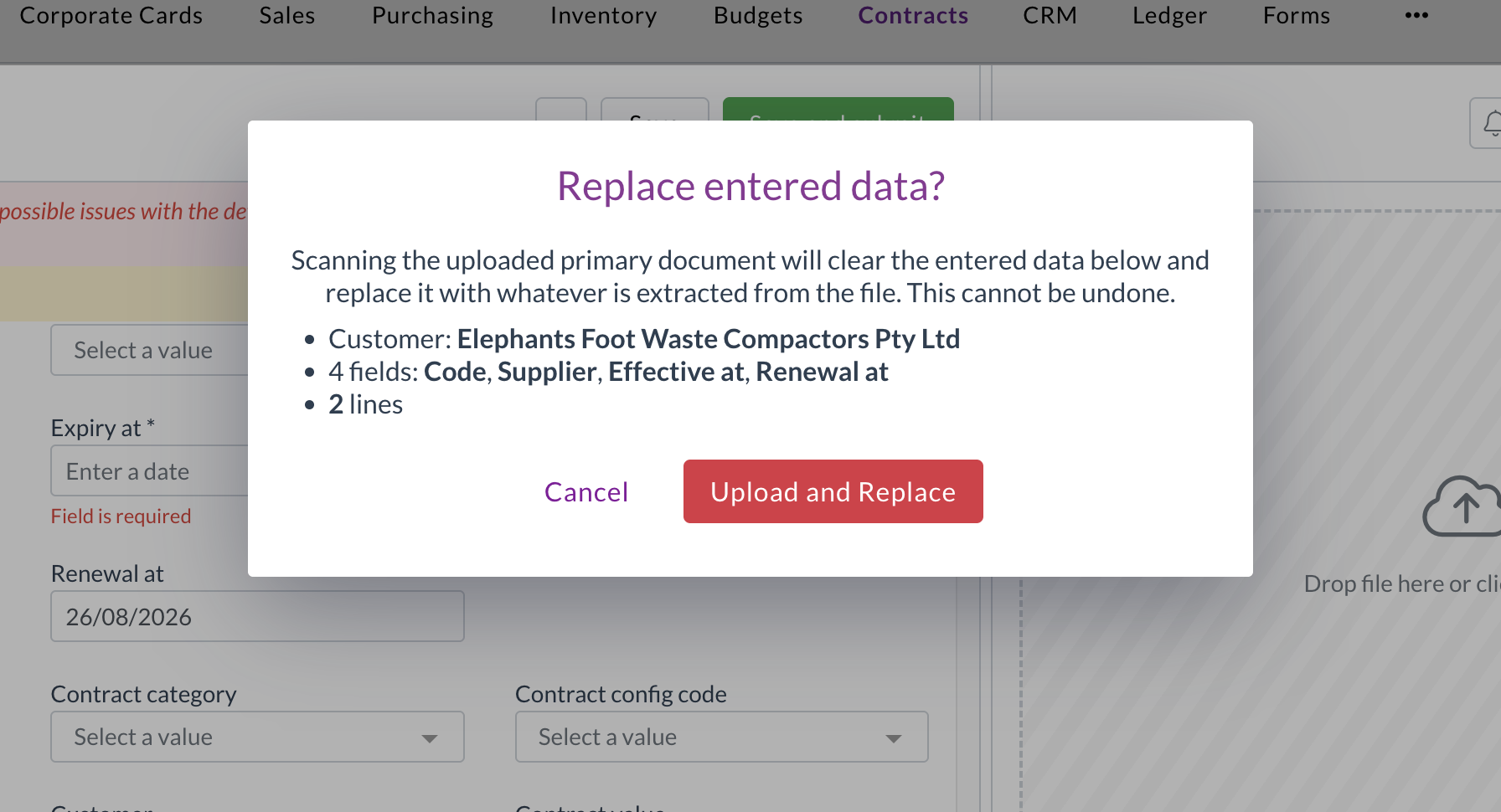
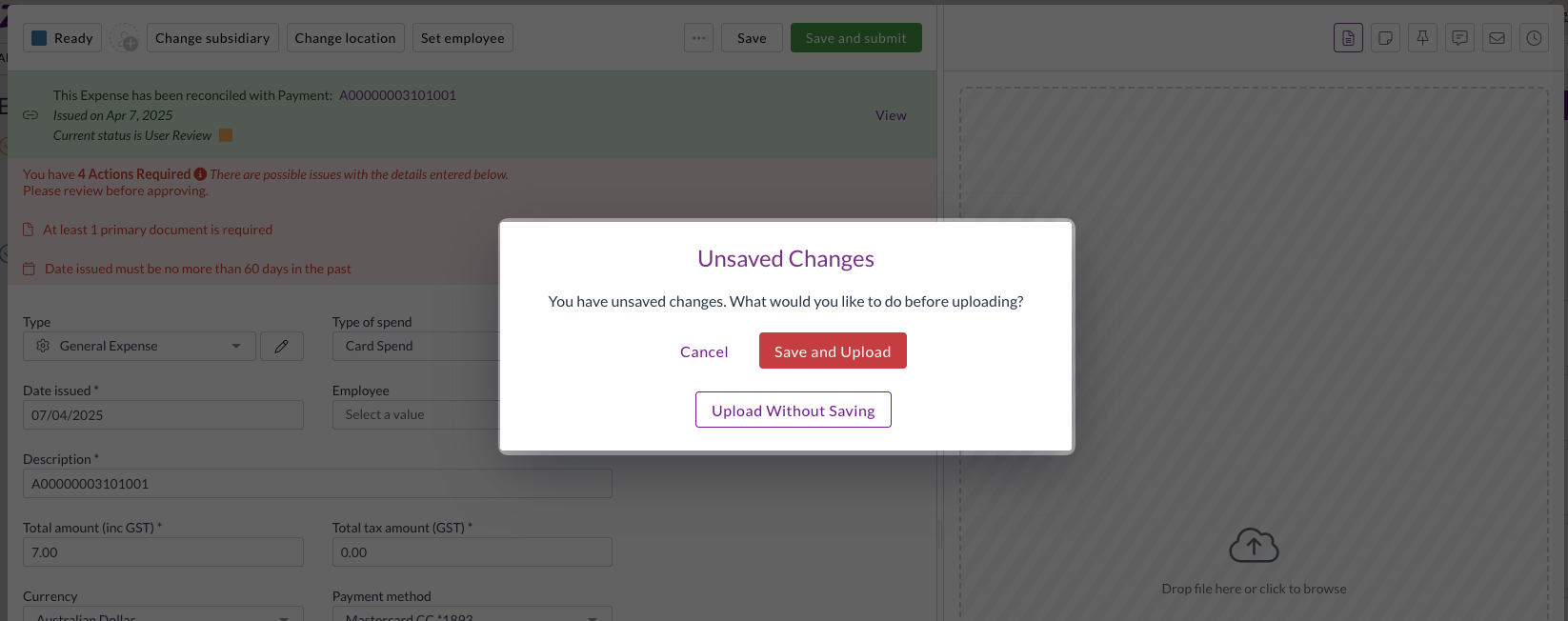
  • You are now warned if you attempt to upload a primary file while there are unsaved changes, preventing accidental data loss.

  • The Root field in the dataset approval field drop-down has been renamed to Header for clarity.

Security improvements

  • We've made a number of security improvements to the Zudello platform.

Resolutions

We're constantly working to refine Zudello functionality and ensure that we address any issues as soon as possible. As part of this release, we've made the following resolutions and improvements:

  • We've fixed an issue where switching between teams could cause an unresponsive page.

Have an idea?

Do you have an idea for a new feature or how we can improve our current features? Let us know at support@zudello.com.

Your ideas and feedback are an important part of our product planning process to make Zudello better for everyone.

Release notes edition 3.7.1

Release date: Thursday 26 February 2026
Version: v3

Here's the latest summary of what's new and improved in Zudello, as well as what we resolved in the latest release.

In this release:

  • Redesigned expenses module for a faster, simpler claims experience
  • Bulk reject for approval workflows
  • New automation actions, interface improvements and more

Looking for something? Browse by tag to find release notes on a specific feature.

New and improved

Redesigned expenses module

The expenses module helps you capture, submit, and approve employee expenses. We took a closer look at how teams actually use the module, and identified a number of ways to simplify the process and save users time.

The result? A redesigned expenses module that gets out of your team's way.

  • Direct submission for expenses
    • For most teams, the majority of expenses are single-line submissions, but the old workflow required every expense to be added to a claim before it could be approved.
    • We've now removed this extra step. Expenses can now be submitted for approval directly, bypassing the claims step entirely for teams that don't need it.
    • The existing claims workflow remains fully supported for teams that do need to use it.

  • Improved GL splits
    • The way GL splits work on expense lines has been updated so that line items must equal the document total, giving you cleaner, more accurate cost allocations.
    • Split percentages are now visible directly on the expense.
  • Expense approval notifications
    • Users now receive email and in-app notifications for expense approval actions, including when an expense is approved, rejected, or flagged for review.
    • Your team stays informed at every step without needing to chase updates manually.

If you have any questions about the updated expenses module, or would like to discuss enabling direct submission for your team, contact support@zudello.com.

Bulk reject for approval workflows

Approvers can now reject multiple documents in a single action, saving time when managing large volumes of documents awaiting approval.

The process for bulk

  • Select multiple documents from the document list and reject them in one action
  • Add a rejection reason that applies to all selected documents
  • Each rejected document triggers its own notification to the relevant user, including the rejection reason

For more information on bulk rejecting documents, see Bulk approving and rejecting.

New change team automation action

We've added a new automation action to give you more options when automating your workflow.

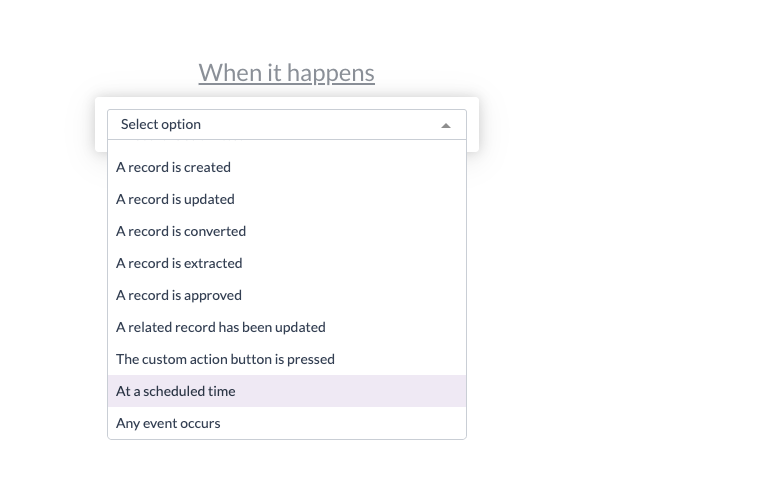
You can now use a Change team action within sentence automations, to automatically move documents to the correct team when certain conditions are met. This is the same as the Change team action available manually on documents.

To discuss adding this automation to your team, please reach out to support@zudello.com.

Interface and performance improvements

We've made several enhancements to improve usability and performance across the system:

  • Inbox field labels updated
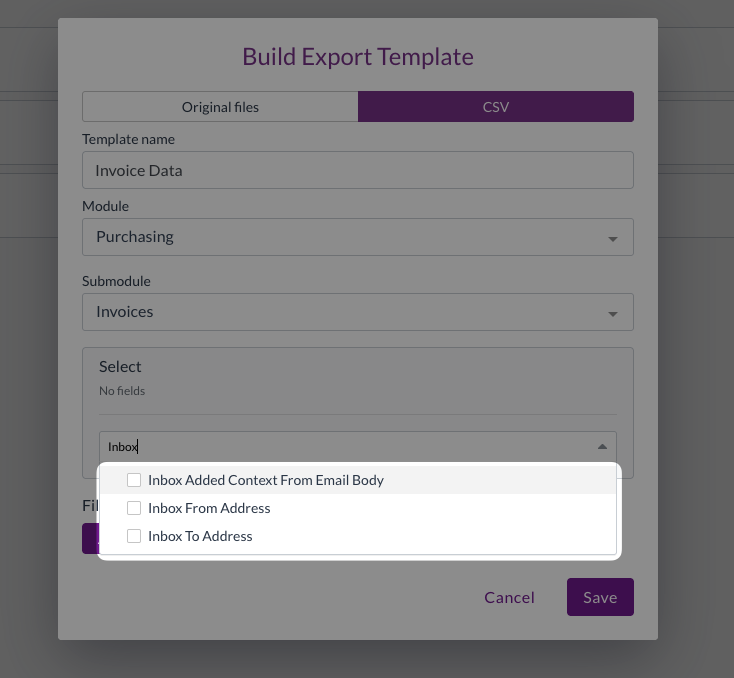
    • Inbox fields are now more clearly labelled in export and import field selectors

  • Performance improvements
    • We've reduced unnecessary processing for users who belong to multiple groups with overlapping permissions, resulting in faster load times

Resolutions

We're constantly working to refine Zudello functionality and ensure that we address any issues as soon as possible. As part of this release, we've made the following resolutions and improvements:

  • We've resolved an issue where inactive contracts were included in spend tracking and variance reporting. Inactive contracts are now correctly excluded, consistent with how inactive budgets are handled.
  • We've fixed an issue where repeatedly reordering documents could generate chains of false duplicate records.
  • We've resolved an issue where fields with forced default values could still be edited by users. These fields are now correctly displayed as read-only.
  • We've fixed a crash that could occur when converting a document type if no target document type was configured.
  • We've resolved an issue where photos taken on a phone camera in JPG format were not rendering correctly in the document preview panel.

Have an idea?

Do you have an idea for a new feature or how we can improve our current features? Let us know at support@zudello.com.

Your ideas and feedback are an important part of our product planning process to make Zudello better for everyone.

Release notes edition 3.6.5

Release date: 3 September 2025
Version: v3

Here's the latest summary of what's new and improved in Zudello, as well as what we resolved in the latest release.

In this release:

  • Enhanced payment terms with month-end options
  • Expense management and budget improvements
  • Document Studio enhancements and more

Looking for something? Browse by tag to find release notes on a specific feature.

New and improved

Enhanced payment terms

Payment terms ensure your payment due dates are consistent and in line with supplier/customer agreements. We've introduced two new flexible payment term options to handle common month-end scenarios more effectively.

We've added the following payment term options:

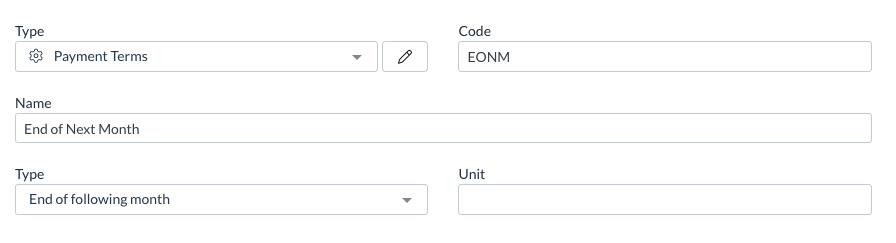
  • End of Month: Automatically sets invoice due dates to the last day of the current month
  • End of Following Month: Automatically sets invoice due dates to the last day of the month after the invoice date

These options automatically adjust for different month lengths, eliminating the need to manually calculate due dates for months with varying numbers of days. The system handles all the complexity automatically, so you don't need to.

Expense management improvements

Expense management helps you track, process, and approve employee expenses efficiently. We've continued investing in improvements to make expense processing more intuitive and consistent.

This release includes several key enhancements:

  • Performance improvements
    • Additional optimisations to make expense processing faster and more responsive.
  • Smart claim handling
    • When a claim is hard deleted, any linked expenses are automatically unlinked and reopened for processing. Similarly, when a claim is reopened (if the status is Ready or User Review), linked expenses automatically reopen as well.
  • Enhanced field controls
    • Resolved an issue where certain GL Impact fields remained editable even when the section was configured as read-only.
  • Improved validation experience
    • Fixed an issue where clicking the review button for validation errors didn't automatically open the related expense records.

These improvements are currently in alpha testing and are available only for selected teams. To discuss enabling these features for your team, reach out to support@zudello.com.

Budget management improvements

Budget management helps you control spending and ensure costs stay within defined limits across your organisation. We've refined how the system handles budget lines to improve accuracy and prevent unintended budget matching.

Improved handling of budget lines without dimensions

Previously, a budget line without any dimensions assigned would be matched to all transaction lines within the relevant date range. We've updated how the system processes these budget lines to avoid incorrect matching:

  • Enhanced validation
    • Budget lines without any dimensions are now considered invalid and won't match transactions
  • Accurate attribution
    • Only budget lines with at least one dimension will match and track related transactions
  • Cleaner reporting
    • This prevents accidentally broad budget matching that could skew your budget reporting

Budget management is currently only available for selected teams. To discuss enabling these features for your team, reach out to support@zudello.com.

Document Studio improvements

Document Studio empowers you to customise how Zudello extracts data from your documents, ensuring maximum accuracy and efficiency for your specific document types and workflows.

We've made several significant enhancements to provide more flexibility and better performance:

  • Multiple workflows per module and submodule
    • You can now create different extraction rules for different document types within the same category (such as stock invoices versus overhead invoices)
    • You can configure precise extraction workflows for each of your specific supplier formats and document requirements
  • Reduced processing option for faster performance
    • You can enable reduced processing for workflows where you only need information from key pages
    • When this is turned on, the system processes only the first, second, and last pages of documents to reduce processing time
  • Enhanced workflow management interface
    • We've improved list views and workflow screens for easier navigation
    • You can toggle between different versions of workflows while maintaining a clean, organised view

Document Studio is currently only available for selected teams. To discuss enabling Document Studio for your team, reach out to support@zudello.com.

Resolutions

We're constantly working to refine Zudello functionality and ensure that we address any issues as soon as possible. As part of this release, we've made the following resolutions and improvements:

  • We've improved how the system handles approval processes during temporary connectivity issues to prevent approvals from getting stuck
  • We've upgraded infrastructure components to enhance extraction processing performance
  • We've resolved an issue where automation history would sometimes incorrectly show actions as completed when they had actually failed
  • We've improved how automations handle datasets that contain empty user or user group rows
  • We've addressed an issue where some invoice uploads were incorrectly being assigned to the purchasing module
  • We've enhanced how the system processes search queries containing quotation marks to prevent syntax errors
  • We've removed unnecessary location and subsidiary options from non-transaction records to streamline the user interface

Have an idea?

Do you have an idea for a new feature or how we can improve our current features? Let us know at support@zudello.com.

Your ideas and feedback are an important part of our product planning process to make Zudello better for everyone.

Release notes edition 3.6.3

Release date: 20 August 2025
Version: v3

Here's the latest summary of what's new and improved in Zudello, as well as what we resolved in the latest release.

In this release:

  • Email matching for user assignment
  • Smarter document defaults
  • Next generation expenses
  • Bulk action refinements and more

Looking for something? Browse by tag to find release notes on a specific feature.

New and improved

Enhanced automation capabilities

Zudello's automations help streamline your document processing by automatically applying business rules and workflows. We've introduced powerful new automation features to reduce manual work and improve accuracy.

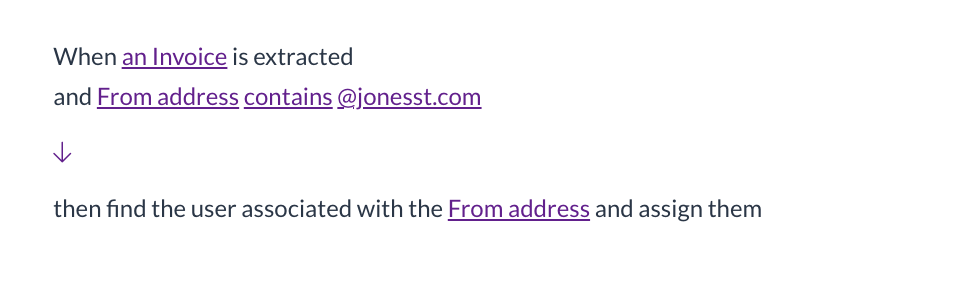
Find and assign users automatically

We've launched a new automation action that automatically finds and assigns users based on email addresses in your documents:
  • Automatic user matching

    • The system can now find users by email address from fields like the sender (From email) field
    • Automatically adds matched users as assignees on documents
  • Smart error handling

    • The automation continues smoothly even if no email is present or no matching user is found, preventing unnecessary workflow disruptions

This enhancement is particularly useful for automatically routing documents to the right team members based on who sent them.

Enhanced approval workflows

Zudello's approval system ensures documents are reviewed by the right people at the right time.

When a document is rejected, the rejection reason is now automatically posted to the document's chat.
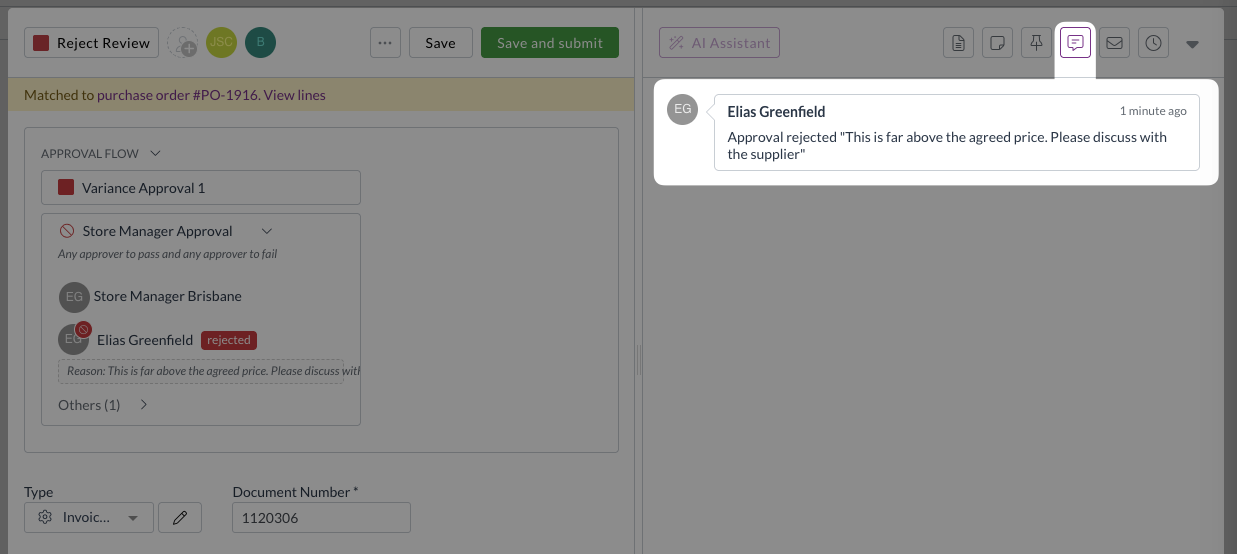
This provides better visibility when approvals are restarted after resubmission, and ensures integrity and accuracy of approval audit trails.

Document type configuration enhancements

Document types help you customise forms and workflows for different kinds of transactions. We've improved how the system handles default document type to reduce the need for manual adjustments.

Smarter default application during enrichment

Document enrichment automatically applies coding rules and defaults to reduce manual data entry. We've enhanced when and how document type defaults are applied:
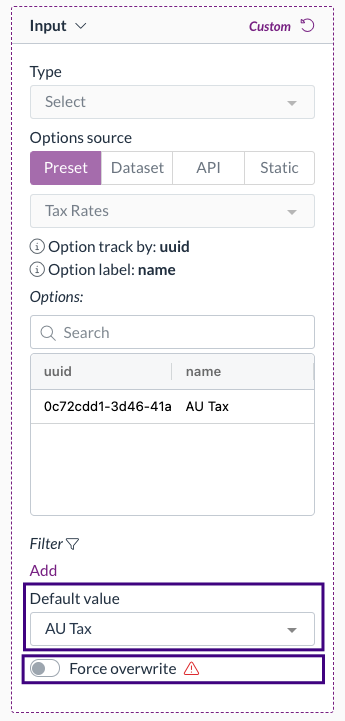
  • Automatic default application

    • Document type defaults are now applied during the enrichment process. This occurs in the background before you open a document.
    • This removes the case where validation errors appear in the submodule view, but disappear when you open the document.
  • Enrichment order of operations

    1. Keyword coding rules
    2. Supplier/customer/item matching
    3. Allocations auto-filling
    4. Apply coding defaults (employee, user, inbox, subsidiary, location, item, supplier/customer)
    5. Document type defaults
  • Smart field population

    • The enrichment process runs in the order above, but only fills empty fields (unless force overwrite is enabled).
    • This leaves any previously set values from other rules unchanged, ensuring general defaults like document defaults don't overwrite more specific defaults like item default coding.

For more information on automated coding rules, see Keyword coding rules, Supplier default coding, and Item default coding.

Improved document conversion handling

Document conversion helps transform one document type into another, such as converting quotes to purchase orders. We've refined how the system handles automation events during conversion to prevent conflicts.

Streamlined event handling

The system now raises appropriate events based on document origin:

  • System created documents

    • Only raises a Converted event when converted
  • Uploaded or emailed documents

    • Only raises an Extract event when converted

This prevents conflicting automations from trying to update the same record simultaneously, eliminating deadlock issues.

Export template enhancements

Export templates help you extract data from Zudello for reporting, analysis, or integration with other systems. We've added new fields to provide better document tracking and reference capabilities.

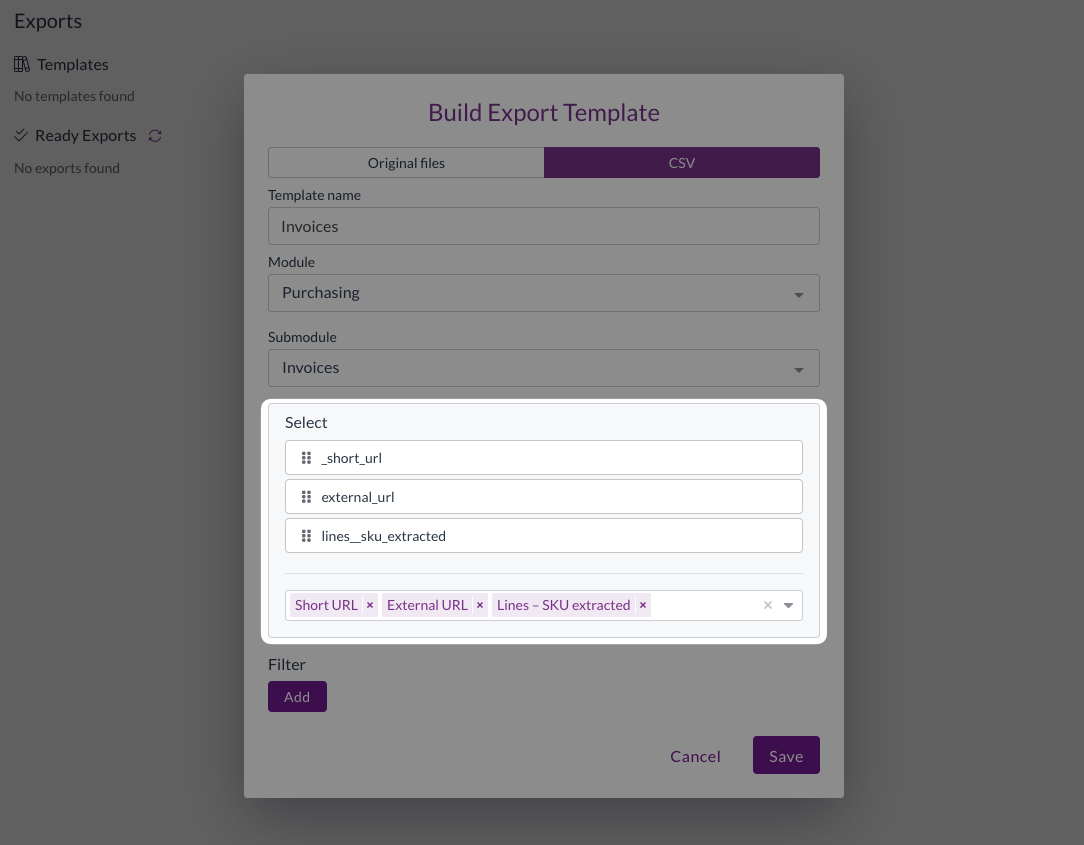
URL fields

You can now include Zudello document URLs in your exports:

  • Short URL: Direct link to the record within Zudello
  • External URL: Reference link to related records in your ERP (only when populated by integrations)

This makes it simple and easy to reference specific Zudello transactions from exported spreadsheets or reports.

Extracted SKU field

We've added the extracted SKU field to transaction exports:

  • Available in purchasing, sales, and receipt exports
  • Shows the original SKU as extracted from documents

Note: This field is only populated for transactions processed after the date of this release.
Email processing improvements

Email processing helps automatically capture and process documents sent to your Zudello inboxes. We've enhanced duplicate handling and added new reprocessing capabilities.

Enhanced duplicate detection

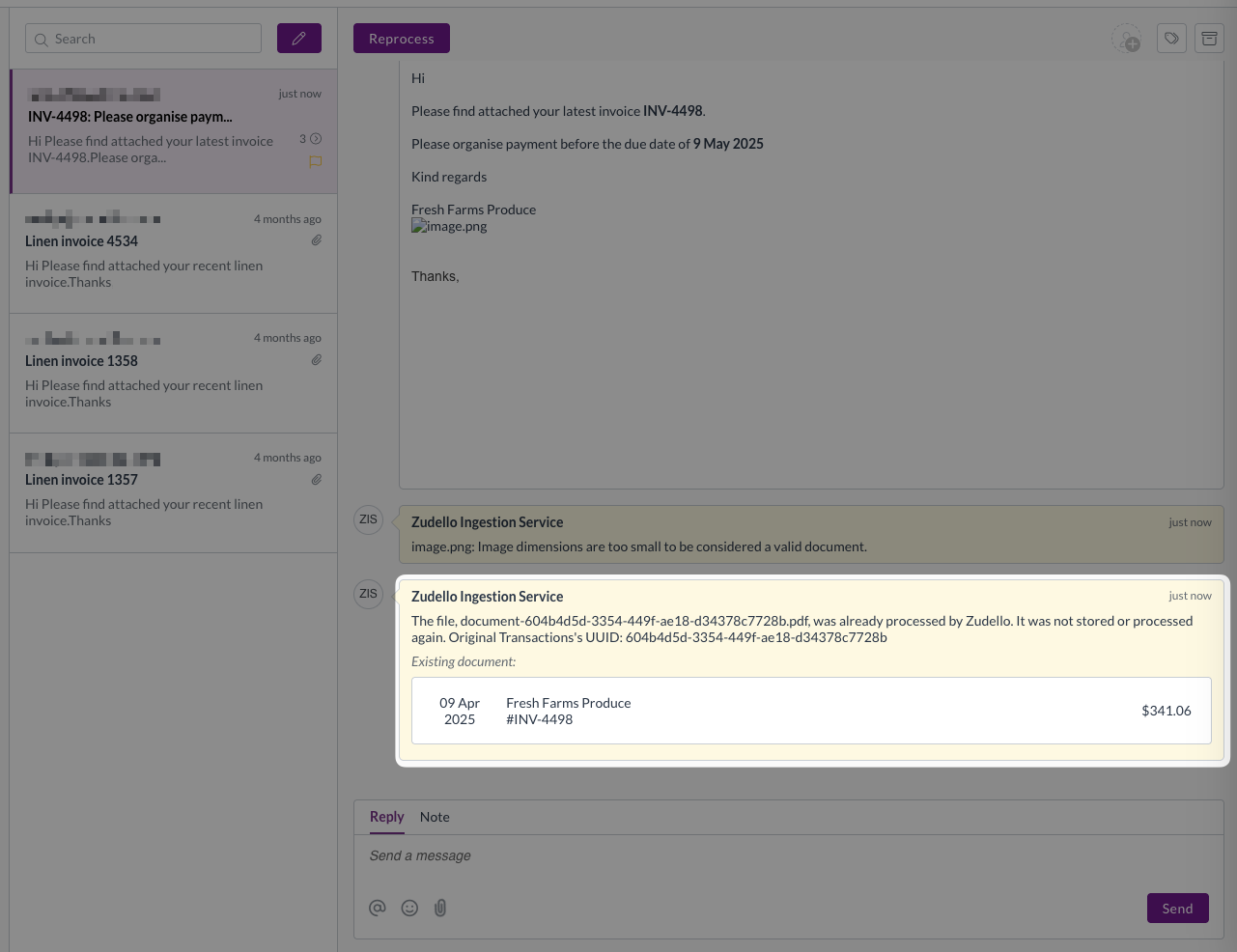
The system now provides more transparency when emails are blocked due to duplicates:

  • Links to the existing document that triggered the duplicate check
  • Connects the email to the existing document for easy review
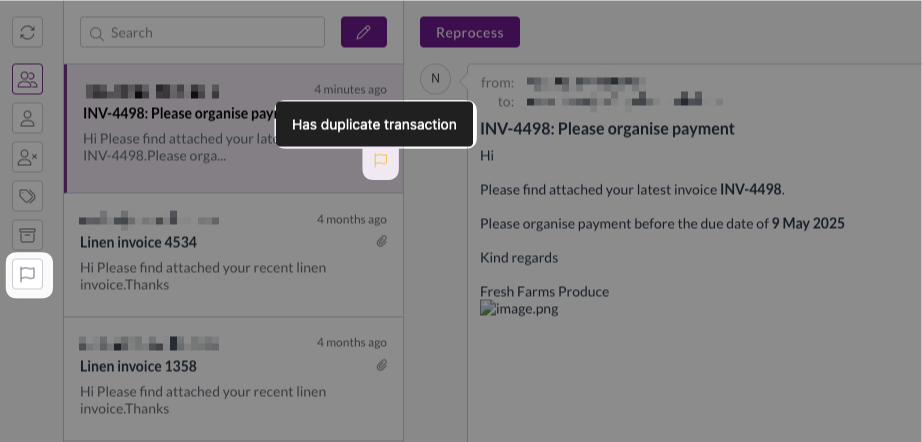
  • Adds quick filters and labels in the inbox for finding duplicates
Reprocess action

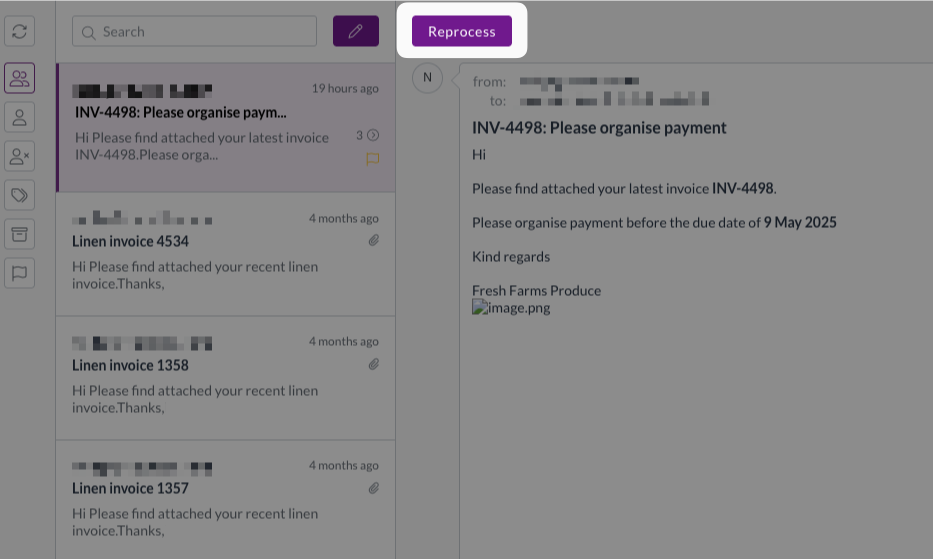
You can now reprocess emails without requiring them to be resent:

  • Available when the original document has been deleted
  • Automatically creates new transactions and sends them for extraction
  • Eliminates the need to ask senders to resend documents
This is particularly useful when documents need to be processed by different team members or when the original sender isn't the authorised approver.

Required permissions

To reprocess documents you need the following permissions:

  • Reprocess permission for the relevant module
  • E.g. Purchasing Reprocess

Expenses improvements

We're making significant investments in improving the expense management experience:

Streamlined claim validation

Claims now validate all linked expenses automatically when submitted:

  • View validation issues for all expenses directly from the claim
  • No need to open individual expenses to check for problems
  • Configurable validation rules including:
  • Matching employee records across claim and expenses
  • Consistent expense types (e.g. card spend vs personal spend)

Simplified expense editing

We've removed unnecessary complexity from the expense editing process:

  • For claims in Approval status, the editability of all linked expenses is now derived from the claim milestone settings
  • This is combined with unlock permissions for better control
  • Eliminates the need to reopen both expenses and claims to make edits

Automatic status synchronisation

Expense statuses now automatically update to match their linked claims:

  • Expenses follow claims through approval statuses
  • Automatic status updates for completed or rejected claims
  • Unlinking expenses from claims automatically reopens them for further editing

Improved user experience

Several enhancements to reduce clicks and improve workflow:

  • Optional confirmation prompts for dimension summary updates
  • Simplified reject function without email requirements
  • Better handling of expenses without policy issues

These improvements are currently in alpha testing and are available only for selected teams. To discuss enabling these features for your team, reach out to support@zudello.com.

Bulk processing enhancements

Bulk actions help you efficiently process multiple documents at once. We've improved the user experience for bulk approvals and submissions. Users can now easily deselect specific records after making their initial bulk selection, providing more precise control over which documents are processed.
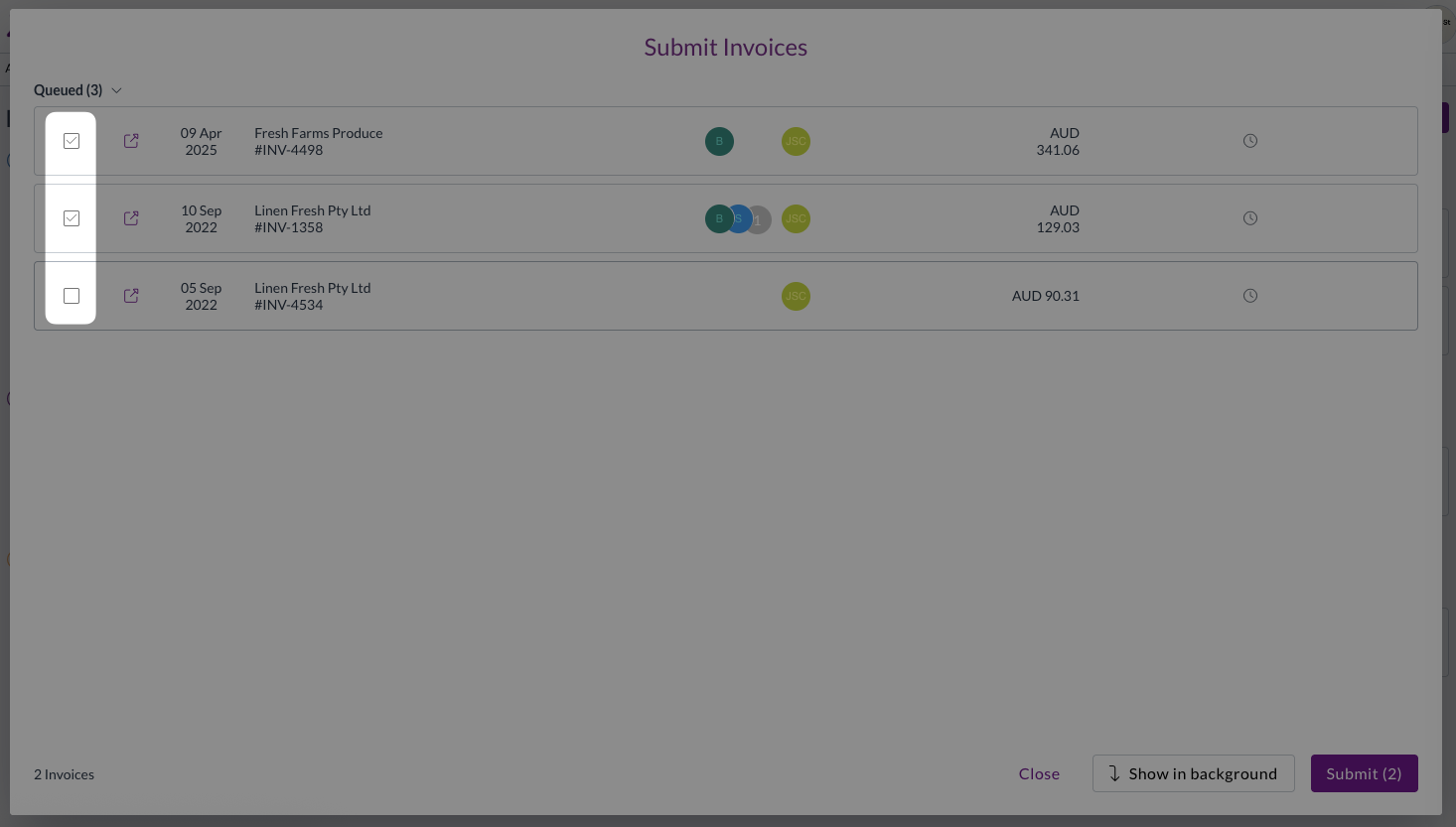
This removes the need to exit the bulk submit or bulk approval modal and reselect the records for submission.

Resolutions

We're constantly working to refine Zudello functionality and ensure that we address any issues as soon as possible. As part of this release, we've made the following resolutions and improvements:

  • Enhanced security by automatically rejecting emails with malicious file attachments and posting notifications to the email thread
  • Resolved an issue where supplier email validation was incorrectly blocking document submission even when email validation wasn't enabled
  • Fixed circular delegation loops that could cause authentication and team data errors
  • Improved persistence of default status settings for create and revert actions
  • Enhanced synchronisation between landed cost tables and item tables, preserving custom fields while updating matching fields
  • Various performance improvements to backend processing

Have an idea?

Do you have an idea for a new feature or how we can improve our current features? Let us know at support@zudello.com.

Your ideas and feedback are an important part of our product planning process to make Zudello better for everyone.
Release notes edition 3.3.6

Release date: 5 November 2024
Version: v3

Here's the latest summary of what's new and improved in Zudello, as well as what we resolved in the latest release.

Looking for something? Browse by tag to find release notes on a specific feature.

New and improved

Dependencies

Data Dependencies help you create smart, contextual field relationships in Zudello. When configured, they automatically limit the options in one field based on what you select in another.

We now support limiting the list of available suppliers based on the subsidiary or location chosen on a document. If you choose a subsidiary or location before selecting a supplier, we can limit the list of suppliers to only those that:

  • Are listed as being available for the selected subsidiary/location, or
  • Have no dependency data saved (i.e. are not subsidiary/location dependent)

These dependencies will also take effect during enrichment, which is the process after document extraction where Zudello links the relevant company (supplier or customer), item, and dimension information. During enrichment, Zudello will now check:

  • If there is a subsidiary and/or location set against the lines (from a keyword document coding rule or some other business rule)
  • If not, if there is:
    • A default subsidiary/location set against the inbox the document was received by (emailed documents only), or
    • A default subsidiary/location set against the user who created or uploaded the document

If the above rules produce a single subsidiary/location, when linking a company we'll filter to only those companies that are:

  • Listed as dependent on the subsidiary/location, or
  • Listed as having no dependencies on subsidiary/location

If the above rules produce multiple subsidiaries/locations (i.e. there are different subsidiaries/locations on each line), we won't apply any filter when linking a company.

For more information, see Data Dependencies.

Mileage expenses

Calculating and tracking mileage is simpler than ever with our new mileage expenses for reimbursement claims.

You can now create mileage expenses by entering the locations you've travelled to and from, and Zudello will calculate the route and distance between the two points. This distance can then be used with preset mileage rates to quickly and easily determine the value of mileage reimbursement expenses.

The new mileage expense form uses Google Maps to determine the route and distance between points. You can add multiple stops to ensure you track all required travel, without needing to process multiple mileage expenses for a single day of travel.

Validation tolerance on forms

Validations ensure your document values are correct without the need for manual checks. Commonly used validations check for issues such as:

  • Line totals that don't add up to the document subtotal or total
  • Tax totals that don't match the sum of line tax amounts
  • Other similar discrepancies that might indicate errors

We now support customisable tolerances on validations to account for slight rounding discrepancies and other minor differences. The default tolerance applied to all document types on Zudello V3 is $0.0201, but you can customise this for each document type in your team.

For help with adjusting the validation tolerances on your forms, please reach out to support@zudello.com.

Resolutions

We're constantly working to refine Zudello functionality and ensure that we address any issues as soon as possible. As part of this release, we've made the following resolutions and improvements:

  • We resolved an issue where keyword coding rules weren't correctly applied due to case sensitivity. All keyword lookup rules are now case insensitive.
  • We've restricted which modules and submodules you can select when converting a document. The following conversions are NOT allowed (structure is Existing Submodule > Converted Submodule):
    • Expenses > Mileage
    • Expenses > Claim
    • All Modules (Expenses, Sales, Purchasing, CRM) > Requests
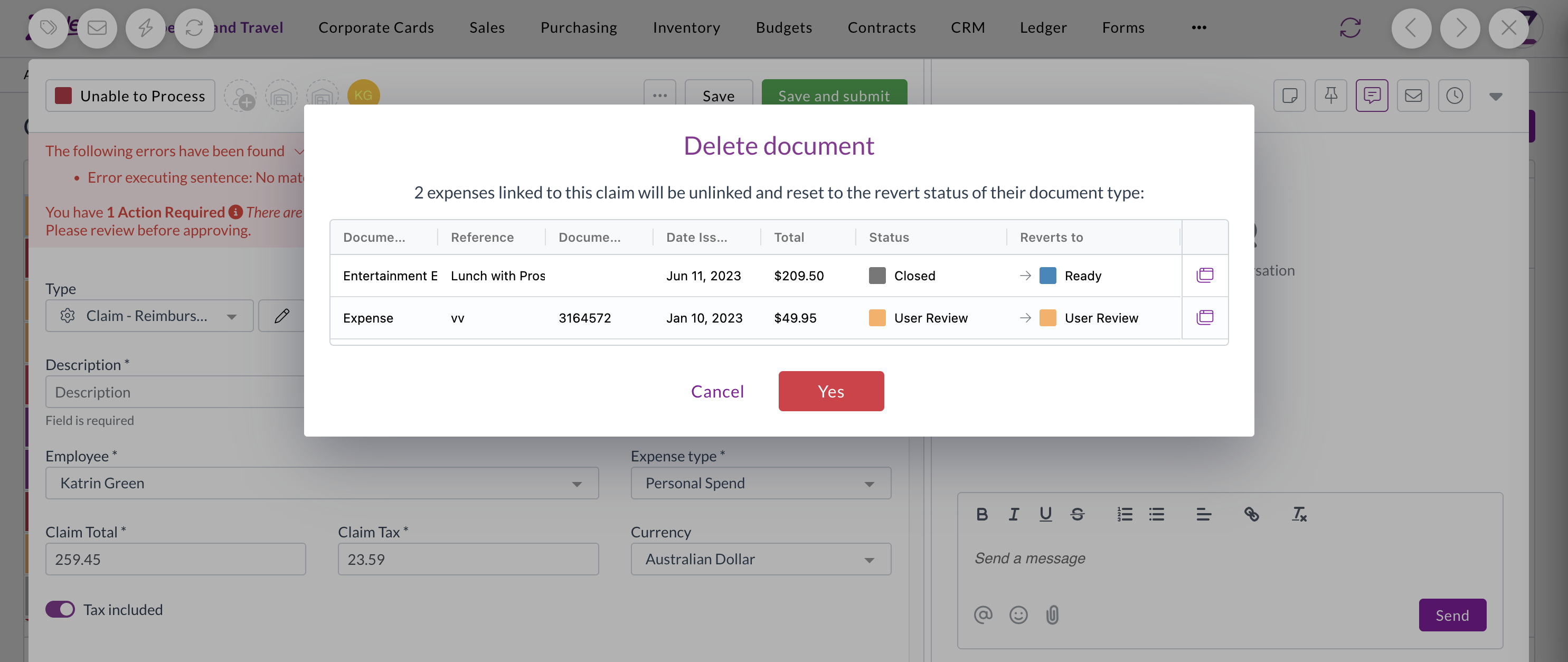
  • We've improved exporting selections and filter behaviour when selecting module and submodule.
  • We've resolved an issue with document URLs displaying incorrectly when a document was opened from the inbox. When you navigate from the inbox to a document, the URL will now refresh properly and display the URL of the document.
  • When you're making a configuration change to dataset fields, we now display a warning and await confirmation before clearing data to prevent accidental deletes. This is in addition to the existing warning that displays when you change the dataset type.
  • You can now view the associated tax solution on a tax rate form if the field is enabled. If you'd like to discuss enabling this field, please contact support@zudello.com.

Have an idea?

Do you have an idea for a new feature or how we can improve our current features? Please let us know at support@zudello.com.

Your ideas and feedback are an important part of our product planning process to make Zudello better for everyone.
Release notes edition 3.3.5

Release date: 31 October 2024
Version: v3

Here's the latest summary of what's new and improved in Zudello, as well as what we resolved in the latest release.
Looking for something? Browse by tag to find release notes on a specific feature.
New and improved

Bulk transaction importing

Zudello's importing feature now supports bulk transactions, allowing you to import multiple transactions at once. For more information on this feature, see Importing Records.

Creating goods receipts

We've added functionality to simplify the goods receipting process. You can now create a goods receipt directly from a PO, and choose the quantity or amount to receive. You can also receive all remaining quantity or amount on a purchase order by clicking Receive all remaining.

For more information see Creating Goods Receipts.

Price comparison alerts

In addition to comparing invoice unit prices against purchase order pricing, we've introduced the option to compare transaction unit prices to the purchase price or sell price of linked items.

When this feature is enabled, we'll compare the unit price (exclusive) of the transaction line to the purchase price (purchasing module) or sell price (sales module) of the linked item where one exists. An icon will appear next to the unit price column to indicate whether the price matches. You can hover over the icon for more details on the comparison.

Zudello uses the tax exclusive unit price for the comparison, regardless of whether the unit price on the invoice is tax inclusive or exclusive.

The comparison is calculated in the background once you save a transaction. Consequently, comparisons may not display until after you've saved the transaction.

Comparisons are displayed as warnings only and can't be used to prevent a transaction from being submitted.

Please contact support@zudello.com to discuss enabling this feature for your team.

Expense/claim handling improvements

We've improved several processes to reduce expense/claim discrepancies and improve transparency.

Prevent deletion of linked records

We now prevent deletion of certain records, even for users with delete permission. The following records can no longer be deleted:

  • Expenses that have been linked to a claim
    • You need to reopen the claim, unlink the expense, and then delete the expense
  • Expenses that have been linked to a payment
    • You need to reopen both the expense and the payment into User Review status, and unlink them via the reconciliation screen
  • Payments that have been linked to an expense
    • You need to reopen both the expense and the payment into User Review Status, and unlink them via the reconciliation screen

Restrict users reopening completed expense transactions

We've introduced a new user permission called Revert completed. Only users with this permission enabled can revert or reopen transactions in a complete-type status (e.g. Completed).

By default, this permission is disabled for all user groups.

Improve audit logs

When a claim is submitted, the associated expenses are set to Closed status. We now show an audit log entry against the expense when this status change occurs.

Calculate claim totals

When expenses are added, edited, or removed from claims, we recalculate and refresh the claim lines automatically. Previously, we relied on front end calculations to update the claim totals. We've now introduced backend processes that calculate the claim total, tax, and subtotal. This ensure that the claim totals are always kept up-to-date and correct.

Resolutions

Performance improvements for approving, rejecting, and force approving

We've made several performance improvements to approval-related actions. You may notice increased speed when approving, rejecting, and force approving documents.

Exporting original files

We've resolved an issue where files weren't bulk downloading correctly when multiple resources shared the same file name. We now append the transaction UUID to the file name when downloading in bulk to ensure that each file name is unique and downloaded correctly.

Allocation messaging

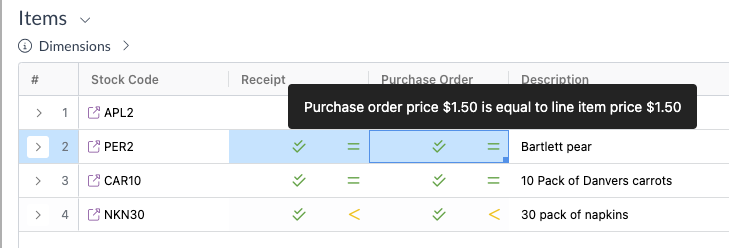
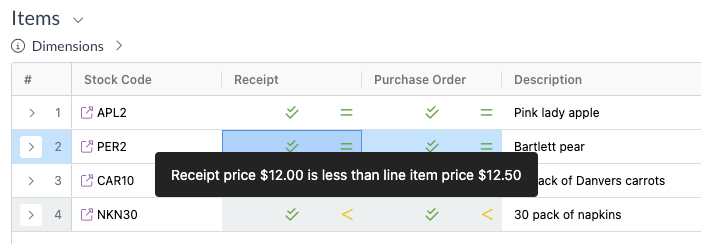
To avoid any confusion around the newly introduced item price comparison, we've improved the hover messaging for price comparisons when allocating transactions. We now include the submodule name in the hover message to provide additional clarity to the comparison.

E.g. Purchase order price comparison displayed on an invoice

E.g. Receipt price compaison displayed on an invoice

Automation error

An automation error was occasionally displayed in the automation log for some resources. The error was not caused by or the cause of an automation failure; it was simply a cosmetic error that was displayed. We've now identified and resolved the root cause of the issue.

Have some ideas?

Do you have an idea for a new feature or how we can improve our current features? Please let us know at support@zudello.com.

Your ideas and feedback are an important part of our product planning process to make Zudello better for everyone.