Release notes edition 3.7.11
Release date: Wednesday 19 August 2026
Version: v3
Here's the latest summary of what's new and improved in Zudello, as well as what we resolved in the latest release.
In this release:
- Bank account verification on your suppliers
- GL Impact on approvals and everywhere you can bulk select
- Clearer warnings before deletes and uploads change your data
- Extraction, budget, and automation improvements and more
Looking for something? Browse by tag to find release notes on a specific feature.
New and improved
Supplier bank account verification
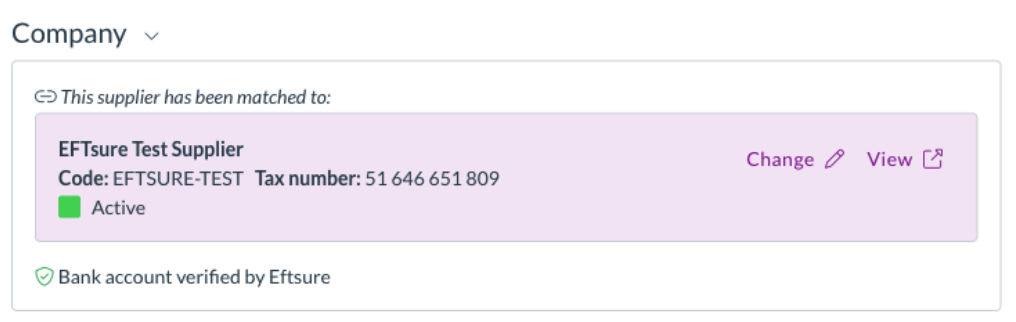
Zudello checks supplier details on your documents so you can pay with confidence. If your team uses Eftsure, we now show the result of their bank account verification directly on the document.
See the verification result on the contact card
- The contact match card now shows a bank account verification line alongside the existing ABN and bank details checks.
- The line tells you the result in plain language, such as Bank account verified by Eftsure, rather than a status code.
- Accounts verified under a different name, cross-matched but not independently verified, or not yet verified are raised as warnings so you can decide how to proceed.
Blocking results stop a submit
- An account reported as incorrect, or one Eftsure doesn't recognise at all, blocks submission and appears in the document's issues list.
- If your team doesn't use Eftsure, nothing is shown at all. There's no placeholder and no change to how the card looks.
Approvals
Zudello's delegation of authority routes documents to the right approvers based on rules you define. We've made it easier to spot approvers who can no longer act, and given approvers more to work with.
Inactive and removed users are flagged
- Users who've been deactivated stayed in delegation of authority and management trees with nothing to show they were inactive, so approvals routed to them stalled with no explanation.
- Inactive and removed users are now flagged wherever they appear, in delegation of authority trees, management trees, and dataset user columns, including on approvals already waiting on them.
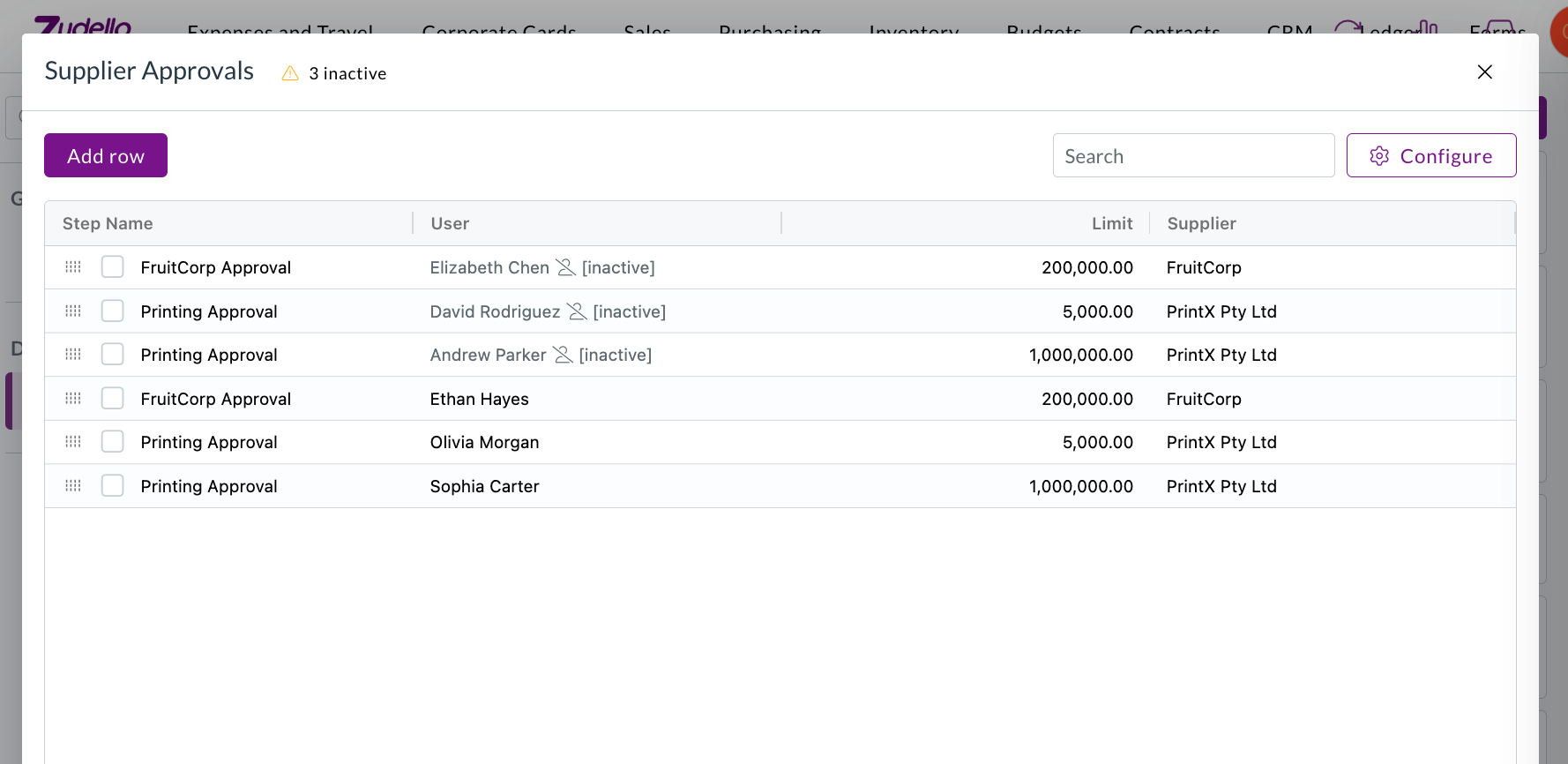
- A warning above the dataset counts how many users are affected and opens a list grouped by user. Selecting a row takes you straight to it.
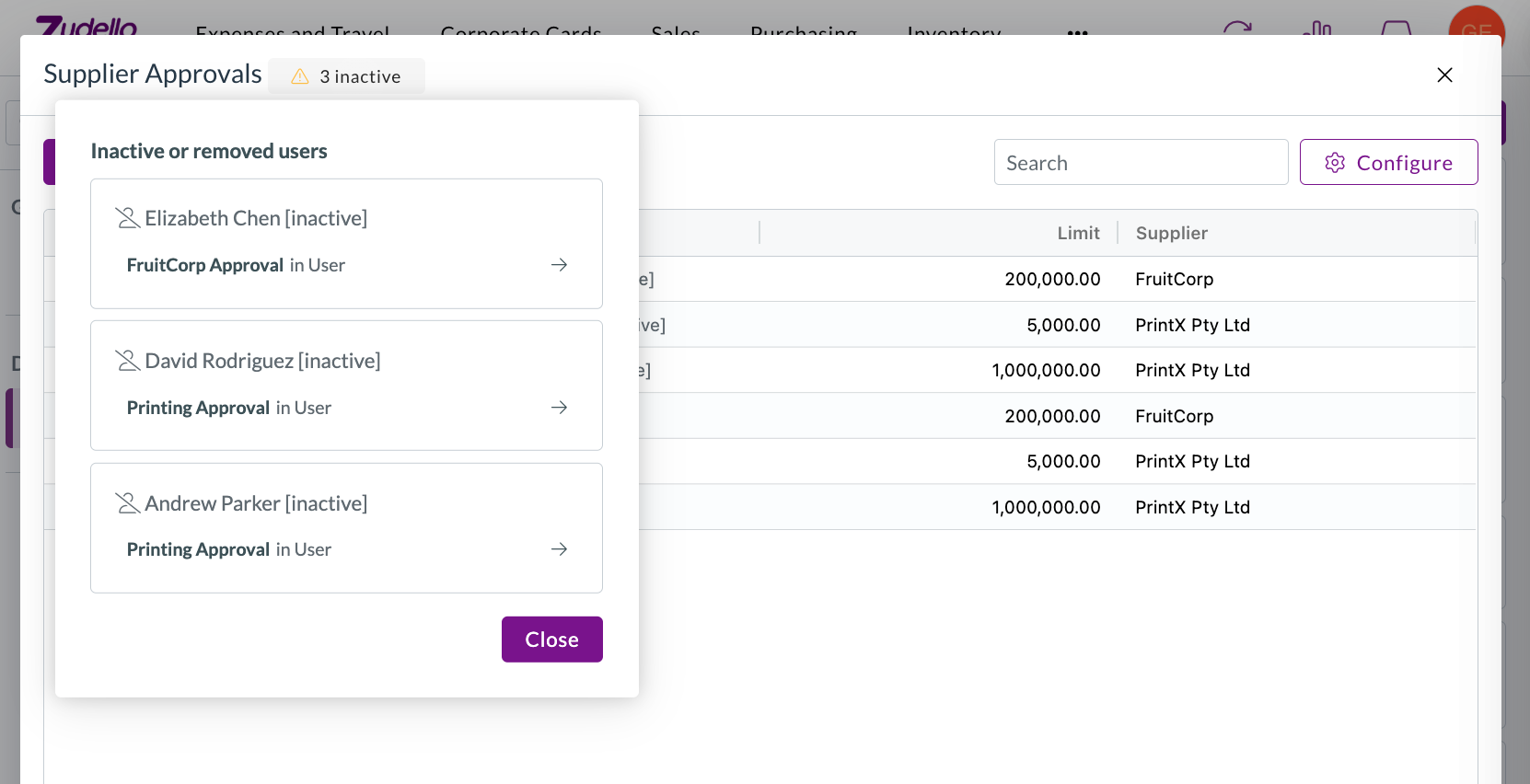
- Where a row has several assignees, only the inactive ones are greyed out, rather than the whole cell.
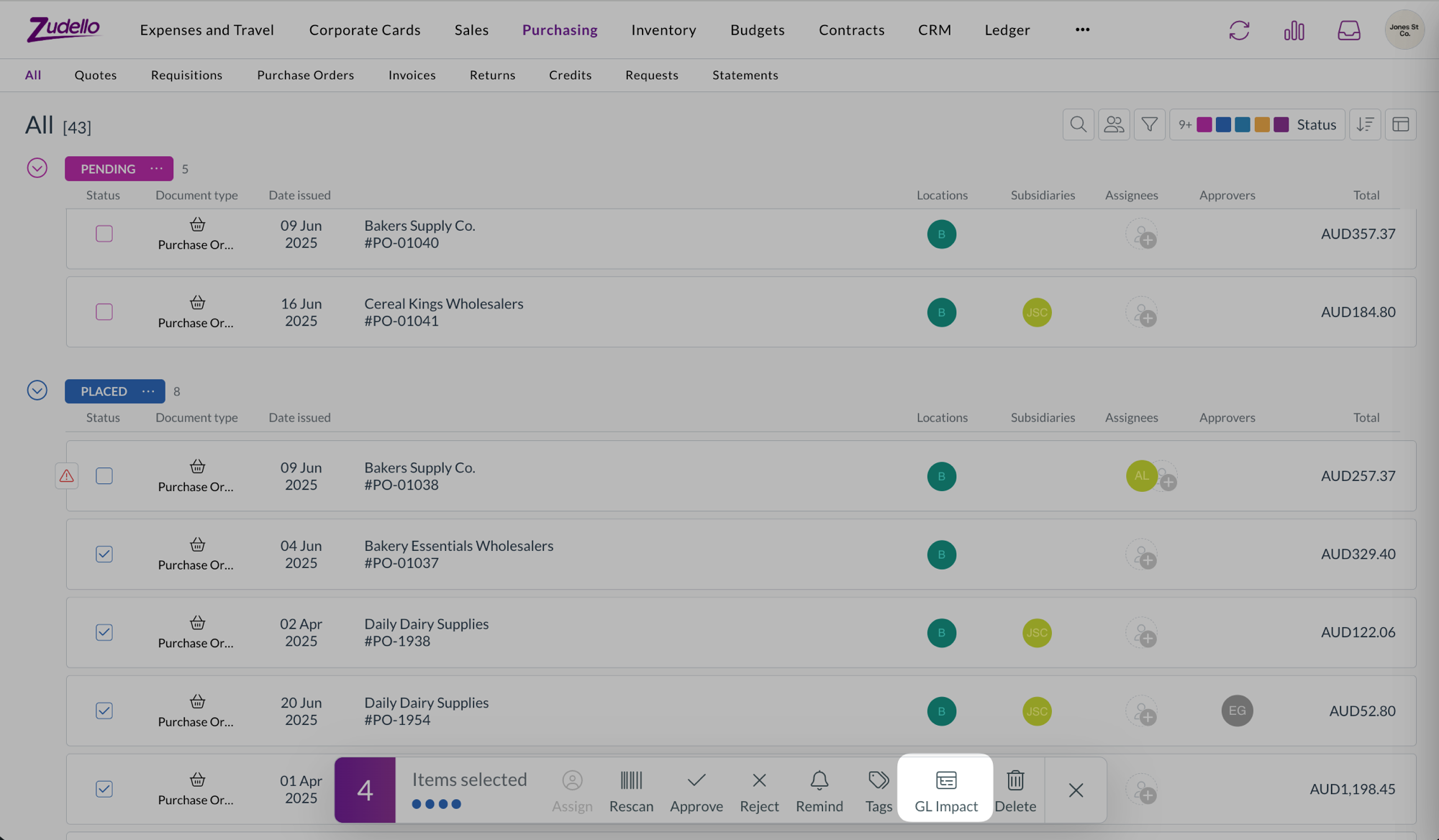
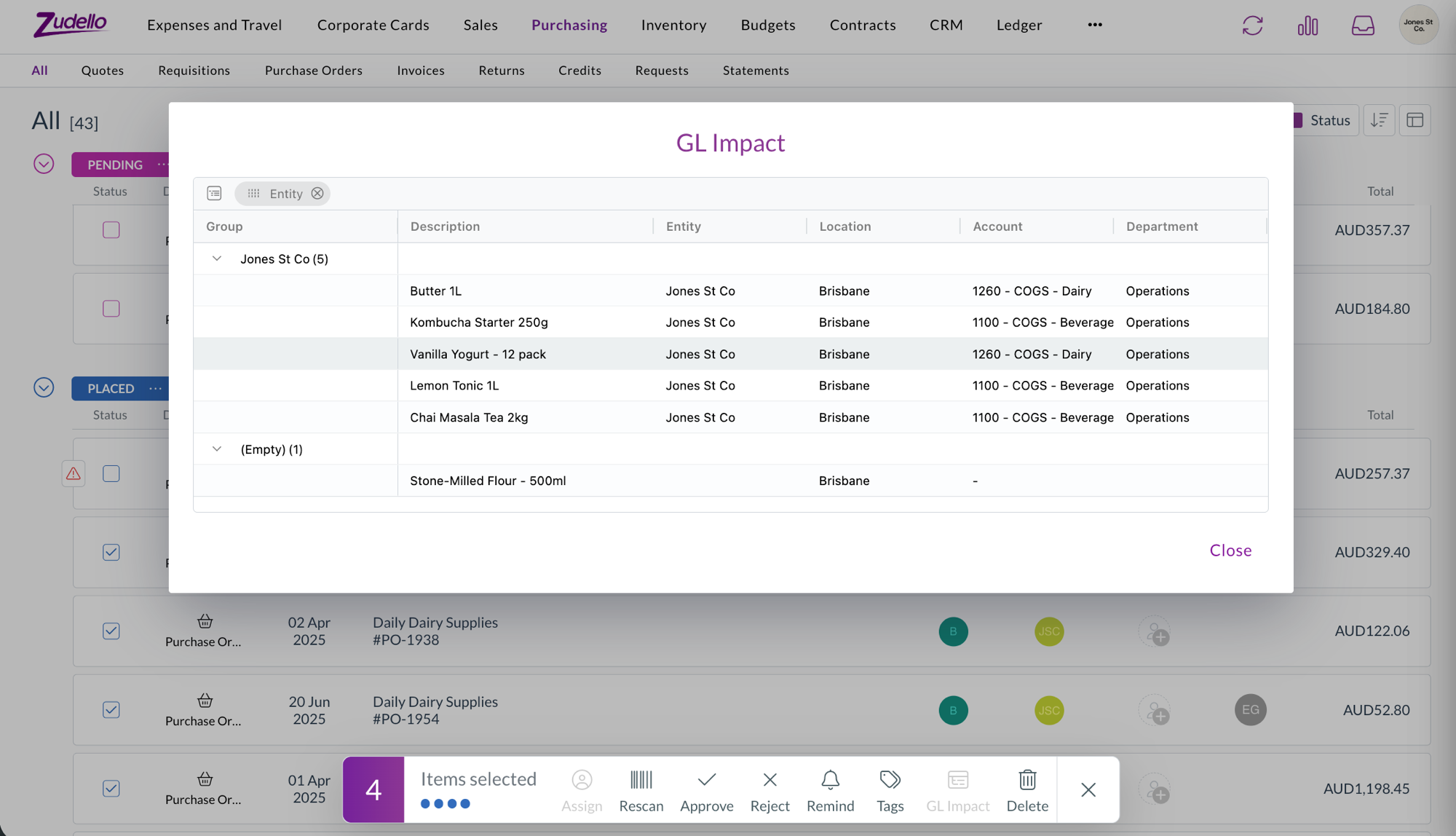
GL Impact available wherever you can bulk select
- GL Impact was previously only available on expenses. It's now available on every list where you can bulk select documents with lines, including the Approvals screen.
- Approvers can now preview the accounting impact of what they're about to approve, and the same is true for supplier invoices, credit notes, and orders.
Reverting and reassigning expense approvals
- The permissions for reverting an expense during approval, and for changing the approver on an active step, can now be granted to your own user groups. Previously these actions couldn't be assigned.
Suppliers
Choose the supplier your Zudello-only records export as
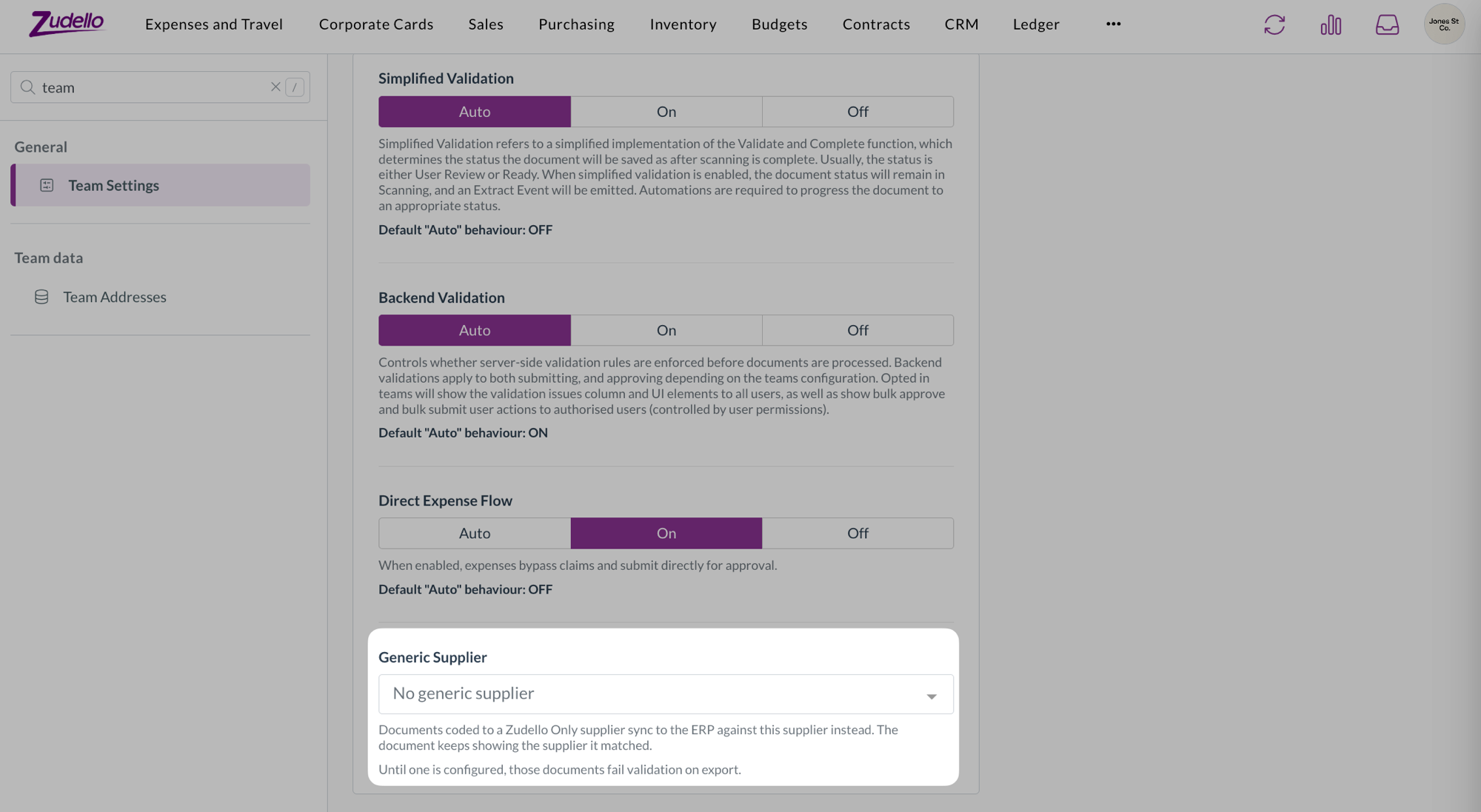
- Suppliers marked as Zudello Only stay in Zudello and are never sent to your ERP. You can now choose the generic supplier they're exported against instead, from Generic Supplier in Team Settings.
- Until one is configured, documents coded to a Zudello Only supplier fail validation on export. Only suppliers your ERP will accept are offered, and one that's later deactivated or deleted is flagged rather than quietly reading as unset.
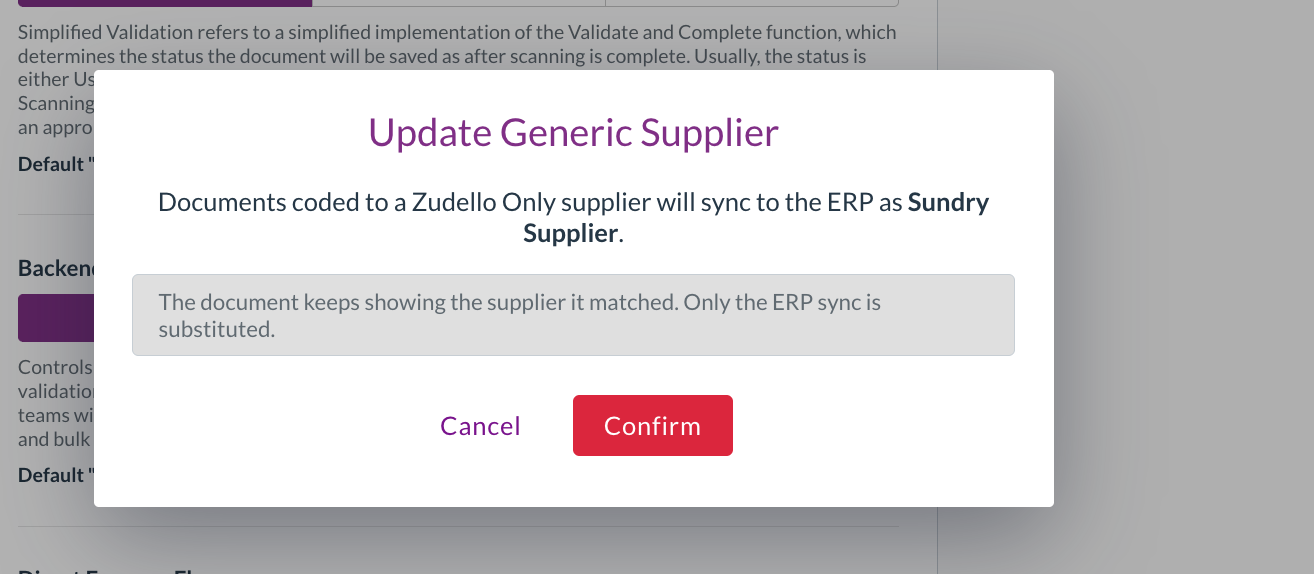
- Setting or changing it asks you to confirm first. The dialog names the supplier your documents will sync to the ERP as, and makes clear the document itself keeps showing the supplier it matched. Only the ERP sync is substituted.
Expenses and claims
Know what a claim deletion will do before you do it
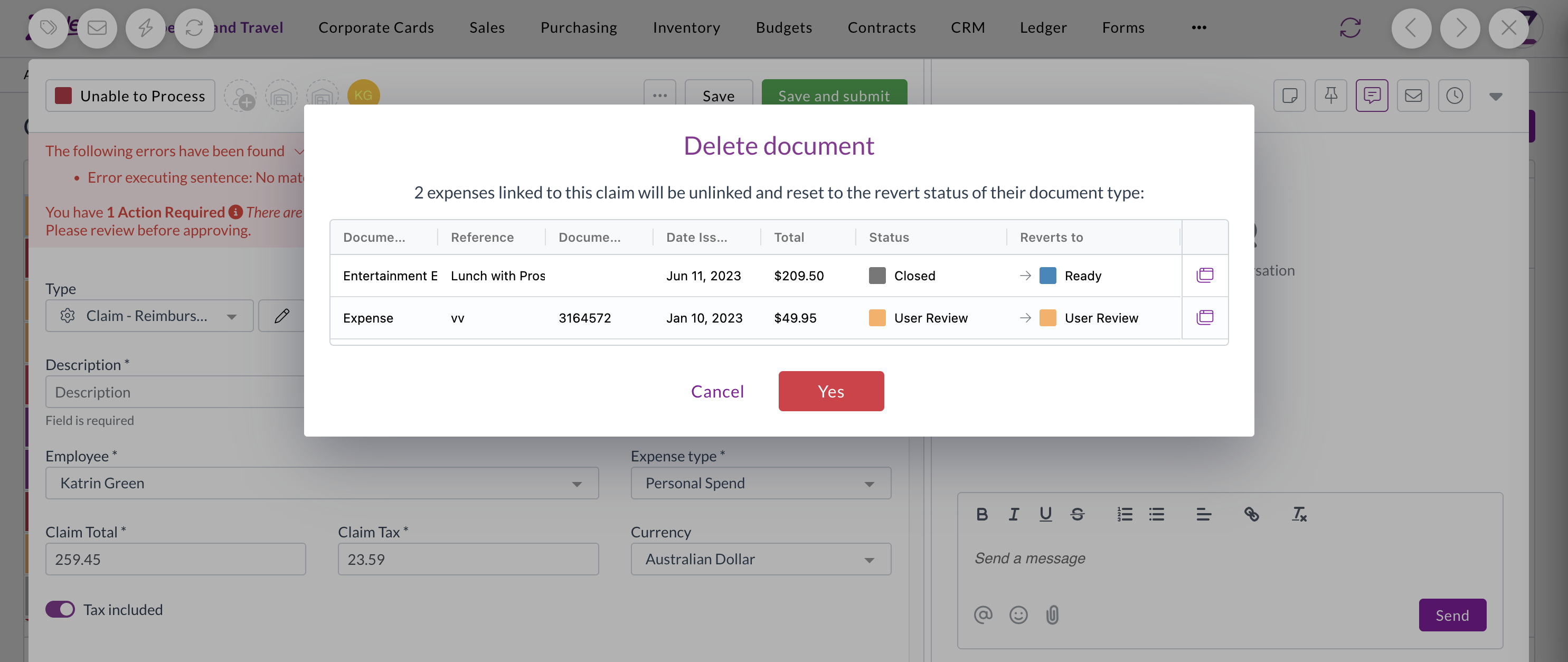
- Deleting a claim resets the expenses inside it back to their revert status, which meant expenses you'd deliberately closed reappeared in review with no explanation.
- Deleting a claim now lists the expenses that will be affected and the status each one returns to, so there are no surprises. Cancel and nothing is changed.
- This applies whether you delete a single claim or several at once.
Document viewer
Confirm before an upload replaces what you've entered
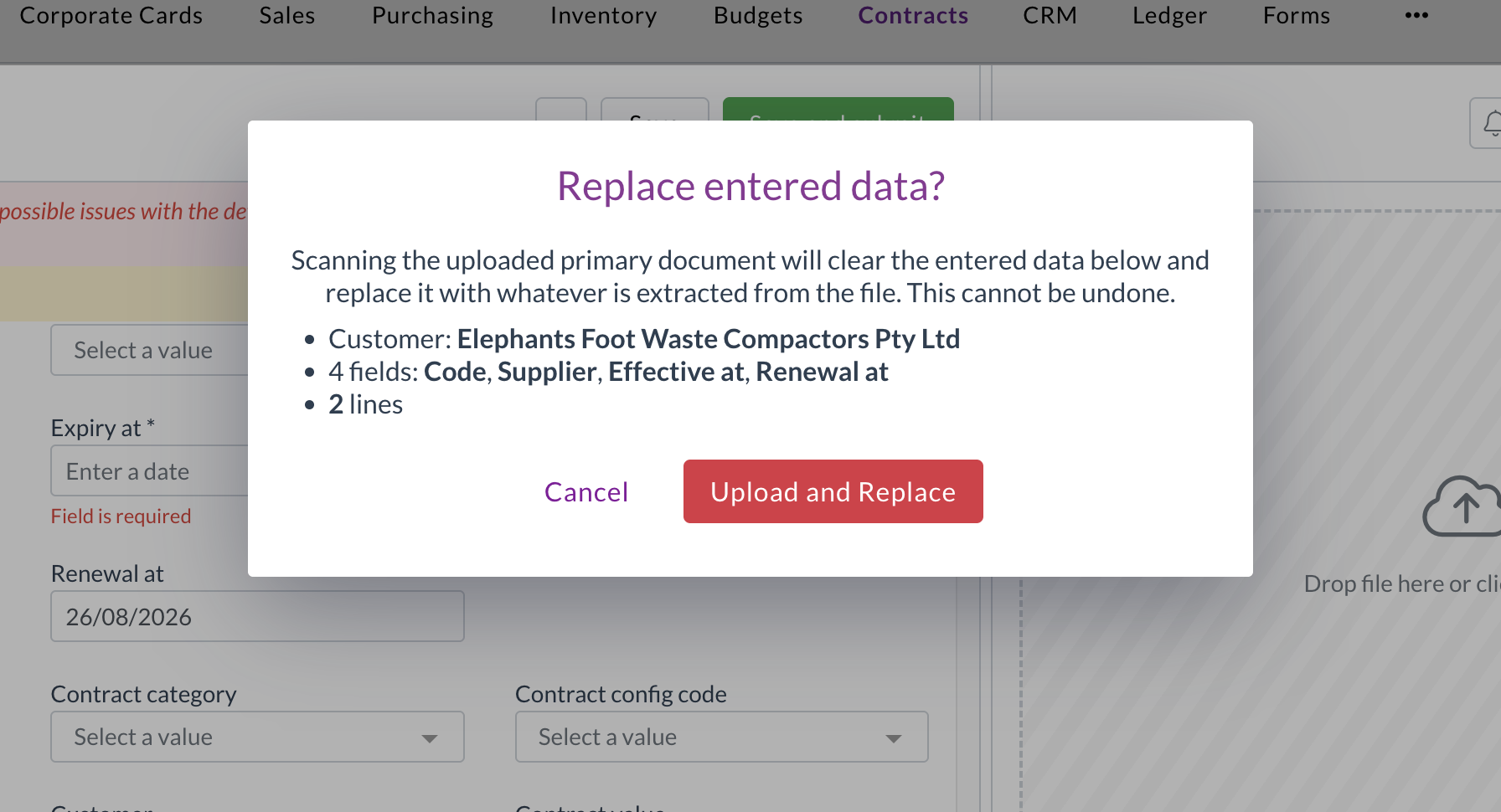
- Uploading a document to a record that already has data triggers a fresh extraction, which clears the header fields and replaces the lines. There was no warning, and no way back.
- You'll now see a warning naming exactly what will be replaced, including the supplier, the fields you've filled in, and the number of lines. Cancel and both the record and its documents are left untouched.
- Uploading to an empty record works exactly as it did before, with no extra step.
Automations
Scheduled automations only offer actions that can run
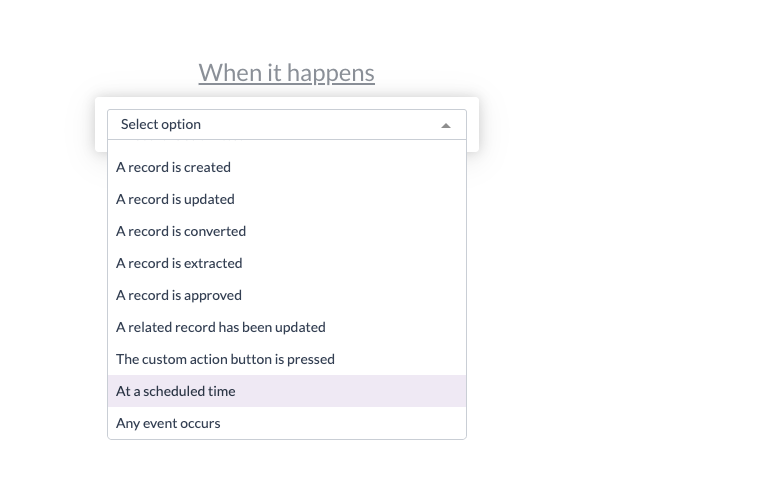
- An automation with a schedule trigger runs on its own, without a document to act on, so document-level actions either failed or quietly did nothing.
- With a schedule trigger selected, the action list now only offers actions that work without a document, so you can't build an automation that can never succeed.
Document extraction
We've made extraction more resilient, so fewer documents get stuck.
- Some PDFs that couldn't be opened before are now repaired automatically. Zudello attempts a wider range of fixes before marking a document as unsupported.
- A document that fails classification now keeps the extraction work already done, so it can be re-extracted instead of starting again.
- Large spreadsheets are now read progressively, so a file with a very large empty range no longer causes extraction to fail.
Inboxes
- Your inbox's default entity and location are now applied to statement documents, the same way they already were for other document types.
Permissions
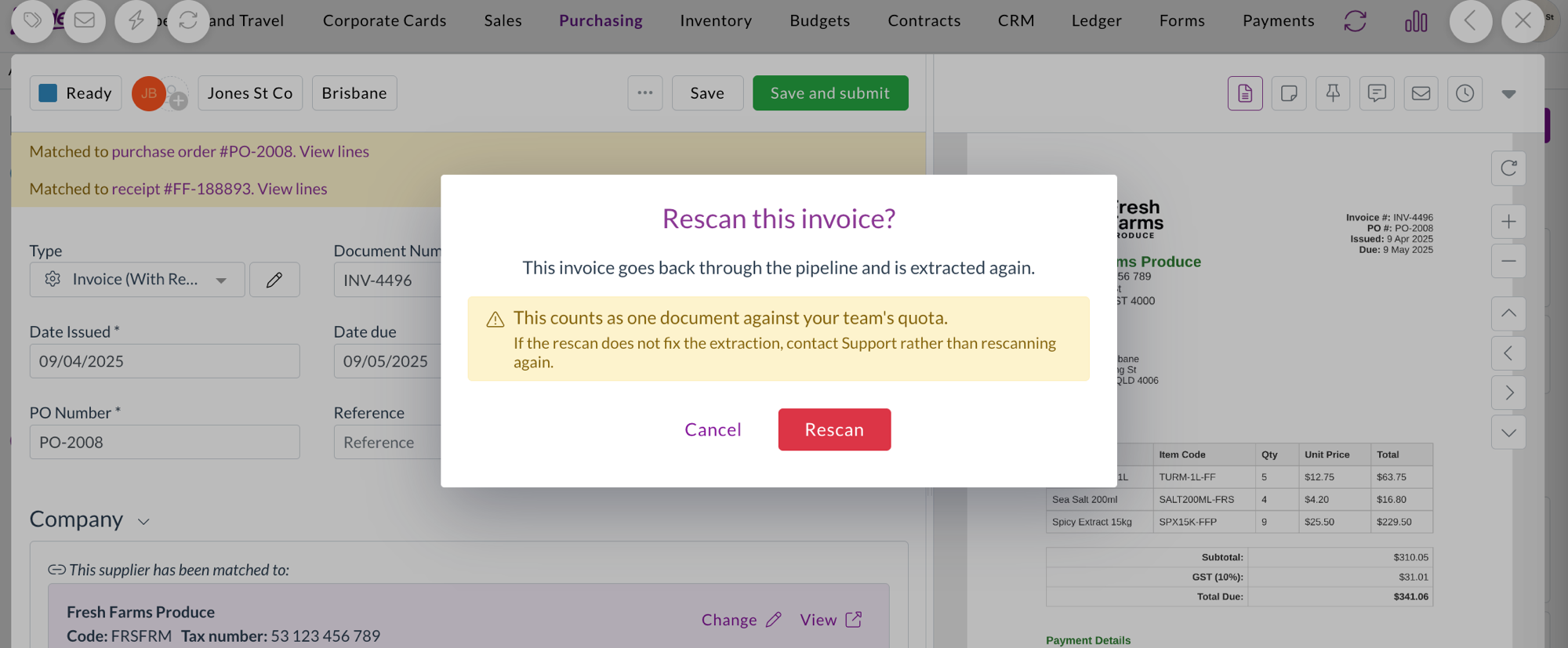
- A new Rescan permission controls who can re-run extraction on a document, and is enforced when the rescan is requested.
- Rescans are now recorded against the person who triggered them, so you can see who re-ran extraction, when, and what it spent from your team's quota.
- New permissions have been added for contract configuration, reasons, and auto coding configuration.
Resolutions
We're constantly working to refine Zudello's functionality and address any issues as soon as possible. As part of this release, we've made the following resolutions:
- We've fixed the Procurement Bottlenecks dashboard, which took 30 to 40 seconds to load and returned intermittent errors.
- We've fixed new passwords being accepted and then rejected as invalid. Passwords are now capped at 70 characters and must use standard characters, matching the limit applied when your account is created, with a clear message when one doesn't qualify.
- We've fixed the budget and contract threshold panels on a document showing foreign-currency amounts unconverted, so a document could read as over budget when it was comfortably under. Stored budget figures were always correct, only the on-screen check was wrong.
- We've fixed budgets continuing to show spend against the dimensions a budget line used before it was edited, which a manual resync didn't clear. Changing a budget configuration now relinks budgets across the whole team.
- We've fixed documents with unresolved error-level validations being able to complete, so a card expense could reconcile to Complete while still carrying a blocking error. Errors now block completion the same way they block submission.
- We've fixed archived, deleted, and rejected documents appearing in the list of documents available to reconcile against and in suggested matches, across invoices, expenses, and credit notes. A document archived while the reconciliation screen is open is now removed from the list rather than staying selectable.
- We've fixed an issue where the supplier on an item's unit of measure conversion couldn't be updated.
- We've fixed the reorder workflows screen in Document Studio, where Save Order could stay disabled even though the order needed saving.
- We've fixed line numbers that weren't visible on forms with purchase order matching turned on.
- We've fixed searchable dropdowns on long lists, which only ever searched the first 30 records, and which could show a blank value for a record outside the loaded page.
- We've fixed an issue where the automation value editor could open off the edge of the screen, and where a long email body ran past the bottom of the window.
- We've fixed an issue where an email arriving with several attachments could create a document with no link back to its email, leaving the inbox thread linked to a different, previously processed invoice instead of the correct one.
- We've fixed an issue that prevented a file being uploaded into an existing contract from the document side panel.
- We've fixed an issue where completed documents could be moved back to Unable To Process.
- We've fixed paged searches that also requested a total count, which returned the first page repeatedly.
- We've made the documents filter panel faster to open.
- We've removed the beta label from the process email body option on inboxes.
Have an idea?
Do you have an idea for a new feature or how we can improve our current features? Let us know at support@zudello.com.
Your ideas and feedback are an important part of our product planning process to make Zudello better for everyone.