12 posts tagged with "Performance"

Description for the performance tag.

View All Tags

Release notes edition 3.7.15

Release date: Wednesday 21 October 2026
Version: v3

Here's the latest summary of what's new and improved in Zudello, as well as what we resolved in the latest release.

In this release:​

  • Certifications: track your suppliers' insurances and certificates, with expiry dates extracted for you
  • Import card transactions from a statement file, straight from the Imports screen
  • See Zudello as your users see it: admins can start a session as a user in a sandbox team
  • Approvals that start from the purchase order raiser, due date checks that can block a document, and more

Looking for something? Browse by tag to find release notes on a specific feature.

New and improved​

Certifications​

Most teams ask their suppliers for a certificate of currency, a licence, or a professional indemnity certificate before they do business with them, and then keep those documents in a shared drive with a spreadsheet of expiry dates. Certifications brings them into Zudello. Each certificate is a record linked to the supplier or customer it belongs to, with its key details extracted from the document, so you can see at a glance who's covered and when that cover runs out.

Certificates come from customers as well as suppliers. A franchisor or landlord holds a certificate of currency for each franchisee or tenant they bill, and a contractor needs a customer's site accreditation or licence before they can supply them. Certifications handles both sides.

Capture a certificate

  • Upload a certificate under Certifications, or email it to a Zudello inbox the same way you'd send an invoice. Zudello reads the document and fills in the policy or certificate Code, the Effective, Issued, Expiry, and Renewal dates, and the Total value with its Currency.
  • Add the contact matching extension to the certification form, the same as on a contract, and Zudello matches the company on the certificate to your supplier or customer record. Where there's no match, or more than one candidate, you search for and pick the right one from the extension.
  • Set the Certification category, such as public liability or professional indemnity, from the categories you define, and group related certificates with a Certification group.
  • The record keeps the original document alongside the form, and has the same actions as any other document: copy a link, download, print, duplicate, download the audit log, and so on.
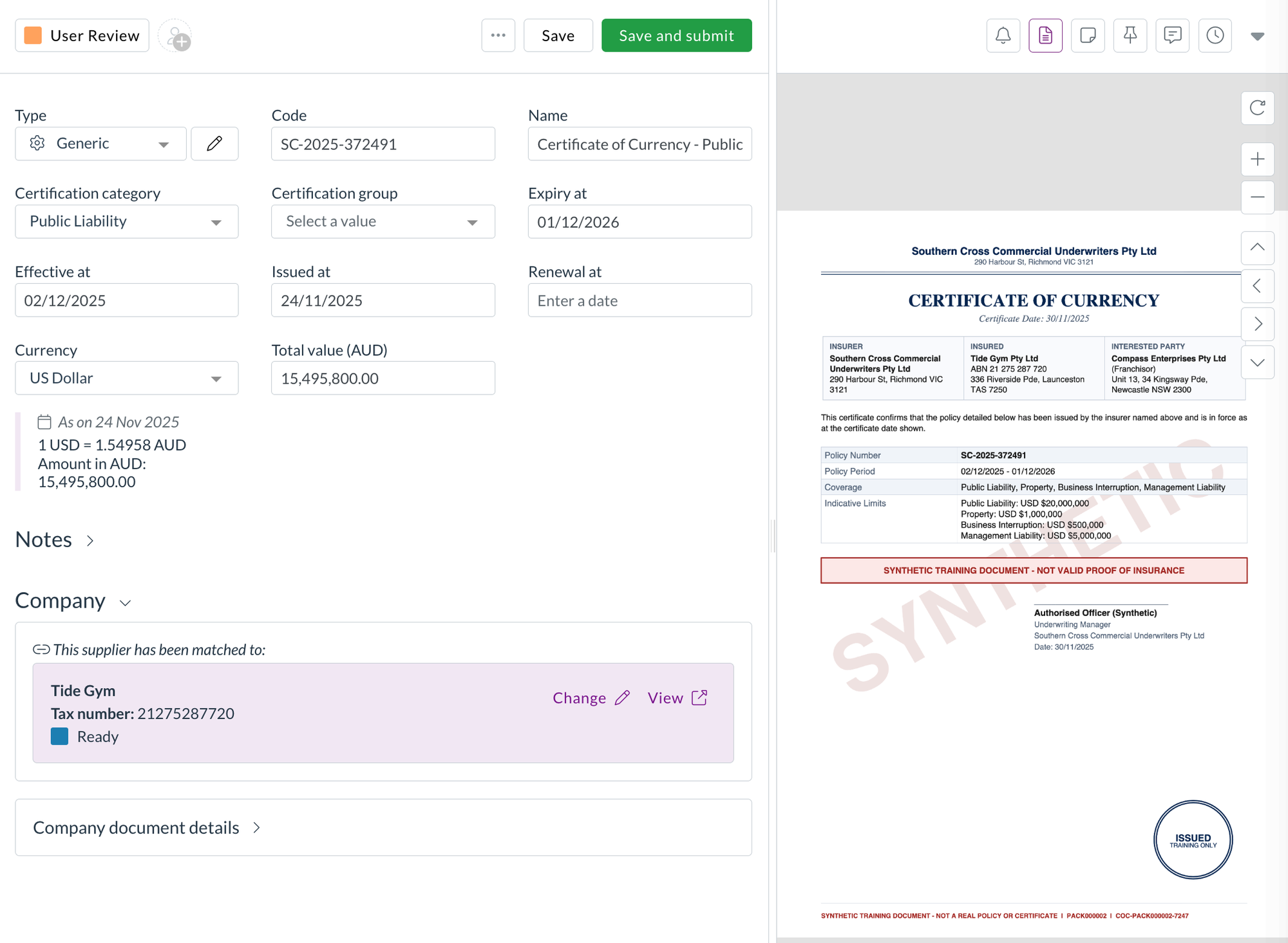
A certification record with the extracted details on the left and the certificate of currency on the right

Track and report on them

  • Certifications use document statuses, so you can move them through your own review flow and see which are current.
  • The list shows the total value in the certificate's own currency and converted to your team's currency, and you can export it like any other list.
  • Certifications sit with your suppliers and customers under CRM, and have their own permissions in that group, so you can choose which user groups can view, create, and update them without touching their access to suppliers.

Reminders ahead of expiry are coming in a later release.

Corporate cards​

Corporate card transactions usually arrive in Zudello through a bank feed. Some banks don't offer one, and some teams would rather load a statement themselves. We've added a card statement import, so you can load a statement file from your bank without waiting on an integration.

Import a card statement

  • Go to Imports, select Corporate cards, then Debits and credits.
  • Choose the Statement format for your bank, and fill in any settings the format needs, such as the card account it belongs to. Once a format has been set up for your team, its settings are shown for reference.
  • Upload the statement file. Zudello runs the format over it and shows you the result, including how many transactions were created, or the reason the file was refused.
  • If the upload fails, start the import again with the file. There's no Try again, since the import can't run without it.
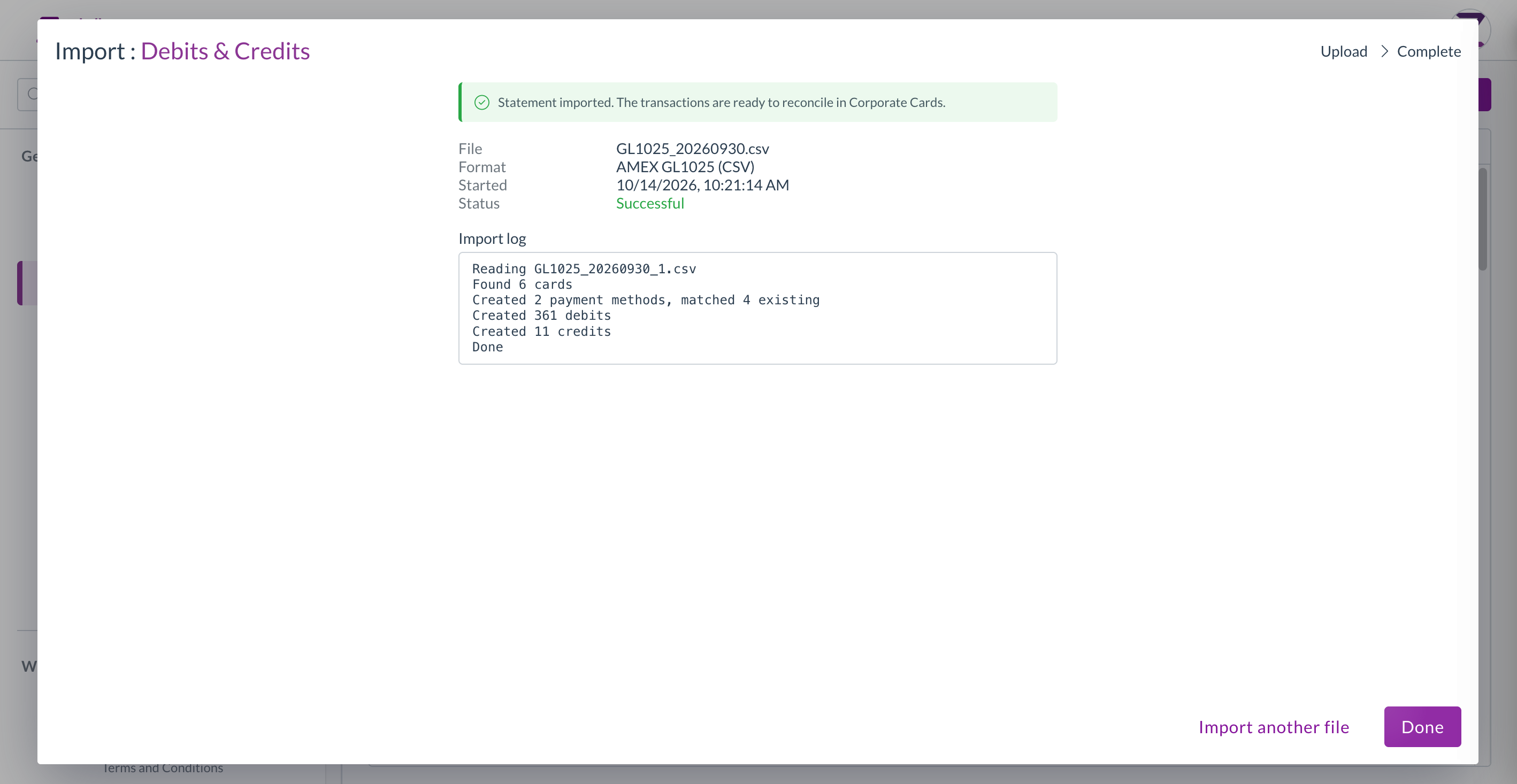
A completed card statement import showing the transactions created

User management​

See Zudello as one of your users sees it

When someone can't find a record or a menu item, the quickest answer is usually to look at Zudello through their eyes. Organisation admins can now do that in a sandbox team, without asking us.

Start a session as a user

  1. Open Setup, then Organisation, then Users.
  2. Find the user and select the Impersonate icon at the end of their row.
  3. Enter a reason for the session, then select Impersonate. The reason is recorded in the audit log.
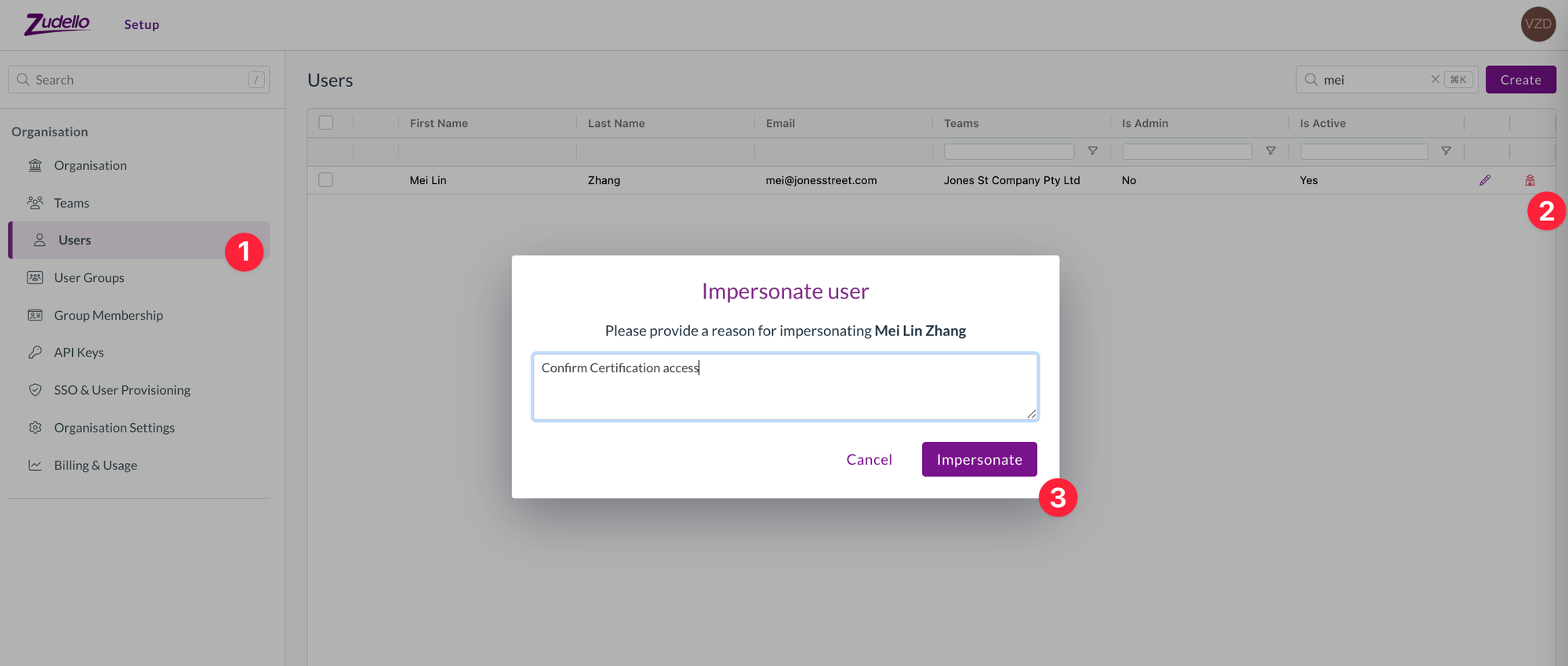
The Users list under Organisation, with the Impersonate icon on a user's row and the Impersonate user prompt asking for a reason

  • Zudello shows a banner for the whole session so you know whose view you're in and how long is left. Select Stop session on the banner to return to your own account.
  • The option is only offered in sandbox teams, and a session is limited to the user's sandbox teams. Production teams are never available this way, so your live data stays as it is.
  • You can only start a session as a user who isn't an organisation admin, so what you see is the experience of someone with ordinary access.
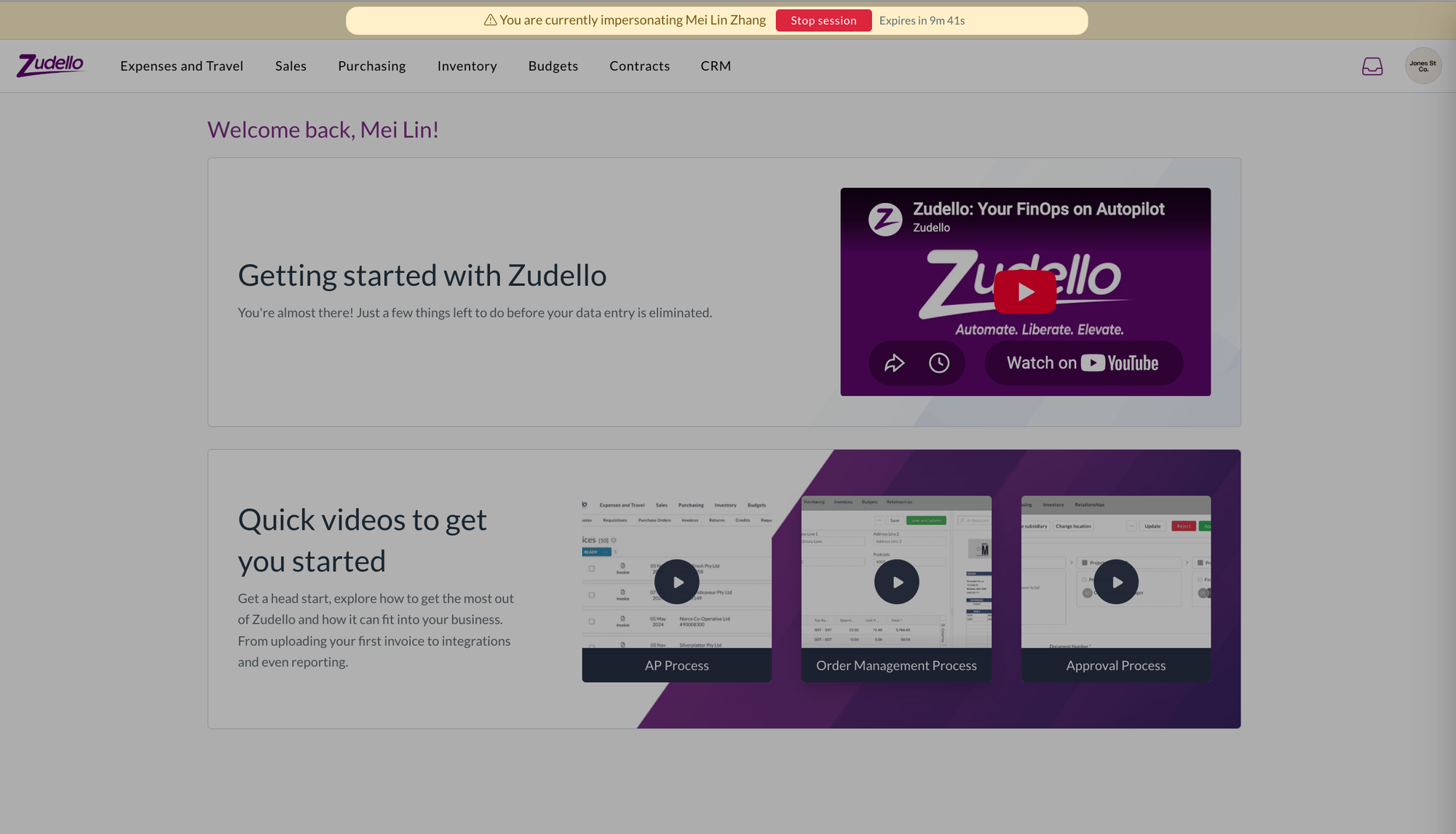
The home page during a session as another user, with the banner across the top naming them and showing the time left

Admin rights per organisation

  • If you belong to more than one organisation, you now see and open organisation settings only for the organisations where you're an admin. Your admin rights in one organisation no longer carry over to the others.

User group exports

  • The permissions export on a user group now has a Granted column with Yes or No against every permission, so you can see at a glance what the group allows.
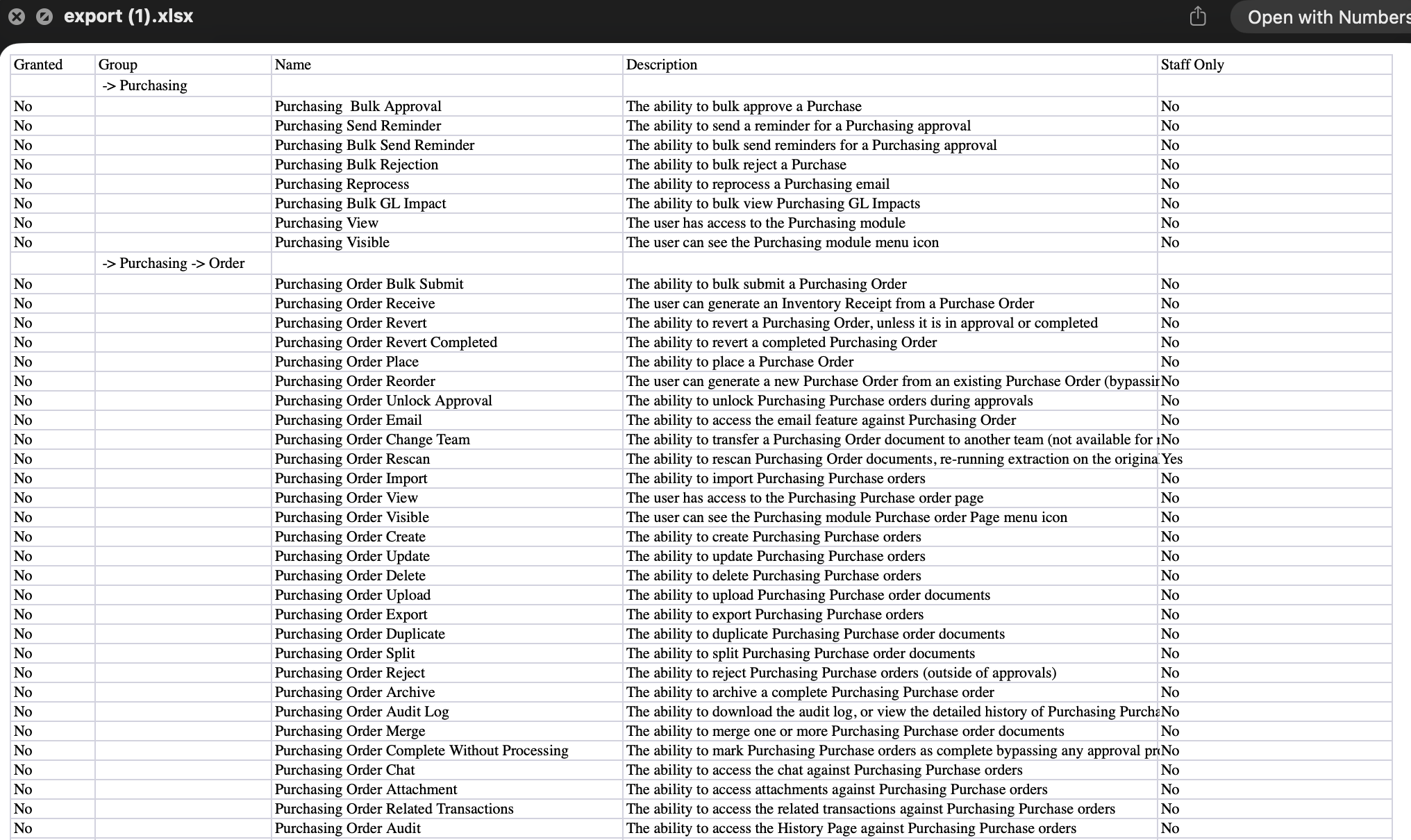
A user group permissions export opened in a spreadsheet, with the Granted column

Approvals​

Approval automations decide who needs to sign off a document and in what order. We've added a new place a management tree approval can start from, a way to keep moving through your approvals, and a couple of gaps filled in the requests lists.

Start from the purchase order raiser

  • A management tree approval can now start from the person who raised the purchase order the invoice is matched to, rather than only from the submitter or the assignees.
  • Choose Purchase order raiser under Start from when you set up the automation. Where an invoice is matched to orders raised by different people, each person's tree is walked once.

Open the next document after you approve

  • A new form extension, Open the next document, opens the next document in your list as soon as you select I approve or I reject, and closes the viewer when there are none left.
  • Add it under the form's utility extensions, next to Close the document viewer. It's off unless you add it, so nothing changes for teams that don't.
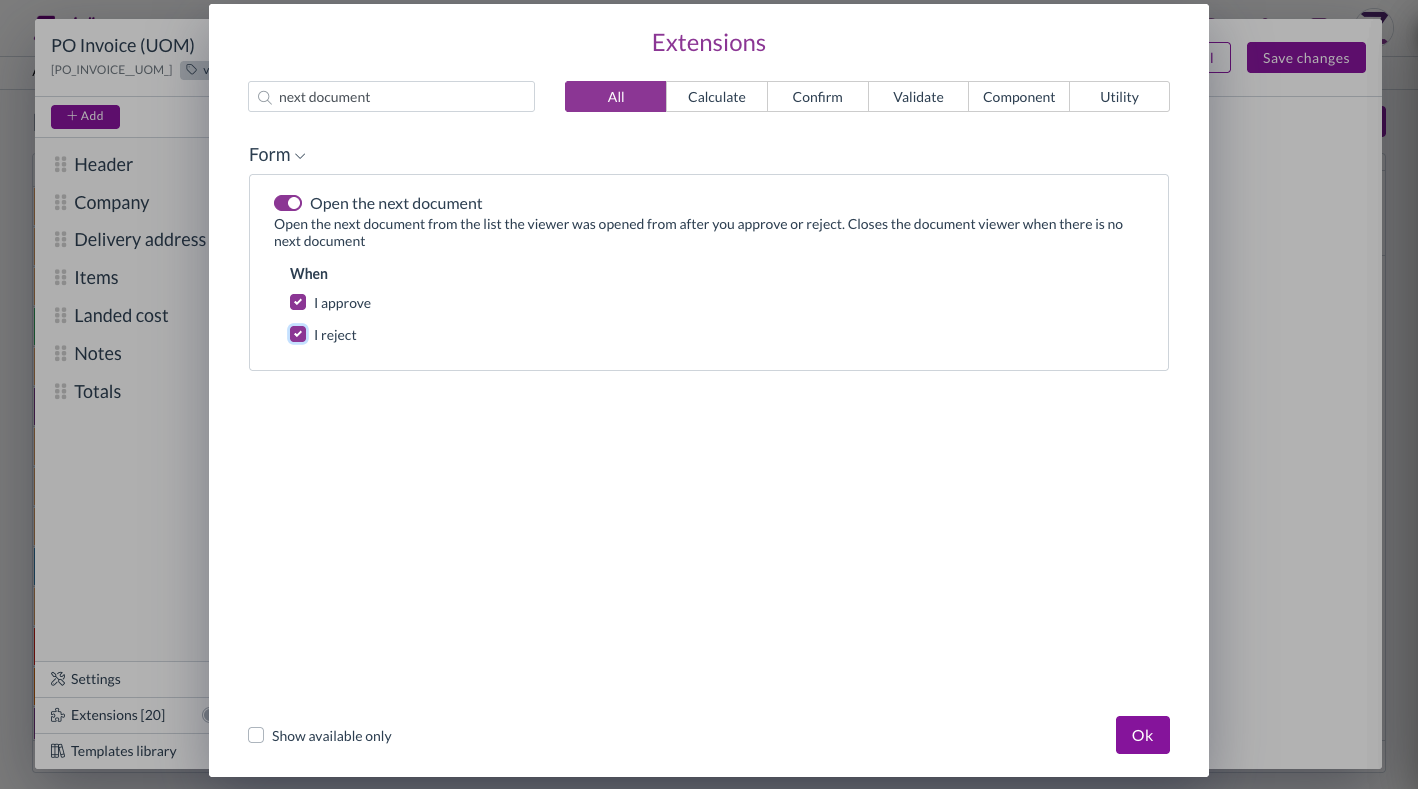
The Open the next document extension in the form extension editor

Requests lists

  • Mileage claims waiting on your approval now show under Expenses in your requests, alongside expense claims.
  • Requests under suppliers and customers now covers customers as well as suppliers. Switch between Suppliers and Customers in the toolbar, and approve or reject a contact straight from the list.

Validations​

Validations check a document for problems before it moves on. The Validate document due date check compares a document's due date with the payment terms on the supplier.

  • You can now choose the level of this check: Info, Warning, or Action required, the same as the delivery address checks.
  • At Action required, a due date that doesn't match the payment terms is listed with the document's other blocking errors, so the document can't be submitted until it's corrected.
  • Your existing configuration keeps its current level.
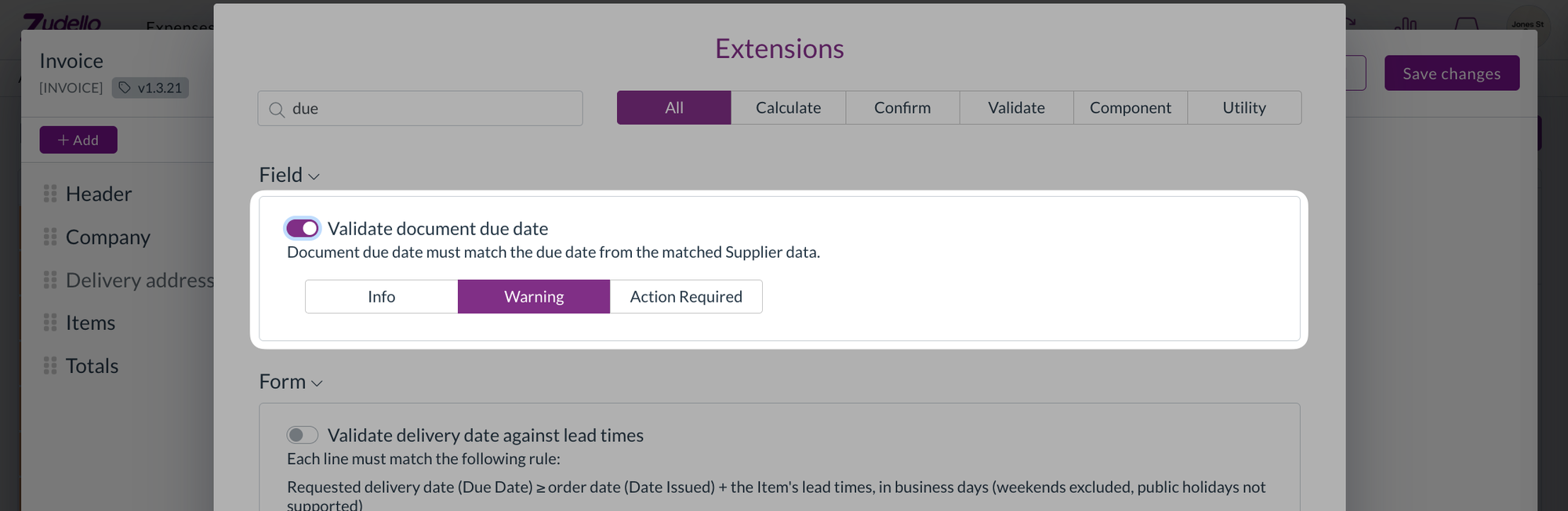
The Validate document due date extension with Info, Warning, and Action required levels, set to Warning

Dependencies​

Dependencies narrow a drop-down to the values that go with what's already on the document, such as the cost centres that belong to a location.

  • Mileage rate, expense category, payment method, and the other dimensions chosen by name now follow your dependencies in the same way as cost centre and location. Their drop-downs are filtered, a value that conflicts with the document is flagged, and inactive records are hidden.

Document viewer​

  • The Inbox tab now shows a blue dot when the document has inbox messages, the same as the related documents, attachments, and chat tabs. It updates after you email the document.
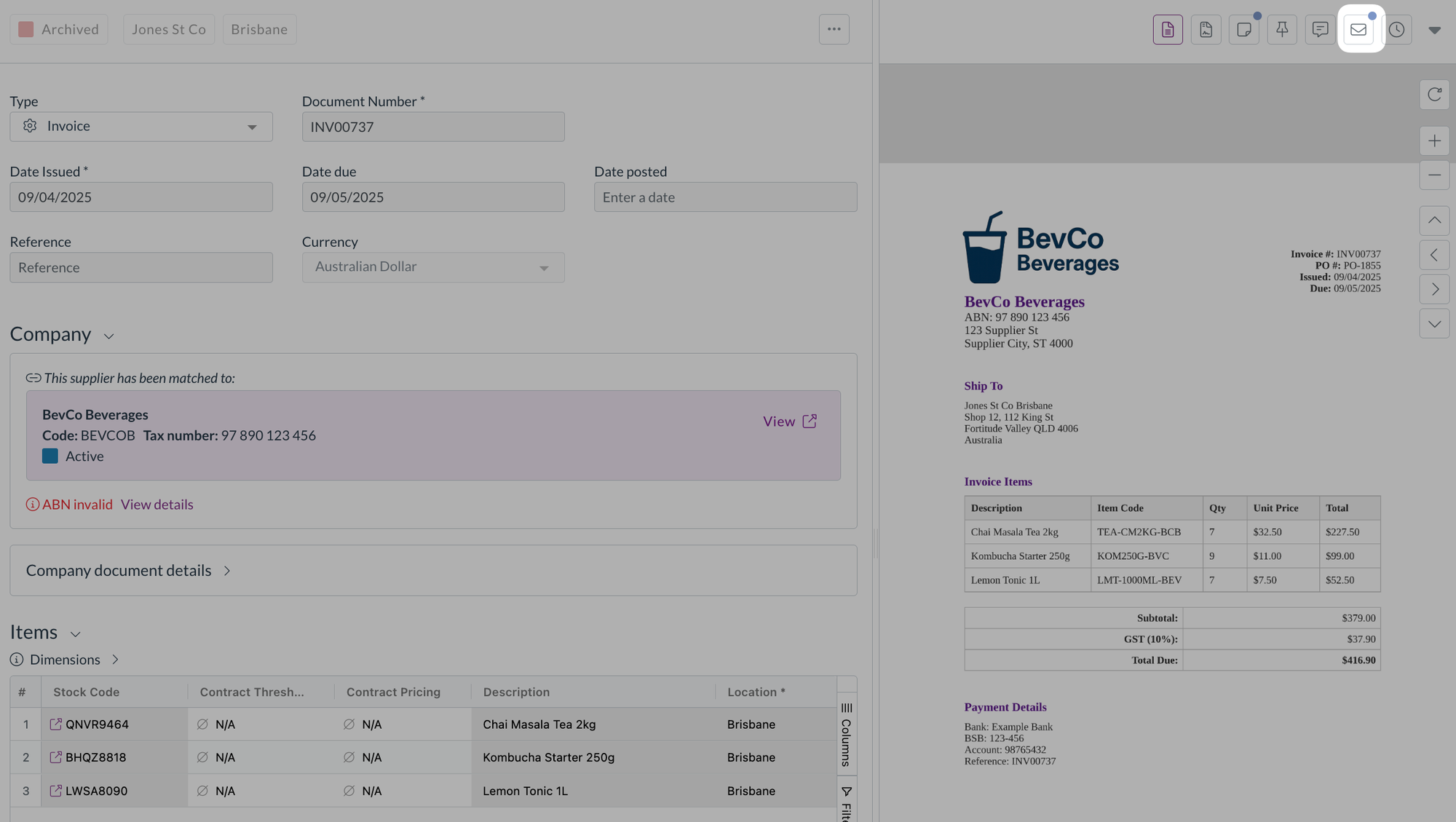
An invoice in the document viewer, with the Inbox tab highlighted and a blue dot showing it has new messages

  • The Inbox tab is now available on documents that are still scanning or unclassified, so you can open the email a stuck document came from.
  • Selecting documents in a list now stops at 100 everywhere. Select all and the header checkbox stop at 100 with the same message as shift-click, and Select all picks the first 100 regardless of how far you've scrolled.

Contracts​

  • Superseded documents under a contract's Related documents now show their version number, such as Version 2, with the newest first. Documents superseded before this release show a plain Version badge.

Budgets​

Budget imports match each row to a budget using a budget number or ID. If no column was mapped to either, every row failed with the same message after the import ran.

  • The Match step now keeps Continue unavailable until a column is mapped to Budget number or UUID, and tells you why.
  • A warning shows when no column is mapped to Budget config code. It doesn't stop the import.
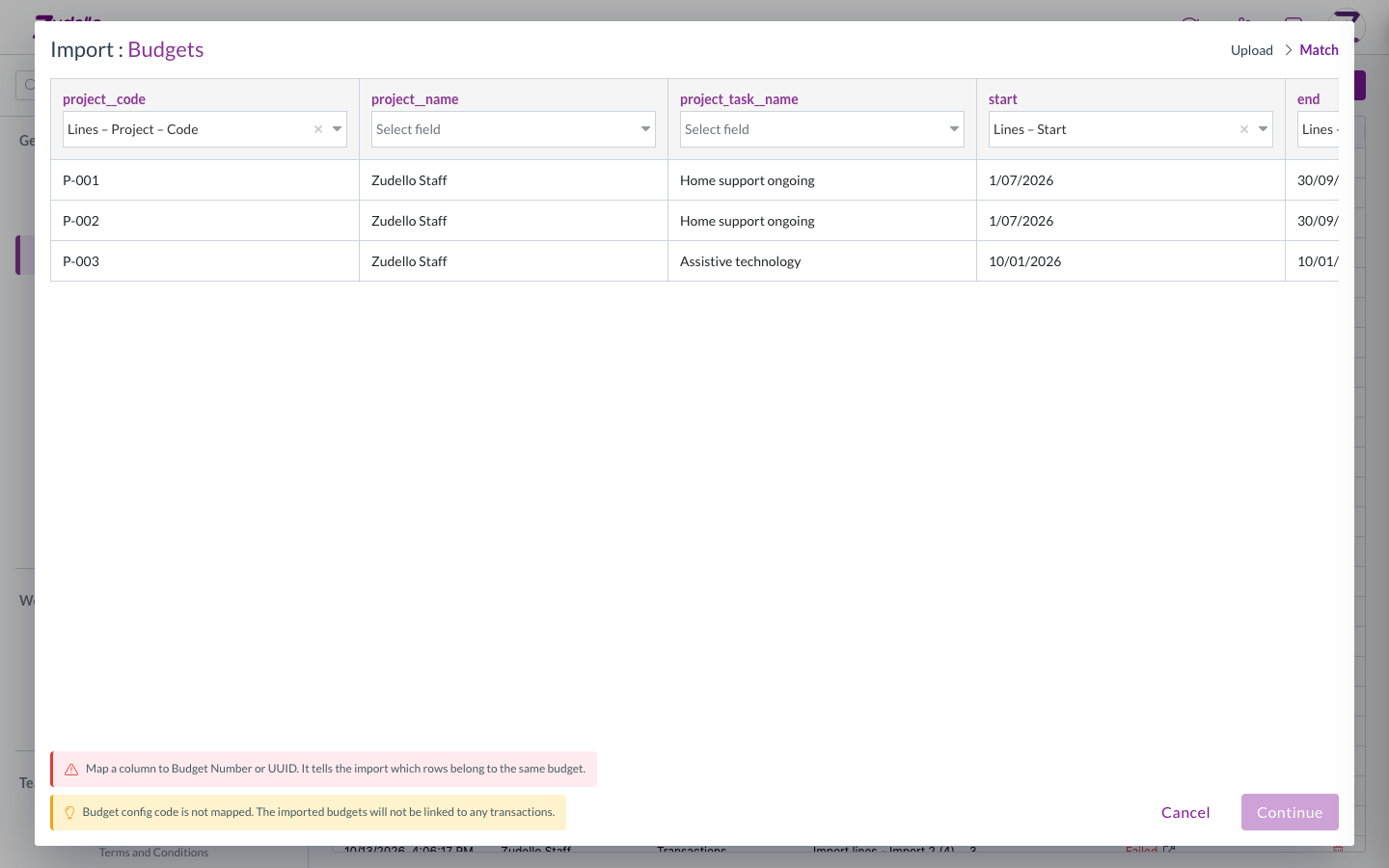
The budget import Match step, with Continue unavailable until a key column is mapped

Reporting​

  • GL impact now has a Document number column for transactions, which you can group by. Contracts don't have a document number, so they're unchanged.
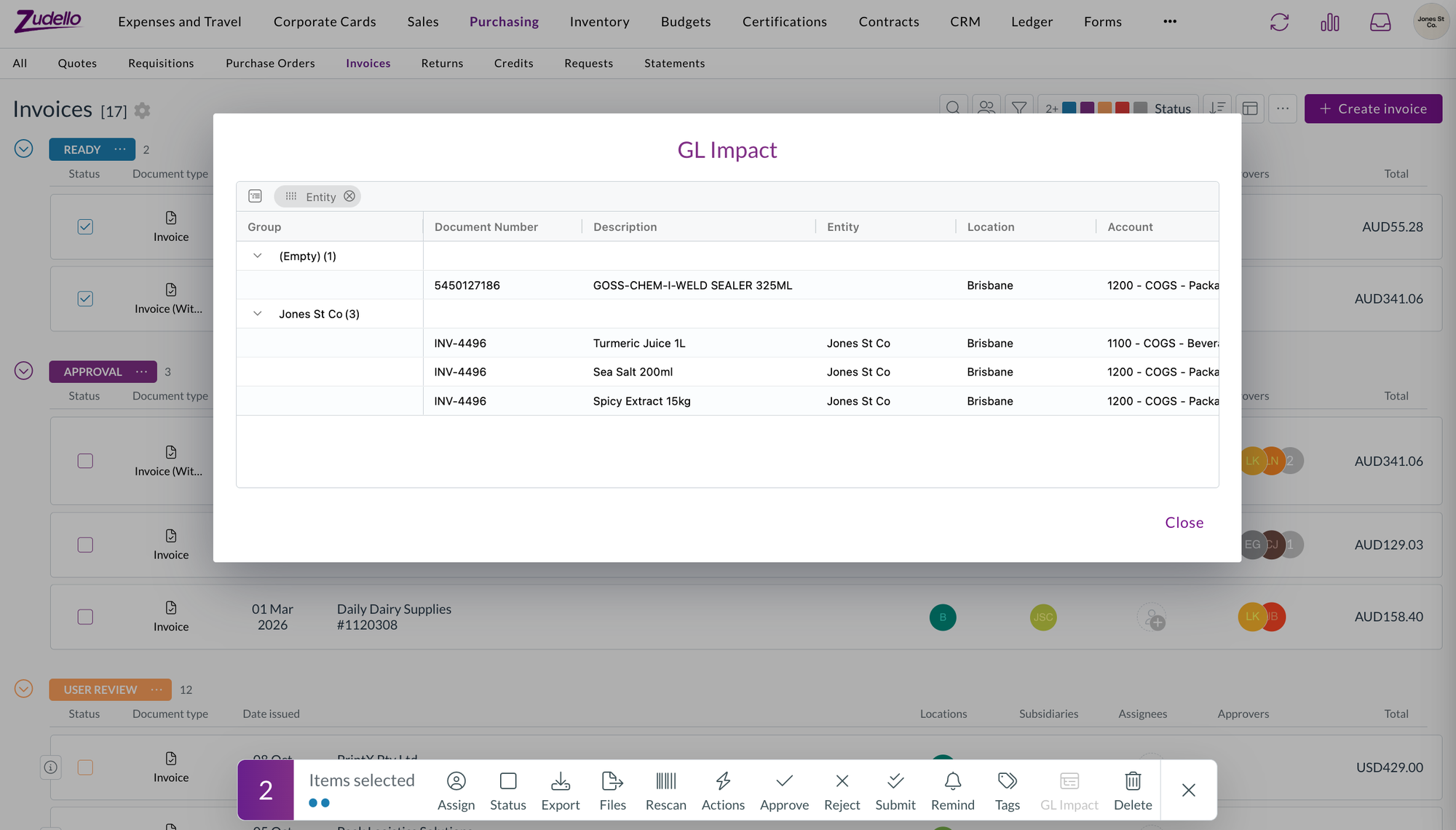
The GL impact report for two selected invoices, grouped by entity, with the Document number column

Suppliers and customers​

  • A supplier or customer you add from a document's contact field now takes the creation status you've set for that contact type, rather than being created as Active straight away. If your team creates contacts as Draft, they go through your usual review and approval first.

Performance​

  • Zudello's first load is about a third smaller. The form settings, email, and reconciliation windows are now loaded when you open them, and some shared code no longer pulls in large libraries up front.
  • If you have Zudello open while this release goes out, the first time you open one of those windows may show a loading error. Reload the page and it'll be fine from then on.

New UI​

We've kept building out the new interface at platform.zudello.io. Everything above is available there as well.

The changes in this section are available in the new UI only.

Group membership matrix

  • Group membership has a new Matrix view next to By group, with users as rows and groups as columns, grouped under Access, Approval, and Visibility. A dot marks each membership, and users in no groups get their own section.
  • Filter by team, search, reorder columns, and export the matrix to Excel. Hovering a cell highlights its row and column.
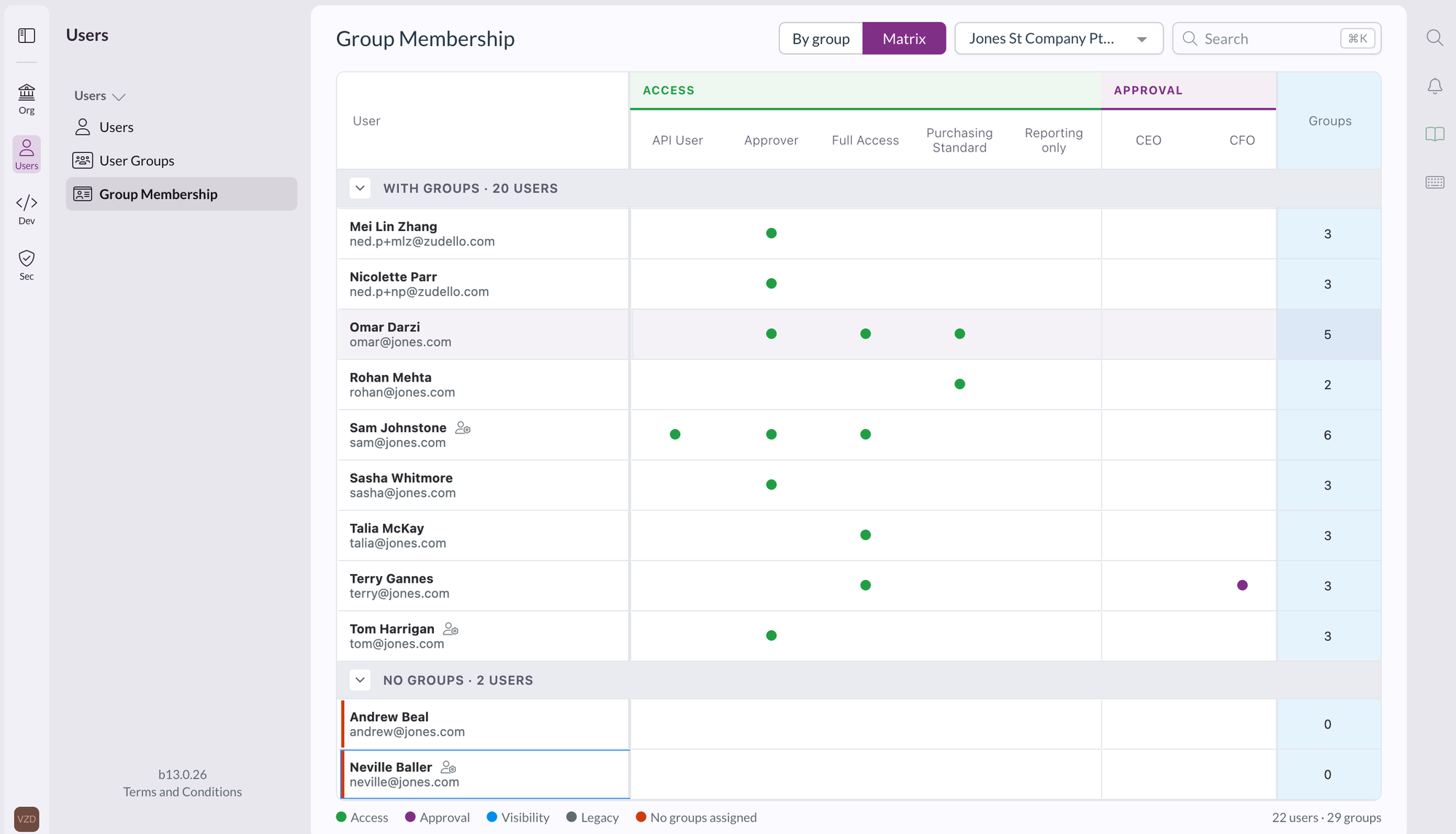
The group membership matrix view, with users as rows, groups as columns under Access and Approval, and a dot where a user belongs to a group

Prepayment schedules

  • Prepayment schedules are now a dimension in Settings, then Data, with their own statuses, document types, data permissions, and renaming in your team language. You can use them in form value lists, document coding rules, and the allocations extension, and lines pick up the prepayment schedule from the item, supplier or customer, and employee.

Grid filters

  • The grey filter boxes above a grid are now drop-downs you can select, and each filter list opens under its own column.
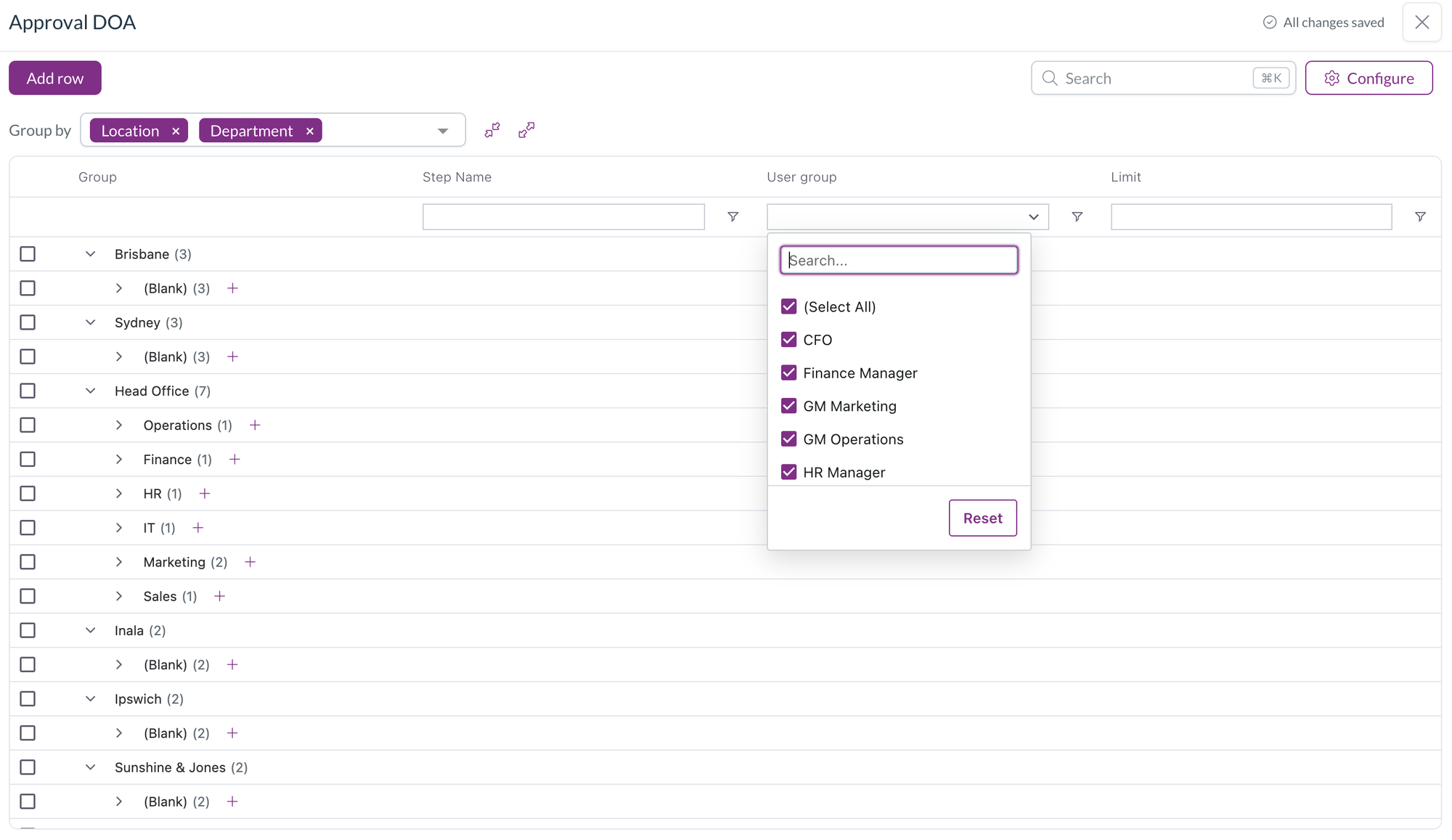
A column filter on a grouped grid, with a searchable list of user groups to tick or untick and a Reset button

Field manager

  • Option lists that Zudello defines, such as the statement line document type, are now read-only in the form editor and field manager, so they can be used as filters but not changed.
  • Your own option lists get a checkbox on each row. Remove selected removes the rows and saves the field, and the list grows with its rows, up to ten, before it scrolls.

Resolutions​

We're constantly working to refine Zudello's functionality and address any issues as soon as possible. As part of this release, we've made the following resolutions:

  • We've fixed Uploaded document in the document viewer downloading the file instead of showing it, so you can highlight and copy text from the original again.
  • Bank account validation no longer flags letters in a BSB. Suppliers who store a SWIFT code in the BSB field are no longer blocked at review.
  • We've fixed a contract's approval being reset when a new document version was promoted to its primary document.
  • We've fixed the card section of the approval digest listing transactions that were already reconciled. Its View all link now opens the list filtered to your unreconciled transactions.
  • We've fixed bulk updates through the API reporting a failure when the documents had validations on them.
  • We've fixed a file dropped onto a document list opening in a new browser tab instead of uploading when the list was refreshing, and the same problem in Chrome on a Mac.
  • We've fixed tax-inclusive scanned invoices being given the wrong tax-inclusive setting and subtotal, which put tax on top of the total.
  • We've fixed a line's tax amount being cleared when the line had a tax amount entered but no tax rate linked. The amount you entered is kept.
  • We've fixed automations set to run when a document is converted firing before all of the converted document's lines were written.
  • We've fixed automations with a reconciled trigger, on transactions or payment disputes, never running.
  • We've fixed a contract's value in your home currency not being recalculated when the contract was edited.
  • We've fixed line and document totals not updating after choosing a unit of measure or editing a converted quantity or price, and a converted quantity edit setting the unit price to zero.
  • We've fixed landed cost lines being counted when working out a document's dimensions, which showed Multiple on items dimensions and header badges. Setting a dimension on a section's lines now updates only that section.
  • We've fixed corporate card expenses being left out of the check that stops an unreconciled expense being submitted.
  • We've fixed card reconciliation crashing and leaving stray connection lines after a quick refresh.
  • We've fixed an error when a statement reconciliation was closed while it was still loading, and the "Error while fetching remote item statuses" message when another statement was opened at the same time.
  • We've fixed a chat message containing only a pasted screenshot showing "Please enter a message or attach a file" instead of being sent.
  • We've fixed indented lists and centred or right-aligned text losing their formatting in emails sent from Zudello, including rejections, place order emails, and inbox replies.
  • We've fixed date fields disappearing, with an error on the page, after a date field was redrawn, such as after switching Force overwrite on a default date in form settings.
  • We've fixed module-level permissions showing under an unnamed group in the user group permissions grid instead of under their module.
  • We've fixed the field to scan and the target field in a document coding rule not offering fields that only contracts have, and the target value showing an ID instead of the item SKU.
  • We've fixed the budgets information pop-over closing when you selected its icon and not opening again on hover.
  • We've fixed long field labels overlapping the next row in export template field pickers.
  • We've fixed Document Studio showing "Failed to fetch team settings" for users who aren't admins.
  • We've fixed adding an existing user to another organisation failing.
  • We've fixed the "Could not find any first approver" message being recorded as an error when a delegation of authority rule was skipped on purpose.
  • We've fixed, in the new UI, windows opened from inside the document viewer, such as reject, resolve duplicates, and create dependency, opening behind the viewer on some screens.
  • We've fixed, in the new UI, the submodule search in Create status finding nothing.

Have an idea?​

Do you have an idea for a new feature or how we can improve our current features? Let us know at support@zudello.com.

Your ideas and feedback are an important part of our product planning process to make Zudello better for everyone.
Mobile app 1.3.0

Release date: Friday 11 September 2026
Version: Mobile app 1.3.0

Here's the latest summary of what's new and improved in the Zudello mobile app, as well as what we resolved in the latest release. Get it from the App Store or Google Play.

In this release:​

  • Use the app in French, German or Spanish
  • Dates, numbers and money formatted for your locale
  • Easier employee coding on expenses
  • A tidier payment card view and more

Looking for something? Browse by tag to find release notes on a specific feature.

New and improved​

Languages​

Until now the Zudello mobile app was English only. You can now use it in the language you work in.

  • Choose French, German or Spanish (or stay in English) from Settings > Language. The app switches straight away, with no need to sign out.
  • The screens you use day to day are translated, including the home screen, expenses, mileage, approvals, document details, activity and settings.

Dates, numbers and money​

Dates, numbers and amounts now follow the conventions of the language you've chosen.

  • Dates and numbers use your locale's format, including the thousands separator and decimal mark.
  • The date picker follows your language too.
  • Amounts keep the document's own currency, or your team's default currency if the document doesn't have one. Changing your language never changes the currency.
  • The currency symbol sits where your locale expects it, before or after the amount.

Expenses​

We've made the employee field on expenses easier to work with.

  • You can now clear the employee on an expense, in the header or on a line, when it isn't needed.
  • Set the employee once and apply it to all lines, rather than entering it line by line.
  • Lines now show the employee's name.
  • When the employee field has a default value set up, it now fills in on the header and every line of a new expense automatically.

Payment cards​

  • The card on your home screen no longer shows a balance, which wasn't reflecting your real card balance. It now shows the payment method assigned to you.

Resolutions​

We're constantly working to refine Zudello's functionality and address any issues as soon as possible. As part of this release, we've made the following resolutions:

  • We've fixed document lists, which could fail to load past the first page.
  • We've optimised the Android build, so the app is smaller to download.

Have an idea?​

Do you have an idea for a new feature or how we can improve our current features? Let us know at support@zudello.com.

Your ideas and feedback are an important part of our product planning process to make Zudello better for everyone.
Release notes edition 3.6.9

Release date: 16 October 2025
Version: v3

Here's the latest summary of what's new and improved in Zudello, as well as what we resolved in the latest release.

In this release:​

  • Launch of the Sales module with enhanced order management
  • New email body extraction for sales orders and quotes
  • Enhanced automation capabilities with tag management
  • Performance improvements and more

Looking for something? Browse by tag to find release notes on a specific feature.

New and improved​

Sales module launch​

We've officially launched the Sales module to help you manage customer relationships, quotes, and orders efficiently.

The Sales module includes:

  • Streamlined document classification
    • Automatic classification of quotes, orders, and remittance advice documents
  • Enhanced order management
    • Complete quote-to-order workflow management
    • Comprehensive order processing and fulfilment capabilities
  • Flexible document support
    • Support for quotes and orders in a range of formats
    • Functionality to extract orders from email bodies

The Sales module launch represents a significant expansion of Zudello's capabilities beyond traditional accounts payable processing, providing a complete order management solution for growing businesses. To learn more, see our Sales module knowledge base articles.

Revolutionary email body extraction​

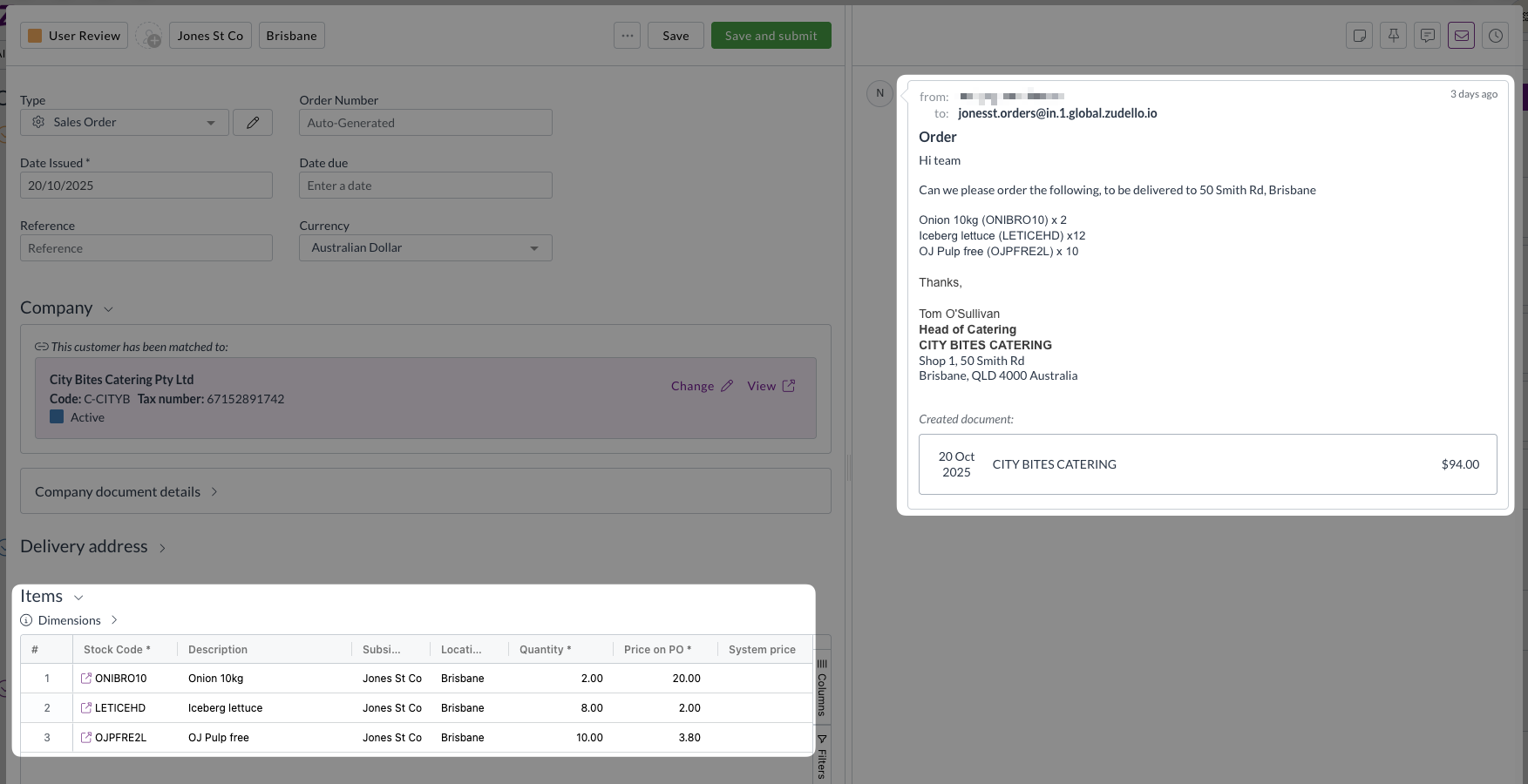
Some of your customers may send orders as an email body rather than an attachment. Previously this required you to manually create a sales order and copy over the data; but no more.

We've introduced groundbreaking functionality that extracts transaction information directly from email content, eliminating the need for separate document attachments in many scenarios.

This innovative feature provides:

  • Smart detection of whether emails contain attachments or require body extraction
  • Automatic extraction of sales orders and quotes directly from email body text
  • Comprehensive transaction functionality, including supplier and item matching and price comparisons

To make your workflow even smoother, we've also introduced the following inbox features to help you better sort between emails where the body is the order, and those with attachments:

  • New filter for emails without document attachments
  • Improved viewing interface showing email origin for extracted transactions

This feature is particularly valuable for businesses that receive orders via email rather than formal purchase order documents, streamlining the entire order capture process.

Advanced tag management automations​

Automation workflows help you streamline repetitive tasks and ensure consistent processing across your organisation. We've expanded automation functionality with powerful new tag management capabilities.

Automations can now add or remove specific tags based on workflow conditions. These enhancements allow for more sophisticated document organisation and processing automation, reducing manual effort while ensuring consistency across your workflows.

For assistance with setting up tag-related automations, please reach out to support@zudello.com.

Significant performance improvements​

We've implemented comprehensive system optimisations to address performance concerns and ensure reliable operation across all regions.

Enhanced processing speed​

  • Streamlined data operations

    • Faster transaction and budget line fetching
    • Improved saving process to decrease the time it takes for documents to save
    • Enhanced audit logging performance
  • Advanced performance monitoring

    • Comprehensive front-end interaction tracking
    • Better identification of performance bottlenecks
    • Proactive performance issue detection

Improved system reliability​

  • Enhanced document numbering

    • Resolved issues with purchase order number generation
    • Improved communication between system components
    • Better handling of automation workflow interactions
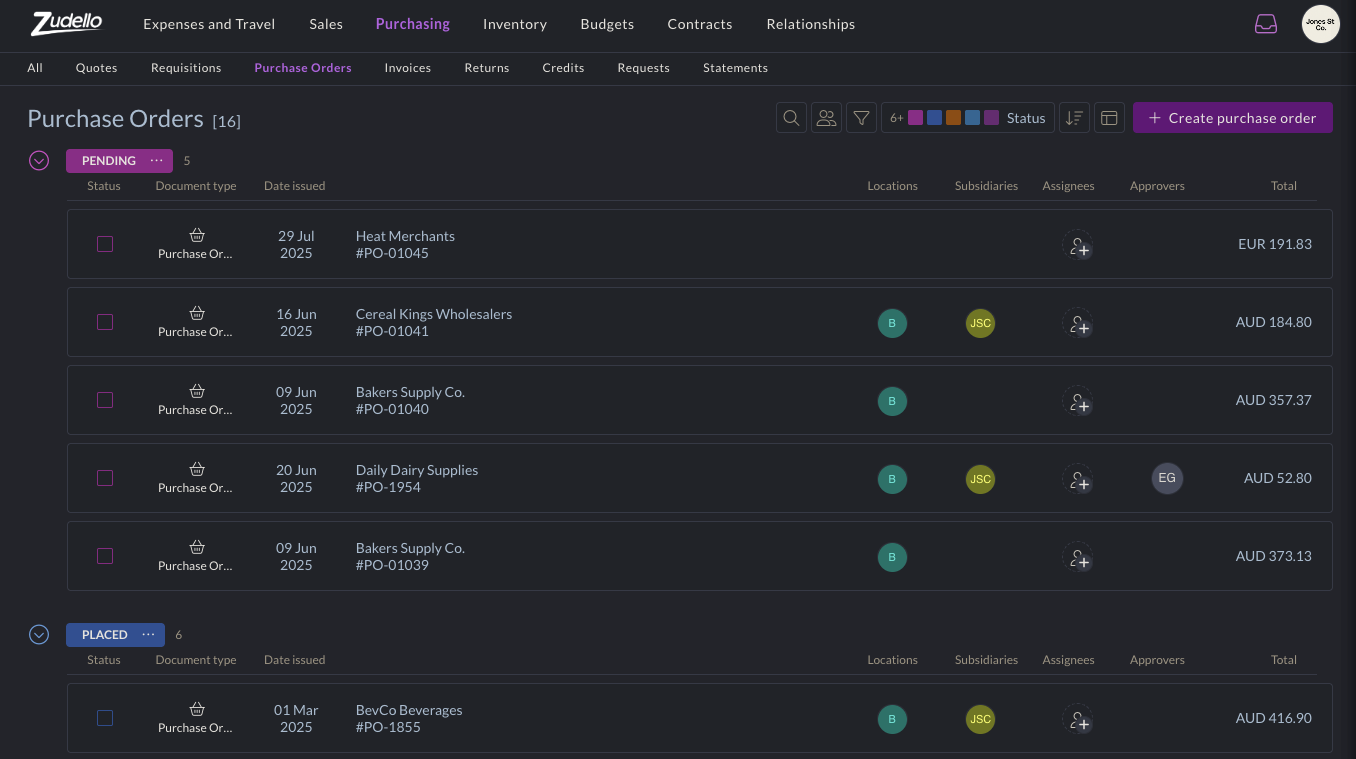
  • Advanced search capabilities

    • Improved search ranking for document numbers
    • Enhanced UUID-based searching
    • Better document discovery and retrieval

Budget management enhancements​

Budget management helps you control spending and track costs across projects and departments. We've made several improvements to budget functionality and performance.

  • We've enhanced calculation speed and system responsiveness for faster budget line processing
  • We've improved the information displayed when viewing allocations, and clarified the transaction line details in budget reporting
  • We've enhanced budget configuration validation and added better handling for budget setup errors

Budget management is currently available for selected teams only. To discuss enabling this feature for your team, reach out to support@zudello.com.

Resolutions​

We're constantly working to refine Zudello functionality and ensure that we address any issues as soon as possible. As part of this release, we've made the following resolutions and improvements:

  • We've enhanced our email processing reliability with improved missing email handling and better system communication
  • We've resolved user interface issues in dark mode and alternative themes when editing forms
  • We've improved system stability during high-volume processing periods
  • We've enhanced error handling and recovery mechanisms across automation workflows
  • We've optimised system performance during peak usage times to ensure consistent response times

Have an idea?​

Do you have an idea for a new feature or how we can improve our current features? Let us know at support@zudello.com.

Your ideas and feedback are an important part of our product planning process to make Zudello better for everyone.
Release notes edition 3.6.8

Release date: 8 October 2025
Version: v3

Here's the latest summary of what's new and improved in Zudello, as well as what we resolved in the latest release.

In this release:​

  • Two brand new user actions for easier document processing
  • New dark mode, visual themes, and accessibility options
  • Improved system performance and reliability
  • Document processing enhancements and more

Looking for something? Browse by tag to find release notes on a specific feature.

New and improved​

New user actions​

User actions help streamline document workflows by providing quick access to frequently used functions. We've launched two new actions that solve common document management challenges.

Change team action​

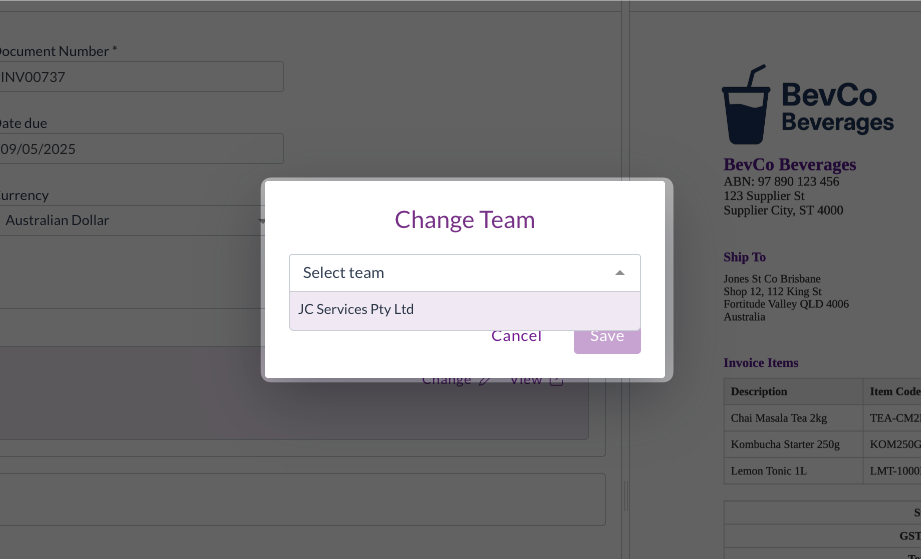
The Change Team action allows you to transfer documents between teams within your organisation after they've been uploaded or emailed in.

The Change team action allows you to move ingested (uploaded or emailed) documents from one team to another within the same organisation. This is particularly useful for users who are members of multiple teams, where documents may be emailed or uploaded to the wrong team.

For help using the Change team action, see Change team.

Reprocess action​

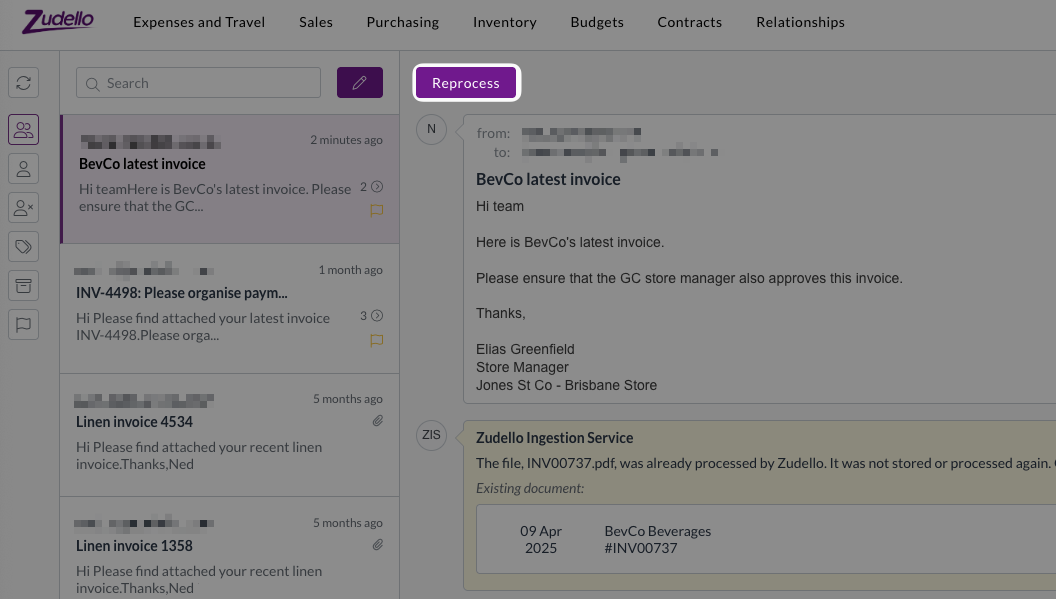
When the same document is received through multiple channels (e.g. an internal team and a supplier email the same document), you're no longer stuck with whichever email arrived first.You can now use the Reprocess action to choose which version of the document you'd like to process.

When you receive the same document attachment from multiple sources, you can now:

  • Choose which email version of the document to treat as the original, and which to treat as the duplicate
  • Delete the first processed copy of the document, and reprocess the copy from your preferred email sender

This is particular useful when you need the copy of a document that was emailed in by a specific person, for approval workflows or automation routing. For help with the Reprocess action, see Reprocess a document.

New visibility and accessibility options​

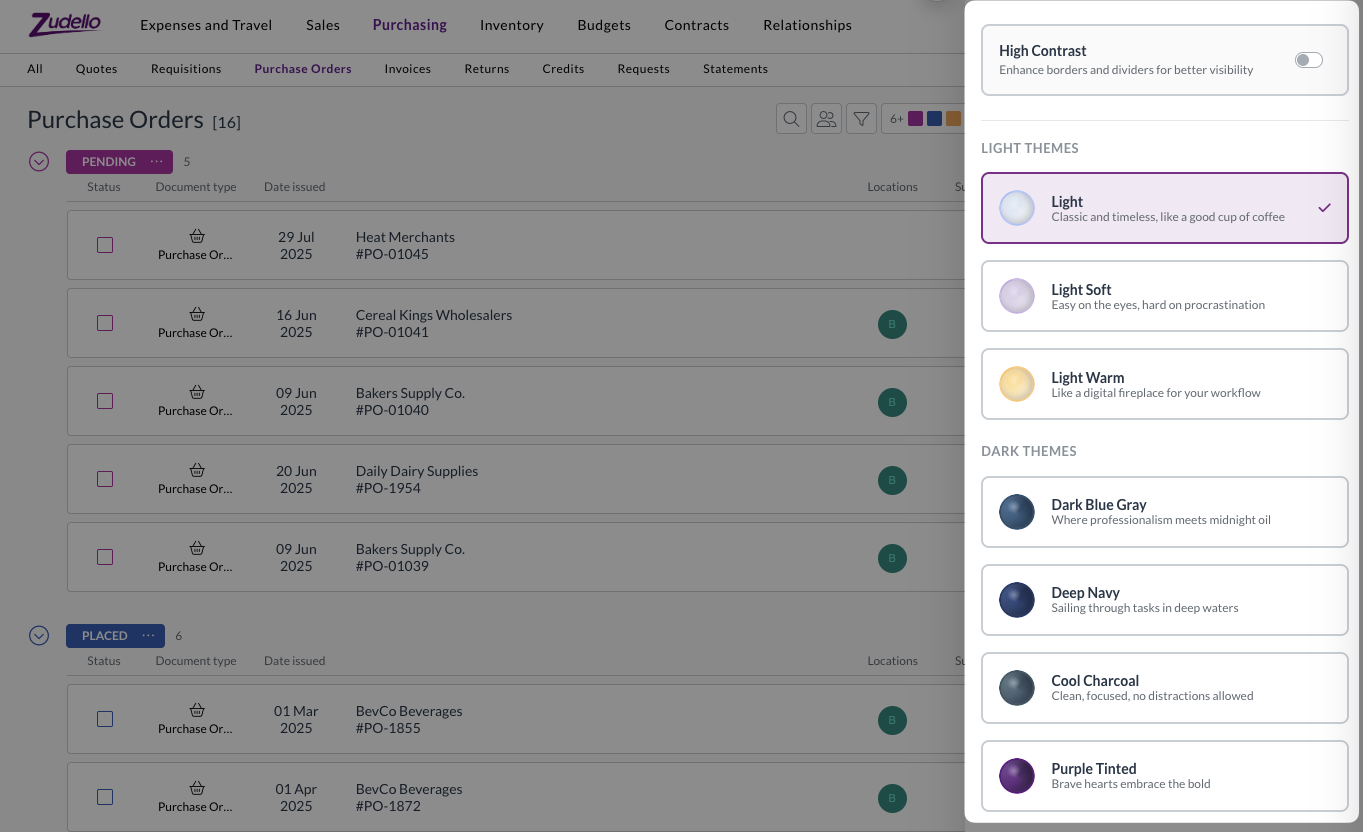
Visual themes and accessibility improvements help create more comfortable working environments for all users. We now offer seven different theme options to improve accessibility and reduce eye strain.

Themes include:

  • Traditional light and dark mode options
  • Additional theme variations for different preferences
  • Enhanced contrast option, for improved border and UI element visibility

These themes are designed to accommodate different environments, accessibility needs, and to help reduce eye strain during extended use.

Theme options can be found under the company menu at the top-right of screen. For assistance with adjusting themes, see Themes.

New Account Category dimension​

We've added a new Account Category dimension to provide additional categorisation options for general ledger accounts.

The new dimension:

  • Works similarly to Account Groups for improved categorisation
  • Can be configured in forms and used in account records
  • Has full import/export support available
  • Is compatible with delegation of authority (DOA) datasets

This dimension provides more flexibility in how you structure and report on your account classifications.

Email processing enhancements​

We've strengthened our email processing infrastructure to ensure reliable document capture and processing from your Zudello inboxes.

We recently experienced an issue where some emails weren't processed correctly, resulting in missing documents. We've now implemented backup systems that store emails on secure cloud storage before processing, ensuring we have local copies should issues occur downstream. These backup emails are automatically cleaned up after 60 days.

We've also improved the communication between system components to prevent documents from getting stuck during processing. The system now uses enhanced queue messaging for automation resumption, which provides better retry mechanisms and prevents API call failures from stopping the process.

Large document handling​

We've changed how we process documents with more than 100 pages to prevent system congestion and improve processing times.

For documents over 100 pages, we now process only the first three pages and last page. This significantly reduces processing time, while maintaining extraction accuracy for key document information. It also prevents large documents from impacting processing times for other teams.

This improvement ensures fair processing times across all teams while maintaining the accuracy needed for business operations.

Enhanced currency conversion flexibility​

Zudello's built in currency conversion helps you manage transactions in foreign currencies by automatically calculating exchange rates and local currency amounts. We've enhanced the currency conversion interface to provide more flexibility in how you handle foreign currency transactions.

When the currency conversion extension is enabled, you can now choose to enter either:

  • The exchange rate, and Zudello will calculates the local currency amount
  • The local currency amount, and Zudello will calculate the exchange rate

This gives you more flexibility when dealing with foreign currency documents.

Budget management improvements​

Budget management helps you control spending and track costs across your organisation. We've made several enhancements to budget functionality and performance:

  • Performance optimisations
    • Improved budget performance with additional system optimisations
    • Enhanced processing speed for budget-related operations
  • User experience improvements
    • Better date picker behaviour for interval budgets
    • Improved calendar navigation when setting budget periods
    • More intuitive date range selection

Budget management is currently available for selected teams. To discuss enabling this feature for your team, reach out to support@zudello.com.

Document Studio improvements​

Document Studio empowers you to customise how Zudello extracts data from your documents, ensuring maximum accuracy for your specific document types and formats.

We've made the following enhancements to handle more complex extraction requirements:

  • Increased prompt size to accommodate larger custom extraction prompts
  • Better support for complex statement line extraction
  • Improved handling of detailed extraction requirements

Document Studio is currently only available for selected teams. To discuss enabling Document Studio for your team, reach out to support@zudello.com.

Resolutions​

We're constantly working to refine Zudello functionality and ensure that we address any issues as soon as possible. As part of this release, we've made the following resolutions and improvements:

  • We've made several system performance enhancements to reduce system load and improve response times across the platform.
  • We've implemented caching for contract and budget checks to improve performance. The system now avoids unnecessary processing when data hasn't changed, which reduces system load and improves response times.
  • We've also optimised calculation processes for pricing, totals, and expense claim synchronisation.
  • We've resolved a specific issue that could cause browser freezing under certain circumstances involving circular reactivity loops when opening particular purchase orders.
  • We've updated homepage video links to connect to current demonstration content.
  • We've resolved a Firefox browser compatibility issue that prevented expense claim links from working correctly.
  • We've improved error handling for users with upload permissions but without update permissions, providing more graceful error messages.
  • We've enhanced how dataset names are displayed in approval configurations to reflect current naming conventions.
  • We've improved filter value display accuracy after selection from drop-down lists.
  • We've extended automation log retention from 30 to 90 days to assist with troubleshooting older issues.
  • We've enhanced our internal alert system to better handle document type conversions and transformations.
  • We've resolved an issue where certain ZIP files caused document processing issues.

Have an idea?​

Do you have an idea for a new feature or how we can improve our current features? Let us know at support@zudello.com.

Your ideas and feedback are an important part of our product planning process to make Zudello better for everyone.
Release notes edition 3.6.6

Release date: 10 September 2025
Version: v3

Here's the latest summary of what's new and improved in Zudello, as well as what we resolved in the latest release.

In this release:​

  • Improved approval navigation and processing
  • Performance enhancements for document extraction
  • New escalation options for approval workflows
  • Document Studio improvements and more

Looking for something? Browse by tag to find release notes on a specific feature.

New and improved​

Requests submodule navigation​

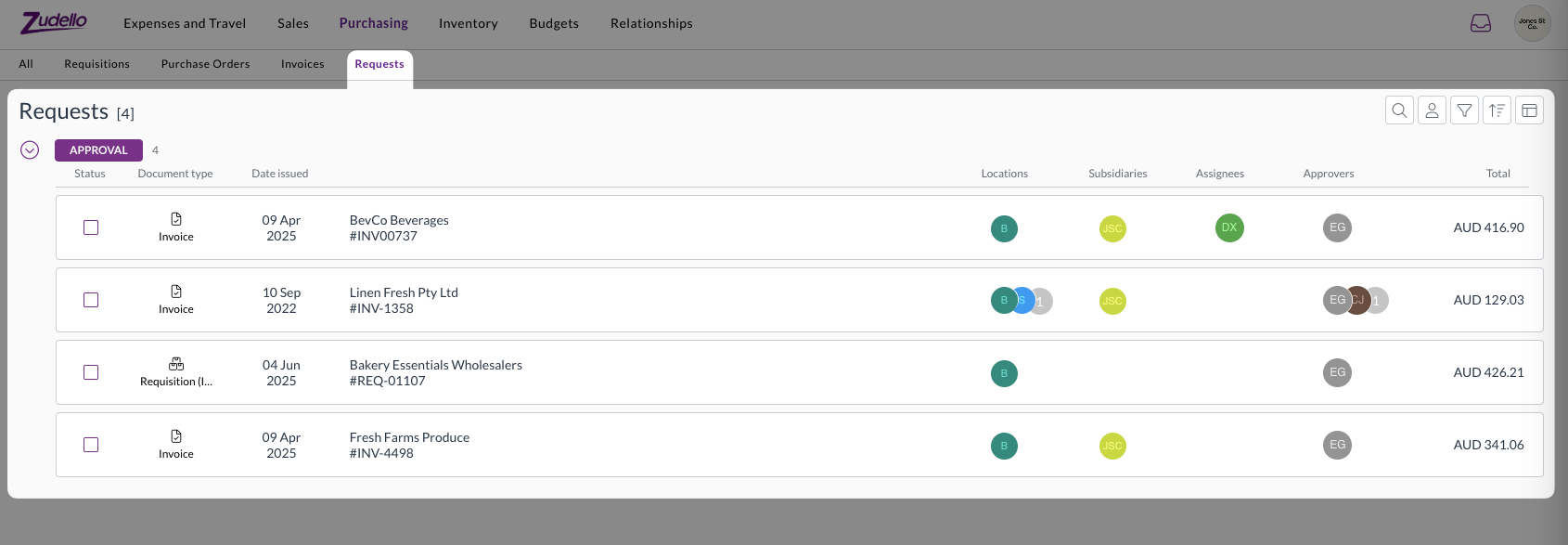
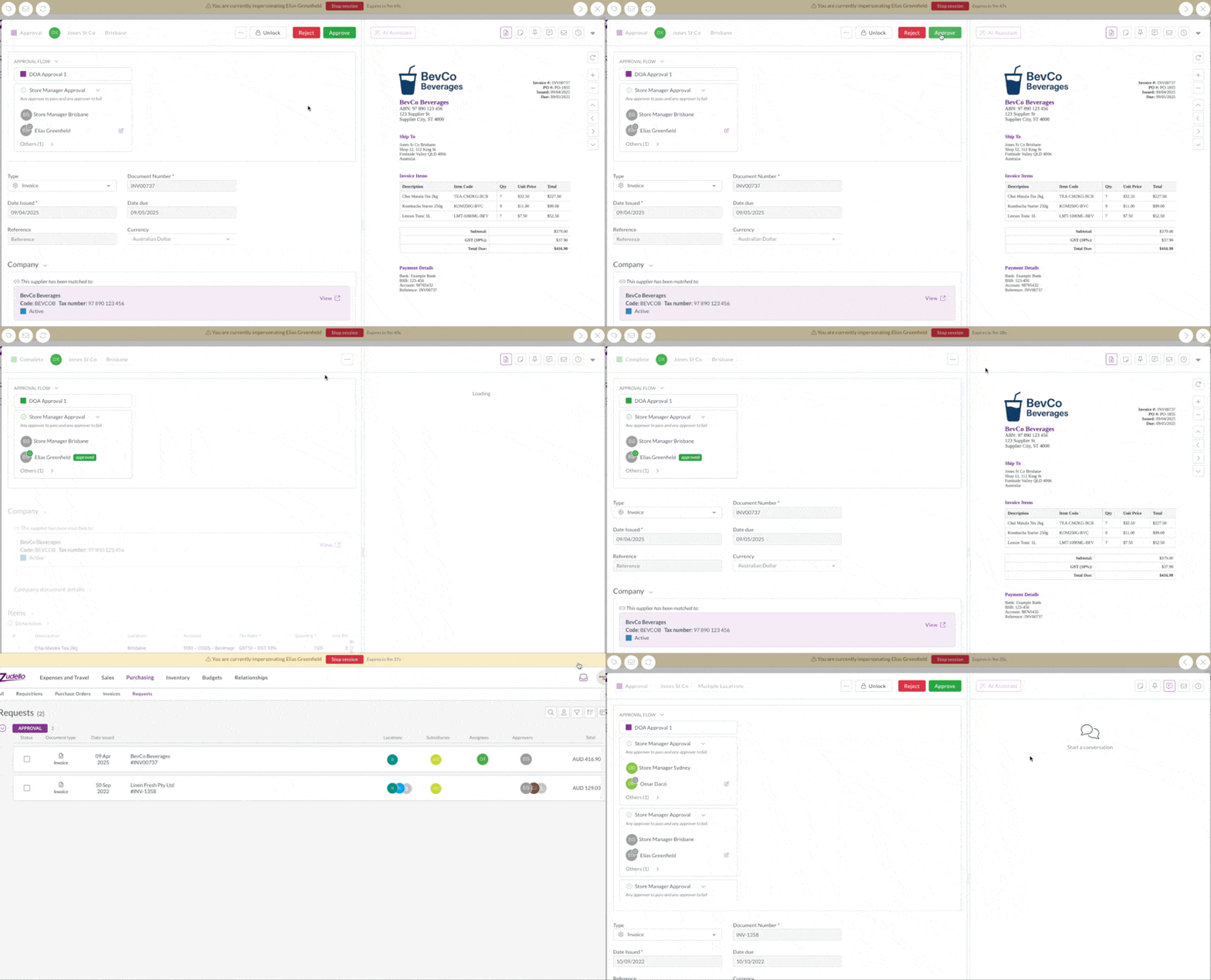
The Requests submodule allows you to quickly view and action all of your outstanding approvals in one place. We've improved the navigation experience when moving between documents to help you process approvals more efficiently.

Previously when navigating through approval requests in the Requests submodule, the navigation buttons would disappear when documents were refreshed after approval, making it difficult to move to the next pending approval.

The system now maintains your position in the queue even after documents are approved and moved to the next processing stage. This allows you to seamlessly move from one approval to the next, without needing to click out of each document and into the next.

Approve GIF

Performance improvements​

We've made significant performance enhancements to improve processing speed and reliability of our document extraction, particularly during high-volume periods.

The system now uses smarter queue management to better handle large document uploads, and ensure fair processing for all teams. This means faster average document processing times and more consistent performance.

Enhanced tax number matching​

Supplier matching automatically links documents to the correct suppliers in your system, and is often driven by the extracted tax number on a document. We've improved how the system matches tax identification numbers such as ABNs to provide more accurate supplier recognition.

The system now correctly handles tax numbers that include dashes. This improvement ensures more reliable supplier matching, regardless of how the numbers are formatted on your documents.

New approval escalation options​

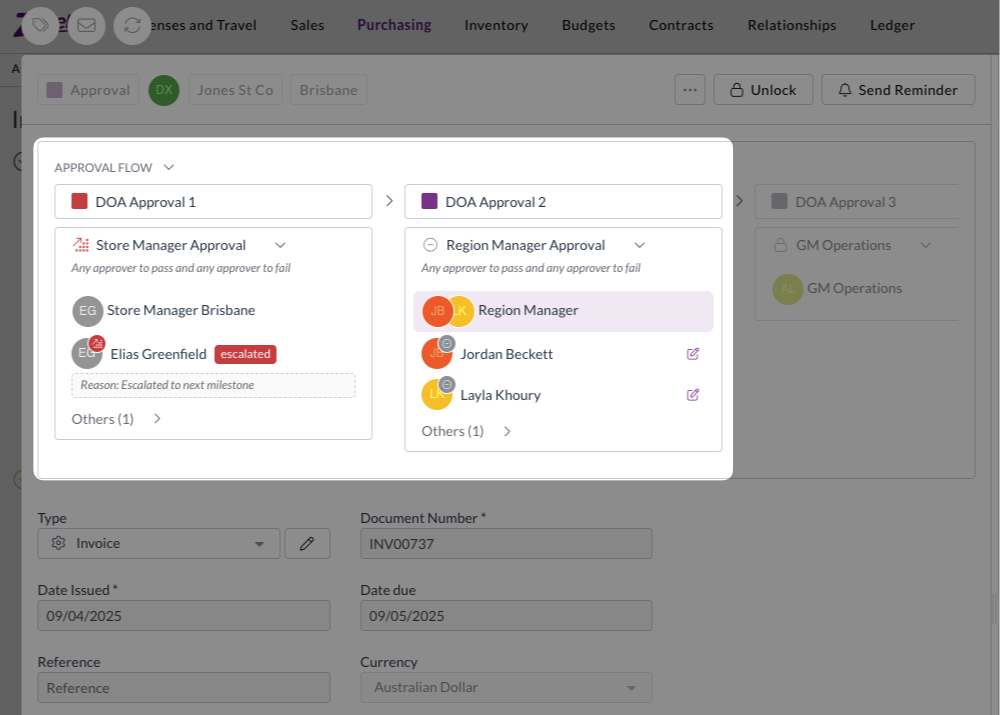
Approval workflows use automated escalations to ensure documents are processed within appropriate timeframes. We've introduced a new escalation method that provides more flexibility in who approvals are escalated to.

Next milestone escalation​

Instead of escalating only to direct managers, approvals can now be configured to escalate through your delegation of authority (DOA) structure.

  • Automatic progression
    • When an approval times out, it automatically moves to the next appropriate approval milestone based on your configured approval limits
  • Fallback protection
    • Configure fallback approvers to ensure approvals don't get stuck if they reach the end of the approval chain
  • Streamlined setup
    • Reduces the need to maintain direct manager relationships in user records if you are already maintaining an approval DOA

How it works​

When an approval exceeds its time limit, the system evaluates your delegation of authority rules and creates the next required approval milestone. The original approver's response is marked as escalated, and the next level approvers receive urgent approval notifications.

If approvals reach the end of the approval chain, they escalate to your configured fallback approvers, who can force approve to ensure processing continues.

This enhancement is particularly useful for organisations with complex approval hierarchies or those who prefer approvals to follow spending authority limits rather than management reporting lines.

Enabling next milestone escalation​

Next milestone escalation is currently only available for selected teams. To discuss enabling this feature for your team, reach out to support@zudello.com.

Document Studio improvements​

Document Studio empowers you to customise how Zudello extracts data from your documents, ensuring maximum accuracy for your specific document types and formats.

We've resolved issues with system prompt availability and improved custom prompt functionality, including better handling of tax extraction when no tax is found in documents.

Document Studio is currently only available for selected teams. To discuss enabling Document Studio for your team, reach out to support@zudello.com.

Resolutions​

We're constantly working to refine Zudello functionality and ensure that we address any issues as soon as possible. As part of this release, we've made the following resolutions and improvements:

  • We've resolved an approval issue where wildcard (empty) cells in delegation of authority (DOA) configurations weren't being applied correctly for header dimensions, such as suppliers.

Have an idea?​

Do you have an idea for a new feature or how we can improve our current features? Let us know at support@zudello.com.

Your ideas and feedback are an important part of our product planning process to make Zudello better for everyone.
Release notes edition 3.4.11

Release date: 23 April 2025
Version: v3

Here's the latest summary of what's new and improved in Zudello, as well as what we resolved in the latest release.

Looking for something? Browse by tag to find release notes on a specific feature.

New and improved​

New feature - Place order​

Purchase order management helps you track orders with suppliers from creation through to fulfillment. We're excited to announce that the Place order feature is now available to all customers who create or process purchase orders through Zudello.

The Place order action is available for purchase orders in Pending status and offers two options:

  • Place and send

    • Generates an updated PDF of the purchase order
    • Sends the PDF to your supplier via email
    • Updates the status to Placed
    • Records who placed the order and when
  • Place without emailing

    • Generates an updated PDF of the purchase order
    • Doesn't send an email to the supplier
    • Updates the status to Placed
    • Records who placed the order and when

For more information, see our guide on using the Place Order function.

Supplier and customer improvements​

Supplier and customer management helps you maintain accurate vendor and client information. We've made it easier to work with suppliers and customers that have similar information.

We've now added the Code field to the supplier and customer modal, making it easier to distinguish between suppliers or customers with identical trading names and ABNs but different codes.

This improvement is particularly helpful for organizations managing multiple subsidiaries within their ERP.

Automations enhancements​

Automations help you create efficient workflows by automatically routing and processing documents based on specific conditions. We've expanded our automation capabilities to give you more control over document routing.

  • We've introduced a new Is not empty operator for assignees in automations, allowing you to create more flexible workflows based on whether a document has any assignees
  • This enhancement makes it easier to automatically route documents that require attention, ensuring nothing falls through the cracks

Contact Zudello support for more information on using this automation condition.

Performance improvements​

We continuously work to make Zudello faster and more efficient. In this release:

  • We've significantly improved the speed of saving user groups with large numbers of permissions
  • We've made various technical performance optimizations across the platform

Resolutions​

We're constantly working to refine Zudello functionality and ensure that we address any issues as soon as possible. As part of this release, we've made the following resolutions and improvements:

  • We've resolved an issue where automations could occasionally leave documents in a "Stuck in Processing" state
  • We've improved the handling of allocation calculations to ensure they don't interfere with other processes happening simultaneously

Have an idea?​

Do you have an idea for a new feature or how we can improve our current features? Let us know at support@zudello.com.

Your ideas and feedback are an important part of our product planning process to make Zudello better for everyone.
Release notes edition 3.4.9

Release date: 26 March 2025
Version: v3

Here's the latest summary of what's new and improved in Zudello, as well as what we resolved in the latest release.

Looking for something? Browse by tag to find release notes on a specific feature.

New and improved​

Completed timestamp​

Document audit trails help you track when key actions occur throughout your document lifecycle. We've enhanced our audit capabilities by adding a completed timestamp that records exactly when a document moves to a complete-type status.

When a document moves into a complete-type status:

  • The system automatically records the current date and time
  • This timestamp remains with the document as part of its audit history
  • The timestamp won't change if the document moves between different complete-type statuses

This enhancement provides a more comprehensive audit trail, making it easier to track when documents were finalised.

Bulk approve & bulk submit​

Processing multiple documents efficiently is key to streamlining your workflow. We've introduced two powerful new bulk actions to help you process documents faster.

Bulk submit​

You can now select multiple documents from either table or list view and submit them all at once:

  • A summary screen shows you all selected transactions before submission
  • You can minimise the bulk submission to run in the background while you continue working on other tasks
  • When complete, Zudello provides a summary of successful and failed submissions
  • For failed submissions, you can open the transactions to review and resolve any issues

Bulk approve​

You can now select multiple documents awaiting your approval and approve them all at once:

  • A summary screen shows you all selected transactions before approval
  • You can minimise the bulk approval to run in the background while you continue working on other tasks
  • When complete, Zudello provides a summary of successful and failed approvals
  • Only documents that require your approval and have no validation errors will be processed

These features are currently only available for teams with backend validation enabled. Reach out to support@zudello.com to discuss enabling these features for your team.

Budgets​

Budget management helps you control spending and ensure procurement and AP costs stay within defined limits. We've launched a new budgets feature that gives you powerful capabilities to track and manage expenditure, including the ability to:

  • Create and edit budgets with designated budget owners who are responsible for approving exceptions
  • Track and display budget information against transactions
  • Receive proactive warnings when transactions exceed budget limits
  • Configure budget reasons for reporting on budget exceptions
  • Route transactions for additional approval when they exceed budget limits
  • Configure which modules, submodules, and statuses count toward which budget categories

The budgets feature is currently only available for a selected number of teams, and requires additional implementation. Reach out to support@zudello.com to discuss enabling budgets for your team.

Performance improvements​

We continuously work to make Zudello faster and more efficient. In this release, we've improved the speed of our standard submodule views by approximately three times, allowing you to navigate through your documents more quickly.

Resolutions​

We're constantly working to refine Zudello functionality and ensure that we address any issues as soon as possible. As part of this release, we've made the following resolutions and improvements:

  • We've resolved an issue where item alternatives would not load when the Is preferred option was included in the form
  • We've removed all request submodules from the Submodule drop-down menu when converting documents

Have an idea?​

Do you have an idea for a new feature or how we can improve our current features? Let us know at support@zudello.com.

Your ideas and feedback are an important part of our product planning process to make Zudello better for everyone.
Release notes edition 3.4.6

Release date: 5 March 2025
Version: v3

Here's the latest summary of what's new and improved in Zudello, as well as what we resolved in the latest release.

Looking for something? Browse by tag to find release notes on a specific feature.

New and improved​

Branding update​

Zudello has had a refresh! We've updated our logo across all teams. You'll see our new look throughout the platform as you continue to use Zudello.

Performance improvements​

We continuously work to make Zudello faster and more efficient. In this release, we've implemented system-wide caching for frequently used resources, such as document types, field settings, and statuses. This enhancement helps the system access information more quickly, resulting in faster response times and a smoother user experience.

Backend validation​

Data validation helps ensure information is accurate and complete before documents are processed. Selected teams have been opted into our new backend validations feature, which provides enhanced validation capabilities.

The new validation system provides several benefits:

  • View validation errors at the submodule level, without needing to open individual documents
  • Identify potential issues earlier in your document processing workflow
  • Receive clearer feedback about what needs to be corrected

This feature is currently available to opted in customers only. Contact support@zudello.com to discuss enabling backend validation for your team.

Resolutions​

We're constantly working to refine Zudello functionality and ensure that we address any issues as soon as possible. As part of this release, we've made the following resolutions and improvements:

  • We've resolved an issue where replies to system-generated emails were failing due to incorrect email domain settings
  • We've resolved an issue where supplier default coding rules couldn't be configured due to dependency conflicts

Have an idea?​

Do you have an idea for a new feature or how we can improve our current features? Let us know at support@zudello.com.

Your ideas and feedback are an important part of our product planning process to make Zudello better for everyone.
Release notes edition 3.4.3

Release date: 6 February 2025
Version: v3

Here's the latest summary of what's new and improved in Zudello, as well as what we resolved in the latest release.

Looking for something? Browse by tag to find release notes on a specific feature.

New and improved​

Invoice line consolidation​

Invoice line consolidation helps simplify your document processing by combining all line items into a single consolidated line. This is particularly useful for utility bills or other invoices where detailed line items aren't necessary for your records.

We've improved the supplier and customer Consolidate lines option to handle invoices with repeated pricing or line items more accurately. When this option is selected, the system now creates a consolidated line with:

  • Description set to Document total
  • Quantity of 1
  • Unit price equal to the document total
  • Line total equal to the document total

To improve system performance, we also now automatically consolidate lines for invoices with more than 500 lines. For these invoices, a single line is created with:

  • Description set to Document total, consolidated due to over 500 lines
  • All other values per the standard consolidate function detailed above

This new automation prevents performance issues when viewing or processing large invoices.

Status type settings​

Status type settings help maintain the integrity of your procurement workflows by controlling which actions users can take on documents at different stages of processing.

We have made a number of changes to complete-type status settings to strengthen your procurement workflows. The following restrictions now apply for all documents in a complete-type status:

  • The status can't be changed using bulk actions
  • Assignees can't be changed using bulk actions
  • Assignees can't be changed from list or table views

These changes ensure that your completed documents maintain their integrity and align with the copies in your ERP.

Amortisation schedules​

Amortisation schedules help you track expenses that need to be spread over multiple accounting periods, ensuring accurate financial reporting.

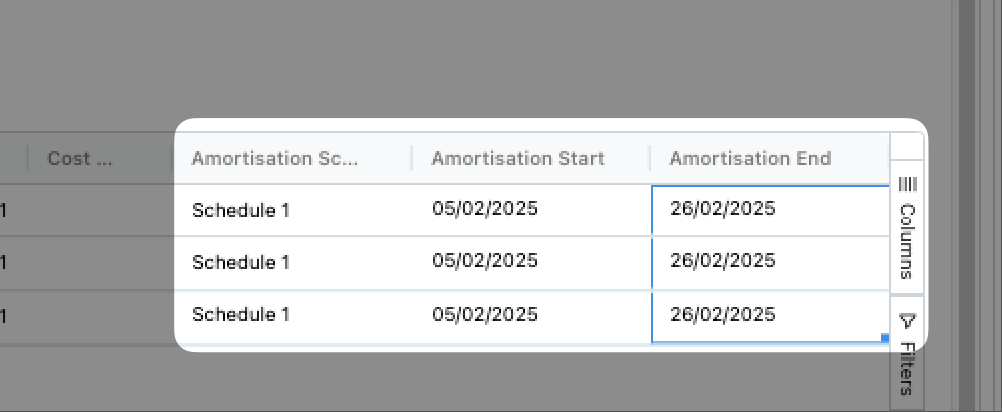
We've added several new optional fields for amortisation scheduling against transaction lines:

  • Amortisation schedule
  • Amortisation start date
  • Amortisation end date

These new fields allow you to record amortisation schedules directly in Zudello, eliminating the need to manually adjust these details in your ERP after completing processing in Zudello.

Performance improvements​

We continuously work to make Zudello faster and more efficient. In this release:

  • We've streamlined the authentication process when you sign in and validate your permissions, making the process faster.
  • We've made various other performance enhancements across the platform.

Resolutions​

We're constantly working to refine Zudello functionality and ensure that we address any issues as soon as possible. As part of this release, we've made the following resolutions and improvements:

  • We've resolved an issue where large exports failed to complete.
  • We've fixed an issue where dragging values (especially items or dimensions) down cells did not correctly fill.
  • We've resolved an issue where the enrichment process linked the wrong item when it found both a direct SKU match and a SKU within the description.The system now gives preference to direct SKU matches over SKUs found within descriptions.
  • We've resolved an issue where quotes failed to process through the enrichment process when uploaded or emailed into Zudello.

Have an idea?​

Do you have an idea for a new feature or how we can improve our current features? Let us know at support@zudello.com.

Your ideas and feedback are an important part of our product planning process to make Zudello better for everyone.
Release notes edition 3.3.10

Release date: 11 December 2024
Version: v3

Here's the latest summary of what's new and improved in Zudello, as well as what we resolved in the latest release.

Looking for something? Browse by tag to find release notes on a specific feature.

New and improved

Performance enhancements​

We've made significant performance improvements across the platform:

  • Opening documents is now approximately 40% faster, allowing you to review information more quickly
  • Saving documents is also around 40% faster, reducing the time you spend waiting for changes to be processed

These improvements help you handle more documents in less time, so you can focus on the tasks that matter most to your business.

Enhanced bank account validation​

Bank account validation compares bank details on documents against the information stored in your system, to ensure you always pay to the right account.

We've made the following enhancements to our bank account validation to improve security and reduce the potential for errors:

  • Zudello now flags discrepancies only when account information is available on both the document and the supplier/customer record, reducing the potential for incorrect errors
  • Users must resolve bank account validation errors before submitting documents, ensuring any discrepancies are addressed immediately
  • Special characters and spaces are automatically removed during comparisons to ensure accuracy

Document classification improvements​

Document classification helps Zudello organise your documents into the correct submodules for processing. We've made several improvements to document classification:

  • Documents that encounter issues during extraction now appear in a new classification submodule, making them easier to find and manage
  • The classification submodule only appears when there are documents that need review, keeping your interface clean and focused
  • You can review these documents and select the correct submodule for processing

Resolutions

  • We've resolved an issue where document views didn't refresh correctly when users changed the selected statuses
  • We've fixed a display issue with the Group Membership Management page where inactive users weren't correctly shown as inactive in single-team organisations

Have an idea?

Do you have an idea for a new feature or how we can improve our current features? Please let us know at support@zudello.com.

Your ideas and feedback are an important part of our product planning process to make Zudello better for everyone.
Release notes edition 3.3.8

Release date: 20 November 2024
Version: v3

Here's the latest summary of what's new and improved in Zudello, as well as what we resolved in the latest release.

Looking for something? Browse by tag to find release notes on a specific feature.

New and improved

Document type default statuses​

Document types now have configurable default statuses that are applied when documents are created or reopened:

  • Transactions (invoices, purchase orders, etc.) default to Review status when created and Ready status when reopened
  • Non-transactions (items, suppliers, customers, dimensions) default to Active status for both creation and reopening

You can customise these settings in the document type settings.

Auto-approve for submitters​

Previously, if document submitters were also valid approvers on a document, they would need to reopen and approve documents they had already submitted for approval.

You can now configure approval flows to automatically approve any steps for document submitters, streamlining the approval process and removing the need for double handling.

New LLM document extraction pipeline​

Zudello's document extraction system pulls key information from your documents and makes it available for processing.

All teams are now automatically opted into our LLM (Large Language Model) extraction pipeline, which provides faster and more accurate document extraction. This advanced technology significantly improves the quality and speed of information extracted from your documents.

Performance enhancements​

We've made several improvements to Zudello's performance, helping you work faster and more efficiently:

  • We've streamlined how documents are processed during enrichment, reducing the time it takes to extract and code your documents. We've also optimised how we calculate allocation variances, making the matching process faster.

  • Opening transactions with allocations is now faster, as we've reduced the amount of background information loaded when viewing these documents.

  • Processing claims with multiple linked expenses is now significantly faster. We've reduced processing time for claims with 20-30 linked expenses from nearly 2 minutes down to about 45 seconds.

We're committed to ongoing performance improvements and will continue to make Zudello faster with each release.

Resolutions

Bank account and ABN validations​

  • We've resolved an issue where bank account and ABN validations were sometimes appearing when they shouldn't. Validations now properly respect their document type extension settings.
  • We've corrected calculations for amount-based matching, ensuring that matching status and variance percentages are displayed accurately.
  • We've resolved an issue where users couldn't complete transactions with lengthy address information.
  • We've added search functionality to the Keyword Coding Rules page, making it easier to find and work with document coding settings.
  • We've upgraded several front-end components to ensure ongoing compliance with security standards.

Have some ideas?

Do you have an idea for a new feature or how we can improve our current features? Please let us know at support@zudello.com.

Your ideas and feedback are an important part of our product planning process to make Zudello better for everyone.
Release notes edition 3.3.5

Release date: 31 October 2024
Version: v3

Here's the latest summary of what's new and improved in Zudello, as well as what we resolved in the latest release.

Looking for something? Browse by tag to find release notes on a specific feature.

New and improved

Bulk transaction importing​

Zudello's importing feature now supports bulk transactions, allowing you to import multiple transactions at once. For more information on this feature, see Importing Records.

Creating goods receipts​

We've added functionality to simplify the goods receipting process. You can now create a goods receipt directly from a PO, and choose the quantity or amount to receive. You can also receive all remaining quantity or amount on a purchase order by clicking Receive all remaining.

For more information see Creating Goods Receipts.

Price comparison alerts​

In addition to comparing invoice unit prices against purchase order pricing, we've introduced the option to compare transaction unit prices to the purchase price or sell price of linked items.

When this feature is enabled, we'll compare the unit price (exclusive) of the transaction line to the purchase price (purchasing module) or sell price (sales module) of the linked item where one exists. An icon will appear next to the unit price column to indicate whether the price matches. You can hover over the icon for more details on the comparison.

Zudello uses the tax exclusive unit price for the comparison, regardless of whether the unit price on the invoice is tax inclusive or exclusive.

The comparison is calculated in the background once you save a transaction. Consequently, comparisons may not display until after you've saved the transaction.

Comparisons are displayed as warnings only and can't be used to prevent a transaction from being submitted.

Please contact support@zudello.com to discuss enabling this feature for your team.

Expense/claim handling improvements​

We've improved several processes to reduce expense/claim discrepancies and improve transparency.

Prevent deletion of linked records​

We now prevent deletion of certain records, even for users with delete permission. The following records can no longer be deleted:

  • Expenses that have been linked to a claim
    • You need to reopen the claim, unlink the expense, and then delete the expense
  • Expenses that have been linked to a payment
    • You need to reopen both the expense and the payment into User Review status, and unlink them via the reconciliation screen
  • Payments that have been linked to an expense
    • You need to reopen both the expense and the payment into User Review Status, and unlink them via the reconciliation screen

Restrict users reopening completed expense transactions​

We've introduced a new user permission called Revert completed. Only users with this permission enabled can revert or reopen transactions in a complete-type status (e.g. Completed).

By default, this permission is disabled for all user groups.

Improve audit logs​

When a claim is submitted, the associated expenses are set to Closed status. We now show an audit log entry against the expense when this status change occurs.

Calculate claim totals​

When expenses are added, edited, or removed from claims, we recalculate and refresh the claim lines automatically. Previously, we relied on front end calculations to update the claim totals. We've now introduced backend processes that calculate the claim total, tax, and subtotal. This ensure that the claim totals are always kept up-to-date and correct.

Resolutions

Performance improvements for approving, rejecting, and force approving​

We've made several performance improvements to approval-related actions. You may notice increased speed when approving, rejecting, and force approving documents.

Exporting original files​

We've resolved an issue where files weren't bulk downloading correctly when multiple resources shared the same file name. We now append the transaction UUID to the file name when downloading in bulk to ensure that each file name is unique and downloaded correctly.

Allocation messaging​

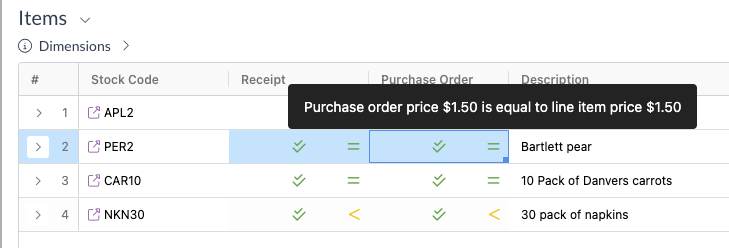
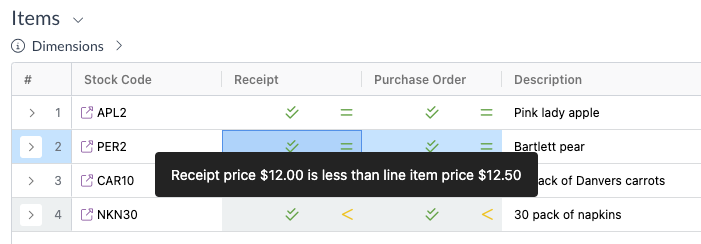
To avoid any confusion around the newly introduced item price comparison, we've improved the hover messaging for price comparisons when allocating transactions. We now include the submodule name in the hover message to provide additional clarity to the comparison.

E.g. Purchase order price comparison displayed on an invoice

E.g. Receipt price compaison displayed on an invoice

Automation error​

An automation error was occasionally displayed in the automation log for some resources. The error was not caused by or the cause of an automation failure; it was simply a cosmetic error that was displayed. We've now identified and resolved the root cause of the issue.

Have some ideas?

Do you have an idea for a new feature or how we can improve our current features? Please let us know at support@zudello.com.

Your ideas and feedback are an important part of our product planning process to make Zudello better for everyone.