4 posts tagged with "Sales module"

Description for the sales module module tag.

View All Tags

Release notes edition 3.7.13

Release date: Wednesday 16 September 2026
Version: v3

Here's the latest summary of what's new and improved in Zudello, as well as what we resolved in the latest release.

In this release:

  • Pause, edit, and see the history of your recurring orders
  • Recurring sales orders that work around weekends and public holidays
  • Replace a contract's primary document and keep the old one as a version
  • Reconciliation status in automations, new data permission categories, and more

Looking for something? Browse by tag to find release notes on a specific feature.

New and improved

Recurring orders

Recurring orders let you save an order as a template and put it on a schedule, so Zudello raises it for you. Last edition introduced templates and schedules. We've now added the controls you need to run them day to day.

Pause and resume a schedule

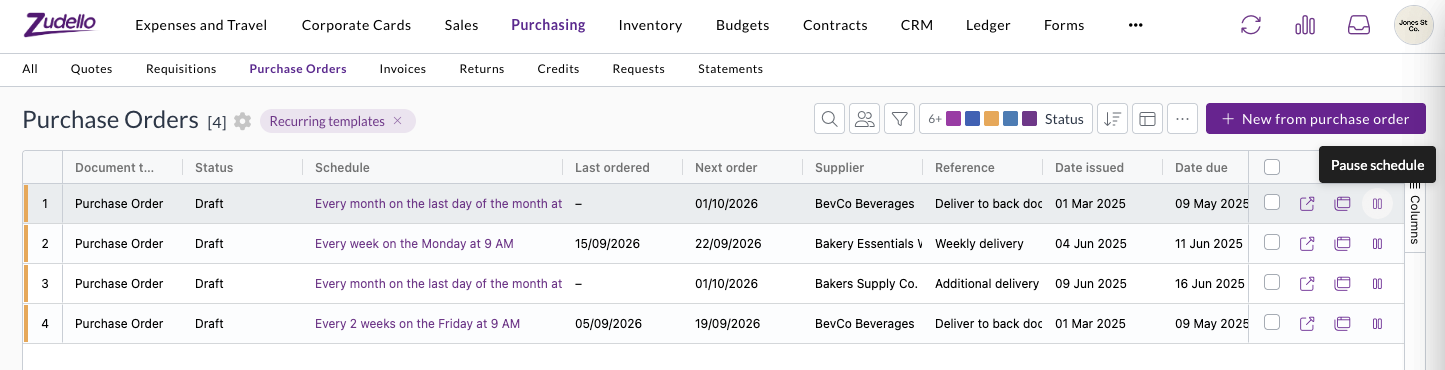
  • Pause a template from its row in the recurring templates list, or with Pause on the template itself. Resume carries on from the next scheduled date.
  • Orders that fall due while a template is paused are skipped rather than raised later. Zudello tells you this before you pause.
  • A paused template shows a Paused tag, and the list reads Paused in place of the next order date, so you can see what's on hold at a glance.
  • Pausing and resuming are recorded in the template's history.

The recurring templates list, with a pause action on each row and columns for schedule, last ordered, and next order

See every order a template has raised

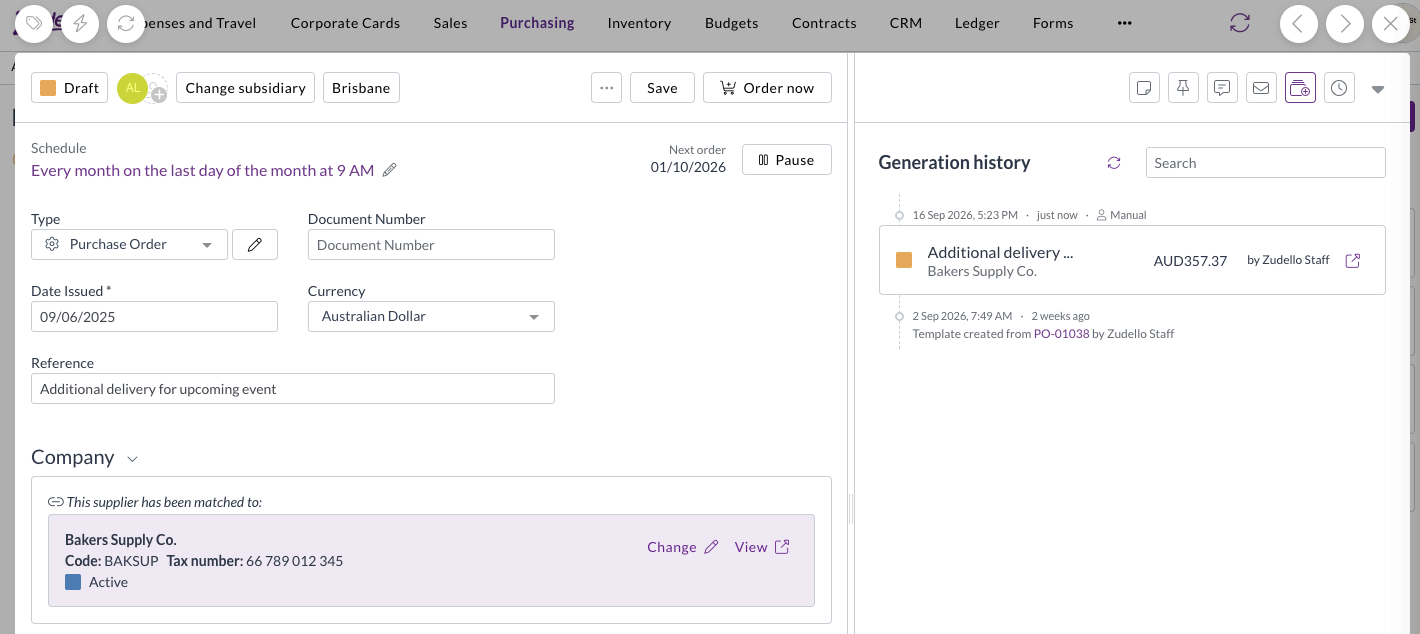
  • Templates now open on a Generation history panel, listing each order the template has produced with its status, total, supplier, and who raised it.
  • An order you raised yourself with Order now is marked Manual, so you can tell it apart from the ones the schedule raised.
  • The panel also records when the template was created, and the order it was created from.
  • Select an order to open it, then use Back to return to the template, and search the list to find a particular order.

A purchase order template open on its Generation history panel, showing an order raised with Order now marked as Manual

Recurring sales orders

  • Recurring orders now work on sales orders as well as purchase orders, including Make recurring, schedules, Order now, pausing, and generation history.
  • Recurring orders need to be turned on for your sales order document type before the options appear.

Choose what happens on weekends and public holidays

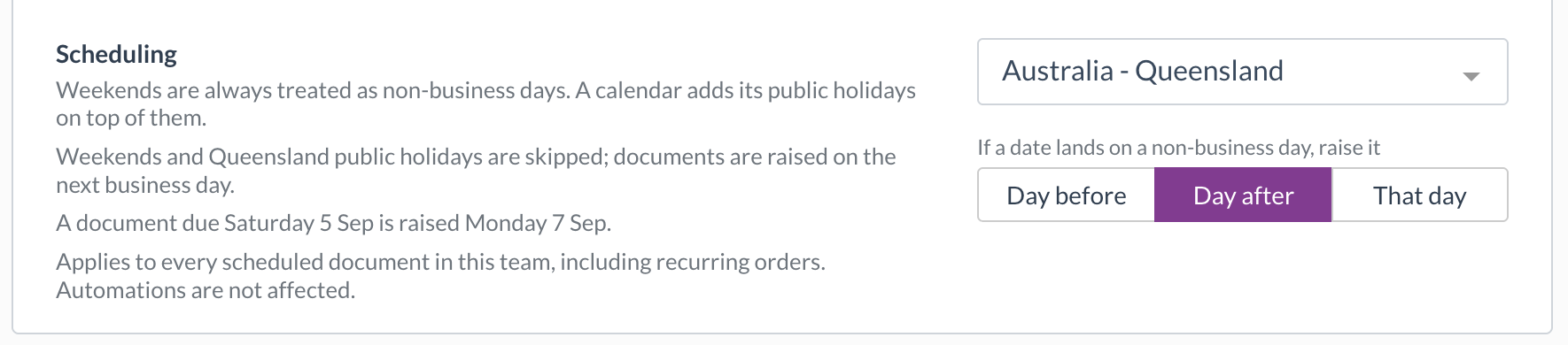
  • A new Scheduling setting in Team Settings lets you choose a public holiday calendar for your team, and whether an order that lands on a weekend or public holiday is raised the day before, the day after, or on that day anyway.
  • Calendars are available for each Australian state and territory, New Zealand, England and Wales, Scotland, Northern Ireland, and the United States. You can also treat weekends alone as non-business days.
  • The setting reads back as a sentence with a worked example, and every schedule shows the rule that applies, with a link to change it.
  • It applies to every scheduled document in your team. Automations aren't affected.

The Scheduling setting in Team Settings, with the Australia - Queensland calendar selected and orders moved to the day after

Contracts

Every contract has a primary document, the main file you see when you open it. When a signed copy or an updated contract arrives, you can now make it the primary document without losing the one it replaces.

Make an attachment the primary document

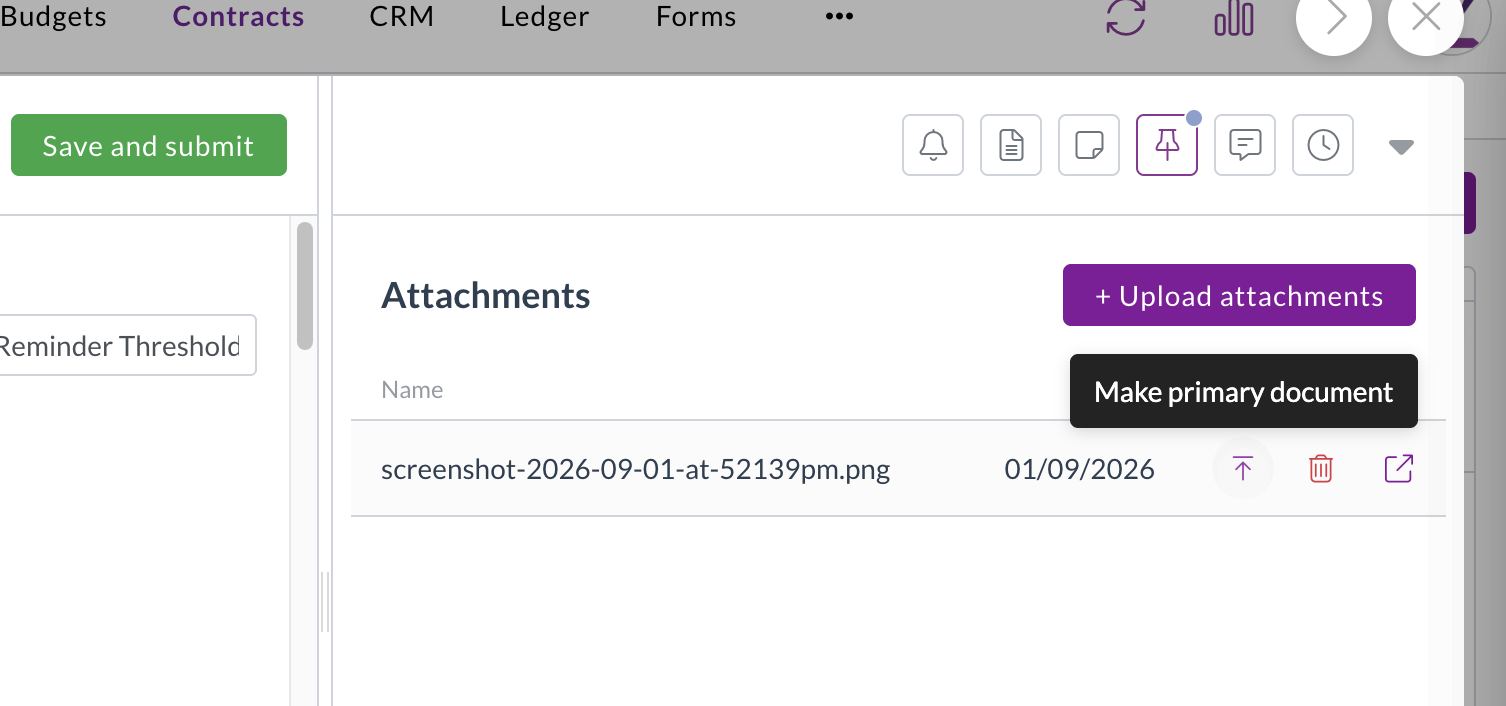
  • Make primary document sits next to each attachment on a contract. Select it to swap that file in as the primary document straight away.
  • Zudello asks you to confirm first if the contract already has a primary document.
  • Changing the primary document doesn't rescan the contract, so the details you've already captured stay as they are.
  • Access is controlled by a permission you can grant to the user groups that manage your contracts.

Make primary document shown next to an attachment on a contract

Previous primary documents are kept as versions

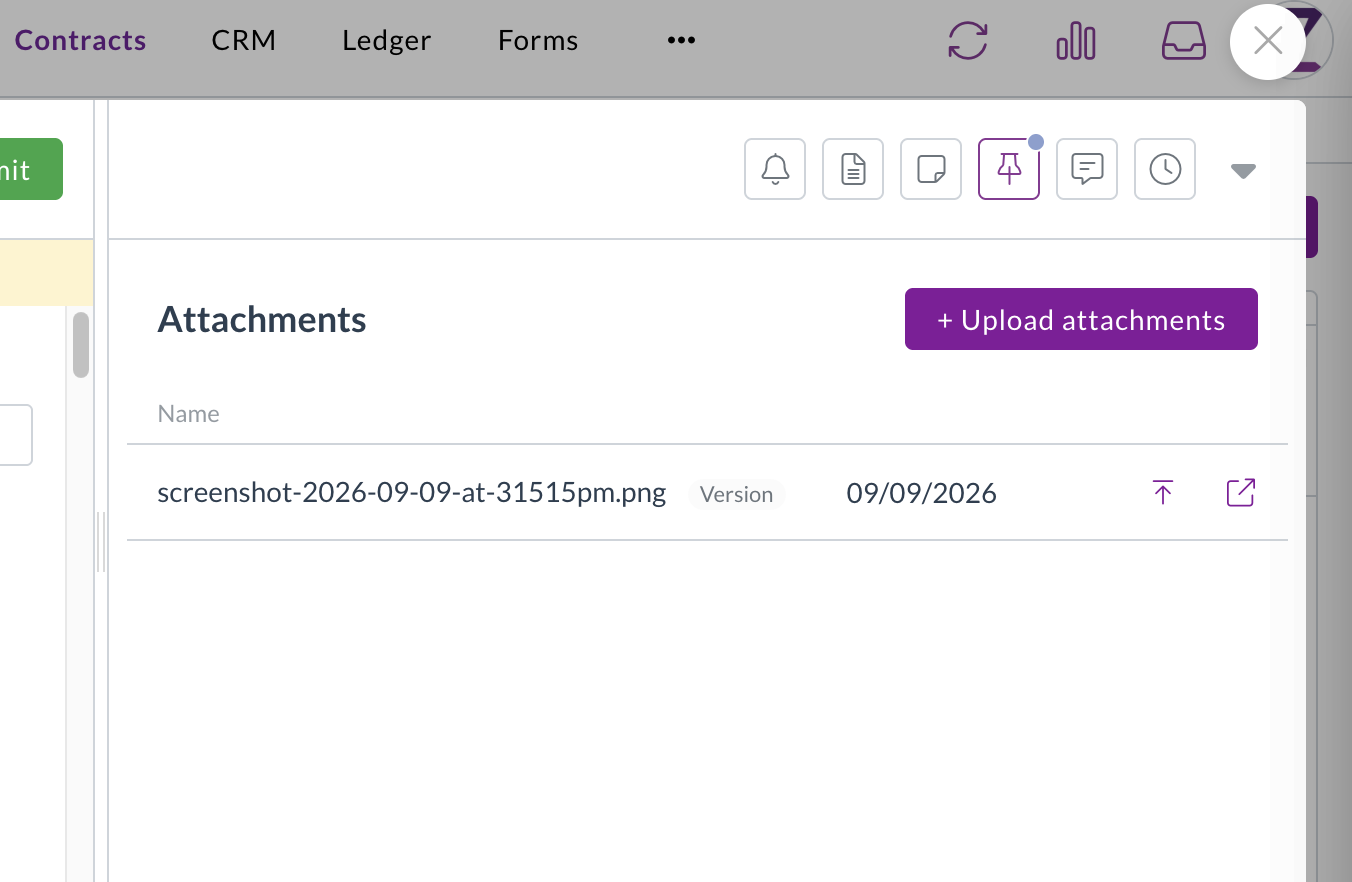
  • The document you replace stays in the attachments list with a Version tag, so you always have the earlier copy.
  • Versions can't be deleted, which keeps a record of every file that's been the primary document.
  • Select the up arrow on a version to restore it as the primary document.

A contract's attachments list showing an earlier primary document kept with a Version tag

Corporate cards

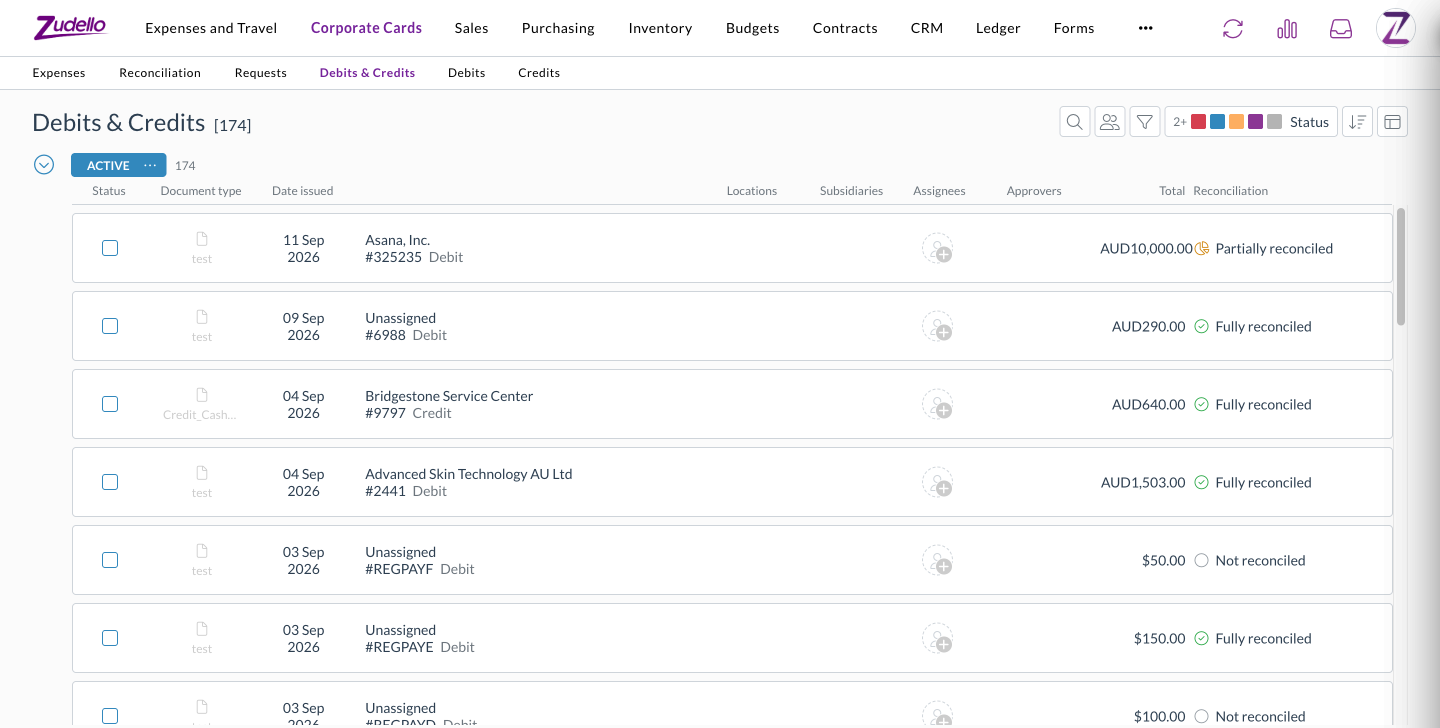
Debits and credits on your card transactions sat in separate lists, which made it hard to review everything over a period. A new Debits & Credits tab brings them together.

  • Each row shows whether it's a debit or a credit, its reconciliation status, and the amount still to reconcile.
  • Filter by Reconciliation to pull up only the transactions that still need attention, and filter by document type across both debits and credits.
  • Sort by reconciliation status on any Corporate Cards transaction screen.
  • The tab appears for anyone who can already see debits or credits, so there's no new permission to set up.

The Debits & Credits tab under Corporate Cards, listing debits and credits with their reconciliation status

Automations

Automations act on your documents when the conditions you set are met. You can now run an automation when a document is reconciled, and use its reconciliation status in conditions.

  • A new trigger runs an automation when a document or payment is reconciled, so you can act on it straight away.
  • Reconciliation status now offers Not reconciled, Partially reconciled, and Fully reconciled as condition values, where it previously showed an empty list.
  • Combine them with Reconciled amount. For example, move an invoice straight to complete once it's fully reconciled against a card payment.

Data permissions

Data permissions control which records each user group can see, based on details like location, subsidiary, or category. We've added more of the categories you can build them on.

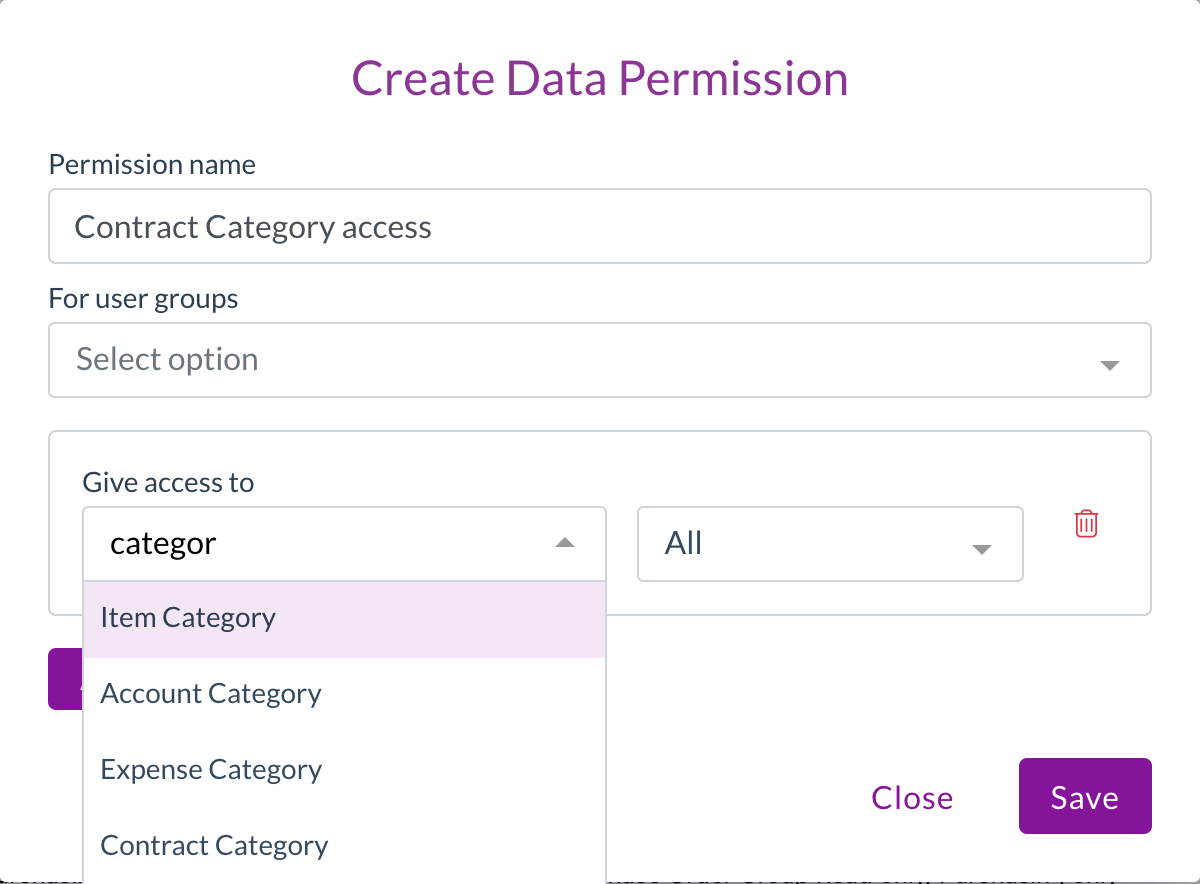
  • Contract Category, Contract Group, and Account Category can now be chosen when you create a data permission, so you can limit access to contracts by how they're categorised.

Creating a data permission, with Account Category and Contract Category in the Give access to list

Statements and remittances

Statements and remittances can record a location and subsidiary against each line. You can now see them without opening each document.

  • The statements and remittances lists now show the locations and subsidiaries from each document's lines, in both list and grid views.
  • The Lines column counts statement lines, so you can see how many lines each statement holds.

Resolutions

We're constantly working to refine Zudello's functionality and address any issues as soon as possible. As part of this release, we've made the following resolutions:

  • We've fixed two- and three-way line price matching on invoices, which wasn't running for some document types. Price checks now run as configured, so you may see price mismatch flags on invoices that didn't show them before.
  • We've fixed invoices that arrived before their goods receipt keeping a "Receipt allocation items required" flag after they were matched, which stopped them moving on automatically.
  • We've fixed supplier matching on invoices where extraction picked up a tax number, such as an ABN, that isn't on the document, which could match the invoice to the wrong supplier. A tax number is now only kept when it appears on the page.
  • We've fixed scans failing for teams whose auto-coding sets a default on a line field, such as subsidiary, account, or tax rate. A default or coding rule that points to a record that doesn't exist is now skipped, and the rest of the document is still processed.
  • We've fixed reconciliations with an adjustment, such as a fee, leaving both documents partially reconciled. A $100 expense with a $2 fee matched to a $102 payment now shows both sides as fully reconciled, and reopening a saved match no longer counts the adjustment twice.
  • We've fixed card payments failing to reconcile with a message that a reconciliation couldn't be removed from a transaction already sent to your ERP. Matches that were removed earlier no longer get in the way.
  • We've fixed scheduled automations with a condition comparing a date to today, which weren't running.
  • We've fixed the schedule options in the automation builder being cut off at the edge of the window.
  • We've fixed the document viewer showing "No file available" when a file failed to load, as though nothing was attached. It now tells you the file couldn't be loaded and gives you a Retry button.
  • We've fixed the document viewer briefly showing details from the previous document, such as its approval flow, when you moved quickly between documents. This only affected what was displayed.
  • We've fixed approval email links taking some approvers to the dashboard instead of the document waiting on them.
  • We've fixed delivery address checks on sales orders not showing in the banner when the address had no country, which blocked the order without saying why. The mismatch now shows in the banner, and the address is marked Not verified with a prompt to add a country.
  • We've fixed upload and split errors showing a generic "The given data was invalid" message. You now see the actual reason, such as an unsupported file type.
  • We've fixed splitting a document, which could queue blank or invalid page ranges. Split now waits until the file has loaded, and tells you when a document has no file or only one page.
  • We've improved performance in large documents, which could slow down or crash the browser while editing many lines.
  • We've fixed recurring order schedules showing times in your browser's time zone rather than your team's, which made the time appear to change when you opened the editor.
  • We've fixed schedule end dates stopping a day early, so a schedule set to end on 29 September now includes the 29th.
  • We've fixed document history showing "rescand" instead of "rescanned". Changing a contract's primary document now reads "changed the primary file of".
  • We've fixed renamed dimensions showing their original names in budget and contract dimension pickers, price book settings, and allocation autofill fields.
  • We've made the potential issues alert collapsible, with the number of issues in its header, so a long list doesn't push the document out of view.
  • We've changed dates in notification emails to read day, month, and year, such as "3 September 2026".
  • We've added a link to Zudello's terms and conditions under the app version in Settings.
  • We've hidden Remove two-factor methods for users who don't have any set up, so it only appears when there's something to remove.

Have an idea?

Do you have an idea for a new feature or how we can improve our current features? Let us know at support@zudello.com.

Your ideas and feedback are an important part of our product planning process to make Zudello better for everyone.
Release notes edition 3.7.12

Release date: Wednesday 2 September 2026
Version: v3

Here's the latest summary of what's new and improved in Zudello, as well as what we resolved in the latest release.

In this release:

  • Recurring orders, so you never rebuild the same purchase order again
  • Contract reminders that trigger on spend against a threshold
  • Delivery date checks against your supplier and production lead times
  • Scheduled automations, credit note allocations, and more

Looking for something? Browse by tag to find release notes on a specific feature.

New and improved

Recurring orders

Plenty of purchasing is the same order, from the same supplier, on the same rhythm. Until now the only way to do that in Zudello was to find last month's order and duplicate it. You can now save an order as a template and put it on a schedule, so Zudello raises it for you.

Save any order as a template

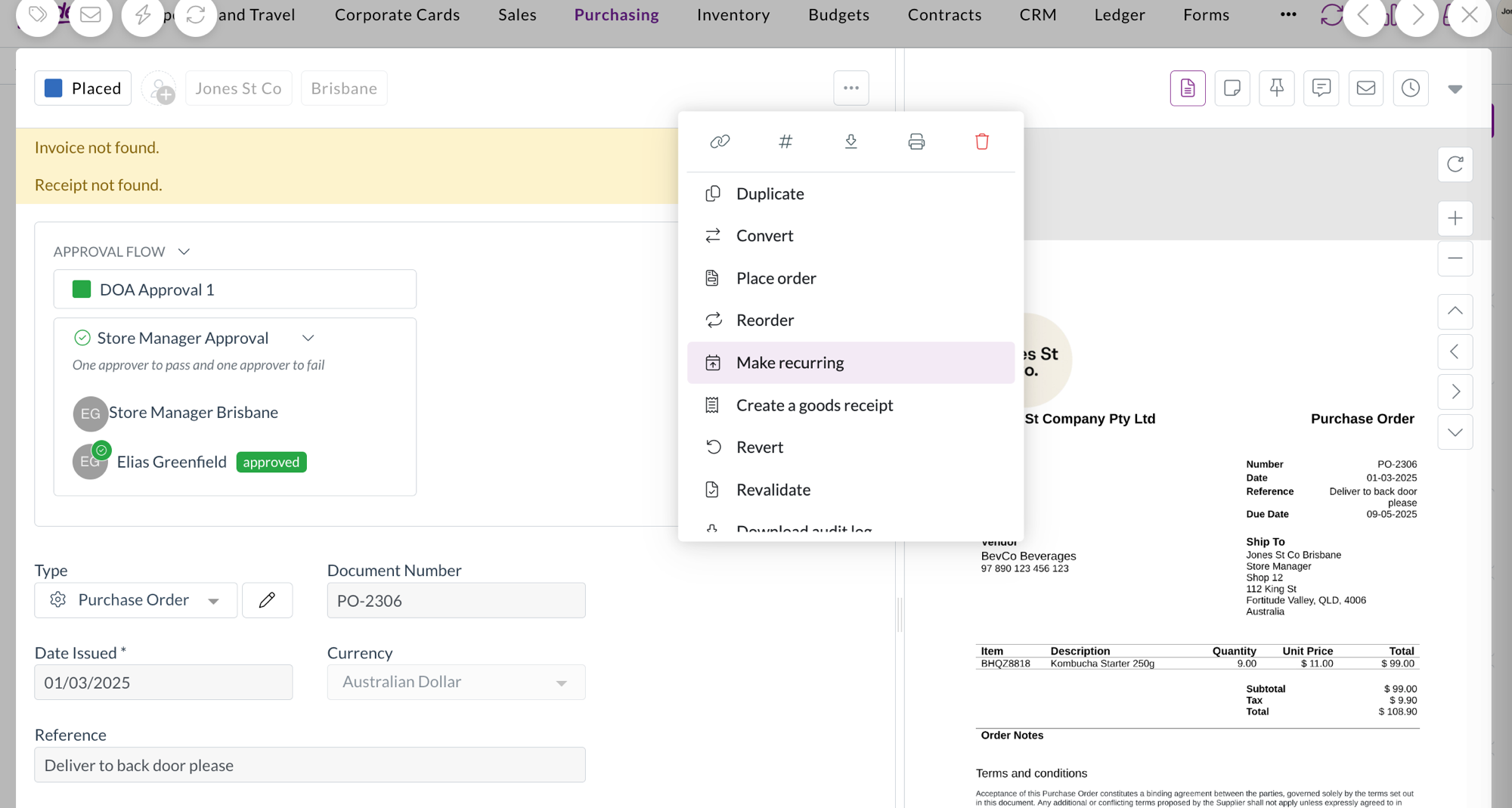
  • Make recurring in the document actions menu saves the order you're looking at as a template, and opens it so you can set a schedule.
  • The order you started from is untouched. The template is a copy, so amending or cancelling the original doesn't affect the arrangement.
  • Templates are also available on invoices, so the same pattern works beyond purchase orders.

Make recurring highlighted in the document actions menu on a purchase order

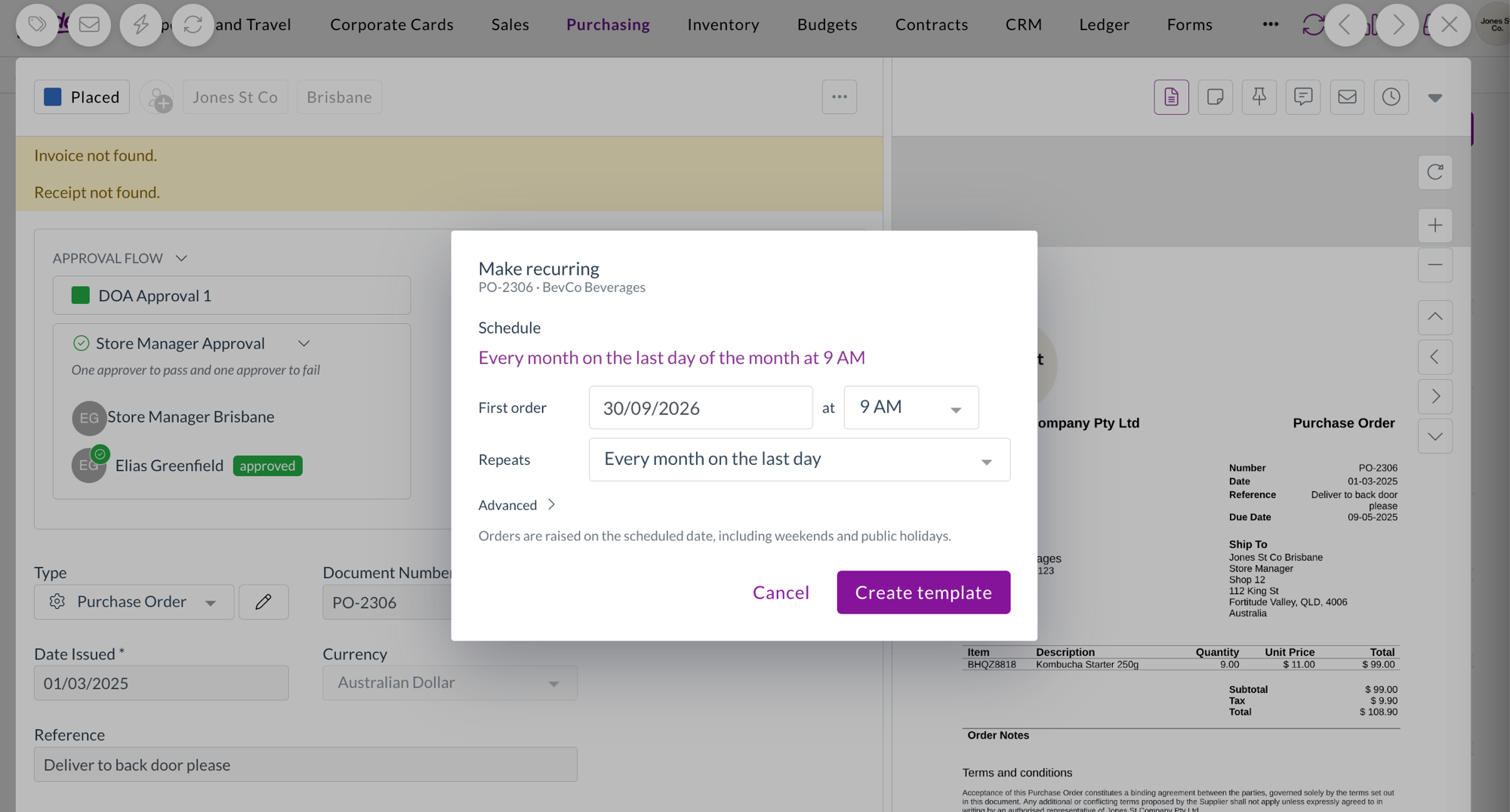
The Make recurring dialog, with the schedule read back as a sentence above the first order date and repeat options

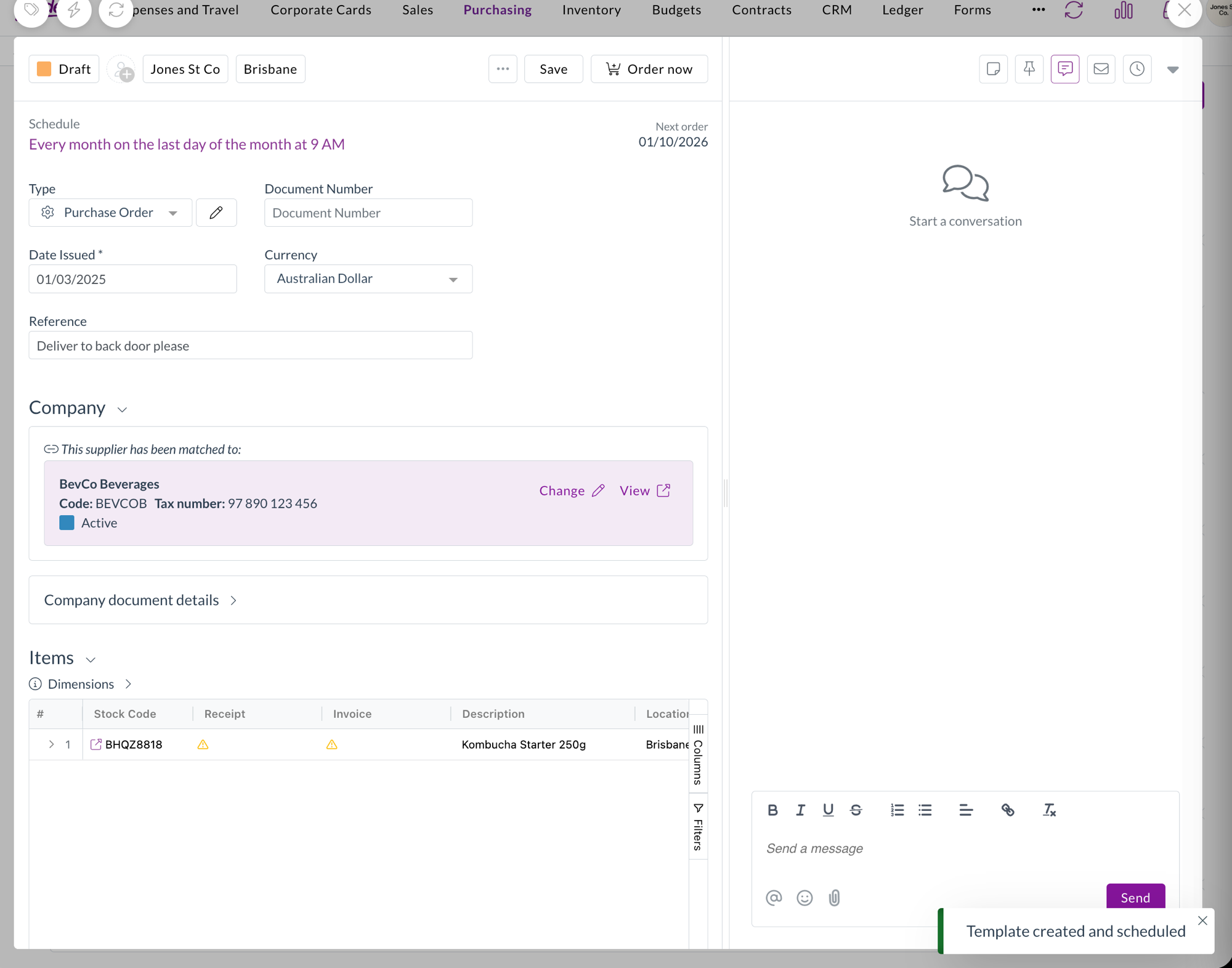
The new template open, showing its schedule and next order date, with a Template created and scheduled confirmation

Find your templates in the orders list

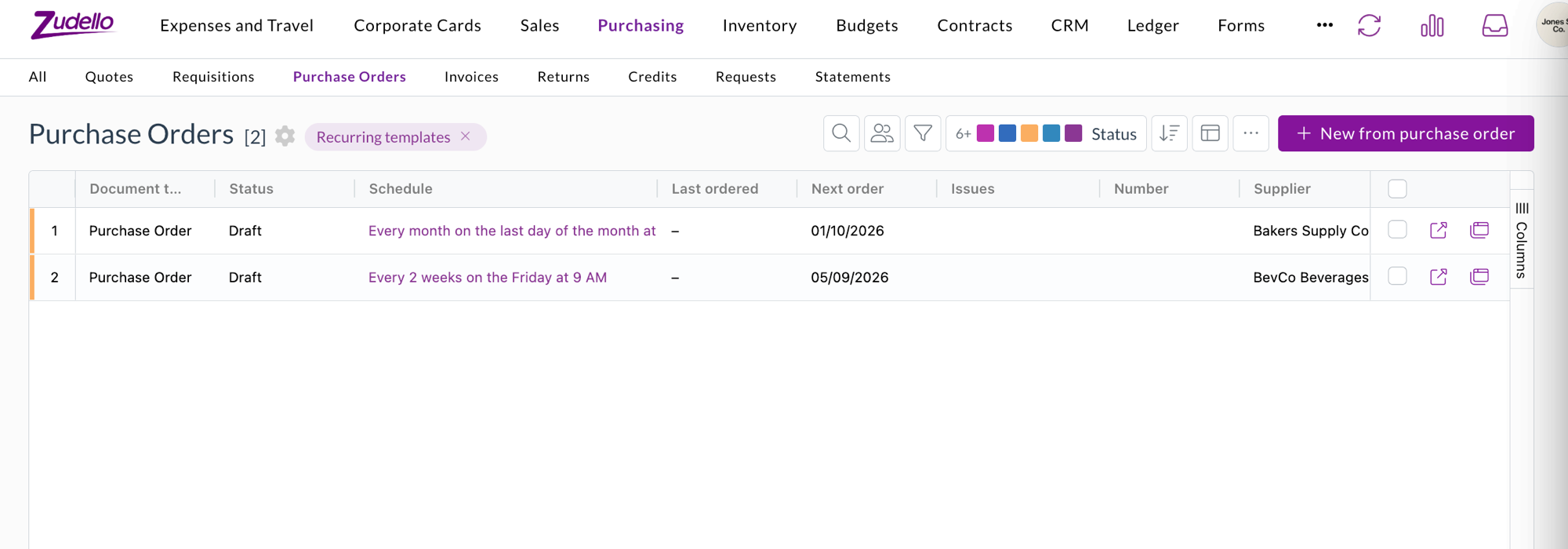
  • Recurring orders in the Purchase Orders toolbar menu switches the list to your templates, using the same grid you already know, with your column picker, sorting, grouping, and saved views.
  • Schedule, Last ordered, and Next order columns show you where each template stands at a glance. A template with no schedule reads Manual only.
  • The mode stays put if you refresh the page, and turning it off returns the list to your orders exactly as before.

The Purchase Orders list switched to Recurring templates, showing each template's schedule as a sentence with Last ordered and Next order columns

Start a template from an order you've already raised

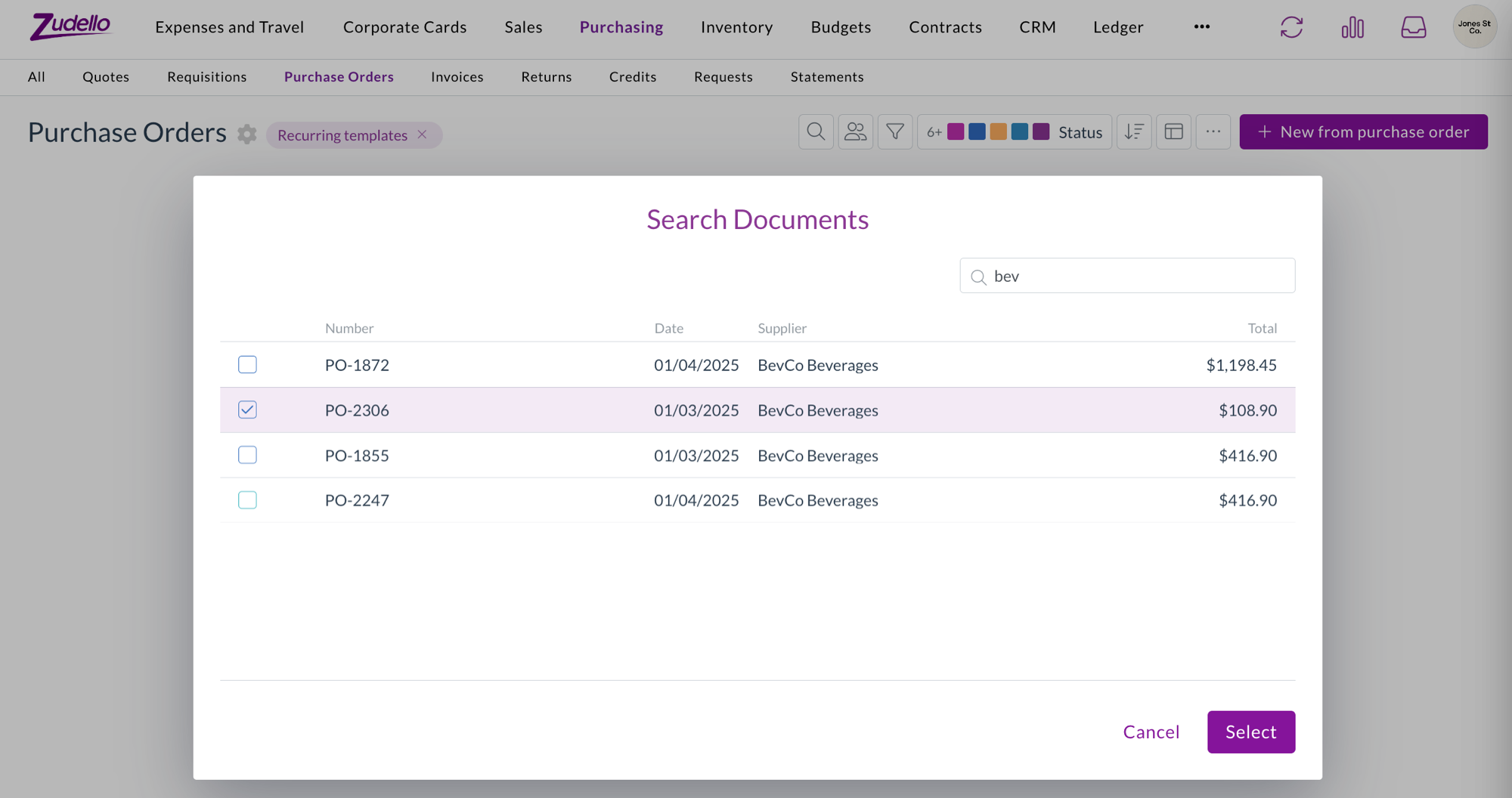
  • While the template library is on, the list's primary action becomes New from purchase order, which opens a search across the orders you've already raised.
  • Search by number, date, supplier, or total, pick the one you want, and Zudello turns it into a template and opens it so you can set the schedule.
  • The picker only offers documents from the section you're in, so you can't accidentally build a purchase order template from a sales order.

The Search Documents picker opened from New from purchase order, searching existing orders by supplier

Set a schedule in plain language

  • Pick the date of the first order, then choose how often it repeats. Zudello builds the options from the date you chose, so you get the patterns accountants actually use, such as every week on Friday, every month on the 27th, every month on the last day, or every three months.
  • Custom covers the awkward ones, like every few days, or the 15th and the last day of the month together.
  • Advanced lets you end the schedule on a date or after a set number of orders, and override the time zone.
  • The schedule reads back to you as a sentence, so you can check it says what you meant before you save.

Order on demand, or let the schedule do it

  • Order now raises an order from the template straight away, whether or not it has a schedule.
  • Every order a template produces is an ordinary draft that still goes through your normal approval and submission process. Nothing is submitted automatically.
  • Templates themselves stay out of approvals, budgets, contracts, and your everyday searches, so they don't clutter your work or count towards your spend.

Contracts

Zudello can remind you before a contract renews or expires. You can now set a reminder that triggers on how much you've spent against a contract instead of on a date.

Reminders that trigger on contract spend

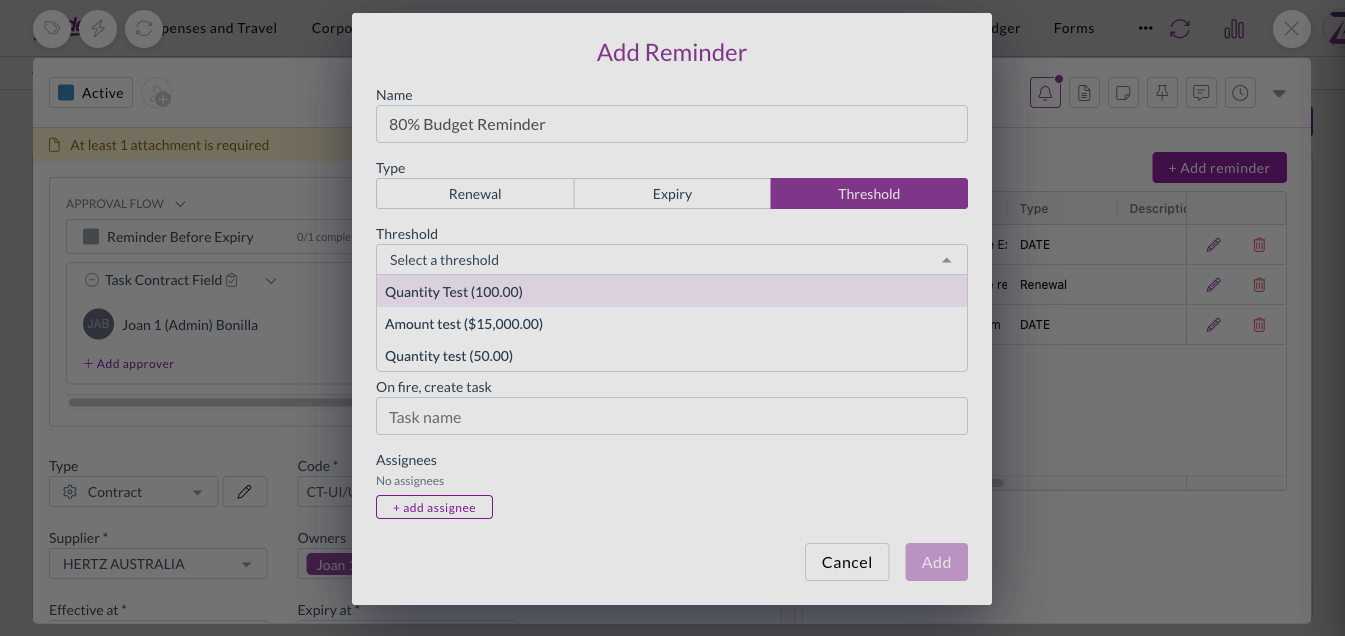
  • Alongside renewal, expiry, and custom date reminders, you can set a reminder that triggers on spend against a contract threshold.
  • Choose the threshold to watch, whether to trigger when spend goes above or below it, and the value as either an amount or a percentage of the threshold total.
  • As with date reminders, you can name the task that gets created and assign it to specific users or to a person recorded on the contract.
  • Contract reminders are now delivered by email as well as raised as a task.

Setting a reminder that triggers on spend against a contract threshold

Sales orders

Zudello can work out the earliest date you could realistically deliver a sales order, using the supplier, production, and seasonal lead times on each item. That calculation arrived last edition. This edition puts it on screen and lets you configure it.

Configure the lead time check

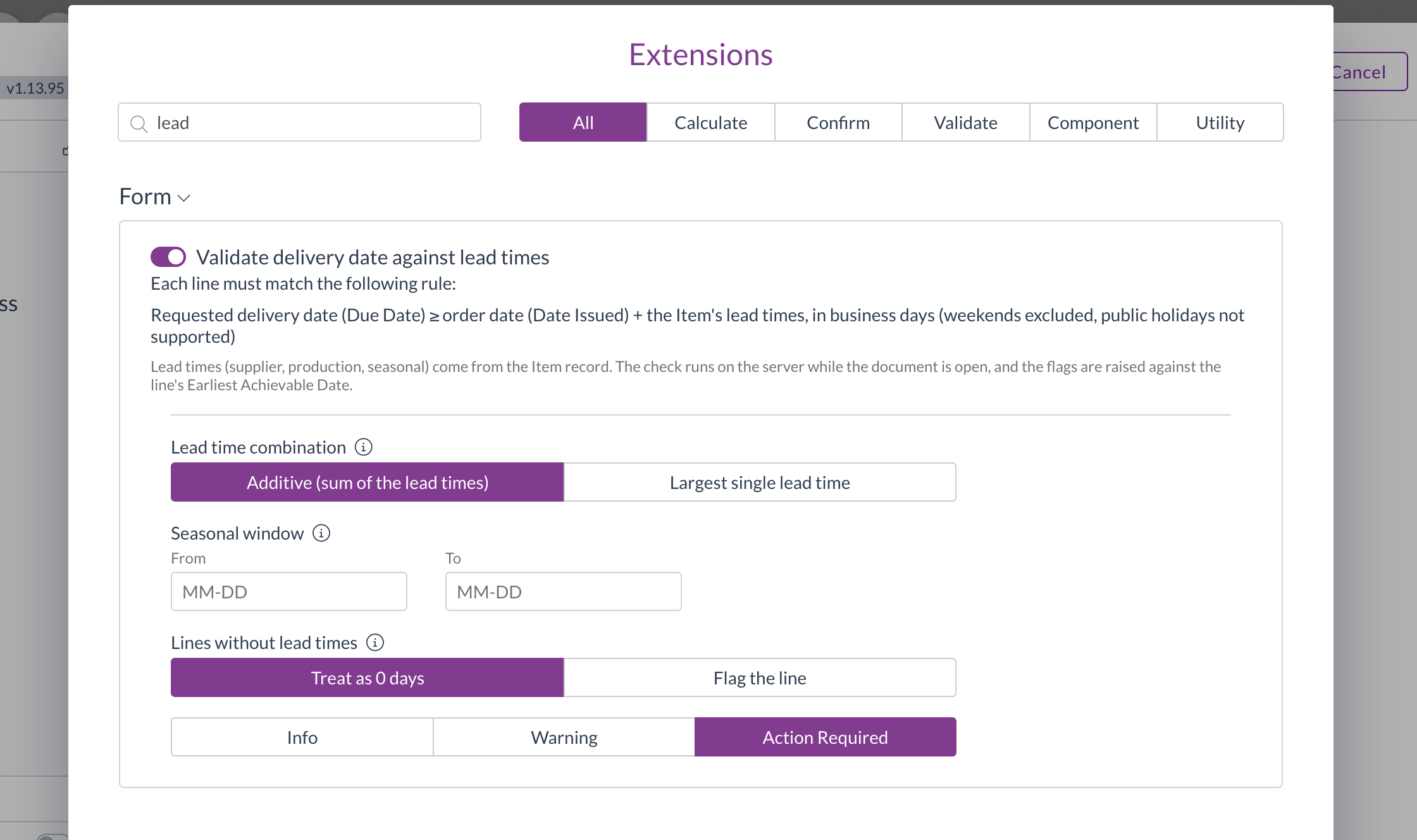
  • Validate delivery date against lead times can now be added to a document type through the validation configuration screen, like any other check.
  • Choose whether lead times add together or the longest one wins, set an optional seasonal window, and decide what happens to a line with no lead time recorded.
  • Set the level to control what a missed date does, from a note through to blocking submission.

The lead time validation extension configuration, showing combination, seasonal window, and missing lead time behaviour

See which line is the problem

  • Lines that can't meet the requested delivery date are flagged on the line itself, with a summary above so you can see the order's position at a glance.
  • The check re-runs as you change dates and lines, so the earliest achievable date stays current while you work.
  • An item with no lead time recorded now defaults to Flag the line, rather than quietly counting as zero days. You can still choose to treat it as zero if that suits your setup.

Order weight flags only the line that needs attention

  • An order that failed the minimum or maximum weight check previously highlighted every line, even the ones that were fine. Only the line missing a weight is flagged now.
  • The weight unit is fixed to kilograms, matching what's stored against your items, so it can no longer be changed to something the calculation won't use.

Automations

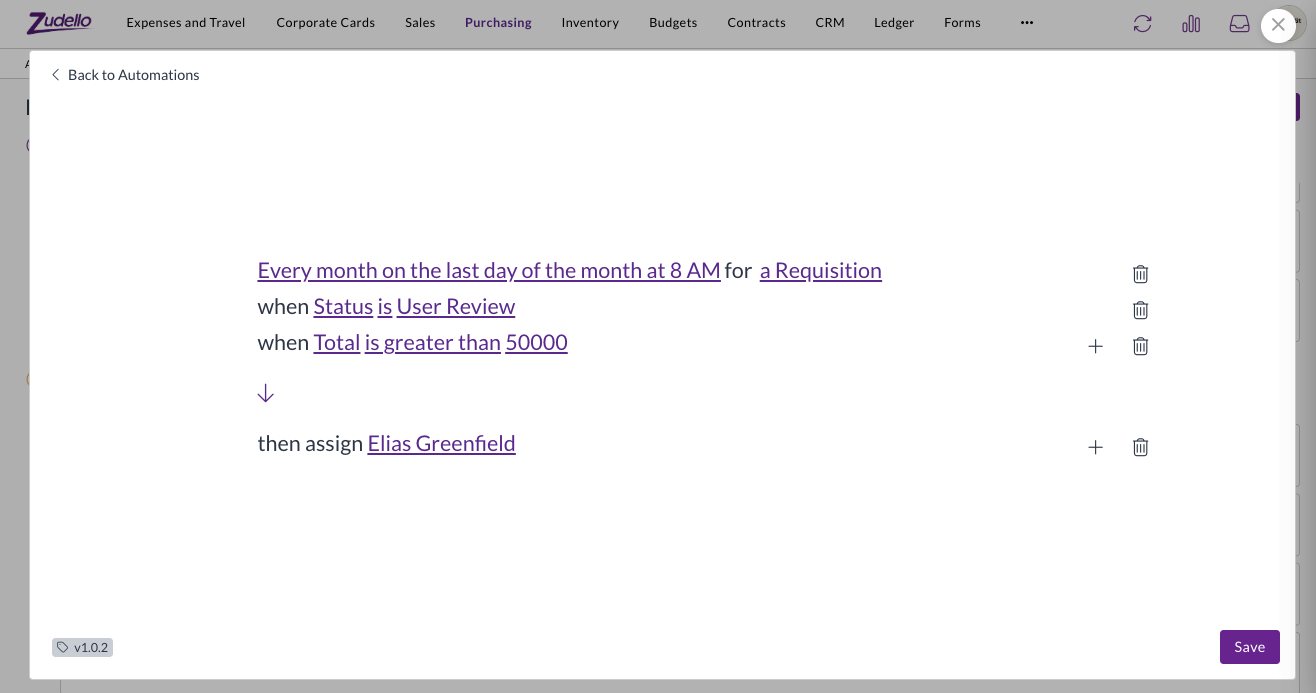
An automation with a schedule trigger runs on its own, without a document in front of it. Last edition we limited what those automations could do, because there was nothing for them to act on. They now work quite differently.

Scheduled automations run across every matching document

  • A scheduled automation now finds every document its conditions match and runs against each one, rather than running once with nothing to act on.
  • Because there's now a document to act on, the full set of actions is available on schedule triggers again, along with conditions.
  • Choose the record type the automation should look at when you set up the trigger, so it sweeps the right set of documents.
  • A limit applies to how many documents one run can match, so a very broad set of conditions is stopped rather than run.

A scheduled automation in the builder, running every month on the last day at 8 AM for a requisition, with conditions on status and total and an assign action

Incomplete schedules are easier to spot

  • An automation with a partly configured schedule used to appear as a blank row on the board. It now reads On no schedule and tells you the schedule is incomplete, both on the board and in the builder.

Allocations

  • Credit notes can now be allocated against purchase orders, so a credit can be matched to the order it relates to alongside invoices and receipts.
  • Remaining amounts on a line are now shown in the document's own currency.

Permissions

Rescan is no longer staff only

  • Re-running extraction on a document was limited to Zudello staff. A Rescan permission can now be granted to your own user groups, on both the single document action and the bulk action.
  • Contracts are included, so a contract can be rescanned by anyone with the permission.

Clear any two-factor method

  • Resetting a user's two-factor authentication previously only cleared authenticator app codes. It now clears passkeys and security keys too, so you no longer need to contact support for those.

Supplier bank details

  • Zudello now extracts IBAN and intermediary bank details from documents, alongside the account details it already picked up, so international payment details are captured rather than left off.
  • Bank detail matching now ignores spacing and punctuation, so the same account written two different ways is recognised as the same account.

Inboxes

  • Replies to an emailed document now thread properly in the recipient's mailbox, rather than arriving as a separate email with no subject.
  • Contracts arriving by email are now checked for duplicates, the same way other document types already were.

Custom dimensions

  • Five new custom dimensions are available across your records, so you can code documents against the categories your business uses that don't map to Zudello's standard dimensions.
  • They work the same way existing dimensions do, including on auto-coding rules, budgets, contracts, and pricing.

Resolutions

We're constantly working to refine Zudello's functionality and address any issues as soon as possible. As part of this release, we've made the following resolutions:

  • We've fixed debits and credits set to customer matching showing no contact, even though a customer had been linked. Saving one of these documents no longer clears the customer that was found.
  • We've fixed supplier matching on payments, where a reference with a trailing space failed to match the supplier it should have.
  • We've fixed spreadsheets that declare a far larger range than they actually use, which failed to preview at all. Each sheet now renders on its own, with a clear message rather than an error where something can't be shown.
  • We've fixed documents that failed classification losing the extraction work already done, so they can be re-extracted rather than started again.
  • We've fixed orders with a zero value not extracting their line quantities.
  • We've fixed email addresses on a document being blocked when the extracted address contained a space, which happens when an underscore is read as one.
  • We've fixed merging documents, which could accept a file type it couldn't process and leave the merge unfinished. Only PDFs and images can be merged, and anything else is rejected up front, naming the file.
  • We've fixed exchange rates you've entered yourself being overwritten by the rate Zudello looks up.
  • We've fixed validation flags not being coloured on read-only line cells, so a flag on a field you can't edit was easy to miss.
  • We've fixed user groups cloned from a Zudello system group hiding the permission column entirely, so there was no way to see which permissions were on. The permissions are now shown as read-only.
  • We've added a marker to the document viewer tabs when there are related documents, attachments, or chat messages to look at, so approvers can see there's something there without opening each tab.

Have an idea?

Do you have an idea for a new feature or how we can improve our current features? Let us know at support@zudello.com.

Your ideas and feedback are an important part of our product planning process to make Zudello better for everyone.
Release notes edition 3.7.10

Release date: Wednesday 5 August 2026
Version: v3

Here's the latest summary of what's new and improved in Zudello, as well as what we resolved in the latest release.

In this release:

  • Clearer delivery address validation
  • A run order you can actually read in Document Studio
  • New weight and lead time checks on sales orders
  • Filtering, expenses, and document viewer improvements and more

Looking for something? Browse by tag to find release notes on a specific feature.

New and improved

Delivery addresses

Zudello checks the delivery address on your documents against Google Address Validation, so orders go to an address that actually exists and can be delivered to. We've rebuilt the delivery address section to make it much clearer where an address stands and what to do about it.

One card, one answer

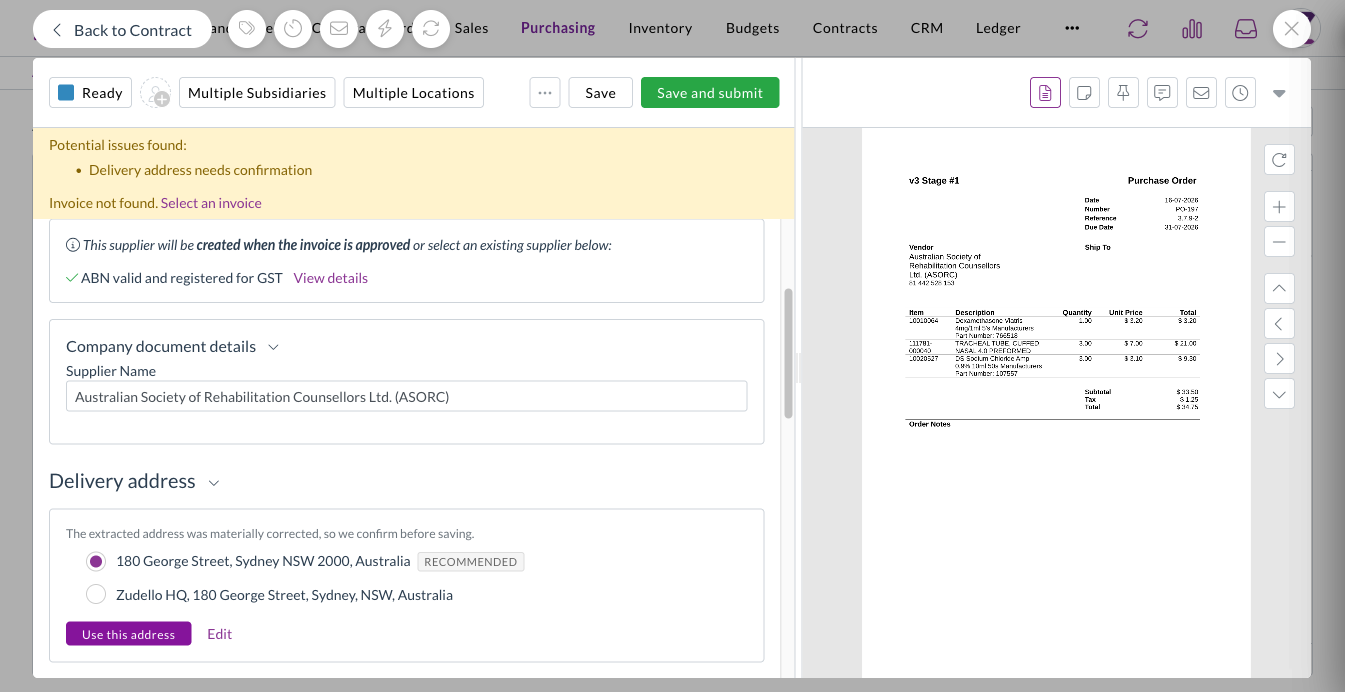
  • The delivery address now shows its result in a single card, so you can see at a glance whether it's matched to an address on file, verified, corrected, or couldn't be verified.
  • The outcome also appears in the Potential issues found bar, alongside everything else that needs your attention.

A delivery address card showing a Matched to supplier result

Suggested corrections

  • When verification returns a meaningfully different address, Zudello shows you the suggestion so you can accept it or keep your own.
  • Minor spelling corrections are applied without interrupting you, so you're only asked about changes that matter.

A suggested correction to a delivery address

You decide what blocks a submit

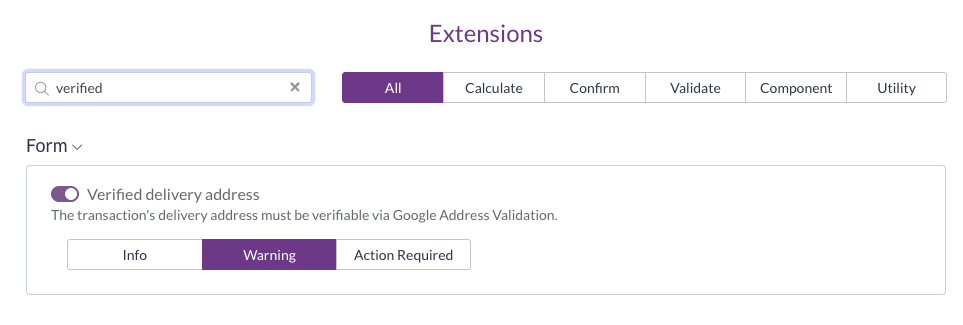
  • An address that couldn't be verified now follows the extension level you've configured, rather than always blocking the document.
  • Set it to Action required and it blocks the submit, set it to Warning and it appears as a warning, and set it to Info and it stays as a note on the section.

The Verified delivery address extension set to Info, Warning, or Action Required

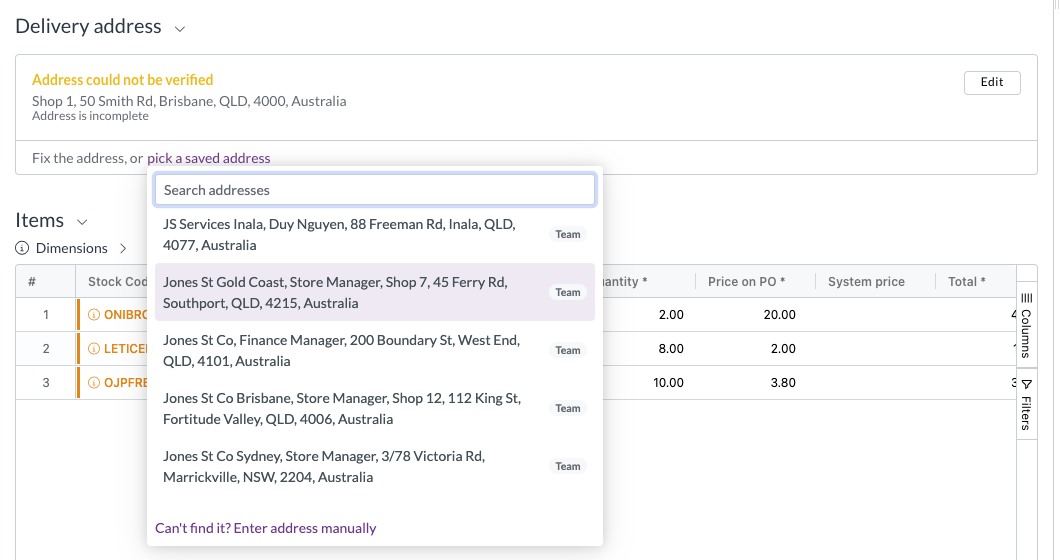
Saved addresses in one place

  • The address search now offers the contact's saved addresses and your team's own addresses together in a single dropdown.
  • Picking one of your team's addresses links the document to that address record, so details stored against it (a notification email address, for example) are available once the document is complete.

The saved address picker opened from a delivery address that could not be verified

Document Studio

Document Studio lets you fine-tune how Zudello extracts information from your documents. Workflows run in order until one matches the document, but a workflow with no document selection question always matches, which means nothing after it ever runs. That was hard to see until now.

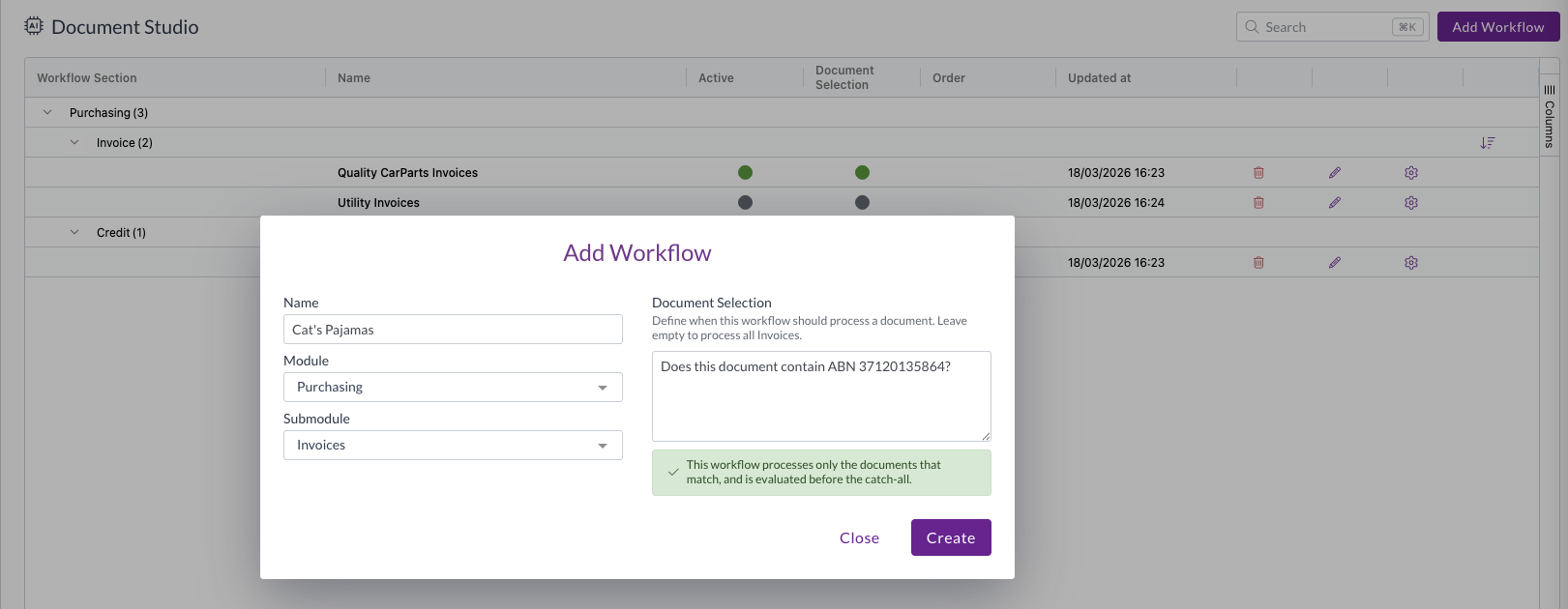
Creating a workflow

  • We've made document selection more prominent when you create a workflow, so it's clear up front whether the workflow will run only on the documents that match, or become the catch-all for its section.
  • Forking a workflow now warns you about unsaved document selection changes and offers to carry them into the fork, so you don't lose them.

The Add Workflow screen with the Document Selection question alongside the name, module, and submodule

Seeing and setting the run order

  • A new Document Selection column shows at a glance which workflows have a document selection question and which don't.
  • A workflow that can never run is flagged on the Order column with an icon, a highlighted row, and a tooltip explaining why.
  • A columns sidebar has been added and the table now sizes to fit, so it no longer scrolls sideways.
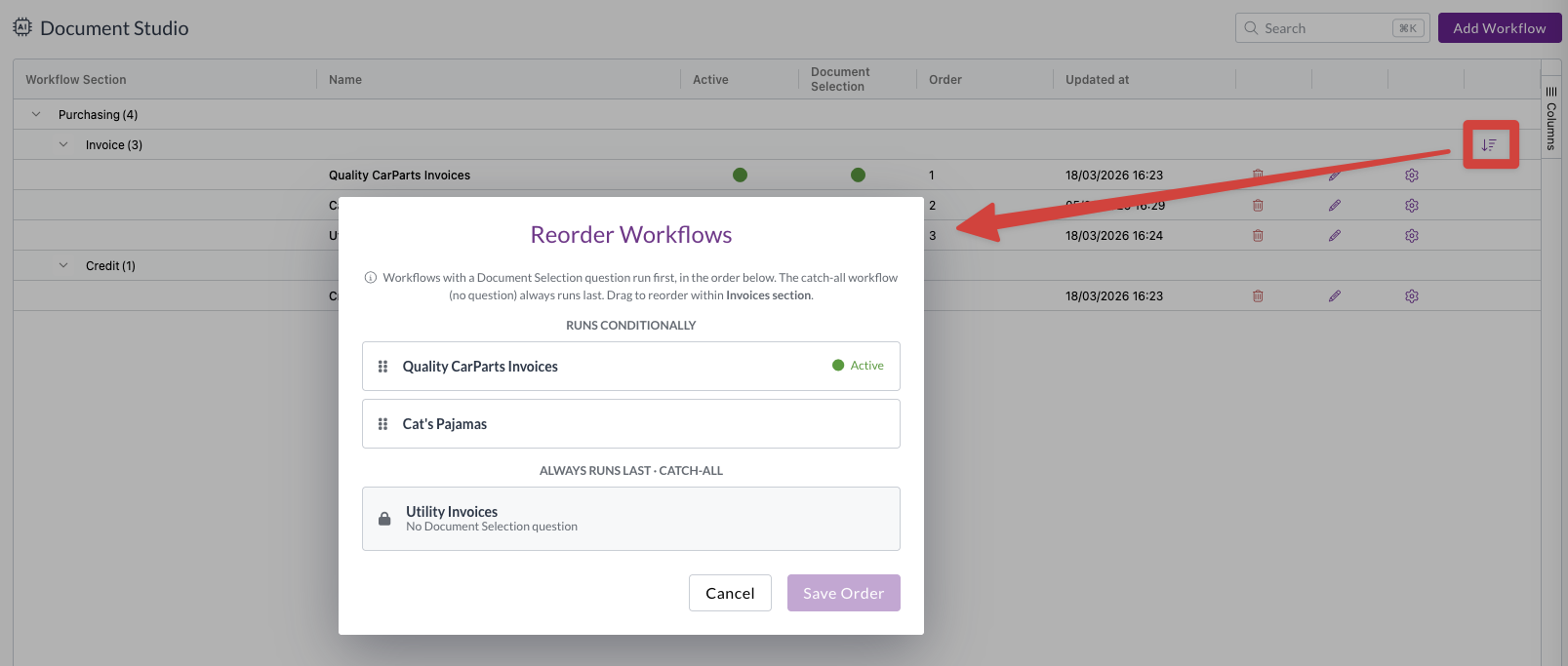
  • The reorder screen now separates the workflows that run conditionally from the ones that always run last, so you can drag the conditional workflows into order and see the catch-all group for what it is.
  • You can order the catch-all group too, so the workflow that should win can be moved to the top. Every other workflow that always runs is flagged, and Zudello warns you when a section has more than one.
  • Removing a workflow's document selection question now moves it to the bottom of its section automatically.

The reorder button on the workflow grid, opening the Reorder Workflows screen split into a runs conditionally group and an always runs last group

Filters

The Assigned to filter did several jobs at once. It's now split into three, so you can filter on exactly the relationship you mean.

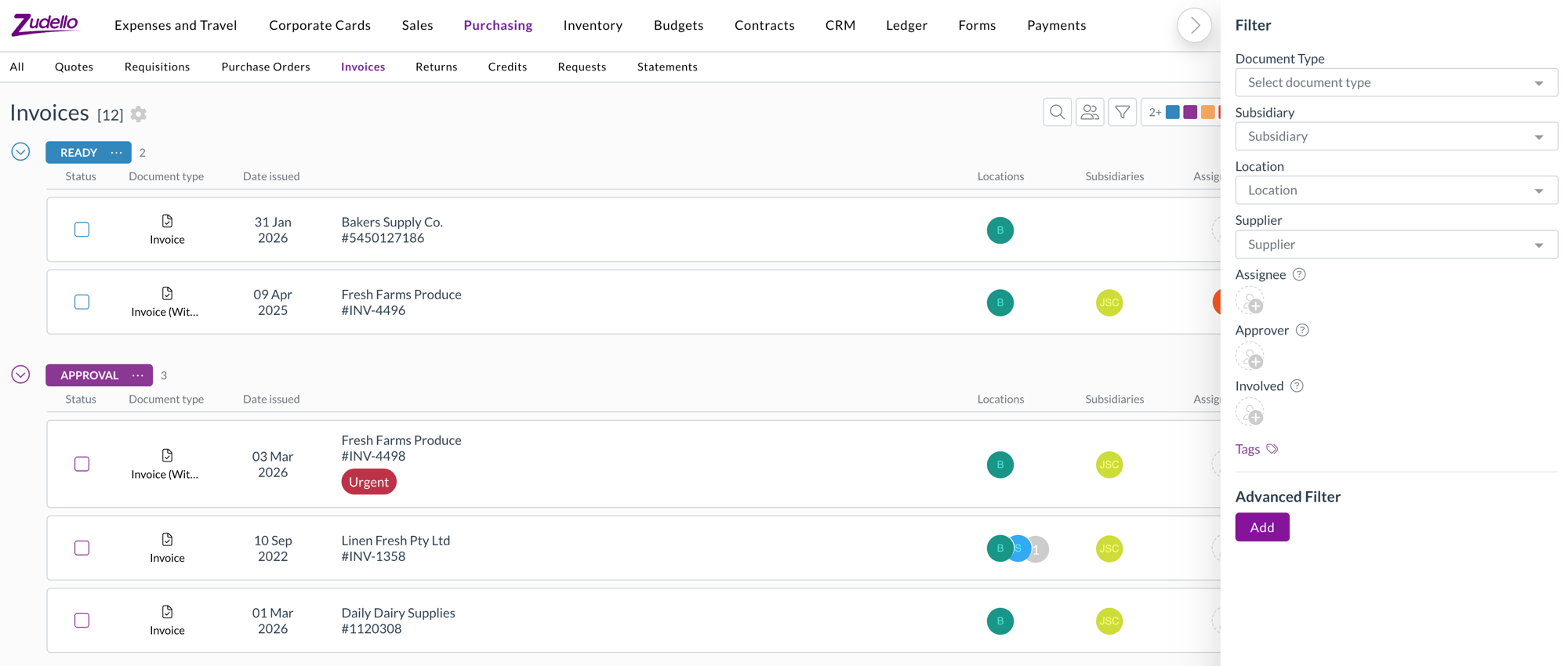
  • Assignee filters strictly on who the document is assigned to.
  • Approver filters on who is approving it.
  • Involved reproduces the previous Assigned to behaviour, covering the assignee, current and past approvers, and the employee.
  • If you have saved views built on the old Assigned to filter, Involved is the equivalent.
  • Filter values now load when you open the dropdown rather than up front, and a filter with no values to show is hidden entirely.

The Assignee, Approver, and Involved filters in the filter panel

Expenses

  • Employee is now available as a line-level dimension on expense forms, alongside location and subsidiary. Choose an employee in the header to apply it to every line, or set it line by line.
  • Location on expense lines is now available in automations, filters, and exports.

Sales orders

Zudello can validate a sales order against your item details before it's placed. We've added two new checks.

Order weight

  • Items can now carry a unit weight, and each line calculates its weight from that unit weight and the quantity, giving a total weight for the order.
  • The order is validated against a configurable minimum and maximum pallet weight.
  • An item with no unit weight is treated as zero and raises a flag naming the item, rather than passing silently.

Lead times

  • Supplier, production, and seasonal lead times on an item now produce an earliest achievable date for each line, calculated in business days.
  • The requested delivery date is validated against the latest achievable date across the order's lines.

Document viewer

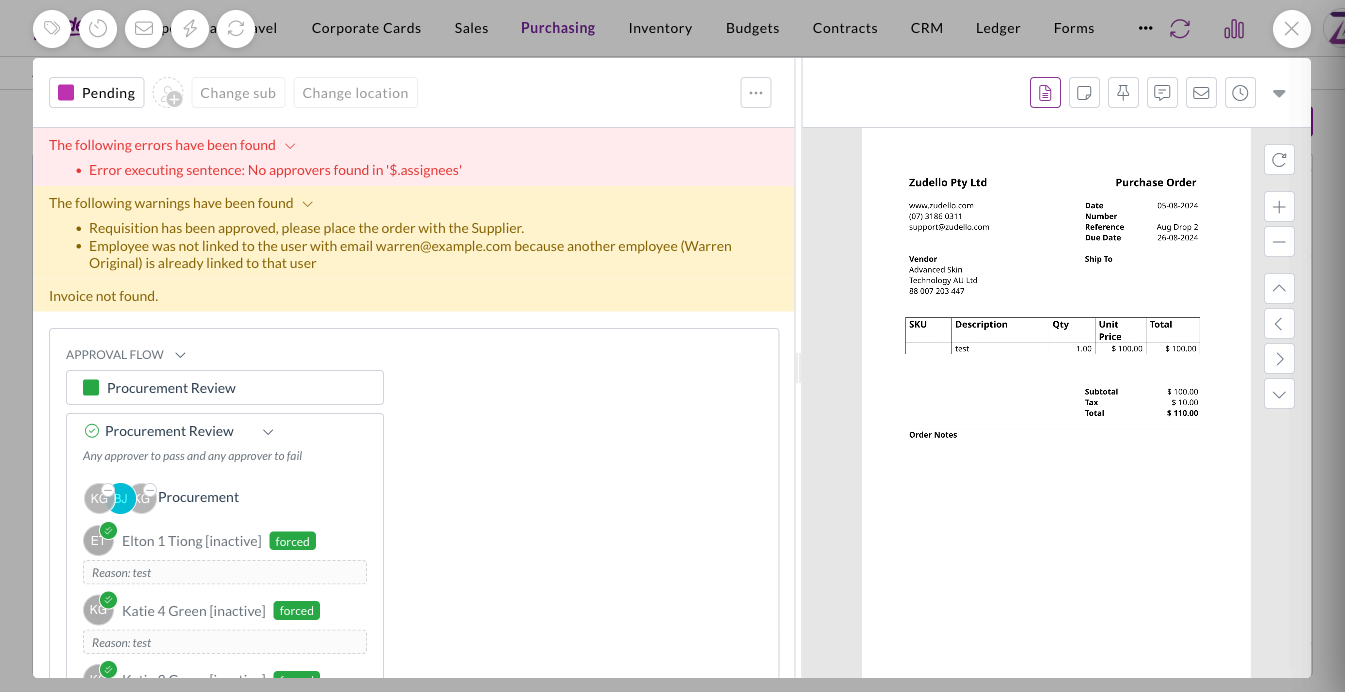
  • Messages on a document are now split into red errors and amber warnings, so something that needs fixing is easy to tell apart from something you just need to know about.

Errors and warnings shown separately on a document

Other improvements

  • Whether a sales line item is in stock is now available in filters and exports.

Resolutions

We're constantly working to refine Zudello's functionality and address any issues as soon as possible. As part of this release, we've made the following resolutions:

  • We've fixed an issue where expanding a lot of allocation details on one document could slow the page down or crash it. Editing line fields on documents with many allocations is also noticeably faster.
  • We've fixed the pending transaction list for corporate cards, where a cardholder with a large number of transactions saw the same ones repeat while scrolling, with some transactions unreachable.
  • We've fixed an issue where a reverted expense still showed as matched in payment searches.
  • We've fixed the sentence value editor in automations, which closed before you'd finished when you picked a field from a dropdown.
  • We've fixed auto-coding rules that failed when a document referenced both a supplier and a customer on the same line.
  • We've fixed employee and supplier syncing so that a record arriving with an email address that's already in use raises a warning on the document instead of failing the whole batch.
  • We've fixed an issue where a ZIP archive containing a very large number of documents could time out while being processed.
  • We've fixed an issue where a document with outstanding validation errors could still be submitted through the API.
  • We've fixed an issue where deleting a document that had allocations, or deleting a task, could fail.
  • We've fixed cached supplier ABN details so they refresh rather than going stale.
  • We've fixed an issue where some invoices were extracted as statements.
  • We've fixed Document Studio so you can upload an existing document from another version or workflow.
  • We've fixed an issue where auto-coding rules couldn't be chosen as a resource in visibility data permissions.
  • We've fixed the JSON side panels, which didn't load on large documents.
  • Contract lines can now carry custom fields, set up in Field Manager the same way as any other record.

Have an idea?

Do you have an idea for a new feature or how we can improve our current features? Let us know at support@zudello.com.

Your ideas and feedback are an important part of our product planning process to make Zudello better for everyone.
Release notes edition 3.6.9

Release date: 16 October 2025
Version: v3

Here's the latest summary of what's new and improved in Zudello, as well as what we resolved in the latest release.

In this release:

  • Launch of the Sales module with enhanced order management
  • New email body extraction for sales orders and quotes
  • Enhanced automation capabilities with tag management
  • Performance improvements and more

Looking for something? Browse by tag to find release notes on a specific feature.

New and improved

Sales module launch

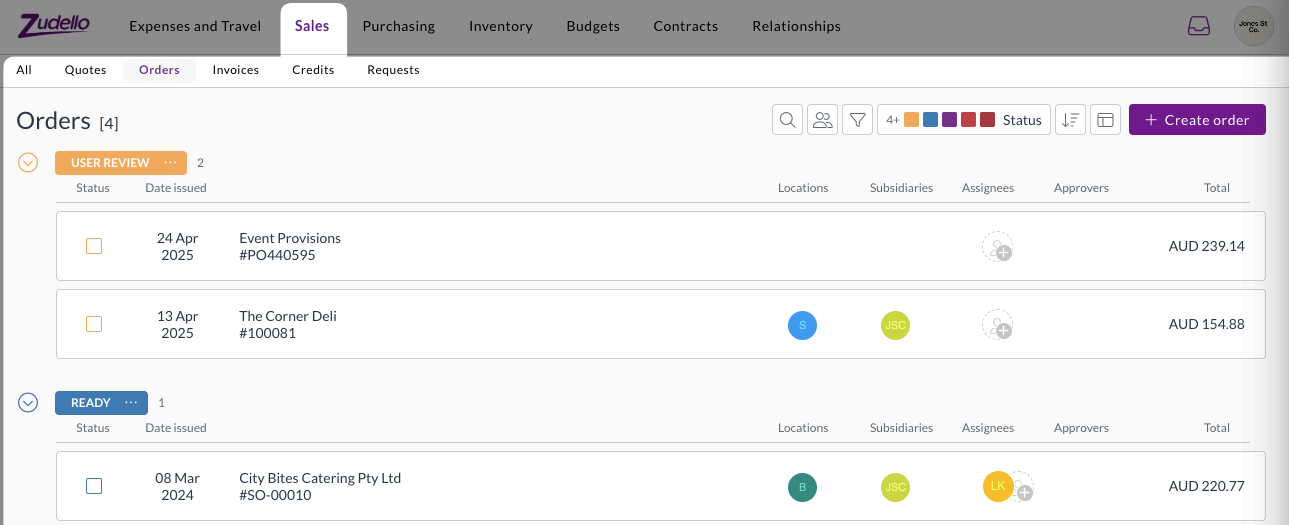
We've officially launched the Sales module to help you manage customer relationships, quotes, and orders efficiently.

The Sales module includes:

  • Streamlined document classification
    • Automatic classification of quotes, orders, and remittance advice documents
  • Enhanced order management
    • Complete quote-to-order workflow management
    • Comprehensive order processing and fulfilment capabilities
  • Flexible document support
    • Support for quotes and orders in a range of formats
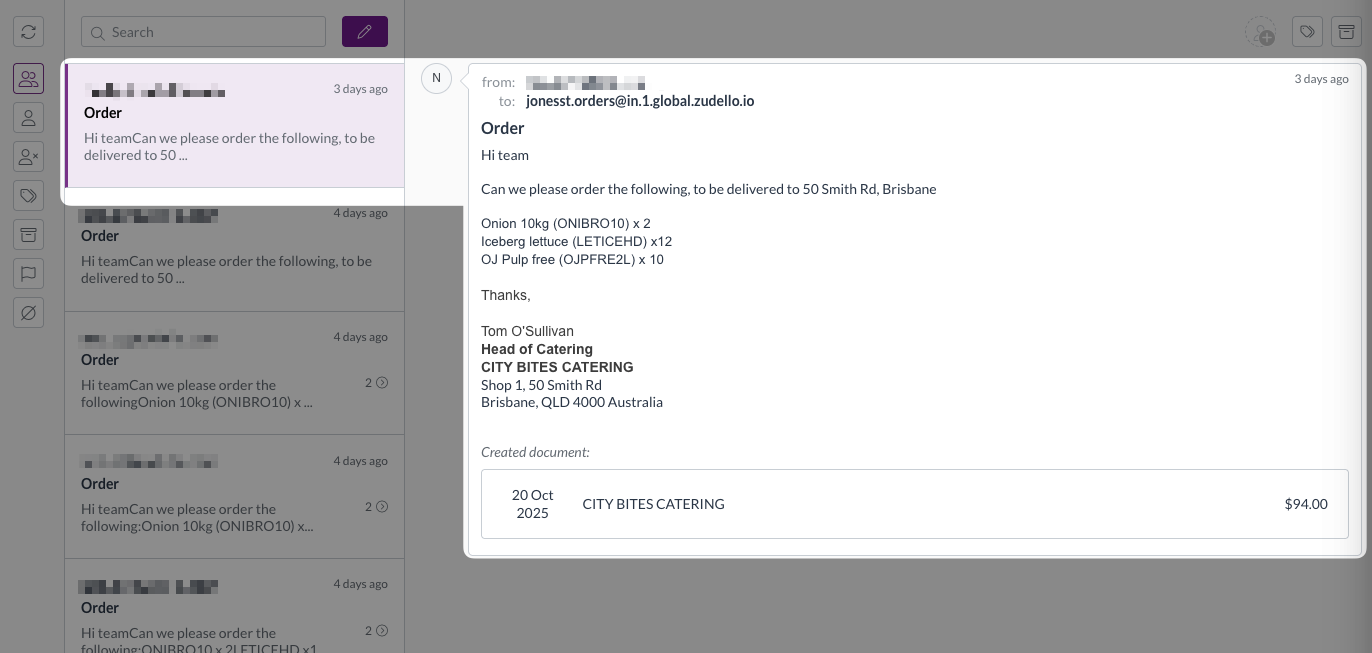
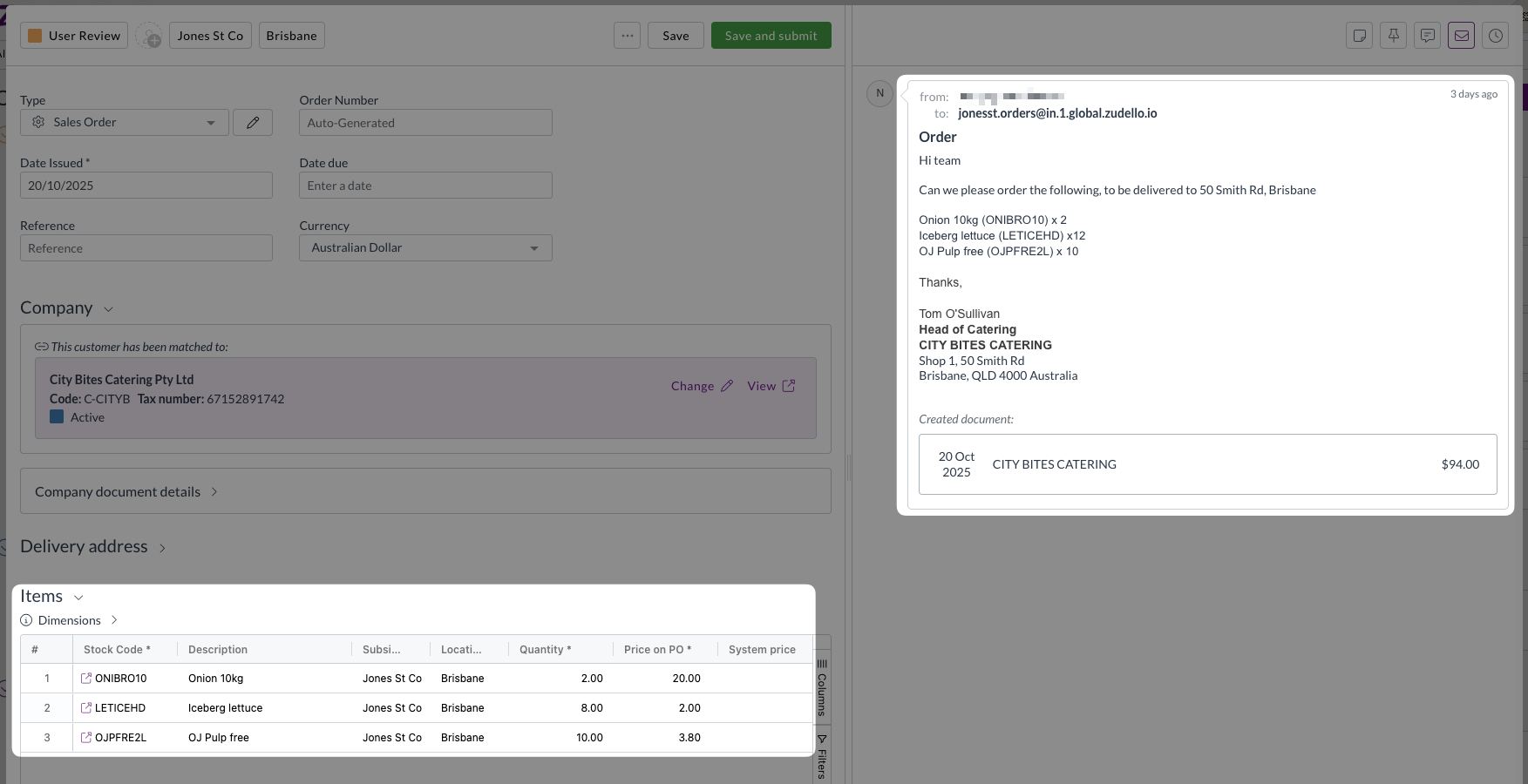
    • Functionality to extract orders from email bodies

The Sales module launch represents a significant expansion of Zudello's capabilities beyond traditional accounts payable processing, providing a complete order management solution for growing businesses. To learn more, see our Sales module knowledge base articles.

Revolutionary email body extraction

Some of your customers may send orders as an email body rather than an attachment. Previously this required you to manually create a sales order and copy over the data; but no more.

We've introduced groundbreaking functionality that extracts transaction information directly from email content, eliminating the need for separate document attachments in many scenarios.

This innovative feature provides:

  • Smart detection of whether emails contain attachments or require body extraction
  • Automatic extraction of sales orders and quotes directly from email body text
  • Comprehensive transaction functionality, including supplier and item matching and price comparisons

To make your workflow even smoother, we've also introduced the following inbox features to help you better sort between emails where the body is the order, and those with attachments:

  • New filter for emails without document attachments
  • Improved viewing interface showing email origin for extracted transactions

This feature is particularly valuable for businesses that receive orders via email rather than formal purchase order documents, streamlining the entire order capture process.

Advanced tag management automations

Automation workflows help you streamline repetitive tasks and ensure consistent processing across your organisation. We've expanded automation functionality with powerful new tag management capabilities.

Automations can now add or remove specific tags based on workflow conditions. These enhancements allow for more sophisticated document organisation and processing automation, reducing manual effort while ensuring consistency across your workflows.

For assistance with setting up tag-related automations, please reach out to support@zudello.com.

Significant performance improvements

We've implemented comprehensive system optimisations to address performance concerns and ensure reliable operation across all regions.

Enhanced processing speed

  • Streamlined data operations

    • Faster transaction and budget line fetching
    • Improved saving process to decrease the time it takes for documents to save
    • Enhanced audit logging performance
  • Advanced performance monitoring

    • Comprehensive front-end interaction tracking
    • Better identification of performance bottlenecks
    • Proactive performance issue detection

Improved system reliability

  • Enhanced document numbering

    • Resolved issues with purchase order number generation
    • Improved communication between system components
    • Better handling of automation workflow interactions
  • Advanced search capabilities

    • Improved search ranking for document numbers
    • Enhanced UUID-based searching
    • Better document discovery and retrieval

Budget management enhancements

Budget management helps you control spending and track costs across projects and departments. We've made several improvements to budget functionality and performance.

  • We've enhanced calculation speed and system responsiveness for faster budget line processing
  • We've improved the information displayed when viewing allocations, and clarified the transaction line details in budget reporting
  • We've enhanced budget configuration validation and added better handling for budget setup errors

Budget management is currently available for selected teams only. To discuss enabling this feature for your team, reach out to support@zudello.com.

Resolutions

We're constantly working to refine Zudello functionality and ensure that we address any issues as soon as possible. As part of this release, we've made the following resolutions and improvements:

  • We've enhanced our email processing reliability with improved missing email handling and better system communication
  • We've resolved user interface issues in dark mode and alternative themes when editing forms
  • We've improved system stability during high-volume processing periods
  • We've enhanced error handling and recovery mechanisms across automation workflows
  • We've optimised system performance during peak usage times to ensure consistent response times

Have an idea?

Do you have an idea for a new feature or how we can improve our current features? Let us know at support@zudello.com.

Your ideas and feedback are an important part of our product planning process to make Zudello better for everyone.