Bulk approving and rejecting documents
Save time and streamline your approval workflow by approving or rejecting multiple documents simultaneously. Zudello's bulk approval features allow you to process several pending approvals in a single action, helping you manage high volumes of approvals efficiently.
Best practices
- Review the summary screen carefully before confirming bulk approval or rejection
- Only select documents you're confident are ready for approval or rejection
- Review any failed approvals or rejections individually to understand why they couldn't be processed
Required permissions
To use bulk approval, you need the following permission:
- Bulk Approval permission for the relevant module
- E.g. Purchasing Bulk Approval
To use bulk rejection, you need the following permission:
- Bulk Rejection permission for the relevant module
- E.g. Purchasing Bulk Rejection
Contact your organisation administrator if you are unsure about your permissions.
When bulk approval and rejection can be used
You can use bulk approval or rejection when:
- Multiple documents are in Approval status
- There is a pending approval step assigned to you in the current (active) approval milestone
- The documents have no validation errors
For more information on validation errors and how to identify them, see Document validations.
How to bulk approve documents
To bulk approve documents:
- Open the relevant module and submodule
- Select the checkbox next to each document you want to approve
- Click Approve in the bulk actions toolbar
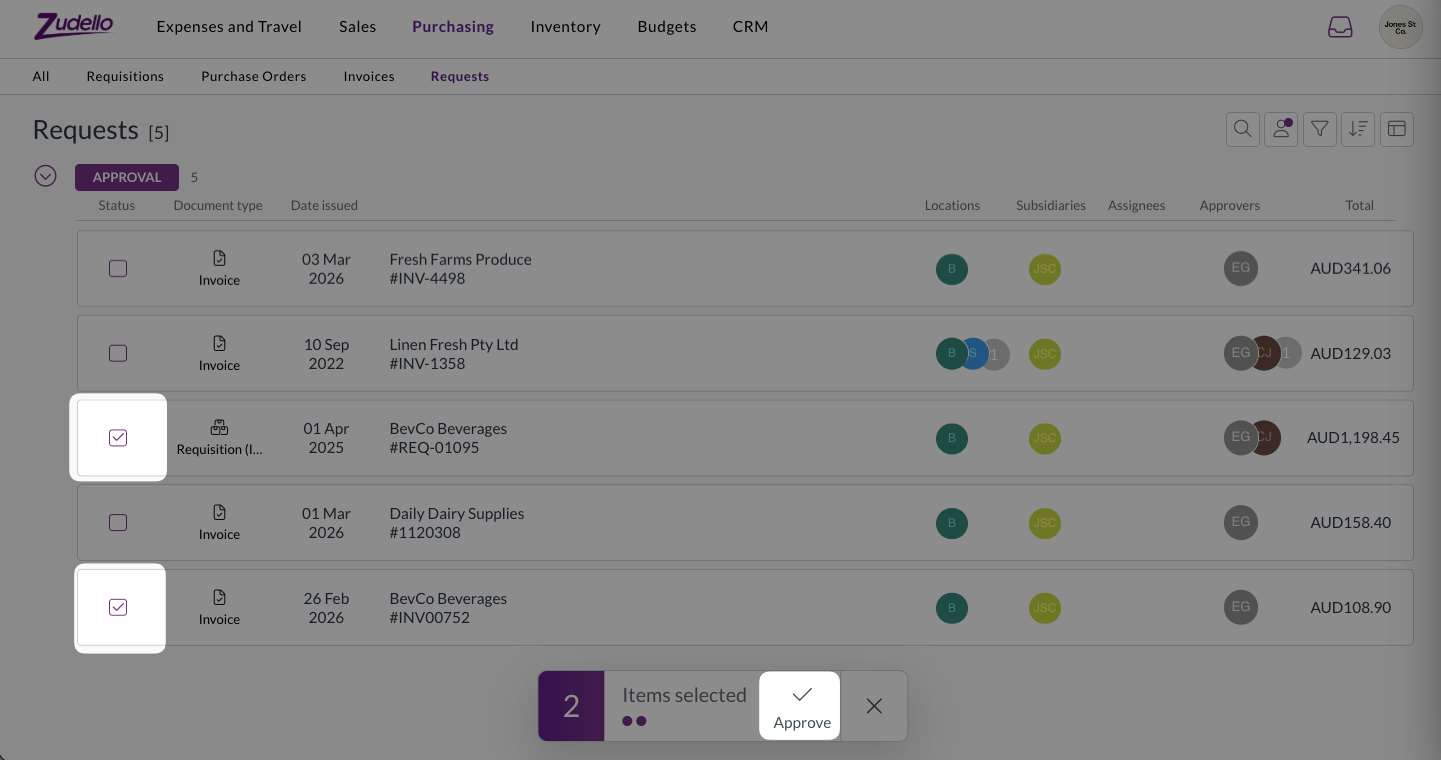
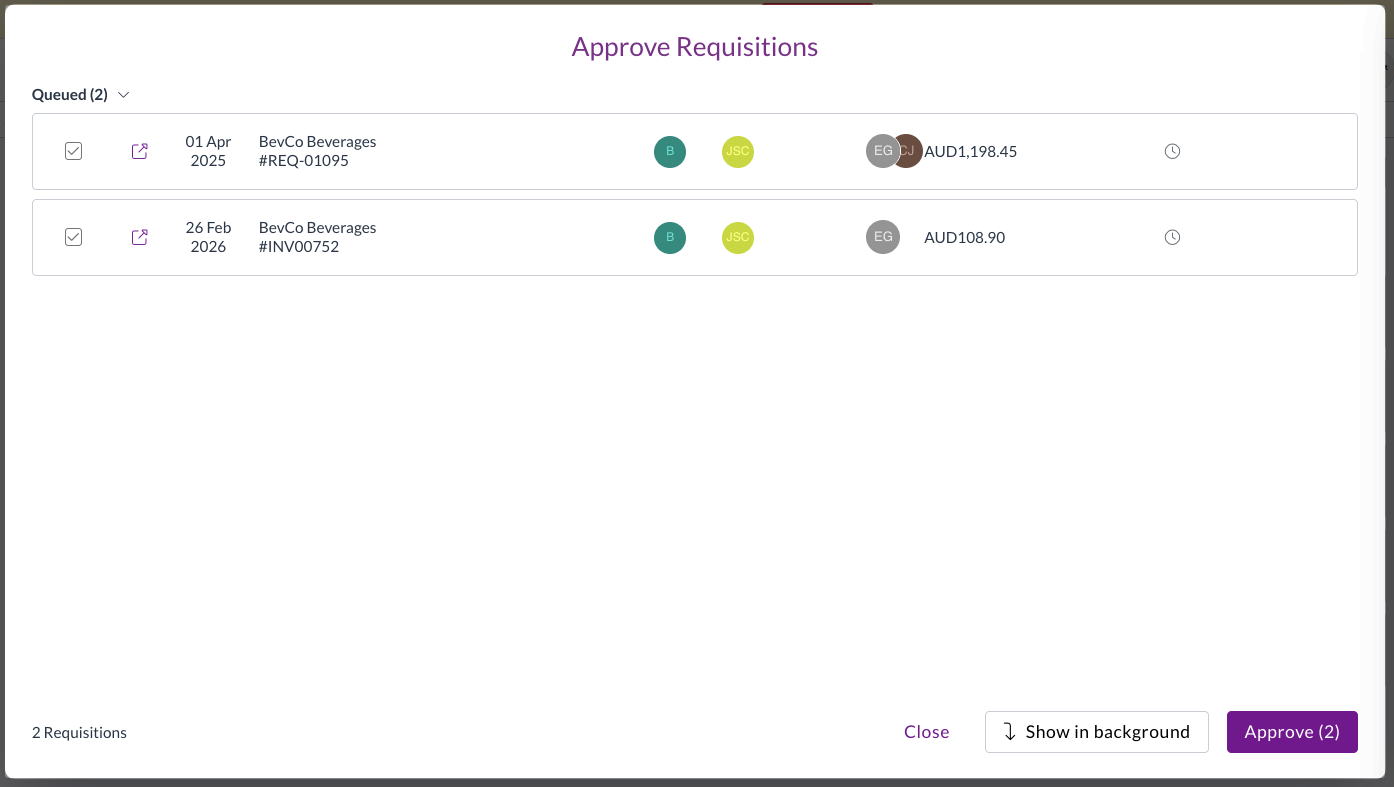
- The bulk approval summary screen will open, showing all selected documents
- Review the summary carefully to ensure all documents are appropriate for approval
- Click Approve to confirm the bulk approval
- When the documents have been approved, the results will show in the bottom left
- A summary shows the total number of successful and failed approvals, and you can click to expand any errors
- Click Close once finished
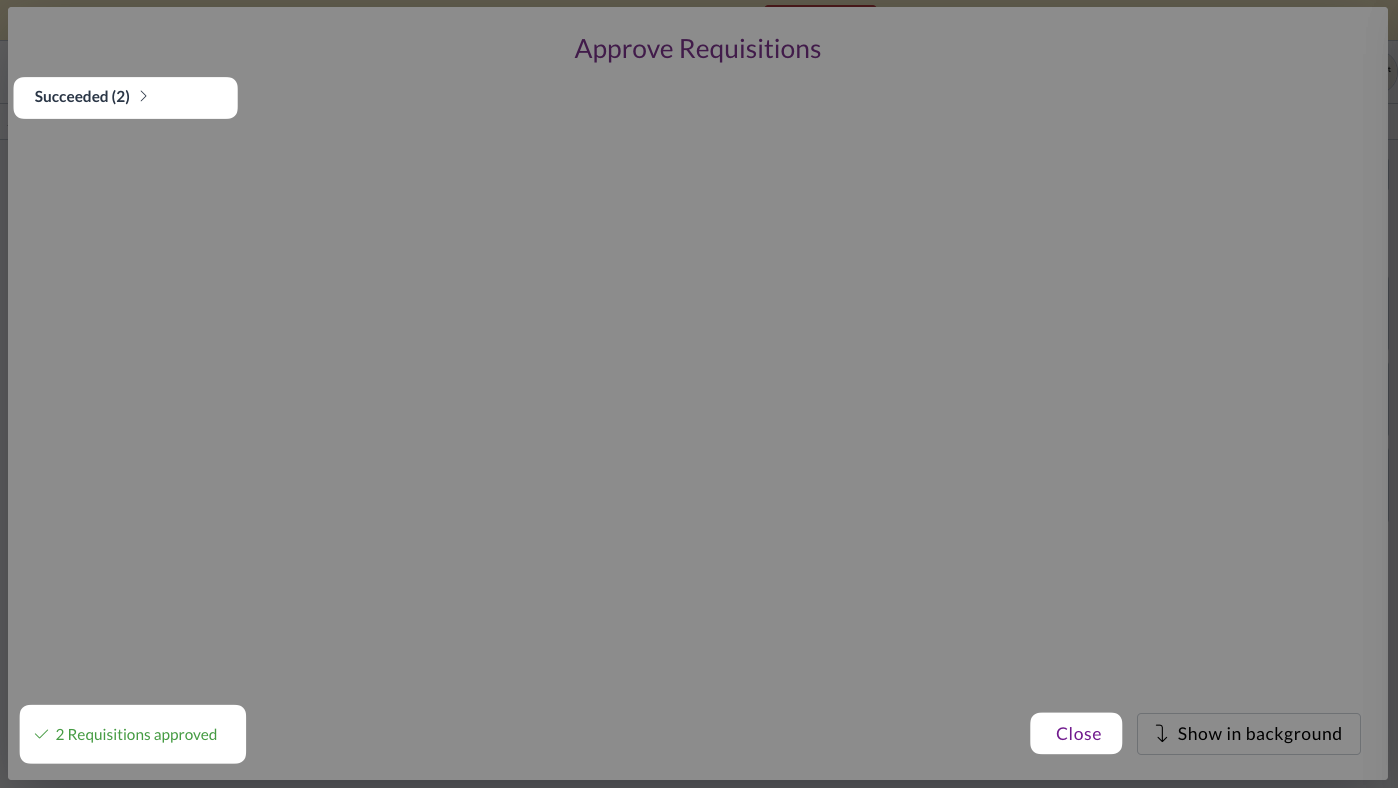
If you are processing a large number of approvals, click Show in background to minimise the modal and let the process run in the background.
How to bulk reject documents
The process for bulk rejecting is the same as for approving. To bulk reject documents:
- Open the Requests submodule
- Select the checkbox next to each document you want to reject
- Click Bulk Reject in the bulk actions toolbar
- The bulk rejection summary screen will open, showing all selected documents
- Review the summary carefully to ensure all documents are appropriate for rejection
- Click Reject to confirm the bulk rejection
- Click Show in background to minimise the modal and let the process run in the background
Understanding the approval and rejection process
When you initiate a bulk approval or rejection, Zudello processes each document individually:
- Successfully approved or rejected documents are marked in green and move through your organisation's workflow
- Documents that cannot be approved or rejected remain visible with an explanation of why the action failed
- The process continues even if some documents fail, ensuring maximum efficiency
Reviewing results
After bulk approval or rejection completes:
- Successful approvals or rejections disappear from your pending list
- Failed documents remain visible with error messages
- You can review and address failed documents individually
- A summary shows the total number of successful and failed approvals or rejections
Common reasons for failures
Documents may fail to be approved or rejected during bulk processing for several reasons. Here are common failure messages, and the cause and fix for each:
-
Unable to bulk approve due to Validation Errors, please review before approving
- The document has validation errors.
- These documents require review before approving.
-
Unable to approve DOCUMENT TYPE, your approval is not required
- This occurs when you don't have a pending approval step for the document.
- This document does not currently require your approval.
-
Unable to approve DOCUMENT TYPE, no required approvals found
- This applies to documents that may have moved out of approval status or don't currently require approval.
Important considerations
Consider the following when bulk approving or rejecting documents.
- Document selection
- The bulk approval and rejection actions are only available when you select documents that are eligible for approval. If you select documents that don't require approval, the bulk approval and rejection buttons will be disabled with a message explaining why.
- Processing time
- For large numbers of documents, bulk approval or rejection may take some time to complete. You can minimise the progress modal and continue working on other tasks while the documents are processed in the background.
- Audit trail
- All bulk approvals and rejections are recorded in each document's audit trail, maintaining full visibility of who approved or rejected what and when.
Need help?
Contact your organisation administrator or Zudello support for assistance with bulk approvals and rejections or if you need help with permissions.