8 posts tagged with "Automations"

Description for the automations tag.

View All Tags

Release notes edition 3.7.1

Release date: Thursday 26 February 2026
Version: v3

Here's the latest summary of what's new and improved in Zudello, as well as what we resolved in the latest release.

Looking for something? Browse by tag to find release notes on a specific feature.

In this release:

  • Redesigned expenses module for a faster, simpler claims experience
  • Bulk reject for approval workflows
  • New automation actions, interface improvements and more

New and improved

Redesigned expenses module

The expenses module helps you capture, submit, and approve employee expenses. We took a closer look at how teams actually use the module, and identified a number of ways to simplify the process and save users time.

The result? A redesigned expenses module that gets out of your team's way.

  • Direct submission for expenses
    • For most teams, the majority of expenses are single-line submissions, but the old workflow required every expense to be added to a claim before it could be approved.
    • We've now removed this extra step. Expenses can now be submitted for approval directly, bypassing the claims step entirely for teams that don't need it.
    • The existing claims workflow remains fully supported for teams that do need to use it.
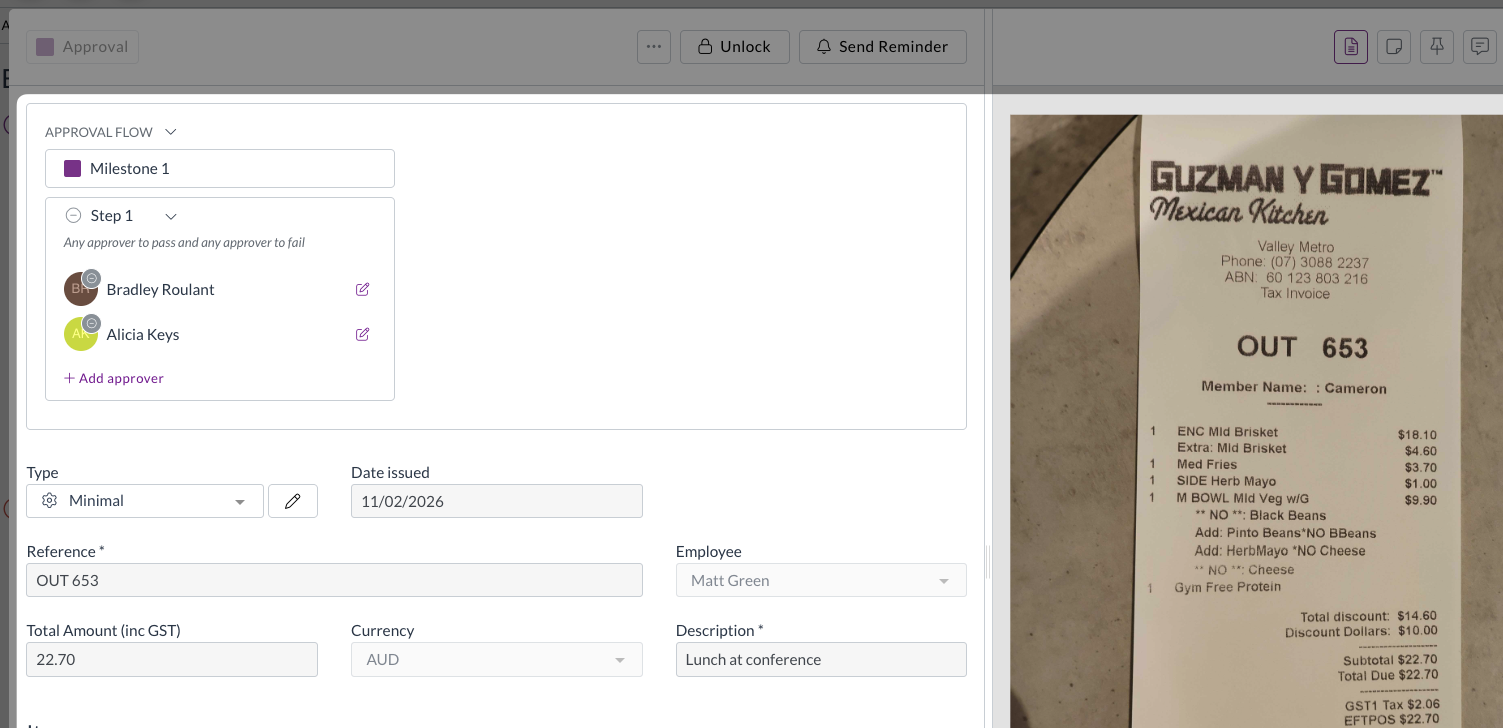
  • Improved GL splits
    • The way GL splits work on expense lines has been updated so that line items must equal the document total, giving you cleaner, more accurate cost allocations.
    • Split percentages are now visible directly on the expense.
  • Expense approval notifications
    • Users now receive email and in-app notifications for expense approval actions, including when an expense is approved, rejected, or flagged for review.
    • Your team stays informed at every step without needing to chase updates manually.

If you have any questions about the updated expenses module, or would like to discuss enabling direct submission for your team, contact support@zudello.com.

Bulk reject for approval workflows

Approvers can now reject multiple documents in a single action, saving time when managing large volumes of documents awaiting approval.

The process for bulk

  • Select multiple documents from the document list and reject them in one action
  • Add a rejection reason that applies to all selected documents
  • Each rejected document triggers its own notification to the relevant user, including the rejection reason

For more information on bulk rejecting documents, see Bulk approving and rejecting.

New change team automation action

We've added a new automation action to give you more options when automating your workflow.

You can now use a Change team action within sentence automations, to automatically move documents to the correct team when certain conditions are met. This is the same as the Change team action available manually on documents.

To discuss adding this automation to your team, please reach out to support@zudello.com.

Interface and performance improvements

We've made several enhancements to improve usability and performance across the system:

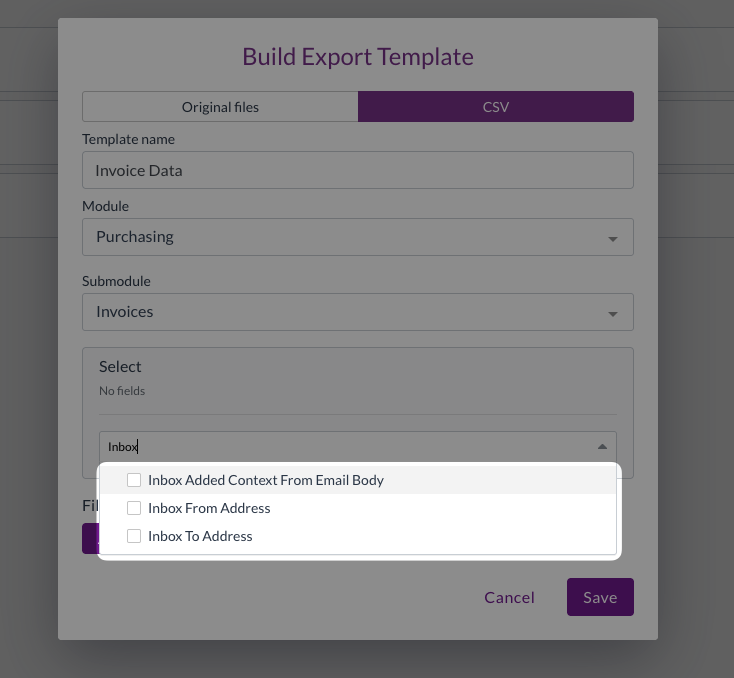
  • Inbox field labels updated
    • Inbox fields are now more clearly labelled in export and import field selectors
  • Performance improvements
    • We've reduced unnecessary processing for users who belong to multiple groups with overlapping permissions, resulting in faster load times

Resolutions

We're constantly working to refine Zudello functionality and ensure that we address any issues as soon as possible. As part of this release, we've made the following resolutions and improvements:

  • We've resolved an issue where inactive contracts were included in spend tracking and variance reporting. Inactive contracts are now correctly excluded, consistent with how inactive budgets are handled.
  • We've fixed an issue where repeatedly reordering documents could generate chains of false duplicate records.
  • We've resolved an issue where fields with forced default values could still be edited by users. These fields are now correctly displayed as read-only.
  • We've fixed a crash that could occur when converting a document type if no target document type was configured.
  • We've resolved an issue where photos taken on a phone camera in JPG format were not rendering correctly in the document preview panel.

Have an idea?

Do you have an idea for a new feature or how we can improve our current features? Let us know at support@zudello.com.

Your ideas and feedback are an important part of our product planning process to make Zudello better for everyone.
Release notes edition 3.6.12

Release date: 17 November 2025
Version: v3

Here's the latest summary of what's new and improved in Zudello, as well as what we resolved in the latest release.

Looking for something? Browse by tag to find release notes on a specific feature.

In this release:

  • New bulk actions for efficient user management
  • Enhanced automation condition options for multi-value fields
  • Further interface improvements for better usability

New and improved

User management bulk actions

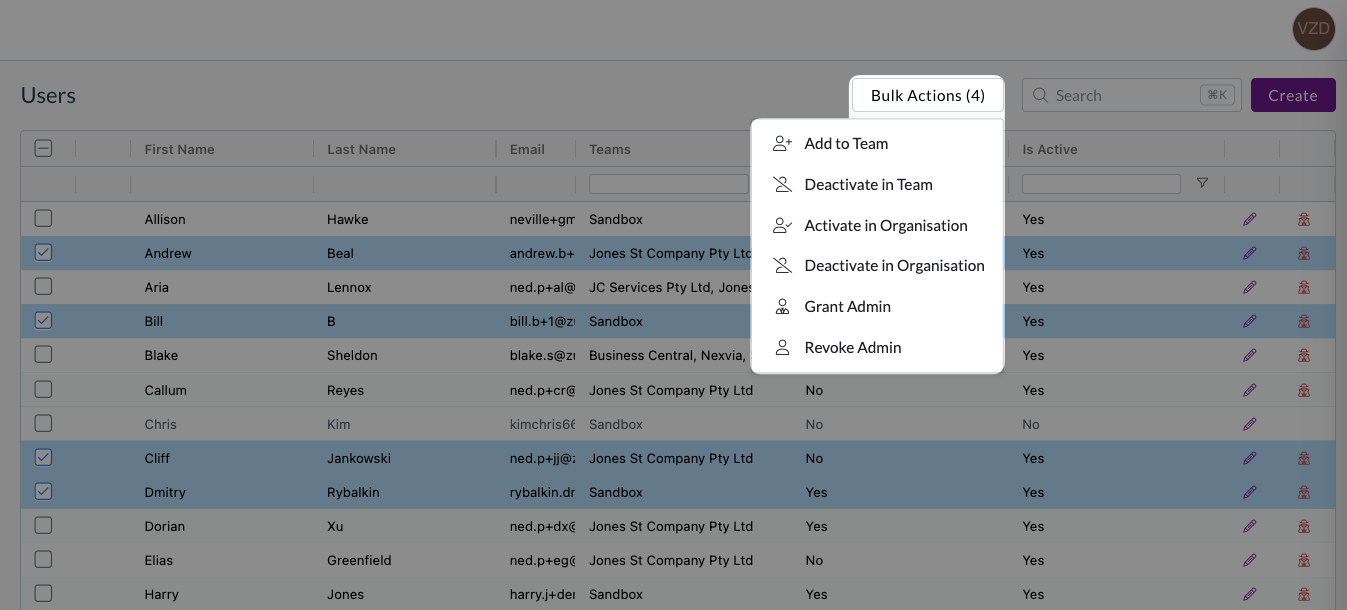
User management helps you control access and permissions across your organisation. Previously, actions like adding users to teams or deactivating users had to be performed one user at a time. We've now introduced bulk actions to streamline user management for organisation administrators.

Organisation administrators can now perform the following actions on multiple users simultaneously:

  • Add to team - Add selected users to a team
  • Activate/Deactivate in team - Control team access for multiple users at once
  • Activate/Deactivate in organisation - Manage organisation-wide access efficiently
  • Grant/Revoke admin - Update admin permissions across multiple users

To use bulk actions, simply select the relevant users from the user management interface, then choose the action you want to perform. See User management for more.

Enhanced automation conditions

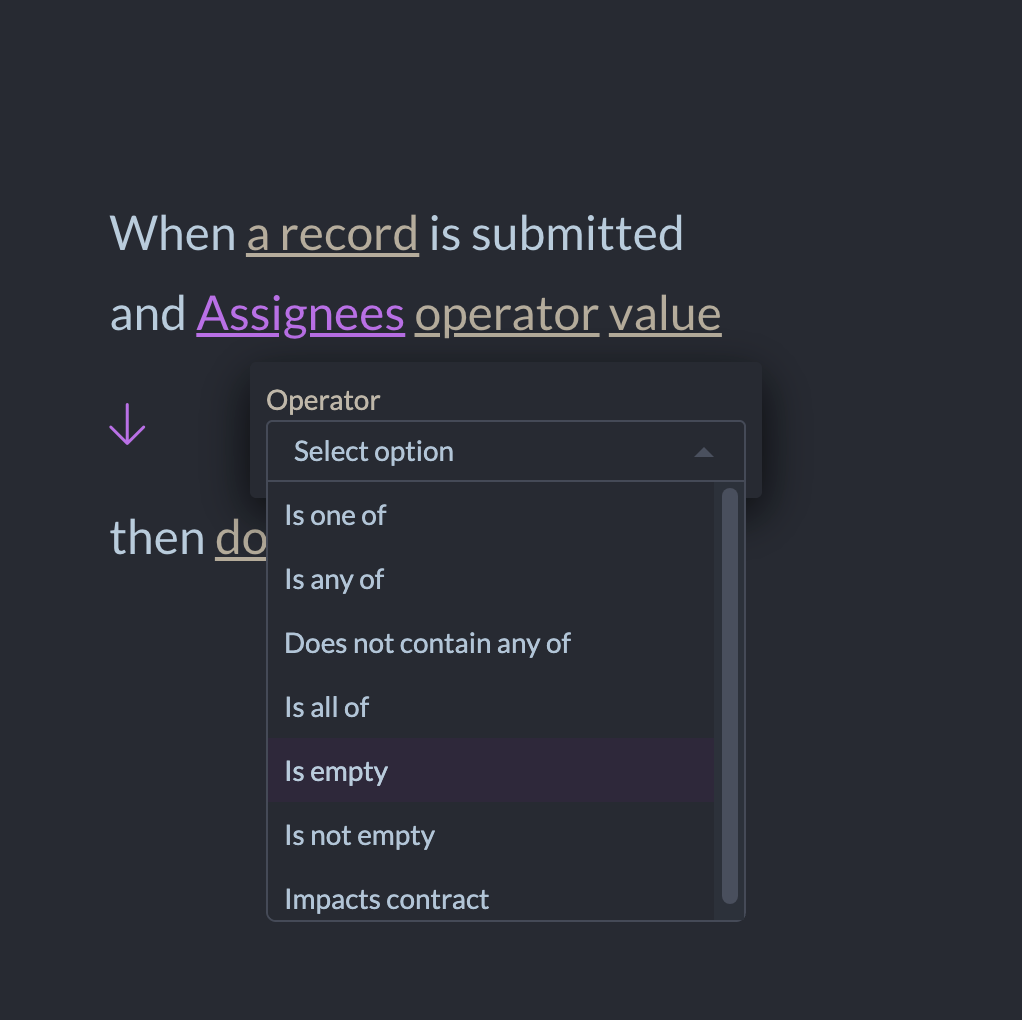
Automation workflows are the driving force behind your approvals, automated processes, and more. Automation conditions now include clearer options when working with multi-value fields like assignees and tags.

  • Is empty and Is not empty
    • These are new operators specifically designed for multi-value fields like assignees and tags
    • They will only show against those fields to which they are relevant
  • Simplified condition options
    • The Is set and Is not set operators are now limited to single-value fields, reducing confusion when building automation rules

These improvements make it easier to create reliable automation workflows that handle multi-value fields correctly.

Interface improvements

We've made several enhancements to improve navigation and usability across the system:

  • Prioritised validation issues
    • Line validation issues are now sorted by severity (error, warning, info), regardless of the order of the fields themselves
    • The most critical errors appear at the top, helping you identify and resolve important issues first

  • Improved document history navigation
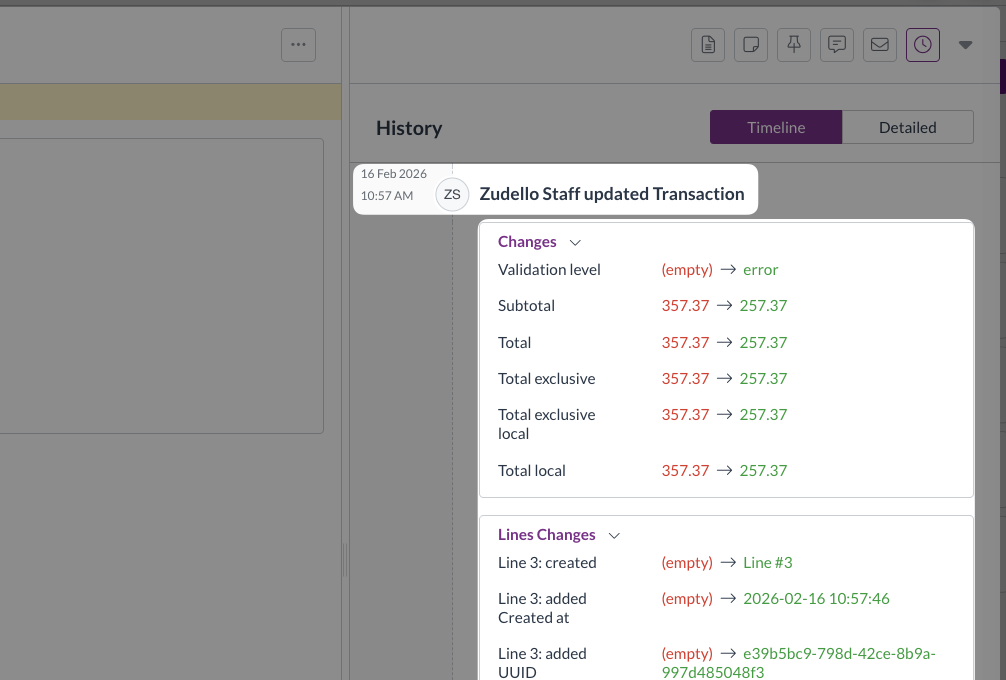
    • Field headers in the document history tab now remain visible as you scroll, making it easier to review changes and understand what was modified over time

  • Enhanced error messaging

    • Updated error messages throughout the system to provide clearer guidance
    • Improved explanations help you understand issues and how to resolve them
  • Better tooltips and interface cleanup

    • Added helpful tooltips to explain features and functionality
    • Removed buttons for deprecated features to reduce clutter

Resolutions

We're constantly working to refine Zudello functionality and ensure that we address any issues as soon as possible. As part of this release, we've made the following resolutions and improvements:

  • We've resolved an issue where emojis weren't displaying correctly in the Chat tab
  • We've fixed a visual issue where dropdown menus were difficult to read when they overlapped with other form fields
  • We've resolved an issue where datasets weren't sorting as expected in certain views

Have an idea?

Do you have an idea for a new feature or how we can improve our current features? Let us know at support@zudello.com.

Your ideas and feedback are an important part of our product planning process to make Zudello better for everyone.
Release notes edition 3.6.10

Release date: 22 October 2025
Version: v3

Here's the latest summary of what's new and improved in Zudello, as well as what we resolved in the latest release.

Looking for something? Browse by tag to find release notes on a specific feature.

In this release:

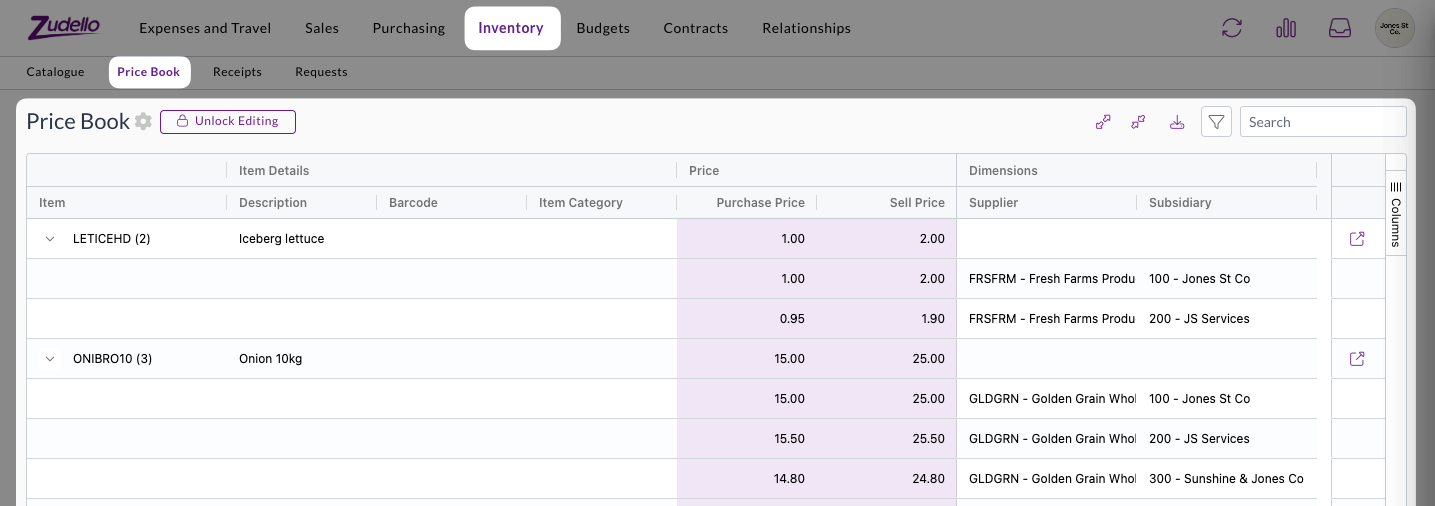
  • New price books feature for advanced pricing management
  • Enhanced automation workflows with improved supplier assignee functionality
  • Reporting functionality for approvals, budgets, and more

New and improved

Price books

Price books allow you to manage item pricing based on specific customers, suppliers, projects, or other business dimensions. This feature automatically applies appropriate pricing and validates special rates across your transactions.

Price books provide comprehensive pricing management:

  • Automatic price application
    • Correct pricing is automatically filled when creating requisitions or purchase orders
    • Special pricing is validated when receiving customer orders or supplier invoices
  • Flexible routing options
    • Transactions with pricing discrepancies can be routed through custom approval workflows
    • Configure routing based on your specific business requirements

Price book functionality includes full integration with requisitions, purchase orders, customer orders, and supplier documents. See Price books for more.

Advanced document validation

Document validation checks your transactions for accuracy and completeness before you open them. This allows you to focus only on those documents that need your attention, and automate those that don't.

In this release, we've made validation errors clearer, more flexible, and more automated.

Automated validation

Document validation is now performed automatically when a document is uploaded, without a user needing to open the document. This provides additional automation capabilities, and allows your team to focus only on those documents that require your attention.

Automated validation is now enabled by default for all existing and new teams.

Enhanced validation feedback

Understanding why documents have validation errors is now easier and clearer:

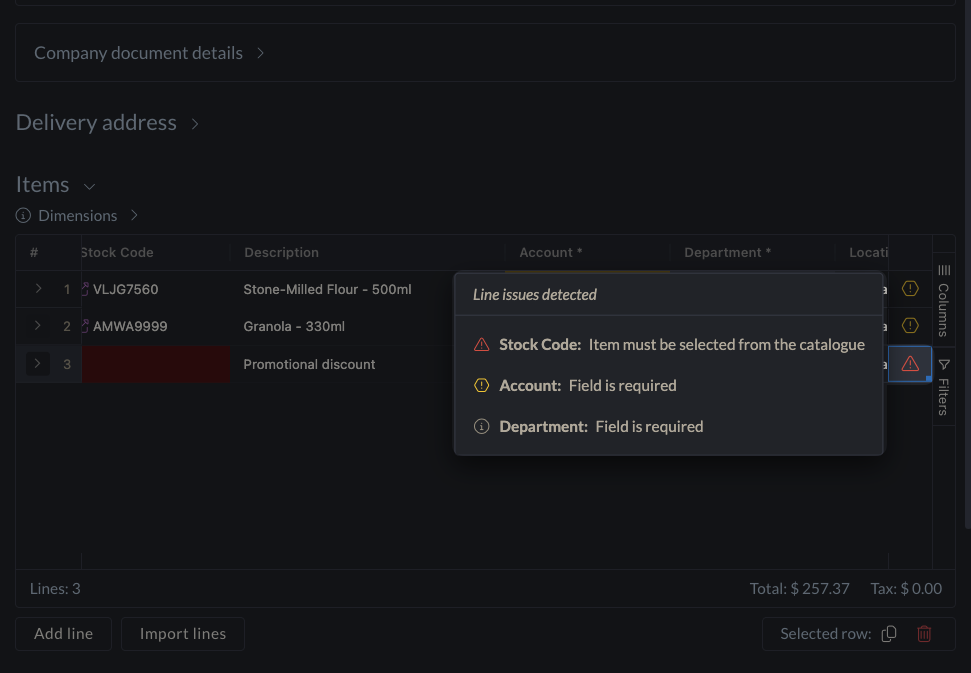
  • Fixed validation column
    • A dedicated error column in the lines table shows all validation issues at a glance
    • Click on error indicators to see detailed explanations for each line
  • Detailed calculation information
    • For validation errors involving calculations, we now show the applied formulas and discrepancies
    • This helps you quickly understand and resolve issues to continue processing

Expanded validation flexibility

We've added new Required if validation options:

  • Support for Any of value rules
    • You can now use Any of conditions when setting up field requirements, which make one field required if another field is set to one of a number of values.
    • E.g. Cost centre is required if account is any of Equipment, Staff Costs, or Entertainment

Automation enhancements

Automations help streamline your document workflows by automatically performing actions based on predefined rules. We've now improved supplier assignee functionality and validation condition options.

  • Supplier assignee actions

    • We've restored full functionality for automation workflows that use supplier assignees
  • Enhanced condition options

    • When setting up conditions for assignees, use the "is not empty" option instead of "is set" for better reliability
    • We're working on improving the interface to prevent configuration mistakes in future releases

Reporting launch

Comprehensive reporting capabilities are now available to help you analyse approval workflows, budget performance, and other key business metrics.

Reporting includes:

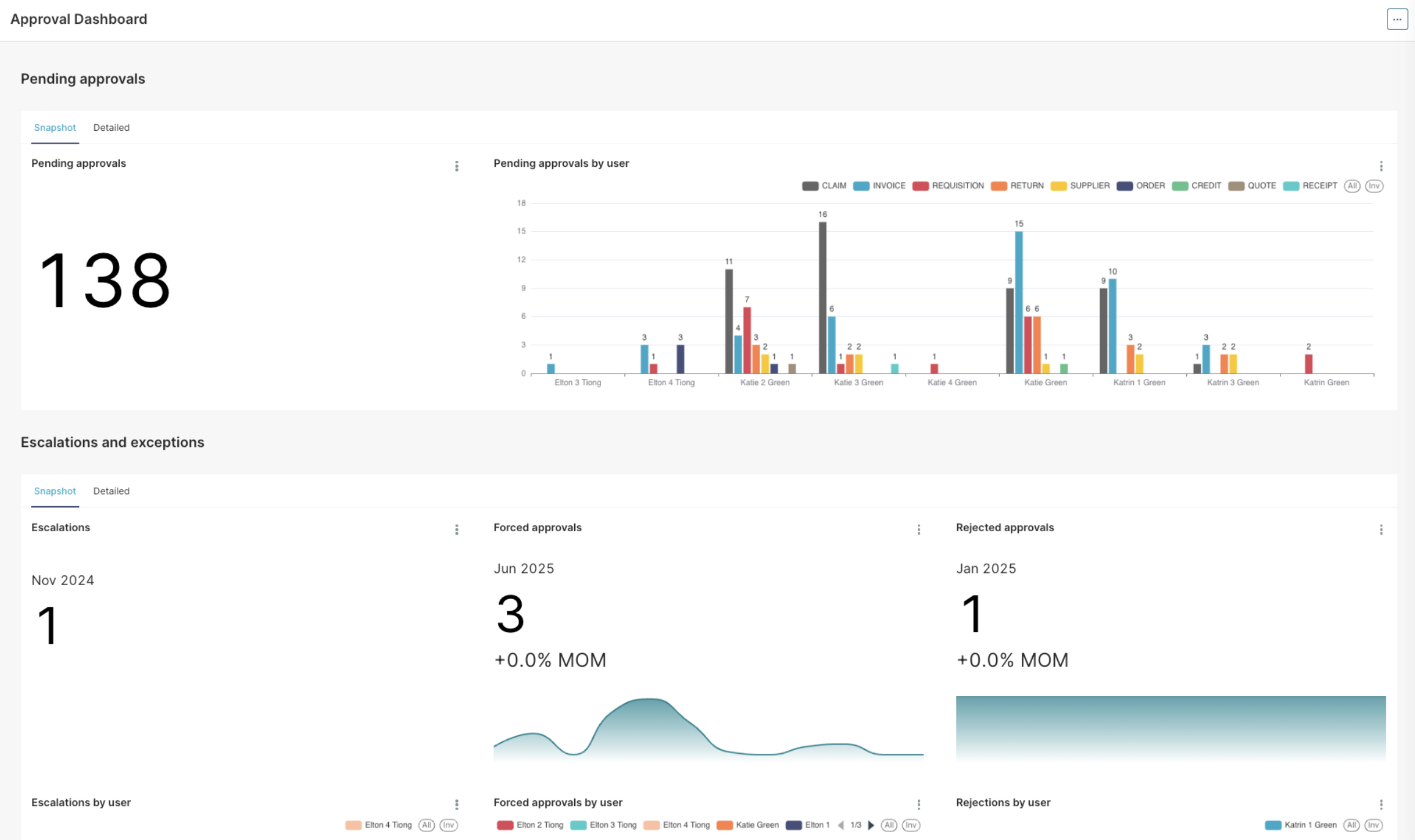
  • Approval dashboard
    • Get an instant overview of all pending approvals, including information on any escalations and exceptions
    • Find the bottlenecks in your approval process with reporting on average time to approve, number of escalations, and number of rejections per user
  • Accrual reports
    • See the combined impact of outstanding orders and invoices that are yet to be processed
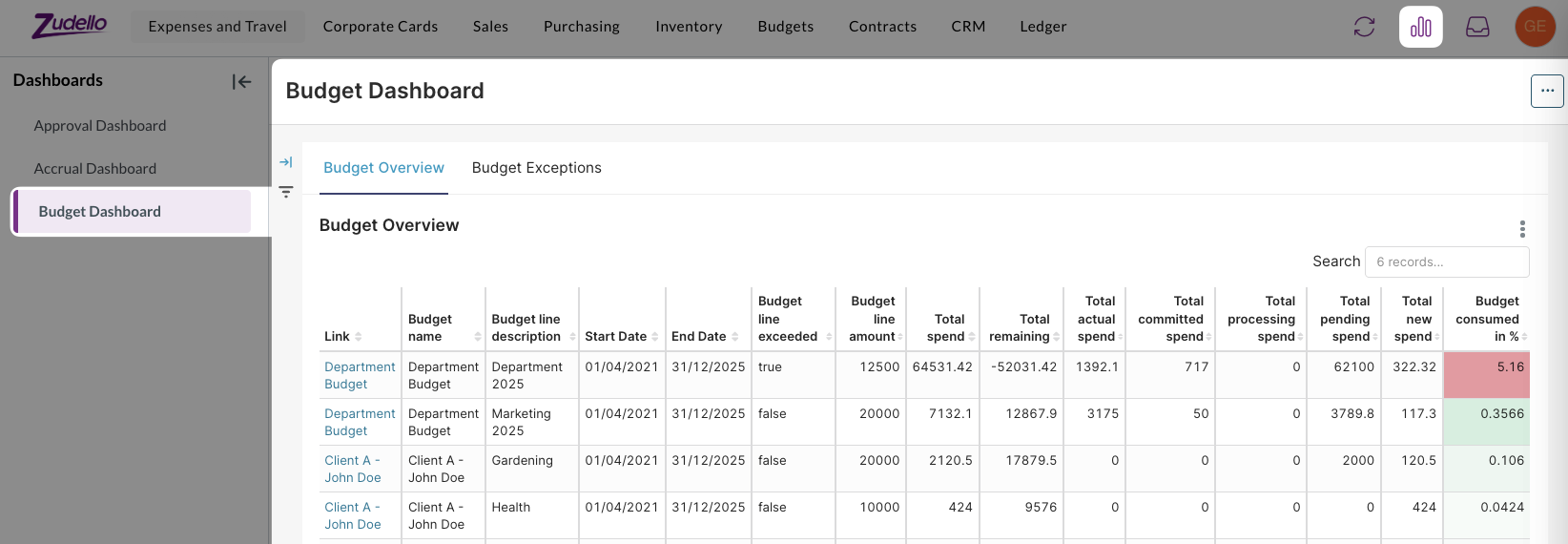
  • Budget dashboard
    • A dedicated dashboard for budget reporting and analysis

Detailed documentation on the reporting feature will be available soon. In the meantime, if you have any questions about reporting please reach out to support@zudello.com.

Email sales order extraction

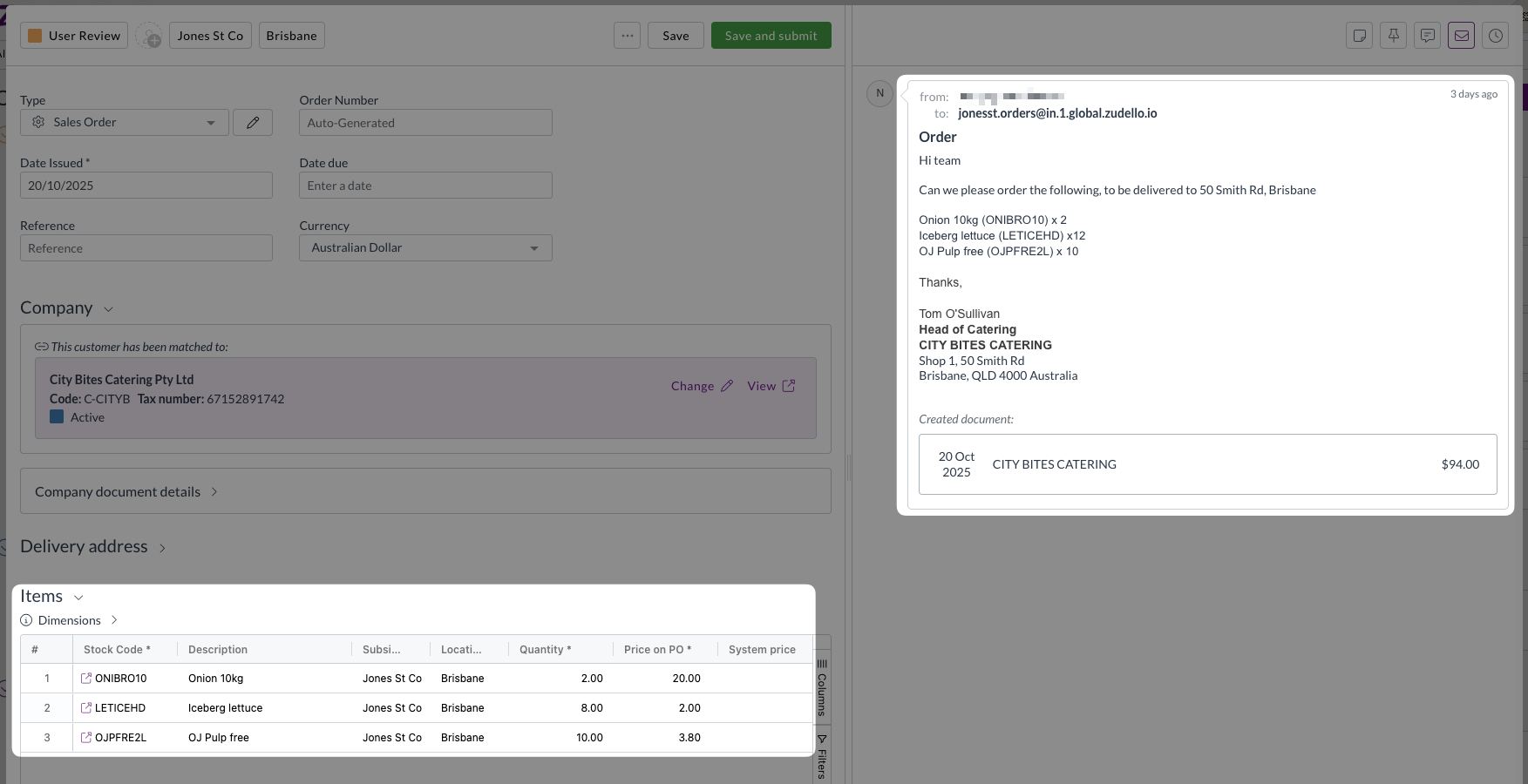
We've restored and enhanced the ability to extract sales orders directly from email content, making it easier to process orders received in email format. Improvements include:

  • Enhanced rescanning capability
    • Documents ingested from email bodies can now be rescanned if needed
    • Improved processing reliability for email-based transactions
  • Bug fixes and optimisations
    • Resolved issues affecting email extraction accuracy and performance

Contracts beta launch

Say hello to Zudello's advanced contract management capabilities directly. We're launching our brand new contracts feature to selected customers only.

Comprehensive contract management

The new contracts feature includes:

  • Flexible contract types
    • Fixed price contracts with transaction impact visibility
    • Threshold contracts with usage tracking and impact reporting
  • Contract lifecycle management
    • Navigation and permissions for contracts, contract groups, and contract categories
    • Contract owner approvals integrated with existing approval workflows
  • Advanced notifications
    • Automated reminders for contract milestones, renewals, and expiry dates
    • Configurable notification preferences for different contract events

Exception handling and compliance

  • Breach management
    • Clear visibility of contract impacts against transactions
    • Required reason collection when submitting transactions with contract breaches
    • Contract owner approval workflows for transactions exceeding contract terms
  • Sales module integration
    • Limited support for sales transactions with planned expansion

Contracts are currently available for very limited teams only. To discuss enabling this feature for your team, reach out to support@zudello.com.

Detailed documentation on the contracts feature will be available soon.

Enhanced features

Budget management improvements

Budget management helps you control spending across projects, departments, and other business dimensions. We've improved performance and enhanced the linking process between budgets and transactions.

Intelligent budget linking

The system now evaluates when budget lines need to be relinked to transactions:

  • Selective relinking triggers
    • Relinking occurs when dimensions change on budget lines
    • Date modifications trigger relinking for better accuracy
    • Amount changes prompt transaction reassessment
  • Performance optimisations
    • Relinking runs as a background process to prevent timeouts
    • Only necessary changes trigger relinking to improve system performance

Budget dashboard

A dedicated Budget dashboard has been added as part of the new reporting feature.

The budget dashboard:

  • Provides dedicated budget reporting and analysis
  • Allows you to track spending patterns and budget utilisation across your organisation

Budget management and reporting are currently available for selected teams only. To discuss enabling these features for your team, reach out to support@zudello.com.

Document studio enhancements

Document studio empowers you to customise data extraction for your specific document types and formats. We've resolved mapping issues and improved field handling for better extraction accuracy.

Key improvements include:

  • Enhanced unit of measure mapping
    • Resolved field mapping issues for units of measure extraction
    • Improved integration between extraction and enrichment processes
    • Updated prompt requirements for optimal performance

Document studio is currently available for selected teams only. To discuss enabling document studio for your team, reach out to support@zudello.com.

Resolutions

We're constantly working to refine Zudello functionality and ensure that we address any issues as soon as possible. As part of this release, we've made the following resolutions and improvements:

  • We've enhanced system performance through infrastructure updates and optimised backend validation processing
  • We've improved communication between system components to resolve purchase order number generation issues
  • We've enhanced search functionality within list views to prevent system slowdowns when processing large document volumes
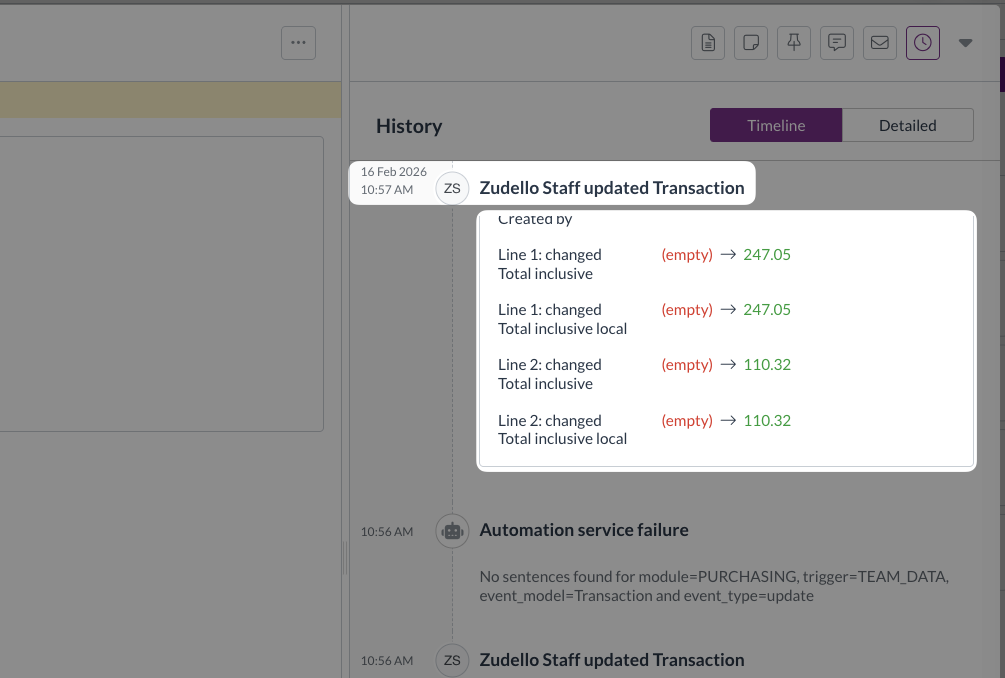
  • We've added comprehensive logging to identify and resolve automation interaction issues
  • We've optimised resource usage for teams with extensive document libraries to ensure consistent system responsiveness

Have an idea?

Do you have an idea for a new feature or how we can improve our current features? Let us know at support@zudello.com.

Your ideas and feedback are an important part of our product planning process to make Zudello better for everyone.
Release notes edition 3.6.9

Release date: 16 October 2025
Version: v3

Here's the latest summary of what's new and improved in Zudello, as well as what we resolved in the latest release.

Looking for something? Browse by tag to find release notes on a specific feature.

In this release:

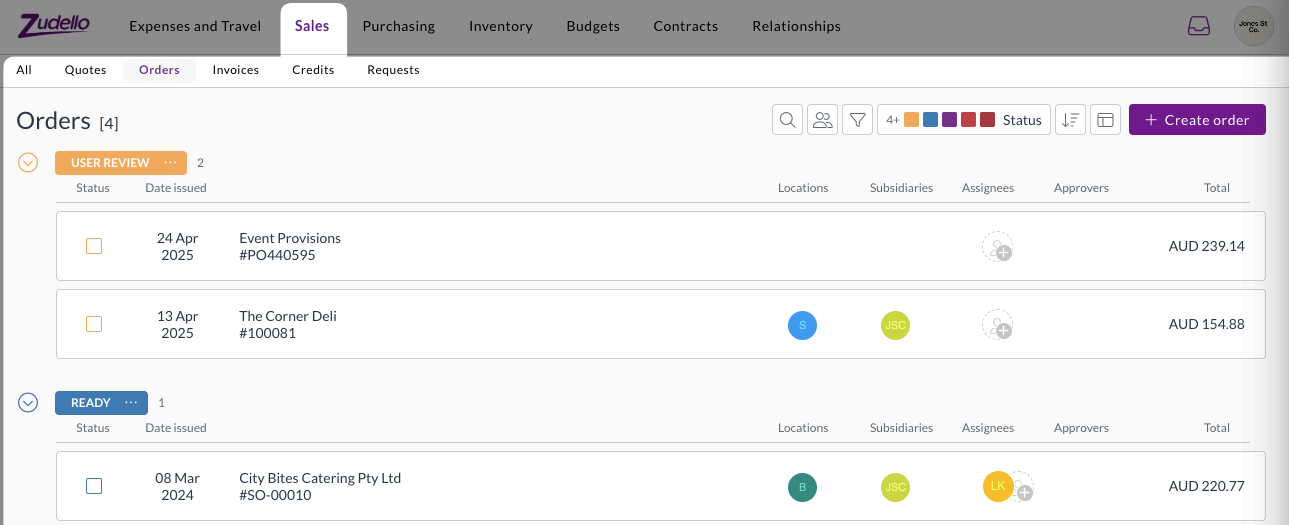
  • Launch of the Sales module with enhanced order management
  • New email body extraction for sales orders and quotes
  • Enhanced automation capabilities with tag management
  • Performance improvements and more

New and improved

Sales module launch

We've officially launched the Sales module to help you manage customer relationships, quotes, and orders efficiently.

The Sales module includes:

  • Streamlined document classification
    • Automatic classification of quotes, orders, and remittance advice documents
  • Enhanced order management
    • Complete quote-to-order workflow management
    • Comprehensive order processing and fulfilment capabilities
  • Flexible document support
    • Support for quotes and orders in a range of formats
    • Functionality to extract orders from email bodies

The Sales module launch represents a significant expansion of Zudello's capabilities beyond traditional accounts payable processing, providing a complete order management solution for growing businesses. To learn more, see our Sales module knowledge base articles.

Revolutionary email body extraction

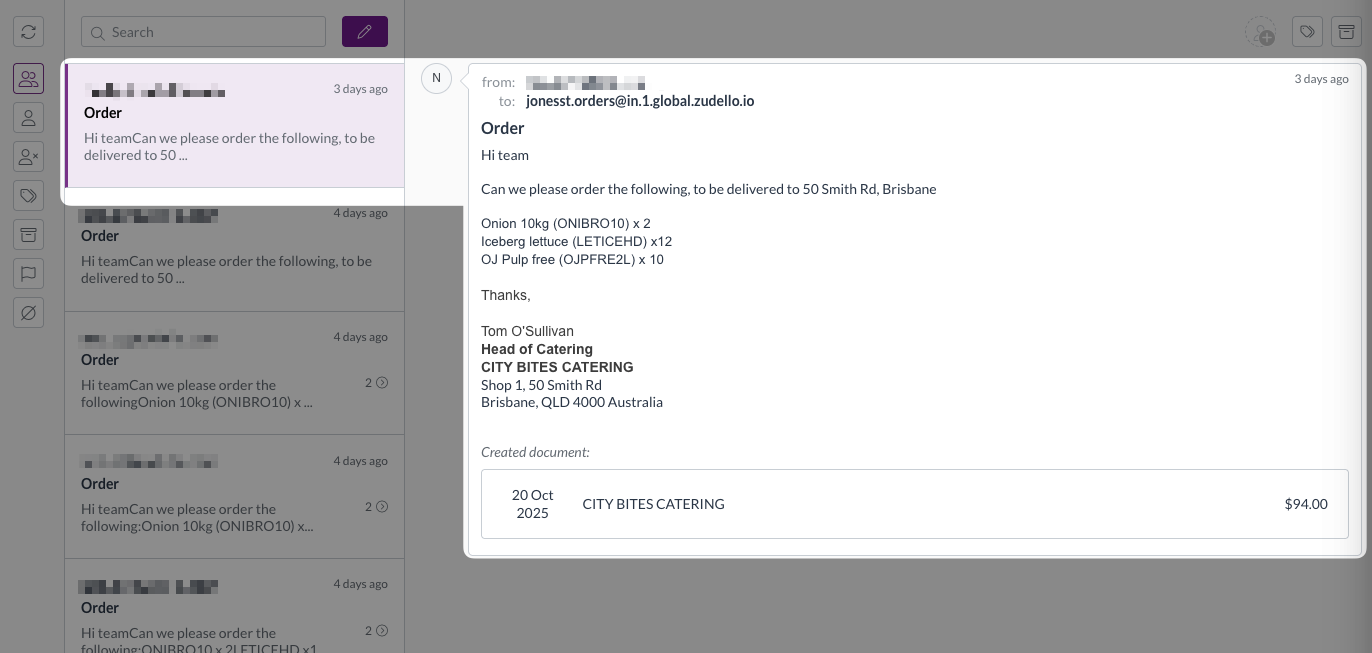
Some of your customers may send orders as an email body rather than an attachment. Previously this required you to manually create a sales order and copy over the data; but no more.

We've introduced groundbreaking functionality that extracts transaction information directly from email content, eliminating the need for separate document attachments in many scenarios.

This innovative feature provides:

  • Smart detection of whether emails contain attachments or require body extraction
  • Automatic extraction of sales orders and quotes directly from email body text
  • Comprehensive transaction functionality, including supplier and item matching and price comparisons

To make your workflow even smoother, we've also introduced the following inbox features to help you better sort between emails where the body is the order, and those with attachments:

  • New filter for emails without document attachments
  • Improved viewing interface showing email origin for extracted transactions

This feature is particularly valuable for businesses that receive orders via email rather than formal purchase order documents, streamlining the entire order capture process.

Advanced tag management automations

Automation workflows help you streamline repetitive tasks and ensure consistent processing across your organisation. We've expanded automation functionality with powerful new tag management capabilities.

Automations can now add or remove specific tags based on workflow conditions. These enhancements allow for more sophisticated document organisation and processing automation, reducing manual effort while ensuring consistency across your workflows.

For assistance with setting up tag-related automations, please reach out to support@zudello.com.

Significant performance improvements

We've implemented comprehensive system optimisations to address performance concerns and ensure reliable operation across all regions.

Enhanced processing speed

  • Streamlined data operations

    • Faster transaction and budget line fetching
    • Improved saving process to decrease the time it takes for documents to save
    • Enhanced audit logging performance
  • Advanced performance monitoring

    • Comprehensive front-end interaction tracking
    • Better identification of performance bottlenecks
    • Proactive performance issue detection

Improved system reliability

  • Enhanced document numbering

    • Resolved issues with purchase order number generation
    • Improved communication between system components
    • Better handling of automation workflow interactions
  • Advanced search capabilities

    • Improved search ranking for document numbers
    • Enhanced UUID-based searching
    • Better document discovery and retrieval

Budget management enhancements

Budget management helps you control spending and track costs across projects and departments. We've made several improvements to budget functionality and performance.

  • We've enhanced calculation speed and system responsiveness for faster budget line processing
  • We've improved the information displayed when viewing allocations, and clarified the transaction line details in budget reporting
  • We've enhanced budget configuration validation and added better handling for budget setup errors

Budget management is currently available for selected teams only. To discuss enabling this feature for your team, reach out to support@zudello.com.

Resolutions

We're constantly working to refine Zudello functionality and ensure that we address any issues as soon as possible. As part of this release, we've made the following resolutions and improvements:

  • We've enhanced our email processing reliability with improved missing email handling and better system communication
  • We've resolved user interface issues in dark mode and alternative themes when editing forms
  • We've improved system stability during high-volume processing periods
  • We've enhanced error handling and recovery mechanisms across automation workflows
  • We've optimised system performance during peak usage times to ensure consistent response times

Have an idea?

Do you have an idea for a new feature or how we can improve our current features? Let us know at support@zudello.com.

Your ideas and feedback are an important part of our product planning process to make Zudello better for everyone.
Release notes edition 3.6.3

Release date: 20 August 2025
Version: v3

Here's the latest summary of what's new and improved in Zudello, as well as what we resolved in the latest release.

In this release:

  • Email matching for user assignment
  • Smarter document defaults
  • Next generation expenses
  • Bulk action refinements and more

Looking for something? Browse by tag to find release notes on a specific feature.

New and improved

Enhanced automation capabilities

Zudello's automations help streamline your document processing by automatically applying business rules and workflows. We've introduced powerful new automation features to reduce manual work and improve accuracy.

Find and assign users automatically

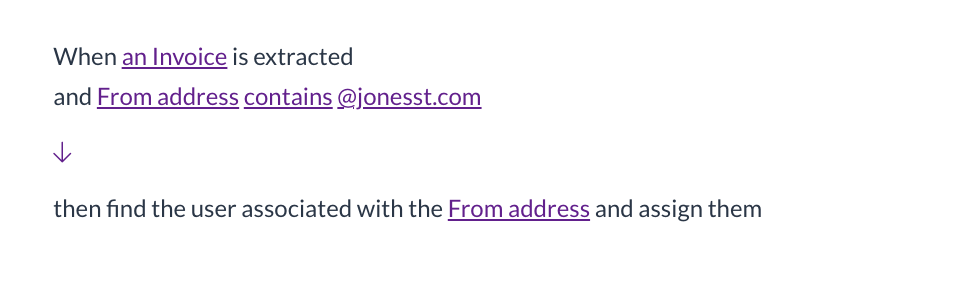
We've launched a new automation action that automatically finds and assigns users based on email addresses in your documents:

  • Automatic user matching

    • The system can now find users by email address from fields like the sender (From email) field
    • Automatically adds matched users as assignees on documents
  • Smart error handling

    • The automation continues smoothly even if no email is present or no matching user is found, preventing unnecessary workflow disruptions

This enhancement is particularly useful for automatically routing documents to the right team members based on who sent them.

Enhanced approval workflows

Zudello's approval system ensures documents are reviewed by the right people at the right time.

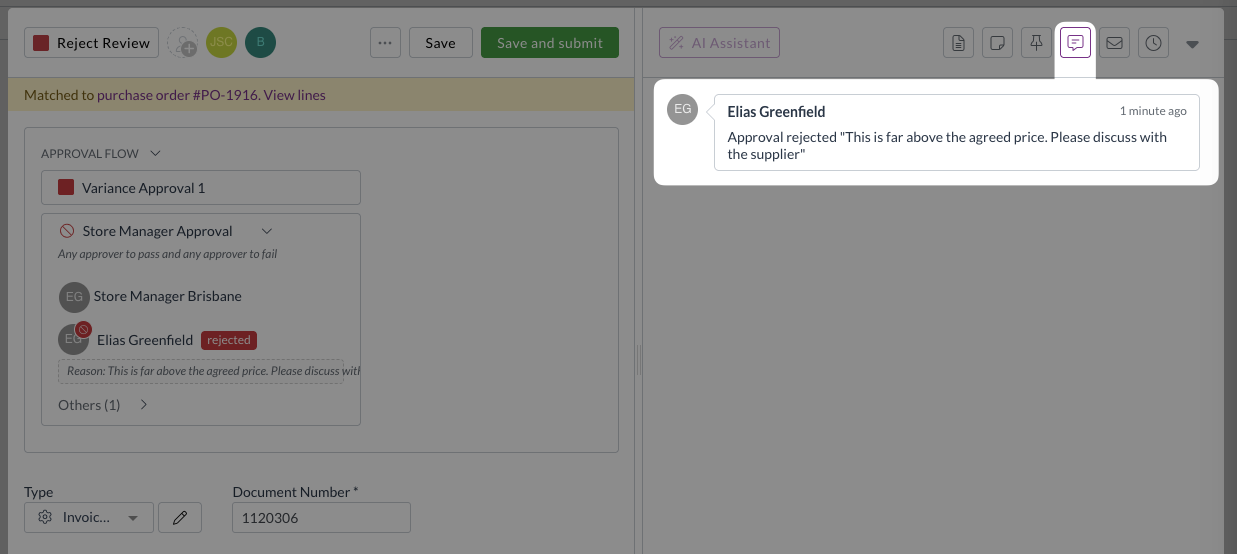
When a document is rejected, the rejection reason is now automatically posted to the document's chat.

This provides better visibility when approvals are restarted after resubmission, and ensures integrity and accuracy of approval audit trails.

Document type configuration enhancements

Document types help you customise forms and workflows for different kinds of transactions. We've improved how the system handles default document type to reduce the need for manual adjustments.

Smarter default application during enrichment

Document enrichment automatically applies coding rules and defaults to reduce manual data entry. We've enhanced when and how document type defaults are applied:

  • Automatic default application

    • Document type defaults are now applied during the enrichment process. This occurs in the background before you open a document.
    • This removes the case where validation errors appear in the submodule view, but disappear when you open the document.
  • Enrichment order of operations

    1. Keyword coding rules
    2. Supplier/customer/item matching
    3. Allocations auto-filling
    4. Apply coding defaults (employee, user, inbox, subsidiary, location, item, supplier/customer)
    5. Document type defaults
  • Smart field population

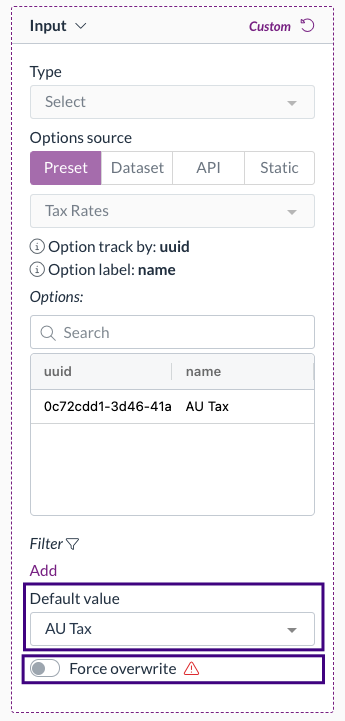
    • The enrichment process runs in the order above, but only fills empty fields (unless force overwrite is enabled).
    • This leaves any previously set values from other rules unchanged, ensuring general defaults like document defaults don't overwrite more specific defaults like item default coding.

For more information on automated coding rules, see Keyword coding rules, Supplier default coding, and Item default coding.

Improved document conversion handling

Document conversion helps transform one document type into another, such as converting quotes to purchase orders. We've refined how the system handles automation events during conversion to prevent conflicts.

Streamlined event handling

The system now raises appropriate events based on document origin:

  • System created documents

    • Only raises a Converted event when converted
  • Uploaded or emailed documents

    • Only raises an Extract event when converted

This prevents conflicting automations from trying to update the same record simultaneously, eliminating deadlock issues.

Export template enhancements

Export templates help you extract data from Zudello for reporting, analysis, or integration with other systems. We've added new fields to provide better document tracking and reference capabilities.

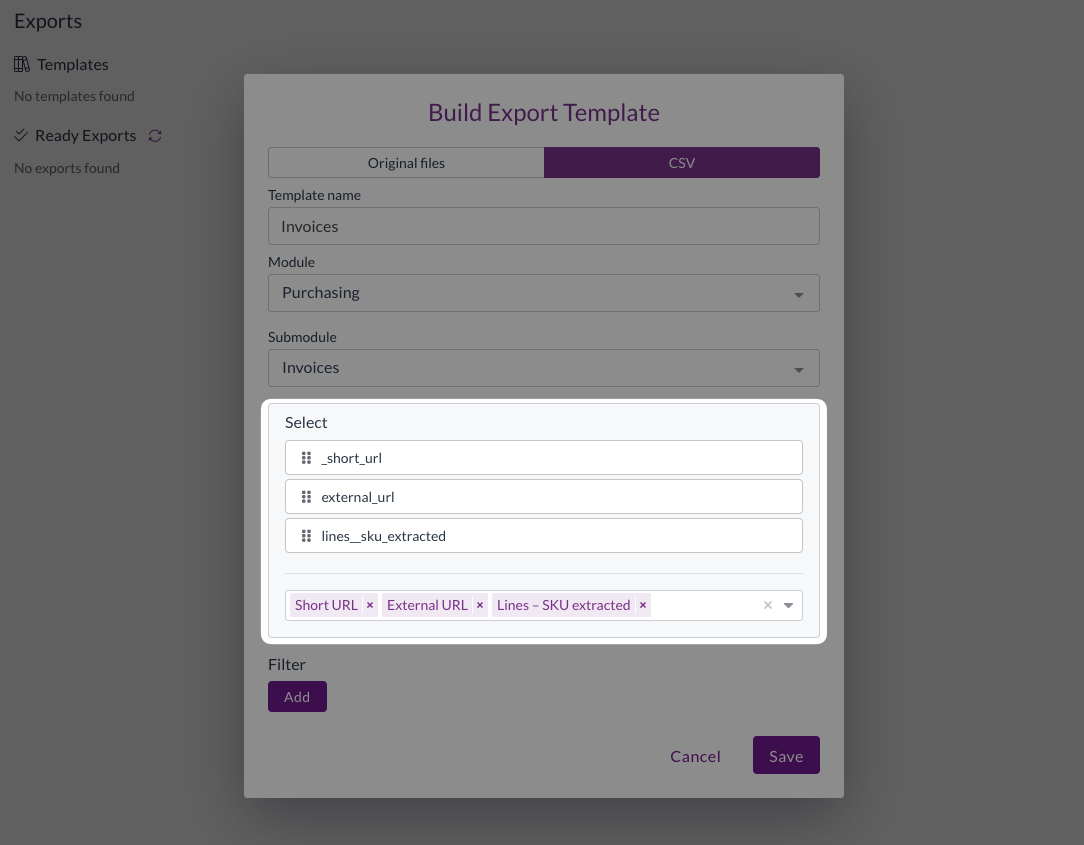
URL fields

You can now include Zudello document URLs in your exports:

  • Short URL: Direct link to the record within Zudello
  • External URL: Reference link to related records in your ERP (only when populated by integrations)

This makes it simple and easy to reference specific Zudello transactions from exported spreadsheets or reports.

Extracted SKU field

We've added the extracted SKU field to transaction exports:

  • Available in purchasing, sales, and receipt exports
  • Shows the original SKU as extracted from documents

Note: This field is only populated for transactions processed after the date of this release.

Email processing improvements

Email processing helps automatically capture and process documents sent to your Zudello inboxes. We've enhanced duplicate handling and added new reprocessing capabilities.

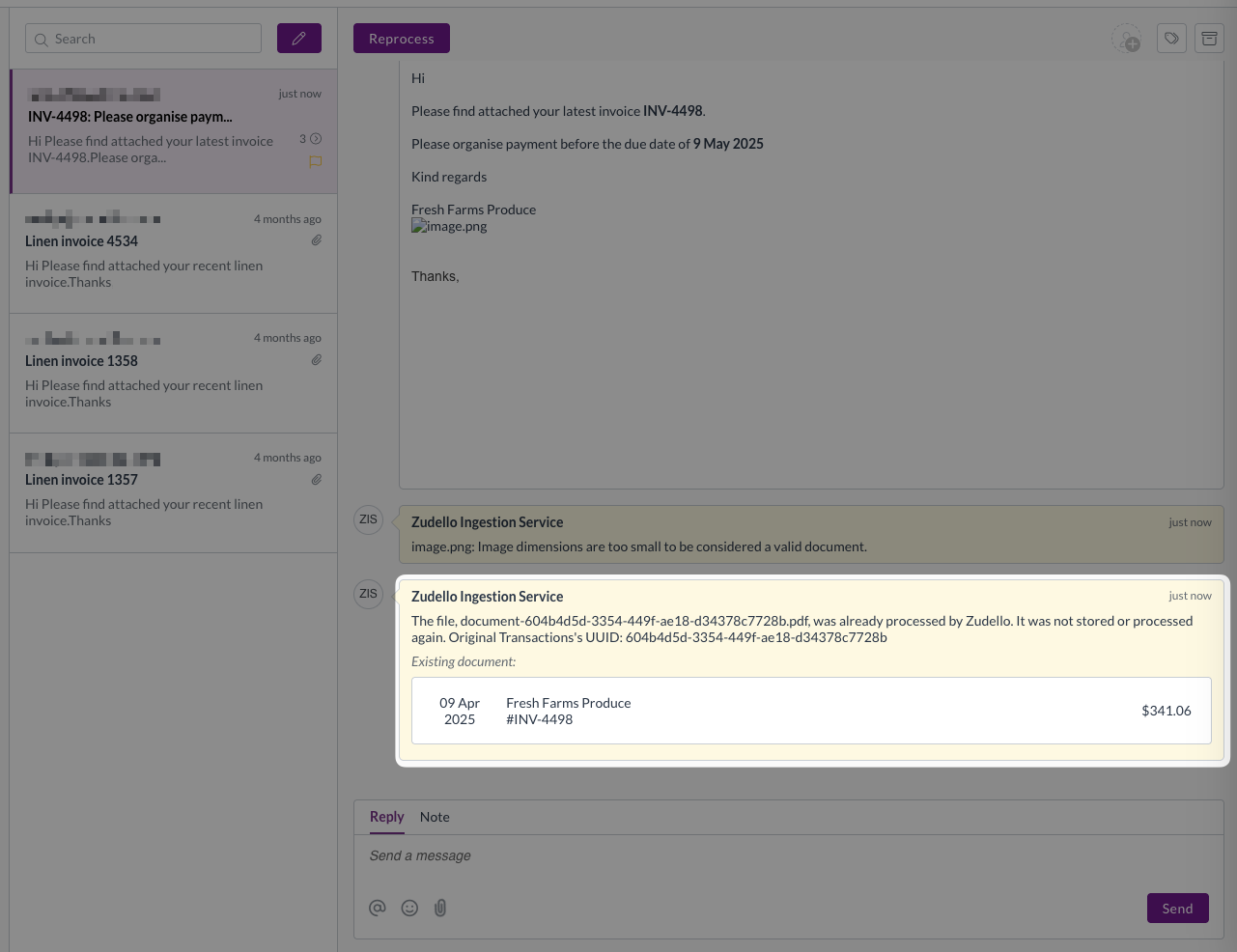
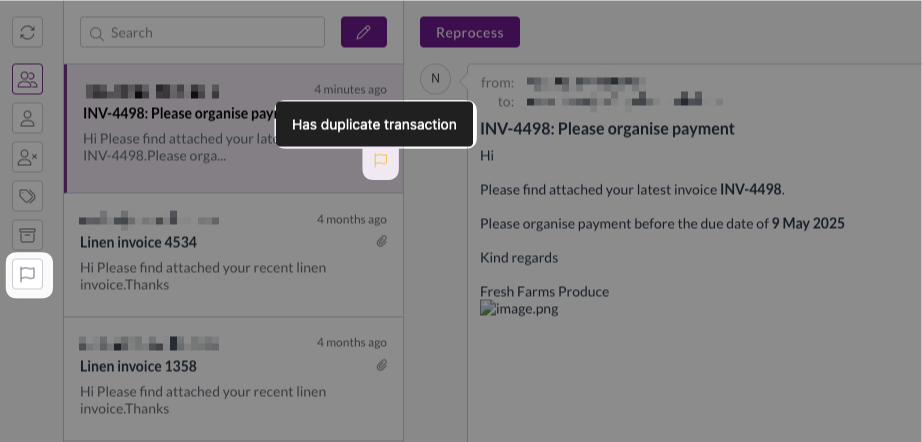
Enhanced duplicate detection

The system now provides more transparency when emails are blocked due to duplicates:

  • Links to the existing document that triggered the duplicate check
  • Connects the email to the existing document for easy review

  • Adds quick filters and labels in the inbox for finding duplicates

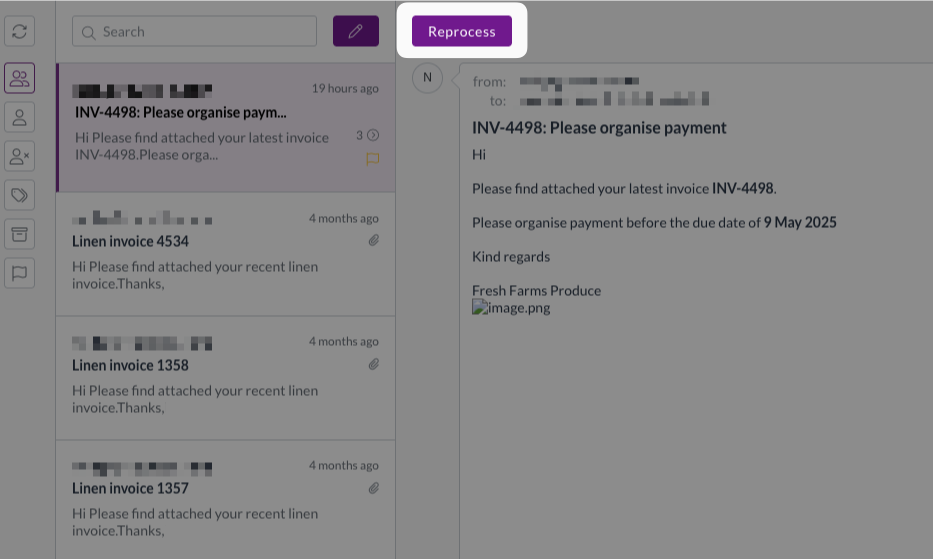
Reprocess action

You can now reprocess emails without requiring them to be resent:

  • Available when the original document has been deleted
  • Automatically creates new transactions and sends them for extraction
  • Eliminates the need to ask senders to resend documents

This is particularly useful when documents need to be processed by different team members or when the original sender isn't the authorised approver.

Required permissions

To reprocess documents you need the following permissions:

  • Reprocess permission for the relevant module
  • E.g. Purchasing Reprocess

Expenses improvements

We're making significant investments in improving the expense management experience:

Streamlined claim validation

Claims now validate all linked expenses automatically when submitted:

  • View validation issues for all expenses directly from the claim
  • No need to open individual expenses to check for problems
  • Configurable validation rules including:
  • Matching employee records across claim and expenses
  • Consistent expense types (e.g. card spend vs personal spend)

Simplified expense editing

We've removed unnecessary complexity from the expense editing process:

  • For claims in Approval status, the editability of all linked expenses is now derived from the claim milestone settings
  • This is combined with unlock permissions for better control
  • Eliminates the need to reopen both expenses and claims to make edits

Automatic status synchronisation

Expense statuses now automatically update to match their linked claims:

  • Expenses follow claims through approval statuses
  • Automatic status updates for completed or rejected claims
  • Unlinking expenses from claims automatically reopens them for further editing

Improved user experience

Several enhancements to reduce clicks and improve workflow:

  • Optional confirmation prompts for dimension summary updates
  • Simplified reject function without email requirements
  • Better handling of expenses without policy issues

These improvements are currently in alpha testing and are available only for selected teams. To discuss enabling these features for your team, reach out to support@zudello.com.

Bulk processing enhancements

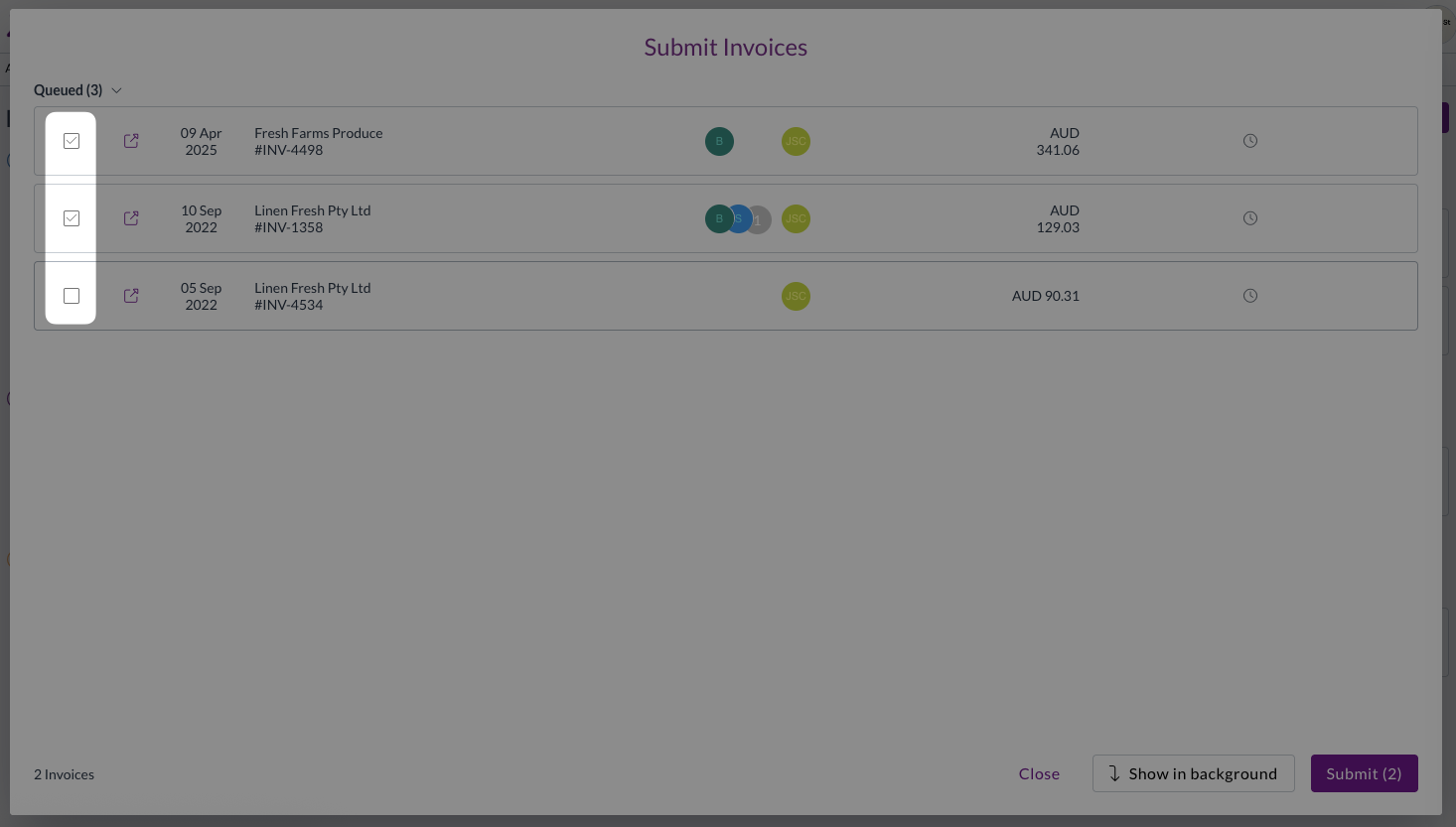
Bulk actions help you efficiently process multiple documents at once. We've improved the user experience for bulk approvals and submissions. Users can now easily deselect specific records after making their initial bulk selection, providing more precise control over which documents are processed.

This removes the need to exit the bulk submit or bulk approval modal and reselect the records for submission.

Resolutions

We're constantly working to refine Zudello functionality and ensure that we address any issues as soon as possible. As part of this release, we've made the following resolutions and improvements:

  • Enhanced security by automatically rejecting emails with malicious file attachments and posting notifications to the email thread
  • Resolved an issue where supplier email validation was incorrectly blocking document submission even when email validation wasn't enabled
  • Fixed circular delegation loops that could cause authentication and team data errors
  • Improved persistence of default status settings for create and revert actions
  • Enhanced synchronisation between landed cost tables and item tables, preserving custom fields while updating matching fields
  • Various performance improvements to backend processing

Have an idea?

Do you have an idea for a new feature or how we can improve our current features? Let us know at support@zudello.com.

Your ideas and feedback are an important part of our product planning process to make Zudello better for everyone.
Release notes edition 3.6.1

Release date: 29 July 2025
Version: v3

Here's the latest summary of what's new and improved in Zudello, as well as what we resolved in the latest release.

Looking for something? Browse by tag to find release notes on a specific feature.

New and improved

Enhanced automation capabilities

Zudello's automations help you reduce manual data entry by automatically setting field values based on your business rules. We've expanded automation capabilities to support custom fields, giving you more flexibility in your document processing workflows.

Custom field automation support

You can now create automation rules that set values for basic custom fields across both document headers and transaction lines. This includes the following field types:

  • Text fields
    • Automatically populate text-based custom fields
  • Number fields
    • Set numeric custom field values
  • Date fields
    • Apply date values to custom date fields
  • Checkbox fields
    • Control boolean custom field settings

Module-specific document coding

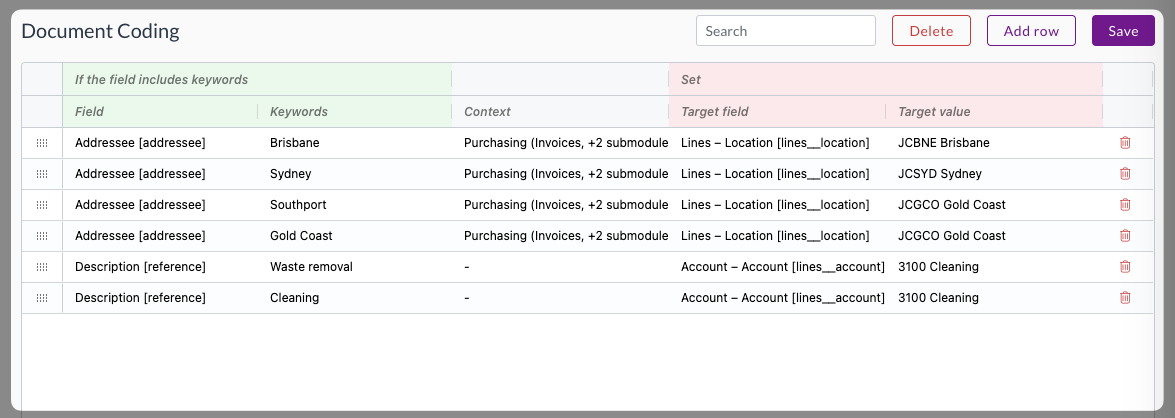
Document coding helps automatically populate transaction fields based on extracted document information. We've enhanced document coding to support module-specific rules, allowing you to apply different coding logic across your various business processes.

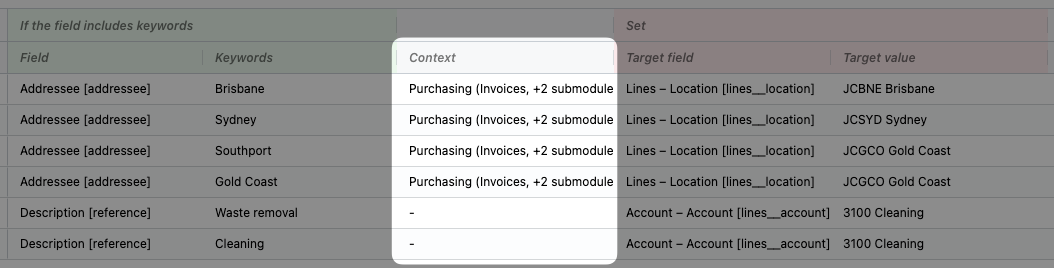
You can now configure document coding rules to apply only to specific modules and submodules:

  • Context-specific rules
    • Set rules that only apply in specific areas like Expenses or Purchasing
  • Flexible configuration
    • Choose which modules and submodules each rule should affect

  • Backwards compatibility
    • Rules without module context will continue to apply across all modules as before

This enhancement allows you to create more precise coding rules that match your specific business workflows for different document types.

Enhanced document viewing options

Document viewing helps you review and work with your uploaded documents efficiently. We've restored and improved document viewing options to give you better access to different document formats and information.

Expanded viewing capabilities

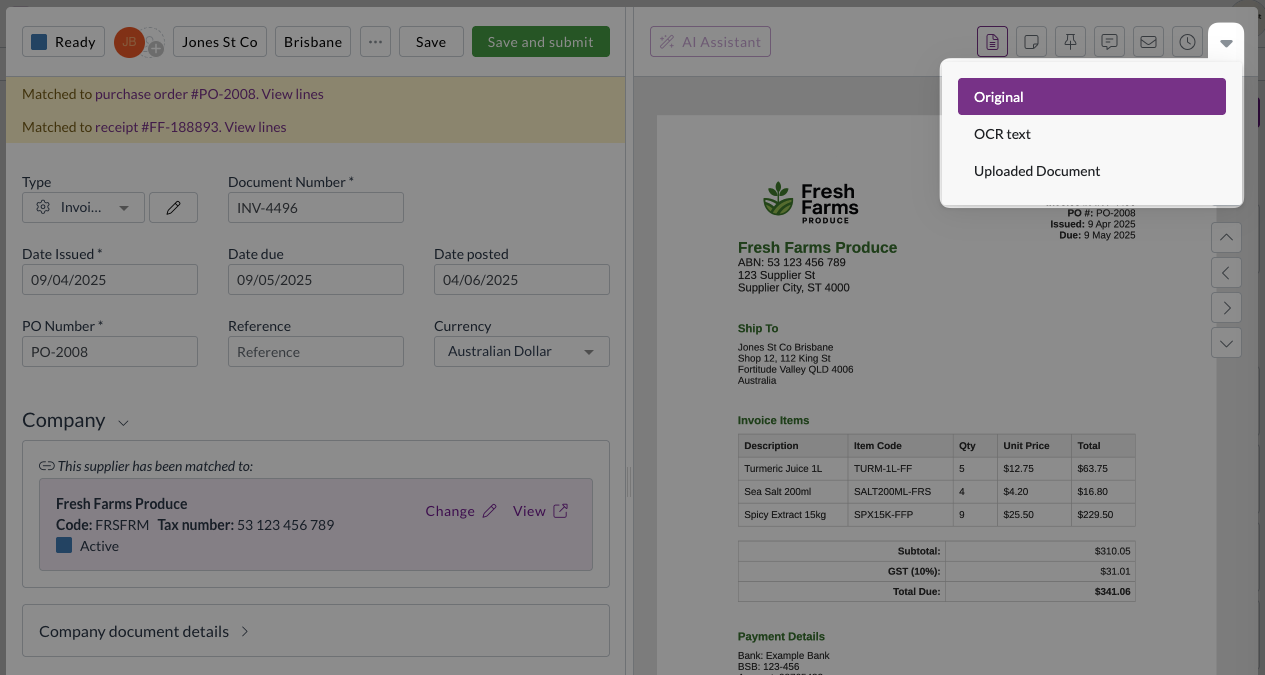
All users now have access to multiple document viewing options through an enhanced viewing menu:

  • Original view
    • Shows documents converted to images for faster loading
  • OCR Text view
    • Displays the text that Zudello extracted from your document, helping you understand what information the AI processing identified
  • Uploaded Document view
    • Provides access to the original PDF format for easy text copying, annotation, rotation, downloading, and printing

Improved menu design

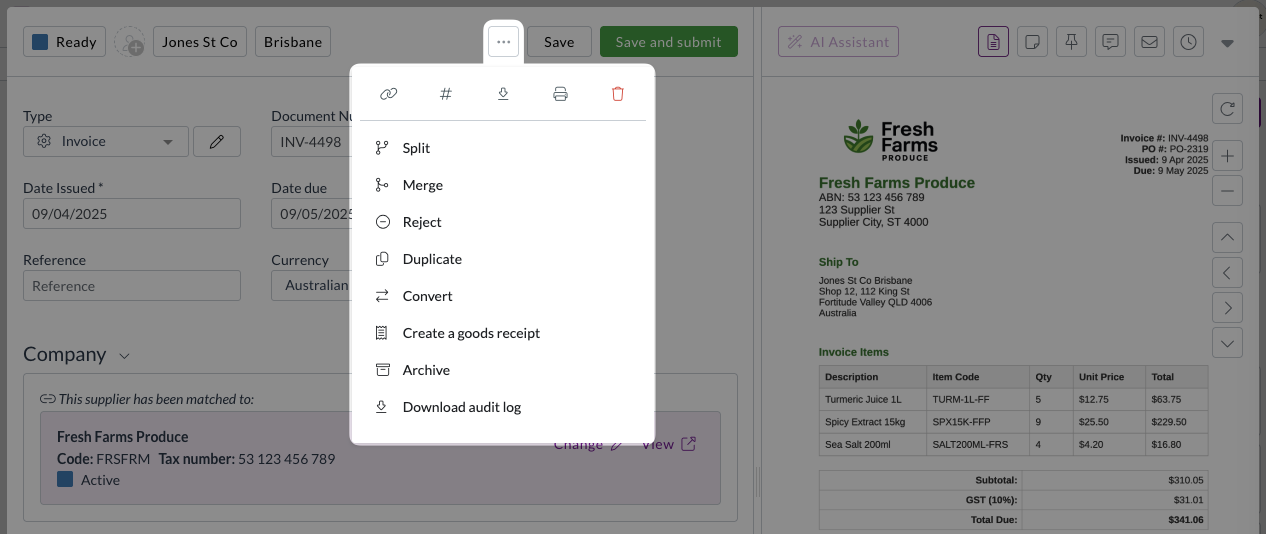
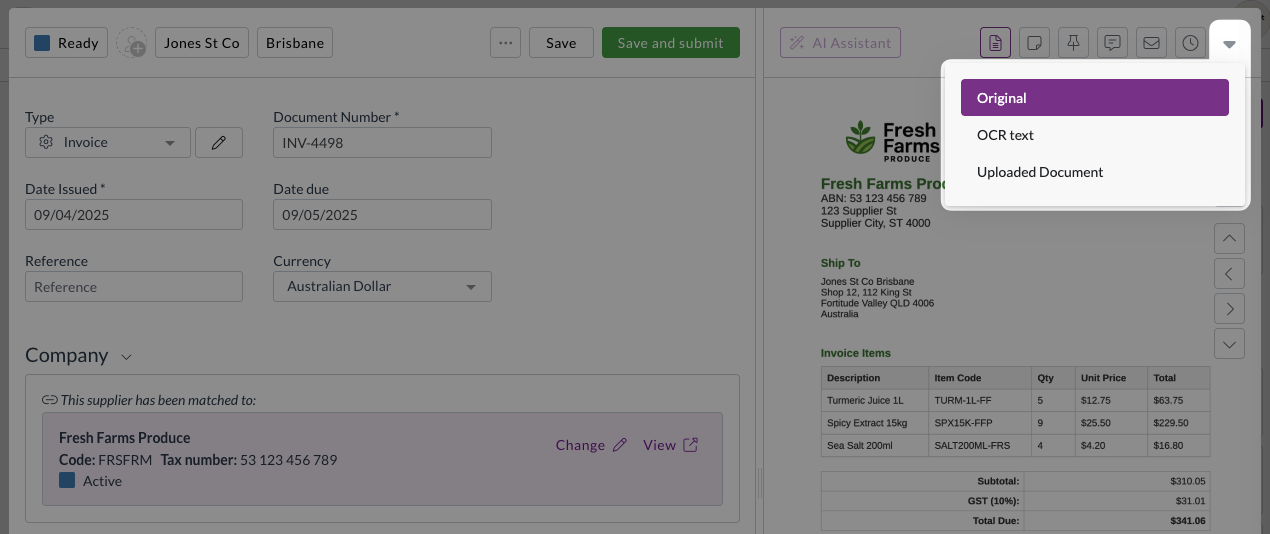
With the addition of this new menu, the document viewer will now have two menus:

  • Three-dot menu (...)

    • Gives you access to various actions you can take on documents
  • Chevron menu (arrow down)

    • Gives you access to different ways of viewing the same document

Unlock permission for approvals

Approval workflows ensure documents are reviewed and approved by the right people at the right time. We've introduced new permission controls to give you finer control over who can edit documents during the approval process.

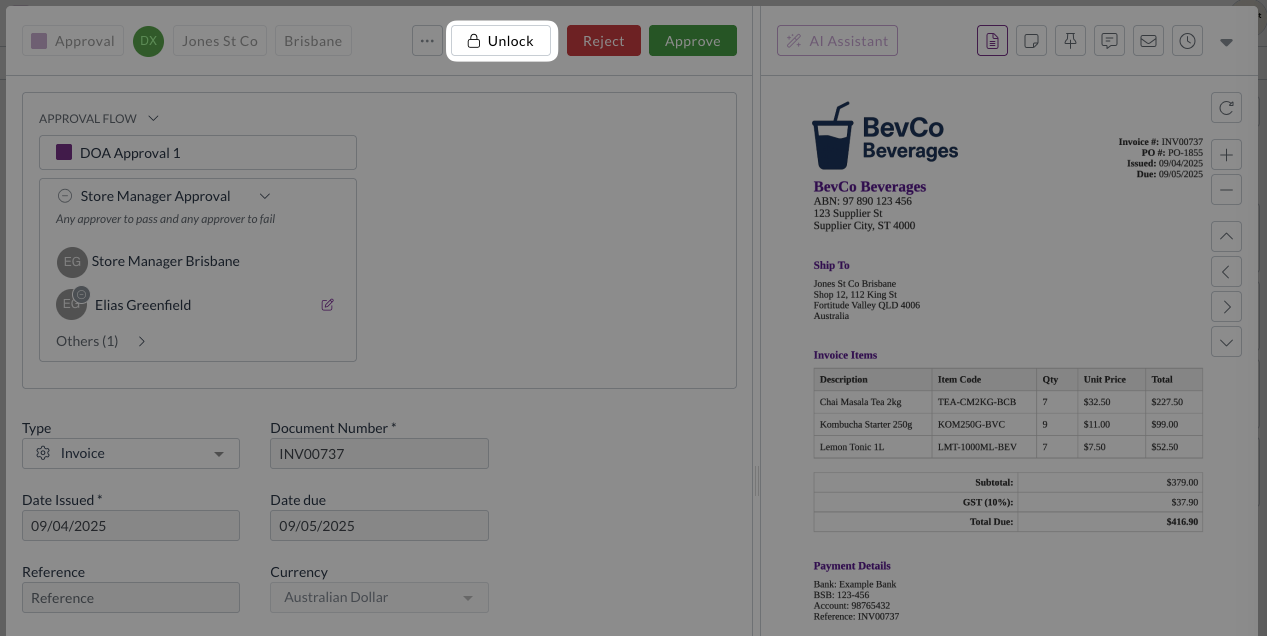
We've added a new permission system that requires users to explicitly unlock documents before editing them during approvals:

  • Enhanced security
    • Prevents accidental edits by requiring an intentional unlock action
  • Granular control
    • Administrators can control which users have unlock permissions separate from general editing permissions
  • Performance improvement
    • Reduces system load by minimising unnecessary update calls during the approval process

Seamless transition

To ensure continuity, we've automatically granted unlock permissions to all users who currently have update permissions. Administrators can adjust these permissions as needed for their specific workflow requirements.

Improved approval visibility

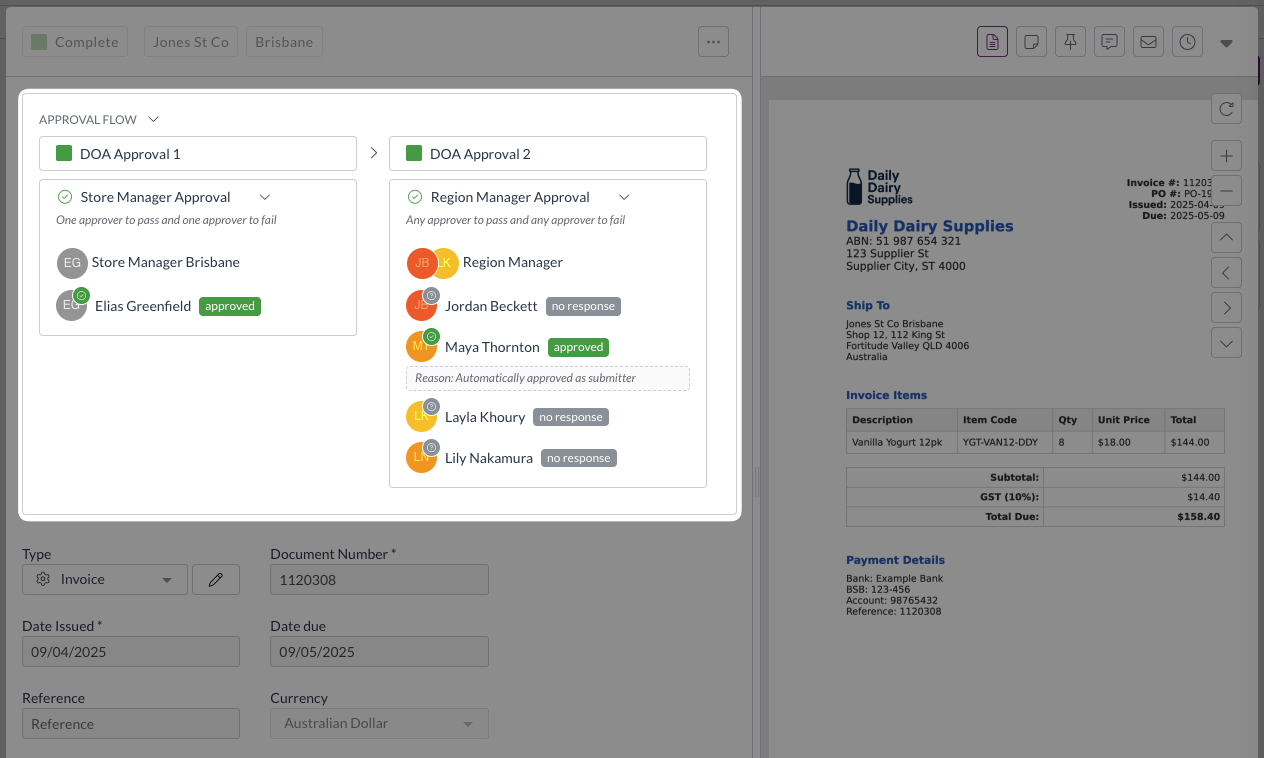
We've enhanced how approval information is displayed to make it easier to track approval status without additional user interactions.

  • Always-visible responses
    • Approval responses are now permanently displayed on screen instead of requiring hover actions
  • Streamlined interface
    • The Others section remains collapsed by default for a cleaner view while keeping essential information visible

Enhanced rejection workflow

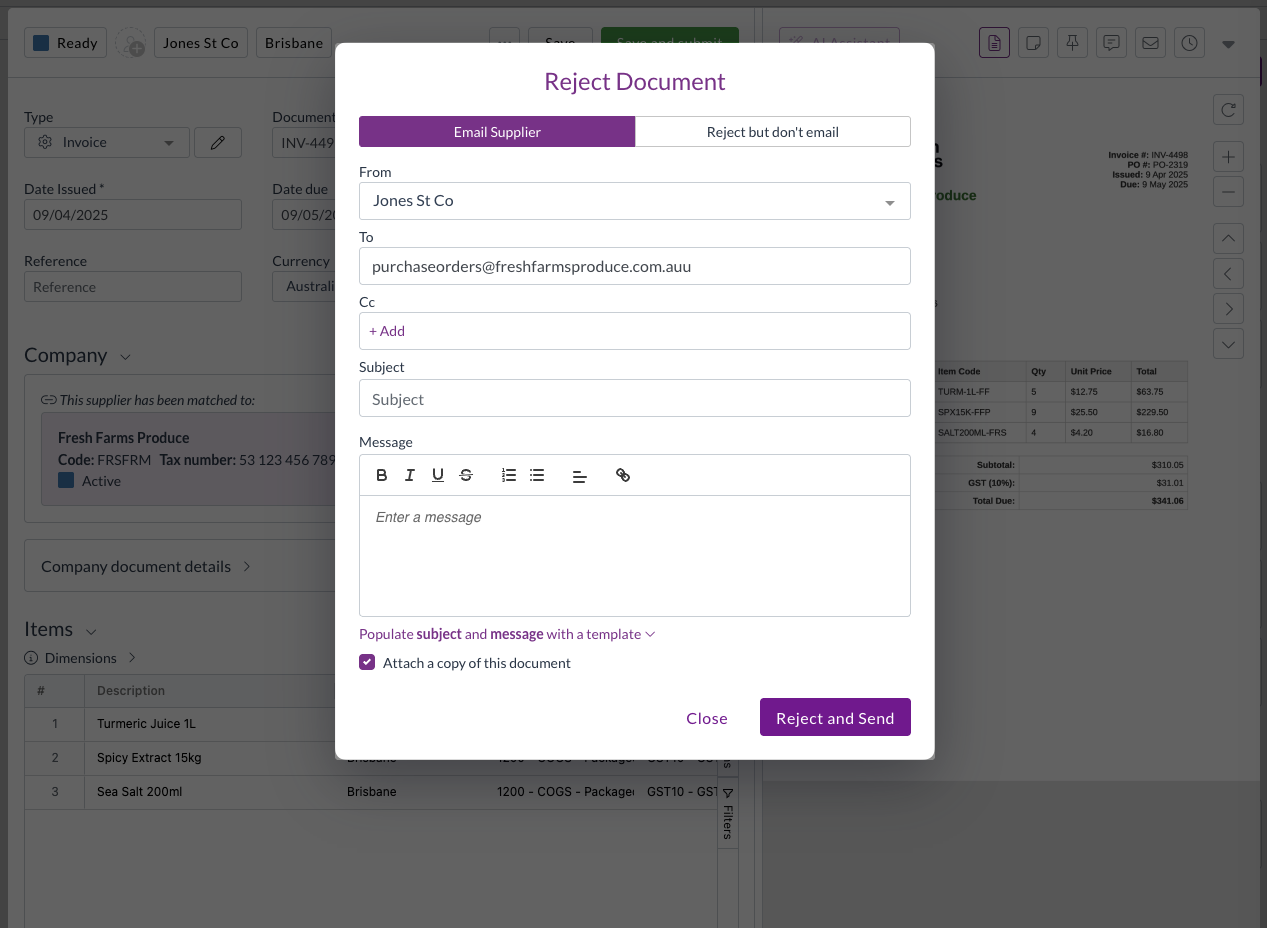
Document rejection helps you return documents to suppliers or submitters when issues need to be resolved. We've improved the rejection feature to make the process more intuitive and automatic.

Intelligent email handling

The system now automatically determines the appropriate recipient for rejection emails:

  • Primary contact
    • Uses supplier or customer email addresses from the document when available
  • Fallback lookup
    • Searches linked supplier or customer records for email addresses if document fields are empty
  • Module-aware display
    • Shows Supplier or Customer labels based on the module you're working in

Configuration improvements

We've made several enhancements to system configuration options to improve usability and reduce setup complexity.

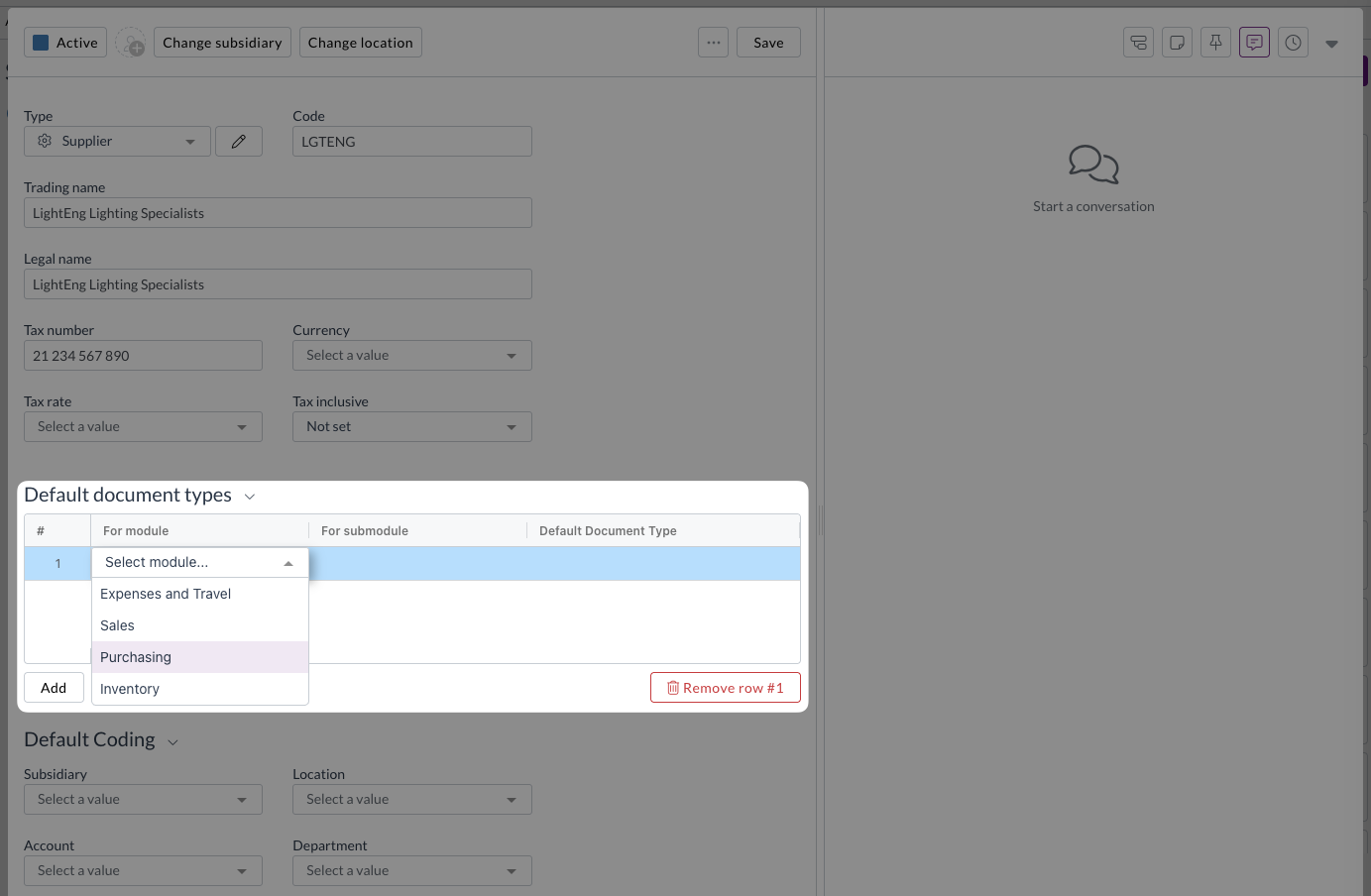
Enhanced default document types

Setting up default document types against suppliers and customer is now more intuitive with dropdown menus for:

  • Module selection: Choose the appropriate module from a dropdown
  • Submodule selection: Select the relevant submodule
  • Document type selection: Pick the specific document type

Inbox management improvements

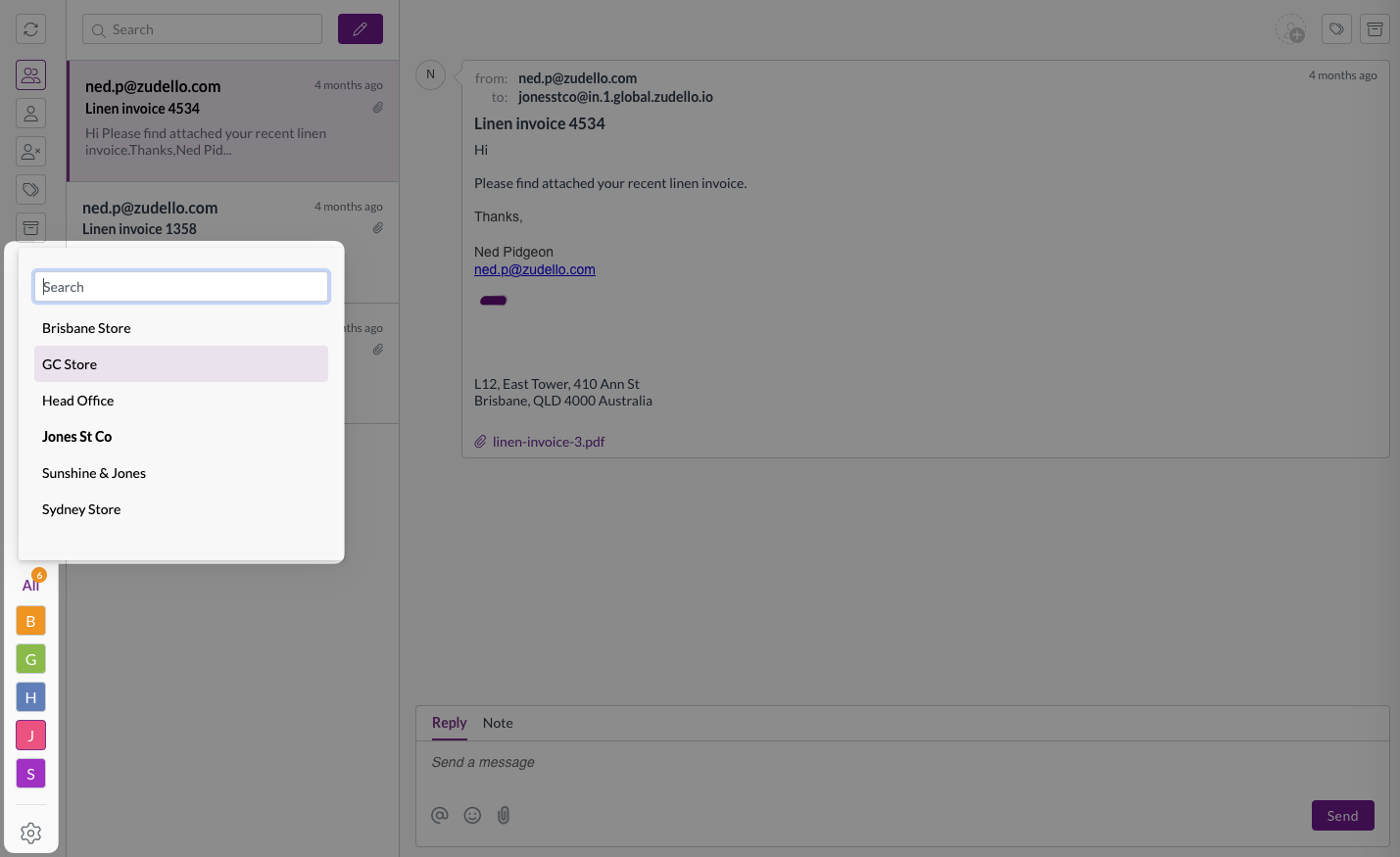
For organisations with multiple inboxes, we've added features to help you find and manage inboxes more efficiently:

  • Search functionality: Quickly find specific inboxes by name
  • Alphabetical sorting: Inboxes are now sorted alphabetically for easier browsing
  • Quick access: The first five search results are pinned for convenient access

Better team management

We've improved how the system handles default team settings to reduce confusion and prevent accidental changes:

  • Smart team loading
    • The system now prioritises your default team when displaying settings
  • Production team priority
    • If no default is set, production teams are shown before sandbox environments
  • Visual indicators
    • Team type icons help you identify when you're viewing sandbox team settings

Card reconciliation enhancements (limited customers only)

Card reconciliation helps you match credit card transactions with expense records for accurate financial reporting and expense management. We've expanded the reference field display to make it easier to identify and match payments.

Card reconciliation is currently only available for a selected number of teams. Reach out to support@zudello.com to discuss enabling this feature for your team.

Document Studio improvements

Document Studio empowers you to customise how Zudello extracts data from your documents, ensuring maximum accuracy for your specific document types and formats. We've enhanced extraction capabilities to capture more supplier and contact information.

Enhanced contact extraction

We have made improvements to how Document Studio extracts and populates supplier, merchant, and contact name information, providing more complete data capture from your documents.

Document Studio is currently only available for a selected number of teams. Reach out to support@zudello.com to discuss enabling Document Studio for your team.

Resolutions

We're constantly working to refine Zudello functionality and ensure that we address any issues as soon as possible. As part of this release, we've made the following resolutions and improvements:

  • We've resolved an issue where hover messages showed incorrect submodule information when opening transactions from related documents (for example, opening a receipt from a purchase order now correctly shows "receipt" in the hover message)
  • We've fixed an issue where expenses on claims were incorrectly numbered in some cases

Have an idea?

Do you have an idea for a new feature or how we can improve our current features? Let us know at support@zudello.com.

Your ideas and feedback are an important part of our product planning process to make Zudello better for everyone.
Release notes edition 3.6.0

Release date: 16 July 2025
Version: v3

Here's the latest summary of what's new and improved in Zudello, as well as what we resolved in the latest release.

Looking for something? Browse by tag to find release notes on a specific feature.

New and improved

Enhanced document status controls

Document status management helps control what actions are available based on where documents are in your workflow. We've improved status controls to prevent inappropriate actions on documents that have been completed or closed.

We've removed the following actions from documents in Rejected, Deleted, or Closed type statuses:

  • Create a goods receipt
  • Change team
  • Archive
  • Mark as complete without processing

These actions will no longer be available for the following statuses:

  • Rejected Type
    • Rejected
    • Duplicate
  • Deleted Type
    • Deleted
  • Closed Type
    • Closed
    • Archived

This enhancement ensures that completed or rejected documents maintain their final status and prevents accidental processing of documents that have already been finalised.

Importing improvements

Document importing helps you efficiently upload large volumes of data into Zudello using CSV files and other structured formats. We've continued enhancing our importing capabilities to make the process more reliable and flexible.

SKU-based item updating

You can now update item records using SKU as the primary identifier when importing. The importing tool will:

  • Update existing items when it finds a matching SKU
  • Create new items when no matching SKU is found
  • Fail the import if multiple items share the same SKU (to maintain data integrity)

If your team intentinally uses duplicate SKUs, you'll need to use the UUID or External ID field for updating records.

Intelligent field mapping

We've added automatic field mapping suggestions based on your upload file column names:

  • Exact matches: "supplier_code" or "Supplier Code" maps to the supplier_code field
  • Close matches: "lines_sku" or "Lines Sku" maps to the lines_sku field
  • The system performs basic matching but won't make assumptions for partial matches

Other changes

  • Import tracking: The system now displays which user created each import for better audit tracking
  • UTF-8 encoding: CSV files must be saved in UTF-8 format (Windows-1252 encoding is no longer supported)

Approval and notification improvements

Approval workflows ensure documents are reviewed and approved by the right people at the right time. We've enhanced our approval system with new bulk reminder capabilities and improved notification content.

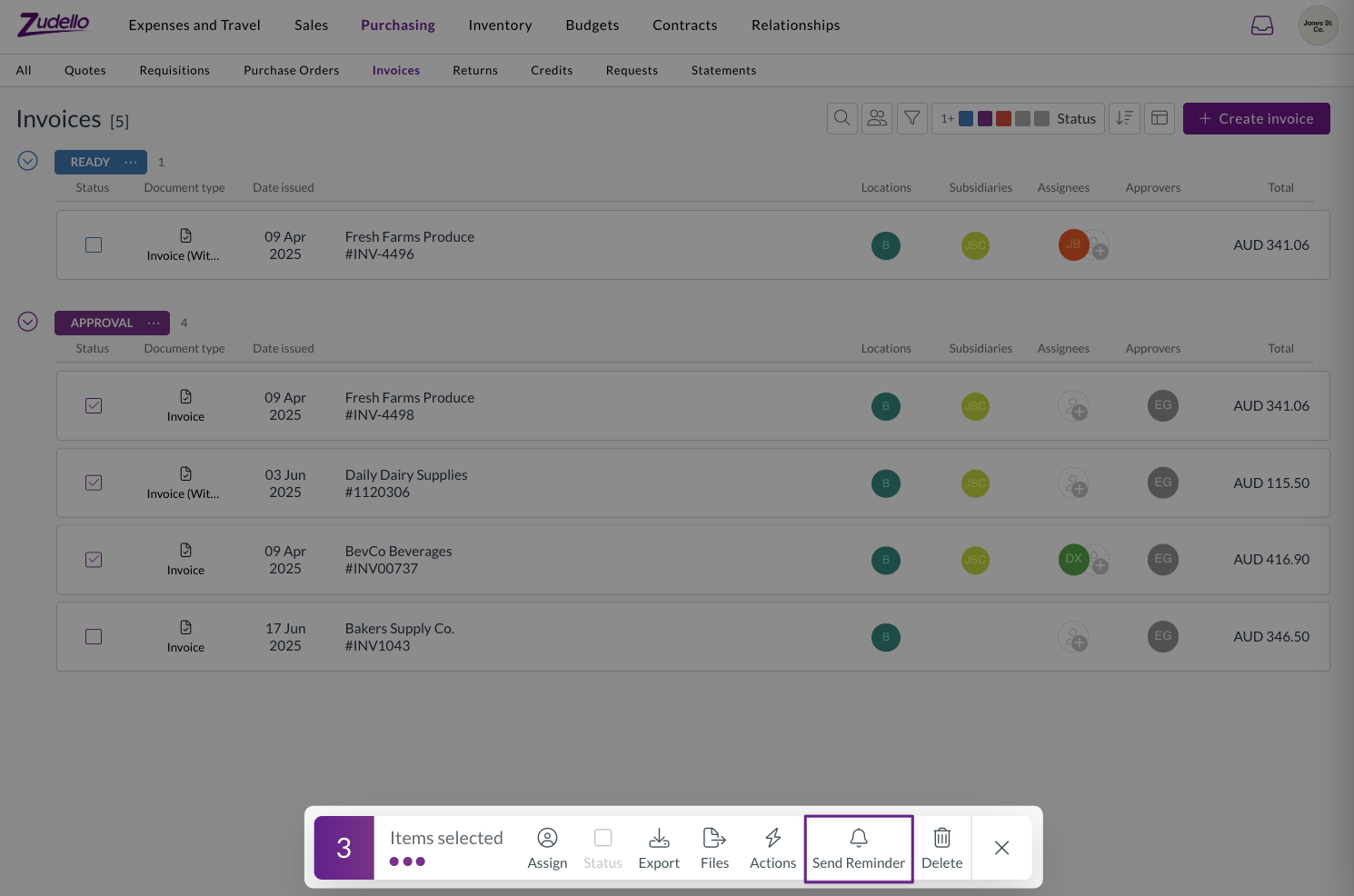
Bulk approval reminders

Users with the appropriate permissions can now send reminder notifications to multiple approvers simultaneously:

Users can navigate to the relevant submodule and select the approvals they want to send reminders for. They can then click the Send Reminder button, and use the bulk actions modal to send reminders.

Reminders can run in the background, allowing users to close the bulk actions modal and continue with other tasks. For more information see Approval reminders.

Enhanced approval notifications

We've improved the information displayed in approval notification emails:

The following dimension information is now included for relevant documents:

  • Project task
  • Unit of measure
  • Payment method
  • Mileage rate
  • Expense category
  • Currency

We have also made the following formatting improvements for better readbility:

  • Dimensions are sorted alphabetically
  • Large amounts now display with thousand separators

Enhanced email processing

Email processing helps automatically capture and process documents sent to your Zudello inboxes. We've made it easier to identify email sources and destinations for automation and document coding purposes.

When documents are received via email, Zudello now automatically sets the following new fields on the transaction:

  • From address (Sender): The email address that sent the document
  • Original recipient (Inbox): The Zudello inbox email address that received the document

These new fields open up a number of automation possibilities, including:

  • Automatically coding documents to specific dimensions based on sender or inbox
  • Assigning documents to specific users based on which inbox received them
  • Setting up conditional workflows based on email source
Important note

Important note:** If users have auto-forwarding configured, the sender will show as the forwarding email address, not the original sender.

Quick Actions improvements

Quick Actions help you perform common tasks efficiently across different areas of Zudello. We've added more control over where Quick Actions appear within your system.

You can now control which modules and submodules display specific Quick Actions by adding context settings (similar to automation actions or field manager settings):

  • No context: Quick Action appears everywhere (existing behaviour)
  • With context: Quick Action only appears in specified module/submodule combinations

This enhancement allows you to create more targeted Quick Actions that appear only where they're most relevant.

Automation improvements

Automation helps streamline your document processing by automatically applying business rules and workflows. We've enhanced error handling to make issues more visible and easier to resolve.

Improved error processing

When automations encounter errors, the system now provides better visibility and handling:

  • Enhanced error detection:

    • Errors that occur during database operations (not just action failures) now properly update document status
    • Documents with automation errors are moved to "Unable to Process" status
    • Error messages are displayed in the header banner for immediate visibility
  • Resolved error scenarios:

    • Fixed issues with consolidate actions when lines are linked to allocations and budgets
    • Resolved problems with incorrect payload construction
    • Improved handling when values like suppliers are unintentionally cleared
  • Better logging:

    • Expanded logging capabilities for easier troubleshooting and investigation
    • Improved traceability for automation-related issues

Enhanced duplicate document handling

Duplicate document detection helps prevent processing the same document multiple times and avoids potential double payments. We've improved how the system handles duplicates to provide more flexibility in document management.

Smart duplicate checking

The system uses SHA (Secure Hash Algorithm) codes to create unique fingerprints for each file. Previously, when a potential duplicate was detected, the system would block all duplicate uploads, requiring permanent deletion of the existing document.

The system now checks the duplicate transaction's status:

  • If the existing document status is Deleted, the new upload is accepted
  • This allows you to replace deleted documents while maintaining duplicate protection for active documents

For more information about managing duplicates, see our guide on Duplicate documents in Zudello.

Statement improvements

During statement reconciliation, the auto-matching feature now ignores transactions in Deleted status, ensuring only active invoices and credit notes are considered for matching.

Resolutions

We're constantly working to refine Zudello functionality and ensure that we address any issues as soon as possible. As part of this release, we've made the following resolutions and improvements:

  • Resolved an issue where staff user names weren't always properly anonymised in budget submissions and resource comments
  • Re-enabled the ability to use the @ symbol when adding users via the chat modal, with improved user selection using Enter or Tab keys
  • Fixed an issue where the Dimension Summary section remained editable on read-only approval documents
  • Resolved a permission error with the Place Order action when users lacked purchase order update permissions
  • Fixed an issue where Payment Method was incorrectly prefilled into transaction lines instead of headers when configured as a supplier default
  • Improved handling of Excel files that cannot be converted to PDF, preventing ingestion crashes
  • Enhanced error handling to properly mark unprocessable documents as UNSUPPORTED or prevent transaction creation for problematic email uploads

Have an idea?

Do you have an idea for a new feature or how we can improve our current features? Let us know at support@zudello.com.

Your ideas and feedback are an important part of our product planning process to make Zudello better for everyone.
Release notes edition 3.4.11

Release date: 23 April 2025
Version: v3

Here's the latest summary of what's new and improved in Zudello, as well as what we resolved in the latest release.

Looking for something? Browse by tag to find release notes on a specific feature.

New and improved

New feature - Place order

Purchase order management helps you track orders with suppliers from creation through to fulfillment. We're excited to announce that the Place order feature is now available to all customers who create or process purchase orders through Zudello.

The Place order action is available for purchase orders in Pending status and offers two options:

  • Place and send

    • Generates an updated PDF of the purchase order
    • Sends the PDF to your supplier via email
    • Updates the status to Placed
    • Records who placed the order and when
  • Place without emailing

    • Generates an updated PDF of the purchase order
    • Doesn't send an email to the supplier
    • Updates the status to Placed
    • Records who placed the order and when

For more information, see our guide on using the Place Order function.

Supplier and customer improvements

Supplier and customer management helps you maintain accurate vendor and client information. We've made it easier to work with suppliers and customers that have similar information.

We've now added the Code field to the supplier and customer modal, making it easier to distinguish between suppliers or customers with identical trading names and ABNs but different codes.

This improvement is particularly helpful for organizations managing multiple subsidiaries within their ERP.

Automations enhancements

Automations help you create efficient workflows by automatically routing and processing documents based on specific conditions. We've expanded our automation capabilities to give you more control over document routing.

  • We've introduced a new Is not empty operator for assignees in automations, allowing you to create more flexible workflows based on whether a document has any assignees
  • This enhancement makes it easier to automatically route documents that require attention, ensuring nothing falls through the cracks

Contact Zudello support for more information on using this automation condition.

Performance improvements

We continuously work to make Zudello faster and more efficient. In this release:

  • We've significantly improved the speed of saving user groups with large numbers of permissions
  • We've made various technical performance optimizations across the platform

Resolutions

We're constantly working to refine Zudello functionality and ensure that we address any issues as soon as possible. As part of this release, we've made the following resolutions and improvements:

  • We've resolved an issue where automations could occasionally leave documents in a "Stuck in Processing" state
  • We've improved the handling of allocation calculations to ensure they don't interfere with other processes happening simultaneously

Have an idea?

Do you have an idea for a new feature or how we can improve our current features? Let us know at support@zudello.com.

Your ideas and feedback are an important part of our product planning process to make Zudello better for everyone.