Release notes edition 3.7.17
Release date: Wednesday 18 November 2026
Version: v3
Here's the latest summary of what's new and improved in Zudello, as well as what we resolved in the latest release.
In this release:
- Contract and certification reminders that repeat, raise change requests, and show what's coming up
- Terminate a contract, with contracts closed automatically at the end of their term
- Accepting a price-book price now updates your line and document totals
- Alerts that scroll with the form, default warehouses for suppliers and customers, and more
Looking for something? Browse by tag to find release notes on a specific feature.
New and improved
Contract reminders
Reminders tell the right people when a contract or certification needs attention, such as an upcoming renewal or expiry. We've rebuilt them so you can see exactly what each reminder will do and when, and set up reminders that repeat or that raise a change request.
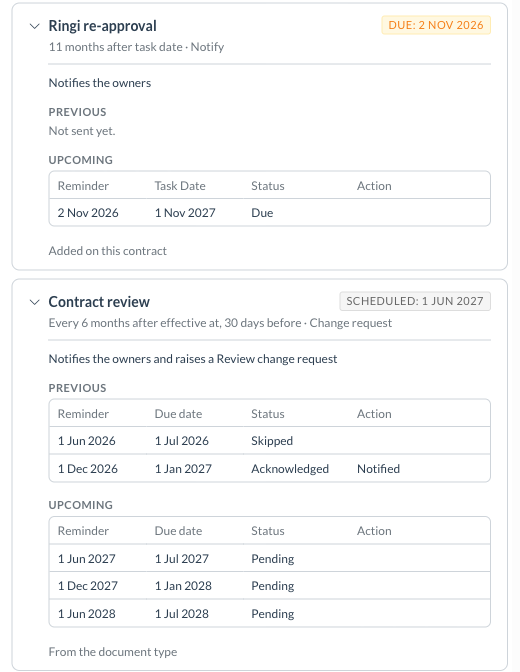
The Reminders tab
- Each reminder on a contract or certification is now a row with its status, such as Scheduled, Due, Sent, or Paused, and a short description of its rule.
- Open a reminder to see who it notifies, what it has already sent under Previous, and the dates it will send under Upcoming. Where it raised a change request, you can see the request and its status. If nothing is coming up, it tells you why, for example because the date is blank.
- Each reminder shows where it came from: the document type's defaults, changed on this record, or added on this record.
- You can skip the next send, and a send that failed shows the reason.
- A bell next to a date field shows that a reminder counts from it.
- While you're creating or editing a record, the reminder dates follow the dates you type, before you save.
Add and edit reminders
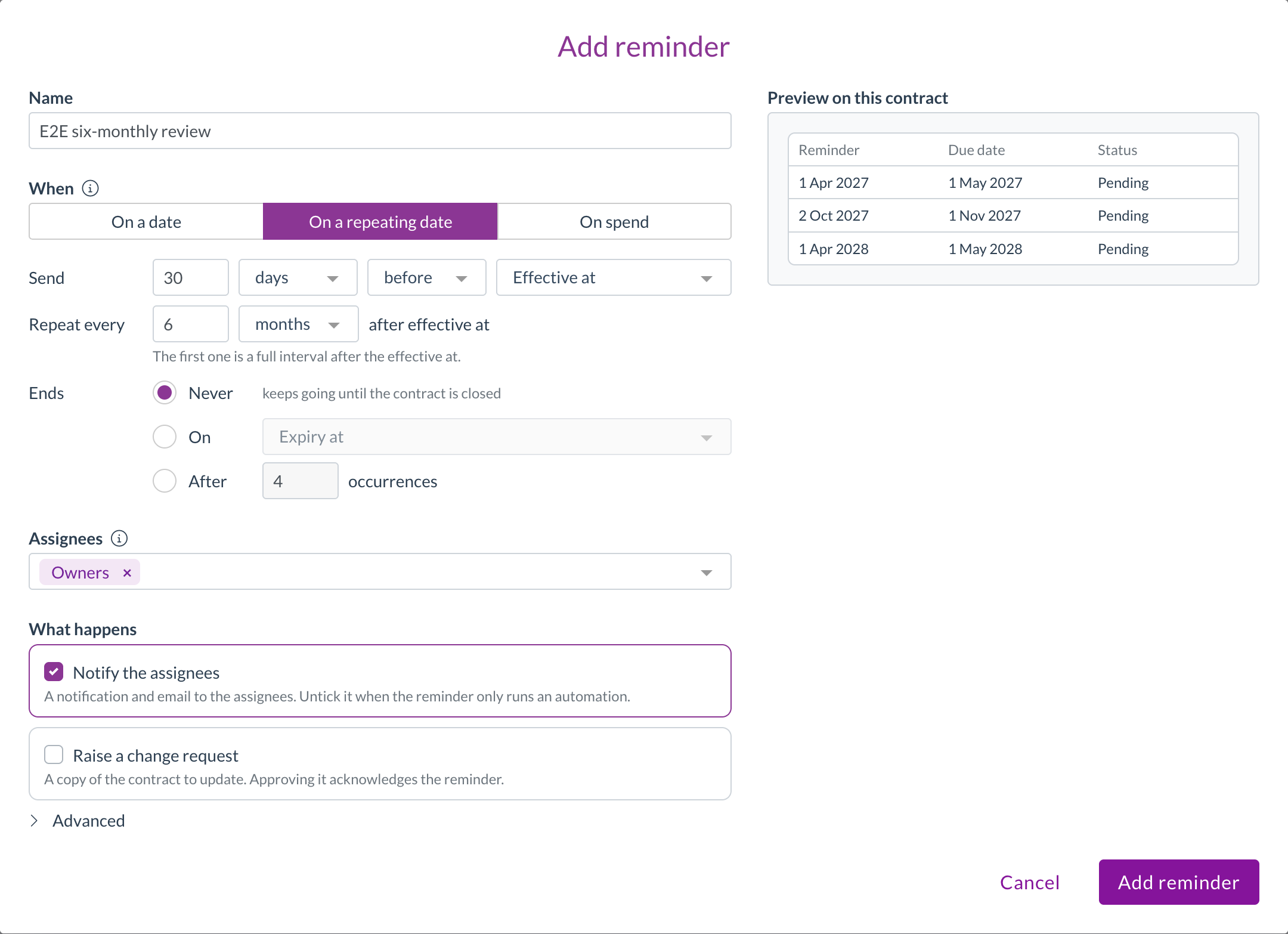
- Use Add reminder, or Edit, Duplicate, Pause, Resume, and Remove from a reminder's menu.
- Choose when it sends:
- On a date: a number of days, weeks, or months before or after any date on the record, including your own date fields.
- On a repeating date: the same, repeating every number of days, months, or years. It can repeat until the contract closes, until a date on the record, or for a set number of times.
- On spend (contracts only): when spend goes above a percentage of the contract value or a set amount.
- Choose who it goes to: the record's owners, named users, or a user field.
- Choose what happens: notify the assignees, raise a change request with a reason, or both.
- A preview shows the next dates as you fill in the form. If you change a reminder that came from the document type, you can revert it to the default.
Default reminders on the document type
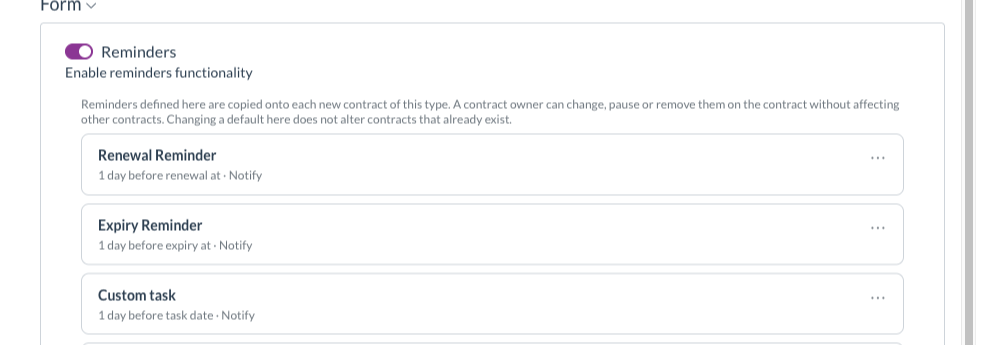
- With the Reminders extension switched on, a contract or certification document type lists its default reminders, and you add and edit them in the same way. They're copied onto each new record of that type.
- Changing a default doesn't change records that already exist.
On the contracts list
- A Next reminder column shows each contract's next send date and the reminder's name, or Paused. You can sort by it.
- A Contract value column can be added to the list.
Evergreen contracts
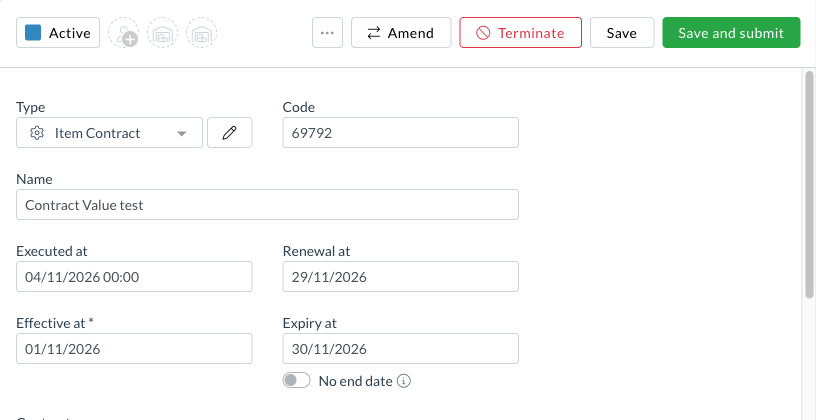
- Turn on No end date under Expiry date for a contract with no end date. It shows as Evergreen.
Contract termination
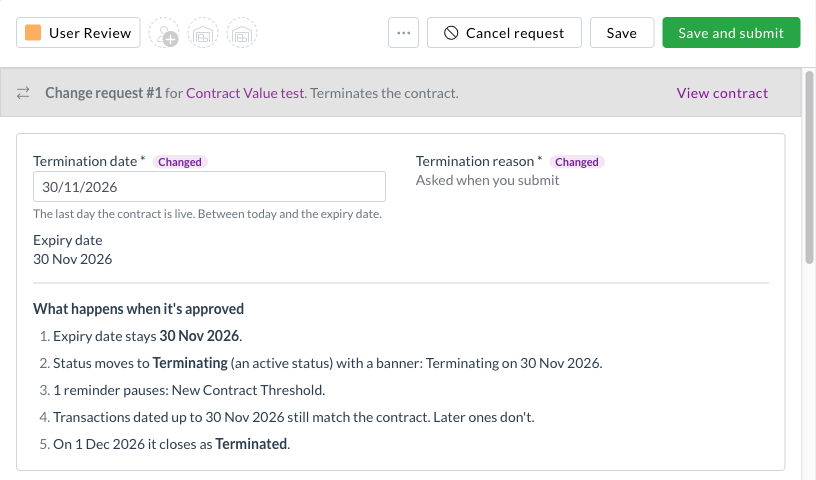
Until now, ending a contract early meant editing its dates by hand. We've added a Terminate action that runs through your approval flow, the same as any other change.
- Terminate sits next to Amend on active and complete contracts, for anyone who can raise a change request on contracts. It opens a termination change request.
- Enter the termination date and the reason. Zudello checks the date against today and the contract's term, and suggests Amend if you want to extend the contract instead. The request lists what happens when it's approved.
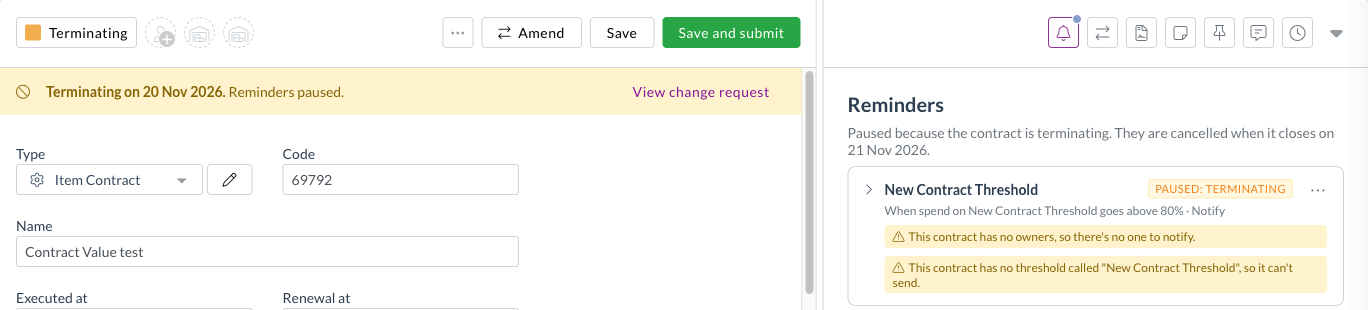
- While it's in approval, the contract shows a banner with the termination date. Once it's approved, the contract is Terminating until that date, and its reminders are paused.
- On the termination date the contract closes as Terminated. A contract that reaches its expiry date without a termination now closes automatically as Expired. Closed contracts show when and how they ended, and are read-only.
- Terminating, Terminated, and Expired are available to add to your team's statuses under Settings > Statuses, so you can group and filter contract lists by them. Speak to your Zudello consultant to set these up for your team.
Price books
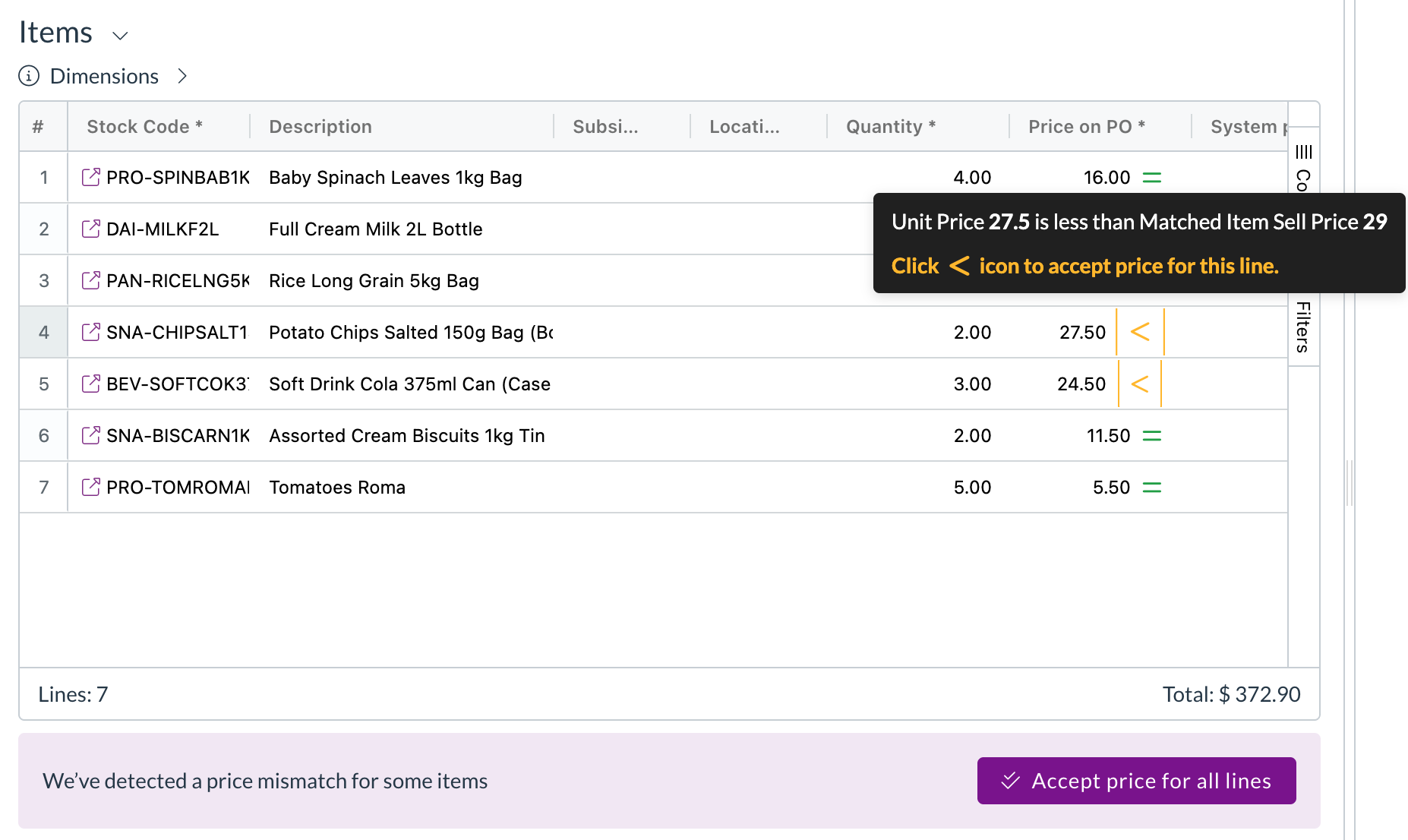
Price books let Zudello check the prices on a sales order or invoice against your agreed prices.
- Accepting a price, on a single line or with Accept price for all lines, now recalculates the line totals, the tax, and the document totals, as if you'd typed the price yourself. Before, the totals stayed the same until you edited a line by hand.
- If your price-book prefill is set to With confirmation, Zudello now asks before updating Unit price after you change the location, cost centre, or subsidiary, instead of overwriting it.
Document viewer
Alerts
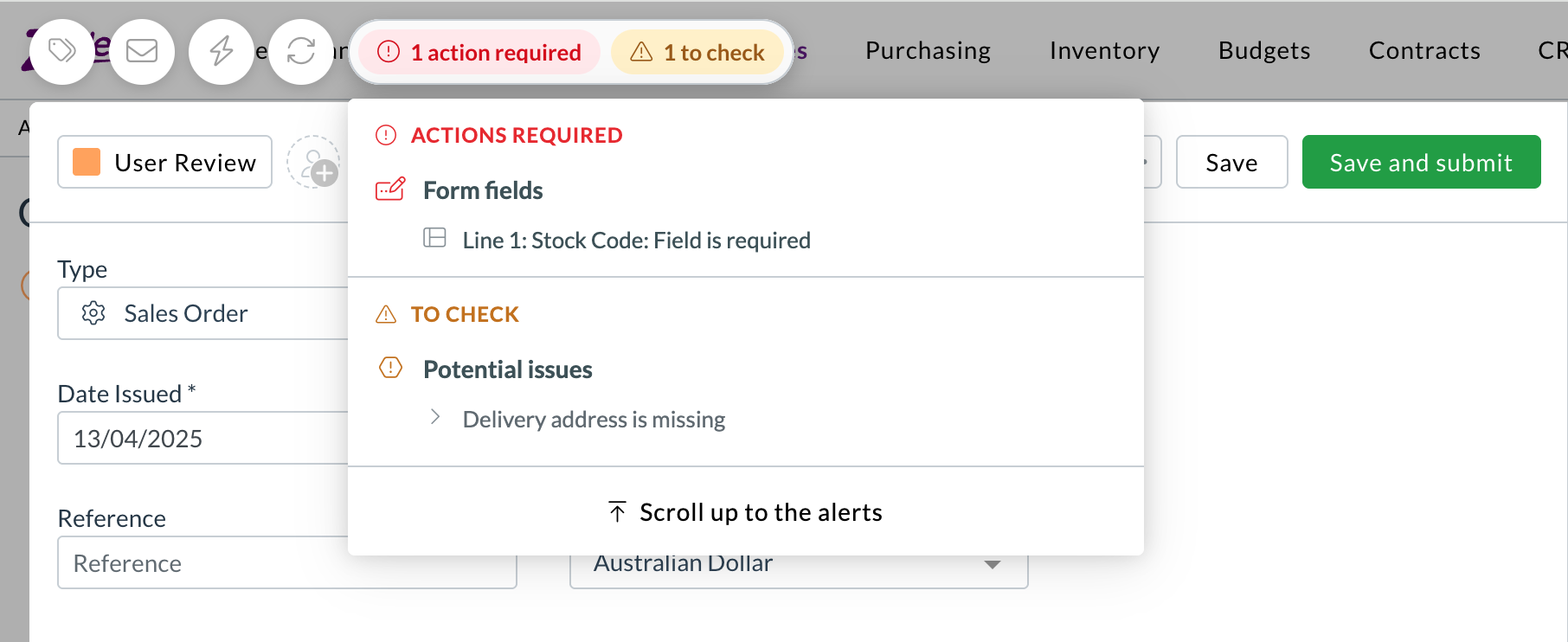
- Alerts now sit inside the form and scroll away with it, instead of staying stacked at the top and taking up space.
- A pill in the toolbar shows how many alerts there are. Select it to see them grouped into Actions required, To check, and notes.
- Each alert links to its place in the form. Go to field opens the section if it's collapsed, scrolls to the field, and puts your cursor in it.
- The pill counts down as you fix things, and shows All done when nothing is left.
Moving between documents
- Next and Previous now keep going past the documents already loaded in the list, until the true end of the view. Documents opened from a board column have them too.
- Documents with the same sort value now stay in one order, so pages never repeat or skip them.
Navigation
- Cmd+click (Ctrl+click on Windows) or middle-click a module, a module tab, Settings, or a team or organisation in the account menu to open it in a new browser tab. Shift+click opens a new window.
- The logo, Reports, and Inbox now open in a new tab already signed in.
Suppliers and customers
- Suppliers and customers can now have a default Warehouse. When you pick a supplier on a document, its warehouse is filled in on the lines. Lines on existing documents pick it up the next time they're coded.
Exports
- Export templates can now filter on related records, such as Project and Supplier. Options show by code and name and you can search them. Saved filters show the record's name in the template builder and when you run it.
- Invoice and receipt export templates can now include each line's remaining amounts and variances.
Corporate cards
- Reconciliation no longer shows cards set to inactive, deleted, or archived, or their transactions. Set a card to inactive to hide it from reconciliation.
Approvals and data permissions
- Users with Own only access can now see the contracts and certifications they own.
- An approver with Own only access no longer loses sight of a document when its approval step finishes without their response.
- A new permission lets users unlock an expense while it's in approval.
- Delegation of authority datasets can now match on amortisation schedule, employee, expense category, and mileage rate.
New UI
The changes in this section are available in the new UI only.
Case reasons
- Dispute reasons in settings is now Case reasons, to match cases, and the reason pickers on new cases read Case reason.
- Anyone on your team with the Reasons permission can now open the page and add, edit, or delete case reasons.
Now in the new UI
- When a file can't be loaded in the document viewer, you see the reason and a Retry button instead of No file available.
Resolutions
We're constantly working to refine Zudello's functionality and address any issues as soon as possible. As part of this release, we've made the following resolutions:
- We've fixed cards not being able to be dragged between columns on the board view. Cards follow the same status rules as the document viewer, and a card goes back to its column if the move can't be saved.
- We've fixed board view columns stopping after the first 25 cards.
- We've fixed a budget's lines disappearing after going Back to it, which a save then deleted.
- We've fixed the whole app bouncing when swiping on a Mac, which could leave the menu and toolbar off screen until a refresh.
- We've fixed scheduled automations occasionally running more than once, missing a run, or running on a deleted record.
- We've fixed the Expense reconciliation required validation skipping corporate card expenses.
- We've fixed quantity thresholds being added to a contract's value as if they were amounts.
- We've fixed contract pricing lines being lost when their SKU didn't match one of your items.
- We've fixed consistency reports stopping when they hit a validation error.
- We've fixed, in the new UI, letters in a BSB being flagged in the bank details check.
- We've fixed, in the new UI, a file dropped on the document list in Chrome on a Mac sometimes opening in a new browser tab instead of uploading.
Have an idea?
Do you have an idea for a new feature or how we can improve our current features? Let us know at support@zudello.com.
Your ideas and feedback are an important part of our product planning process to make Zudello better for everyone.