Release notes edition 3.7.16
Release date: Wednesday 4 November 2026
Version: v3
Here's the latest summary of what's new and improved in Zudello, as well as what we resolved in the latest release.
In this release:
- Approve changes to suppliers, customers, contracts, and certifications before they apply
- See Eftsure's bank account verification on the supplier record
- Set your own default view in the new UI
- Field rules for "is none of", opening records in a new tab, and more
Looking for something? Browse by tag to find release notes on a specific feature.
New and improved
Change requests
Until now, a change to a supplier, customer, contract, or certification applied to the record as soon as it was saved. If the change then went to approval and was rejected, nothing was undone. We've added change requests, so a change is approved before it reaches the record.
Raise a change request
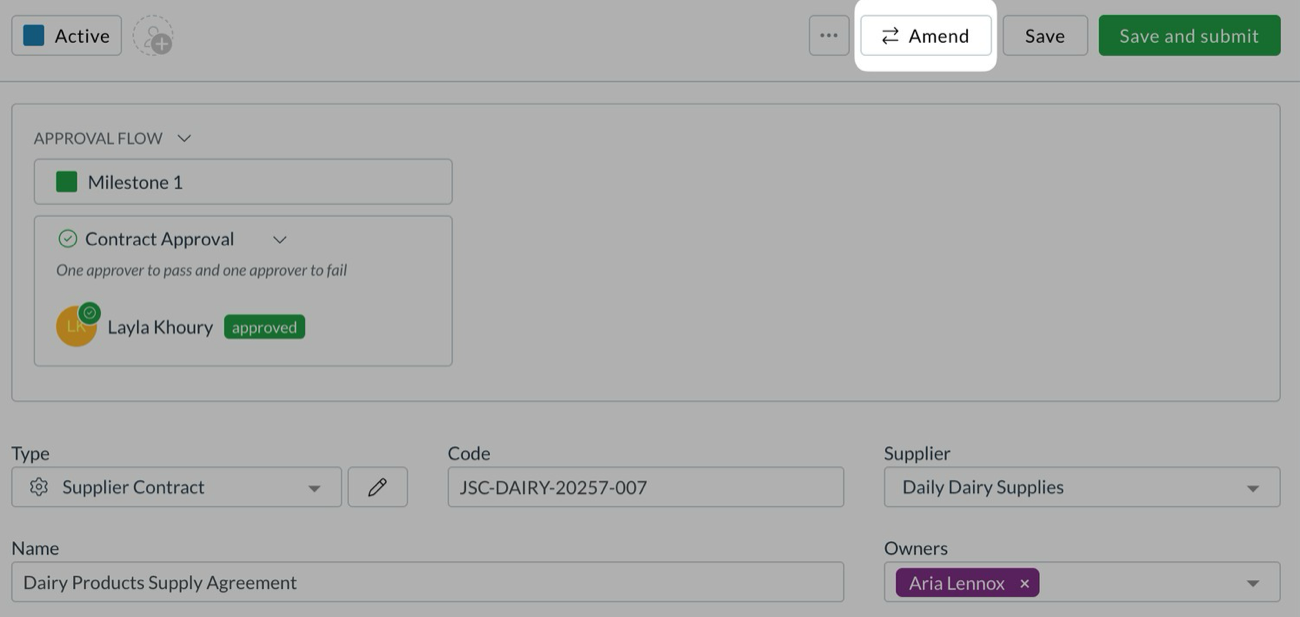
Choose Amend at the top of a supplier, customer, contract, or certification. Zudello opens a copy of the record as a change request, and the record itself stays as it is.
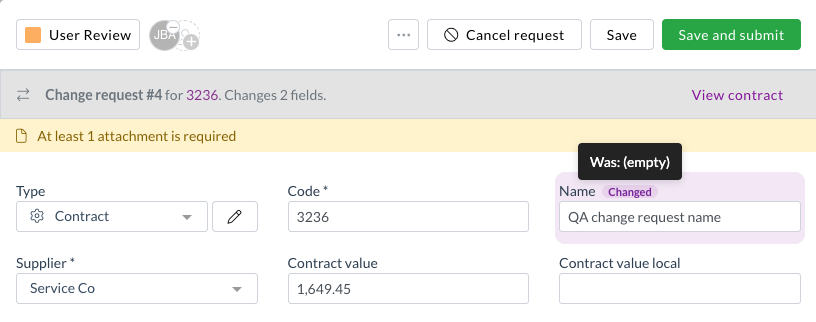
- Every field you change is marked Changed. Hover over it to see the previous value. Changed cells in tables, such as contract lines and pricing, are highlighted in the same way.
- The banner at the top shows the change request number and how many fields it changes. Select View contract (or supplier, customer, or certification) to open the record it belongs to.
- When you submit, Zudello asks why the change is needed.
Approve and merge
- Change requests go through your approval flows like any other record. Approvers see them on Requests with a Change request tag, and certifications now have a Requests view too.
- Add the Merge change request action to the approval automation. Once the request is approved, only the fields it changed are written to the record, so any other edits made to the record in the meantime are kept.
- A rejected change request leaves the record untouched and keeps the reason. You can also withdraw one with Cancel request.
- The Change requests panel on the record lists each change request with its number, status, and who raised it.
Who can raise one
- To see Amend, a user needs the new Amend permission for that type of record. For example, Amend on contracts lets them raise change requests on contracts. They don't need permission to edit the record itself.
- Amend isn't granted automatically. Speak to your Zudello consultant to set up change requests for your team.
Suppliers
If your team uses Eftsure to check supplier bank details, the result now shows where you need it. We've added the verification to the supplier record itself.
Eftsure bank account verification
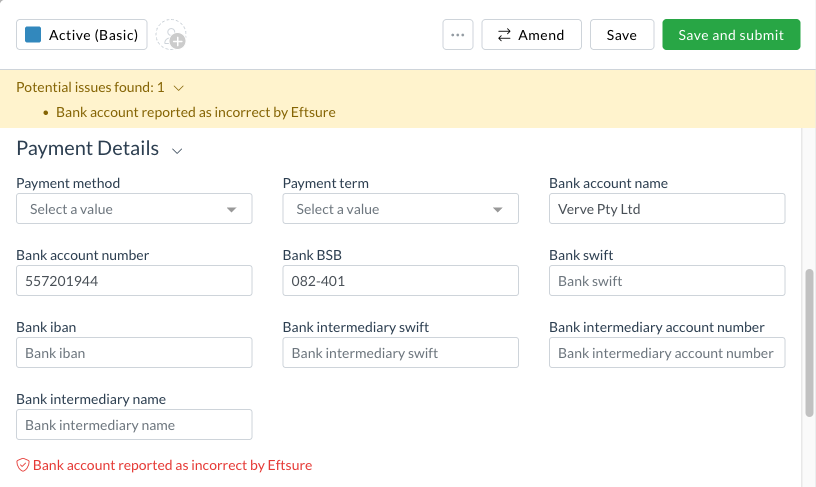
- The bottom of Payment details on a supplier shows Eftsure's verification of the bank account.
- Any result other than verified is also listed under Potential issues found at the top of the record, so it's hard to miss. It never stops you saving.
- Payment details is now a system section on supplier forms. Add it from the form editor with the payment and bank fields, and you can then switch on the Contact Eftsure extension for that form.
Records opened from another page
- A supplier, customer, item, or dimension opened from another module's page now has its actions menu, Save, Submit, and Dependencies tab, the same as when you open it from its own list.
Field rules
Field rules make a field required, or show and hide it, depending on the value of another field. Until now a rule could match a field that is any of a list of values. We've added the opposite.
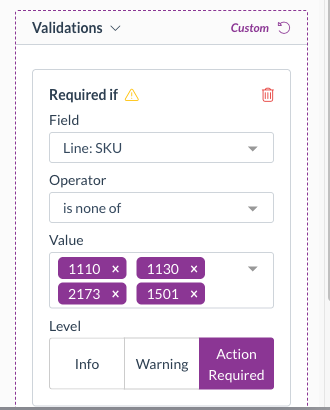
- Choose is none of to apply a rule when a field matches none of several values. For example, make Department required on a line unless its stock code is one of a handful that never need one.
- For text fields, type each value and it's added as a chip. For drop-downs and status, pick from a list.
- is none of isn't offered for dates and numbers.
Navigation
Records open in a pop-up over the list you're working in. Sometimes you'd rather have one open in its own tab while you keep working.
- Hold Cmd (Mac) or Ctrl (Windows) and click a record link to open it in a new browser tab, or middle-click it. Shift and click opens it in a new window. Your current tab stays where it is.
- This works across document lists, links inside an open record (related documents, supplier, items, people, form responses), reconciliation, inbox, imports, and item alternatives.
- A plain click still opens the pop-up, as before.
Contracts
Contracts hold your agreements with suppliers and customers, with their pricing, key dates, and reminders.
Reminders
- Each contract now keeps its own copy of the reminders set on its document type. Change a contract's reminders and those changes stay with that contract, even if the document type's defaults change later.
- Deleting a reminder now removes just that reminder.
Requests and pricing
- Requests under Contracts now shows each contract's name, effective and expiry dates, assignees, and owners, with column headings. In the table layout, contracts waiting on you have Approve and Reject, the same as purchasing requests.
- Contract pricing shows the Purchase price and Sell price columns on contracts that show the company in the Company section. They follow the supplier or customer you pick there.
- Contracts can show the Subsidiary and Location options in the toolbar when they're switched on in form settings.
Certifications
Certifications keep your suppliers' and customers' insurances and certificates in Zudello.
- A certification form can now be linked to a supplier or a customer.
- When you upload a certificate through Document Studio, Zudello now fills in the company details, value, and currency as well. Contracts get the same value and currency mapping.
- The Certifications and People lists now have column headings, including Effective at, Expiry at, Assignees, and Owners.
Corporate cards
- Expenses on a corporate card are no longer blocked from being submitted once they're fully reconciled.
- Switching a document from a foreign currency back to your team's currency now resets the exchange rate, so the base amount is no longer left converted and the expense can be reconciled in full.
- When you reconcile a card, expenses that have since been moved to a different card or payment method are no longer offered as matches.
- Apply trained rules in the actions menu is now available on completed card payments, for users with permission to apply rules.
Accounts receivable
Payment disputes are now called cases. A dispute is now a type of case, shown in the case's Type.
- Reconciliation details shows Case with its type and reason, and a reconciliation against a case no longer shows as an empty payment.
- Your existing disputes, their permissions, and any settings that referred to them carry across automatically.
Consolidate lines
When a supplier has Consolidate lines switched on, Zudello replaces a document's lines with a single line.
- The single line now keeps the line dimensions and defaults, rather than losing them.
- Inventory receipts and purchase orders are no longer consolidated.
- Set the description the single line gets with Consolidated line description in Team settings. Leave it empty for no description. If you've never set it, it stays as Document total.

Document viewer
- The asset panel has a Fit to window button under Rotate.
- Zooming with a mouse wheel or trackpad is smoother and follows how far you scroll. Zoom is limited to between 5% and 500%, and the page can no longer be dragged out of view.
- The assets button now reads Assets rather than Invoice assets, since it shows on every document type.
- We've removed the "created" message where the action already opens what you made, such as Create person, Make recurring, Order now, and merging documents.
Forms
- Form responses now show who each response is linked to, such as the customer, supplier, employee, contract, or document, in the list, grid (as a new Linked to column), board, and the opened response. Select the name to open that record.
- List rows also show the form name and the sent and completed dates, and an untitled form no longer shows as Unknown.
- Search now finds responses by the linked name and the form title.
Billing and usage
- Billing & usage has an Export button that downloads the usage for the selected month or range as a CSV, for the teams you pick.
- The page is now available to anyone with permission to view billing.
- Usage is counted in whole UTC days, matching the export.
Automations
- A copied link to an automation now opens that automation on the Board tab, and saving it updates the automation instead of making a copy.
- The Board automations filter no longer stays applied between sessions and hides automations. It clears when you close Automations, reload, or change module or team.
- A schedule trigger saved without a time zone now runs in your team's time zone.
New UI
We've kept building out the new interface at platform.zudello.io. Everything above is available there as well.
The changes in this section are available in the new UI only.
Your own default view
- Choose Set as my default from a list's view menu to land on that view each time you open the list in that team. It's saved to your account and used before the team's default.
- The team option is now Set as default for everyone, and the two defaults have their own icons. You can set your own default even if you can't edit views.


Line dimensions as list columns
- Any line dimension, such as cost centre, department, project, tax rate, or your own dimensions, can be added as a column to a document list from the Columns panel.
- A Reset link in the Columns panel puts a view back to its default columns, order, and pins.
Cases
- Disputes are now Cases across the new UI, including the navigation, the Cases list with a Type column, cases linked to an invoice, and the new case window.
- Raising a case from a sales inbox now shows the customer's name, ticks the email's own open invoice, and tells you plainly when the customer has no open invoices.
PDF templates and themes
- The PDF template tester has a Download template button, so you can save the selected team or global template as a Word document.
- Theme colours are no longer offered for dark backgrounds, where they only tinted part of the page.
Resolutions
We're constantly working to refine Zudello's functionality and address any issues as soon as possible. As part of this release, we've made the following resolutions:
- We've fixed lines that share one item all showing the item's description in Match with purchase order item. Each line now shows its own description, and long descriptions wrap instead of being cut off.
- We've fixed Project type showing blank on a project that has one set.
- We've fixed an Original files export template switched to Download all reopening as Download selected, so it now exports files from every module.
- We've fixed downloaded file names losing a supplier's name when it contains Chinese or other non-Latin characters.
- We've fixed a file dropped onto an open document, such as a chat image released outside the message box, creating a new document.
- We've fixed the excluded sender note on inbox rules being pushed against the edit and delete buttons.
- We've fixed the Zudello logo looking blurry on the sign-in screens, and round profile pictures being squeezed next to long names.
- We've fixed older date add and subtract conditions in automations opening the wrong way round and losing their number when the type was changed.
- We've fixed some automation errors caused by a brief connection problem not being retried.
- We've fixed custom fields created with Create field in the document type editor showing as Unknown field after a refresh, in the new UI.
Have an idea?
Do you have an idea for a new feature or how we can improve our current features? Let us know at support@zudello.com.
Your ideas and feedback are an important part of our product planning process to make Zudello better for everyone.