3 posts tagged with "Price books"

Description for the Price books tag.

View All Tags

Release notes edition 3.6.10

Release date: 22 October 2025
Version: v3

Here's the latest summary of what's new and improved in Zudello, as well as what we resolved in the latest release.

Looking for something? Browse by tag to find release notes on a specific feature.

In this release:

  • New price books feature for advanced pricing management
  • Enhanced automation workflows with improved supplier assignee functionality
  • Reporting functionality for approvals, budgets, and more
New and improved

Price books

Price books allow you to manage item pricing based on specific customers, suppliers, projects, or other business dimensions. This feature automatically applies appropriate pricing and validates special rates across your transactions.
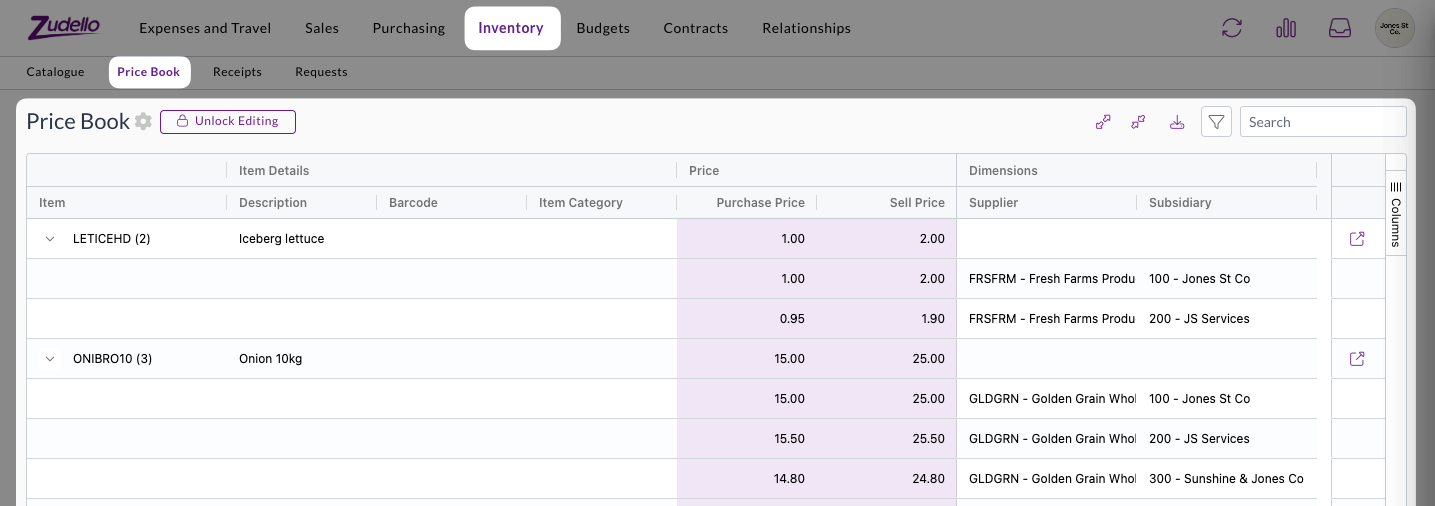
Price books provide comprehensive pricing management:

  • Automatic price application
    • Correct pricing is automatically filled when creating requisitions or purchase orders
    • Special pricing is validated when receiving customer orders or supplier invoices
  • Flexible routing options
    • Transactions with pricing discrepancies can be routed through custom approval workflows
    • Configure routing based on your specific business requirements

Price book functionality includes full integration with requisitions, purchase orders, customer orders, and supplier documents. See Price books for more.

Advanced document validation

Document validation checks your transactions for accuracy and completeness before you open them. This allows you to focus only on those documents that need your attention, and automate those that don't.

In this release, we've made validation errors clearer, more flexible, and more automated.

Automated validation

Document validation is now performed automatically when a document is uploaded, without a user needing to open the document. This provides additional automation capabilities, and allows your team to focus only on those documents that require your attention.

Automated validation is now enabled by default for all existing and new teams.

Enhanced validation feedback

Understanding why documents have validation errors is now easier and clearer:

  • Fixed validation column
    • A dedicated error column in the lines table shows all validation issues at a glance
    • Click on error indicators to see detailed explanations for each line
  • Detailed calculation information
    • For validation errors involving calculations, we now show the applied formulas and discrepancies
    • This helps you quickly understand and resolve issues to continue processing

Expanded validation flexibility

We've added new Required if validation options:

  • Support for Any of value rules
    • You can now use Any of conditions when setting up field requirements, which make one field required if another field is set to one of a number of values.
    • E.g. Cost centre is required if account is any of Equipment, Staff Costs, or Entertainment

Automation enhancements

Automations help streamline your document workflows by automatically performing actions based on predefined rules. We've now improved supplier assignee functionality and validation condition options.

  • Supplier assignee actions

    • We've restored full functionality for automation workflows that use supplier assignees
  • Enhanced condition options

    • When setting up conditions for assignees, use the "is not empty" option instead of "is set" for better reliability
    • We're working on improving the interface to prevent configuration mistakes in future releases

Reporting launch

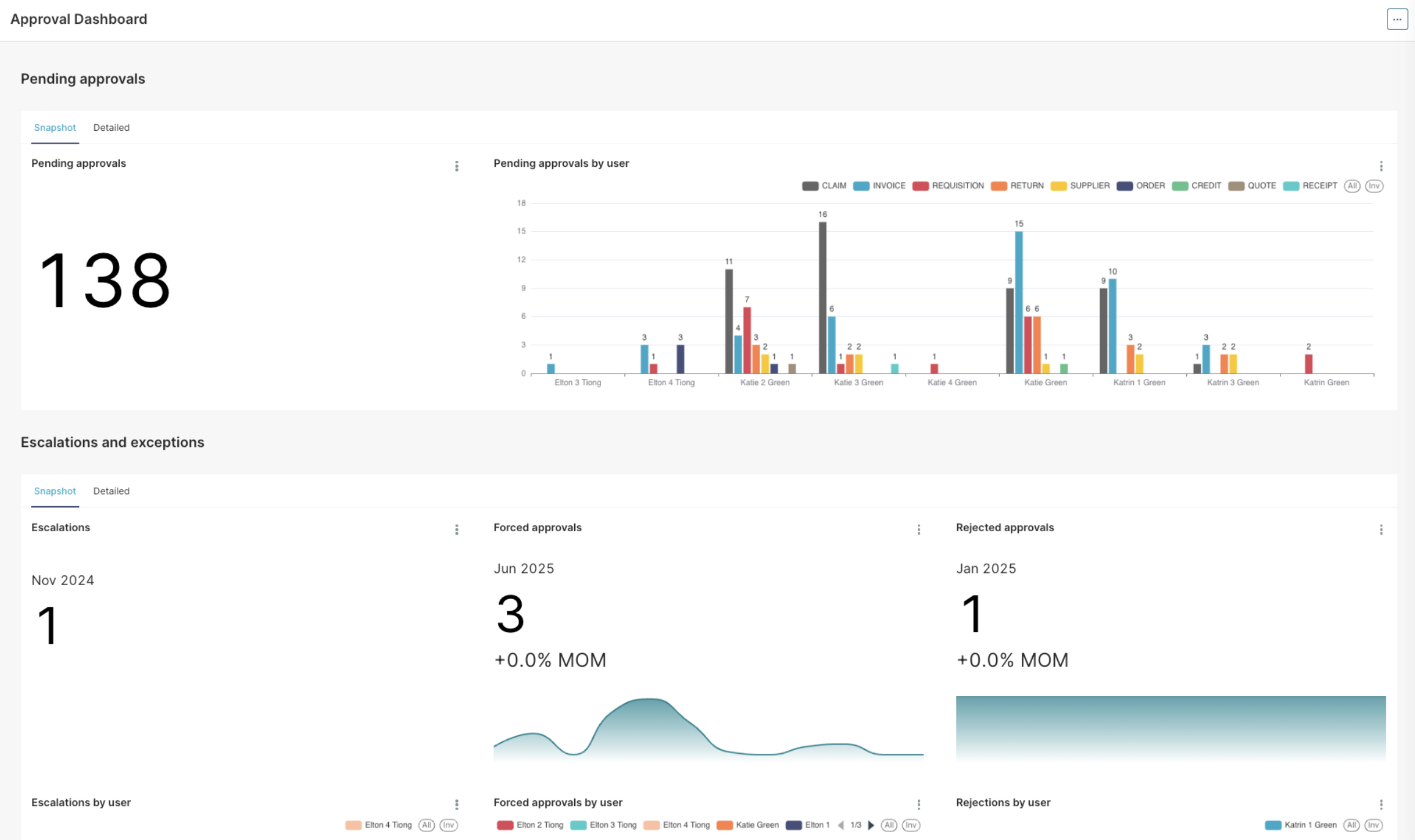
Comprehensive reporting capabilities are now available to help you analyse approval workflows, budget performance, and other key business metrics.

Reporting includes:

  • Approval dashboard
    • Get an instant overview of all pending approvals, including information on any escalations and exceptions
    • Find the bottlenecks in your approval process with reporting on average time to approve, number of escalations, and number of rejections per user
  • Accrual reports
    • See the combined impact of outstanding orders and invoices that are yet to be processed
  • Budget dashboard
    • A dedicated dashboard for budget reporting and analysis

Detailed documentation on the reporting feature will be available soon. In the meantime, if you have any questions about reporting please reach out to support@zudello.com.

Email sales order extraction

We've restored and enhanced the ability to extract sales orders directly from email content, making it easier to process orders received in email format. Improvements include:

  • Enhanced rescanning capability
    • Documents ingested from email bodies can now be rescanned if needed
    • Improved processing reliability for email-based transactions
  • Bug fixes and optimisations
    • Resolved issues affecting email extraction accuracy and performance

Contracts beta launch

Say hello to Zudello's advanced contract management capabilities directly. We're launching our brand new contracts feature to selected customers only.

Comprehensive contract management

The new contracts feature includes:

  • Flexible contract types
    • Fixed price contracts with transaction impact visibility
    • Threshold contracts with usage tracking and impact reporting
  • Contract lifecycle management
    • Navigation and permissions for contracts, contract groups, and contract categories
    • Contract owner approvals integrated with existing approval workflows
  • Advanced notifications
    • Automated reminders for contract milestones, renewals, and expiry dates
    • Configurable notification preferences for different contract events

Exception handling and compliance

  • Breach management
    • Clear visibility of contract impacts against transactions
    • Required reason collection when submitting transactions with contract breaches
    • Contract owner approval workflows for transactions exceeding contract terms
  • Sales module integration
    • Limited support for sales transactions with planned expansion

Contracts are currently available for very limited teams only. To discuss enabling this feature for your team, reach out to support@zudello.com.

Detailed documentation on the contracts feature will be available soon.

Enhanced features

Budget management improvements

Budget management helps you control spending across projects, departments, and other business dimensions. We've improved performance and enhanced the linking process between budgets and transactions.

Intelligent budget linking

The system now evaluates when budget lines need to be relinked to transactions:

  • Selective relinking triggers
    • Relinking occurs when dimensions change on budget lines
    • Date modifications trigger relinking for better accuracy
    • Amount changes prompt transaction reassessment
  • Performance optimisations
    • Relinking runs as a background process to prevent timeouts
    • Only necessary changes trigger relinking to improve system performance

Budget dashboard

A dedicated Budget dashboard has been added as part of the new reporting feature.
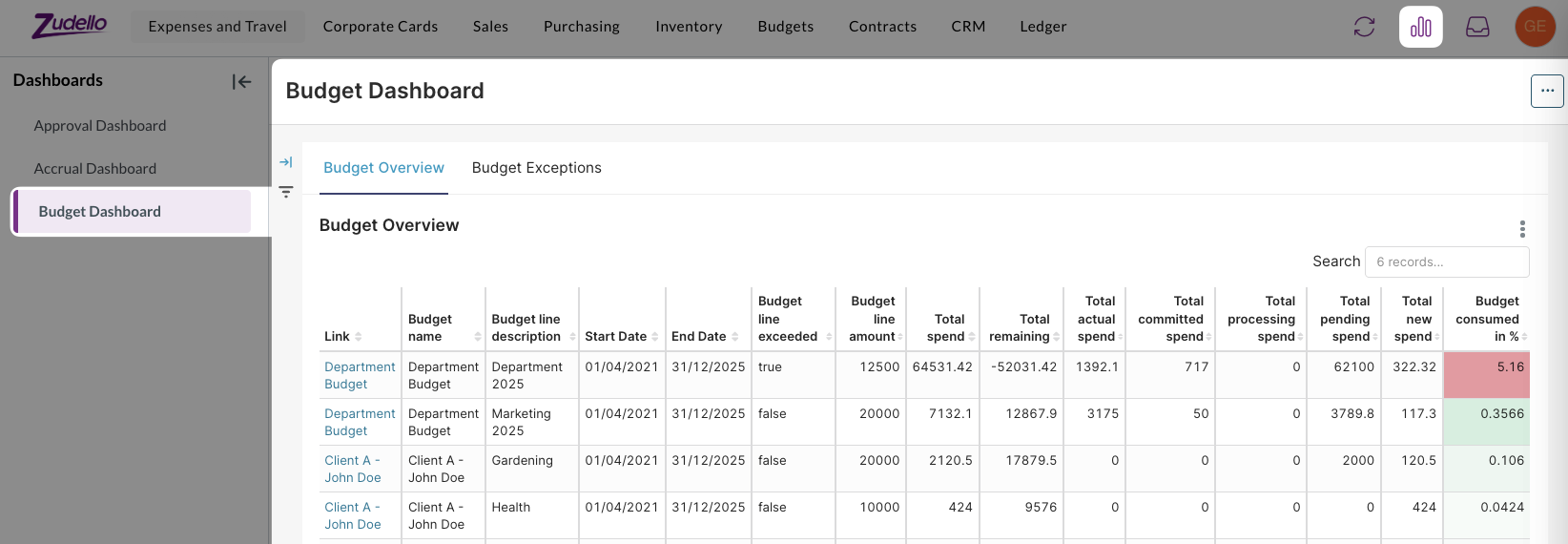
The budget dashboard:

  • Provides dedicated budget reporting and analysis
  • Allows you to track spending patterns and budget utilisation across your organisation

Budget management and reporting are currently available for selected teams only. To discuss enabling these features for your team, reach out to support@zudello.com.

Document studio enhancements

Document studio empowers you to customise data extraction for your specific document types and formats. We've resolved mapping issues and improved field handling for better extraction accuracy.

Key improvements include:

  • Enhanced unit of measure mapping
    • Resolved field mapping issues for units of measure extraction
    • Improved integration between extraction and enrichment processes
    • Updated prompt requirements for optimal performance

Document studio is currently available for selected teams only. To discuss enabling document studio for your team, reach out to support@zudello.com.

Resolutions

We're constantly working to refine Zudello functionality and ensure that we address any issues as soon as possible. As part of this release, we've made the following resolutions and improvements:

  • We've enhanced system performance through infrastructure updates and optimised backend validation processing
  • We've improved communication between system components to resolve purchase order number generation issues
  • We've enhanced search functionality within list views to prevent system slowdowns when processing large document volumes
  • We've added comprehensive logging to identify and resolve automation interaction issues
  • We've optimised resource usage for teams with extensive document libraries to ensure consistent system responsiveness

Have an idea?

Do you have an idea for a new feature or how we can improve our current features? Let us know at support@zudello.com.

Your ideas and feedback are an important part of our product planning process to make Zudello better for everyone.
Release notes edition 3.5.8

Release date: 2 July 2025
Version: v3

Here's the latest summary of what's new and improved in Zudello, as well as what we resolved in the latest release.

Looking for something? Browse by tag to find release notes on a specific feature.

New and improved

Enhanced item alternatives management

Item alternatives let Zudello automatically recognise different codes that suppliers and customers use for the same products, reducing manual data entry and improving processing accuracy. We've made significant improvements to how the system searches for and manages existing item alternatives.

We've enhanced the search functionality when assessing potential new item alternatives, particularly when an item has existing alternatives linked to other suppliers or customers. This improvement ensures more accurate matching and reduces duplicate alternative creation, making your item management more efficient and reliable.

Importing improvements

Document importing helps you efficiently upload large volumes of data into Zudello using CSV files and other formats. We've continued enhancing our importing capabilities with several key improvements to make the process more reliable and user-friendly.

Enhanced importing reliability

We've upgraded our importing tool to use new backend technology, resolving several issues with the previous system:

  • Improved document type handling: The system now correctly sets document types during import, eliminating previous inconsistencies
  • Better error handling: Resolved issues where imports would stall without providing error messages to users
  • Enhanced UUID validation: Improved handling of invalid UUID entries during import

Code-based resource updates

Previously, to update records you needed to provide the UUID or external ID of each record. We've now added the ability to import and update resources using the code field for matching, making it easier for end users to manage existing data via imports.

warning

Since codes aren't enforced as unique, imports will fail if multiple records share the same code. This helps maintain data integrity within your team.

Enhanced filtering capabilities

Filtering helps you quickly locate specific transactions and documents within your system. We've expanded filtering options and improved the user experience for finding the information you need.

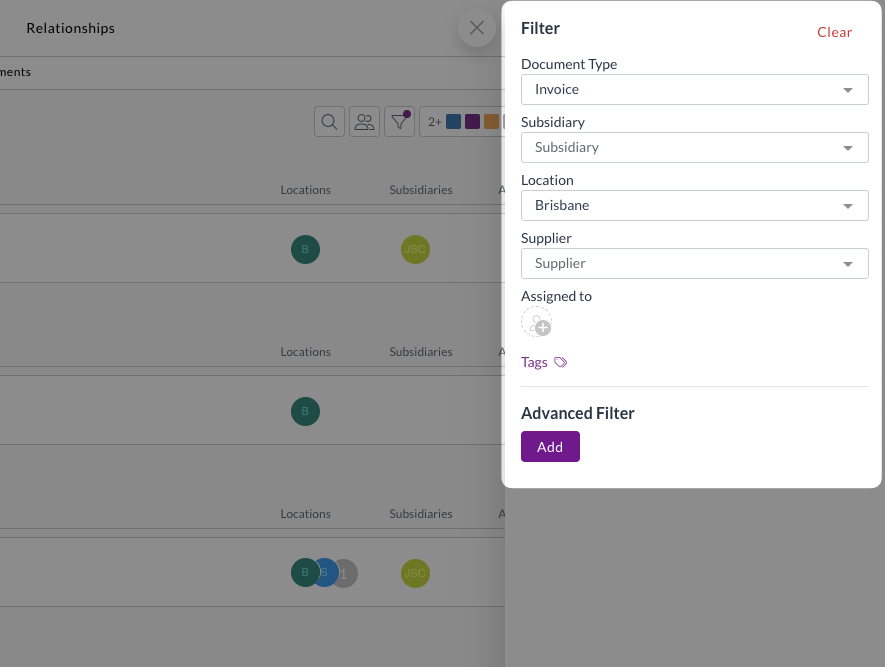
Improved quick filters and better display

Quick filters are always visible when you open the filtering tab, and allow you to quickly drill down to the documents you need.

We've also improved the display of very long filter names, particularly for approval-related filters.

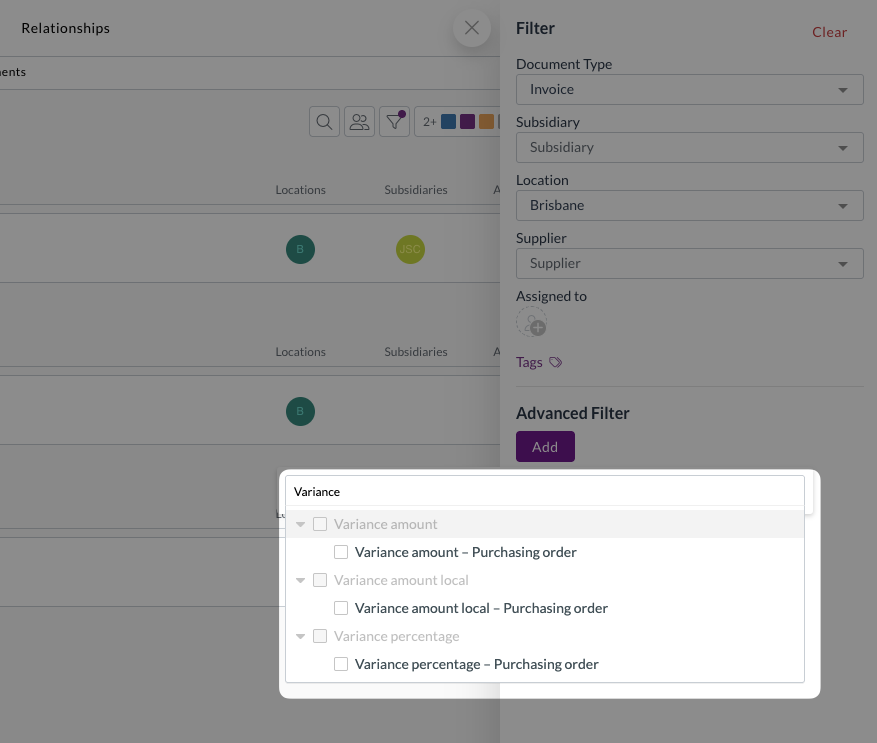
New allocation filters

We've added allocation-related fields to the filtering options, making it easier to track transaction matching status:

  • Allocation statuses: Filter by current allocation status
  • Variance amounts and percentages: Find transactions with specific variance levels
  • Remaining amounts and percentages: Identify partially allocated transactions
  • Discrepancy amounts and percentages: Locate transactions with matching discrepancies

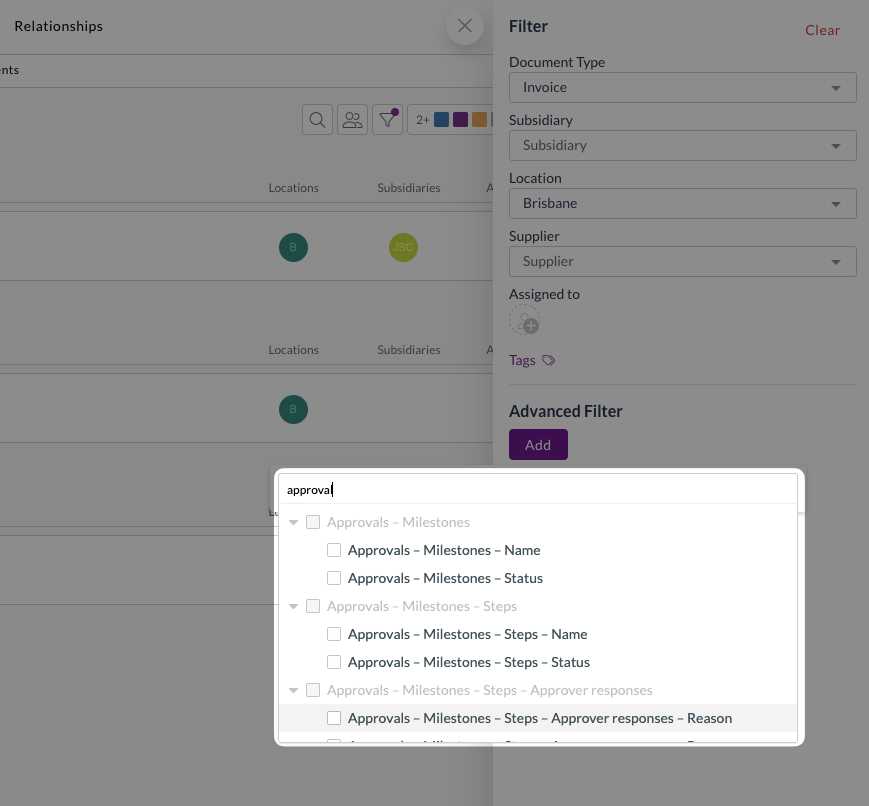
Enhanced approval filters

We've expanded approval filtering capabilities to help you manage workflow status more effectively:

  • Filter by specific milestone names or statuses
  • Filter by step names or statuses
  • Filter by associated approvers
  • Filter by approval responses or reasons

Available approval statuses and responses:

  • PENDING (response and status)
  • ESCALATED (response and status)
  • DELEGATED (response only)
  • FORCED (response only)
  • CHANGED (response only)
  • APPROVED (response and status)
  • REJECTED (response and status)

Approval and notification improvements

Approval workflows ensure documents are reviewed and approved by the right people at the right time. We've made several enhancements to improve the approval experience and ensure proper workflow management.

Automatic approval cleanup

We've improved how the system handles archived or completed documents with open approvals:

  • Automatic clearing
    • When documents change from "Approve" status to any other status type (such as Archive or Mark as Completed), the system automatically clears any open approvals
  • Improved reporting accuracy
    • This ensures approval reporting correctly reflects actual outstanding approval actions
  • Reduced unnecessary notifications
    • Prevents escalation and reminder notifications for archived or completed documents

Open approvals are defined as active and future milestones, including all their steps and responses. Previously approved or rejected milestones are preserved for historical tracking.

Enhanced approval notifications

We've improved the approval notification system:

  • New approver notifications
    • When you manually change an approver, the system automatically sends approval required notifications to the newly assigned approver
  • Expanded reminder options
    • Manual reminders are now available for escalated approval steps
  • Improved claim notifications
    • Enhanced handling of claim notifications to avoid showing "unavailable" or "unknown" placeholders when key information is missing

Document coding improvements

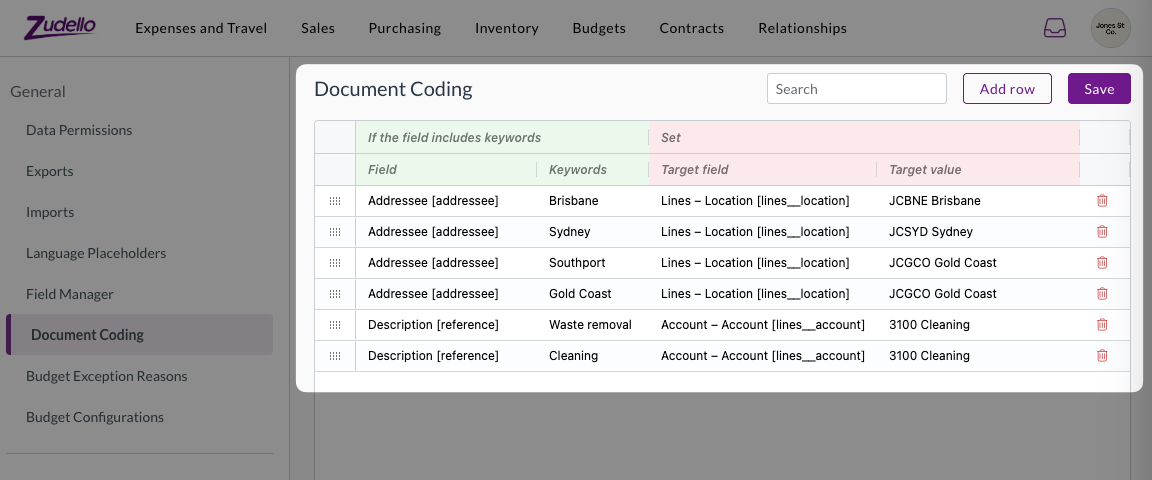
Document coding helps you automatically populate transaction fields based on extracted document information, reducing manual data entry and ensuring consistent coding. We've enhanced the document coding configuration to prevent invalid setups and provide clearer error messaging.

Improved field selection

We've refined which fields can be used in document coding rules:

  • Source fields
    • Limited to only text fields that can be populated by the extraction pipeline
  • Target fields
    • Filtered to show only writable fields, excluding system-controlled fields like:
      • User and system date fields (e.g. Created at, Created by)
      • System-controlled fields (e.g. Budget status, Allocation status)
      • Sub-resources that can't be directly updated

Enhanced error messaging

We've reformatted error messages for invalid document coding rules to make them easier to read and understand, helping you resolve configuration issues more quickly.

Price Books improvements (limited customers only)

Price management helps you maintain accurate pricing across different suppliers, customers, and business dimensions. We've continued enhancing our Price Books feature with new capabilities for managing complex pricing scenarios.

Dimension-specific pricing management

Building on our basic implementation, we've added advanced pricing capabilities:

  • Accept pricing workflow
    • Ability to accept pricing when managing dimension-specific pricing (such as Subsidiary or Project pricing) without overwriting existing prices
  • Bulk import and export
    • Full support for importing and exporting item pricing records via the user interface

Price Books are currently only available for a selected number of teams and require additional implementation. Reach out to support@zudello.com to discuss enabling this feature for your team.

Reporting enhancements (limited customers only)

Business intelligence and reporting help you gain insights into your document processing workflows and business performance. We've made improvements to enhance the reporting experience and provide better navigation capabilities.

Enhanced report exports

We've improved how the system handles URLs and links when exporting reports:

  • Better CSV and Excel exports
    • Enhanced handling of document URLs and links in exported data
  • Approval dashboard improvements
    • Added document URLs and links to the approval dashboard, allowing users to easily navigate directly to transactions requiring attention (such as pending approvals)

Reporting is currently only available for selected teams. Reach out to support@zudello.com to discuss enabling this feature for your team.

Card Reconciliation improvements (limited customers only)

Card reconciliation helps you match credit card transactions with expense records for accurate financial reporting and expense management. We have launched this new feature with selected customers and have made several enhancements based on initial feedback.

Enhanced expense management

  • Payment method visibility
    • Added the Payment method field as a column to the payments submodule table view for better transaction tracking
  • Improved filtering
    • Added an additional filter to the card reconciliation screen specifically for Card Spend expenses

Smart default filters

We've implemented intelligent default filters that users can modify as needed:

  • Payment method matching:

    • Filters expenses by the selected Payment Method for reconciliation
    • Includes expenses without a Payment Method set
    • Can be disabled to show expenses regardless of payment method
  • Card spend filtering:

    • Filters expenses by Expense Type = Card Spend
    • Can be disabled to show all expenses regardless of type
    • Both filters can be removed by clicking the 'x' if not needed

Card reconciliation is currently only available for a selected number of teams. Reach out to support@zudello.com to discuss enabling Document Studio for your team.

Document Studio improvements

Document Studio empowers you to customise how Zudello extracts data from your documents, ensuring maximum accuracy for your specific document types and formats. We've added new extraction capabilities to capture more information from your documents.

Enhanced extraction capabilities

We've expanded Document Studio's ability to extract information from transaction documents:

  • Transaction Line Notes support
    • Document Studio now supports extracting notes from individual transaction lines

Document Studio is currently only available for a selected number of teams. Reach out to support@zudello.com to discuss enabling Document Studio for your team.

Resolutions

We're constantly working to refine Zudello functionality and ensure that we address any issues as soon as possible. As part of this release, we've made the following resolutions and improvements:

  • We resolved an issue where logos with identical names would overwrite each other across different teams, ensuring each team's branding remains distinct.

Have an idea?

Do you have an idea for a new feature or how we can improve our current features? Let us know at support@zudello.com.

Your ideas and feedback are an important part of our product planning process to make Zudello better for everyone.
Release notes edition 3.5.7

Release date: 25 June 2025
Version: v3

Here's the latest summary of what's new and improved in Zudello, as well as what we resolved in the latest release.

Looking for something? Browse by tag to find release notes on a specific feature.

New and improved

New item management features

Item management helps you maintain your product catalogue and ensure accurate coding across all transactions. We've launched two new item management features to let how you create and manage items directly from the document viewer.

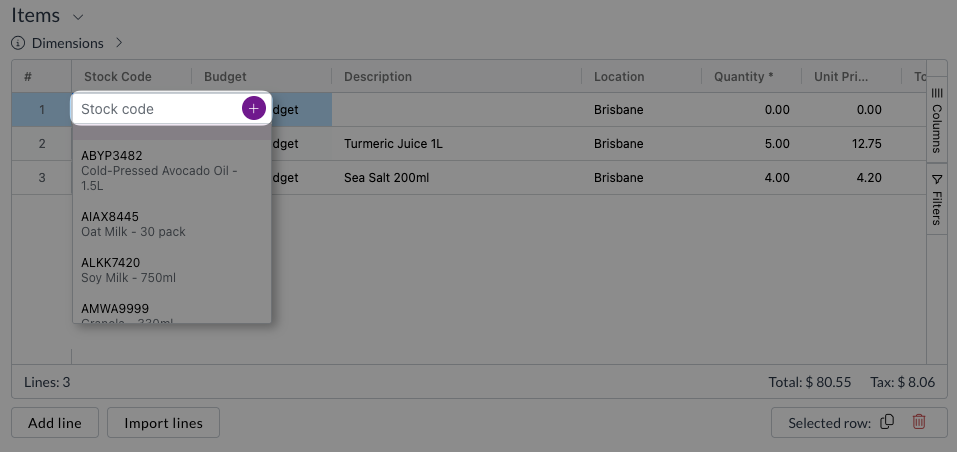
Create new item flow

You can now create new items directly while processing documents. When this setting is enabled, you'll see a + icon when searching for items in your catalogue.

Clicking the + icon will:

  • Open a new item modal
  • Prefill key information from the transaction line, including SKU, description, and pricing
  • You can then add additional relevant information before saving the new item

This eliminates the need to leave the document viewer and navigate to the Items submodule to create missing items. Reach out to support@zudello.com to discuss enabling this feature for your team.

Create item alternatives flow

When suppliers or customers use different codes than your internal product codes, Zudello's Item alternatives automatically recognises these alternative codes and match them to the corresponding items.

To make onoing item management easier, Zudello now allows you to add new Item Alternatives straight from the document viewer. If you manually link an item to a transation line:

  • Zudello checks if the extracted code matches any existing item alternatives
  • If no match is found, you'll see a warning with the option to create new item alternatives
  • You can save all suggested alternatives or deselect unwanted options
  • The system automatically populates supplier or customer fields for the new alternatives

Enhanced Extraction Process

To support item alternative creation, we've improved our extraction process:

  • The system now captures both the original extracted code and the matched item code
  • When items are linked to transaction lines, the line code is automatically updated to match the linked item
  • The extracted item code is still saved against the document, to ensure all originally extraced data remains available, even after alternatives are applied

Price Books (Limited customers only)

Price management helps you maintain accurate pricing for validation and automation across different suppliers, customers, and business dimensions. We're excited to announce the limited release of our new Price Books feature.

Price Books make it simpler for you to:

  • Manage specific pricing arrangements: Configure and manage fixed item pricing for specific suppliers, customers, locations, or projects
  • Automate pricing application: Automatically apply the correct pricing when creating requisitions or purchase orders
  • Validate invoice pricing: Compare received invoice prices against your negotiated rates to ensure accurate billing
  • Support complex pricing scenarios: Handle multiple pricing dimensions and hierarchies

Key capabilities

  • Flexible pricing dimensions: Configure pricing by supplier, customer, subsidiary, project, or combinations thereof
  • Automatic price prefilling: Populate correct pricing when creating new transactions
  • Price validation: Compare invoice prices against configured rates with customisable tolerance levels
  • Comprehensive search and filtering: Easily find and manage pricing across large catalogues

Price validation enhancements

We've upgraded our price comparison capabilities with a new validation system that checks prices in order of priority:

  1. Price Book pricing (most specific and relevant)
  2. Supplier/Customer specific pricing (legacy feature, to be deprecated)
  3. Line pricing (customer-specific retail pricing)
  4. Item pricing (standard purchase or sell prices)

The system displays clear indicators showing whether prices match, are higher, or lower than expected, with detailed context available on hover.

Price Books are currently only available for a selected number of teams and require additional implementation. Reach out to support@zudello.com to discuss enabling this feature for your team.

Importing improvements

Document importing helps you efficiently upload large volumes of data into Zudello. We've significantly upgraded our importing infrastructure to provide better reliability and expanded functionality.

Enhanced importing engine

  • Improved reliability: Resolved issues where imports would stall without error messages
  • Better document type handling: Fixed problems with document type assignment during import
  • Enhanced error reporting: More detailed feedback when imports encounter issues

Expanded date format support

You can now import data using additional date formats:

  • YYYY-MM-DD
  • YYYY/MM/DD

Flexible resource updating

  • Code-based matching: Update existing resources by matching the code field, eliminating the need to provide UUIDs or external IDs
  • Improved data integrity: The system prevents duplicate matches by failing imports when multiple records share the same code

We're continuing to test and refine the importing system to identify and resolve any remaining issues in upcoming releases.

Enhanced virus scanning

Document security is essential for protecting your business data. We've improved our virus scanning capabilities to provide better protection against corrupted and malicious files.

The enhanced virus scanning now:

  • Rejects unsafe files: Automatically blocks corrupted and malicious files during manual upload
  • Provides clear feedback: Shows error warnings when files are rejected
  • Protects all upload methods: Covers manual uploads, email attachments, and API submissions

This improvement helps maintain the security and integrity of your document processing workflows.

Reporting (Limited customers only)

Business intelligence and reporting help you gain insights into your document processing workflows and identify opportunities for improvement. We're excited to announce the alpha release of our new Reporting suite.

Key features

  • Comprehensive dashboards: Access pre-built reporting dashboards covering key business areas
  • Flexible filtering: Filter reports by date ranges, users, submodules, and other dimensions
  • Export capabilities: Download individual charts and reports to Excel or CSV formats
  • Real-time insights: Refresh dashboards on demand to see the latest data

Available dashboards

Approval Dashboard

  • Track pending approvals by user and submodule
  • Monitor escalations, forced approvals, and rejections over time
  • Analyse approval response times and identify bottlenecks
  • Review detailed approval histories with searchable data

Accrual Dashboard

  • Monitor business expenses recorded before payment
  • Track documents yet to be fully processed through to your ERP
  • View accruals at both header and line level
  • Filter by supplier, location, account codes, and other dimensions

Administrative access

  • Super user access: Unrestricted access to reports across all teams
  • Configurable permissions: Teams can be opted in using REPORTING#VISIBLE and REPORTING#VIEW permissions
  • Admin-focused: Designed for administrative users with elevated access requirements

Reporting is currently only available for selected teams. Data permissions are not enforced in reporting, so this should be considered an admin-level feature. Reach out to support@zudello.com to discuss enabling this feature for your team.

Document Studio improvements

Document Studio empowers you to customise how Zudello extracts data from your documents. We've resolved several issues to improve the accuracy and reliability of document extraction:

  • Fixed reference field population: Resolved an issue where reference fields weren't being populated correctly during extraction
  • Enhanced extraction reliability: Improved overall extraction accuracy and consistency

Document Studio is currently only available for a selected number of teams. Reach out to support@zudello.com to discuss enabling Document Studio for your team.

Backend validation enhancements

Data validation helps ensure information is accurate and complete before documents are processed. We've added new validation capabilities to help maintain data quality:

  • Unit of measure validation: Added validation to flag items with unit of measure conversions but no base unit of measure configured
  • Payment reconciliation fixes: Resolved validation errors that could occur during payment reconciliation processes

Backend validation is currently only available for a selected number of teams. Reach out to support@zudello.com to discuss enabling this feature for your team.

Budget management improvements

Budget management helps you control spending and ensure costs stay within defined limits. We've introduced new configuration options to provide more flexibility in how budget information is displayed and managed.

Enhanced budget visibility controls

We've added the following budget visibility controls:

Restrict budget impact visibility

  • Budget owner restrictions: Limit budget impact information to budget owners and budget line owners only
  • Configurable access: Choose whether all users or only budget owners can see budget details
  • Comprehensive coverage: Restrictions apply to banners, sidebar modals, exception columns, and email notifications

Streamlined budget exception handling

  • Optional exception reasons: Configure whether users must provide reasons when submitting over-budget transactions
  • Flexible workflows: Allow users to submit without disruption when exception reasons aren't required
  • Maintained validation: Budget exceptions still require individual document review and cannot be bulk submitted

These enhancements provide more granular control over budget information access while maintaining necessary financial controls.

Enhanced data permissions

Data permissions help control which users can access specific documents and information within your system. We've made several improvements to provide more intuitive access management:

  • Simplified message thread permissions: Removed unsupported Related options from message thread permissions
  • Improved expense access: Resolved an issue where claim approvers couldn't access linked expenses when using Own data permissions
  • Automatic related access: Users who can access claims now automatically gain access to related expenses, and vice versa

Resolutions

We're constantly working to refine Zudello functionality and ensure that we address any issues as soon as possible. As part of this release, we've made the following resolutions and improvements:

  • Dataset management: Added dataset type and version labels to the dataset list view for easier identification
  • Module organisation: Removed unnecessary All submodules from modules where they weren't needed
  • Email handling: Improved email display in related resources and resolved issues where emails showed as "unknown" related resources
  • Email visibility: Emails are now hidden from the related resources section but remain accessible via the inbox icon
  • Workflow improvements: Resolved an issue where update events weren't raised after the place order action

Have an idea?

Do you have an idea for a new feature or how we can improve our current features? Let us know at support@zudello.com.

Your ideas and feedback are an important part of our product planning process to make Zudello better for everyone.